If you have ever watched a hot lead go cold because nobody answered a chat fast enough, you already know why enterprise chat software matters. I have spent years testing live chat and AI chatbot platforms for teams that cannot afford slow, disconnected support.
The pain points I keep hearing are almost always the same. Bots that give wrong answers. Tools that refuse to talk to the CRM properly. Handoffs to a human agent that lose all context halfway through the conversation.
In this guide, I am breaking down the best platforms available today, what each one actually does well, where it falls short, and how to pick the one that fits your stack, your budget, and your support team’s real day-to-day workflow.
What Is Enterprise Chat Software?
That distinction actually matters for your team because it:
- Handles volume spikes without forcing you to add headcount every quarter
- Keeps agents and bots working off the same customer record, so nobody repeats themselves
- Syncs with the CRM and ticketing tools you are already paying for
- Meets the compliance bar that your IT and procurement team will ask about before signing off
- Gives you the reporting you need to actually prove ROI to leadership
Top 10 Enterprise Chat Software for Smarter Customer Support
I’ve reviewed these tools based on their strengths, use cases, pricing, and how well they fit different enterprise support setups.
| Enterprise Chat Software | Best For | Pricing | User Rating |
| ProProfs Chat | Easy Live Chat & AI Customer Service Agent for Instant, Automated Support | Free plan available. Paid plans start from $19.99/user/month. | 4.5 (G2) |
| Intercom | Mobile Chatbots | Paid plans start at $19/seat/month. | 4.5 (G2) |
| LiveChat | Boosting Sales and Customer Engagement | Paid plans start at $19/month. | 4.5 (G2) |
| Tidio | Live Chat With Ticketing Functionality | Paid plan starts at $24.17/month. | 4.6 (G2) |
| Zendesk | Zendesk Users | Paid plan starts at $19/agent/month, paid yearly. | 4.3 (G2) |
| HubSpot Live Chat | CRM Native Support and Sales Alignment | Free plan available. Paid Service Hub plans start at $20/month. | 4.4 (G2) |
| JivoChat | Mobile-Friendly Customer Support | Paid plans start at $28/month. | 4.6 (G2) |
| Crisp | Creating Engaging Dialogues With Cutting-Edge Chatbot Technology | Paid plan starts at $45/month. | 4.5 (G2) |
| Olark | Custom Chat Routing | Paid plans start at $400/month, billed annually. | 4.3 (G2) |
| BotPenguin | Lead Generation | Paid plans start at $29/month. | 4.4 (G2) |
1. ProProfs Chat – Best for Easy Live Chat & AI Customer Service Agent for Instant, Automated Support
When I started using ProProfs Chat, the first thing that impressed me was how effortless it made delivering real-time, round-the-clock support. The platform combines AI-powered chatbots, intelligent chat routing, and canned responses to help teams handle hundreds of customer queries at once without compromising quality.
Getting the AI running doesn’t require a lengthy rollout either. You can enter your website URL and have an AI support agent created from your existing content, then expand its knowledge with help center articles, FAQs, and internal files.
What I love most is its ability to scale, whether it’s automating FAQs or transferring complex cases to live agents; everything feels seamless. Before deployment, teams can test how the AI responds and refine its knowledge, which is particularly useful when you’re rolling it out across a large customer base. AI agent performance reports also show customer ratings, recurring issues, and areas where responses need improvement.
Plus, ProProfs integrates effortlessly with tools like Salesforce, Zendesk, and HubSpot, making it a powerful fit for large support teams that can’t afford to miss a beat. It also works closely with ProProfs Knowledge Base and ProProfs Help Desk, connecting self-service, AI assistance, and agent-led support as query volumes grow.
Pros:
- AI chatbot for 24/7 automated customer support
- Intelligent chat routing and canned responses for faster resolutions
- Supervisor dashboard with real-time performance tracking
- 200+ integrations and white-label options for enterprises
Cons:
- Lacks an on-premise version
- The dark user interface option is not available
User Rating: 4.5 (G2)
Pricing: A free plan with all premium features is available for growing businesses. Paid plan starts from $19.99/user/month.
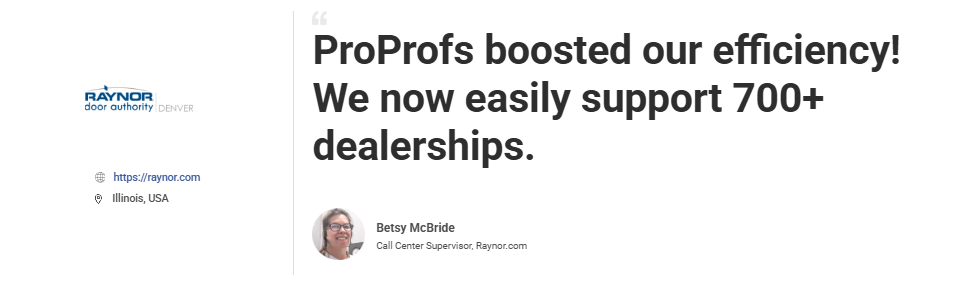
See how ProProfs Chat helped Raynor Garage Doors boost customer engagement, streamline support, and resolve queries faster, enhancing overall service efficiency.
2. Intercom – Best for Mobile Chatbots
A friend running a mid-market SaaS company switched to Intercom last year after outgrowing a bare-bones chat widget, and the jump in engagement surprised even her. I tested Intercom specifically for how well its mobile chatbots hold a conversation inside an app, and it handles that better than most enterprise chat solutions I have reviewed.
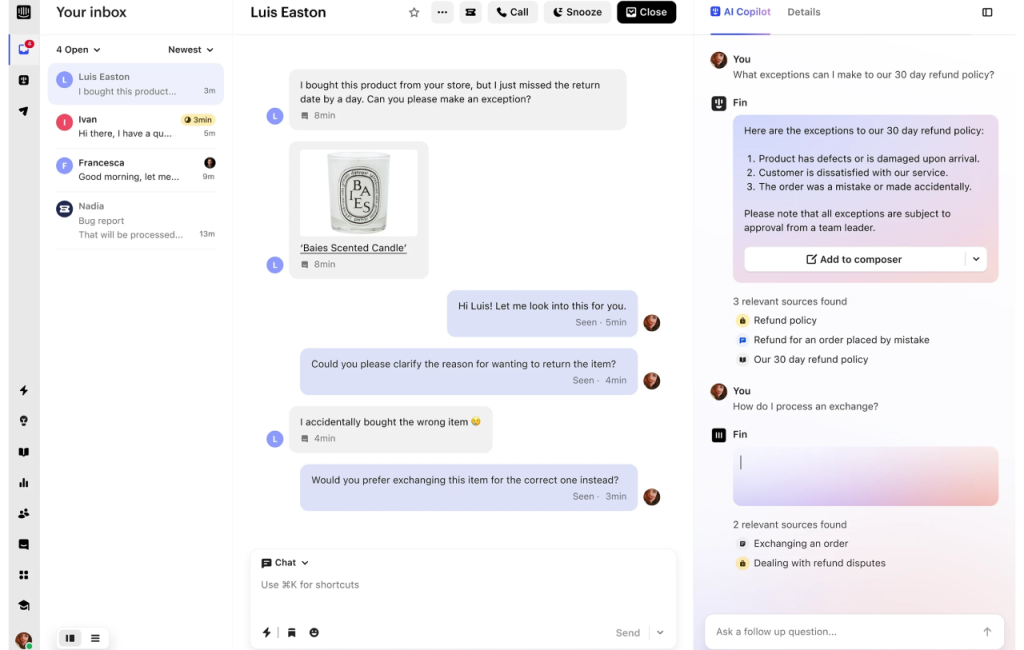
The automation feels less scripted, more like a real assistant reading intent instead of matching keywords. What stood out to me is how tightly it ties into CRM data, so an agent taking over from the bot already knows who they are talking to.
For teams juggling web, app, and social support in one place, this is one of the more capable platforms on the market today. The tradeoff is cost. Once you start adding seats and premium automation, the bill climbs fast, so I would only recommend it if your support volume justifies the spend.
Pros:
- Mobile-first chatbot experience keeps in-app messaging natural, so guests never feel like they left the product
- AI-driven automation delivers instant, relevant responses without waiting on agent availability
- CRM and workflow integrations keep the agent context accurate, the moment a bot hands off a conversation
- Customizable chat widgets and user segmentation let you target messaging by audience instead of one size fits all
Cons:
- Pricing scales quickly for large teams
- Learning curve for setting up advanced automations
User Rating: 4.5 (G2)
Pricing: Paid plans start at $19/seat/month.
3. LiveChat – Best for Boosting Sales and Customer Engagement
I brought LiveChat into a client’s stack when their sales team kept losing warm visitors to slow response times, and it fixed that problem within a week. What I like about LiveChat is how naturally it bridges sales and support inside one thread, so a chat that starts as a product question can turn into a qualified lead without switching tools.
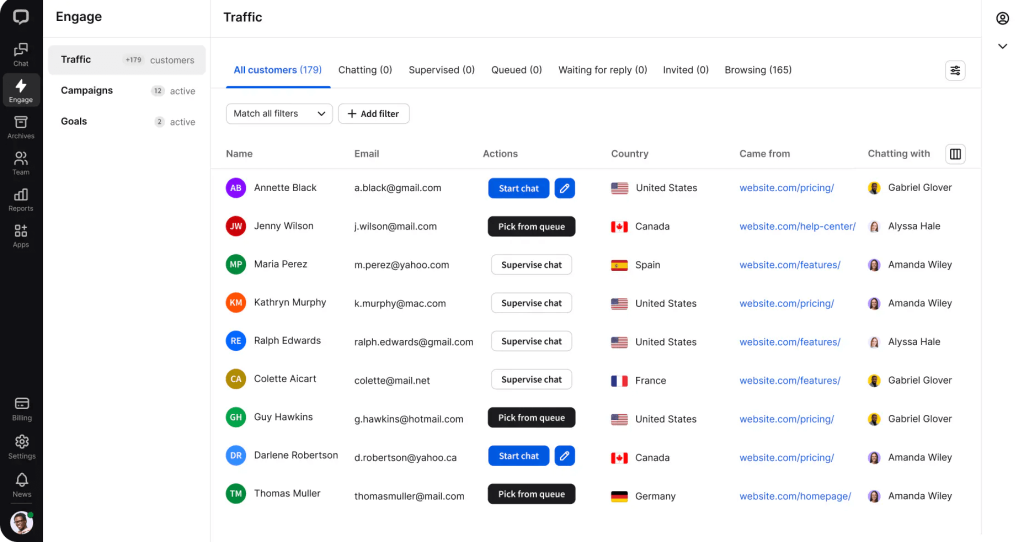
The integrations with CRMs like Salesforce and Shopify make it easy to see order history or deal stage mid-conversation, which agents genuinely appreciate. Reporting here is strong, too, letting you track which chats actually convert rather than just counting volume.
If your team runs both sales and support through chat, this is one of the more balanced tools I have used for that exact mix. Just know that enterprise-level analytics and multi-department routing take real setup time, so budget a proper onboarding window before expecting full value from day one.
Pros:
- Sales and engagement tools with CRM and eCommerce integrations turn browsing visitors into tracked, qualified leads
- AI-driven chatbots and automation qualify leads and handle support without adding headcount
- Real-time analytics and performance tracking show exactly which chats convert, not just how many happen
- Highly customizable chat widget fits your brand and supports multiple channels from one place
Cons:
- Pricing can scale up quickly for larger teams
- Requires setup time to fully utilize enterprise-level analytics
User Rating: 4.5 (G2)
Pricing: Paid plans start at $19/month.
4. Tidio – Best for Live Chat With Ticketing Functionality
Tidio kept coming up in the customer conversations I reviewed, mostly from teams who liked starting simple but eventually needed more structure as they grew. I tested it specifically because so many growing support teams treat it as a bridge between basic chat and a full ticketing workflow, and it does that job reasonably well.
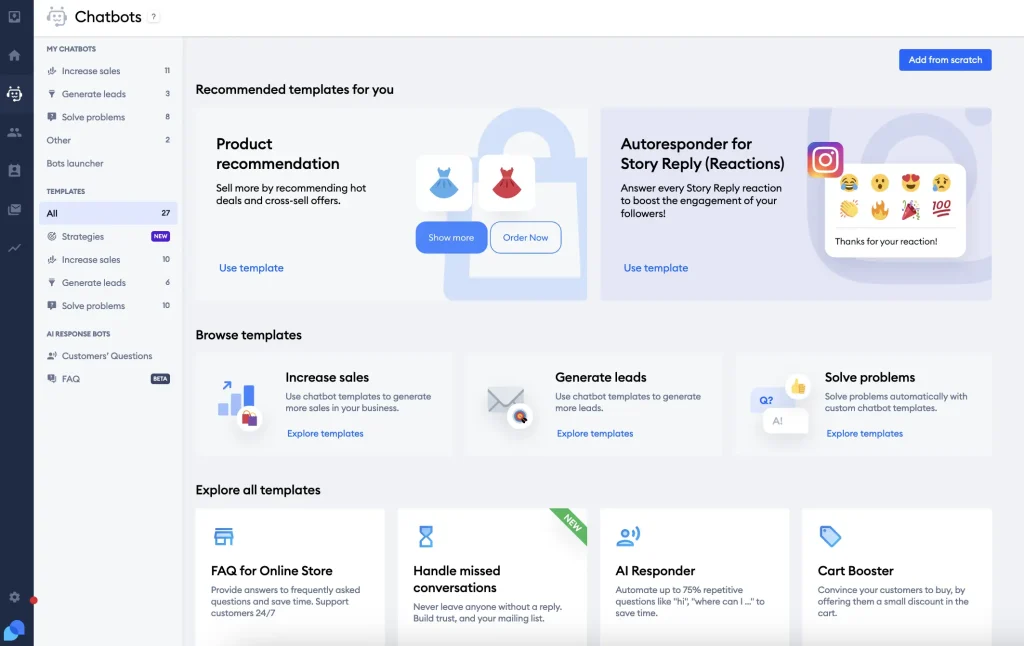
The single dashboard for chat, chatbot, and tickets means agents are not toggling between three tools just to close one conversation. Its AI bot handles repetitive FAQs decently, though I would keep an eye on accuracy as your knowledge base grows larger.
One limitation worth flagging before you commit: several teams found Tidio syncs contacts to Salesforce but does not create full leads, so your sales team may still need manual cleanup afterward. If your pipeline depends on clean lead creation, confirm this directly with their team first, since it caught more than one buyer off guard.
Pros:
- Unified dashboard for chat, chatbot, and ticketing keeps agents from switching between three separate tools
- Deep integrations with CRM, email, and social cut down on manual data entry between systems
- Smart automation and routing get conversations to the right person without added admin work
- Real-time analytics show team and chat performance without waiting on a weekly report
Cons:
- Advanced features require higher-tier subscriptions
- Interface can feel busy when managing large teams
User Rating: 4.6 (G2)
Pricing: Paid plan starts at $24.17/month.
5. Zendesk – Best for Zendesk Users
Zendesk shows up constantly in the enterprise deals I have reviewed, mostly from teams who already run their ticketing through it and do not want a disconnected chat tool bolted on top. I tested it mainly for that continuity, and it delivers exactly that: a chat that opens becomes a ticket automatically, so nothing falls through when a conversation gets long or complicated.
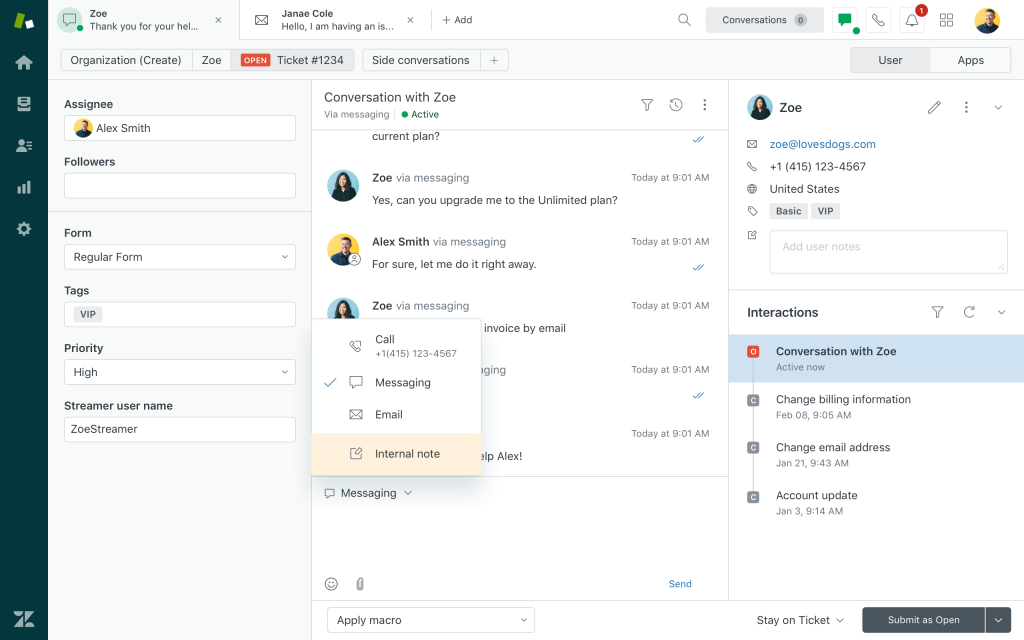
Agents can jump between chat, email, and call history without losing the thread, which matters a lot once you are supporting thousands of customers a month. The AI chatbot layer handles routine triage well, though setup outside the core Zendesk suite takes real technical lift.
For large support organizations that already trust Zendesk for tickets, adding chat here is close to a no-brainer decision. Just plan for pricing to grow once you start layering enterprise add-ons, since the base plan alone will not cover everything a large team needs.
Pros:
- Native Zendesk integration keeps chat and tickets in one place so context never gets lost
- Advanced analytics and reporting make team and chat performance easy to track and act on
- AI chatbots and automation workflows handle routine triage before it reaches a live agent
- Multi-department routing scales cleanly for large teams handling multiple support queues
Cons:
- Setup can feel complex for new users outside the Zendesk suite
- Pricing may increase significantly with enterprise add-ons
User Rating: 4.3 (G2)
Pricing: Paid plan starts at $19/agent/month, paid yearly
6. HubSpot Live Chat – Best for CRM Native Support and Sales Alignment
I swapped this into my list after noticing how often teams already running HubSpot for marketing or sales ask why their chat tool lives somewhere else entirely. Testing HubSpot Live Chat answered that question fast. Every conversation logs directly against the contact record, so a support agent and a sales rep are looking at the same history without exporting anything between tools.
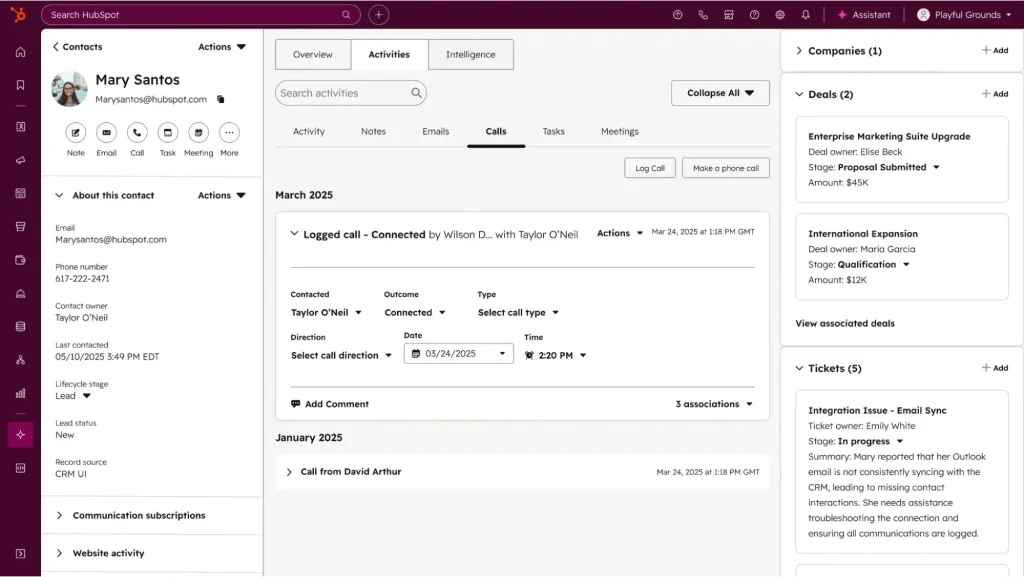
The bot layer handles meeting booking and basic FAQs cleanly, and handoff to a human keeps the full thread intact instead of starting the conversation over. What I appreciate most is the real free tier, which is rare among tools at this feature depth.
For teams already living inside the HubSpot ecosystem, this removes a layer of integration headache most enterprise chat tools create. The ceiling is lower once you need heavier omnichannel automation, so larger operations may eventually outgrow it, but for CRM aligned teams, it is an easy call.
Pros:
- Native HubSpot CRM sync keeps every conversation logged against the contact record automatically
- Real free plan gives unlimited live chat without a credit card or a trial period
- Bot for FAQs and meeting scheduling handles routine requests without a human touching them
- Shared inbox across chat, email, and forms keeps every channel in one place for agents
Cons:
- Limited standalone features outside the HubSpot ecosystem
- Advanced automation locked behind higher-tier Service Hub plans
User Rating: 4.4 (G2)
Pricing: Free plan available. Paid Service Hub plans start at $20/month.
7. JivoChat – Best for Mobile-Friendly Customer Support
I tested JivoChat specifically for teams whose support reps are rarely sitting at one desk, and the mobile experience genuinely holds up under real daily use. What impressed me was how smooth the app feels when an agent is juggling a live chat, a WhatsApp message, and a website inquiry all within minutes of each other.
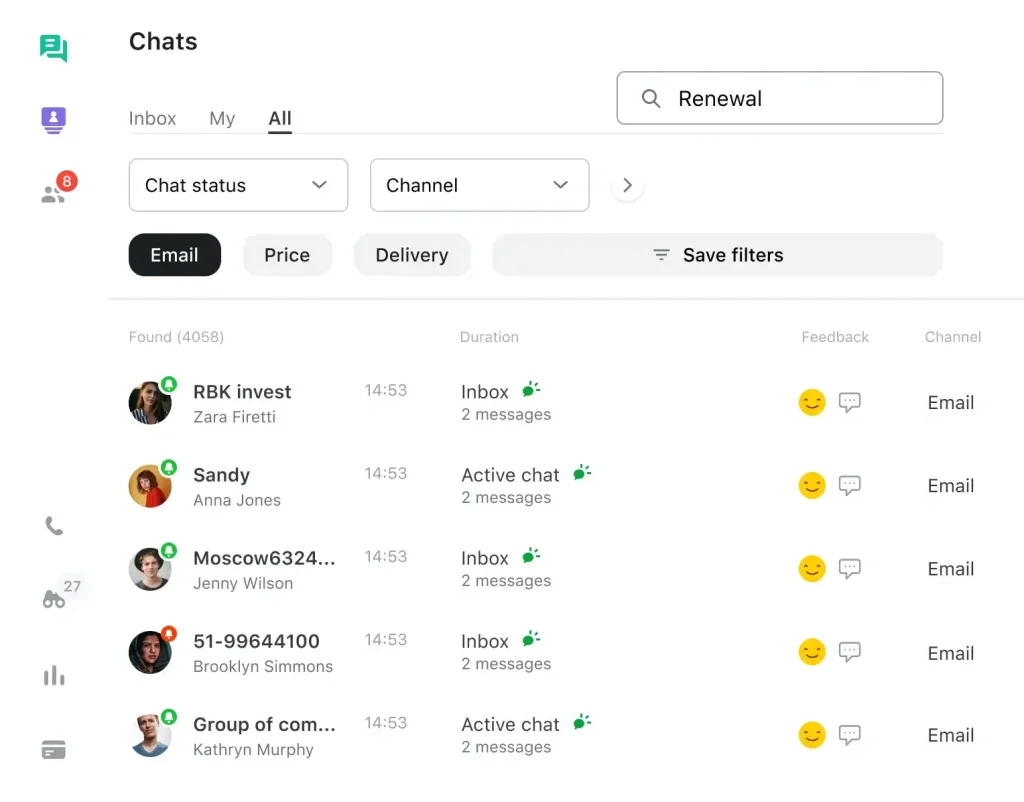
The unified inbox pulls website, social, and email conversations into one place, which cuts down the app switching that slows a lot of support teams down. Real-time visitor tracking gives agents useful context before they even open a chat, something smaller tools tend to skip entirely.
Where it falls short is AI depth. If your team wants advanced automated flows or nuanced chatbot logic, this is not built for that yet. But for mobility and quick omnichannel replies, JivoChat earns its spot, especially for field teams or businesses running lean support shifts across time zones.
Pros:
- Mobile app keeps support reps connected to chats even when they are away from a desk
- Unified inbox pulls website, social, and email into one place so nothing gets missed
- Real-time visitor tracking gives agents context before a chat even starts
- CRM and business tool integrations connect easily without a heavy setup lift
Cons:
- Limited AI automation compared to advanced chatbots
- Interface can feel crowded for first-time users
User Rating: 4.6 (G2)
Pricing: Paid plans start at $28/month.
8. Crisp – Best for Creating Engaging Dialogues With Cutting-Edge Chatbot Technology
Crisp came into the picture when I was researching tools built to feel less robotic, and the chatbot builder here backs that claim up. I like that you can layer in conditional logic and event triggers without writing code, so conversations branch based on what a visitor actually does instead of a rigid script.
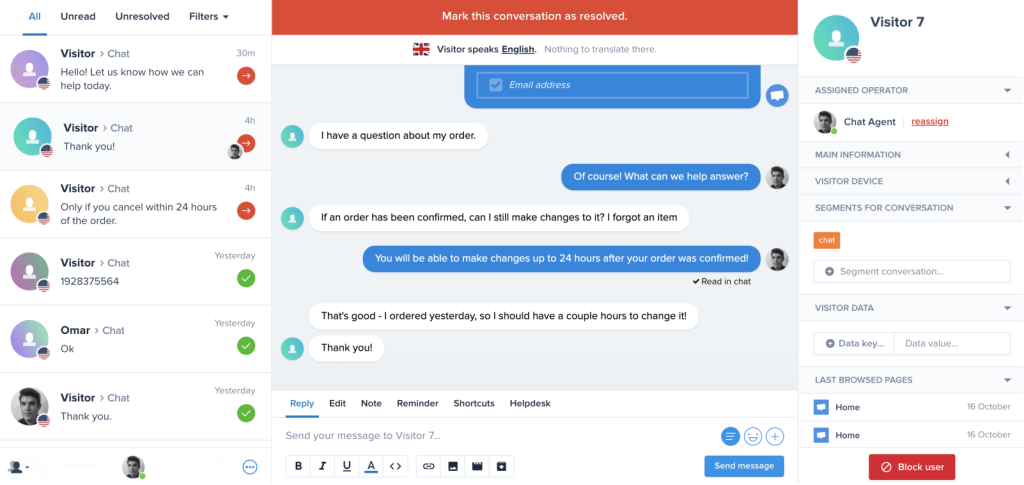
Co-browsing is the standout feature for me. Watching an agent guide a customer through a confusing checkout page in real time solves problems a chat message alone never could fix. The CRM integrations with Salesforce and HubSpot mean none of that context gets lost once a bot hands off to a human agent.
For teams that want engagement to feel personal at scale, this is one of the stronger picks I have tested this year. The setup curve is steeper than most, though, so give your team real ramp time before expecting the advanced automation to run smoothly.
Pros:
- Chatbot workflows with conditional logic create personalized, automated dialogues without writing code
- Shared inbox and multi-channel integration keep email, chat, and social replies in one place
- Real-time co-browsing lets agents guide customers through tricky screens instead of just describing steps
- Detailed analytics track chatbot performance so you know exactly what to fix
Cons:
- Steeper learning curve for advanced automation setup
- Some enterprise integrations require premium plans
User Rating: 4.5 (G2)
Pricing: Paid plan starts at $45/month.
9. Olark – Best for Custom Chat Routing
Olark got my attention for one specific reason: custom chat routing that actually works the way teams describe it in their reviews. I tested this for a business running multiple product lines through one support inbox, and the rule-based routing sent conversations to the right department without anyone manually reassigning chats all day.
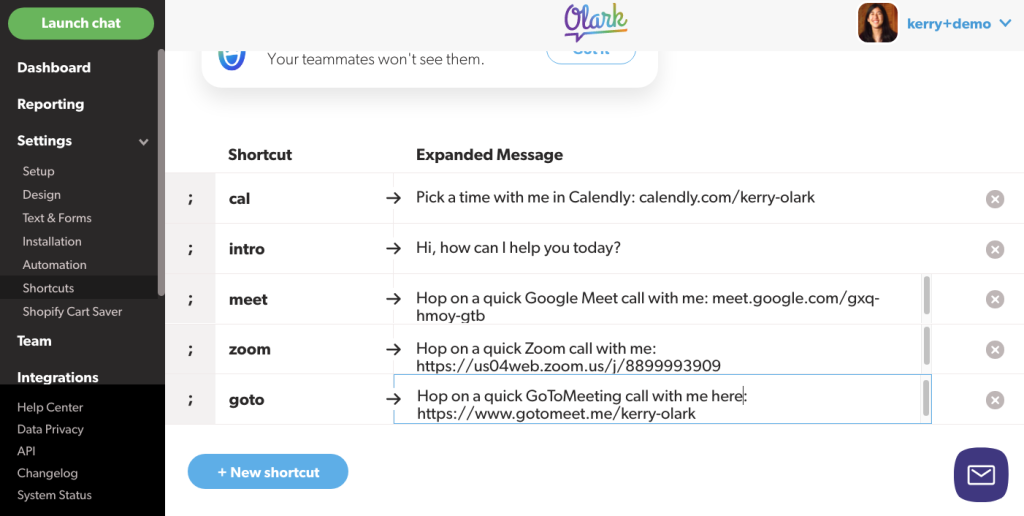
Searchable transcripts are genuinely useful here too, letting a manager pull up exactly how a past issue got resolved instead of relying on someone’s memory. Integrations with Salesforce, HubSpot, and Zendesk are straightforward to set up, and I did not run into the friction some other tools create when connecting a CRM.
Where Olark shows its age a bit is in AI. If you are expecting a modern automated chatbot layer, you will not find much depth here yet. But for routing precision and clean reporting, Olark still holds up well for teams that value control over flash.
Pros:
- Intelligent chat routing sends conversations to the right department automatically, based on rules or visitor data
- Real-time analytics with full transcripts let managers review exactly how past issues got resolved
- CRM and help desk integrations connect without the friction some other tools create
- Customizable branding and workflows fit enterprise support processes without a rebuild
Cons:
- Lacks advanced AI automation compared to newer tools
- Reporting features could use more depth and flexibility
User Rating: 4.3 (G2)
Pricing: Paid plans start at $400/month, billed annually
10. BotPenguin – Best for Lead Generation
A colleague running a small agency would not stop recommending BotPenguin to me, and after testing it myself, I understood exactly why. This tool is built almost entirely around lead capture, and it does that job better than most general-purpose chat tools trying to do everything at once.
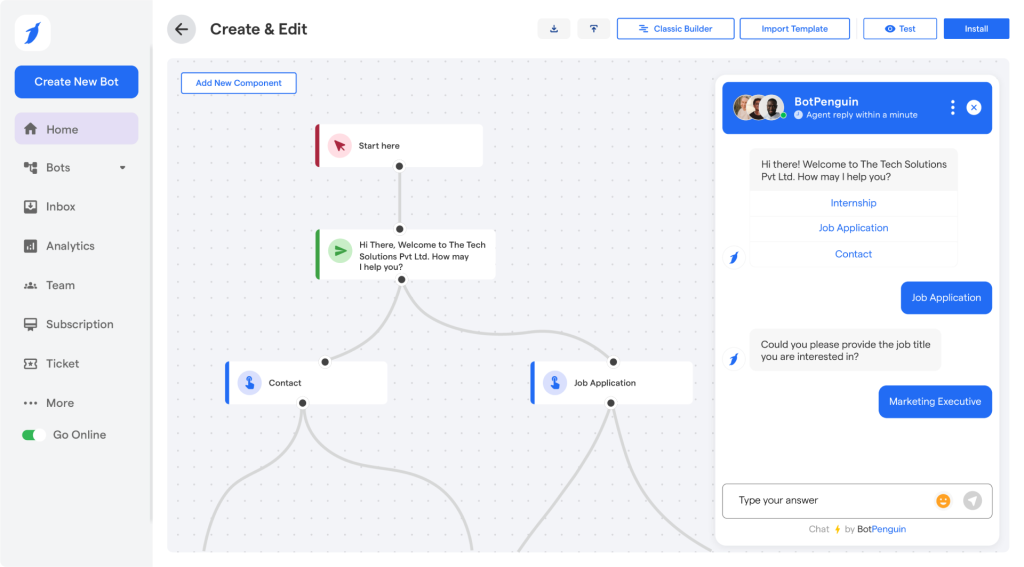
I watched it qualify a visitor through a short conversation flow, then push that lead straight into Salesforce without anyone touching a spreadsheet. The multi-channel setup across WhatsApp, Facebook, and web means an agency managing several clients can run it all from one dashboard instead of hopping between platforms.
Reporting here is clean and specific to campaign performance, which matters if you are proving ROI to a client monthly. It does take some tweaking upfront to get custom flows feeling natural, and a few premium features sit behind higher tiers, but for a lead-generation-focused enterprise chat solution, BotPenguin is hard to beat.
Pros:
- AI-driven lead capture and qualification pushes real leads into your CRM without manual entry
- CRM integrations with Salesforce and HubSpot keep lead data synced automatically
- Multi-channel chat management runs WhatsApp, Facebook, and web from one dashboard
- Clean lead performance analytics make it easy to prove ROI to a client every month
Cons:
- Initial setup may take a bit of tweaking for custom flows
- Some premium features are locked behind higher plans
User Rating: 4.4 (G2)
Pricing: Paid plans start at $29/month.
How I Evaluated These Enterprise Chat Tools
I did not rank these tools on feature lists or marketing pages. I tested claims against real reviews, real integrations, and real escalation flows because that is where most tools quietly fail once you are past the demo.
- User Reviews: G2 and Capterra ratings tell you how teams describe a tool once the sales call is over, especially around reliability and how fast support actually responds.
- Core Features: AI accuracy, chat routing, canned responses, and reporting depth all had to hold up. If a tool could not handle these basics well, it did not make the cut, no matter how polished the demo looked.
- Ease of Use: A powerful tool that agents refuse to use is a wasted line item, so clean interfaces and fast onboarding mattered more to me than flashy dashboards nobody opens after week one.
- Bot Handoff: How cleanly a conversation moves from AI to a human agent without the customer repeating themselves is where most enterprise live chat software quietly breaks, so I tested this specifically.
- Integration Depth: Connections to CRMs, ticketing systems, and CMS platforms like WordPress and Shopify matter here, since this is exactly where most enterprise deals stall out.
- Support Quality: Vendor responsiveness during setup was something I paid close attention to, since that predicts how they will treat you once you are a paying customer.
- Value For Money: What you get at each price tier against what teams actually need day to day counts for more than who has the cheapest sticker price on their homepage.
Top 3 Enterprise Chat Software Picks
These three tools from the list of ten really caught my attention. Let’s check them out.
1. ProProfs Chat
ProProfs Chat streamlines 24/7 customer support using AI chatbots, intelligent routing, and canned responses to handle large query volumes smoothly. It provides scalable automation, seamless live agent transfer, and enterprise oversight with dashboards, reports, and integrations with Salesforce, Zendesk, and HubSpot, perfect for large teams.
2. HubSpot Live Chat
HubSpot Live Chat is the pick for teams that live and breathe their CRM. Every chat logs straight to the contact record, bots handle FAQs and meeting booking on a real free plan, and support and sales finally look at the same conversation history.
3. LiveChat
LiveChat is an enterprise platform that instantly connects sales and support teams. Its customizable widget integrates with CRM systems and offers AI chatbots, analytics, agent routing, and proactive messaging, an efficient way to manage high interaction volumes and boost conversions.
FREE. All Features. FOREVER!
Try our Forever FREE account with all premium features!
How to Get Bot to Human Handoff Right
An enterprise chat platform is only as good as its worst conversation, and that usually happens during handoff. Here is what to test before you commit.
- Context Transfer: The human agent should see the full chat history the moment they pick up, so your customer never has to repeat themselves.
- Escalation Triggers: Set clear rules for when a bot hands off: unresolved after two attempts, a sensitive keyword, or a direct request for a human.
- Queue Visibility: Confirm the tool checks agent availability before routing, instead of dropping a customer into a queue nobody is watching.
- Fallback Options: If no agent is available, the bot should offer a ticket, callback, or email option instead of leaving the customer stuck in a loop.
Turn Faster Responses Into Better Customer Experiences
Picking the right enterprise chat software comes down to matching the tool to the job you actually need done, not the longest feature list. Before you commit to anything, confirm the AI is trained on your own data, the bot-to-human handoff keeps context intact, the integrations cover your actual CRM and ticketing stack, and the pricing will not blow up once you scale past your trial.
I have tested enough of these tools to say this confidently: the ones that win long term make automation and human support feel like one continuous conversation, not two separate systems bolted together. ProProfs Chat consistently gets this right, combining AI-powered support, intelligent routing, and enterprise-grade reporting in a setup that takes minutes, not months, to launch.
If you are ready to stop losing leads to slow response times and start giving your support team a tool that actually keeps up, take ProProfs Chat for a spin on your free plan and see the difference for yourself
Frequently Asked Questions
What compliance features should enterprise chat software have?
Look for SSL encryption, secure hosting, GDPR and CCPA compliance, and HIPAA support when handling health data. SSO, IP restrictions, and audit logs are also important so IT, procurement, and legal teams can properly control and review access.
Is enterprise chat software worth it for a small support team?
Yes. Even a five-person team can benefit when repetitive questions take up too much time. AI can handle common FAQs, basic requests, and routine conversations, while human agents focus on complex issues that need judgment, empathy, or deeper product knowledge.
Can I train an AI chatbot on my own documents?
Yes. Most modern platforms let you train AI using your website, help center articles, knowledge base content, FAQs, and uploaded files. Tools like ProProfs Chat make this useful for keeping responses aligned with your existing support content and documentation.
How long does setup usually take?
A basic live chat widget can often go live within minutes using a simple code snippet. More advanced setups, including AI training, routing rules, integrations, permissions, and automated workflows, may take a few days depending on your requirements and team size.
Do these tools work with WhatsApp and Instagram?
Many enterprise chat platforms support popular messaging channels such as WhatsApp, Instagram, and Facebook Messenger. Tools, including ProProfs Chat and JivoChat, can bring conversations into one dashboard, helping agents manage customer messages without constantly switching between separate apps.
What happens if the AI bot cannot answer a question?
A well-configured chatbot should automatically transfer unresolved questions to a human agent. The best setups also preserve the full conversation history, so the customer does not need to repeat information and the agent can immediately understand the context.
Is white-labeling available for agencies?
Yes. Some enterprise chat platforms offer white-label options for agencies managing multiple clients. Tools such as ProProfs Chat and BotPenguin can support branded experiences, helping agencies offer chat services under their own identity while managing different customer accounts centrally.
How do I know if a tool actually creates leads in my CRM?
Test the integration before buying. Some platforms only sync contact details, while others create complete leads with conversation data and qualification information. Confirm how records are created, mapped, updated, and assigned so important prospects do not disappear from your sales workflow.
Do I need IT involved in the buying decision?
For compliance-heavy industries, yes. Bring IT in early to review SSO, data residency, encryption, access controls, audit logs, integrations, and security requirements. This helps you eliminate unsuitable vendors before investing time in demos, evaluations, or procurement discussions.
FREE. All Features. FOREVER!
Try our Forever FREE account with all premium features!

 We'd love your feedback!
What did you like & how can we make it even better?

 Thanks for your feedback!
 Ask Your Question
Have a question? Get expert help to make your decision easier.