A policyholder calls at 10 PM after a fender-bender. They want to know whether they’re covered, what to file, and what happens next. They are not going to send an email and wait 12 hours. They are not going to stay on hold. They will open a browser, visit your website, and if no one is there to answer, they will call your competitor.
Live chat for insurance companies is not a nice-to-have. It is the difference between capturing that policyholder’s trust at the worst moment of their week and losing them permanently. Every minute you take to respond is a minute they spend looking at your competitor’s website.
This guide covers the 10 best live chat tools built for or suited to insurance operations, what separates them, and which one is worth starting with.
What Is Live Chat for Insurance Companies?
This matters more than most teams realize. According to a Gartner survey in 2025, found that 60% of customer service agents fail to actively promote self-service options, leaving significant deflection and satisfaction gains on the table.
Modern platforms combine human operator support with AI-powered chatbots trained on policy documentation, FAQs, and claims workflows.
Done right, live chat in insurance handles four distinct jobs simultaneously:
- Answering routine policy questions (coverage details, deductible amounts, exclusions) without tying up licensed agents
- Qualifying inbound leads by coverage type, location, and intent before routing to a specialist
- Triaging claims inquiries and routing urgent cases to the right department instantly
- Capturing after-hours queries so no lead or service request falls through overnight
The tools that do this well are not just generic chat widgets with an insurance logo. They integrate with your CRM, support intelligent routing, handle secure data capture, and give your team a full conversation history before a human agent ever types a word.
Top 10 Live Chat Software for Insurance Companies
After testing each platform against real insurance workflows, including claims triage, after-hours automation, policy FAQ handling, and CRM sync, here is how they stack up:
| Live Chat Tool | Best For | Pricing | User Rating |
| ProProfs Chat | Easy live chat & AI customer service agent for instant, automated support | A free plan is available for growing teams. Paid plan starts at $19.99/operator/month | 4.8/5 (Capterra) |
| Intercom | Mid-to-large carriers with complex support workflows | Starts from $74/month | 4.5/5 (G2) |
| Freshchat | Policy renewals + mobile-first insurance teams | Free plan available. Starts from $19/agent/month | 4.4/5 (G2) |
| Tidio | Independent agents and smaller brokerages | Free plan available. Starts from $29/month | 4.7/5 (Capterra) |
| LiveChat | Multi-channel insurance support with deep analytics | Starts from $20/agent/month | 4.5/5 (G2) |
| Drift | B2B insurance and high-value account acquisition | Starts from $2,500/month | 4.4/5 (G2) |
| Zendesk Chat | Enterprise carriers with existing Zendesk stacks | Starts from $55/agent/month | 4.3/5 (G2) |
| Tawk.to | Cost-conscious agents needing basic chat coverage | Free | 4.5/5 (G2) |
| HubSpot Live Chat | Insurance teams with HubSpot CRM at their core | Free (with HubSpot CRM) | 4.4/5 (G2) |
| LiveAgent | High-volume insurance support teams needing ticketing | Starts from $15/agent/month | 4.5/5 (G2) |
1. ProProfs Chat – Easiest Live Chat & AI Customer Service Agent for Instant, Automated Support
When a policyholder files a claim at midnight, the last thing they want is a blank chat window. That is exactly the gap ProProfs Chat closes for insurance teams.
Getting an AI support agent running is straightforward too. You can enter your website URL, and ProProfs automatically creates an agent using the content already available on your site, which you can then expand with policy documents, FAQs, and help articles.
I was impressed by how deep the advanced AI agent training goes: you feed it your policy documents, knowledge base, or website URL, and it starts handling coverage questions and claims queries the same day with zero developer involvement.
Instead of giving generic responses, the AI pulls from the content it has been trained on and cites the source behind its answers, which is useful when policyholders need clarity around specific information.
What keeps it running well over time is the AI agent performance reports, which show you exactly which questions the bot resolved, which ones it failed, and where your training has gaps so you can close them before they become a support problem.
On the human side, sentiment analysis tracks how policyholders feel during every conversation in real time, and risk prediction flags high-stress exchanges before they escalate, which matters especially during claims. The resolution overview then ties it all together, giving your managers a clear picture of what got resolved, what got escalated, and how the team is performing across every chat.
ProProfs Chat also works with ProProfs Knowledge Base and ProProfs Help Desk, so routine policy questions can stay within self-service or AI while claims and other issues requiring human attention can move into a structured support workflow.
Pros:
- Advanced AI agent training ingests policy documents, knowledge base, or website URL with no coding required
- AI agent performance reports surface unresolved query logs and training gaps for continuous improvement
- Proactive chat invitations trigger based on visitor behavior to engage high-intent prospects before they leave
- CRM integrations push captured lead data to Salesforce, HubSpot, and Zoho without custom code
- Omnichannel support covers website, WhatsApp, Facebook, and Instagram from a single dashboard
Cons:
- Cloud-only – no offline access
- No dark theme
User Rating: 4.8/5 (Capterra)
Pricing: A free plan is available for growing teams. Paid plan starts at $19.99/operator/month.
2. Intercom – Best for Mid-to-Large Carriers With Complex Support Workflows
What impressed me about Intercom is Fin, its AI agent, which handles multi-turn insurance conversations from your existing help center content without needing manual flow-building.
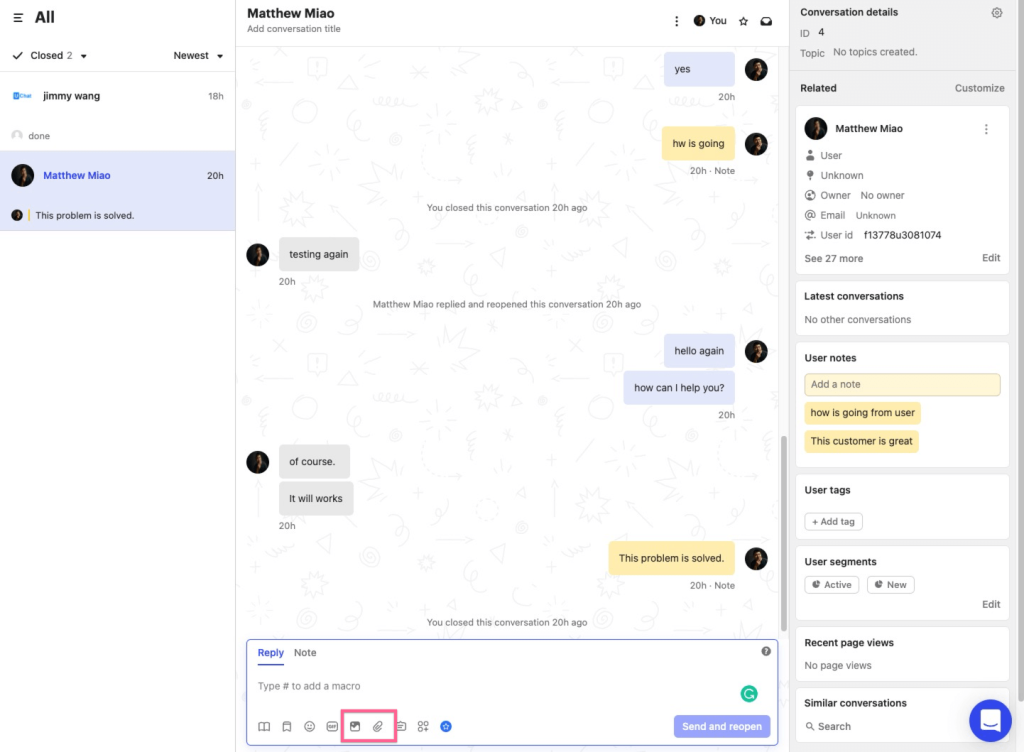
Claims status checks, renewal questions, and coverage eligibility queries that unfold across several exchanges are handled cleanly, something a lot of bots fail at once the conversation gets more than two steps deep.
The workflow builder takes that further, letting you automate repetitive tasks using pre-built templates so your team stops answering the same renewal reminder questions by hand. Where Intercom earns its keep is the proactive messaging engine, which uses behavioral triggers to engage high-intent visitors before they click away.
Pros:
- Fin AI handles multi-turn conversations accurately from your help center content
- Proactive messaging and behavioral triggers engage high-intent visitors automatically
- Strong resolution rate tracking across every support channel
- Deep integration with ticketing, CRM, and customer data in one dashboard
- Pre-built workflow templates speed up automation setup for common insurance support scenarios
Cons:
- Pricing becomes expensive quickly as team size and usage grow
- Steeper configuration requirements for advanced automation
User Rating: 4.5/5 (G2)
Pricing: Starts from $74/month.
3. Freshchat – Best for Policy Renewals and Mobile-First Insurance Teams
I found Freshchat works best for insurance teams running active renewal campaigns or serving policyholders primarily through a mobile app. The campaign messaging feature is the one that caught my attention.
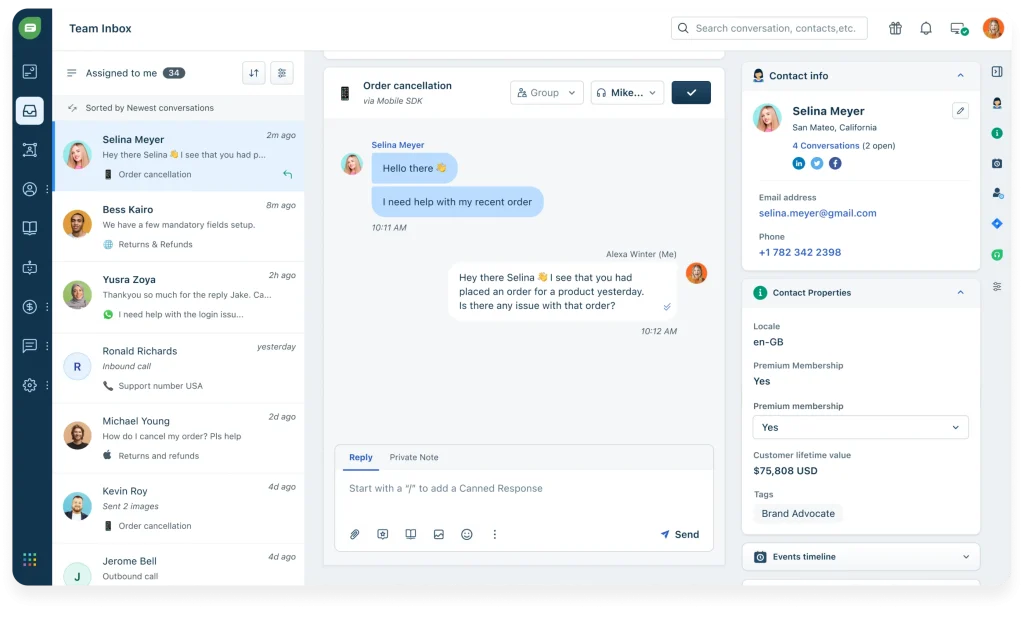
It lets you set up targeted outreach for policy renewals, coverage upsells, and lapse reminders based on actual policyholder behavior, not just a generic broadcast.
The agent interface surfaces customer context and policy information mid-conversation, so your team is not switching tabs to look things up while someone is waiting. For insurtech companies with a dedicated iOS or Android app, the mobile SDK embeds support directly inside it.
Pros:
- Campaign messaging enables targeted outreach for renewals, cross-sells, and lapse reminders
- Mobile SDK integrates support directly into your iOS or Android insurance app
- Intelligent routing sends inquiries to the right department based on policy type or query
- Clean agent interface with contextual policyholder information visible mid-chat
- AI chatbot handles lead qualification and appointment scheduling without agent involvement
Cons:
- Integration depth with niche insurance CRM systems requires configuration
- Advanced analytics features are gated behind higher-tier plans
User Rating: 4.4/5 (G2)
Pricing: Free plan available. Starts from $19/agent/month.
4. Tidio – Best for Independent Agents and Smaller Brokerages
I tested Tidio specifically with independent insurance agents in mind, and the combination of its AI agent Lyro and the Flows builder makes it one of the more accessible options for a solo or small-team setup.
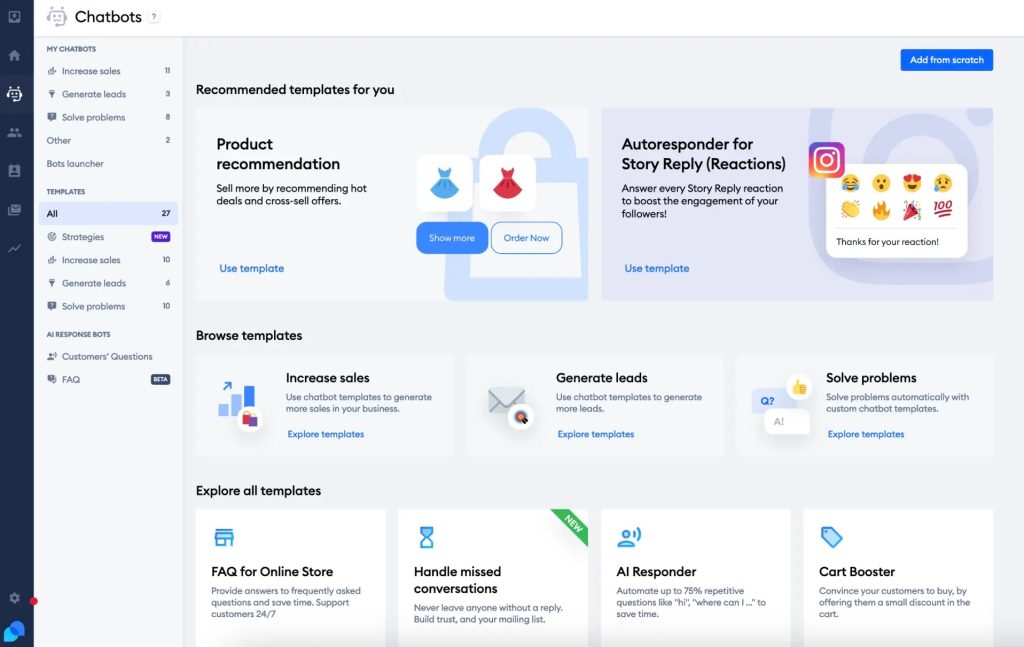
Lyro handles routine policy questions directly from your FAQ content with no manual flow-building required, so common queries about deductibles or coverage terms get answered without an agent touching them.
The Flows builder then takes care of the lead capture side, letting you create sequences for specific coverage types without any coding. Native integrations with HubSpot, Salesforce, and email marketing tools make it easy to connect chat to your existing lead nurturing workflows.
Pros:
- Lyro AI handles policy FAQ queries accurately from your content without manual flow-building
- Flows builder creates lead capture sequences for specific coverage types without any coding
- Clean interface with minimal setup friction that a solo agent can manage without IT support
- Free plan covers basic coverage for agents testing live chat before committing
- Native integrations with HubSpot, Salesforce, and email marketing tools for lead nurturing workflows
Cons:
- Lyro’s conversation cap on lower plans drives costs up fast at higher inquiry volumes
- Less suited for complex claims triage or multi-department routing workflows
User Rating: 4.7/5 (Capterra)
Pricing: Free plan available. Starts from $29/month.
5. LiveChat – Best for Multi-Channel Insurance Support With Deep Analytics
What I kept coming back to with LiveChat is the visitor monitoring feature. It shows you which policy pages a prospect is browsing in real time, so your agent can open a proactive conversation before that person gives up and calls a competitor.
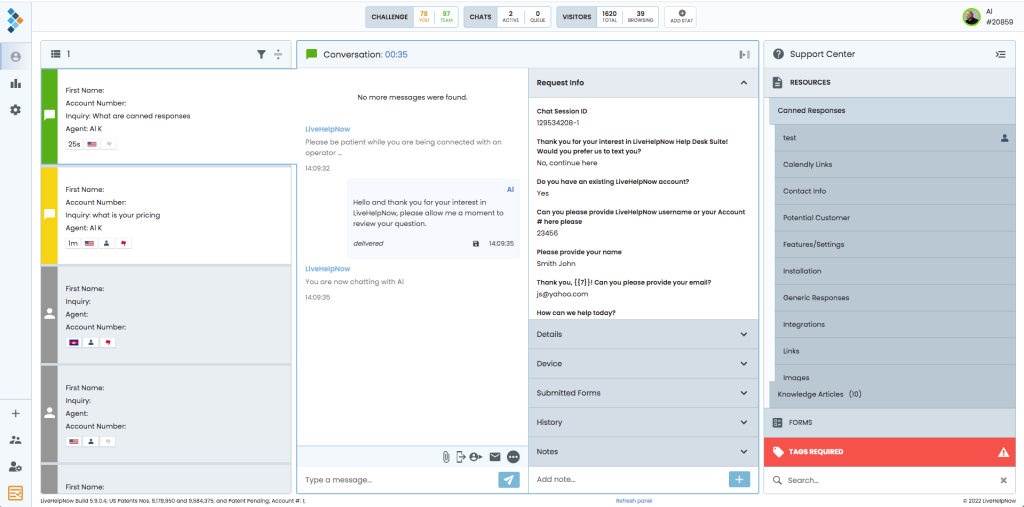
That kind of visibility is genuinely useful on a high-traffic auto or home insurance quote page. The insurance customer journey analytics build on that, giving you conversation volumes, resolution times, and CSAT scores across every channel in one view.
The integration ecosystem is wide, with Salesforce, HubSpot, Zendesk, and most major CRM platforms connecting natively.
Pros:
- Real-time visitor monitoring shows which policy pages prospects are on before the conversation starts
- Deep analytics on resolution times, CSAT, and chat volume by agent and department
- Wide integration ecosystem covering major insurance CRM and ticketing platforms
- Chat routing rules direct inquiries to the right department based on page or keyword triggers
- Canned responses and message templates speed up agent replies for common policy questions
Cons:
- AI bot requires more manual flow-building; no URL-based auto-training
- Per-seat pricing adds up for larger teams relative to some alternatives
User Rating: 4.5/5 (G2)
Pricing: Starts from $20/agent/month.
6. Drift – Best for B2B Insurance and High-Value Account Acquisition
I would recommend Drift specifically for commercial insurance lines, wholesale brokers, or B2B carriers where a single closed account justifies the monthly cost.
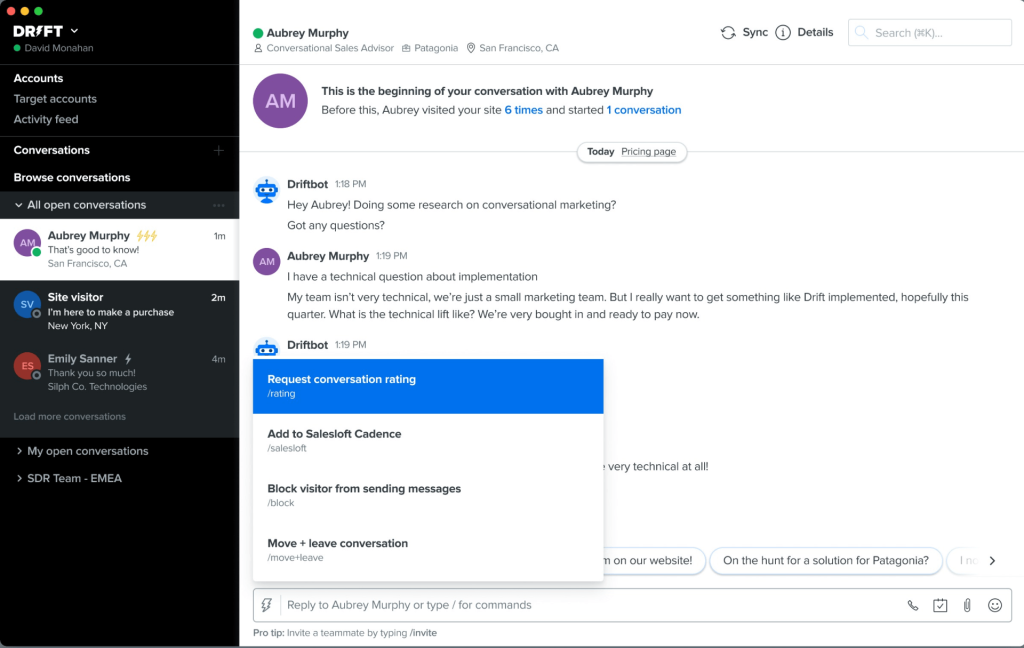
The account-based engagement features are what make it different: they identify high-intent visitors, personalize the conversation based on company profile, and route them directly to a commercial lines specialist without a sales rep manually stepping in.
The real-time buying signals feature goes further, surfacing firmographic data so your team knows which accounts are actively evaluating coverage and which are just browsing. Salesforce and HubSpot integrations push that qualified conversation data directly into pipeline.
Pros:
- Account-based targeting engages and qualifies high-value commercial insurance prospects automatically
- Meeting booking integrated directly into the conversation without redirecting to a scheduling tool
- Real-time buying intent signals help commercial lines teams prioritize the right accounts
- Strong Salesforce and HubSpot pipeline integration
- Personalized messaging adapts to company profile, industry, and prior engagement history
Cons:
- Not cost-effective for personal lines or consumer-facing insurance operations
- Requires significant configuration time before the AI performs reliably
User Rating: 4.4/5 (G2)
Pricing: Starts from $2,500/month.
7. Zendesk Chat – Best for Enterprise Carriers Already on the Zendesk Platform
If your team is already running on Zendesk, adding Zendesk Chat is the natural move, and that is exactly the context where I would recommend it. The tight integration with Zendesk’s ticketing, help center, and CRM means every live chat conversation flows directly into your existing infrastructure without any data mapping.
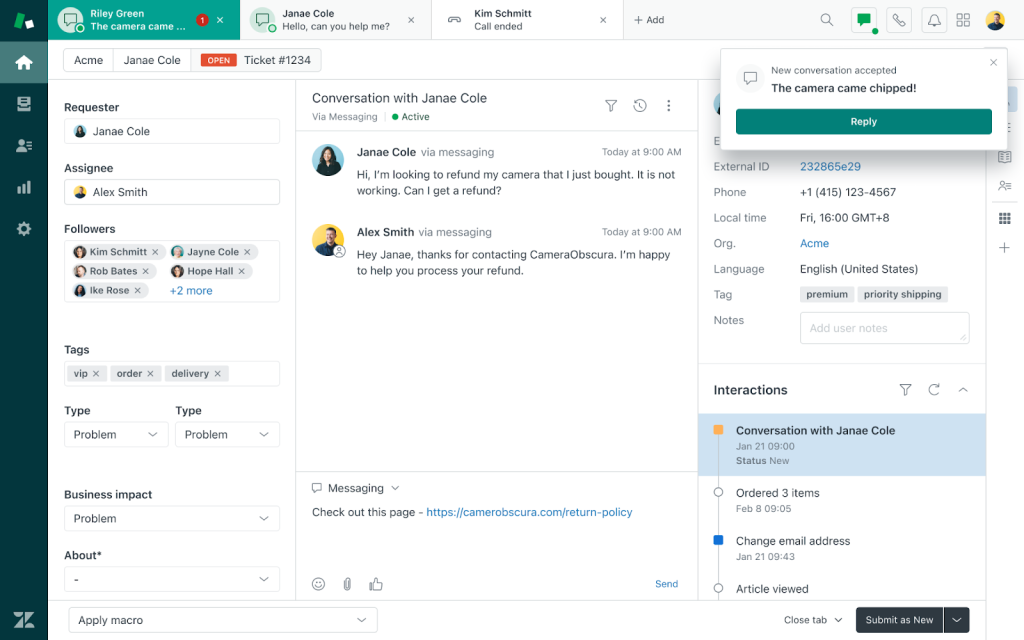
Agents pull up full policyholder history, open tickets, and prior transcripts from a single view, which matters for enterprise insurance carriers managing complex, multi-touch cases across departments.
The routing and escalation engine handles those departmental structures well, and the reporting suite covers first reply times, resolution rates, and agent performance at the depth large operations need.
Pros:
- Seamless integration with Zendesk Suite: tickets, help center, and CRM in one view
- Advanced routing directs chats to the right agent or department based on policy type
- Enterprise-grade reporting on resolution rates, agent performance, and satisfaction scores
- Strong compliance and security posture suitable for regulated insurance environments
- Full policyholder conversation history and open tickets visible to agents mid-chat
Cons:
- Full value only realized within the broader Zendesk Suite; cost adds up fast
- Less compelling for teams not already on the Zendesk platform
User Rating: 4.3/5 (G2)
Pricing: Starts from $55/agent/month.
8. Tawk.to – Best for Cost-Conscious Agents Needing Basic Chat Coverage
Tawk.to is free, full stop. For small insurance agencies or independent agents testing live chat for the first time, that matters.
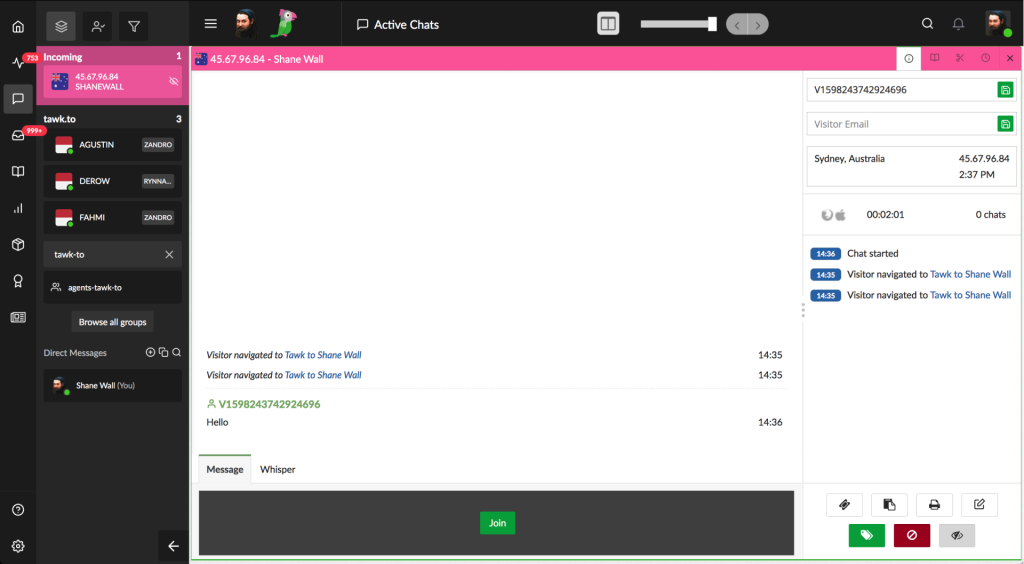
I have seen teams run it successfully for basic policyholder queries during business hours, where canned responses and simple routing keep things moving without a support ticket system underneath.
There are no hidden per-seat charges, and setup takes less than an hour. For agencies that want to get a chat widget live on their website quickly without any budget commitment, it is the most straightforward starting point on this list.
Pros:
- Completely free with no per-seat charges
- Simple setup with a basic but functional chat widget
- Canned responses and basic routing available out of the box
- Works on any website without developer involvement
- Chat history and visitor tracking available even on the free plan
Cons:
- No native AI chatbot trained on your own policy content
- After-hours coverage requires a paid staffing add-on or manual agent availability
User Rating: 4.5/5 (G2) Pricing: Free. Paid add-ons available.
9. HubSpot Live Chat – Best for Insurance Teams With HubSpot CRM at Their Core
If your agency is already running on HubSpot CRM, HubSpot Live Chat is the easiest first step into live chat, and it costs nothing extra. Every conversation logs directly against the contact record, so when an agent follows up on a renewal call, they already know what the policyholder asked about online.
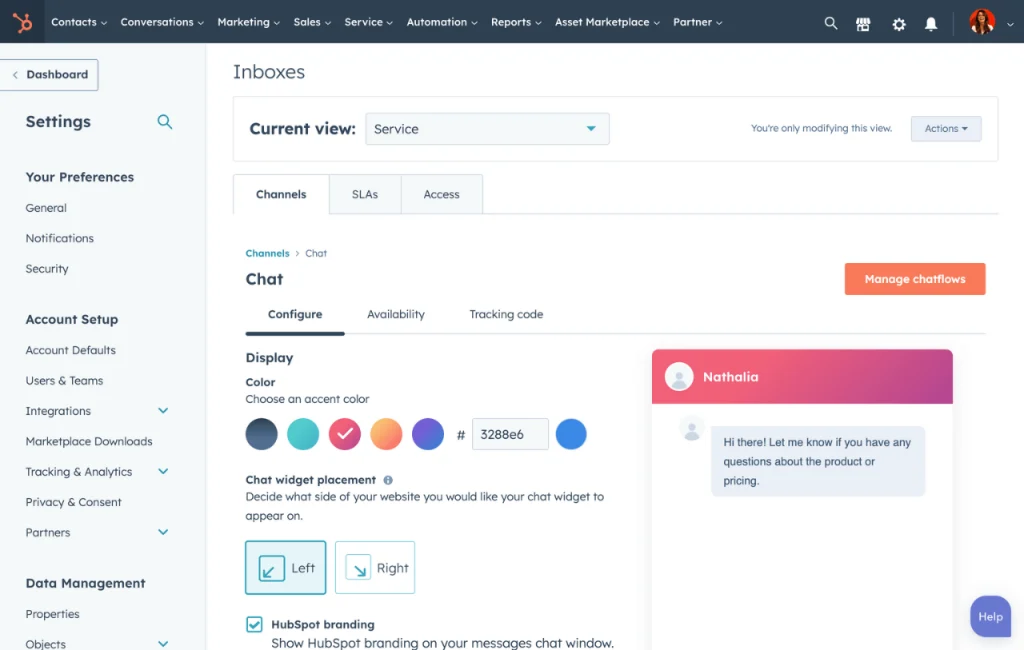
The chatbot builder then handles insurance lead qualification automatically, asking visitors about coverage type and routing them to the right rep based on their answers, without any manual handoff.
For agencies using HubSpot for inbound lead generation, that native connection between chat and CRM is genuinely useful.
Pros:
- Free with HubSpot CRM; every chat logs directly to the contact record automatically
- Chatbot builder qualifies leads by coverage type and routes to the right rep
- Full lead and contact context visible to agents during every conversation
- Works naturally within broader HubSpot marketing and sales automation workflows
- Meeting scheduling built into the chat flow so prospects can book directly with an agent
Cons:
- Limited AI capabilities compared to dedicated live chat platforms
- Not designed for high-volume claims support or complex departmental routing
User Rating: 4.4/5 (G2)
Pricing: Free with HubSpot CRM. Starts from $45/month for Service Hub features.
10. LiveAgent – Best for High-Volume Insurance Support Teams Needing Ticketing
What sets LiveAgent apart in insurance is how it connects real-time chat with structured case management through its unified ticketing system.
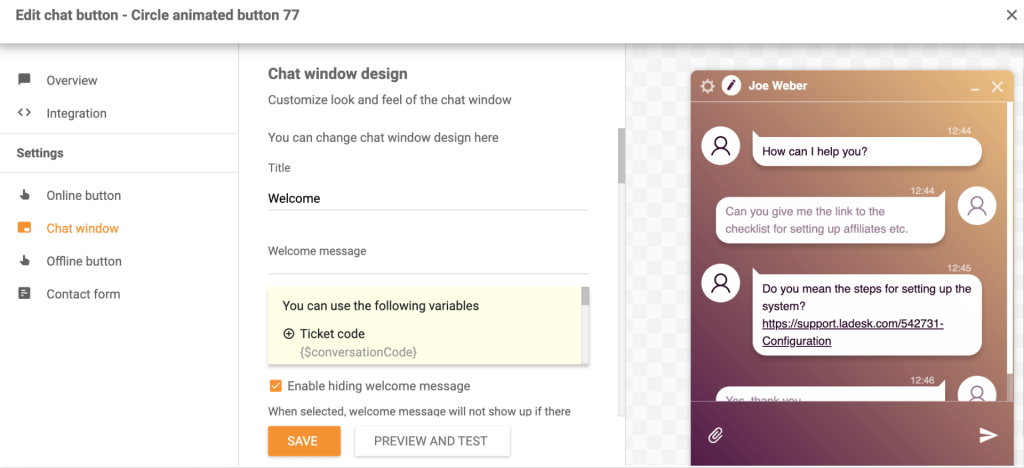
Every live chat automatically converts to a ticket, so a claims inquiry that starts in chat does not disappear when the conversation ends. It gets tracked, assigned, and followed through to resolution.
The shared inbox brings chat, email, phone, and social media into a single view, so your team doesn’t have to jump between four tools to manage a single policyholder’s case. The CSAT and first-contact resolution reporting give operations managers a clear read on where queries are being resolved and where they keep escalating.
Pros:
- Converts live chats to support tickets automatically for tracked case management
- Shared inbox handles chat, email, phone, and social in one view
- Strong CSAT and first-contact resolution reporting for operations managers
- Affordable per-seat pricing relative to enterprise alternatives
- Internal notes and agent collision detection keep teams from duplicating work on the same case
Cons:
- Interface is less modern than newer platforms and has a steeper learning curve
- AI bot capabilities are more limited than platforms purpose-built for AI-first support
User Rating: 4.5/5 (G2)
Pricing: Starts from $15/agent/month.
How I Evaluated These Insurance Live Chat Tools
Choosing the wrong chat platform in insurance has real consequences: dropped claims inquiries, unqualified leads routed to the wrong specialist, and policyholders who call a competitor because no one responded. Here is exactly how I approached this evaluation:
- User Reviews and Ratings: I pulled verified feedback from G2, Capterra, and Gartner, filtering for recurring complaints and what real users valued after six or more months of use. Recency mattered because older reviews often miss product changes.
- Core Features and Functionality: I specifically tested insurance-relevant capabilities: policy FAQ handling, claims triage, lead qualification flows, human handoff quality, and CRM integration depth.
- Ease of Deployment: The benchmark was simple: can a non-technical team member get the bot running and trained without a developer or a call with sales?
- Integration Quality: I looked at whether native integrations with Salesforce, HubSpot, Zoho, and help desk tools worked reliably in practice, not just in the feature list.
- Customer Support Quality: I paid attention to how vendors responded during setup issues and whether ongoing support operated as a real partnership or a ticket queue.
- Value for Money: I compared pricing against actual feature depth. A tool that covers three insurance use cases well is not a bargain at enterprise pricing.
- Personal Experience: I used each platform directly and cross-checked my findings with peers who manage live insurance support operations.
My Top 3 Picks for Insurance Live Chat
1. ProProfs Chat
For insurance agencies needing 24/7 AI coverage without a development team, ProProfs Chat is the fastest path from zero to functional. Train it on your policy documents, set up lead qualification flows, and the bot handles routine queries while your agents focus on complex cases. Sentiment analysis and risk prediction make it genuinely suited for claims-related conversations.
2. Freshchat
For insurance teams with a mobile-first policyholder base or a strong focus on renewal campaigns, Freshchat’s campaign messaging and mobile SDK address use cases that generic chat tools miss. If a meaningful portion of your policyholder interactions happen inside a mobile app or through structured renewal outreach, Freshchat earns its place in the stack.
3. LiveAgent
For insurance support operations where every inquiry needs a full audit trail from first contact through resolution, LiveAgent’s unified ticketing and live chat removes the handoff gap. If your team handles claims inquiries, billing disputes, and policy changes at volume, this is the tool that handles that structure without requiring two separate platforms.
FREE. All Features. FOREVER!
Try our Forever FREE account with all premium features!
Stop Losing Policyholders to Slow Response
Insurance customers make decisions in real time. According to J.D. Power’s 2025 U.S. Insurance Shopping Study, the auto insurance shopping rate hit 57%, the highest in 19 years. The agencies that respond first win the policy.
Before you pick a platform, map your five highest-volume query types and confirm the tool handles them from your existing content. Test your after-hours scenario. Run a 30-day pilot, track containment rate and CSAT, and review unresolved query logs weekly.
If you want AI agent training, sentiment analysis, risk prediction, and bot performance analytics in one place without an enterprise procurement cycle, start with ProProfs Chat. The Forever Free plan goes live in a day. No credit card needed.
Frequently Asked Questions
What features should an insurance company's live chat include?
At minimum, you need an AI chatbot that trains on your policy documents, intelligent routing to send inquiries to the right department, lead capture with CRM integration, and after-hours automated coverage. For teams handling claims, sentiment analysis and escalation triggers add meaningful value by catching high-stress conversations before they become complaints.
Can live chat software handle insurance claims intake?
Yes, when configured correctly. An AI chatbot can collect initial claim details, document required information, and route the conversation to the right adjuster or department. Complex cases that require a licensed agent should always escalate with full conversation context intact so the policyholder does not have to repeat themselves.
Is live chat compliant with insurance regulations?
Compliance depends on the platform and how it is configured. Look for data encryption in transit and at rest, GDPR-compliant data handling, configurable data retention policies, and secure conversation storage. For health insurance operations, it is worth confirming whether the platform supports HIPAA-compliant configurations before committing.
How quickly should an insurance chat response arrive?
The faster the better, especially for inbound leads. An AI chatbot responds in seconds regardless of time of day, which is where most of the lead conversion advantage comes from. For human-handled chats, the target first response time should be under two minutes to keep policyholders from dropping off.
What is the cost of not having live chat for an insurance website?
Every unanswered inquiry is a lead your team will likely never recover. Most prospects who do not get a response on their first visit do not come back. At the cost per lead in the insurance sector, that adds up fast. Having an AI chatbot handle after-hours queries alone closes a significant portion of that gap.
Can small insurance agencies afford live chat software?
Yes. ProProfs Chat offers a Forever Free plan that covers a single operator with full features, which is enough for most independent agents getting started. Paid plans scale from there as your team grows, without requiring enterprise-level commitment upfront.
How long does it take to set up live chat for an insurance website?
With a platform like ProProfs Chat, a basic AI chatbot trained on your policy content can be live within a few hours. CRM integrations and advanced routing rules typically take one to two business days to configure and test correctly before going live at full volume.
What is a good containment rate for an insurance chatbot?
A containment rate above 60% means the bot resolves at least six in ten conversations without escalating to a human, which is a solid starting benchmark. Well-configured bots trained on comprehensive policy and FAQ content typically reach 70 to 80 percent within the first 90 days as you review the unresolved query log and update training.
FREE. All Features. FOREVER!
Try our Forever FREE account with all premium features!

 We'd love your feedback!
What did you like & how can we make it even better?

 Thanks for your feedback!
 Ask Your Question
Have a question? Get expert help to make your decision easier.