
“Why do I have to explain this again?”
That is the moment businesses start losing trust, leads, and sales. I have seen it happen: a customer messages on Instagram, follows up on your website, and then reaches out on WhatsApp, only to start from scratch every time. That is where an Omnichannel Chatbot becomes more than just a nice feature.
It connects your conversations across channels into one continuous experience, so customers get faster answers and your team gets the full context instantly. From what I have seen, this is not just about better support. It is about building a smarter business.
When your chat, social, and messaging channels work together, you reduce friction, capture more opportunities, and make it much easier to scale without overwhelming your team.
In this guide, we’ll break down how it works, why it matters, and what to look for when choosing one for your business.
What Is an Omnichannel Chatbot?
This shift is gaining momentum as the global chatbot market is projected to reach USD 41,244.2 million by 2033, growing at a CAGR of 19.6% from 2026 to 2033, according to Grand View Research, Inc (2026).
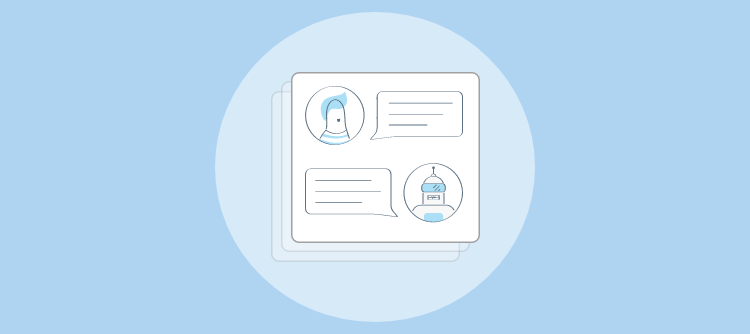
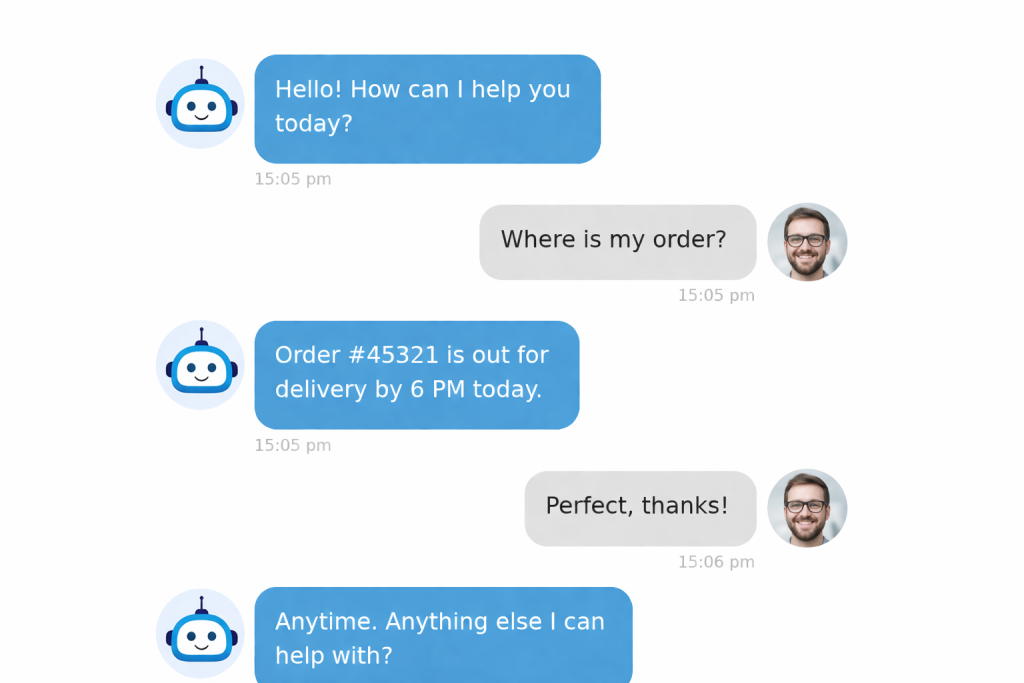
So if a customer starts a conversation on Facebook and switches to your website later, the bot knows exactly where things left off. No repeating. No confusion. Just a connected experience from start to finish.
Why Are Businesses Switching to Omnichannel Chatbots?
As customer conversations spread across websites, social media, messaging apps, and email, disconnected support is becoming harder to manage. Customers now expect quick, consistent answers everywhere, and that is why more businesses are turning to omnichannel chatbots.
Let’s take a look at five key reasons why:
1. Meet Customers Everywhere
Customers move across channels without thinking twice. They may discover a brand on social media, ask a question on the website, and follow up later on WhatsApp. Omnichannel chatbots help businesses keep those conversations connected, so customers get a smoother experience instead of repeating themselves at every touchpoint.
2. Respond Faster, Less Chaos
Managing separate inboxes often leads to delays, missed messages, and inconsistent replies. Omnichannel chatbots bring conversations into one system, helping teams stay organized and respond more quickly. This creates a better customer experience while reducing the confusion that comes from jumping between multiple platforms all day.
3. Capture More Sales Opportunities
Many leads drop off simply because businesses respond too late or miss key questions. Omnichannel chatbots help engage visitors instantly, answer common concerns, and move prospects toward the next step. That makes it easier to turn interest into action and reduce missed sales opportunities across channels.
4. Reduce Agent Workload
Support and sales teams often spend too much time answering the same routine questions. Omnichannel chatbots can handle repetitive queries, collect basic details, and route conversations when human help is needed. This gives agents more time to focus on complex issues and higher-value customer interactions. In fact, Gartner (2025) predicted that agentic AI will resolve 80% of common service issues by 2029, potentially reducing operational costs by 30%.
5. Scale Support More Easily
As businesses grow, the volume of conversations grows with them. Handling that increase manually can slow teams down and hurt service quality. Omnichannel chatbots make scaling easier by helping businesses manage more customer interactions efficiently, without losing speed, consistency, or responsiveness.
What Problems Does an Omnichannel Chatbot Actually Solve?
Most support teams aren’t struggling because they lack effort. They’re struggling because their tools weren’t built for the way customers actually communicate today. Here’s what an omnichannel chatbot fixes:
1. Your Team Is Drowning in Scattered Conversations
Your support team is juggling WhatsApp, website chat, Instagram DMs, email, and sometimes phone. All from separate tools. Messages get missed, leads slip through, and response times suffer. An omnichannel chatbot centralizes every conversation into one inbox, so nothing falls through the cracks and your team responds faster without switching between five different apps.
2. Agents Keep Answering the Same Questions on Repeat
“What are your hours?” “Where’s my order?” “Do you offer a free trial?” These questions eat hours every week. An omnichannel chatbot is trained on your FAQs, product docs, and help content. It answers these instantly, around the clock. Your agents get their time back for work that actually needs a human.
3. Leads Disappear Before Anyone Responds
A visitor lands on your site, has a question, and bounces before anyone replies. Without real-time engagement across support channels, that’s revenue walking out the door. The chatbot engages them instantly on your website, WhatsApp, or Facebook. It collects their details, and qualifies them before routing to your team.
4. Switching Channels Breaks the Entire Conversation
Most tools don’t carry context between channels. So when a customer moves from WhatsApp to your website, they’re starting from scratch, and so is your agent. An omnichannel chatbot fixes this by preserving the full conversation history, so interactions continue smoothly no matter where the customer goes.
5. Your Support Can’t Scale Without Adding More People
As your business grows, support volume grows with it. Hiring more agents isn’t always practical, especially for small and mid-size teams. An omnichannel chatbot handles repetitive queries at scale and escalates only the conversations that truly need a human, helping your team stay efficient without increasing headcount.
What Features Should You Look for in an Omnichannel Chatbot?
Not every chatbot can handle true omnichannel support. Here are the features that genuinely matter, and exactly how each one helps your business.
1. Multi-Channel Support
This feature connects your chatbot to every channel your customers use: website live chat, WhatsApp, Facebook Messenger, Instagram DMs, email, and SMS. All managed from a single dashboard. You stop switching between tools and start seeing the full picture of every customer conversation in one place.
How It Helps:
- Eliminates the need for separate tools for each communication channel
- Ensures no customer message goes unnoticed, regardless of where it was sent
- Gives your team a unified inbox to respond faster with full context
- Supports growing channel coverage as your customer base expands
- Makes it easier to identify which channels drive the most support volume
2. AI Chatbot Training on Your Own Content
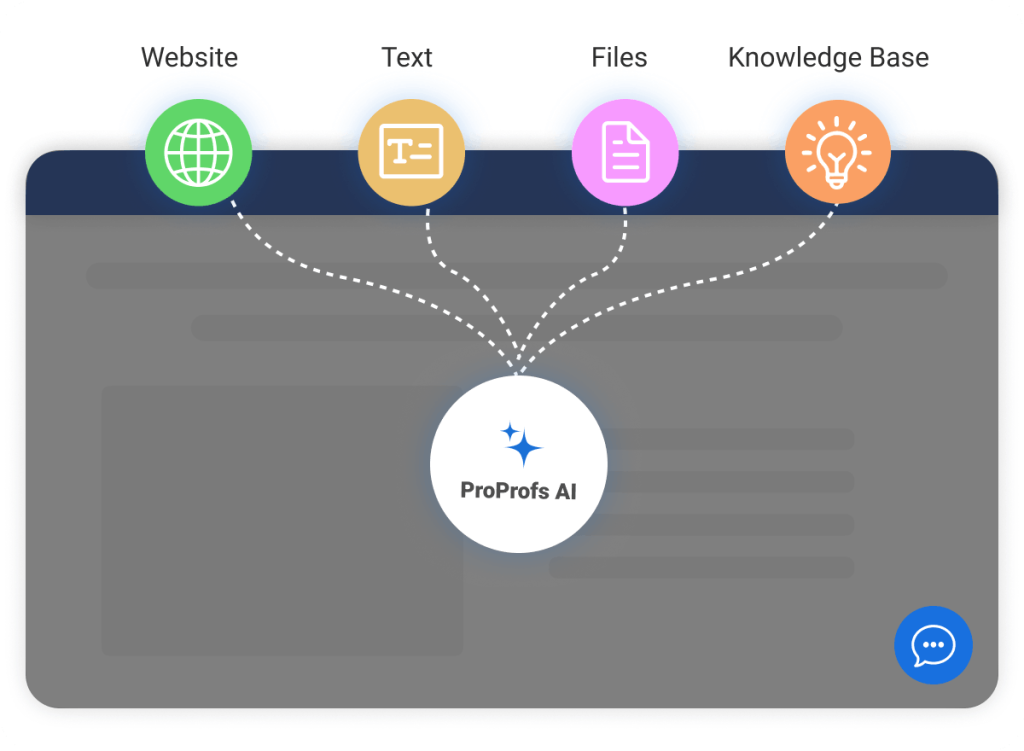
This allows you to train the bot using your website URLs, FAQs, product documentation, PDFs, and knowledge base articles, so it gives accurate, brand-aligned answers instead of generic ones. The more relevant content you feed it, the sharper it gets.
How It Helps:
- Reduces wrong or irrelevant answers that frustrate customers
- Keeps bot responses consistent with your brand voice and policies
- Handles product-specific or service-specific queries without manual setup
- Allows you to update training content as your offerings change
- Minimizes escalations to agents for questions the bot can easily handle
3. AI and Human Handoff
When a conversation goes beyond what the bot can handle, whether due to complexity, emotion, or an explicit customer request, it escalates instantly to a live agent and passes the complete conversation history along. The customer doesn’t have to repeat themselves. The agent doesn’t have to catch up manually.
How It Helps:
- Removes the most frustrating part of bot-based support: starting over with a human
- Gives agents instant context so they can resolve issues faster
- Lets you define escalation rules by keyword, topic, or channel
- Maintains a consistent tone and experience across bot and human touchpoints
- Builds customer trust by showing that human backup is always available
4. Lead Capture and CRM Integration
The chatbot automatically collects contact details (name, email, phone number) during conversations and qualifies leads based on rules you define. It then pushes that data directly into your CRM (Salesforce, Zoho, HubSpot, Monday.com, and others) without any manual entry.

How It Helps:
- Captures leads from every channel 24/7, even outside business hours
- Eliminates manual data entry and the errors that come with it
- Routes high-priority leads to the right sales rep in real time
- Keeps your CRM updated automatically as conversations happen
- Lets your sales team focus on closing rather than chasing data
5. Branding and Customization
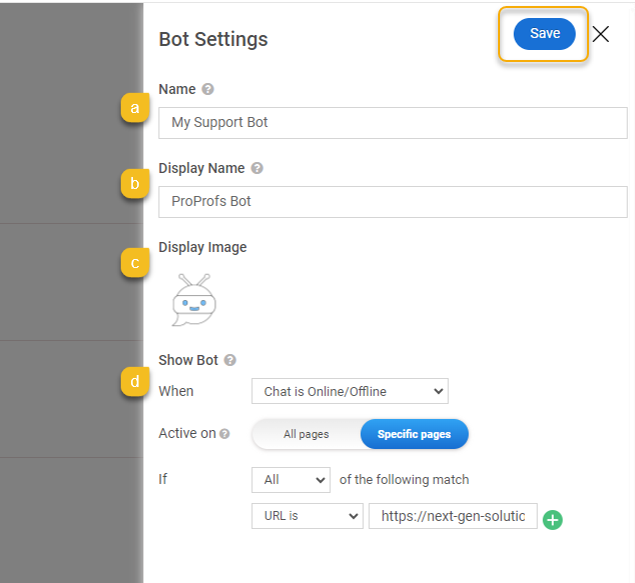
You control how the chatbot looks and sounds: widget color, icon, greeting text, bot name, pre-chat form fields, and chat flow. For businesses managing multiple brands, products, or regions, you can create separate bot configurations for each.
How It Helps:
- Keeps the chatbot experience consistent with your brand identity
- Creates a more professional first impression for website visitors
- Allows different greetings or flows for different pages, products, or audiences
- Supports multilingual setup for businesses serving global customers
- Helps maintain brand trust, especially for enterprise or regulated industries
6. Reporting and Analytics
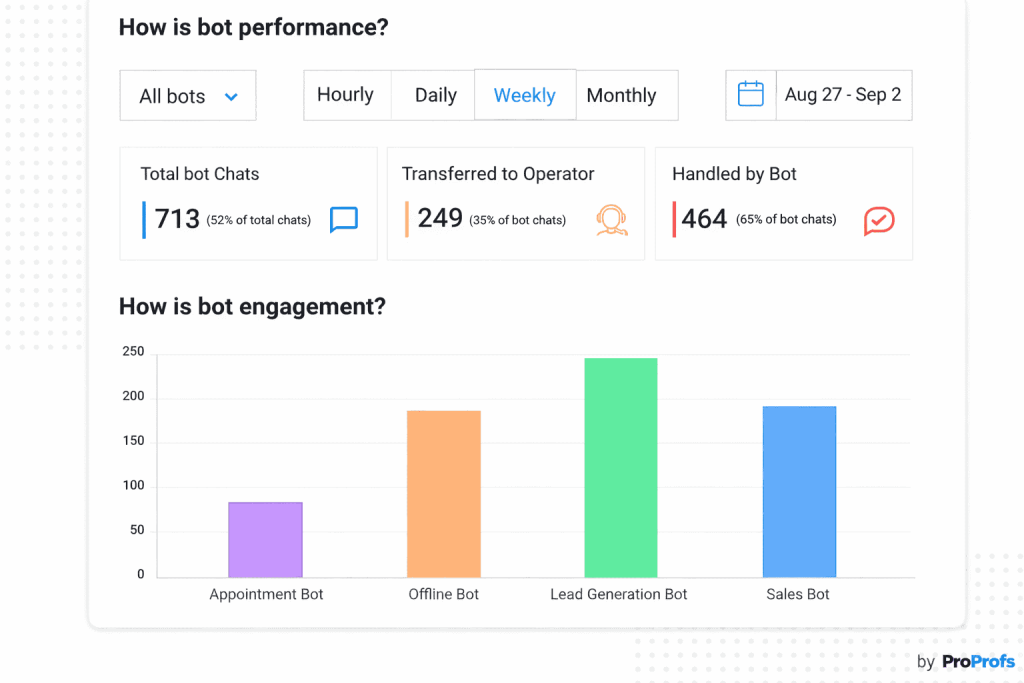
A built-in dashboard tracks what’s happening across every channel: chat volume, response times, missed chats, top questions, lead conversions, agent/chatbot performance, and channel-level breakdowns. You can see exactly where conversations drop off and where the bot performs best.
How It Helps:
- Identifies which channels generate the most support volume and leads
- Pinpoints the questions your bot handles well vs. where it struggles
- Tracks response time and resolution rate improvements over time
- Helps you refine bot flows based on actual conversation data
- Gives support managers the visibility to make faster, smarter decisions
FREE. All Features. FOREVER!
Try our Forever FREE account with all premium features!
Omnichannel Chatbot vs. Multichannel Chatbot: What’s the Difference?
This comparison comes up constantly. Here’s the clearest way to think about it:
A multichannel chatbot is present on multiple channels. An omnichannel chatbot connects them.
| Feature | Multichannel Chatbot | Omnichannel Chatbot |
|---|---|---|
| Channel Coverage | Multiple channels | Multiple channels |
| Conversation Context | Resets when channel changes | Carries over across all channels |
| Customer Experience | Fragmented, starts over each time | Seamless and connected end-to-end |
| Agent Handoff | No shared context passed | Full conversation history transferred |
| Lead Tracking | Siloed by channel | Unified view across all channels |
| CRM Sync | Often manual or channel-specific | Centralized, automatic |
If your customers ever switch channels mid-conversation (and most do), only an omnichannel chatbot keeps the experience intact.
How to Install Your Omnichannel Chatbot: Step-by-Step Guide
Installing an omnichannel chatbot is simpler than it sounds. When I used ProProfs Chat to set it up, I was surprised by how quickly it went live, even on my first try. You do not need deep technical skills to get started.
Here’s an easy step-by-step guide to to set up, train, and launch your AI bot across channels with ease.
Step 1: Create a New AI Chatbot
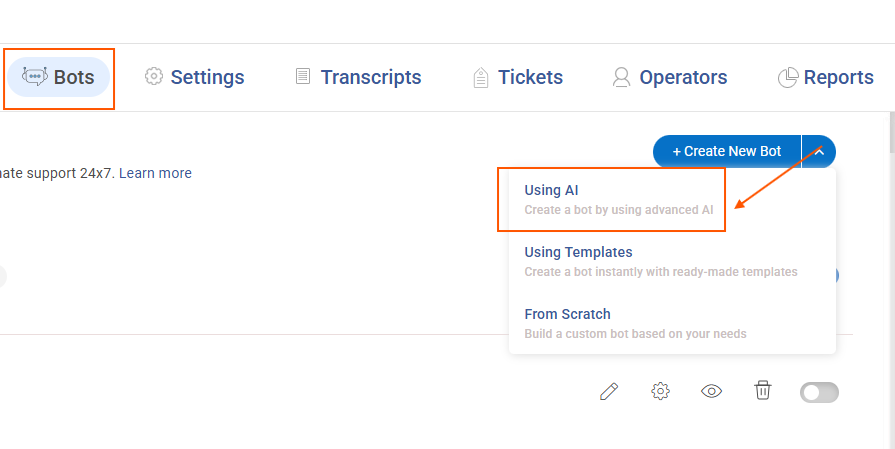
After logging in, go to the Botssection and click Create New Bot. From the available options, select Using AI. This allows the chatbot to learn from your content instead of relying only on fixed scripts.
Step 2: Add Your Data Source
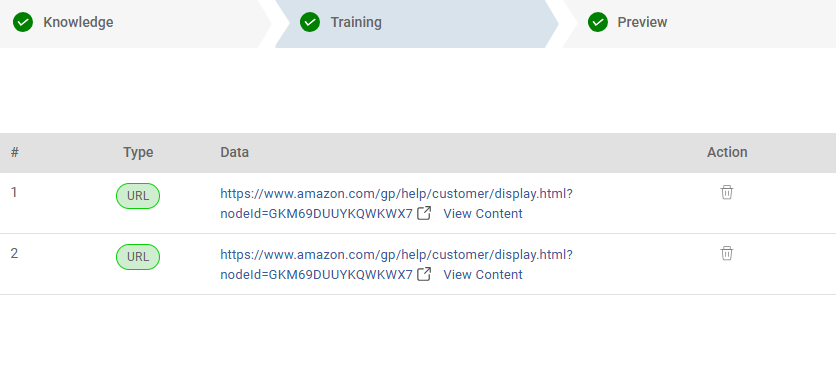
Upload the content you want the chatbot to learn from. This can be a website URL, documents, plain text, or a connected knowledge base.
Once added, click Process Data so the system can prepare the content for training.
Step 3: Preview and Test the Chatbot
When processing is complete, use the Preview option to test how the chatbot responds.
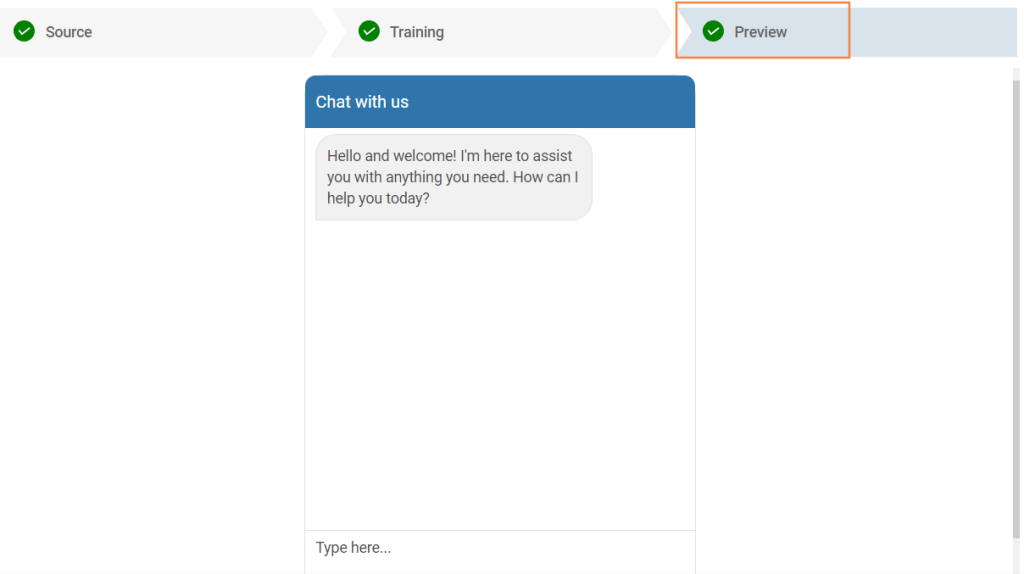
Your omnichannel chatbot is now live and ready to engage visitors. You can revisit the Bots section anytime to retrain the chatbot or adjust its settings.
Stop Losing Customers Between Channels: Fix It Today
Every business eventually hits the same wall: too many channels, not enough people, customers who expect instant answers everywhere, and a support setup that can’t keep up. An omnichannel chatbot is how you break through it.
Bring all your conversations together. Let the bot handle the repetitive work. Give your agents the context they need to resolve issues fast. A few practical tips to start strong: focus on your highest-volume channels first, train the bot on your actual FAQs and product content, and always build a clear escalation path to a live agent. That combination alone will change how your customers experience your support.
If you want to test this without spending anything, ProProfs Chat is a solid starting point. The free plan supports a single user, covers omnichannel messaging, and includes built-in live chat, so your bot and your agents work from the same platform. No awkward handoffs. No switching tools.
Start your free plan today and make seamless support your biggest competitive edge.
Frequently Asked Questions

Can a small business use an omnichannel chatbot?
Yes. Many platforms, including ProProfs Chat, offer free or entry-level plans that work well for small teams. You don't need a large budget or a technical team to get started and see results quickly.
Does an omnichannel chatbot replace human agents?
No. It handles repetitive, high-volume queries automatically and escalates complex or sensitive conversations to a human agent with full context. Most businesses use it to make their existing team more productive, not to replace it.
Which channels can an omnichannel chatbot cover?
Website live chat, WhatsApp, Facebook Messenger, Instagram DMs, email, SMS, and mobile app SDKs are the most common. The key is whether those channels are truly unified, meaning context travels between them.
How does context stay intact when a customer switches channels?
The bot stores conversation history in a centralized system. When a customer moves from WhatsApp to your website, the bot retrieves that history and continues without asking them to repeat anything.
Can the chatbot integrate with my existing CRM?
Yes. Most platforms support integrations with Salesforce, Zoho, HubSpot, Monday.com, ActiveCampaign, and Microsoft Dynamics. Lead and conversation data sync automatically.
What happens when the bot doesn't know the answer?
A well-configured omnichannel chatbot escalates to a live agent, offers a callback option, or directs the customer to a help resource, depending on how you set it up. It should never leave a customer stranded.
Is an omnichannel chatbot compliant with data privacy regulations?
It depends on the platform. For healthcare, finance, or regulated industries, look specifically for platforms with GDPR/HIPAA compliance, data encryption, transcript deletion controls, and role-based admin access.
FREE. All Features. FOREVER!
Try our Forever FREE account with all premium features!

 We'd love your feedback!
What did you like & how can we make it even better?

 Thanks for your feedback!
 Ask Your Question
Have a question? Get expert help to make your decision easier.