If you are hunting for Provide Support alternatives, chances are the chat widget still works, but your needs have quietly moved on. You want AI that answers from your own content, a cleaner agent window, clear costs as chat volume grows, and integrations that fit your stack.
I spent weeks reading real G2 and Capterra reviews, vendor documentation, and pricing pages, then shortlisted tools that fix those gaps for a small, growing support team.
This guide covers why teams switch, the ten best options, how I chose them, my top three picks, how to test the AI before you commit, and how to move your chats over safely.
Why Are Teams Switching From Provide Support?
If you are reading this, you have probably felt a few of these. I am laying them out clearly so you know exactly what to check when you compare Provide Support competitors.
- Dated look: Reviewers describe the admin portal, chat pop-up, and operator window as dated. Open every shortlisted widget on your own site and judge it against your brand before you commit.
- Thin AI: The strengths reviewers highlight are core chat, mobile access, and transcripts, not AI answers. If you want a bot that answers from your website and PDFs, make that a must-have on day one.
- Billing clarity: One reviewer said billing could be clearer. Ask each vendor whether pricing is per operator, per conversation, or per resolution, and what counts as a billable event.
- Customization depth: G2 reviewers say you can match your site, but with less depth than LiveChat. Check for custom colors, fonts, your logo, and white-label options.
- Basic feel: One Capterra reviewer called it a basic live chat tool. Write down the advanced jobs you need, such as routing, surveys, and ticketing, then test each one in a trial.
- Weak handoff: Teams moving to AI want the bot to handle the first layer and pass the chat to a human with full context. Test that handoff yourself before you buy.
- Integration fit: CRM, ticketing, Microsoft Teams, and Outlook compatibility decide many switches. List your must-have integrations before you start and verify each one in a trial.
Top 10 Provide Support Alternatives for Support Teams
I put this list together using G2 ratings, vendor documentation, and review-site feedback. Every tool here fixes at least one of the problems above in a meaningful way.
| Tool | Best For | Starting Price | User Rating |
| ProProfs Chat | Easy Live Chat & AI Customer Service Agent for Instant, Automated Support | Free for 1 operator; paid from $19.99/operator/month | 4.5/5 (G2) |
| Tidio | Live Chat With Ticketing Functionality | $24.17/month | 4.6/5 (G2) |
| Tawk.to | Free Live Chat for Budget-Conscious Small Businesses | Free | 4.5/5 (G2) |
| Crisp | Shared Inbox Across Chat, Email & Social Channels | $45/workspace/month | 4.5/5 (G2) |
| LiveChat | Agent Productivity, Analytics & Proactive Engagement | $19/user/month | 4.5/5 (G2) |
| HelpCrunch | Live Chat, Email & Knowledge Base in One Inbox | $15/month | 4.7/5 (G2) |
| Freshchat | Freshworks Suite Users | $19/agent/month | 4.4/5 (G2) |
| Intercom | Omnichannel Platform With Messenger & Fin AI | $29/seat/month | 4.5/5 (G2) |
| Zendesk | Ticket-Heavy Teams Already Running Zendesk | $19/agent/month | 4.3/5 (G2) |
| LiveAgent | Chat, Ticketing & Call Center in One Help Desk | $15/agent/month | 4.5/5 (G2) |
1. ProProfs Chat: Easiest Live Chat & AI Customer Service Agent for Instant, Automated Support
I started by pasting my website URL into ProProfs Chat, and the AI Customer Support Agent was answering visitor questions almost immediately. The AI support agent trains on your website, help center, FAQs, or uploaded files, so every answer comes from your real content with the source cited alongside it.
When a conversation needs a person, the chat passes to an operator with the full history intact, which means customers never repeat themselves. Proactive chat invitations, canned responses, and routing by department or keywords keep busy queues organized. Chat transfers between operators and SLA settings keep replies on time, and a supervisor dashboard shows operator performance.
I also like that it connects with ProProfs Knowledge Base and ProProfs Help Desk, so offline messages and missed chats can turn into tickets. Sentiment tagging shows my team which customers sound frustrated, and support for 70+ languages means visitors can chat in the language they prefer.
Pros:
- AI trains on your website, help center, PDFs, or raw text, and each answer shows its source
- Bot-to-human handoff passes the full chat history, so customers never repeat themselves
- Intelligent routing sends chats to the least busy operator or by department, location, time, or keywords
- Canned responses, chat transfers between operators, and SLA settings keep busy queues organized
- Post-chat surveys, operator ratings, and a live supervisor dashboard track team performance
Cons:
- Cloud-only, so there is no offline access
- No dark theme
How ProProfs Chat Compares With Provide Support: Provide Support reviewers praise easy setup, but call the widget and admin portal dated, and its top-rated Capterra features are core chat, not AI. ProProfs Chat gives you 100+ chat window settings, color and font control, and an AI agent trained on your own content, so the widget looks current and answers from day one.
User Rating: 4.5/5 (G2)
Pricing: Forever free for 1 operator. Paid starts at $19.99/operator/month
2. Tidio: Best for Live Chat With Ticketing Functionality
My friend, who runs a small online store, outgrew plain live chat, so we looked at Tidio together. It puts live chat, a help desk, and the Lyro AI agent on one dashboard. Lyro pulls from existing support content, and the AI agent can also train on website data and Shopify catalogs to field where is my order questions.
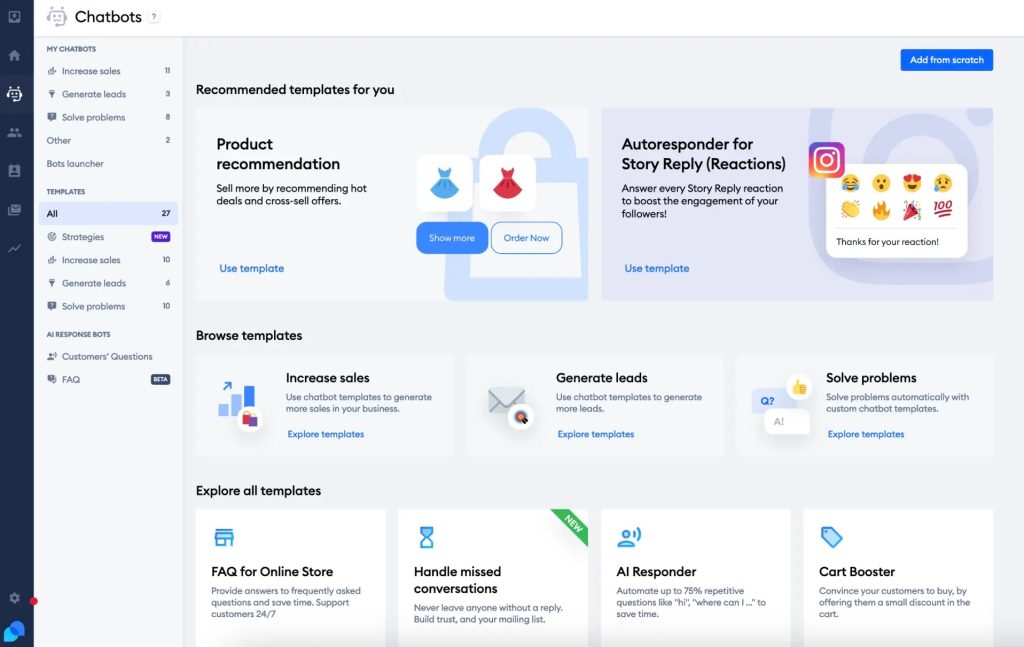
When something needs a person, the chat converts into a ticket in the same inbox, so longer issues stay organized. We liked that live chats, emails, and Messenger threads share one inbox, and that agents can reply from mobile, snooze threads, and trigger automated follow-ups. The visitor typing preview let her prepare an answer before the message arrived.
Visual workflows cover product quizzes and upsell pop-ups, and proactive messages fire on time on page or cart value. The automation builder took some getting used to, so plan an afternoon for setup.
Pros:
- Unified inbox merges live chats, emails, and Messenger threads in one place
- AI agent trains on website data and Shopify catalogs to handle order status questions automatically
- Chat-to-ticket conversion keeps longer issues organized and easy to track
- Visitor typing preview lets agents prepare answers before the message even arrives
- Proactive messages trigger on time on page or cart value
Cons:
- Automation setup can feel daunting for teams without prior chatbot experience
- Visual workflows need planning time before quizzes and upsell pop-ups are ready
How Tidio Compares With Provide Support: Provide Support is a focused chat tool, and its Capterra highlights are core chat, mobile access, and transcripts. Tidio adds the Lyro AI agent, chat-to-ticket conversion, and a unified inbox for chats, emails, and Messenger threads, which suits teams that want automation and support under one roof.
User Rating: 4.6/5 (G2)
Pricing: Starts at $24.17/month
3. Tawk.to: Best for Free Live Chat for Budget-Conscious Small Businesses
One of my friends runs a small service business and wanted a simple live chat without a long setup, so she tried tawk.to. She pasted a script into her site, and no developer was needed at all. The dashboard brought live chat, a basic ticketing system, and a small knowledge base together, and the iOS and Android apps let her reply away from her desk.
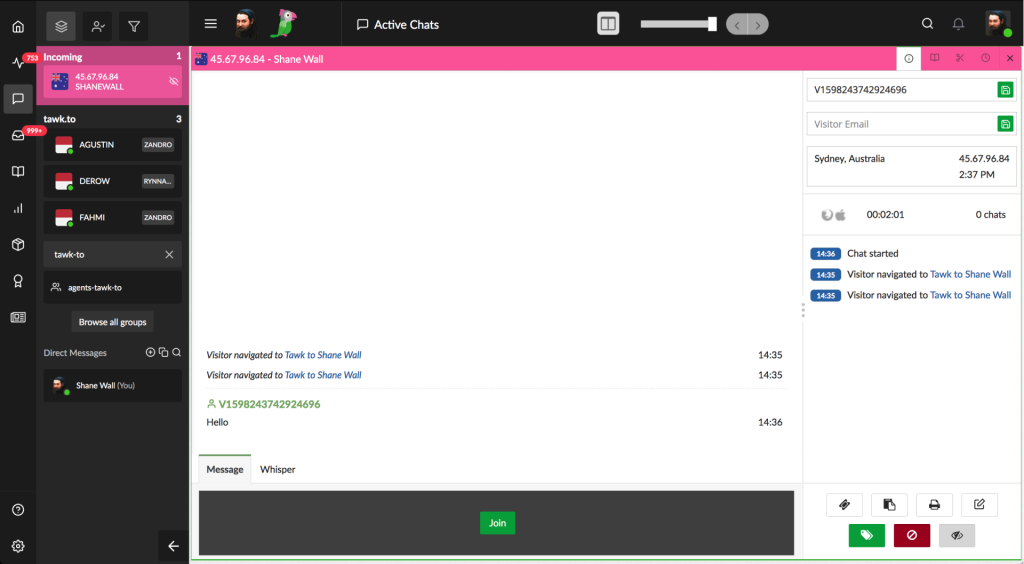
Real-time visitor analytics showed who was browsing her site right now. There is also an optional hired agent service for after-hours conversations, which she kept in mind for later growth. Because analytics, ticketing, and the knowledge base share one dashboard, she avoided juggling several separate tools. Her main caution was the AI.
It feels less advanced than purpose-built AI chatbot tools, so I would not rely on it for automation-heavy support. Ticketing and the knowledge base are also basic, which matters if you plan to scale.
Pros:
- Live chat, ticketing, and a basic knowledge base sit inside one dashboard
- Mobile apps for iOS and Android make on-the-go replies simple
- Real-time visitor analytics show exactly who is browsing your site
- Setup takes minutes with a simple script paste, no developer needed
- Optional hired agent service covers after-hours conversations
Cons:
- Ticketing and the knowledge base are basic compared with dedicated help desk tools
- AI features feel less advanced compared to purpose-built AI chatbot tools
How Tawk.to Compares With Provide Support: Provide Support has no free version, only a free trial, while tawk.to’s core product is free with unlimited agents, chats, and sites. You give up AI depth, since tawk.to’s AI feels less advanced, but you gain a basic ticketing system and knowledge base, which helps if headcount drives your costs.
User Rating: 4.5/5 (G2)
Pricing: Free
4. Crisp: Best for Shared Inbox Across Chat, Email & Social Channels
Crisp felt like a shared inbox first and a chat widget second when I set it up. Messages from website chat, email, WhatsApp, Instagram, and Messenger landed in one place, so replies stayed consistent across channels. Hugo, its AI agent, is built to handle full conversations instead of only suggesting replies, and it is the newest big addition to the platform.
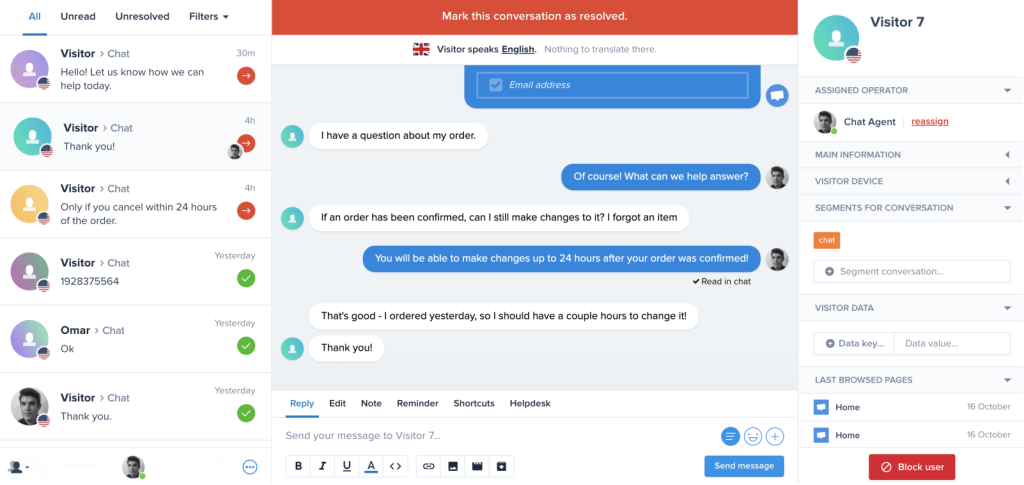
I tried MagicBrowse, which lets agents see a visitor’s screen, and it helps when someone is stuck on a form. I also built in-chat and email sequences from the same place, and the built-in Knowledge Base lets my team reuse help content in answers.
Crisp connects with tools like Slack, Squarespace, n8n, and Activepieces. It began in 2015 as a simpler enterprise chat alternative, and the interface keeps that same spirit. My advice is to test Hugo on your own content and plan some extra time for channel setup.
Pros:
- Shared inbox for website chat, email, WhatsApp, Instagram, and Messenger
- Hugo AI agent handles full conversations, not just reply suggestions
- MagicBrowse lets agents view the visitor’s screen to resolve issues faster
- Built-in Knowledge Base lets agents reuse help content in conversations
- In-chat and email sequences can be built directly inside the platform
Cons:
- Hugo is a recent addition, so test it on your own content before relying on it
- Setting up several channels in one inbox takes planning time
How Crisp Compares With Provide Support: Provide Support reviewers say the chat window looks dated, whereas G2 reviewers call Crisp’s interface clean and powerful. Crisp also adds a shared inbox across website chat, email, WhatsApp, Instagram, and Messenger, plus the Hugo AI agent, so it fits teams that want one place for every conversation.
User Rating: 4.5/5 (G2)
Pricing: Starts at $45/month/workspace
5. LiveChat: Best for Agent Productivity, Analytics & Proactive Engagement
A support lead I know picked LiveChat for one reason: day-to-day agent efficiency. Canned responses and tagging kept repetitive replies fast, and analytics gave her a clear view of how the whole team was performing.
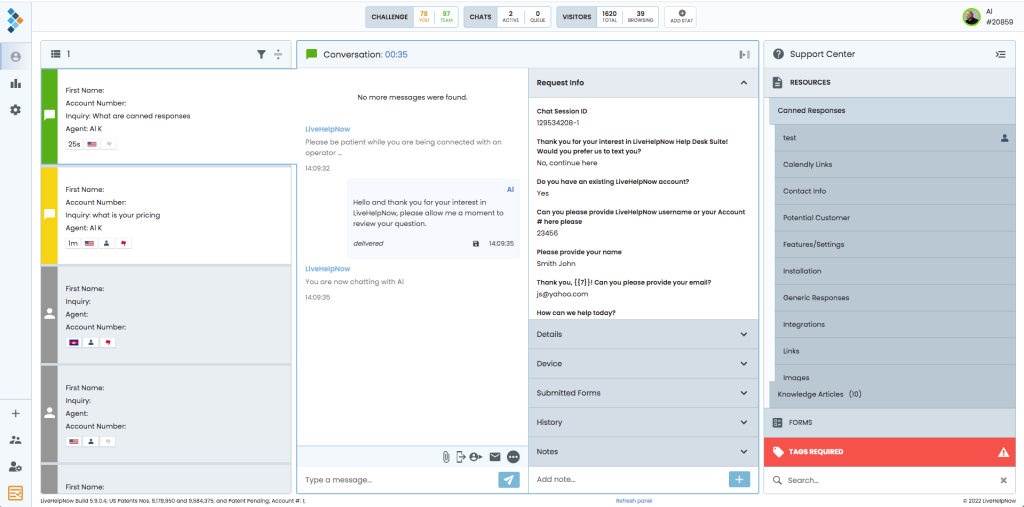
She used pop-up chat and response automation to start conversations instead of waiting for them. What she liked most was visitor tracking and recurring campaigns, which turn chat into a proactive channel rather than a help button. A customer portal also gives visitors a self-service route before they ever open a chat.
Real-time interactions sit right at the core of the product, which makes it a natural fit when chat is part of the sales process too. I would happily recommend it to teams that want a proven chat product and are happy to build automation around it. If AI answers matter most, test how far its AI features go on your own content first.
Pros:
- Canned responses and tagging speed up repetitive replies
- Analytics give managers visibility into chat performance
- Pop-up chat engages visitors proactively
- Response automation streamlines repeat interactions
- Customer portal gives visitors a self-service route
Cons:
- Engagement campaigns and automation need setup time before they pay off
- Teams that want AI answers from their own content should test how far its AI features go
How LiveChat Compares With Provide Support: G2 comparisons rate LiveChat higher than Provide Support on quality of support and ease of use, and reviewers say it offers deeper customization and engagement tools. Pop-up chat, response automation, and analytics give managers more ways to start conversations and measure results, which suits teams that want proactive chat.
User Rating: 4.5/5 (G2)
Pricing: Starts at $19/user/month
6. HelpCrunch: Best for Live Chat, Email & Knowledge Base in One Inbox
When I tried HelpCrunch, the first thing I noticed was one inbox covering website messages and email requests, with a knowledge base alongside. Auto messages work across chat and email, proactive chat invites visitors to talk, and popups plus email marketing sit in the same product. Help desk tools and email templates round out the toolkit for multichannel replies.
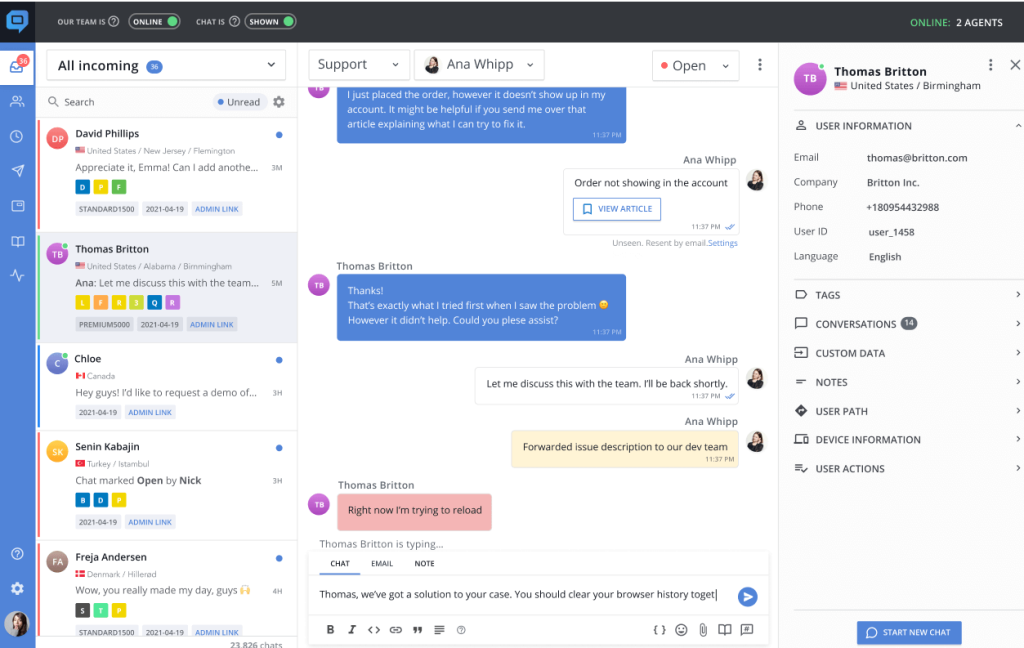
Mobile apps, social messengers, and website chat can come together in a single dashboard, which is exactly the consolidation many teams want. The widget is highly customizable, so I could match my brand without much fuss, and a guided onboarding wizard helped me finish the first setup.
The knowledge base lets visitors find answers on their own before they start a chat. It took me a little time to learn at first, but the help material is solid. For chat and email in one place, it truly deserves a serious look.
Pros:
- Live chat, email, and a knowledge base share one inbox
- Auto messages work across chat and email
- Proactive chat messages engage visitors on your site
- Popups and email marketing tools sit in the same product
- Mobile apps let agents reply on the go
Cons:
- Can take a little time to learn at first, so use the onboarding wizard and help material
- Chatbot and AI depth is lighter than AI-first platforms, so test it on your own content
How HelpCrunch Compares With Provide Support: Provide Support concentrates on chat. HelpCrunch widens the scope with email, a knowledge base, auto messages, and popups in one inbox, and it carries a higher G2 rating at 4.7. It suits teams that want to consolidate tools instead of running chat on its own.
User Rating: 4.7/5 (G2)
Pricing: Starts at $15/month
7. Freshchat: Best for Freshworks Suite Users
A contact of mine already ran Freshdesk and Freshsales, so she added Freshchat to the stack, and I watched her whole setup. The Freddy AI layer handles multiple languages, auto-detects sentiment, and nudges priority chats toward human reps, so urgent conversations do not sit in a queue.
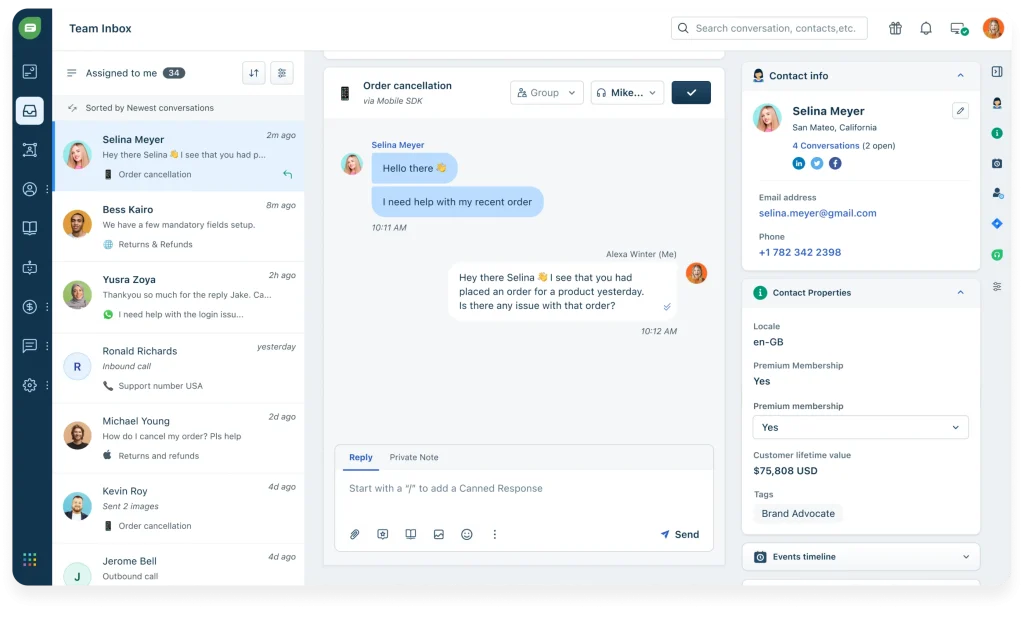
A no-code flow builder with pre-trained FAQ templates got her bot live quickly, and unified inboxes showed rich visitor profiles with in-thread CSAT surveys. Omnichannel coverage spans web, mobile, WhatsApp, and Apple Business Chat, and trigger campaigns respond to user journey and page behavior.
Knowledge base suggestions appeared alongside the bot and live chat, so agents answered faster without hunting through articles. Inside the suite, agents had CRM-level context without switching tabs. Two things to watch: advanced bot flows feel less intuitive than simpler tools, and syncing across several Freshworks products can lag. I would test both with a real workload before launch.
Pros:
- Native fit with other Freshworks apps gives agents CRM-level context instantly
- Omnichannel inbox covers web, mobile, WhatsApp, and Apple Business Chat in one screen
- Freddy AI suggests replies and tags intent automatically
- No-code flow builder with pre-trained FAQ templates gets bots live fast
- Trigger campaigns respond to user journey and page behavior
Cons:
- Syncing across multiple Freshworks products can occasionally lag
- Setup for advanced bot flows can feel less intuitive than simpler standalone tools
How Freshchat Compares With Provide Support: Provide Support reviews focus on standalone chat. Freshchat adds Freddy AI with language and sentiment detection, omnichannel messaging across web, mobile, WhatsApp, and Apple Business Chat, and CRM context if your team already runs Freshworks apps. If you do not use that suite, the advantage shrinks.
User Rating: 4.4/5 (G2)
Pricing: Starts at $19/agent/month
8. Intercom: Best for Omnichannel Platform With Messenger & Fin AI
Rolling out Intercom with a product team, I found the Fin AI agent was the star of the Messenger. Fin reads your help center, answers in natural language, and passes the thread to a human with full context once things get complicated, so customers never explain the problem twice.
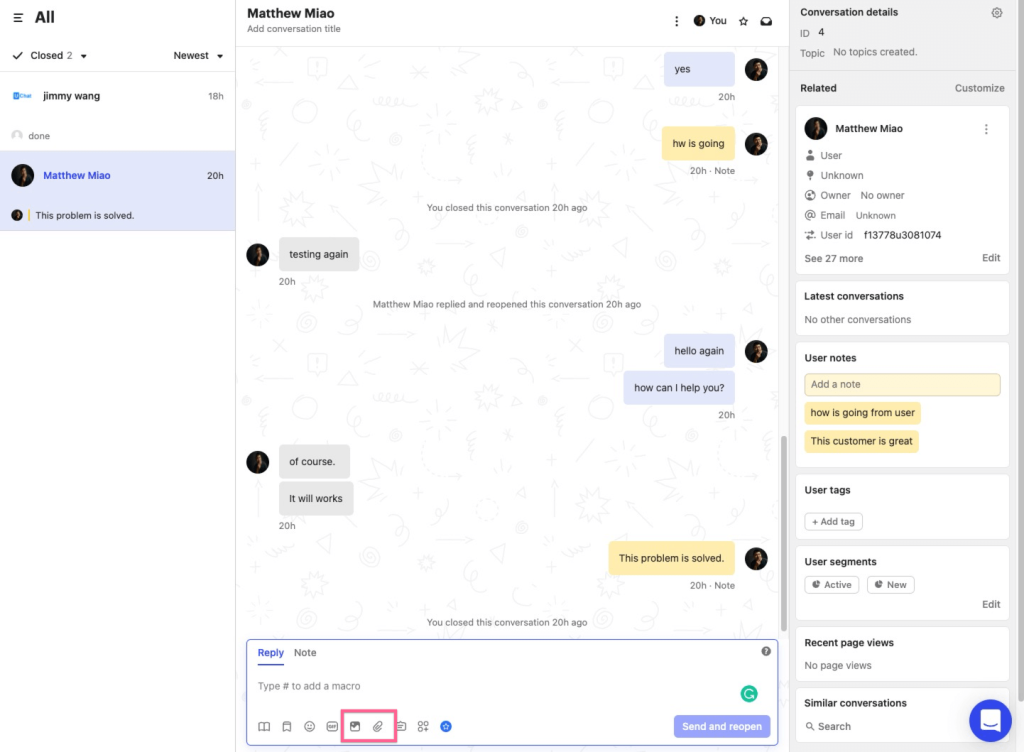
Fin also works alongside other helpdesks, which helps during a gradual move. Behind it, an omnichannel inbox merges email, chat, and social DMs, while a drag-and-drop workflow builder routes, tags, and escalates conversations. Support, onboarding, and growth ran from one cockpit, so the team juggled fewer tools.
Interactive product tours and a mobile SDK for in-app messages make it a strong pick for product-led teams. The workflow tools took time to learn, so I set aside a few hours to build and test our first routing rules. I would shortlist it for larger teams with the patience for a deeper platform.
Pros:
- Fin AI answers 24/7 and hands off with full conversation history intact
- Unified inbox combines chat, email, and social channels into one view
- Workflow builder automates routing, SLAs, and follow-ups without manual tracking
- Interactive product tours accelerate feature adoption for new customers
- Mobile SDK pushes targeted in-app messages and surveys directly to users
Cons:
- Interface has a learning curve for teams new to workflow automation tools
- Product tours and in-app messaging add depth that small teams may never use
How Intercom Compares With Provide Support: Provide Support is a simpler chat tool. Intercom brings the Fin AI agent, product tours, and an omnichannel inbox, which is more than many small teams need. Check whether you will actually use the extras, because AI resolution fees sit on top of seat pricing.
User Rating: 4.5/5 (G2)
Pricing: Starts at $29/seat/month
9. Zendesk: Best for Ticket-Heavy Teams Already Running Zendesk
Since my team already lived inside Zendesk tickets, macros, and SLAs, another chatbot tool would have created one more silo. I tried Zendesk’s Advanced Bot, which sits inside the same agent workspace, so nobody jumped between products. It trained on help center articles, which avoided duplicate content work, and the setup was mostly point and click: I chose the articles, set fallback rules, and mapped my hand-off triggers.
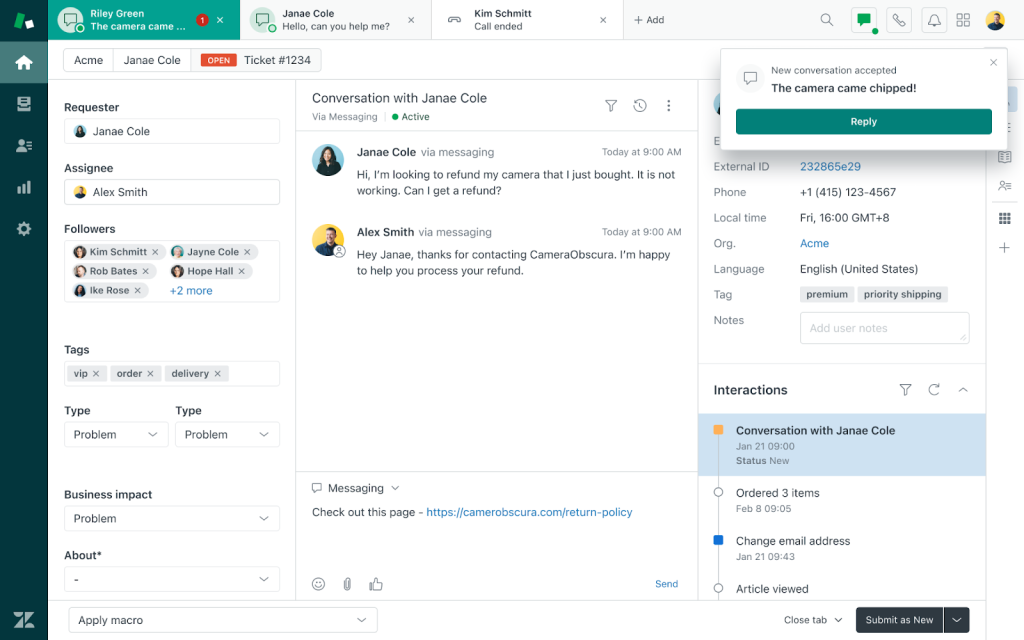
My agents kept their familiar interface while customers got instant answers. Handoffs pass transcripts and user data to agents, and unresolved chats convert into follow-up tickets automatically. Multilingual article detection serves answers in the visitor’s language, and reporting rolls into the Explore dashboards we already checked.
Ticket history and bot activity stay together in one place. If you are new to the ecosystem, expect a longer setup, and I would choose it for ticket-heavy desks rather than small teams that only want chat.
Pros:
- Native to Zendesk Support, Guide, and Messaging, so nothing feels bolted on
- Trains directly on help center articles, avoiding duplicate content work
- Context-rich handoffs pass transcripts and user data to agents instantly
- Multilingual article detection serves answers in the visitor’s language
- Smart triggers convert unresolved chats into follow-up tickets automatically
Cons:
- The agent workspace can take time to get used to
- Initial setup can take longer for teams new to the Zendesk ecosystem
How Zendesk Compares With Provide Support: Provide Support keeps things simple. Zendesk gives you ticketing, bots that train on help center articles, and Explore reporting in one workspace. That pays off only if you will actually run a ticket-driven desk, so small teams that only want chat may find it heavier than they need.
User Rating: 4.3/5 (G2)
Pricing: Starts at $19/agent/month
10. LiveAgent: Best for Chat, Ticketing & Call Center in One Help Desk
I treated LiveAgent as a help desk that includes live chat, and that framing made it click for me. It combines an omnichannel universal inbox, real-time chat, a built-in call center, and a customer portal, so my phone and chat agents could work in one tool.
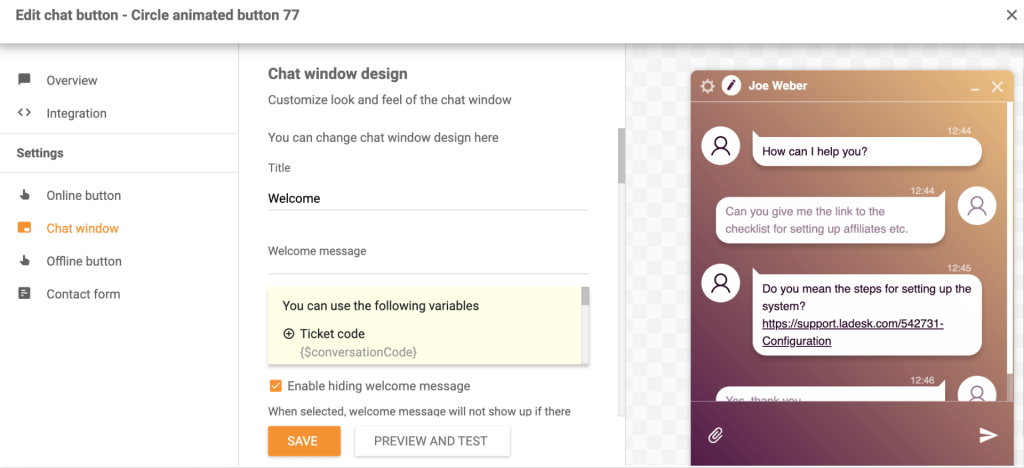
The chat widget is customizable, and chat distribution rules send conversations to the right agent quickly, so nothing slips through. AI tools help automate replies and improve responses. I liked the self-service customer portal too. I also valued the 200+ native integrations, canned responses, chat history, and ticketing, with transcripts built in and email ticketing connected to live chat.
Multi-site live chat lets me handle every inquiry from one hub. On the downside, the interface feels a bit dated, and the mobile app lacks some desktop features. If your agents split their time between calls and chats, I would put it on the list.
Pros:
- Omnichannel universal inbox handles email, chat, social, and phone
- Built-in call center sits alongside live chat
- Chat distribution rules route conversations to the right agent
- Customizable chat widget matches your site
- Multi-site live chat manages several websites from one hub
Cons:
- The interface feels a bit dated next to newer tools
- The mobile app lacks some desktop features
How LiveAgent Compares With Provide Support: Provide Support is chat first. LiveAgent is a help desk first, with ticketing, a built-in call center, and a customer portal built around the chat widget. It suits teams whose agents split time between calls and chats, and it supports multi-site live chat from one hub.
User Rating: 4.5/5 (G2)
Pricing: Starts at $15/agent/month
How I Chose These Provide Support Alternatives
When I evaluate live chat software for this list, I don’t just rely on feature lists or marketing claims. I look at how these tools actually perform in real-world scenarios. Here’s the framework I used to make sure every recommendation is practical, reliable, and worth considering:
- User Reviews / Ratings: I start by looking at real user feedback from platforms like G2. This gives me a clear picture of how teams actually experience the tool day to day, what they love, and where it falls short.
- Core Features & Functionality: I focus on what truly matters in live chat software. This includes AI training on your own content, bot-to-human handoff, routing, integrations, omnichannel support, and reporting. If a tool cannot handle these well, it does not make the cut.
- Ease of Use: I pay close attention to how intuitive the platform feels. A tool might be powerful, but if teams struggle to adopt it, it defeats the purpose. Clean interface, simple navigation, and quick onboarding are non-negotiable for me.
- Customer Support: From my experience, implementation is where many tools fail. I evaluate how responsive and helpful the support team is, especially during setup and ongoing use. Fast, reliable support makes a big difference in adoption.
- Value for Money: I compare pricing with what the tool actually delivers. This is not about picking the cheapest option, but about whether the features, flexibility, and performance justify the cost.
- Personal Experience / Expert Insights: Wherever possible, I rely on my own hands-on experience with these tools. I also consider insights from support managers, operations teams, and small business owners who run live chat in real environments. This helps me go beyond surface-level reviews and highlight what actually works.
Top 3 Provide Support Alternatives
After comparing all ten, three come out on top for different reasons. The right one depends on which gap pushed you to start looking.
1. ProProfs Chat
ProProfs Chat is my top overall pick because it solves the broadest set of problems that Provide Support users run into. The AI agent trains on your website, help center, or PDFs and cites its sources, the bot hands off with full chat context, and the tool connects with ProProfs Knowledge Base and ProProfs Help Desk. A forever-free plan for one operator lets you test all of it first.
2. Tidio
Tidio earns its place as the pick for teams that want live chat, an AI agent, and tickets on one dashboard. Chat-to-ticket conversion and a unified inbox keep longer issues from getting lost between channels.
3. Crisp
Crisp is the right choice if customers write in from several channels. The shared inbox for website chat, email, WhatsApp, Instagram, and Messenger keeps replies consistent, and the Hugo AI agent handles full conversations.
FREE. All Features. FOREVER!
Try our Forever FREE account with all premium features!
How to Test the AI Before Committing?
Whichever of the alternatives to Provide Support you shortlist, run this test on a trial account with your own content before you sign anything. It tells you more than any demo.
- Train on real content: Point the bot at your website, help center, and PDFs, not a demo site. Ask the five questions customers send most often and check every answer.
- Check the sources: Look for answers that show where they came from. If you cannot see the source, you cannot spot a wrong answer quickly.
- Break it on purpose: Ask something the bot clearly cannot answer. A good bot admits it and escalates instead of guessing.
- Test the handoff: Start as a customer, escalate to a human, and confirm the operator sees the full chat history so the customer never repeats themselves.
- Set guardrails: List the topics that must always reach a human, such as billing disputes or sensitive issues, and confirm the tool can route them.
- Price the AI: Ask what counts as a resolution or an AI conversation, what the monthly cap is, and what happens when you pass it.
- Check languages: If you serve visitors in several languages, ask questions in each one and confirm the reply comes back in the same language.
How to Switch Away From Provide Support?
Before you move to any of the competitors of Provide Support on this list, work through these steps so nothing gets lost along the way.
- Export transcripts: Download the chat history you want to keep before you cancel, and store it with clear tags.
- List operators and departments: Note who handles what so you can rebuild routing rules on day one.
- Copy canned responses: Move your saved replies across first. They are the fastest win for your agents.
- Record widget settings: Capture your colors, logo, greetings, pre-chat form fields, and business hours so the new widget matches.
- Rebuild integrations: Reconnect your CRM, ticketing, and analytics tools, then send a test lead and a test ticket.
- Run both in parallel: Keep the old widget on one section of your site and the new one on another for a week, then compare response times and missed chats.
- Retire the old widget: Remove the old embed code, update chat links in email signatures, and tell operators the go-live date.
Give Your Support Team a Chat Tool That Works Harder
Moving on from Provide Support does not mean starting over. It means choosing a tool that answers from your own content, hands off cleanly, and keeps costs predictable as chat volume grows.
My advice is to shortlist three tools that match your top need, then train each bot on your own website and PDFs during a trial so you can judge real answers instead of demo ones. Ask each bot something it cannot answer and check the handoff, then pilot a single workflow for 30 days before you expand.
ProProfs Chat checks each of those boxes for me, since it trains on your website, help center, or PDFs, hands off with full chat context, connects with Knowledge Base and Help Desk, and offers a forever-free plan for one operator.
Start free with ProProfs Chat, train the AI on your website today, and test it on your five most common questions.
Frequently Asked Questions
Do I need a developer to install a new chat widget?
No. Most tools install with a copy-paste code snippet. ProProfs Chat installs on any website this way and needs no HTML or CSS.
How do I know the new tool is working after launch?
Track missed chats, response time, ratings, and ticket volume every week. ProProfs Chat summary reports show total, rated, and missed chats alongside response time.
Can I white-label the chat widget for clients?
Agencies can remove vendor branding with white-label options. ProProfs Chat supports this by removing the Powered by ProProfs label, so confirm the same with any other tool you shortlist.
Will a chatbot replace my operators?
No. A hybrid setup works best, with the bot handling routine questions and humans taking complex or sensitive ones. That is why the handoff test matters.
What if my agents handle both phone calls and chats?
Use AI to deflect routine chats so agents can focus on calls, or look at a help desk with a built-in call center such as LiveAgent.
What privacy checks should I run before switching?
Ask about GDPR and CCPA compliance, single sign-on, encryption, and spam blocking. ProProfs Chat documents GDPR and CCPA compliance, SSL encryption, and single sign-on.
FREE. All Features. FOREVER!
Try our Forever FREE account with all premium features!

 We'd love your feedback!
What did you like & how can we make it even better?

 Thanks for your feedback!
 Ask Your Question
Have a question? Get expert help to make your decision easier.