If you are searching for ManyChat alternatives, you have probably hit one of two walls: a bill that climbs every time a Reel does well, or flows that break the moment a customer asks something off script.
ManyChat is great for Instagram comment-to-DM funnels, but it gets awkward when you need website chat, AI answers from your own content, or a clean handoff to a human.
I compared 10 tools on channels, AI depth, setup effort, and real cost, then matched each one to a specific use case. You will also find a comparison table, a top three shortlist, a migration checklist, a short FAQ, and the exact criteria I used to rank every tool. Pick the tool that fits your actual job, then test it properly before you commit.
Why Are Teams Switching From ManyChat?
If you are reading this, a few of these probably sound familiar. I am laying them out clearly so you know exactly what to check in a replacement, and why the ManyChat competitors below earn a place on this list.
- Free plan cliff: On March 2, 2026, the free plan dropped from 1,000 to 25 active contacts a month, so one popular post can stop new people from entering your automations. Count last month’s engaged contacts before you decide.
- Growth tax: Billing follows active contacts, so your bill rises when your content works, even if your setup never changed. Spiky campaigns like giveaways feel this most.
- Dead-end flows: Decision-tree flows send off-script questions to a dead end or a human, which hurts when customers ask real support questions.
- Social-only focus: ManyChat is built around Instagram, Messenger and WhatsApp and was designed for marketing automation, so website chat and customer service are not its core.
- Setup and support: Complex flow setup, limited support and thin free training material come up often in user reviews, especially for first-time builders.
- AI by tier: AI replies depend on your plan tier, so smarter answers push you up the ladder.
- Rebuild worry: Contacts and automations do not move easily between tools, so people stay longer than they want to. The migration section below fixes that.
Top 10 ManyChat Alternatives for Growing Businesses and E-commerce Teams
Here are the 10 tools I shortlisted, starting with the one I would try first. The table gives you a quick view, and each entry below covers what the tool does well, where it falls short and how it compares with ManyChat.
| Tool | Best For | Starting Price | User Rating |
| ProProfs Chat | Easy Live Chat & AI Customer Service Agent for Instant, Automated Support | Free for 1 operator; paid from $19.99/operator/month | 4.5/5 (G2) |
| Chatfuel | Instagram and Messenger Sales Funnels | $20/month | 4.4/5 (G2) |
| Tidio | Website Live Chat With Ticketing and AI | Free plan available; paid from $24.17/month | 4.6/5 (G2) |
| respond.io | Multi-Channel Team Inbox | $99/month | 4.8/5 (G2) |
| Wati | WhatsApp-First Sales and Support | $49/month | 4.6/5 (G2) |
| Landbot | No-Code Conversational Lead Capture | $36/month | 4.7/5 (G2) |
| SendPulse | Chatbots Plus Email Campaigns in One Platform | Free plan available; paid from $9.60/month | 4.6/5 (G2) |
| Crisp | Shared Inbox and Website Chat Across Channels | Free plan available; paid from $45/workspace/month | 4.5/5 (G2) |
| Intercom | AI-First Support for Growing Teams | $29/seat/month | 4.5/5 (G2) |
| Freshchat | Freshworks Suite Users | $19/agent/month | 4.4/5 (G2) |
1. ProProfs Chat: Easiest Live Chat & AI Customer Service Agent for Instant, Automated Support
ProProfs Chat is the first tool I would test if ManyChat feels too heavy for your team. I pasted in my website URL, and the AI agent started answering visitor questions from that content right away, with the source shown beside each reply.
You can train the AI agent on a help center, FAQs, or uploaded files, too, so answers come from your own material instead of guesses. When a chat needs a person, the bot hands over the full conversation, so customers never repeat themselves. I also like that Facebook, WhatsApp, and Instagram messages land in the same dashboard as website chat.
The drag-and-drop flow builder includes templates for lead generation, support, and appointment booking, and branching logic handles longer paths without code. Sentiment tags show me who is frustrated first, so I can step in, while resolution overviews and AI performance reports tell me how the bot is really doing.
When a conversation needs a human touch, the bot hands it to a live operator with the full chat history, so the customer does not have to repeat anything. Unlike ManyChat’s marketing-first setup, ProProfs Chat also connects with ProProfs Help Desk to turn unresolved conversations into tickets and ProProfs Knowledge Base to give the AI agent a reliable source for self-service answers.
Pros:
- AI trains on your website, help center, FAQs, or uploaded files, and cites the source in each answer
- Facebook, WhatsApp, and Instagram messages arrive in one dashboard next to website chat
- Drag-and-drop flow builder with lead generation, support, and appointment booking templates, no coding needed
- Bot-to-human handoff passes the full chat history to the agent, so customers never repeat themselves
- Multilingual support in 70+ languages with a white-label option for client sites
Cons:
- Cloud-only, so there is no offline access
- No dark theme
How ProProfs Chat Compares With ManyChat: ManyChat is built around social DM funnels. ProProfs Chat covers Facebook, WhatsApp, and Instagram messages and adds website live chat, visitor tracking, proactive chat invitations, and an AI agent trained on your own content, so one inbox handles both marketing and support conversations.
User Rating: 4.5/5 (G2)
Price: Forever Free for a single operator. Starts at $19.99/operator/month.
2. Chatfuel: Best for Instagram and Messenger Sales Funnels
I rebuilt a comment-to-DM giveaway in Chatfuel, and it felt familiar within minutes, which is why I call it the lowest-friction switch for Instagram-heavy brands. You drag blocks onto a canvas, set triggers, and publish, much like ManyChat. It lives on Facebook Messenger, Instagram, and WhatsApp, so your audience stays where it already scrolls.
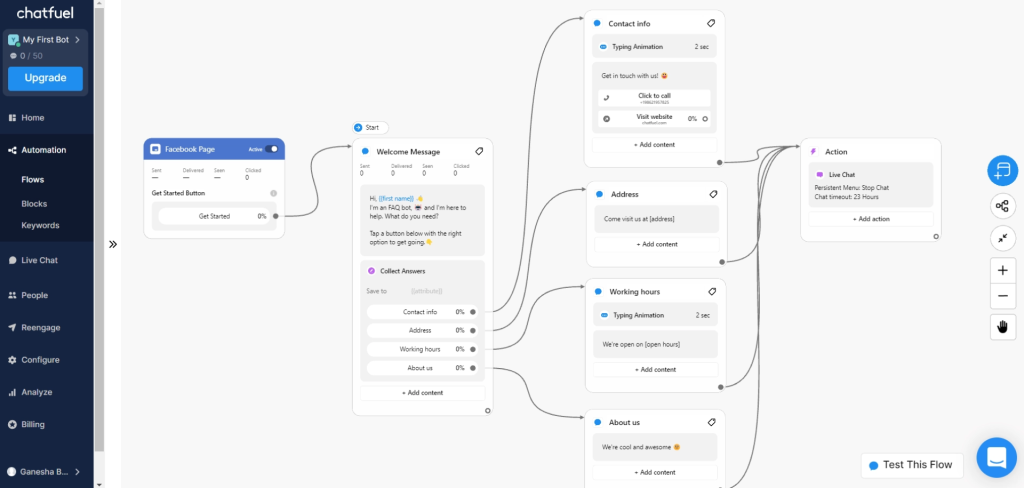
Comment-to-DM, story replies, and QR codes turn every social touchpoint into an opt-in, and GPT-powered replies sounded less scripted than the old template bots I had used. Ready-made e-commerce templates sped up my own launch considerably, and quick reply buttons walked shoppers through a short product quiz.
The Shopify integration handles cart recovery and order updates, while Stripe and PayPal support let people pay without ever leaving the thread. If most of your revenue starts on Meta apps and you want a similar builder, this is the lightest path from a comment to a confirmed order.
Pros:
- Drag-and-drop composer with ready-made e-commerce templates speeds up launch
- Instagram comment-to-DM automation turns giveaways into qualified leads
- Quick reply buttons guide shoppers through product quizzes and recommendations
- One-click Shopify integration handles cart recovery and order updates
- In-chat payments through Stripe and PayPal shorten the path to purchase
Cons:
- Best suited to Meta channels, so website chat use cases feel limited
- Support responsiveness varies between users
How Chatfuel Compares With ManyChat: ManyChat and Chatfuel share the same Meta-first, flow-based approach, so your Instagram and Messenger funnels will feel familiar here. Chatfuel leans harder into e-commerce, with Shopify and in-chat payments built into its flows.
User Rating: 4.4/5 (G2)
Price: Starts at $20/month.
3. Tidio: Best for Website Live Chat With Ticketing and AI
A friend who runs a small online store uses Tidio for website chat, and watching her setup showed me why it works for shops. The widget greets visitors and fields routine where-is-my-order questions, and the AI agent trains on website data and Shopify catalogs, so product answers stay accurate.
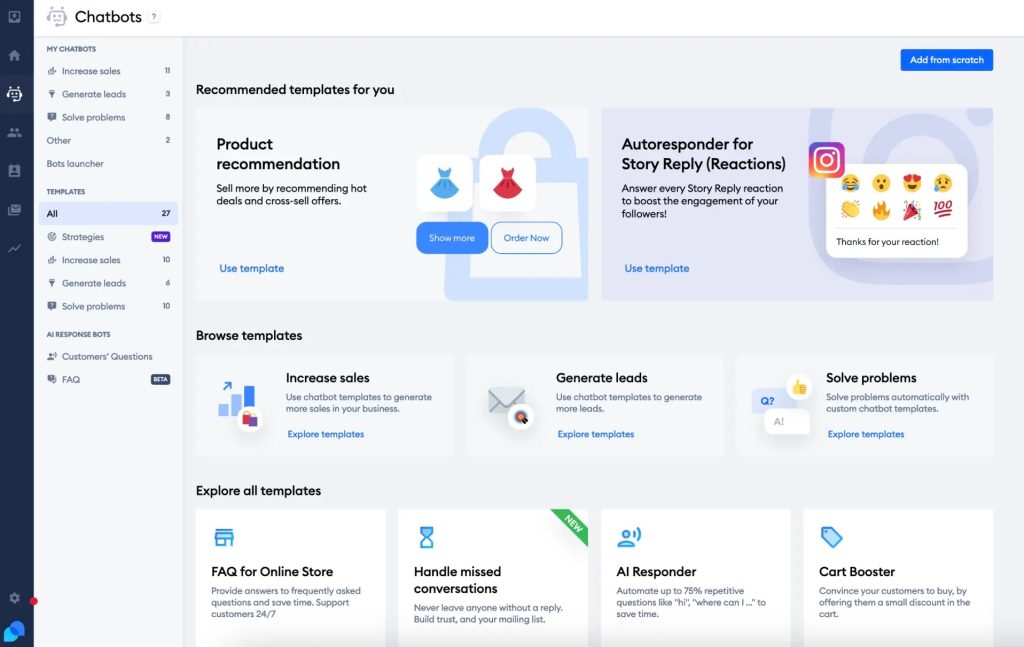
When an issue needs more attention, the chat converts into a ticket inside the same inbox, keeping live chats, emails, and Messenger threads together. She replies from her phone too, snoozes threads, and sets automated follow-ups without juggling several tools. I especially like the visitor typing preview, because it lets an agent prepare an answer before the message arrives.
Visual workflows build product quizzes and upsell pop-ups in minutes, and proactive messages fire based on time spent on a page or cart value. It is a tidy pick for small teams wanting support and light automation under one roof without learning code.
Pros:
- Unified inbox merges live chats, emails, and Messenger threads in one place
- AI agent trains on website data and handles order status questions automatically
- Chat-to-ticket conversion keeps longer issues organized and easy to track
- Visitor typing preview lets agents prepare answers before the message arrives
- Proactive messages trigger on time on the page or cart value
Cons:
- Automation setup can feel daunting for teams new to chatbots
- Support responsiveness has been inconsistent for some users
How Tidio Compares With ManyChat: ManyChat automates conversations on social apps. Tidio focuses on visitors already on your store, handling order questions, tickets, and proactive nudges from one inbox.
User Rating: 4.6/5 (G2)
Price: Free plan available. Paid starts at $24.17/month, billed annually.
4. respond.io: Best for Multi-Channel Team Inbox
Once a solo DM setup turns into a team job, a shared inbox matters more than a clever flow, and respond.io is built around that idea. When I tested it, every conversation from my connected channels landed in one app, so nobody had to hunt through separate Instagram, Messenger, and WhatsApp tabs.
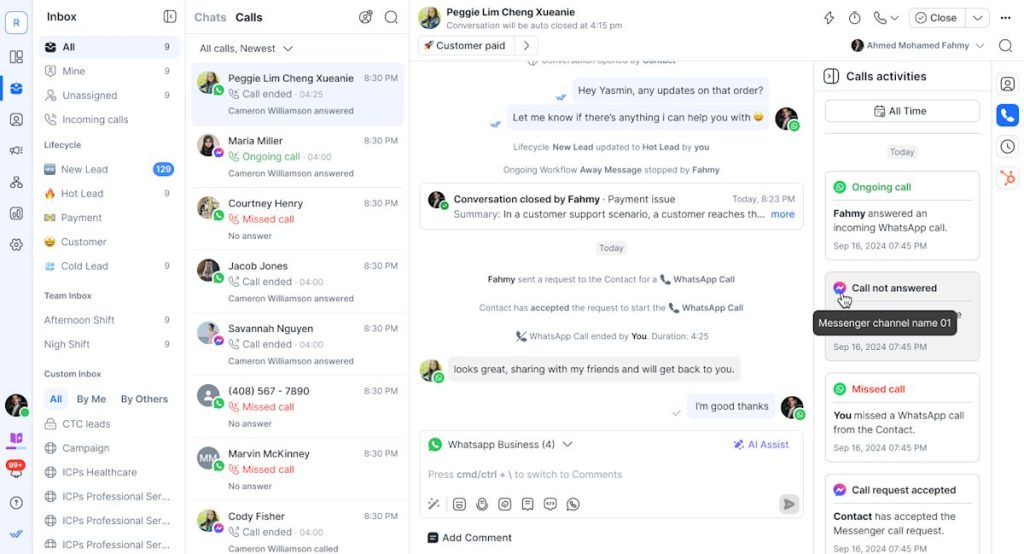
Segmentation and tagging kept contacts organized, which made follow-ups much easier to target. Instagram automation can reply to comments, DMs, Story mentions, and Story reactions, using either general replies or keyword-based messages. Bulk WhatsApp messaging suits promotions, announcements, and updates, and AI prompts help draft replies faster when message volume spikes.
I found the setup quick and genuinely intuitive, and the interface easy to read, even with several teammates assigned to conversations at once. If you are leaving ManyChat because one person can no longer keep up, this gives your whole team a shared view and clear ownership.
Pros:
- One inbox gathers conversations from all connected messaging channels
- Segmentation and tagging organize contacts for targeted follow-ups
- Instagram automation replies to comments, DMs, Story mentions, and Story reactions
- Bulk WhatsApp messaging supports promotions and updates
- AI prompts help agents draft replies faster
Cons:
- Website live chat is a smaller part of the product than messaging apps
- Offers more inbox and workflow depth than one marketer running a single automation needs
How respond.io Compares With ManyChat: ManyChat is built for one marketer designing flows. Respond.io is built for teams that assign, tag, and track conversations across channels.
User Rating: 4.8/5 (G2)
Price: Starts at $99/month.
5. Wati: Best for WhatsApp-First Sales and Support
Someone I know sells almost entirely over WhatsApp, so I pointed them toward Wati and followed along closely during their first afternoon of setup. It is a WhatsApp API solution, which means you connect your business number and manage chats from a simple web dashboard instead of the phone app.
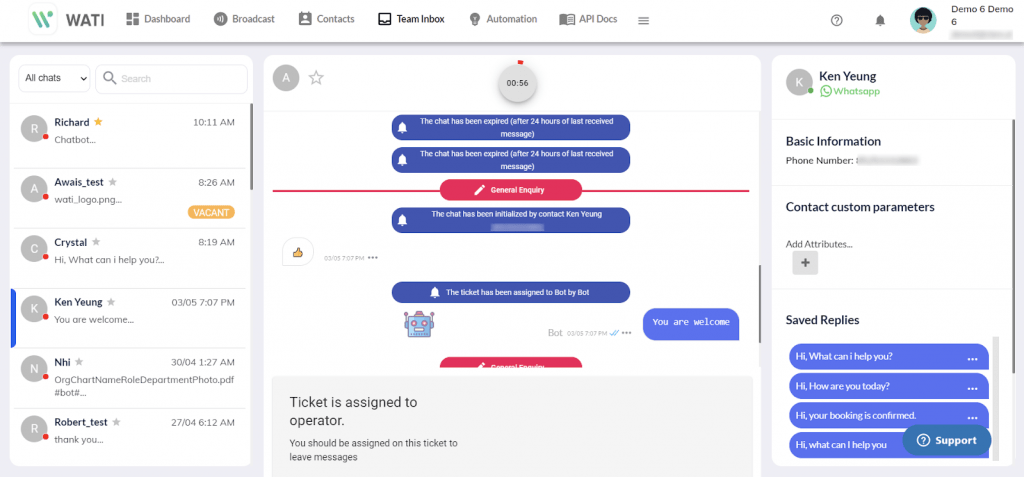
The guided setup steps kept onboarding short, even for a non-technical owner running everything alone. No-code chatbots answer routine customer questions, and broadcasts reach many contacts with promotions and updates in one go. Conversations stay neatly organized for teammates, so nobody has to ask a customer to repeat details after a handoff.
Because it focuses on just one channel, the interface feels uncluttered, and that focus shows in how quickly a team picks it up. It will not replace Instagram or Messenger automation, but for WhatsApp-led sales, follow-ups, and routine customer support, I honestly think it covers the job cleanly.
Pros:
- Connects your WhatsApp Business number through the WhatsApp API
- Guided setup steps make onboarding quick for non-technical owners
- No-code chatbots answer routine WhatsApp questions automatically
- Broadcasts send promotions and updates to many contacts at once
- Simple interface keeps chat management easy for teammates
Cons:
- Focused on WhatsApp, so Instagram and Messenger automation is not its strength
- Leans toward campaigns and broadcasts more than website chat
How Wati Compares With ManyChat: ManyChat treats WhatsApp as one channel among several. Wati is built around it, which suits businesses whose customers already message them there.
User Rating: 4.6/5 (G2)
Price: Starts at $49/month
6. Landbot: Best for No-Code Conversational Lead Capture
Want chat that behaves like an interactive page? When I built a lead-qualification flow in Landbot, it skipped the message stream and handled the whole thing that way. The no-code builder mixes chat with rich interface elements, so a visitor can tap through options and share details without typing long answers.
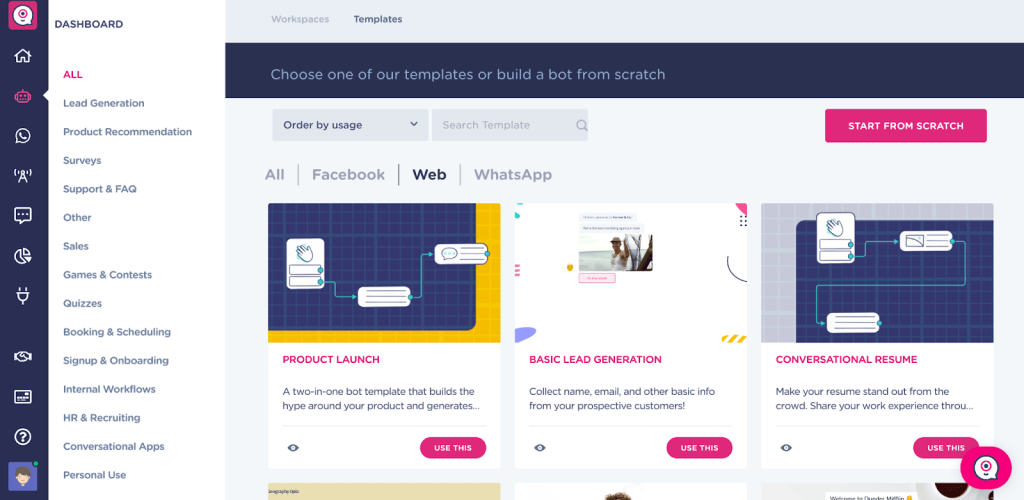
It works across websites, WhatsApp, and Facebook Messenger, which helps if you want the same lead-capture flow in several places. I used it to create an on-brand bot that asks a few qualification questions before a sales call.
Customization is where it feels especially flexible, since you control the look and wording of each step closely. The one trade-off I noticed is that it is a builder first and an agent inbox second, so I would pair it with a team chat tool when live support is a priority. For marketers who truly love designing funnels, it feels natural.
Pros:
- Visual no-code canvas lets marketers design conversations without developer help
- Works across websites, WhatsApp, and Facebook Messenger
- On-brand chatbots double as lead-generation tools
- Rich interface elements let visitors tap through options instead of typing
- Detailed control over the look and wording of each conversation step
Cons:
- Instagram is not among its main channels
- Built as a flow builder first, so team inbox features are lighter
How Landbot Compares With ManyChat: ManyChat builds DM funnels inside social apps. Landbot builds lead-capture conversations that live on your website, WhatsApp, and Messenger.
User Rating: 4.7/5 (G2)
Price: Starts at $36/month.
7. SendPulse: Best for Chatbots Plus Email Campaigns in One Platform
If your ManyChat flows usually end with an email or follow-up anyway, SendPulse is the natural home, as a colleague on a lean marketing team told me after she moved her flows over. Its chatbot module sits inside a wider marketing platform, so social bots, email campaigns, and automations live under one login.
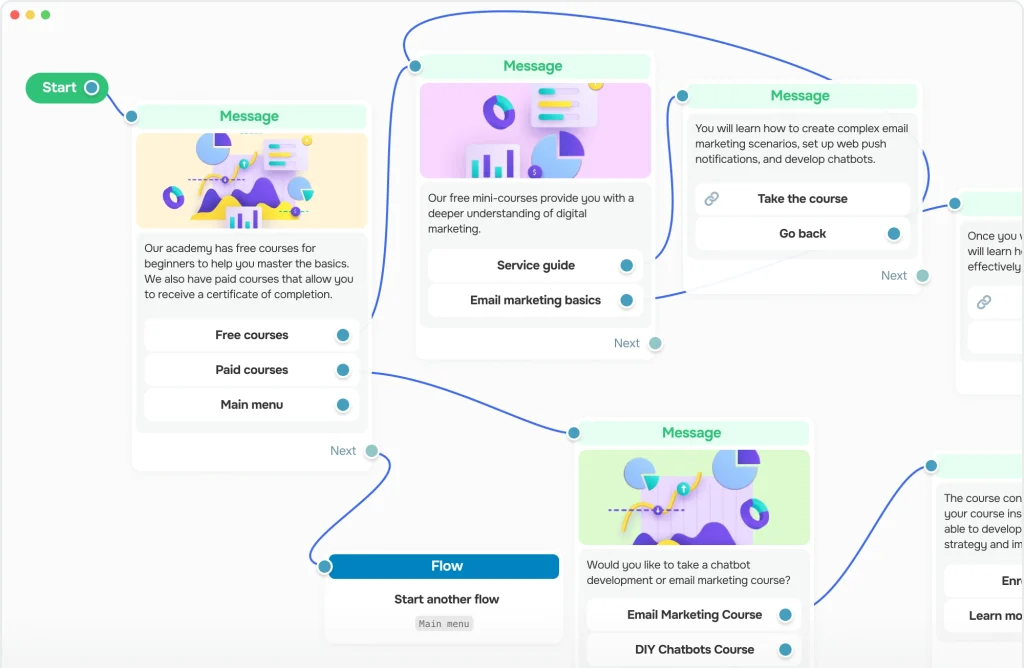
The visual flow builder covers Instagram chatbots and a WhatsApp chatbot, with AI-powered features to help create, test, and improve conversations. I like that bots can also accept payments inside the chat, which shortens the path from question to purchase.
You can manage chatbots from your phone too, handy when a big promotion goes live, and you are away from your desk. The email side adds an intuitive builder, list segmentation, and an email verifier, so contacts you collect in DMs can move straight into proper campaigns. For lean teams like hers, it keeps the stack small.
Pros:
- Chatbots, email campaigns, and automations live in one marketing platform
- Visual flow builder covers Instagram chatbots and a WhatsApp chatbot
- Bots can accept payments inside the chat
- Manage chatbots from your mobile device
- Email segmentation and verification turn DM contacts into email campaigns
Cons:
- Chatbots are one module in a wider suite, so there is more to learn than in a pure DM tool
- Support-desk features are not the main focus
How SendPulse Compares With ManyChat: ManyChat adds email as a step inside a flow. SendPulse treats email as a full campaign product that sits beside the bots.
User Rating: 4.6/5 (G2)
Price: Free plan available. Chatbot paid plans start at $9.60/month
8. Crisp: Best for Shared Inbox and Website Chat Across Channels
My shortlist for a clean widget and shared inbox almost always includes Crisp. When I tried the no-code chatbot builder, I could test a bot before flipping it live, then push it to the website widget, WhatsApp, Instagram, and Messenger in one go.
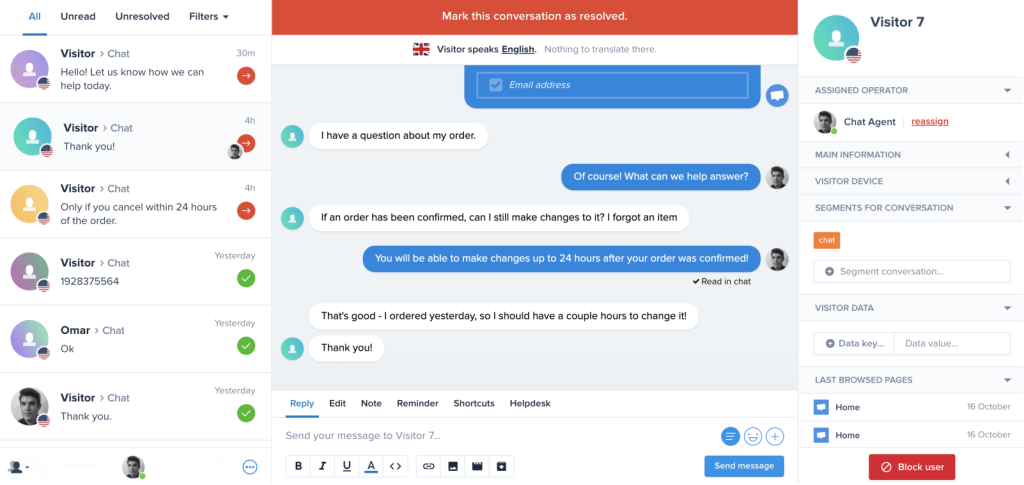
Beyond chat, the workspace bundles a knowledge base, mini-CRM, campaigns, and a status page, which replaces several small tools. Co-browsing helps agents see what a customer sees when a flow confuses them, and the Hugo AI agent handles first-line questions.
The interface is polished and quick to learn, so new teammates get comfortable with it fast. One thing I would flag is that the AI feels like a layer added to a strong live chat core, so I would judge it against your own real questions during a trial. If you want one tidy inbox, it delivers one workspace for every conversation that arrives from any channel.
Pros:
- No-code chatbot builder pushes one bot to the widget, WhatsApp, Instagram, and Messenger
- Test your bot before flipping it live
- Knowledge base, mini-CRM, campaigns, and status page sit in one workspace
- Co-browsing lets agents see what the customer sees
- Hugo AI agent handles first-line questions
Cons:
- The AI feels like a layer added to a live chat core
- Each brand needs its own workspace
How Crisp Compares With ManyChat: ManyChat is focused on marketing flows. Crisp is focused on a clean website widget and a shared inbox, with bots that reach your social channels too.
User Rating: 4.5/5 (G2)
Price: Free plan available. Paid starts at $45/workspace/month.
9. Intercom: Best for AI-First Support for Growing Teams
Support quality is where Intercom earns its place, well beyond DM funnels, according to a support lead I know who runs it daily. Fin, its AI agent, reads your help center, answers in natural language, and flips the thread to a human with full context once things get properly complicated. I really like the omnichannel inbox, which merges email, chat, and social DMs, so nobody switches tabs to find a customer.
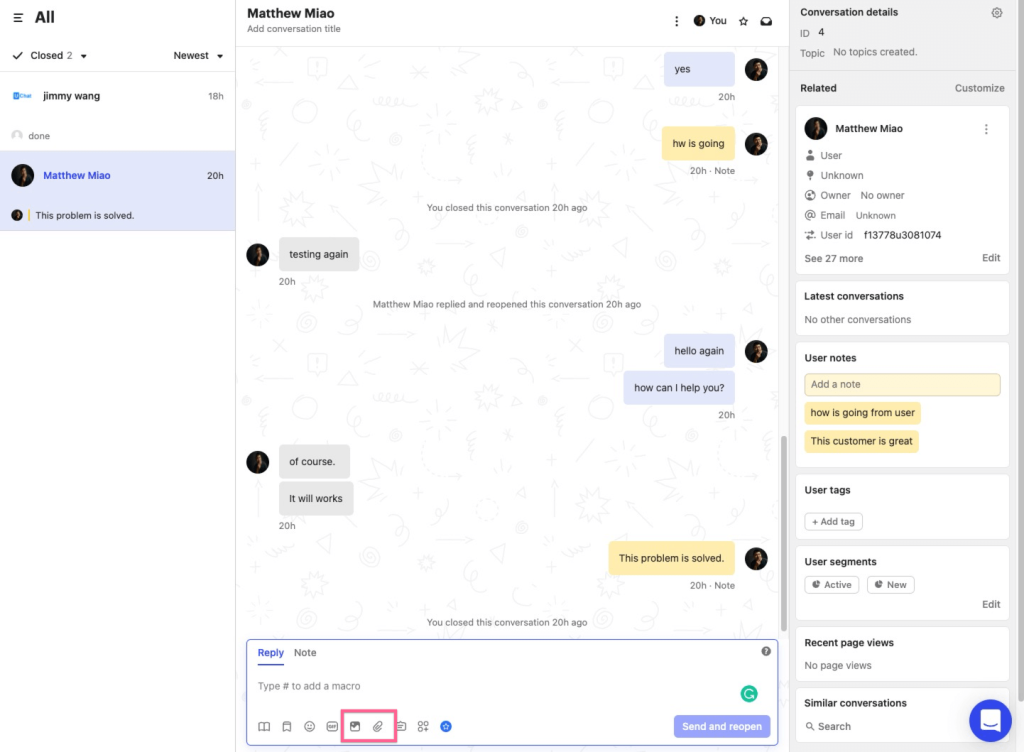
A drag-and-drop workflow builder routes, tags, and escalates conversations automatically, saving a lot of manual sorting. Beyond support, interactive product tours help new customers adopt features, and a mobile SDK sends targeted in-app messages and surveys.
That breadth means onboarding, support, and growth messaging can sit in one workspace. It feels like more platform than a one-person Instagram shop needs, but for a growing store or SaaS team wanting strong AI answers and clean handoffs, it deserves a trial.
Pros:
- Fin AI agent answers 24/7 and hands off with full conversation history
- Unified inbox combines chat, email, and social channels
- Workflow builder automates routing, tagging, and follow-ups
- Interactive product tours speed up feature adoption
- Mobile SDK pushes targeted in-app messages and surveys
Cons:
- Interface has a learning curve for teams new to workflow automation
- Some users report slower support during peak periods
How Intercom Compares With ManyChat: ManyChat is built for marketing flows. Intercom is built for support and product messaging, with AI answers at the center of the experience.
User Rating: 4.5/5 (G2)
Price: Starts at $29/seat/month.
10. Freshchat: Best for Freshworks Suite Users
Teams on Freshdesk, Freshsales, or Freshmarketer will find Freshchat clicks into place, and I saw that firsthand while helping a friend’s team set it up during a busy week. Everything shares context, so an agent sees customer details without opening another app or asking the customer to repeat anything.
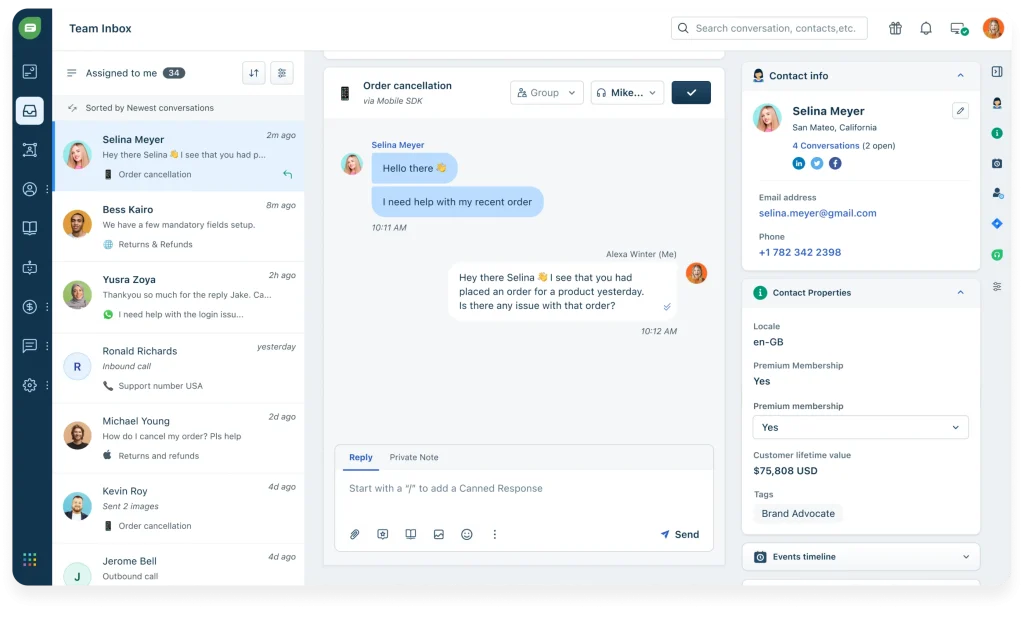
Its Freddy AI handles multiple languages well, detects sentiment, and nudges priority chats toward human reps instead of leaving them in a queue. The no-code flow builder also comes with pre-trained FAQ templates, so a bot can start answering common questions fast.
The omnichannel inbox covers web, mobile, WhatsApp, and Apple Business Chat, with rich visitor profiles and in-thread CSAT surveys. Trigger campaigns can fire based on a visitor’s journey and page behavior, which brings some of ManyChat’s proactive feel to your website. Marketing, support, and success teams all look at the same screen, which cuts handoff confusion and finger-pointing.
Pros:
- Connects natively with other Freshworks apps for CRM-level context
- Omnichannel inbox covers web, mobile, WhatsApp, and Apple Business Chat
- Freddy AI suggests replies and tags intent automatically
- No-code flow builder with pre-trained FAQ templates
- Trigger campaigns based on user journey and page behavior
Cons:
- Occasional lag reported when syncing across several Freshworks products
- Advanced bot flows can feel less intuitive than simpler tools
How Freshchat Compares With ManyChat: ManyChat sits on its own, outside any help desk. Freshchat plugs straight into Freshdesk, Freshsales, and Freshmarketer, so chats and customer records stay connected.
User Rating: 4.4/5 (G2)
Price: Starts at $19/agent/month.
How I Chose These ManyChat Alternatives
When I evaluate ManyChat alternatives for this list, I don’t just rely on feature lists or marketing claims. I look at how these tools actually perform in real-world scenarios. Here’s the framework I used to make sure every recommendation is practical, reliable, and worth considering:
- User Reviews / Ratings: I start by looking at real user feedback from platforms like G2. This gives me a clear picture of how small teams actually experience the tool day to day, what they love, and where it falls short.
- Core Features & Functionality: I focus on what truly matters in a ManyChat replacement. This includes channel coverage across Instagram, Messenger, WhatsApp, and website chat, AI trained on your own content, flow building, human handoff, integrations, and reporting. If a tool cannot handle these well, it does not make the cut.
- Ease of Use: I pay close attention to how intuitive the platform feels. A tool might be powerful, but if a small team struggles to build and edit flows, it defeats the purpose. Clean interface, simple navigation, and quick onboarding are non-negotiable for me.
- Customer Support: From my experience, setup is where many tools fail. I evaluate how responsive and helpful the support team is, especially during setup and ongoing use. Fast, reliable support makes a big difference in adoption.
- Value for Money: I compare pricing with what the tool actually delivers. This is not about picking the cheapest option, but about whether the billing model, features, and flexibility justify the cost as your contact count grows.
- Personal Experience / Expert Insights: Wherever possible, I rely on my own hands-on experience with these tools. I also consider insights from marketing leads, e-commerce owners, and support managers who run chat automation in real environments. This helps me go beyond surface-level reviews and highlight what actually works.
How to Migrate Off ManyChat Without Losing Leads
Moving off ManyChat is mostly a rebuild, so plan it like a small project. Most of the competitors of ManyChat cannot import your contact list or your flows, which means the order of your steps matters.
- Export first: Save whatever ManyChat lets you export, such as contacts, tags and custom fields, and store it in your CRM or email tool before you touch anything else.
- Map your flows: List every live automation with its trigger keyword and its outcome, such as lead, order, or FAQ answer. There is no shared export format between platforms, so every flow gets rebuilt by hand.
- Rebuild three: Recreate the three flows that drive the most revenue first. Leave low-traffic flows for later.
- Reconnect channels: Link Instagram, Messenger, and WhatsApp through the new tool’s official Meta connections, and ask the vendor to confirm API compliance.
- Run in parallel: Keep ManyChat live for one full campaign cycle while the new tool handles a small share of traffic. Compare lead capture and reply quality side by side.
- Test handoff: Ask the new bot something it cannot answer and check that a human receives the full chat history.
- Rebuild your list: Instagram’s API does not allow importing contact lists into a DM tool, so your list rebuilds as people engage. Point comment triggers and link-in-bio buttons to the new flows.
- Cancel last: Cancel ManyChat only after the new flows have handled real traffic, and check your billing date so you are not charged twice.
FREE. All Features. FOREVER!
Try our Forever FREE account with all premium features!
Top 3 ManyChat Alternatives
After comparing all ten of the alternatives to ManyChat above, three consistently came out on top, each for a different reason. The right one depends on what ManyChat has been failing to do for you.
1. ProProfs Chat
ProProfs Chat is my top overall pick. It is the easiest live chat and AI customer service agent for instant, automated support. It trains on your website, help center, or files, answers with the source cited, and hands off to a human with full chat context. Facebook, WhatsApp, and Instagram messages sit in the same dashboard as website chat.
2. respond.io
respond.io is the right choice if your biggest problem is a team drowning in DMs. One inbox for every channel, tagging, segmentation, and Instagram comment and Story automation make shared ownership simple.
3. Chatfuel
Chatfuel is the closest direct switch if Instagram and Messenger funnels drive your revenue. The builder feels familiar, and its Shopify and in-chat payment features suit e-commerce owners.
Pick the Tool That Does Your Job, Not Just the One With the Lowest Price
Leaving ManyChat works best when you start from your job, not a feature list. If you need Instagram comment-to-DM, Chatfuel is the closest swap. If you need website chat, AI answers from your own content, and a clean human handoff alongside Facebook, WhatsApp, and Instagram messages, ProProfs Chat is where I would start.
Before you switch, I would count your active contacts in your busiest month, list your top three flows, rebuild those first, and test the human handoff by asking the bot something it cannot answer. Then train ProProfs Chat on your website URL this week and watch how it handles your real customer questions.
Frequently Asked Questions
Which ManyChat alternatives have a free plan?
ProProfs Chat, Tidio, SendPulse, and Crisp all offer free plans. Limits differ on operators, conversations, and AI usage, so check the caps before you build anything.
Are WhatsApp message fees separate from the software price?
Usually yes. WhatsApp charges follow Meta's rate card, and some vendors add a markup. Ask for the per-message rate for your country and message type before you commit.
Is it safe to connect Instagram and Facebook to a third-party tool?
Choose tools that connect through Meta's official APIs, and ask the vendor to confirm API compliance before you link any account.
Do I need a developer to switch?
Flows on these tools are built in no-code or visual builders. A website widget typically needs a one-time code snippet or plugin install. ProProfs Chat installs by copy-paste code with no HTML or CSS.
Which alternative works for agencies managing client sites?
ProProfs Chat offers white-labeling, which removes the "Powered by ProProfs" label, along with 70+ languages and WordPress, Wix, and Shopify integrations. Confirm your multi-client needs with the vendor.
How do I test whether a bot's human handoff really works?
Ask it a question it clearly cannot answer. Then check whether the agent receives the full chat history so the customer never repeats themselves.
FREE. All Features. FOREVER!
Try our Forever FREE account with all premium features!

 We'd love your feedback!
What did you like & how can we make it even better?

 Thanks for your feedback!
 Ask Your Question
Have a question? Get expert help to make your decision easier.