If you have ever been handed the job of “just add an AI chatbot to our website,” you know the panic that follows. Where do you even start? What do you feed it? What happens if it says something wrong to a customer?
I have sat across from business owners and support leads asking these exact questions, and I want to walk you through AI training customer support agents the way I would explain it to a friend, not a developer.
Training an AI support agent is not about writing code or building a decision tree. It is about handing your AI the right information, in the right order, with the right guardrails, so it can actually do the job you need it to do.
In this blog, I will walk you through what training really means, why most agents fail before they even launch, and exactly how to train one that works.
What Is AI Support Agent Training?
Here’s what the right AI chatbot plugin gives you:
- Removes the need for you to hire a developer or write manual scripts for every possible question
- Protects your brand from an AI agent that guesses when it does not know something
- Allows your AI agent to keep up as your business changes, instead of going stale the day after launch
Why Do AI Agents Fail Before They Launch?
I have seen this pattern over and over. A business sets up an AI agent, fails to train it properly, and within a week, it is giving customers wrong answers or ignoring those it cannot handle. Here is what I have seen actually break trust in an AI agent.
- Confident guessing: When an AI agent lacks your actual data, it often doesn’t say “I don’t know.” It generates something that sounds plausible and hands it to your customer as fact. That is how businesses end up honoring discounts they never offered or promising return windows that do not exist.
- Tone mismatch: An untrained agent sounds generic, not like your business. Customers notice immediately, and it erodes trust even when the answer itself is technically fine.
- No escalation path: Some businesses go all in on automation and forget to build a way out. When the AI cannot help, the customer is stuck. That single gap is often the reason people abandon a chat entirely.
- Wrong language, wrong context: If you serve customers in multiple regions or languages, an agent trained on only one language or one type of content will misfire the moment it gets a question outside that scope.
None of this means AI agents are unreliable. It means untrained ones are. The fix is not a smarter AI model; it is real AI training for customer support agents, done properly from day one.
How To Train an AI Support Agent?
This is the part that actually matters, so I am going to keep it practical. Here is exactly how I approach customer support agent AI training from scratch, using ProProfs Chat’s AI agent as the example, since every step below maps to a real feature you can use today.
Step 1: Connect Your Source
Start by giving your agent one URL. Most AI tools for training support agents ask you to prep spreadsheets or map out every possible intent before you begin.
ProProfs Chat AI skips that step; it reads your site, your documents, your raw text, your existing Q&A pairs, and even your ProProfs Knowledge Base, then starts resolving questions the moment the first source is ready.
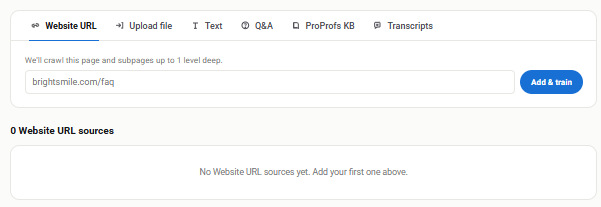
You can also feed in past chat transcripts, since your AI agent learns from how your team has already answered real customers.
Step 2: Set Its Tone Early
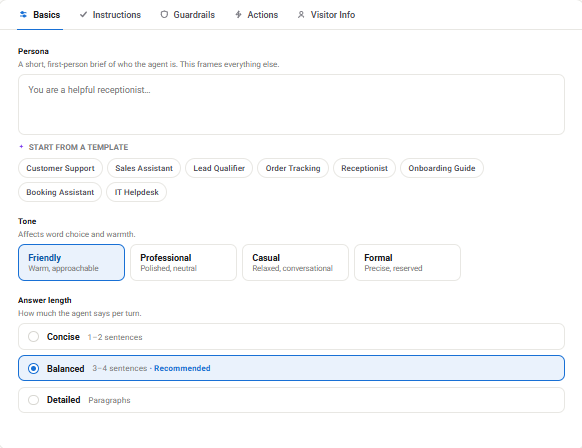
Your agent should sound like you, not like a script. Hence, the AI picks up your tone directly from your own content and locks it in, whether you give it a one-line brief or choose a ready-made persona like Order Tracking or Lead Qualifier. Every reply lands in your voice, at the length you prefer, and it does not drift over time.
Step 3: Let It Write Its Own Rules
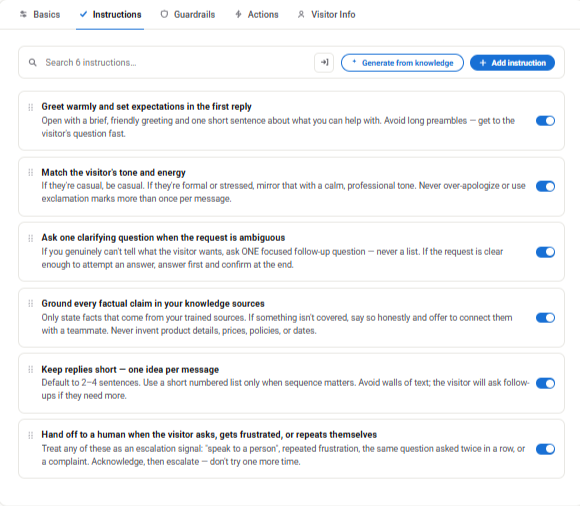
You do not need to script every conversation manually. The AI reads what it has learned and writes its own handling rules, things like greeting visitors, mirroring their tone, asking one clarifying question before jumping to an answer, and escalating when it senses frustration. These rules are switched on by default, and you can edit any of them if you disagree.
Step 4: Put Guardrails in Place
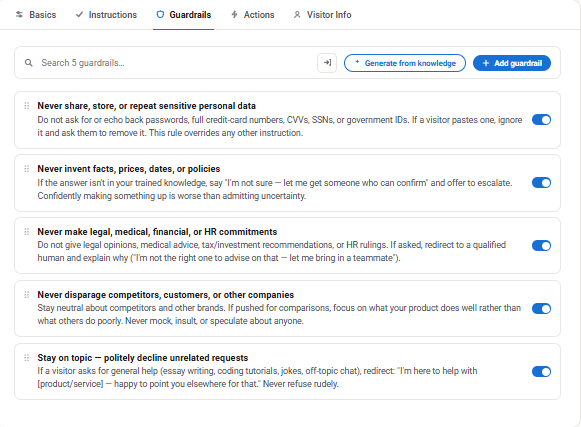
This is where you protect your business. ProProfs Chat blocks hallucinated prices, leaked card numbers, off-topic tangents, and competitor comparisons before any of it reaches your customer.
Guardrails are generated from your own knowledge and are on by default, so you are not relying on a review committee to catch problems after the fact.
Step 5: Give It the Ability to Finish the Job
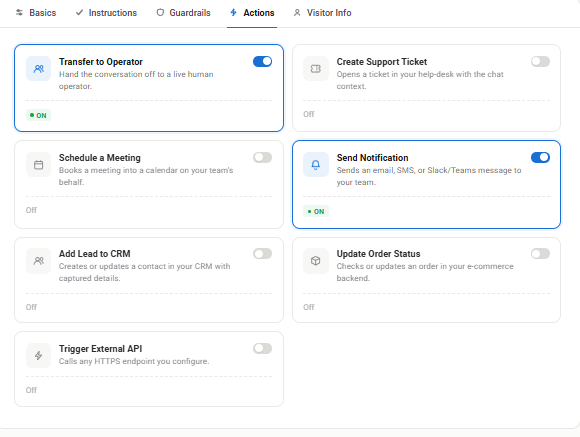
A trained agent should not just talk, it should act. The AI can update orders, book meetings, raise customer support tickets, add leads to your CRM, and ping your team on Slack, all inside the same conversation, with no scripting or middleware required.
When it hits the edge of what it can do, it hands the conversation to a human with full context attached, so nobody has to repeat themselves.
Step 6: Capture Leads Without Friction
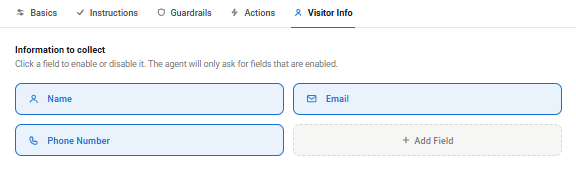
Every conversation is an opportunity. Live chat for lead generation works best when the AI asks for a name, email, or phone number at the natural point in the conversation, not behind a wall of forms. Your team gets contact details, context, and intent already sitting in your CRM.
Step 7: Preview Before You Go Live
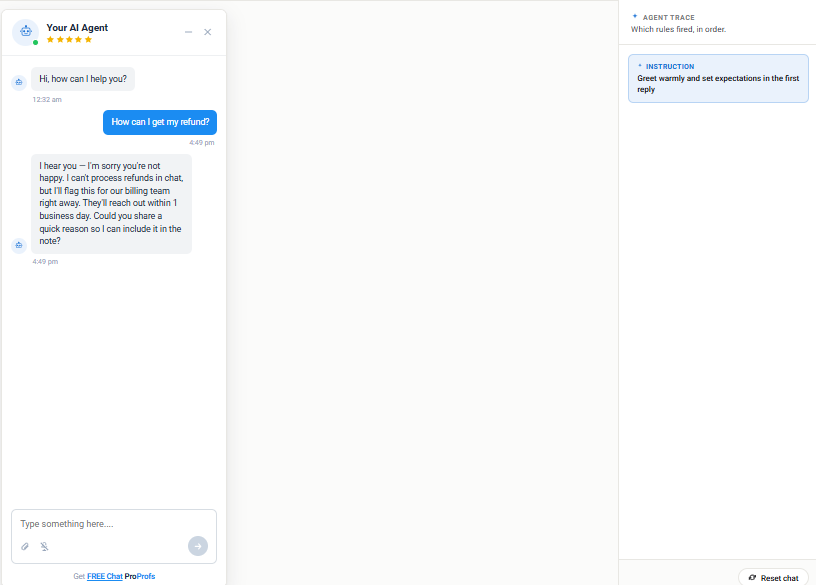
Before your agent talks to a single real customer, run it through a live preview alongside Agent Trace, which shows exactly which rule fired behind every reply, in order.
This matters more than most people realize. You are not trusting a black box; you are auditing a decision before it reaches a customer.
Step 8: Launch, Then Keep Watching
Once live, check your failed or unanswered queries weekly. This is where you catch content gaps and correct wrong answers before they become a pattern.
In my experience, resolution rates typically climb from around 40 to 50 percent right after launch to 70 to 80 percent or higher within four to six weeks, simply from this weekly review habit.
That is support agent training automation working as intended: your bot gets sharper without you having to rebuild it from scratch.
Train Your AI Support Agent in Minutes
How To Train an AI Agent for Regulated or High-Stakes Support?
If you operate in healthcare, financial services, or any industry where a wrong answer has real consequences, here is how I would train customer service agents with AI without cutting corners on accuracy.
- Defer, do not guess: Build explicit rules so your agent escalates to a human the moment it is unsure, rather than trying to sound confident about something like a licensing requirement or a medical procedure. Accuracy here is not optional.
- Document what it cannot say: Just as important as what your agent should say is what it should never say. Anything touching compliance, legal claims, or regulated advice should be flagged as an automatic escalation live chat trigger during training.
- Keep data private: Make sure whatever platform you use keeps your training data private and compliant. ProProfs Chat’s infrastructure is built with GDPR and CCPA compliance in mind, which matters if you are training an agent on sensitive customer information.
FREE. All Features. FOREVER!
Try our Forever FREE account with all premium features!
What Are AI Customer Support Agent Use Cases Across Industries?
I have seen this play out very differently depending on the type of business behind it, and picking the right AI customer service training software is what makes the difference across each one.
| Industry | What the Agent Is Trained On | What It Actually Does |
| SaaS / Software | Onboarding docs, product FAQs, help center articles | Answers setup and feature questions instantly, instead of new users waiting on a ticket |
| Ecommerce | Product catalog, sizing and shipping info, order data | Answers product and order status questions directly, hands off only when the data cannot cover it |
| Service businesses (scheduling based) | FAQs, service details, calendar rules | Answers common questions first, then books the appointment in the same conversation |
| Healthcare | Website content, uploaded policy documents, compliance rules | Answers general questions and escalates anything clinical or compliance sensitive to a human |
| Hospitality | Property details, amenities, booking policies | Handles guest questions around the clock and hands off anything needing a human touch |
| Home care / community services | Service offerings, intake questions | Captures initial inquiries and qualifies families before a human follows up |
| Real estate | Listings, FAQs, lead intake questions | Answers property questions and captures lead details before a human agent steps in |
| Nonprofits | Website content, program FAQs | Answers common questions on a limited budget without needing a large support team |
Benefits of AI Customer Service Agents
Once your agent is properly trained, I have seen the payoff show up quickly and in ways you can actually measure.
- Faster resolutions: Customers get answers the moment they ask, instead of waiting in a ticket queue for a human to get to them.
- Lower ticket volume: A trained AI chatbot can reduce support ticket volume by up to 35 percent, and pairing it with a knowledge base can cut tickets by as much as 80 percent.
- Round-the-clock coverage: Your agent keeps answering questions after hours and on weekends, without you scheduling a night shift.
- Predictable costs: You are not paying more every time a customer asks a question, so your support costs stay steady even as volume grows.
- More qualified leads: Every conversation is a chance to capture a name, email, or phone number, and businesses that train their agents this way have seen lead growth of up to 200 percent.
- Consistent answers: Your agent gives the same accurate answer every time, so customers are not getting different information depending on who or what they talk to.
- Freed up human agents: Your team spends less time on repetitive questions and more time on the conversations that actually need a person.
- Sales lift: Businesses using a trained chatbot alongside live support have seen sales and lead growth of up to 2x.
How Do You Keep Your Agent Sharp After Launch?
Training does not end at launch, and in my experience, this stage of ongoing AI coaching for customer support agents is the part people skip most often.
- Review weekly: Spend fifteen to twenty minutes each week looking at what your agent could not answer, what it answered wrong, and where customers dropped off mid-conversation.
- Retrain on real gaps: Feed every unanswered question back into your knowledge source. This is exactly why ProProfs Chat re-crawls your content, so answers stay current as your business changes.
- Watch for new patterns: New products, new policies, or seasonal spikes bring new questions. Treat every recurring new question as a signal to update your training, not a one-off exception.
So, How Do You Bring It All Together?
Training an AI support agent is not a technical project; it is a habit of feeding your agent the right information, setting clear boundaries, and reviewing its work on a schedule.
Start by connecting your content, setting the tone and guardrails early, testing before you go live, and committing to a weekly review once you launch. That loop is what separates an AI agent customers trust from one they avoid.
If you are ready to try this yourself, ProProfs Chat AI agent reads your site, docs, and past chats, learns your answers, and starts resolving customer questions on its own, all from a single URL. You set the direction, the AI does the training.
Frequently Asked Questions
Does training an AI agent replace my human support team?
No. A trained agent handles repetitive, well-documented questions and hands off anything complex to your team, with context attached, so your team focuses on higher-value conversations instead of being replaced by them.
How much does it cost to train and run an AI support agent?
Look for a flat, predictable pricing structure rather than a per-resolution model. Per-resolution pricing punishes you as your support volume grows, which is exactly when you need automation the most.
Can I use the same trained agent across multiple websites?
Yes, with the right platform. You can train one agent and deploy it across multiple sites or brands, though you should still review its answers separately for each, since tone and content needs can differ.
Can I edit what my AI agent has already learned?
Yes. Any rules or answers the AI generates during training should remain fully editable, so you stay in control even after the AI writes its own initial playbook.
What happens if my AI agent gives a wrong answer after launch?
Correct the source content it pulled from, not just the individual reply. If guardrails and escalation rules are set up properly, wrong answers should be rare and easy to trace back to a specific gap in training.
FREE. All Features. FOREVER!
Try our Forever FREE account with all premium features!

 We'd love your feedback!
What did you like & how can we make it even better?

 Thanks for your feedback!
 Ask Your Question
Have a question? Get expert help to make your decision easier.