I tested a long list of Zoho SalesIQ alternatives this year because the same complaints kept surfacing in user reviews. Zobot flows that break after an update. A codeless builder that crawls. Reports that show today, but not the trend. Integrations that feel smooth inside Zoho and clunky everywhere else.
If you run support or operations for a small team, those gaps cost real hours. Agents juggle phones and chat, routine questions pile up, and escalations lose context on the way to a human.
So I compared features line by line, read G2 and Capterra reviews, and ran each tool against real support scenarios. This guide covers why teams switch, how to migrate, the ten best tools to shortlist, how to test one properly, and how to build hybrid bots.
Why Are Support Teams Switching From Zoho SalesIQ?
Zoho SalesIQ does a lot right, especially visitor tracking and lead scoring for Zoho CRM users. But the same friction points keep showing up in Zoho’s own community forum and on review sites, which is why so many teams start comparing Zoho SalesIQ to competitors. Here is what to check for in any replacement.
- Fragile bot flows: Users report Zobots skipping steps, asking for fields that were never in the flow, and failing to save chats as CRM leads. In any replacement, preview every branch in a test widget before going live.
- Slow bot builder: Some users say the codeless builder loads so slowly that the browser flags the page as crashed. During a trial, time how long it takes to edit one existing flow?
- Duplicate content work: Teams convert blog posts into articles before Answerbot can use them, then maintain both. Shortlist only tools that train directly on your website URL, help center, and PDFs.
- Clunky outside integrations: Zoho CRM sync works well, but GA4 tracking, Shopify order status, and non-Zoho ticketing often need workarounds or custom Plugs. List every system chat must talk to before you book a single demo.
- Thin reporting: Reviewers call reporting hard to manipulate and want trends over time, not just daily snapshots. Ask each vendor to show you a 90-day report on response time and missed chats.
- Rigid widget branding: Limited chat window customization and logo problems come up in reviews and forum threads. Check that you can apply your own logo, colors, and fonts on day one.
- Hard-to-reach help: Reviewers mention unclear answers from support and service that needs improvement. Send one real setup question during your trial and time the reply.
10 Best Zoho SalesIQ Alternatives for Support Teams
I put this list together using verified G2 ratings, product documentation, and patterns from Zoho SalesIQ community threads and reviews. Every one of these Zoho SalesIQ competitors fixes at least one of the problems above in a meaningful way.
If you only have time for a quick look, the table below compares these alternatives to Zoho SalesIQ at a glance.
| Tool | Best For | User Rating | Starting Price |
| ProProfs Chat | Easiest Live Chat & AI Customer Service Agent for Instant, Automated Support | 4.5/5 (G2) | Forever free for 1 operator; paid starts at $19.99/operator/month |
| Tidio | E-commerce Stores That Need AI Order Support | 4.6/5 (G2) | $24.17/month |
| Intercom | SaaS Teams Wanting a Mature AI Agent | 4.5/5 (G2) | $19/seat/month |
| LiveChat | Agent-Led Chat for Busy Sales & Support Teams | 4.5/5 (G2) | $19/agent/month |
| Freshchat | Teams Already Using the Freshworks Suite | 4.4/5 (G2) | $19/agent/month |
| Zendesk | Teams Outgrowing Zoho Desk Ticketing | 4.3/5 (G2) | $19/agent/month |
| Crisp | Lean Teams Wanting Workspace-Based Pricing | 4.5/5 (G2) | Free plan; paid starts at $45/month |
| LiveAgent | Handling Calls, Chat & Tickets in One Inbox | 4.5/5 (G2) | $15/agent/month |
| Tawk.to | Free Live Chat for Budget-Conscious Small Businesses | 4.5/5 (G2) | Free |
| HubSpot Service Hub | Replacing Zoho CRM & Chat Together | 4.4/5 (G2) | Free tools; paid starts at 7–20/month per seat |
1. ProProfs Chat: Best for Easiest Live Chat & AI Customer Service Agent for Instant, Automated Support
I rank ProProfs Chat first among Zoho SalesIQ alternatives because it fixes the two gaps teams complain about most: bots that take too long to build and handoffs that lose context. Setup takes minutes.
You enter your website URL, and ProProfs AI builds an AI Customer Support Agent that trains on your site, help center, or uploaded files, then answers questions with the source cited alongside each reply. No article conversion needed. The AI agent also updates orders and schedules meetings inside the chat window.
When a question needs a person, the bot hands the chat to a live operator with the full conversation attached, while ProProfs Help Desk automatically creates a ticket for follow-up. It also integrates with ProProfs Knowledge Base, giving the AI agent a reliable source for self-service answers.
Intelligent routing sends each chat to the least-busy operator or the right department, while native integrations with Zoho CRM, Salesforce, and Microsoft Dynamics 365 mean you can switch chat tools without rebuilding the rest of your stack.
Pros:
- Proactive triggers launch on exit intent or high cart value, catching hesitant buyers instantly
- Sentiment analysis flags frustrated customers early, so agents step in before a chat goes sideways
- Supports 70+ languages, with language customization based on visitor location
- WhatsApp, Facebook, and Instagram messages sit in one dashboard alongside website chat
- White-label option and 100+ chat window settings, including your own logo, colors, and fonts
Cons:
- Cloud-only, so there is no offline access
- No dark theme
How ProProfs Chat Compares With Zoho SalesIQ: Zoho SalesIQ asks you to build Zobot flows and turn content into articles before Answerbot can use it. ProProfs Chat trains on your website, help center, or PDFs directly and hands off to a human with full context, which makes it the most complete of the alternatives to Zoho SalesIQ on this list.
User Rating: 4.5/5 (G2)
Price: Forever free for a single operator. Paid starts at $19.99/operator/month
United Performance Metals used ProProfs Chat to connect with prospects in real time and handle multiple inquiries without keeping buyers waiting. By answering questions instantly during the buying journey, the team increased online orders and saw a significant improvement in online sales.

2. Tidio: Best for E-commerce Stores That Need AI Order Support
I tried Tidio by pointing its Lyro AI agent at the website and FAQ content, and routine where-is-my-order questions got answered without anyone stepping in. The Shopify connection was the part I liked most, because order details show up inside the chat window, and I never had to switch tabs to look things up.
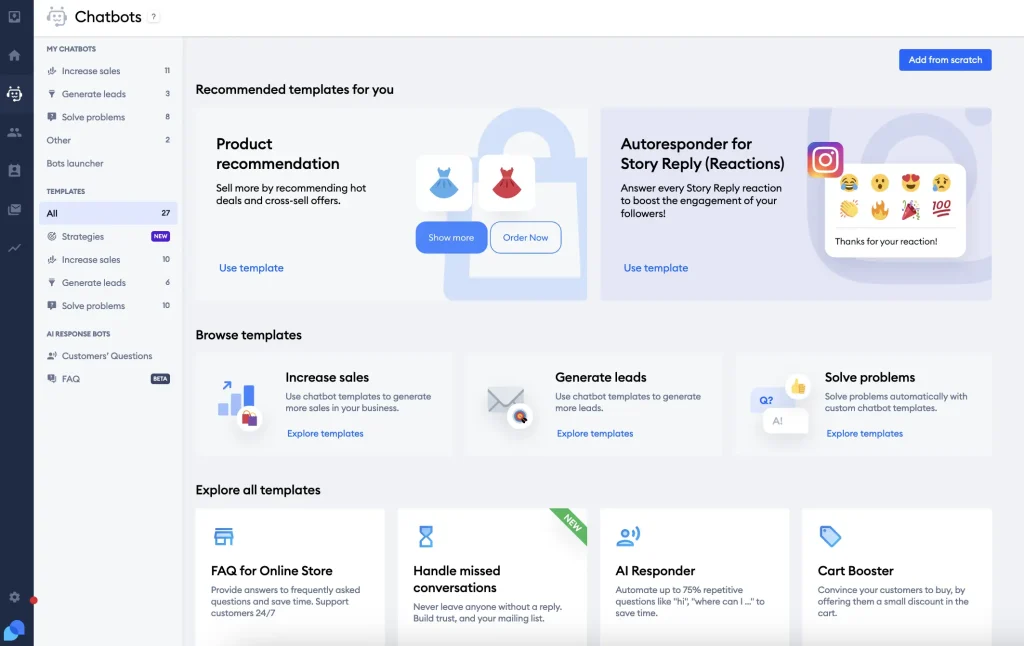
Flows, the no-code automation builder, let me set up abandoned cart nudges and product recommendation messages quickly. The setup felt approachable, though I spent time understanding how the different automation flows connect to each other at first.
Chats, emails, Messenger, Instagram, and WhatsApp land in one inbox, and longer issues turn into tickets on the same dashboard. For online stores, Tidio is one of the more practical Zoho SalesIQ alternatives, since it feels built around retail from day one. Just know that B2B service teams may never touch half of their e-commerce features, so check the fit first.
Pros:
- Visitor typing preview lets agents prepare answers before the message arrives
- Live visitor list shows which page each shopper is browsing right now
- Lyro replies in multiple languages, useful for cross-border stores
- Mobile apps let agents reply and snooze threads on the go
- Canned responses speed up the answers your team types most often
Cons:
- Automation setup can feel daunting for teams without chatbot experience
- Customer support responsiveness has been inconsistent, according to some reviewers
How Tidio Compares With Zoho SalesIQ: Zoho SalesIQ needs a custom Plug to handle Shopify order status. Tidio shows order details natively inside the chat, which saves e-commerce teams a lot of build work.
User Rating: 4.6/5 (G2)
Price: Starts at $24.17/month
3. Intercom: Best for SaaS Teams Wanting a Mature AI Agent
Intercom’s Fin AI agent was the first thing I tested here. It reads your help center, then answers in natural language. When a question got complicated, the thread passed to a human with the full conversation attached, so nobody had to repeat themselves.
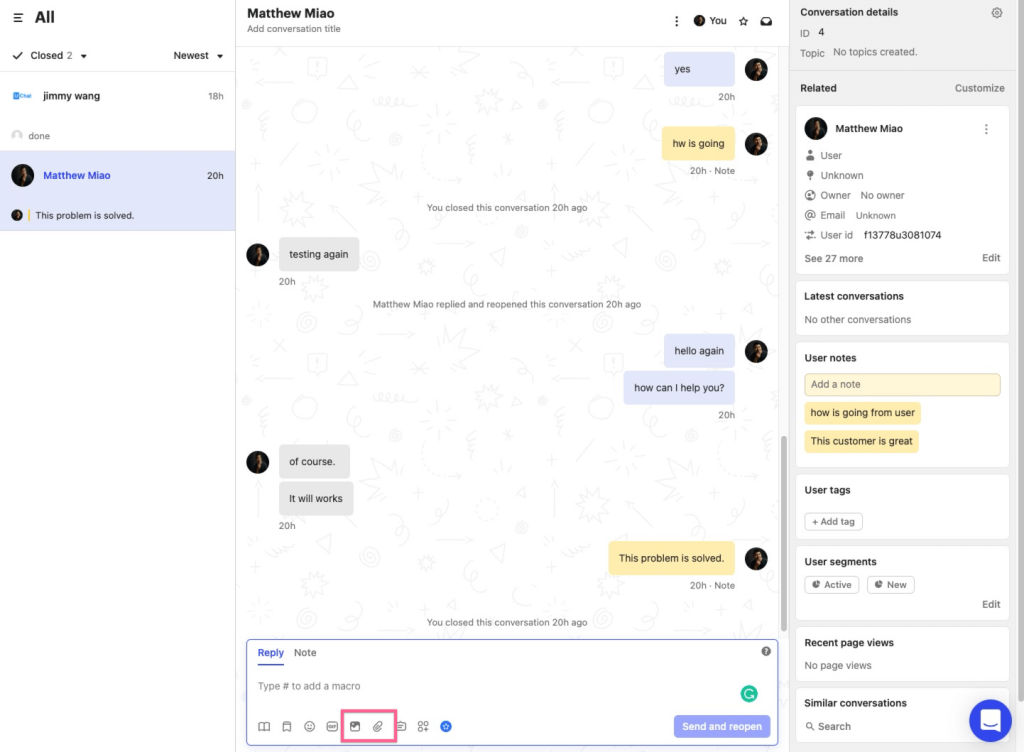
The interface took me a little while to learn, but once I understood the building blocks, the routing rules were easy to test safely before launch. I liked that a single inbox pulls in chat, email, and social messages, while the visual workflow builder routes, tags, and escalates conversations on its own.
Product tours and in-app messages live in the same platform, so onboarding and support share one customer view. Among the competitors, Intercom has one of the most mature AI agents I tested. The tradeoff is cost control, because AI resolution fees sit on top of seat pricing, so model your volume before committing.
Pros:
- Mobile SDK pushes targeted in-app messages and surveys to app users
- Built-in help center publishes articles that Fin uses as its answer source
- SLA rules and assignment workflows keep response times on track
- Fin handles conversations in many languages
- Reporting shows AI resolution rates alongside human agent performance
Cons:
- Interface has a learning curve for teams new to workflow automation
- Some users report a dip in support responsiveness during peak periods
How Intercom Compares With Zoho SalesIQ: Zoho SalesIQ leans on Zia and Zobot for automation. Intercom’s Fin resolves more conversations on its own using your help center, which suits SaaS teams that want AI to carry the first line of support.
User Rating: 4.5/5 (G2)
Price: Starts at $19/seat/month
4. LiveChat: Best for Agent-Led Chat for Busy Sales and Support Teams
Speed of reply is where LiveChat earned its reputation in my testing. The agent app feels built for people who chat all day, with canned responses, tags, chat transfers, and a clear queue view that keeps busy shifts under control. The setup was quick, and the widget looked polished with my own branding applied.
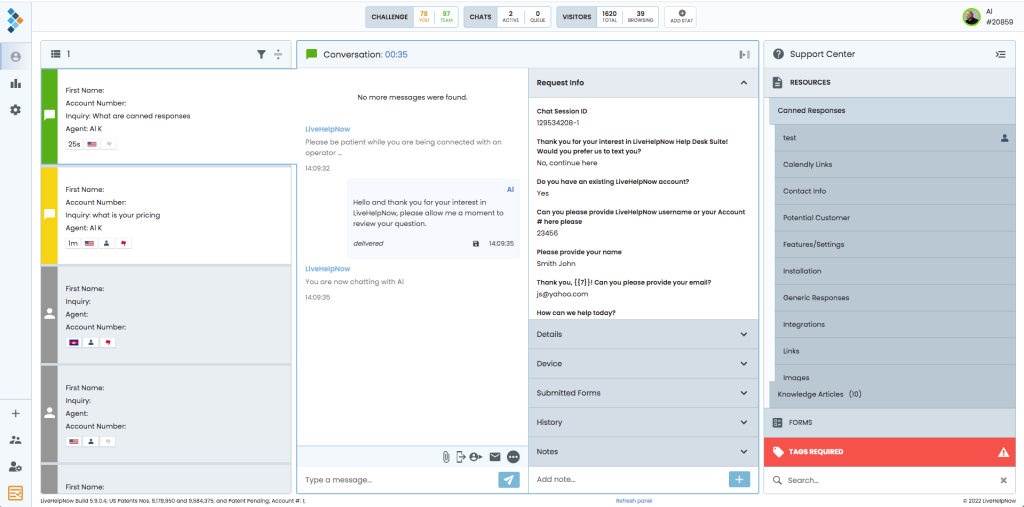
I also liked the e-commerce integrations. Connected to Shopify or BigCommerce, agents can see cart contents during a chat and recommend products without leaving the window. The marketplace adds hundreds of integrations whenever you need them.
The AI side comes in layers. Reply suggestions help agents draft answers, while an AI agent and the separate ChatBot product handle automation. Of all the alternatives here, LiveChat suits teams whose agents do most of the talking. If you want AI to resolve most chats alone, budget for the extras, since automation is metered separately from seats.
Pros:
- Routing rules send conversations to the right team automatically
- Visitor tracking shows pages viewed and returning visitors in real time
- Desktop and mobile apps keep agents reachable across devices
- Reports cover chat satisfaction, response time, and agent activity
- Customizable widget with themes, eye-catchers, and your own branding
Cons:
- Full bot automation lives in a separate ChatBot product, so setup spans two tools
- Channels like WhatsApp and Instagram rely on marketplace add-ons
How LiveChat Compares With Zoho SalesIQ: Zoho SalesIQ is built around visitor scoring for sales. LiveChat is built around the agent’s workspace, which suits teams that care more about fast human replies than lead scoring.
User Rating: 4.5/5 (G2)
Price: Starts at $19/agent/month
5. Freshchat: Best for Teams Already on the Freshworks Suite
Freshchat felt like the missing piece when I connected it to a Freshdesk account, since the bot, live chat, and knowledge base suggestions started working together quickly. Freddy AI handles the first layer. It suggests replies, detects customer intent and language, and pushes priority chats toward human agents instead of leaving them in a queue.
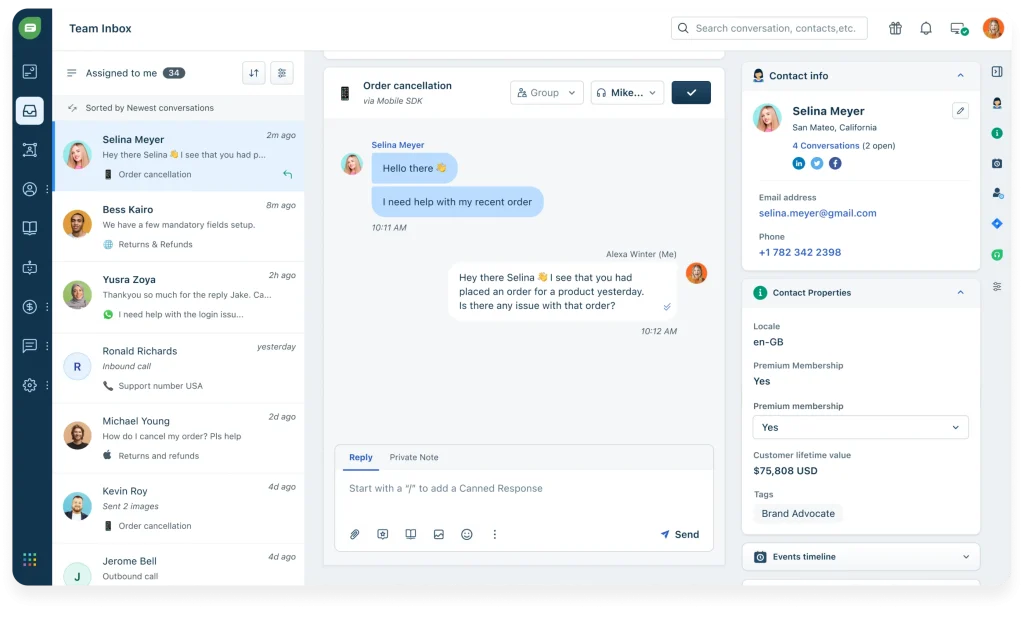
The basics were easy to learn, though advanced bot flows took me longer to figure out. Agents see a rich customer profile next to every conversation, which matters when you handle support and sales in the same shift. The omnichannel inbox covers web, mobile apps, WhatsApp, and Apple Messages for Business.
Among the competitors I reviewed, Freshchat is the closest like-for-like swap if you want an ecosystem, just not the Zoho one. Keep an eye on bot session packs as your chat volume grows, because that is where costs usually creep up fastest.
Pros:
- No-code flow builder with prebuilt FAQ templates gets you live fast
- Trigger campaigns fire based on page behavior and user journey
- In-thread CSAT surveys capture feedback right after resolution
- Skill-based assignment routes chats by agent expertise and workload
- Mobile SDK brings the same chat experience inside your app
Cons:
- Occasional lag reported when syncing across multiple Freshworks products at once
- Advanced bot flows feel less intuitive than simpler standalone tools
How Freshchat Compares With Zoho SalesIQ: Zoho SalesIQ works best inside Zoho’s suite. Freshchat offers the same all-in-one benefit inside Freshworks, with Freddy AI and Freshdesk ticketing connected natively.
User Rating: 4.4/5 (G2)
Price: Starts at $19/agent/month
6. Zendesk: Best for Teams Outgrowing Zoho Desk Ticketing
Adding a separate chat vendor to a Zendesk queue just creates another silo, so I tested Zendesk’s own AI agents instead. They sit inside the same agent workspace, answer from your help center articles, and update tickets in real time as conversations happen.
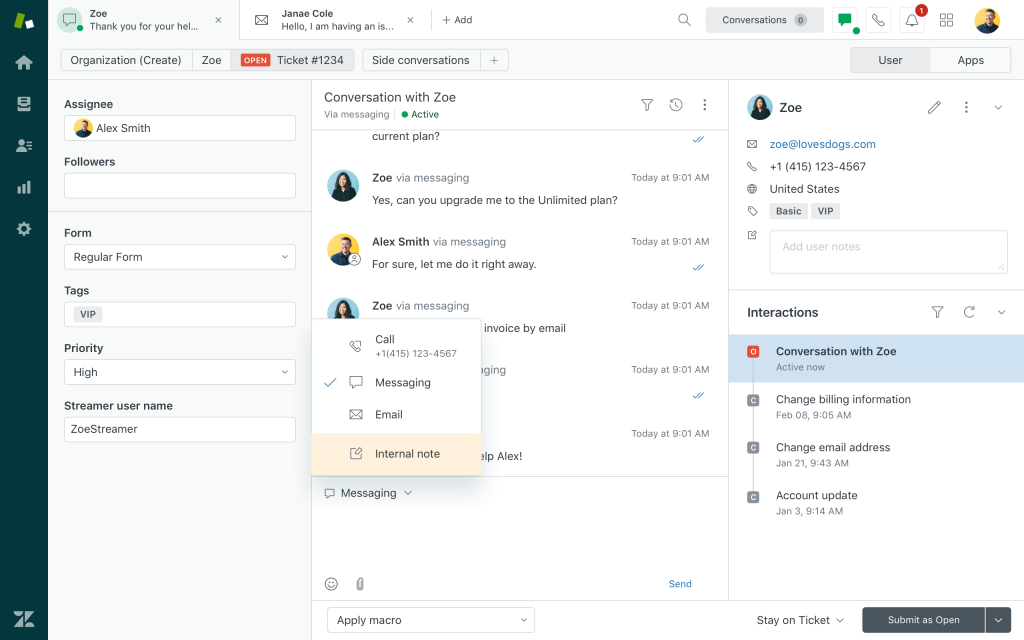
Setup was mostly point and click: I chose which articles the bot could use, set fallback rules, and mapped handoff triggers. The first setup took me longer than it would with a simpler tool, mainly because I was new to the Zendesk workspace and all its terminology.
Messaging covers web, mobile, and social channels, and every handoff passes the transcript and customer data to the agent. This is one of the strongest competitors for teams moving past Zoho Desk. The catch is scope. Zendesk shines as a full help desk, so small teams that only need chat may pay for more than they use.
Pros:
- Multilingual detection serves answers in the visitor’s own language
- Explore dashboards track bot and agent performance together
- Macros and SLA policies keep responses consistent at scale
- Large app marketplace connects CRM, ecommerce, and telephony tools
- Unresolved chats convert into follow-up tickets automatically
Cons:
- Some users report minor usability quirks in the agent workspace
- Initial setup can take longer for teams new to the Zendesk ecosystem
How Zendesk Compares With Zoho SalesIQ: Zoho SalesIQ pairs chat with Zoho Desk through an integration. Zendesk runs chat, bots, and tickets in one workspace, which removes sync issues like failed ticket assignments.
User Rating: 4.3/5 (G2)
Price: Starts at $19/agent/month
7. Crisp: Best for Lean Teams Wanting Workspace-Based Pricing
Crisp caught my attention because it bills per workspace rather than per agent, so I tried it the way a lean team would. The shared inbox keeps website chat, email, Instagram, Messenger, and WhatsApp together. The interface felt quite busy at first because it packs in so many built-in features.
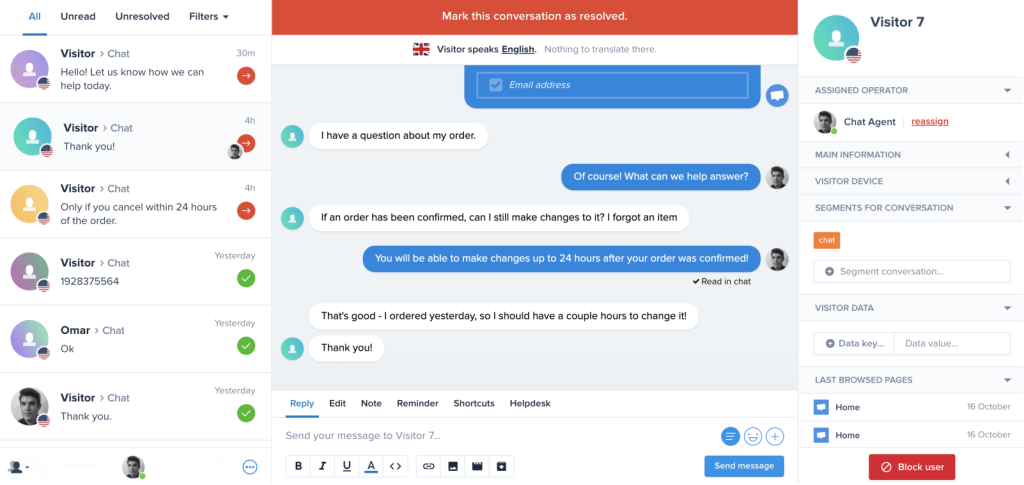
Two features I kept coming back to were MagicType, which shows what a visitor is typing before they hit send, and MagicBrowse, which lets an agent co-browse the visitor’s screen to walk them through a fix. Hugo, the AI agent, answers from your knowledge base and business data, then passes tough questions to a teammate.
The widget stays light and loads fast, which matters on content-heavy sites. As alternatives go, Crisp fits lean teams who want modern chat without enterprise weight. Larger teams should confirm reporting depth before committing, since analytics feel lighter than dedicated support suites.
Pros:
- Built-in knowledge base publishes help articles in multiple languages
- Chatbot builder automates lead capture and routing without code
- Campaigns and status page tools sit inside the same platform
- Desktop and mobile apps make replying possible from anywhere
- Automatic translation helps agents reply to visitors in other languages
Cons:
- Analytics feel lighter than dedicated support suites
- The interface packs in many features, which can feel busy at first
How Crisp Compares With Zoho SalesIQ: Zoho SalesIQ charges per operator. Crisp’s workspace model keeps costs steadier as your team grows, and co-browsing tools help agents solve visual problems faster.
User Rating: 4.5/5 (G2)
Price: Free plan available. Paid starts at $45/month
8. LiveAgent: Best for Handling Calls, Chat, and Tickets in One Inbox
Phones and chat in one place is what made me try LiveAgent. It pulls live chat, a built-in call center, email, and social messages into a single universal inbox for everyone, so nothing slips between systems. The chat widget is known for loading quickly, which keeps page speed intact on busy pages.
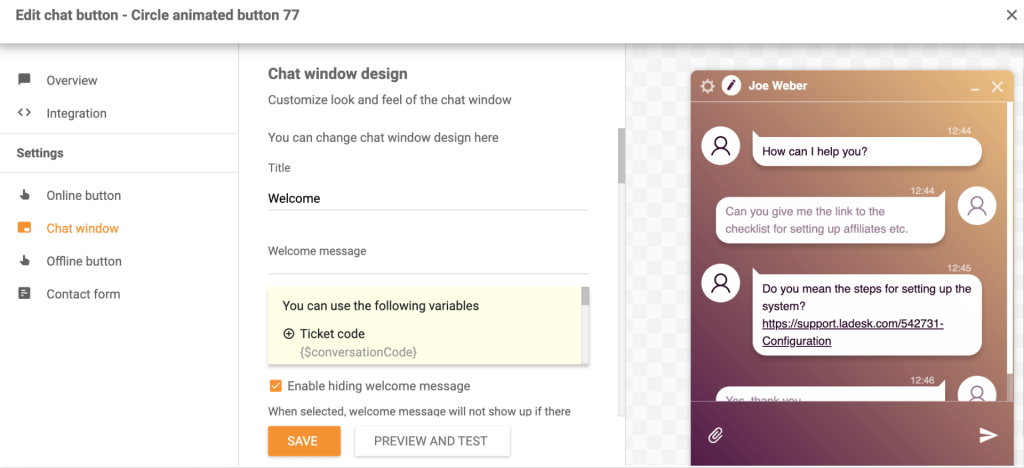
The call center setup needed some extra configuration time before calls felt as smooth as chat. Real-time typing view lets agents see a message forming and prepare an answer early. Every conversation becomes a ticket automatically, so follow-ups never depend on someone remembering them.
An AI Autoresponder drafts replies using past conversations, and the knowledge base gives customers a self-service option. Among competitors with help desk depth, LiveAgent suits teams that want calls and chat together without Zendesk-level complexity. The interface is dense, though, so plan a proper walkthrough for every new agent before launch.
Pros:
- Gamification badges and levels keep agents motivated through busy shifts
- SLA rules and time-based automation escalate stale tickets
- Customer portal and forum support self-service communities
- 200+ integrations, including Shopify, Slack, and popular CRMs
- Video calls can start straight from a chat window
Cons:
- Interface feels dense and dated for brand-new agents
- Call center setup takes extra configuration time
How LiveAgent Compares With Zoho SalesIQ: Zoho SalesIQ offers audio calls inside chat, but ticketing lives in Zoho Desk. LiveAgent puts calls, chat, and tickets in one inbox, which helps teams where agents handle every channel at once.
User Rating: 4.5/5 (G2)
Price: Starts at $15/agent/month
9. Tawk.to: Best for Free Live Chat for Budget-Conscious Small Businesses
Cost was my first question, and Tawk.to answers it better than any tool here. The free core plan includes unlimited agents, unlimited chats, and unlimited sites. I pasted the script into a site and had chat live within minutes without a developer.
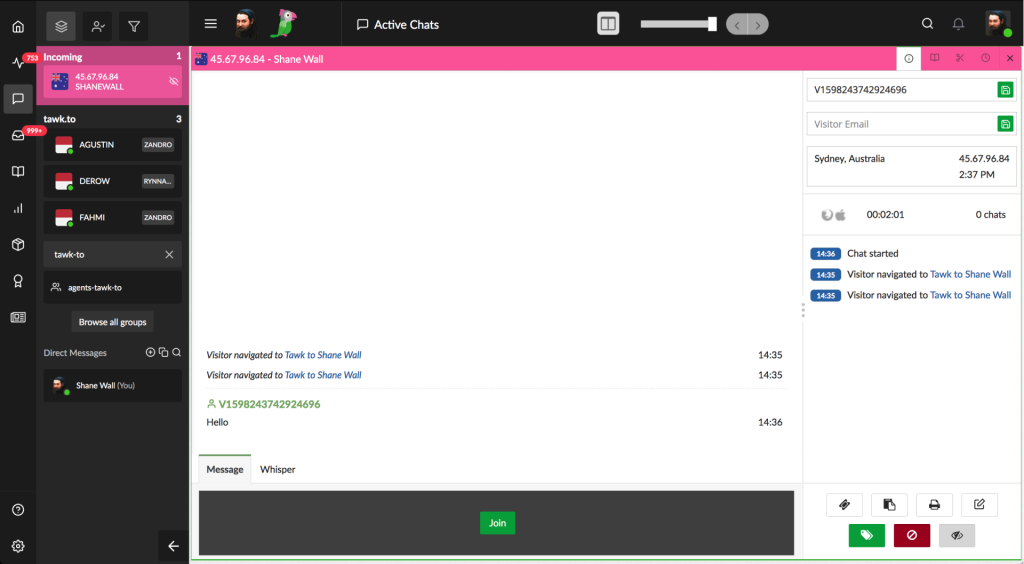
The dashboard covers live chat, basic ticketing, a knowledge base, and a simple CRM, while mobile apps let staff answer between other tasks. When you need help after hours, Tawk.to offers a hired agent service that staffs chat with real people, and Apollo AI can take routine questions off your hands.
Removing the Tawk.to branding from the widget is a paid add-on, which I found fair for a free product. Of all the competitors on this list, it is the easiest to justify for a tiny team. The limits show up in AI depth and reporting, so growing teams often outgrow it within a year.
Pros:
- Real-time visitor monitoring shows who is on your site right now
- Chat pages let you talk to customers even without a website
- Triggers send automated messages based on visitor behavior
- Shortcuts speed up repeat answers for busy agents
- Widget supports multiple languages out of the box
Cons:
- Some users report occasional technical glitches during peak traffic
- AI features feel less advanced than purpose-built AI chatbot tools
How Tawk.to Compares With Zoho SalesIQ: Zoho SalesIQ’s free plan caps operators and chats. Tawk.to’s core product stays free with unlimited agents and chats, which makes it the lowest-risk way to replace basic chat.
User Rating: 4.5/5 (G2)
Price: Free
10. HubSpot Service Hub: Best for Replacing Zoho CRM and Chat Together
Keeping chat, CRM, and service in one login is why I tested HubSpot Service Hub. Every chat lands on the right contact record automatically, so sales and support see the same history without any sync setup.
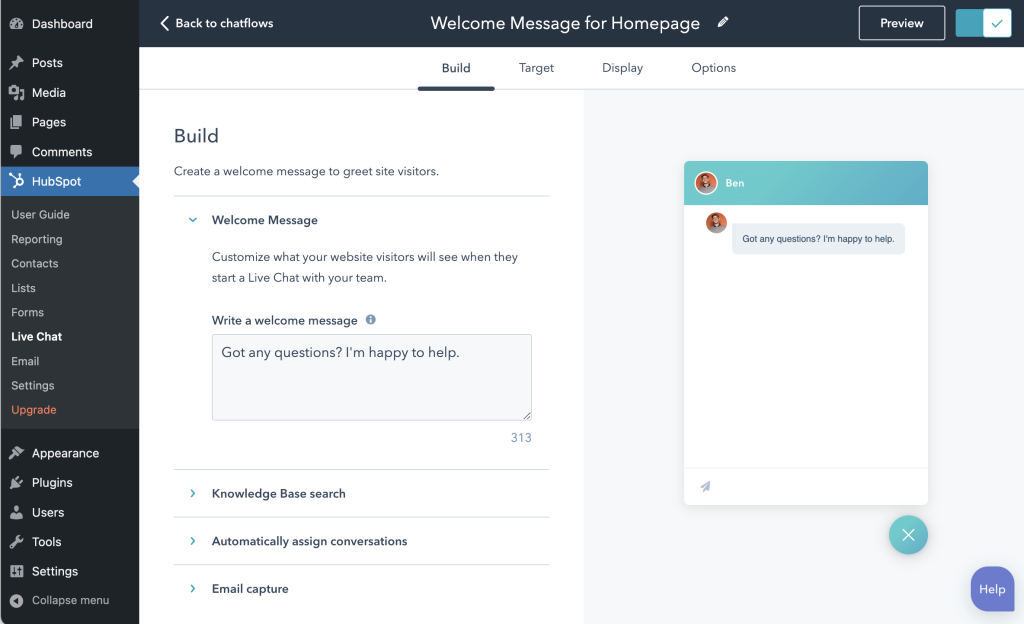
The free tools include live chat and a basic bot, which let me test everything properly before paying a cent. Breeze, HubSpot’s AI, answers questions from your website and helps content and routes chats to the right owner using CRM data like deal or lifecycle stage. Workflows took me some planning.
Conversations from chat, email, and Facebook Messenger sit in a shared inbox, and chats can become tickets with pipelines and SLAs as you grow. Among competitors, HubSpot is the natural move if you are replacing Zoho CRM at the same time. If you only need chat, the platform may feel heavier than necessary, and AI usage runs on a credit system.
Pros:
- Chatflows routes visitors to owners based on CRM properties
- Meeting links let visitors book calls directly inside the chat
- Feedback surveys measure CSAT and NPS after conversations
- Reporting ties conversations to deals and revenue
- Mobile app keeps reps on top of chats while away from their desks
Cons:
- Automation workflows take time to plan and configure
- The platform can feel heavy for teams that only need chat
How HubSpot Compares With Zoho SalesIQ: Zoho SalesIQ connects chat to Zoho CRM through an integration. HubSpot builds chat into the CRM itself, which makes sense only if you plan to move your CRM too.
User Rating: 4.4/5 (G2)
Price: Free tools available. Paid starts at $7–$20/month per seat
How I Chose These Zoho SalesIQ Alternatives
When I evaluate live chat and AI chatbot software for this list, I don’t just rely on feature lists or marketing claims. I look at how these tools actually perform in real-world scenarios. Here’s the framework I used to make sure every recommendation is practical, reliable, and worth considering:
- User Reviews / Ratings: I start by looking at real user feedback from platforms like G2. This gives me a clear picture of how support teams actually experience the tool day to day, what they love, and where it falls short.
- Core Features & Functionality: I focus on what truly matters when comparing competitors of Zoho SalesIQ. This includes AI training on your own content, bot-to-human handoff with context, ticket creation, CRM sync, omnichannel messaging, and reporting. If a tool cannot handle these well, it does not make the cut.
- Ease of Use: I pay close attention to how intuitive the platform feels. A tool might be powerful, but if agents struggle to adopt it, it defeats the purpose. Clean interface, simple navigation, and quick onboarding are non-negotiable for me.
- Customer Support: From my experience, implementation is where many tools fail. I evaluate how responsive and helpful the support team is, especially during setup and ongoing use. Fast, reliable support makes a big difference in adoption.
- Value for Money: I compare pricing with what the tool actually delivers. This is not about picking the cheapest option, but about whether the features, flexibility, and performance justify the cost as chat volume grows.
- Personal Experience / Expert Insights: Wherever possible, I rely on my own hands-on experience with these tools. I also consider insights from support managers, operations leads, and e-commerce owners who have moved between competitors of Zoho SalesIQ in real environments. This helps me go beyond surface-level reviews and highlight what actually works.
Top 3 Zoho SalesIQ Alternatives
After comparing all ten Zoho SalesIQ competitors, three consistently came out on top for different reasons. The right one for you depends on where Zoho SalesIQ has been letting you down.
1. ProProfs Chat
ProProfs Chat is my top overall pick because it solves the broadest set of problems I saw across Zoho SalesIQ competitors. It is the easiest live chat & AI customer service agent for instant, automated support. It trains on your website, help center, or PDFs in minutes, hands off to a human with full chat context, and creates tickets automatically through ProProfs Help Desk.
2. Intercom
Intercom earns its place as the top pick for SaaS teams that want a mature AI agent and in-app messaging in one platform. If your product lives inside an app and your help center is solid, Fin can carry a large share of first-line questions.
3. Tidio
Tidio is the right choice if your chat mostly handles orders. Native Shopify order views, Lyro AI, and cart-based flows make it a practical fit for online stores that want automation without heavy setup.
FREE. All Features. FOREVER!
Try our Forever FREE account with all premium features!
What to Replace Before You Leave Zoho SalesIQ
Switching tools is easy, but switching without losing leads, history, or tracking takes a checklist. Work through these items before you cancel, whichever of the competitors of Zoho SalesIQ you pick.
- Chat transcripts: Export your chat history and visitor data before cancellation, and ask Zoho how long data stays available after you close the account.
- Zobot flows: Zoho users have asked for a way to export codeless Zobots, so screenshot each flow and write down every branch, question, and handoff rule to rebuild later.
- CRM lead mapping: Note which chat fields create or update leads in Zoho CRM, Bigin, or Salesforce, then recreate that mapping in the new tool.
- Lead scoring logic: Replace SalesIQ scoring with pre-chat forms, qualifying bot questions, and scoring rules inside your CRM.
- Visitor tracking: Confirm the new tool shows pages browsed and time on site, then rebuild your proactive triggers to match the old ones.
- Ticketing rules: Recreate chat-to-ticket rules for Zoho Desk or your new help desk so nothing falls through during the switch.
- Messaging channels: Disconnect WhatsApp, Instagram, and Messenger from SalesIQ, then reconnect them to the new inbox on the same day.
- Tracking scripts: Remove the SalesIQ code from your site and tag manager so visitors never see two widgets, and rebuild your GA4 chat events.
Pick the Tool That Fixes Your Real Bottleneck
Moving off Zoho SalesIQ is worth it when the gap is real: bots that break, handoffs that lose context, or integrations that fight your stack. The best Zoho SalesIQ alternatives fix that exact bottleneck without adding new complexity.
Start with your top 20 questions, train two alternatives to Zoho SalesIQ on your own website and PDFs, test escalation and ticket creation, and model cost at your real chat volume. If Zoho CRM works for you, keep it and swap only the chat layer.
If you want AI answers from your own content, clean human handoffs, and automatic tickets in one place, ProProfs Chat covers each of those. It is the easiest live chat & AI customer service agent for instant, automated support, with a forever-free plan for one operator.
Train it on your website this week and run your first 10 real questions through it.
Frequently Asked Questions
How do I test Zoho SalesIQ alternatives before switching?
Train each tool on your website and a few PDFs, then ask 10 real questions from your SalesIQ transcripts. Test an angry or urgent chat for escalation, confirm tickets and CRM leads sync with context, and time one reply from the vendor's support team.
How do I set up a hybrid bot that keeps AI costs down?
Use scripted button flows for fixed questions like hours and returns, and send open-ended questions to AI trained on your content. Route unresolved or sensitive chats, like refunds or cancellations, to a live agent with the full transcript. Most alternatives to Zoho SalesIQ on this list support this setup.
Will a new chat widget slow down my website?
It can if the script is heavy. Test page speed with the widget on and off during your trial, especially on mobile, before you pick between Zoho SalesIQ competitors.
Can I run Zoho SalesIQ and a new tool at the same time?
Yes, for a short overlap on separate pages. Avoid two widgets on the same page, and set a hard cutover date so chats don't split across tools.
Do I need a developer to install one of these competitors of Zoho SalesIQ?
Usually no. Most install by pasting a code snippet or using a WordPress or Wix plugin. You may need a developer only for custom API work like order lookups.
How long does switching to one of these Zoho SalesIQ competitors take?
For a small team, plan one to two weeks for setup and testing, plus a week of monitoring. Complex CRM mapping or custom integrations can add more time.
Are these alternatives to Zoho SalesIQ GDPR compliant?
Most major vendors offer GDPR support, and ProProfs Chat is GDPR and CCPA compliant. Always request the vendor's data processing agreement before storing customer data.
Can a chat tool handle voice or video calls?
Some can. ProProfs Chat supports audio and video chat with real-time screen sharing, which helps when a problem is easier to show than type.
Can agents answer chats from their phones?
Yes, every one of these competitors of Zoho SalesIQ offers mobile apps, so operators can respond while away from their desks.
How do I get agents to adopt the new tool quickly?
Run a one-hour walkthrough on whichever of the alternatives to Zoho SalesIQ you pick, load canned responses on day one, and have a supervisor monitor chats for the first week.
FREE. All Features. FOREVER!
Try our Forever FREE account with all premium features!

 We'd love your feedback!
What did you like & how can we make it even better?

 Thanks for your feedback!
 Ask Your Question
Have a question? Get expert help to make your decision easier.