I compared ten ThriveDesk alternatives for lean support teams that outgrow a basic help desk once inboxes, AI replies, and chat volume start climbing.
If you run support for a small SaaS product or a WordPress or WooCommerce store, you want a tool that answers routine questions instantly, hands off to a person cleanly, and keeps pricing predictable as your volume grows.
I checked G2 ratings, tested how each tool sets up, read the fine print on add-ons and AI usage, and matched every option to those jobs. Below, I cover why teams switch, when ThriveDesk still fits, ten tools by use case, pricing models, and a migration checklist.
Why Are Support Teams Switching From ThriveDesk?
If you are reading this, you have probably hit a few of these already. I am laying them out so you know what to check when comparing ThriveDesk competitors, and what to fix in a replacement.
- Add-on creep: Some listings show extra charges for more inboxes, the knowledge base, and removing ThriveDesk branding. List every add-on you need before you compare totals.
- Thin AI depth: One 2026 review wishes for more advanced chat automation and AI replies. Run 20 real customer questions through any AI before you commit.
- Shallow contacts: One reviewer found contact management less deep than a CRM. Write down the customer fields you track, then check the new tool stores or syncs them.
- Basic interface: Reviewers call the interface basic and want more customizable features. Open the widget and inbox settings in a trial and note what you cannot change.
- Plan gating: One reviewer said you need a higher plan to unlock all features. Mark your must-have features and confirm which plan includes each.
- Channel gaps: An older review noted no social media integration at the time. Confirm that every channel your customers use is supported today, not assumed.
- Stack fit: ThriveDesk’s WordPress and WooCommerce depth helps on those stacks, but teams on other platforms get less from it. List your CRM, store, and ticketing tools, then check native integrations first.
Top 10 ThriveDesk Alternatives for Lean Support Teams
I put this list together using G2 ratings, product documentation, and the questions buyers ask most often. Every tool here solves at least one of the problems above in a meaningful way.
| Tool | Best For | Starting Price | User Rating |
| ProProfs Chat | Easy Live Chat & AI Customer Service Agent for Instant, Automated Support | Forever free for 1 operator. Paid starts at $19.99/operator/month | 4.5/5 (G2) |
| Zendesk | Deep Ticketing & Escalation Workflows as You Scale | Starts at $19/agent/month | 4.3/5 (G2) |
| Freshdesk | Ticket-First Teams Wanting Automation & Integrations | Free plan available. Paid starts at $19/agent/month | 4.4/5 (G2) |
| Help Scout | Email-First Shared Inbox With a Personal Feel | Free for up to 5 users. Paid starts at $25/user/month | 4.4/5 (G2) |
| Tidio | Live Chat With Built-In Ticketing & AI | Starts at $24.17/month | 4.6/5 (G2) |
| LiveAgent | Email, Chat & Phone With a Built-In Call Center | Starts at $15/agent/month | 4.5/5 (G2) |
| Crisp | Chat-First Support With Flat Workspace Pricing | Free plan available. Paid starts at $45/month per workspace | 4.5/5 (G2) |
| Zoho Desk | Teams Already Running Zoho Apps | Free for up to 3 agents. Paid starts at $7/agent/month | 4.4/5 (G2) |
| Tawk.to | Free Live Chat for Budget-Conscious Small Teams | Starts at $0/month (free core plan) | 4.5/5(G2) |
| Chatwoot | Open-Source, Self-Hosted Support Control | Free to self-host. Paid starts at $19/agent/month | 4.5/5(G2) |
1. ProProfs Chat: Easiest Live Chat & AI Customer Service Agent for Instant, Automated Support
Setting up ProProfs Chat took three steps: I branded the chat window, pasted one code snippet into the site, and started chatting. No HTML or CSS was needed, and it works in a browser, on Windows and Mac, and on iOS and Android.
The AI agent is what makes it a strong ThriveDesk alternative for me. I pointed it at a website URL and trained the AI agent on the help center, added uploaded files, and it answered from that content with the source cited. When a question gets tricky, the AI support agent passes the chat to a human with the full conversation attached, so customers never repeat themselves.
I like the daily tools: canned responses, pre-chat forms, chat transcripts, and customer details visible during a chat. When the bot cannot solve something, it creates a ticket through ProProfs Help Desk. The ProProfs Knowledge Base integration gives the AI agent a reliable source for self-service answers.
Pros:
- Drag-and-drop flow builder with templates for lead generation, support, appointment booking, sales, and CSAT
- Proactive chat invitations trigger on time on the page or the URL a visitor views
- Integrations include WordPress, Salesforce, Zendesk, and Shopify, so chat fits your current stack
- Multilingual chat in 70+ languages, with language options set by visitor location
- Supervisor dashboard and SLA settings help you watch response times and operator performance live
Cons:
- Cloud-only, so there is no offline access
- Full ticket management and a shared inbox need the connected ProProfs Help Desk
How ProProfs Chat Compares With ThriveDesk: ThriveDesk bundles a shared inbox, live chat, and a knowledge base around a help desk. ProProfs Chat puts instant, automated support first, with an AI agent trained on your own content and a clean handoff to humans, then connects to ProProfs Help Desk and Knowledge Base when you need ticketing and self-service.
User Rating: 4.5/5 (G2)
Price: Forever free for 1 operator. Paid starts at $19.99/operator/month
2. Zendesk: Best for Deep Ticketing & Escalation Workflows as You Scale
Zendesk is the name I think of first when a support desk already lives in tickets and queues. Its Advanced Bot sits inside the same agent workspace, so I did not need a separate chat tool or dashboard.
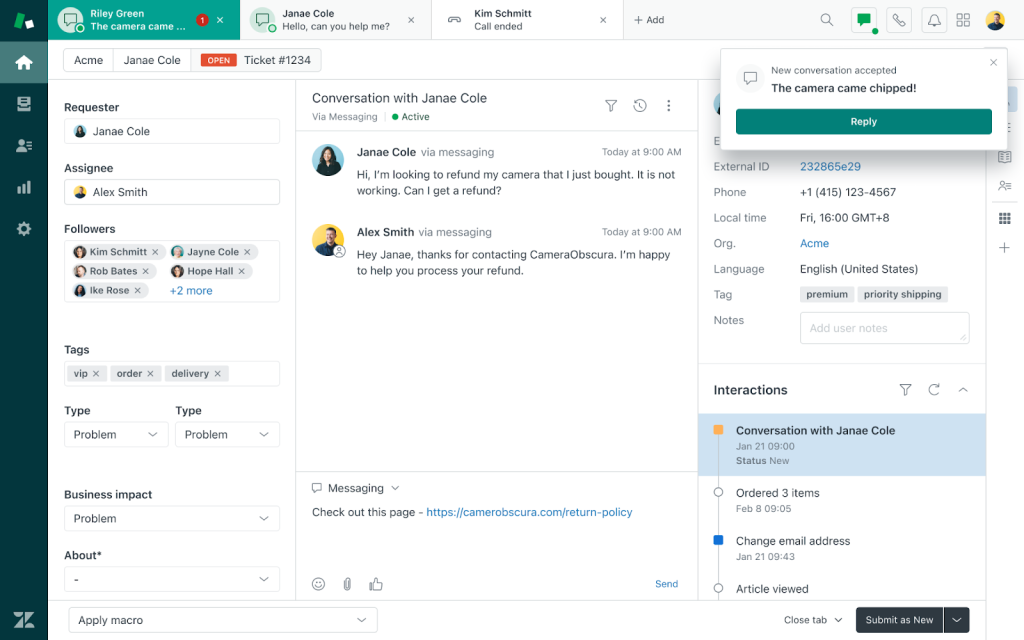
Setup is mostly point and click, and no developer help is needed. I chose which Guide articles the bot should learn from, added fallback rules, and mapped the triggers that pass a chat to a person. When that happens, the transcript and user details travel with it, which cuts down the back and forth for agents. Agents keep a familiar interface, so training stayed short, and customers get instant answers.
Answers come straight from your help center, so keeping those articles current matters more than any bot setting. I would audit them before launch, because the bot is only as accurate as the content you give it, and customers notice outdated answers fast.
Pros:
- Support, Guide, and Messaging work as one suite, so chat and ticket data stay together
- Multilingual article detection serves answers in the visitor’s own language
- Smart triggers turn unresolved chats into follow-up tickets automatically
- Explore dashboards, show chat reporting next to your existing ticket reports
- Macros and SLAs give agents repeatable ways to handle common requests
Cons:
- Some users report minor usability quirks in the agent workspace
- Initial setup can take longer for teams new to the Zendesk ecosystem
How Zendesk Compares With ThriveDesk: ThriveDesk is built as a light all-in-one for small teams. Zendesk fits teams whose ticket volume and process depth have outgrown that, because it wraps a full ticketing structure around chat.
User Rating: 4.3/5 (G2)
Price: Starts at $19/agent/month
3. Freshdesk: Best for Ticket-First Teams Wanting Automation & Integrations
Ticket volume is what pushed me to test Freshdesk, and it handled that part well. Emails, social messages, and chats land in one queue, while automation rules route and tag requests before an agent opens them. Collision detection keeps two people from replying to the same ticket.
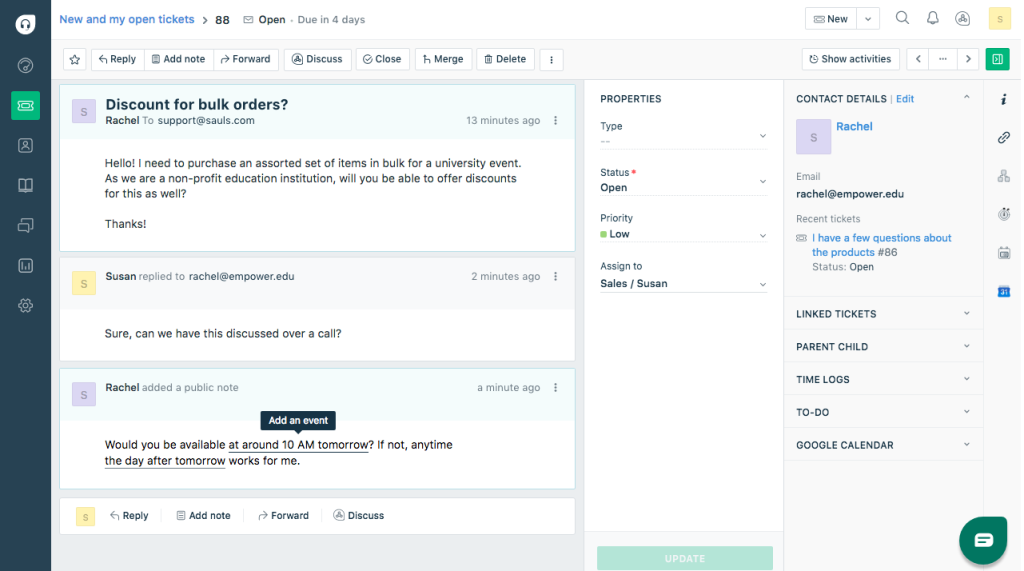
If you run WordPress, the official plugin adds the help widget to your site. Pair that with more than 150 integrations, and the setup gets less manual.
AI comes in two forms. Freddy AI Copilot suggests replies and summarizes tickets for agents, while Freddy AI Agent is a customer-facing bot. Chat is not the center of the design, so I treat Freshdesk as a ticketing engine first. For teams that live in the inbox, that tradeoff feels fair. My tip: build your routing and tagging rules before you invite the whole team, because that is where most of the time savings come from.
Pros:
- SLA management keeps response targets visible to the whole team
- A self-service knowledge base lets customers find answers before they raise a ticket
- The app marketplace extends the help desk with extra tools
- Freddy AI Insights adds analytics on top of your ticket data
- A unified help desk and live chat view helps agents who handle both
Cons:
- Ticket-first design makes chat feel less central than in chat-led tools
- Messaging and phone channels sit in the separate Freshdesk Omni edition
How Freshdesk Compares With ThriveDesk: ThriveDesk keeps things simple for small teams. Freshdesk gives you a deeper ticketing engine, with SLAs and a wider app marketplace, once your process needs more structure.
User Rating: 4.4/5 (G2)
Price: Free plan available. Paid starts at $19/agent/month
4. Help Scout: Best for Email-First Shared Inbox With a Personal Feel
Help Scout keeps the personal feel of email, which is why I trust it for teams that talk to customers like people instead of ticket numbers. Conversations sit in a shared inbox, and the Beacon widget adds live chat and help articles in the same place.
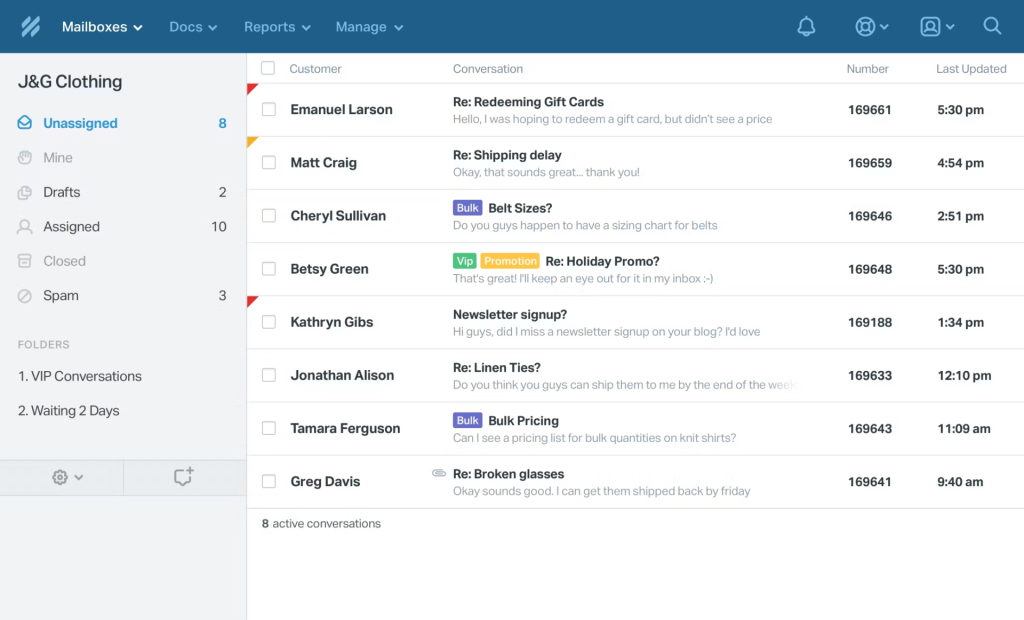
WordPress and WooCommerce stores get extra help from the Help Scout Desk plugin, which connects the site to your mailbox. Help Scout also connects with WooCommerce and Easy Digital Downloads. I set office hours, too, so automatic replies matched business hours.
For reporting, I looked at conversation volume, response times, and customer happiness, and the pre-built views covered what a small team needs. Nothing felt bloated or cluttered, which is rare for a tool with this much range. It has been around since 2011, and the polish shows. My tip: save a few replies on day one, then judge the inbox with real conversations.
Pros:
- Round-robin routing shares new conversations evenly across teammates
- Instagram and Messenger channels join email and live chat in the same inbox
- A Docs knowledge base site gives customers a self-service help center
- AI Answers works as a customer-facing chatbot for routine questions
- The free Import2 tool moves data from tools like Zendesk for most customers
Cons:
- Email-first design makes live chat feel secondary to the inbox
- AI features are lighter than those in AI-first platforms
How Help Scout Compares With ThriveDesk: ThriveDesk positions itself as a Help Scout alternative, so the experience feels similar: inbox first, chat second. Help Scout adds a longer track record and a WordPress plugin option.
User Rating: 4.4/5 (G2)
Price: Free for up to 5 users. Paid starts at $25/user/month
5. Tidio: Best for Live Chat With Built-In Ticketing & AI
One question guided my Tidio test: Can a small team really get chat, tickets, and AI in a single inbox without hiring an admin? Mostly, yes. I tested a handful of routine questions first. Live chats, emails, and Messenger threads merge into one view, and replies work from mobile too.
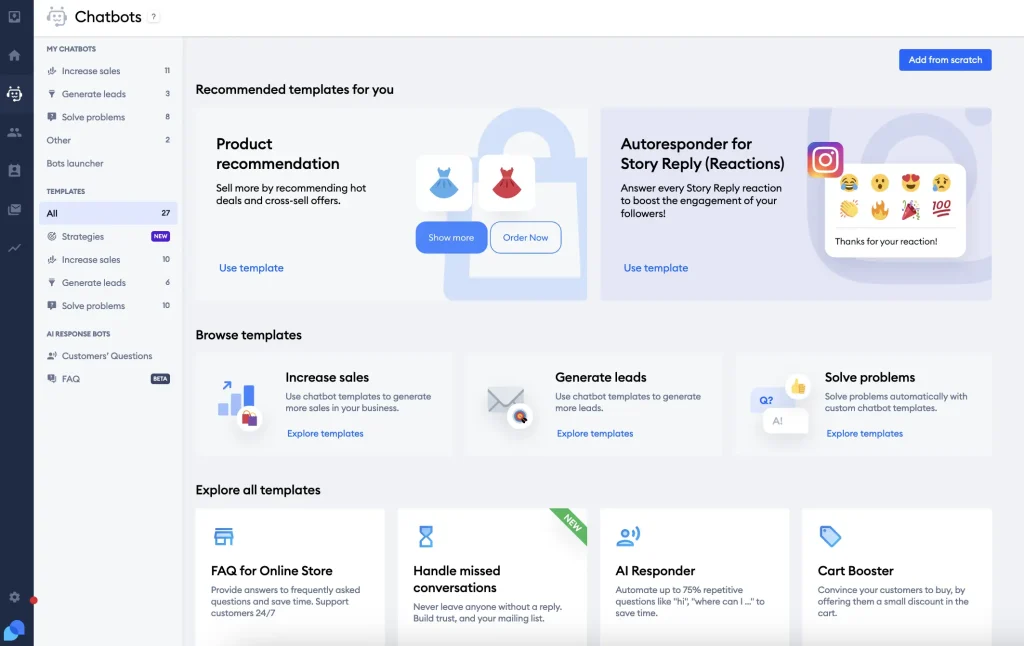
The AI agent trains on website data and Shopify catalogs, so routine where-is-my-order questions get answered without a person. When a chat needs more time, it converts into a ticket on the same dashboard, and I can snooze threads or set automated follow-ups so nothing slips.
Setup starts fast, but automation takes longer. If you have never built a chatbot before, expect to spend an afternoon getting the options straight. Once that was done, the day-to-day routine felt light. My tip: start with one flow, such as order status, and measure how many chats it closes before you add more.
Pros:
- Visitor typing preview lets agents prepare an answer before the message arrives
- Proactive messages trigger on time on the page or cart value
- Visual workflows build product quizzes and upsell pop-ups without code
- The Lyro AI agent can build a knowledge base from your website automatically
- Built-in issue tracking sits alongside live chat in one dashboard
Cons:
- Automation setup can feel daunting for first-time chatbot builders
- Support responsiveness can be inconsistent
How Tidio Compares With ThriveDesk: ThriveDesk starts from the help desk and attaches live chat. Tidio flips that around, with chat and automation up front and ticketing for the longer issues.
User Rating: 4.6/5 (G2)
Price: Starts at $24.17/month
6. LiveAgent: Best for Email, Chat & Phone With a Built-In Call Center
Phone support is the reason LiveAgent made my shortlist. Email, chat, and calls arrive in one agent screen, and the ticketing side sorts and routes requests quickly, which keeps a small team from juggling separate tools.
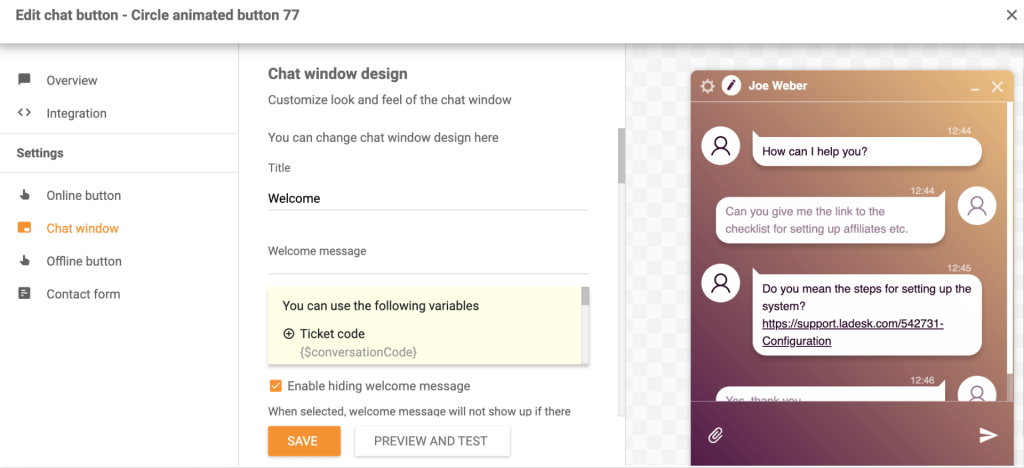
If your customers phone before they type, the built-in call center matters. On the chat side, automated triggers reach out to visitors on your website before they leave, so you start more conversations without extra effort.
Social channels connect too, so one agent can follow a customer from a Facebook message to an email thread without switching apps. That kept my test inbox tidy.
Plan on a learning curve for the advanced settings, and give the mobile app a hands-on test during your trial before you roll it out to the whole team. I would also test one real phone call end-to-end, from ring to recording, before trusting it with live customers.
Pros:
- Call routing and IVR (interactive voice response) direct callers to the right agent
- Unlimited call recordings support coaching and quality checks
- Video calls handle issues that need a face-to-face look
- Agent ratings show how customers feel about each interaction
- SLA management tracks response targets across channels
Cons:
- The mobile app is a weaker spot, so test it before rollout
- Customization options can feel limited compared with some rivals
How LiveAgent Compares With ThriveDesk: ThriveDesk covers shared inbox, chat, and knowledge base. LiveAgent adds a built-in call center, which matters if your customers pick up the phone before they type.
User Rating: 4.5/5 (G2)
Price: Starts at $15/agent/month
7. Crisp: Best for Chat-First Support With Flat Workspace Pricing
Crisp surprised me by feeling like a chat app first and a help desk second. The website widget and shared inbox sit side by side, and the whole interface stays quick to scan.
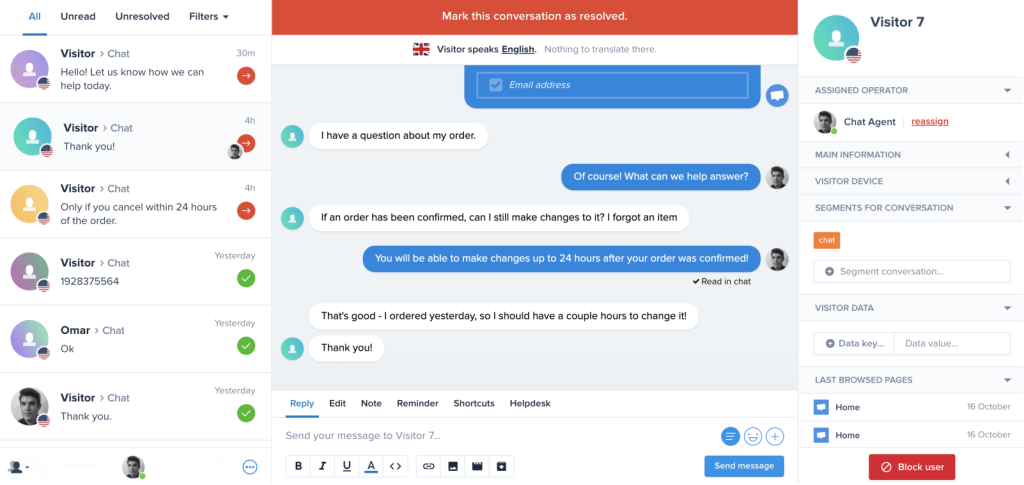
Hugo, Crisp’s AI agent, is built to handle full conversations rather than only suggest replies. I like that you stay in control of how far it goes, since you can decide which topics it handles and which ones stay with your team.
Features arrive as plugins from a marketplace, which let me add only what I need and skip the rest. The trade-off is setup time, since extras are separate pieces you install and configure. Test the iOS and Android apps yourself during a trial, because some users call them clunky, and decide whether that matters for your team. My tip: start with a small plugin set, then add more only when a real need shows up.
Pros:
- Chat triggers start conversations based on what a visitor does on the page
- Shortcuts speed up repeat answers for agents
- A custom email domain keeps replies on your brand
- Customer profiles keep each person’s conversation history in one place
- Workflows route chosen situations to a script instead of the AI
Cons:
- Mobile apps get mixed feedback, with some users calling them clunky
- Many extras are separate marketplace plugins, which adds setup
How Crisp Compares With ThriveDesk: ThriveDesk starts from the help desk. Crisp starts from the conversation, with a plugin marketplace you grow into as your needs change.
User Rating: 4.5/5 (G2)
Price: Free plan available. Paid starts at $45/month per workspace
8. Zoho Desk: Best for Teams Already Running Zoho Apps
If your CRM already lives in Zoho, Zoho Desk deserves a look before anything else. It pulls customer conversations from several channels into one clean interface and syncs with Zoho CRM, so agents see who they are talking to.
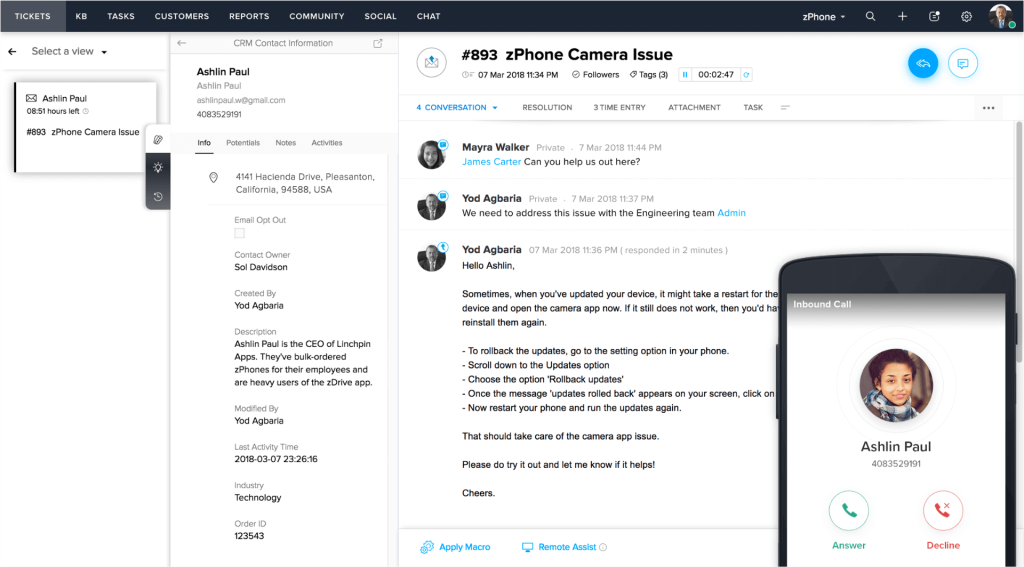
Automation is where it earns its keep. I assigned tickets, tracked them, and set alerts without much effort, and repetitive routing stopped landing on my plate. Zoho built it as a context-aware help desk, and that shows in how much customer detail stays close at hand during a reply.
One detail to plan for: live chat comes through a separate Zoho product called SalesIQ, so test that connection early. Outside the Zoho family, the fit feels weaker, so list your current tools and check each integration before you commit to a switch. I would also map your ticket fields to Zoho CRM before launch, so reports line up from week one.
Pros:
- The Zia assistant helps manage and route tickets as volume grows
- Satisfaction measurement shows how customers rate your support
- A customer portal lets people track their own requests
- A private knowledge base and help center support self-service
- A mobile app keeps agents responsive away from the desk
Cons:
- Live chat runs through a separate Zoho product, SalesIQ
- The fit is strongest when your stack already includes other Zoho apps
How Zoho Desk Compares With ThriveDesk: ThriveDesk leans on WordPress and WooCommerce. Zoho Desk leans on the wider Zoho family, so it pays off most when your CRM and other tools already live there.
User Rating: 4.4/5 (G2)
Price: Free for up to 3 agents. Paid starts at $7/agent/month
9. Tawk.to: Best for Free Live Chat for Budget-Conscious Small Teams
Tawk.to packs more into its core dashboard than I expected. I pasted one script into the homepage, and chat was live within minutes. No developer was involved.
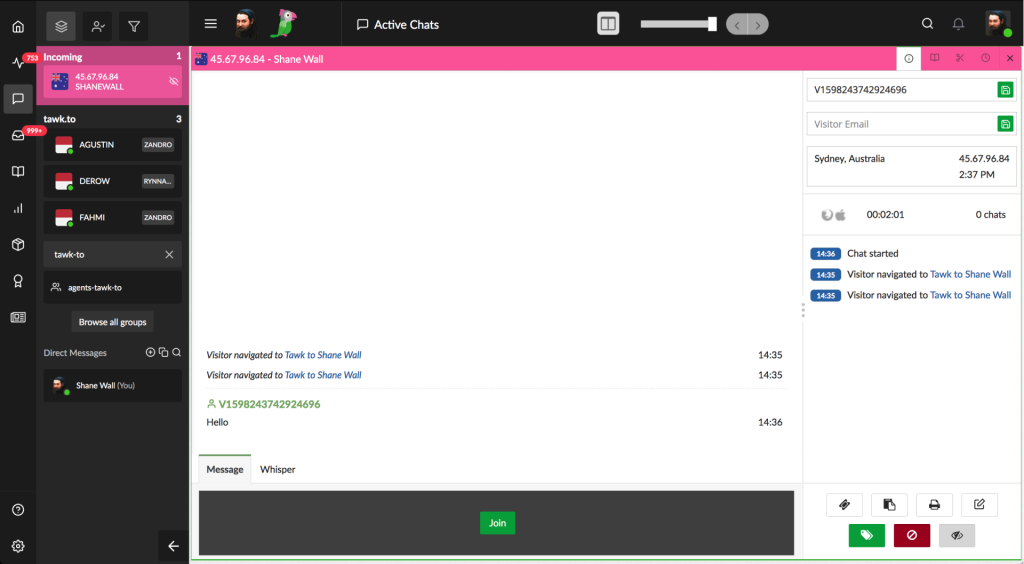
Agents and chats are unlimited on the core product, which helps a growing team avoid counting seats every month. Real-time visitor analytics show who is browsing right now, and I used that view to decide when to start a conversation instead of waiting for a message.
For a bootstrapped team just starting with chat, that mix is hard to beat. You can add AI from another tool later if you need it, and keep the live chat part exactly where it is. I would not expect deep automation from it, so set expectations before you install it. Run it for a week on one site and see whether the core setup covers your volume before adding anything else. Preview the widget on mobile.
Pros:
- Unlimited sites on one account suit multi-site owners and agencies
- Live chat and a basic ticketing system share one dashboard
- A small built-in knowledge base lets visitors find answers themselves
- Mobile apps for iOS and Android keep replies moving on the go
- An optional hired-agent service covers after-hours chats
Cons:
- Some users report occasional glitches during peak traffic
- AI features are less advanced than in purpose-built AI chatbot tools
How Tawk.to Compares With ThriveDesk: ThriveDesk is a paid, help-desk-first tool. Tawk.to gives you core live chat without a bill, so it works when budget matters more than AI depth.
User Rating: 4.5/5 (G2)
Price: Starts at $0/month (free core plan)
10. Chatwoot: Best for Open-Source, Self-Hosted Support Control
Self-hosting was the part of Chatwoot I weighed the longest. The code is open source, so you can run it on your own server or use the hosted cloud version, and the community around it is big, with more than 32,000 GitHub stars.
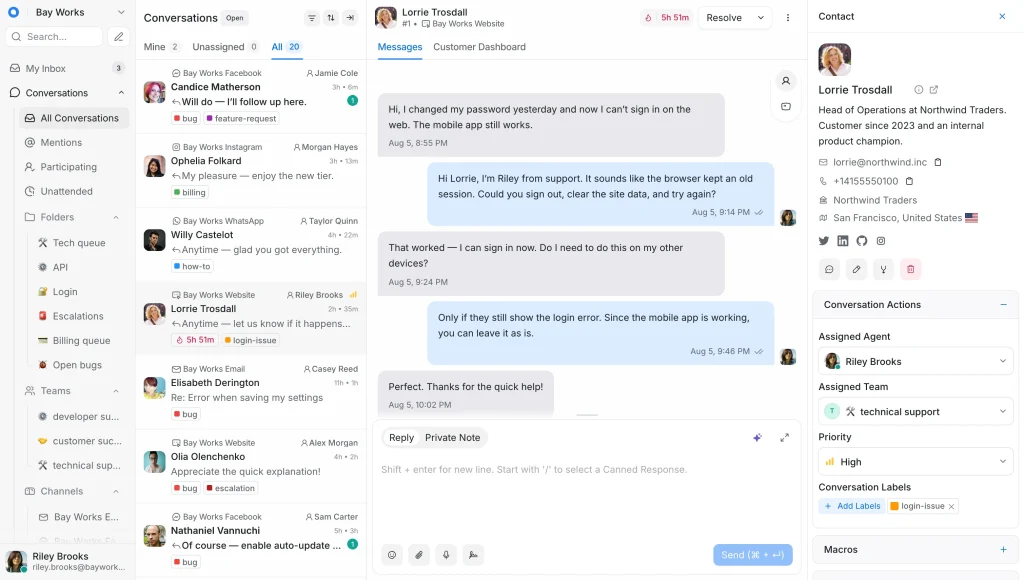
Setup is quick on the cloud version, and the project updates often. Community Edition users get help through Discord and GitHub, which suits technical teams, while phone support comes only with the Enterprise Edition.
Captain, its AI assistant, is not part of the open-source Community Edition, so check the editions if AI matters to you. Self-hosting is open source, not effortless, because servers, updates, storage, and security fall on your team. Decide who owns upkeep before starting. If nobody on your side enjoys that work, choose the cloud version instead. My tip: try the cloud trial first, and move to self-hosting only if you truly need that control.
Pros:
- An omnichannel inbox brings live chat and other channels into one place
- A built-in help center supports customer self-service
- You can choose the hosted cloud version or run it on your own server
- Open-source code means you can inspect how the product works
- A large, active community supports troubleshooting and updates
Cons:
- Self-hosting puts servers, updates, and security on your team
- The ticketing system lacks some advanced collaboration tools
How Chatwoot Compares With ThriveDesk: ThriveDesk is a hosted product tuned for WordPress teams. Chatwoot gives you control over where it runs and how it is set up, which suits technical teams that value that freedom.
User Rating: 4.5/5 (G2)
Price: Free to self-host. Paid starts at $19/agent/month
How I Chose These ThriveDesk Alternatives
When I evaluate alternatives to ThriveDesk, I do not just rely on feature lists or marketing claims. I look at how these tools actually perform in real-world scenarios. Here is the framework I used to make sure every recommendation is practical, reliable, and worth considering.
- User Reviews / Ratings: I start by looking at real user feedback from platforms like G2. This gives me a clear picture of how teams actually experience the tool day to day, what they love, and where it falls short.
- Core Features & Functionality: I focus on what truly matters in help desk and live chat software. This includes shared inbox, live chat, AI chatbot, ticketing, knowledge base, and integrations. If a tool cannot handle these well, it does not make the cut.
- Ease of Use: I pay close attention to how intuitive the platform feels. A tool might be powerful, but if teams struggle to adopt it, it defeats the purpose. Clean interface, simple navigation, and quick onboarding are non-negotiable for me.
- Customer Support: From my experience, implementation is where many tools fail. I evaluate how responsive and helpful the support team is, especially during setup and ongoing use. Fast, reliable support makes a big difference in adoption.
- Value for Money: I compare pricing with what the tool actually delivers. This is not about picking the cheapest option, but about whether the features, flexibility, and performance justify the cost.
- Personal Experience / Expert Insights: Wherever possible, I rely on my own hands-on experience with these tools. I also consider insights from support leads, online store operators, and SaaS customer success managers who use these tools in real environments. This helps me go beyond surface-level reviews and highlight what actually works.
Top 3 ThriveDesk Alternatives
After comparing all ten tools against each other, three came out on top for different reasons. The right one depends on where ThriveDesk has been letting you down.
1. ProProfs Chat
ProProfs Chat takes my top spot because it fits the job lean teams actually have: instant, automated support. The AI agent learns from your website, help center, and uploaded files, answers with the source cited, and hands off to a human with the full chat attached. Setup takes three steps.
2. Help Scout
Help Scout is my pick for teams that live in the inbox and want customers to feel like they are talking to a person. A shared inbox, Beacon live chat, a Docs knowledge base, and a WordPress plugin cover most small-team support needs without adding clutter or steep learning curves.
3. Tidio
For teams that want chat, tickets, and AI in one dashboard, I chose Tidio. The AI agent answers routine order questions, longer chats convert into tickets, and visual workflows handle follow-ups. It keeps the day-to-day routine light and simple, which suits a small support team that cannot spare an admin.
FREE. All Features. FOREVER!
Try our Forever FREE account with all premium features!
How Do You Switch Without Losing Data?
A smooth move comes down to order of operations. Work through this checklist and keep ThriveDesk running until the new tool proves itself.
- Export first: Check what ThriveDesk lets you export, such as conversations, contacts, saved replies, and knowledge base articles, before you cancel anything.
- Rebuild replies: Move your saved replies into the new tool’s canned responses so agents keep their shortcuts from day one.
- Reuse your content: Point the new AI at your help center URL or upload your documents. With ProProfs Chat, the AI trains on a website URL, help center, or uploaded files.
- Swap the widget: Install the new chat code alongside the old one. With ProProfs Chat, the steps are to brand the chat window, add the code, and start chatting.
- Reconnect integrations: List WordPress, WooCommerce, CRM, and team chat connections, and check whether each is native or runs through Zapier or an API.
- Run both: Keep ThriveDesk live for a week or two while the new widget handles part of your traffic, then cut over.
- Test escalation: Ask the bot something it cannot answer and confirm the full chat history reaches your agent.
Pick the Alternative Your Team Will Actually Use
The best ThriveDesk alternative should solve your biggest support challenges without creating new ones. Before switching, identify your top three pain points, compare pricing based on actual operator count and AI usage, and test human handoffs with real conversations.
Also, check integrations with WordPress, WooCommerce, your CRM, and knowledge base. Running both tools side by side can make migration smoother.
ProProfs Chat is my top recommendation for teams seeking instant, automated support without complicated setup. It trains on your content, transfers conversations with full context, and offers a forever-free plan for one operator.
Start with one workflow this week and evaluate the results.
Frequently Asked Questions
What is a chat operator, and how many do I need?
An operator is a person who handles live chats and takes handoffs from the bot. Start with the number of people who will answer chats at the same time, not your total headcount.
How do I stop an AI chatbot from giving wrong answers?
Train it only on content you trust, such as your website, help center, and uploaded files. Pick a tool that shows the source behind each answer, and review a sample of chats every week.
Will a chat tool create leads in my CRM, or only contacts?
It depends on the tool. Ask the vendor whether it pushes full lead records with qualifying details, not just a name and email. ProProfs Chat integrates with Salesforce, Microsoft Dynamics 365, and Zoho CRM.
Can I manage WhatsApp, Instagram, and Facebook in one place?
Many tools support this, but it is often tied to a higher plan. ProProfs Chat brings WhatsApp, Instagram, and Facebook messages into one dashboard on its Business plan and above.
Do I still need a separate help desk with a chat-first tool?
If you rely on ticket workflows and a shared inbox, yes, or pick a tool with ticketing built in. ProProfs Chat turns missed chats into tickets, and full ticket management runs through ProProfs Help Desk.
What security checks should I run before switching?
Ask about encryption, access controls such as single sign-on, and data deletion. ProProfs Chat documents GDPR and CCPA compliance and uses encryption in transit.
FREE. All Features. FOREVER!
Try our Forever FREE account with all premium features!

 We'd love your feedback!
What did you like & how can we make it even better?

 Thanks for your feedback!
 Ask Your Question
Have a question? Get expert help to make your decision easier.