If you are searching for Ada alternatives, you have probably seen the quote or sat through a long demo and wondered if there is an easier way. I wrote this guide for support leads, CX managers, and founders who need an AI agent that answers from their own content, hands off to a human cleanly, and goes live in days instead of months.
Below, I cover exactly why teams switch, what to ask every vendor, and how ten options compare on setup, handoff, and integrations. I also share a simple demo checklist and a switching plan, so you can shortlist in one sitting and test with your own tickets this week.
This guide covers why teams are switching from Ada, the top ten options, how I chose them, my top three picks, how to test and switch, and the conclusion.
Why Are CX Teams Switching From Ada?
If you are reading this, you are probably weighing a switch. I am laying out what to check in a replacement, and a good share of the alternatives to Ada below fix at least one of these points.
- Pricing clarity: Ask every vendor, Ada included, for a written annual estimate at your own volume before you compare options.
- Rollout time: Ask for a go-live date in writing, and test a same-day setup first.
- Billing unit: Ask exactly what counts as billable: a conversation, a resolution, or an outcome.
- Human handoff: Run your trickiest question through each handoff, and check that the full context carries over.
- Content sources: Expect the AI to learn from website URLs, PDFs, and help center articles, and confirm each source works natively.
- Stack fit: Check which helpdesk and CRM integrations are native for your stack.
- Renewal terms: Ask for a renewal cap in writing, whatever you choose.
Top 10 Ada Alternatives for Customer Support Teams
I put this list together using G2 ratings and product documentation. Every tool here solves at least one of the problems above in a meaningful way.
| Tool | Best For | Starting Price | User Rating |
| ProProfs Chat | Easy Live Chat & AI Customer Service Agent for Instant, Automated Support | Free for 1 operator; paid from $19.99/operator/month | 4.5/5 (G2) |
| Tidio | Small Teams and Online Stores Wanting Fast AI Chat | Free plan available; paid from $24.17/month | 4.6/5 (G2) |
| Intercom (Fin) | SaaS Teams Wanting Fin AI With a Published Per-Outcome Rate | From $29/seat/month; Fin at $0.99/outcome | 4.5/5 (G2) |
| Zendesk AI Agents | Teams Already Running Zendesk | From $55/agent/month | 4.3/5 (G2) |
| Freshchat | Freshworks Suite Users | From $19/agent/month | 4.4/5 (G2) |
| LiveChat | Human-Led Chat Teams With Strong Staffing Controls | From $19/agent/month | 4.5/5 (G2) |
| Gorgias | Shopify Stores Automating Order Tickets | From $40/month | 4.6/5 (G2) |
| Voiceflow | Teams That Want to Build and Own Their AI Agent | Custom quote | 4.5/5 (G2) |
| Decagon | Closest Enterprise Like-for-Like Swap | Custom quote | 4.8/5 (G2) |
| Kore.ai | Enterprise Multi-Channel Virtual Assistants | Custom quote | 4.6/5 (G2) |
1. ProProfs Chat: Easiest Live Chat & AI Customer Service Agent for Instant, Automated Support
I pointed ProProfs Chat at my website URL in a couple of clicks, and its AI agent started answering visitor questions within a few minutes. It also trains on a help center or uploaded files, and each answer comes from your own content with the source cited, so I never had to worry about invented replies.
Handoff is where it won me over as an Ada replacement. The AI support agent passes the chat to a human with the full conversation attached, and routing rules send it to the least busy operator or the right department. I built my flows in the drag-and-drop editor from the support template, with no code.
It also pulls WhatsApp, Instagram, and Facebook messages into one dashboard, supports 70+ languages, and creates tickets through ProProfs Help Desk when the bot cannot solve something. It also integrates with ProProfs Knowledge Base, giving the AI agent a reliable source for self-service answers. Canned responses and SLA settings keep operators consistent, and tagged transcripts make reviews easy.
Pros:
- Action-based AI agents update orders and schedule meetings directly inside the chat window
- Sentiment analysis flags frustrated customers early, so agents step in before churn happens
- Resolution overviews and AI performance reports help you keep improving answer accuracy
- Proactive triggers launch on exit intent or high cart value to catch hesitant buyers
- 100+ integrations cover Salesforce, Zendesk, Shopify, WordPress, and more
Cons:
- Cloud-only, so there is no offline access
- No dark theme
How ProProfs Chat Compares With Ada: If you want to test before you talk to sales, ProProfs Chat lets you train the AI on your own content and check the human handoff yourself.
User Rating: 4.5/5 (G2)
Pricing: Forever free for a single operator. Paid starts at $19.99/operator/month
2. Tidio: Best for Small Teams and Online Stores Wanting Fast AI Chat
Setting up Tidio for a friend who runs a small online store took me one afternoon. Lyro learned from her website content, and once we connected her Shopify catalog, it answered order status questions on its own. Her live chats, emails, and Messenger threads all landed in one inbox, which she loved.
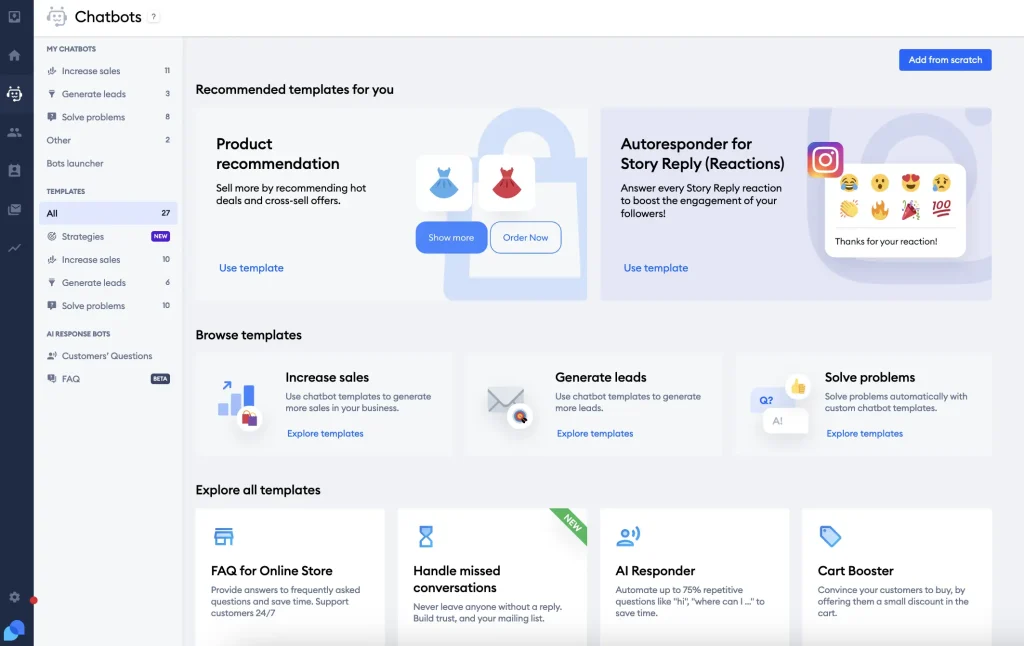
When a chat needed more attention, we turned it into a ticket with one click and kept working on the same dashboard. I also set up a proactive message that fired after a visitor spent time on a product page, so chat helped with sales too. Visitor typing preview let her prepare answers early.
The Flows builder took me a while to understand, so I built two simple automations first and tested both before showing them to real visitors. I would suggest the same to any small team starting out, because careful testing saves you embarrassing mistakes later.
Pros:
- Unified inbox merges live chats, emails, and Messenger threads in one place
- Lyro AI agent trains on website data and handles order status questions automatically
- Chat-to-ticket conversion keeps longer issues organized and easy to track
- Visitor typing preview lets agents prepare answers before the message even arrives
- Proactive messages trigger on time on the page or cart value to boost conversions
Cons:
- Automation setup can feel daunting for teams without prior chatbot experience
- Focused on small and mid-sized teams and online stores, so enterprise needs may call for another tool
How Tidio Compares With Ada: Tidio suits small teams that want to test with a free plan first, which is a lighter starting point than an enterprise rollout.
User Rating: 4.6/5 (G2)
Pricing: Free plan available. Paid starts at $24.17/month (billed annually). Lyro AI add-on from $32.50/month
3. Intercom (Fin): Best for SaaS Teams Wanting Fin AI With a Published Per-Outcome Rate
Fin came up when a SaaS support lead I work with was weighing her options, so I sat in on her setup. She pointed it at her help center, and Fin began replying in natural language. When a question got tricky, it passed the thread to a teammate with the full history, so the customer never repeated a word.
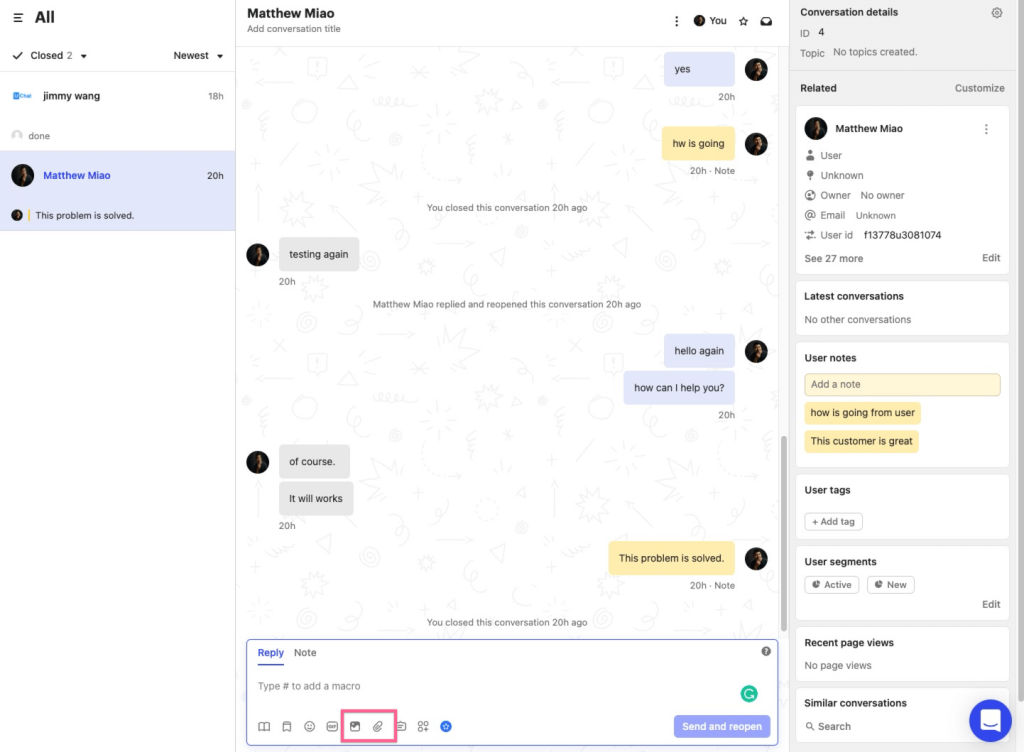
Around Fin, she used the unified inbox for email, chat, and social messages, and the workflow builder routed and tagged conversations without manual work. Product tours and mobile messages covered onboarding, and Fin answered around the clock, which mattered because her customers wrote in from several time zones.
Her biggest lesson was about content. Fin answers from the articles behind it, so she cleaned up outdated help center pages first. If you run another helpdesk, ask for a demo inside your own stack before you decide, since integration depth can differ.
Pros:
- Fin AI answers 24/7 and hands off with full conversation history intact
- Unified inbox combines chat, email, and social channels into one clean view
- Workflow builder automates routing, SLAs, and follow-ups without manual tracking
- Interactive product tours accelerate feature adoption for new customers
- Mobile SDK pushes targeted in-app messages and surveys directly to users
Cons:
- Interface has a learning curve for teams new to workflow automation tools
- Answers depend on the quality of your help center, so content cleanup comes first
How Intercom Compares With Ada: Fin charges a published rate per outcome, which makes costs easier to project before you sign.
User Rating: 4.5/5 (G2)
Pricing: Starts at $29/seat/month (billed annually). Fin AI Agent at $0.99 per outcome
4. Zendesk AI Agents: Best for Teams Already Running Zendesk
One support manager I know already ran everything in Zendesk, so adding a separate bot felt like creating one more system to babysit. She tried Zendesk’s AI agents instead, and they worked inside her agent workspace. They learned from her Guide articles, and when a human took over, the transcript and customer details came along.
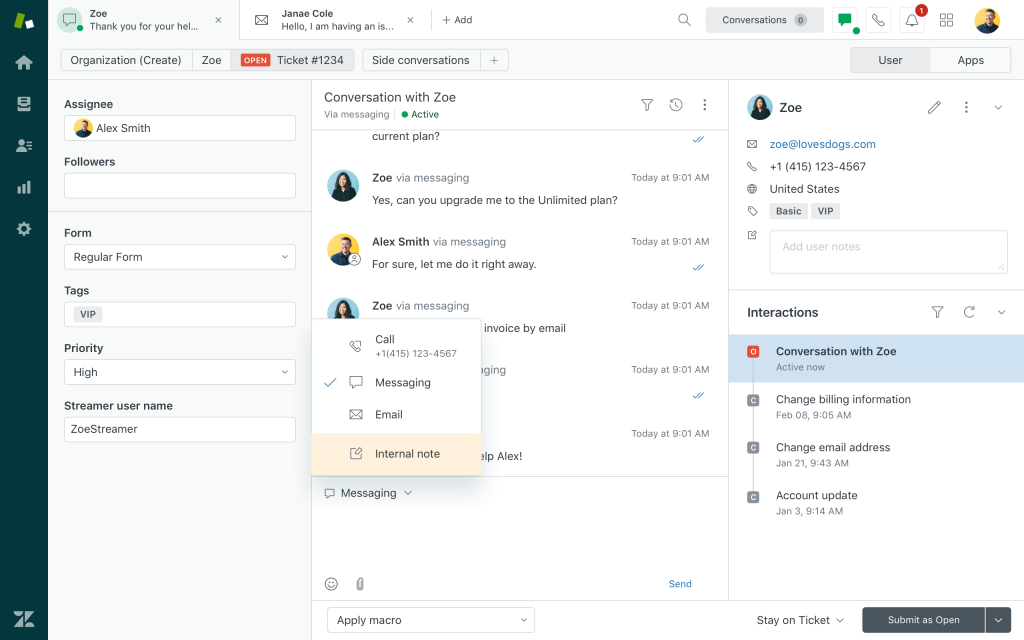
She liked the small touches. Replies appeared in the visitor’s language whenever a matching article existed, and unresolved chats became follow-up tickets automatically. Her team kept using the Explore dashboards they already checked.
Setup took her extra time in week one because the options were new to her. She picked the articles to train on, set fallback rules, and mapped the handoff triggers, all through point and click, which she called manageable. By week’s end, the handoff triggers were already keeping her agents inside the workspace they already knew, instead of bouncing between separate tools.
Pros:
- Native to Zendesk Support, Guide, and Messaging, so nothing feels bolted on
- Trains directly on help center articles, avoiding duplicate content work
- Context-rich handoffs pass transcripts and user data to agents instantly
- Multilingual article detection serves answers in the visitor’s language
- Smart triggers convert unresolved chats into follow-up tickets automatically
Cons:
- Initial setup can take longer for teams new to the Zendesk ecosystem
- Works best when your help center articles are already well organized
How Zendesk AI Agents Compares With Ada: Zendesk’s AI agents are native to the helpdesk, so there is no extra vendor to manage if Zendesk is already your system of record.
User Rating: 4.3/5 (G2)
Pricing: Starts at $ 55agent/month paid yearly
5. Freshchat: Best for Freshworks Suite Users
My colleague’s team already used Freshdesk and Freshsales, so I helped him wire up Freshchat. The AI bot, live chat, and knowledge base suggestions connected to each other without much fuss, so he had a working setup quickly. Before launch, we tested the widget on two pages so greetings looked right.
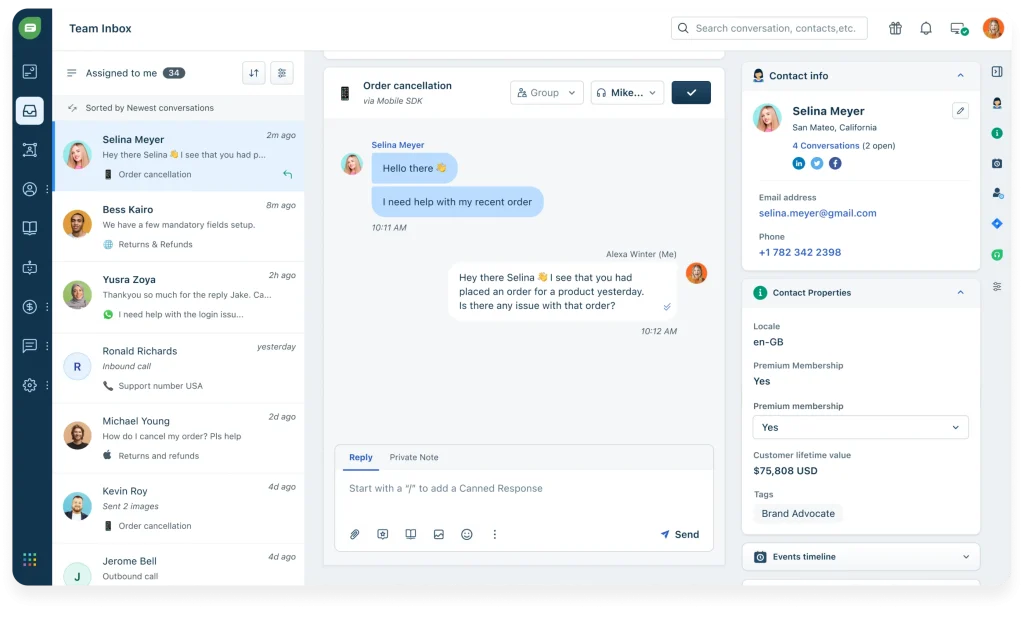
Freddy AI replied in multiple languages and picked up sentiment, which nudged priority chats toward his reps. His agents saw one inbox with visitor profiles and chat history beside each customer, and customers could rate the chat in the same thread. He started his first bot from the FAQ templates in the no-code flow builder.
He also set behavior-based triggers that opened conversations on certain pages. The advanced bot flows felt harder than the basics, so I suggested he sketch the escalation paths on paper first. If your stack is not Freshworks, other tools here may suit you better.
Pros:
- Grows natively with other Freshworks apps, giving agents full CRM-level context instantly
- Omnichannel inbox covers web, mobile, WhatsApp, and Apple Business Chat on one screen
- Freddy AI suggests replies and tags intent automatically, speeding up every response
- No-code flow builder with pre-trained FAQ templates gets you live fast
- Trigger campaigns based on user journey and page behavior for timely engagement
Cons:
- Setup for advanced bot flows can feel less intuitive than simpler standalone tools
- Strongest when the rest of your stack is Freshworks
How Freshchat Compares With Ada: Freshchat is the better fit when Freshworks is already your core stack and you want chat, CRM, and helpdesk context together.
User Rating: 4.4/5 (G2)
Pricing: Starts at $19/agent/month
6. LiveChat: Best for Human-Led Chat Teams With Strong Staffing Controls
AI as a helper, not a replacement, was what a support director I know wanted for her human agents, so she chose LiveChat. The AI inside the core product assists her agents, and hands-off resolution comes from ChatBot, a separate product from the same company.
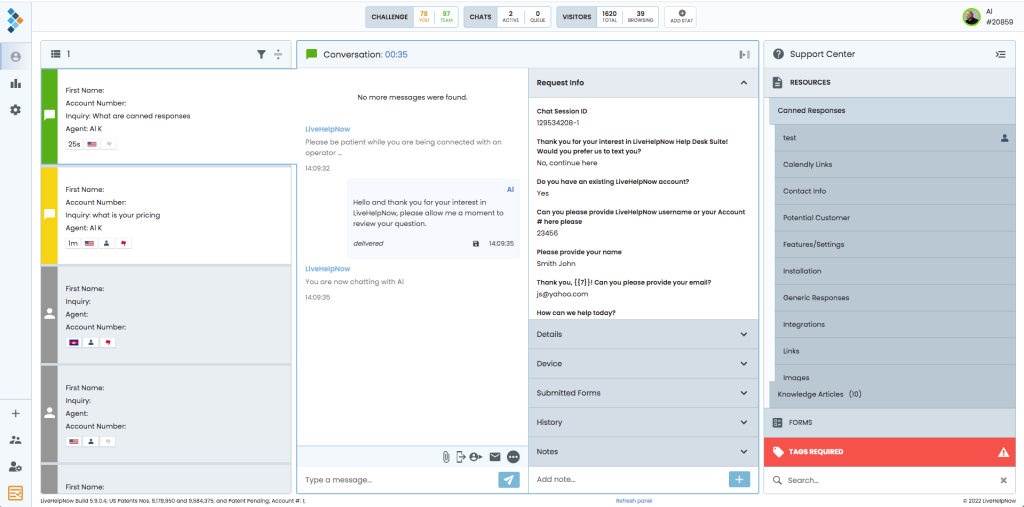
What she praised was the staffing side. She used agent groups and skill-based routing to send chats to the right people, and the work scheduler and staffing prediction helped her plan coverage across shifts. Visitor tracking showed which pages people browsed, so agents could start the right conversation.
She also customized the chat widget to match her brand and colors and checked the advanced reports each week to see how the team was doing. She said the weekly review made staffing conversations with her managers much easier and more concrete than before.
When she wanted routine questions handled automatically, she knew she would add ChatBot.
Pros:
- Agent groups route each chat to the right team
- Work scheduler and staffing prediction help you schedule coverage
- Skill-based routing sends complex chats to experienced agents
- Advanced reporting dashboards track team performance
- Visitor tracking shows who is browsing and which pages they view
Cons:
- Autonomous AI resolution needs a separate ChatBot product, since AI in the core product assists agents
- Best suited to human-led teams rather than fully AI-led support
How LiveChat Compares With Ada: LiveChat centers on skilled human agents, with AI assisting them and hands-off automation added through ChatBot.
User Rating: 4.5/5 (G2)
Pricing: Starts at $19/agent/month (billed annually). ChatBot for autonomous AI is sold separately
7. Gorgias: Best for Shopify Stores Automating Order Tickets
Gorgias was the helpdesk a founder friend of mine, who sells on Shopify, walked me through last time we met. Its AI Agent answers chat and email tickets, and inside the ticket it can edit orders, handle returns, and process cancellations. She told me where-is-my-order questions were the very first thing it took off her team’s plate.
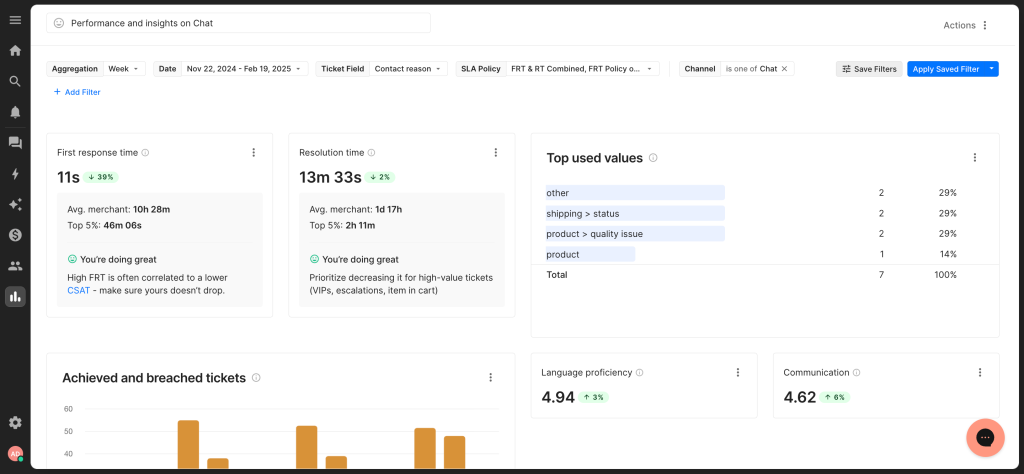
It connected with the tools she already used, including Recharge, Klaviyo, Loop Returns, and Yotpo, so the context an agent needed sat right next to the conversation. She also added voice and SMS to the same helpdesk.
Her advice to me was to look at your ticket mix first. If most of your questions are about orders, this fits well. If they are mostly conversational, a general AI agent may serve you better. She also reminded me that the AI Agent works only with Shopify, so confirm your platform before booking a demo.
Pros:
- In-ticket Shopify automation handles order edits, returns, and cancellations
- AI Agent resolves chat and email conversations without a human
- Connects with 100+ tools, including Recharge, Klaviyo, Loop Returns, and Yotpo
- Where-is-my-order, refund, and return questions can be automated end to end
- Voice and SMS channels can sit in the same helpdesk
Cons:
- The AI Agent works only with Shopify, not BigCommerce, Magento, or WooCommerce
- Less suited when most questions are conversational rather than order actions
How Gorgias Compares With Ada: Gorgias is built around e-commerce workflows, so it goes deeper on order actions but only for Shopify stores.
User Rating: 4.6/5 (G2)
Pricing: Starts at $40/month
8. Voiceflow: Best for Teams That Want to Build and Own Their AI Agent
Owning the agent instead of renting it was the goal for a product builder I know, so she tried Voiceflow. She chose the language model she preferred, since it works with any major one, and combined deterministic Workflows with reasoning Playbooks. Refunds followed her exact steps, while open questions got flexible answers.
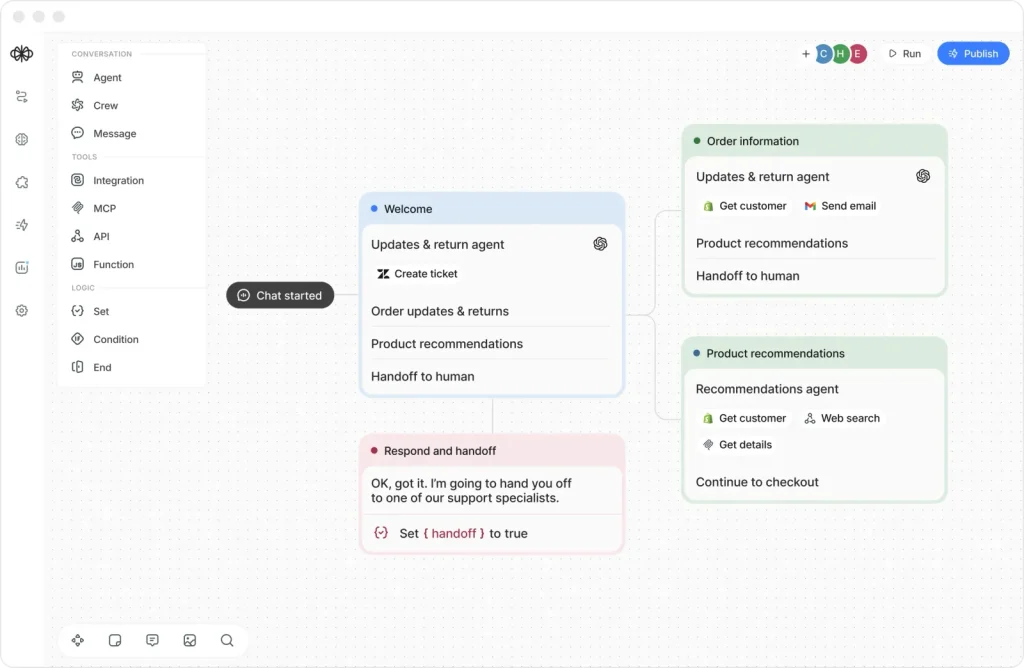
What she loved most was the observability. She could see what the agent did at each step, which made tuning feel less like guessing. Handoffs routed into the helpdesk she already ran, and she tested chat, voice, and telephony agents in the same place.
The tradeoff was ownership. She had to design, test, and maintain the agent herself, and she tested the handoff with her own helpdesk during the demo to see how it behaved. Her suggestion to me was to reserve some real builder time, because a first useful version needs careful design and plenty of testing.
Pros:
- Model-agnostic, so you can use any major language model
- Deterministic Workflows and reasoning Playbooks work together in one agent
- Built-in observability shows what the agent did at each step
- Handoffs route into the helpdesk you already run
- Supports chat, voice, and telephony agents
Cons:
- You design, test, and maintain the agent yourself, which asks more of your team
- Handoff capabilities vary by helpdesk, so test your own setup
How Voiceflow Compares With Ada: Voiceflow gives you the building blocks to own your agent logic, which suits teams with builders and a clear process to automate.
User Rating: 4.5/5 (G2)
Pricing: Custom Quote
9. Decagon: Best for Closest Enterprise Like-for-Like Swap
Decagon is a tool I have only seen through demos, so I will stick to what I observed there. It builds AI concierge agents that handle chat, email, and voice, and the enterprise controls and analytics were easy to see in the walkthrough. It felt newer and AI-native next to older platforms.
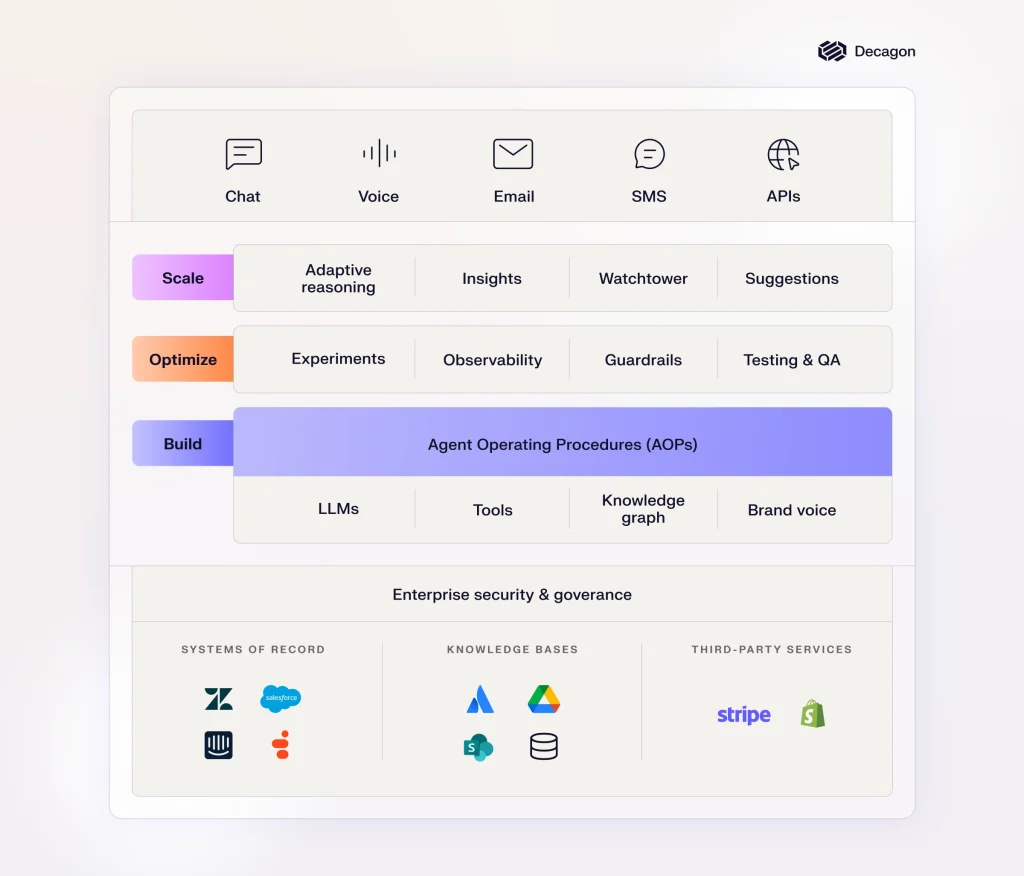
My take is that it suits a large queue and a team that genuinely likes testing. Someone has to own tuning the agent each week, so I would not hand it to a team without that capacity. Ask who maintains it after launch.
The process was sales-led, with no self-serve signup to click through. I would ask for a pilot on real tickets and judge the results myself, rather than trusting a polished demo.
For a small or mid-sized team that wants to go live this week, I found the tools above this one easier to start with.
Pros:
- AI concierge agents cover chat, email, and voice
- Enterprise controls for larger support operations
- Analytics on agent performance
- AI-native product built for customer support
- Highest G2 score on this list, though from a small review base
Cons:
- Only 18 G2 reviews so far, so the rating is a small sample
- Built for larger teams that can own ongoing agent tuning
How Decagon Compares With Ada: Decagon sits in the enterprise tier with a quote-only, sales-led process, so expect a pilot conversation rather than a signup.
User Rating: 4.8/5 (G2)
Pricing: Custom Quote
10. Kore.ai: Best for Enterprise Multi-Channel Virtual Assistants
Kore.ai only made sense to me after a consultant friend described her rollout for a large company. The platform ran conversational agents for customer service, employee support, and business process automation, so one vendor covered the customer help desk and the internal IT desk. Deep industry templates gave the team a head start.
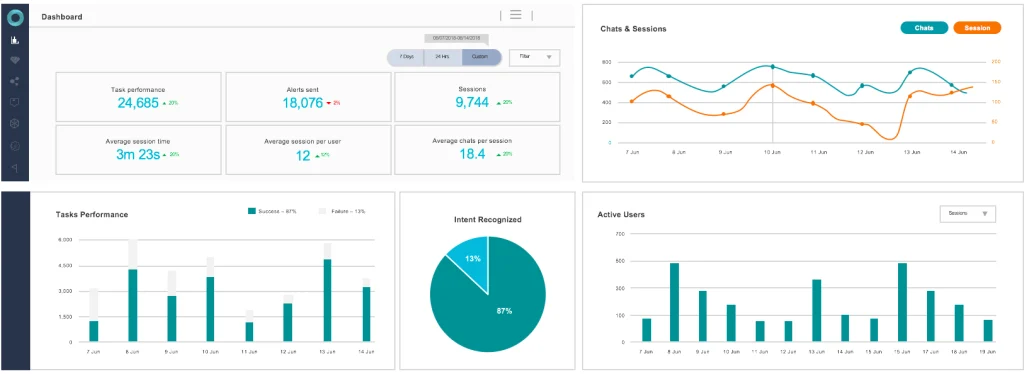
Natural language understanding is clearly central to the platform, and the assistants worked across multiple channels. Behind the chat, it also automated business processes, which is why her client picked it. It worked well for her client because they planned the work properly before starting.
It was also a lot of work. Her team needed a project owner, a clear rollout plan, and a lot of patience. I would call it a serious platform for a serious program.
If your goal is a fast website agent with a human one click away, start elsewhere on this list.
Pros:
- Deep industry templates speed up regulated and rule-heavy use cases
- Strong natural language understanding heritage
- Customer-facing and employee-facing assistants on one platform
- Business process automation behind the conversation
- Multi-channel virtual assistants reach customers where they message you
Cons:
- Needs a project owner and a rollout timeline, unlike self-serve tools
- Bigger than needed for small teams that mainly want website chat
How Kore.ai Compares With Ada: Kore.ai covers broader automation beyond customer support, with deep industry templates, so it is a bigger program than a website chat agent.
User Rating: 4.6/5 (G2)
Pricing: Custom Quote
How I Chose These Ada Alternatives
When I evaluate Ada alternatives for this list, I do not just rely on feature lists or marketing claims. I look at how these tools actually perform in real-world scenarios. I write for the ProProfs Chat editorial team, so I placed our tool first and said plainly where other tools fit better. Here is the framework I used to make sure every recommendation is practical, reliable, and worth considering:
- User Reviews / Ratings: I start by looking at real user feedback from platforms like G2. This gives me a clear picture of how support teams actually experience the tool day to day, what they love, and where it falls short.
- Core Features & Functionality: I focus on what truly matters in AI customer service software. This includes training on your own content, bot-to-human handoff, integrations, omnichannel support, and reporting. If a tool cannot handle these well, it does not make the cut.
- Ease of Use: I pay close attention to how intuitive the platform feels. A tool might be powerful, but if your team struggles to set it up and maintain it, it defeats the purpose. Clean interface, simple navigation, and quick onboarding are non-negotiable for me.
- Customer Support: From my experience, implementation is where many tools fail. I evaluate how responsive and helpful the support team is, especially during setup and ongoing use. Fast, reliable support makes a big difference in adoption.
- Value for Money: I compare pricing with what the tool actually delivers. This is not about picking the cheapest option, but about whether the features, flexibility, and billing model justify the cost.
- Personal Experience / Expert Insights: Wherever possible, I rely on my own hands-on experience with these tools. I also consider insights from support managers, CX leads, and operations teams who run AI agents on real queues. This helps me go beyond surface-level reviews and highlight what actually works.
Top 3 Ada Alternatives
After comparing all ten tools, three came out on top for different reasons. The right one depends on your stack and how fast you need to go live.
1. ProProfs Chat
ProProfs Chat is my top overall pick because it is the easiest live chat and AI customer service agent for instant, automated support. It trains on your website, help center, or PDFs in one click, and it hands off to a human with the full chat context, so customers never repeat themselves.
2. Intercom (Fin)
Intercom is the pick I would test if you want a polished AI agent with a published per-outcome rate. Fin answers from your help center and hands off with the history intact, while the unified inbox keeps email, chat, and social messages together in one clean view for your team.
3. Zendesk AI Agents
Zendesk AI Agents fit best if your team already works in Zendesk. They run inside the same agent workspace, learn from your Guide articles, and pass context along on handoff, so you add no extra vendor to manage and your agents keep the tools they already know.
FREE. All Features. FOREVER!
Try our Forever FREE account with all premium features!
How to Test an Ada Alternative Before Buying?
Demos show the best day, and a pilot shows the real one. Run this checklist on every one of the Ada competitors you trial, so you compare tools on the same ground.
- Hard-ticket test: Pull 20 of your toughest real tickets and ask each tool the same questions. Score accuracy, tone, and whether it admits what it does not know.
- Escalation test: Ask something the bot cannot answer, then check that the human receives the full chat history so customers never repeat themselves.
- Source check: Train the AI on your website, one PDF, and one help center article, then confirm each answer points to the right source.
- Integration check: Connect your helpdesk or CRM during the trial and confirm it creates leads and tickets, not just contacts.
- Language check: Ask questions in your top two customer languages and confirm the reply language matches.
- Reporting check: Ask to see resolution, deflection, and satisfaction reports, and confirm who can view them without a login.
- Contract check: Get the billing unit, overage rate, renewal cap, and exit terms in writing before you sign.
- Pilot scope: Run one workflow for 30 days before you expand to other channels.
How Do I Switch From Ada Without Downtime?
A clean switch is a short project, not a rebuild. Whichever of the competitors of Ada you pick, here is the order I would follow so your customers never notice the change.
- Day 1, export: Pull your knowledge sources, top intents, and handoff rules into one document.
- Days 2 to 3, train: Point the new AI at your website, help center, and PDFs, then fix any gaps it exposes.
- Days 4 to 7, rebuild: Recreate your top 20 intents and escalation rules first, and skip the long tail for now.
- Week 2, parallel run: Put the new agent on one page or one channel while Ada stays live, and compare answers daily.
- Week 3, cut over: Move the remaining channels, then watch resolution and handoff reports for two weeks.
- Before renewal: Start the pilot at least 60 days before your renewal date, so you negotiate with real data.
Pick the Ada Alternative Your Team Will Actually Use
Switching away from Ada does not mean settling for less. It means choosing a platform with a billing model you understand, a human handoff you have tested, and a setup your team can realistically complete this month.
Before comparing vendors, price out three volume scenarios in writing, test your 20 hardest support tickets instead of relying on a polished demo script, and check the human handoff early. Once you choose a platform, start with one workflow and run it for 30 days before expanding.
If you want the easiest live chat and AI customer service agent for instant, automated support, ProProfs Chat is a strong place to start. It can train on your website, help center, or PDFs, hand conversations to human agents with the full chat context. It also offers a forever-free plan for one operator.
You can start by training it on your website URL and testing it with your toughest customer question.
Frequently Asked Questions
Can I add an AI agent on top of my current helpdesk instead of replacing it?
Some tools can sit on top of a helpdesk you already use, and ProProfs Chat connects with Zendesk, Salesforce, and Shopify. Ask for a test inside your own helpdesk and check how deep the ticket sync goes.
What is the difference between deflection rate and resolution rate?
Deflection counts chats that never reached a human. Resolution counts only the chats where the customer's issue was actually solved. Ask each vendor which one they report.
Is a free plan enough to test an AI agent properly?
It depends on the plan. ProProfs Chat has a forever-free plan for one operator. With any tool, check how many AI conversations a free plan includes and whether that allowance renews.
Do any of these tools handle phone calls?
Voice support varies by tool, so ask each vendor to demo it. ProProfs Chat focuses on website and messaging channels. If AI phone support is a must-have, put it first on your demo checklist.
What security questions should I ask before switching?
Ask where data is stored, whether your conversations train any models, and what access controls and SSO are available. ProProfs Chat documents GDPR and CCPA compliance and supports SSO.
FREE. All Features. FOREVER!
Try our Forever FREE account with all premium features!

 We'd love your feedback!
What did you like & how can we make it even better?

 Thanks for your feedback!
 Ask Your Question
Have a question? Get expert help to make your decision easier.