A white-label AI chatbot is supposed to feel like it was built in-house, but the first time I added one to my website, I barely noticed the “powered by” tag in the corner. Then a customer asked if we had outsourced support to a third-party provider.
That changed how I looked at branding. According to Gartner’s 2026 customer service research, 50% of customers say interactions are easier when companies use GenAI, while 87% still consider access to a human agent essential. That makes trust and a seamless experience just as important as automation.
A good white-label chatbot should run on your own domain, carry your branding, and fit naturally into your support setup. The real questions are how much you can rebrand, how quickly you can launch, and whether it will actually reduce support workload.
What Is a White Label AI Chatbot?
A white-label AI chatbot is a ready-built conversational AI platform that you rebrand entirely as your own, using your logo, colors, domain, and dashboard, so customers never see the original software provider’s name.
Here’s why picking the right white-label chatbot software actually matters for your own website or app:
- Full brand ownership: Your logo, colors, domain, and dashboard all carry your name, not a third-party watermark that breaks trust.
- No vendor tags anywhere: No “powered by” text or vendor branding shows up anywhere a customer can see it.
- Branded notifications: Emails and alerts triggered by the bot carry your name, not the vendor’s.
- Faster support coverage: You launch a working bot on your own site in days, not months of custom development.
- Full customization: You control the tone, flows, and integrations instead of being boxed into a generic bot experience.
- Lower cost than building your own: You skip hiring developers to build a chatbot from scratch.
10 Best White Label AI Chatbot Platforms
Here are the 10 best white-label AI chatbot platforms for businesses that want to rebrand a chatbot and run it on their own website or app. I tested each one for how well it handles white labeling, AI training, and support automation before ranking it here.
| Tool | Best For | Pricing | User Rating |
| ProProfs Chat | Easy Live Chat & AI Customer Service Agent for Instant, Automated Support | Free plan available; paid plan starts at $19.99/user/month | 4.5/5 (G2) |
| Tidio | Combining Live Chat With AI Automation for Small Teams | Free plan available; Lyro AI from $42/month; paid plans from $29/month | 4.6/5 (G2) |
| Botpress | Developer-Grade Customization and Full Brand Control | Starts at $150/month | 4.5/5 (G2) |
| Tawk.to | Free Live Chat With a Full White Label Add-On | Free; Remove Branding add-on available separately | 4.5/5 (G2) |
| Voiceflow | Designing Voice and Chat Agents Customers Actually Trust | Custom quote | 4.6/5 (G2) |
| CustomGPT.ai | Training Deeply Accurate Bots on Large Knowledge Bases | Starts at $99/month | 4/5 (G2) |
| Engati | Multilingual Support Across Global Customer Bases | Custom quote | 4.1/5 (G2) |
| Botsify | Live Agent Handoff Combined With Simple Bot Building | Starts at $149/month | 4.3/5 (G2) |
| Crisp | Live Chat and AI Chatbot Combined Under One Brand | Starts at $45/month/workspace | 4.5/5 (G2) |
| Chatbase | Fast, Affordable AI Chatbot Setup From Your Own Content | Starts at $40/month | 4.9/5 (G2) |
1. ProProfs Chat – Easiest Live Chat & AI Customer Service Agent for Instant, Automated Support
I’ll be straightforward. Of every white-label AI chatbot platform I’ve tested for my own website, ProProfs Chat is the one I return to when I need something live in days, not weeks. You train the AI support agent on your website URL, help center, or uploaded files, and it organizes that content into working answers in seconds.
No coding required. Setup is genuinely three steps: brand the chat window, add the code snippet, and start chatting. The white-label option removes “Powered by ProProfs” entirely, and you control the color scheme, logo, custom domain, and 100+ display settings so your customers never see the underlying vendor.
This AI support agent handles bot-to-human handoff cleanly, connects across your website, WhatsApp, Facebook, Instagram, and SMS, and syncs with 100+ integrations, including Salesforce, Zoho CRM, and Shopify. Built-in reports and analytics track every conversation, and built-in security covers SSL, SSO, and GDPR compliance.
Beyond answering questions, AI agents can take action too, such as updating Shopify orders or triggering notifications. They can also book appointments, capture leads, and send contact data directly to Salesforce, HubSpot, Zoho, or Shopify without requiring custom code. It also works seamlessly with ProProfs Knowledge Base and ProProfs Help Desk, giving businesses a connected AI, self-service, and live support experience from a single platform.
Pros:
- Train AI chatbot directly on your website URL, help center, or uploaded files with no manual scripting
- Removes all “Powered by ProProfs” branding under the white label option
- Sentiment analysis and risk prediction surface at-risk conversations before they escalate
- Bot-to-human handoff is built into the same workflow
- Omnichannel across website, WhatsApp, Facebook, Instagram, and SMS
- 100+ integrations, including Salesforce, Zoho CRM, and Shopify
Cons:
- Cloud-only; no offline or self-hosted deployment
- No dark theme for the chat interface
User Rating: 4.5/5 (G2)
Pricing: A free plan is available for growing teams. Paid plan starts at $19.99/user/month (white label available as a paid add-on)
2. Tidio – Best for Combining Live Chat With AI Automation for Small Teams
I tested Tidio on a small online store last year to see how well it handled real customer questions without constant babysitting from anyone. Within a week, the bot caught almost every repeat question about shipping and returns before it ever reached a live agent.
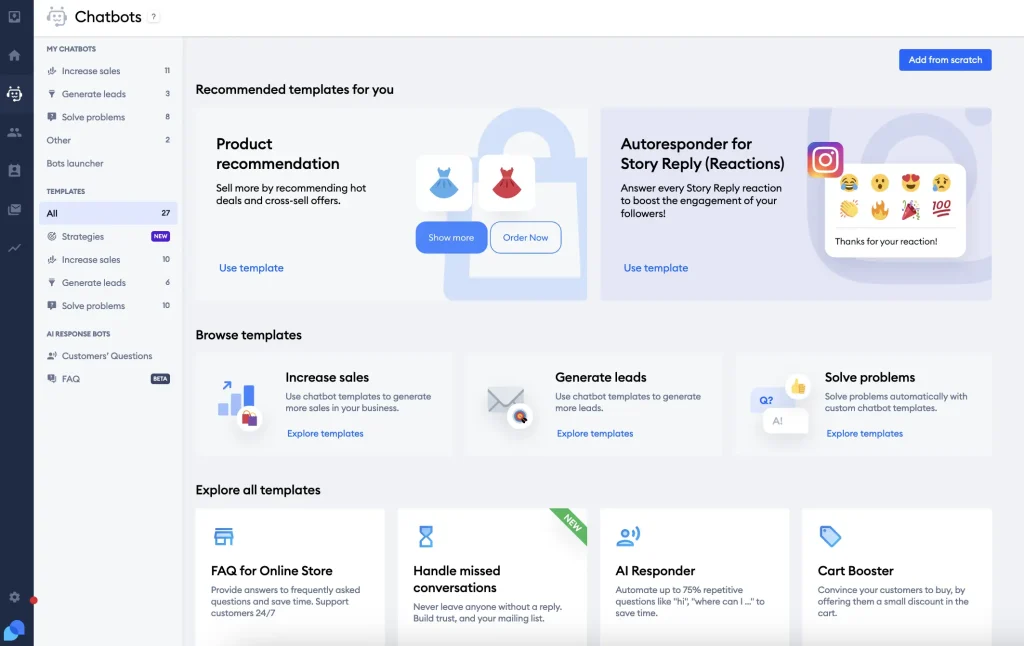
What stood out was how the AI reads through product pages and help articles on its own, so there was no need to write scripted flows for every scenario. The white label option let me swap Tidio’s own branding for the store’s logo and color palette, so shoppers never noticed a third-party tool behind the chat window.
It connects to Shopify for order lookups and routes anything the bot cannot handle straight to a live agent. For a small business running everything with a lean team, the biggest win is simply not having to touch the bot again once it is trained and fully live.
Pros:
- AI reads your product pages and help content automatically without manual flow-building
- White label removes Tidio’s own branding across the chat widget
- Native Shopify integration for order-related questions
- Simple bot-to-owner escalation for anything outside its training
Cons:
- Multilingual depth is lighter than platforms built specifically for global support
- Advanced automation logic is more limited than developer-first platforms
User Rating: 4.6/5 (G2)
Pricing: Free plan available. Lyro AI from $42/month (50 conversations). Full-featured paid plans from $29/month.
3. Botpress – Best for Developer-Grade Customization and Full Brand Control
Botpress is the platform I recommend when your website needs more than a simple FAQ bot and instead wants custom logic built around it. The visual flow builder lets you design conversation paths without writing code, but you can also drop into the underlying logic when you need something specific, like pulling live order data or triggering a webhook mid conversation.
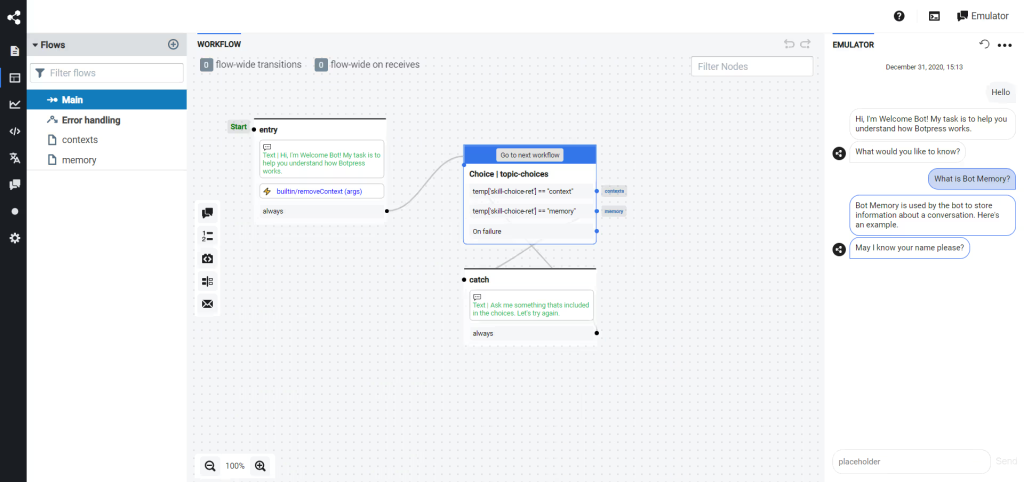
White labeling here goes well past a logo swap. You get a custom UI, your own domain, and full API access, so the platform genuinely feels like your own product rather than a rented tool. I have used it to stitch together several LLM agents behind one branded chat widget on my own site, each handling a different part of a conversation.
It integrates cleanly with your existing CRM and support stack, which matters once you already have a workflow in place you won’t rebuild around a new chatbot.
Pros:
- Visual flow builder combined with full custom code access when needed
- Custom UI, dedicated domain, and full API access under white label
- Can chain multiple LLM agents behind a single branded widget
- Integrates cleanly with your existing CRM and support tools
Cons:
- Steeper learning curve for teams without any technical background
- Getting the most value requires comfort with hands-on configuration
User Rating: 4.5/5 (G2)
Pricing: Starts at $150/month
4. Tawk.to – Best for Free Live Chat With a Full White Label Add-On
Tawk.to is the platform I recommend to anyone who wants live chat without paying anything for the core product itself. The base plan includes unlimited agents, unlimited chat history, and a hosted knowledge base at no cost, which is rare for a tool this capable.
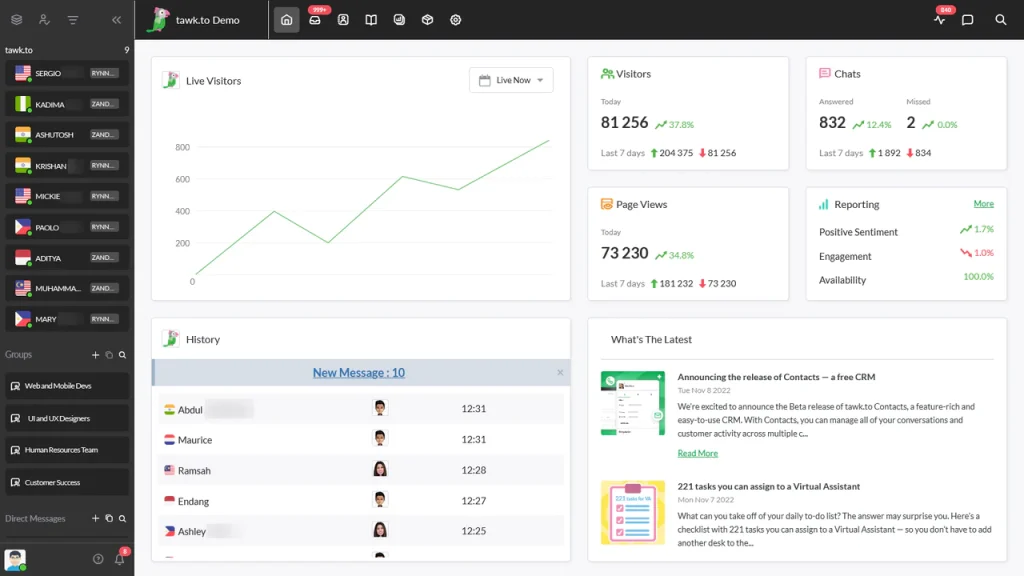
The Remove Branding add-on is what actually makes it worth including here, since it strips the “Powered by tawk.to” tag from the widget, the chat page, ticket emails, and the knowledge base, and lets you run all of it on your own custom domain.
There is no reseller terminology to wade through and no agency-first setup flow, just a straightforward toggle once the add-on is active. It also supports triggers, canned responses, and a built-in AI assist option for handling repeat questions automatically. For a business on a tight budget that still wants a fully branded chat experience, this platform is genuinely hard to beat.
Pros:
- Core live chat product is free with unlimited agents and chat history
- Remove Branding add-on white labels the widget, chat page, emails, and knowledge base
- Custom domain support across every white-labeled surface
- Built-in AI assist option for handling repeat questions
Cons:
- Full white labeling requires purchasing the Remove Branding add-on separately
- Interface feels less polished than some premium alternatives
User Rating: 4.5/5 (G2)
Pricing: Starts at Free (Remove Branding add-on available separately)
5. Voiceflow – Best for Designing Voice and Chat Agents Customers Actually Trust
A colleague of mine runs a travel booking website, and she needed a chatbot that could feel less like a script and more like an actual conversation across both voice and text for her own site visitors. Voiceflow ended up being the platform she stuck with.
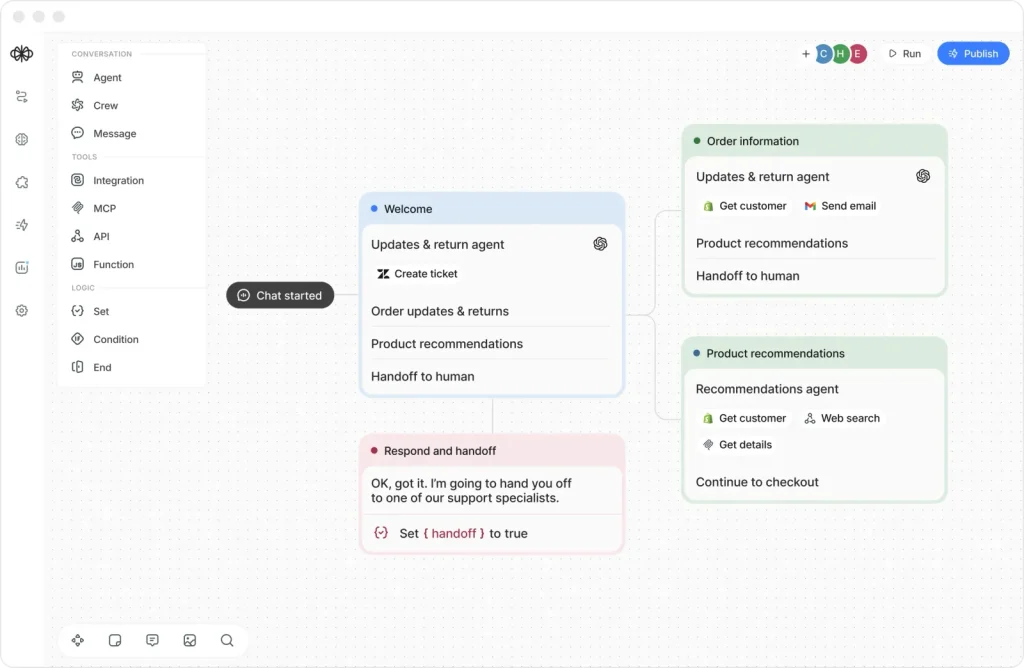
Its design canvas lets you map out agent behavior visually, so building a complex flow does not require a developer sitting beside you the whole time. She white-labeled the entire experience under her own brand, from the widget to the internal design environment her team used to build it.
What stood out to her most was how well it handled larger, higher traffic deployments, since her own growth kept raising questions about uptime and structured escalation paths to a live team. She now treats it as her default whenever her business needs an agent that customers actually enjoy talking to, not just tolerate.
Pros:
- Visual design canvas for building both voice and chat agent behavior
- White label extends to the design environment, not just the chat widget
- Built for larger, higher-traffic deployments with structured escalation
- Strong fit for businesses designing complex, multi-turn conversations
Cons:
- More setup time than simpler no-code builders
- Voice capabilities add complexity that a text-only business may not need
User Rating: 4.6/5 (G2)
Pricing: Custom Quote
6. CustomGPT.ai – Best for Training Deeply Accurate Bots on Large Knowledge Bases
CustomGPT.ai earns its spot on this list because of how seriously it treats accuracy, which is the biggest fear I have before putting any bot in front of real customers. You upload a large knowledge base, whether that is hundreds of PDFs, a full help center, or scattered internal documents, and it builds answers strictly from that source instead of guessing.
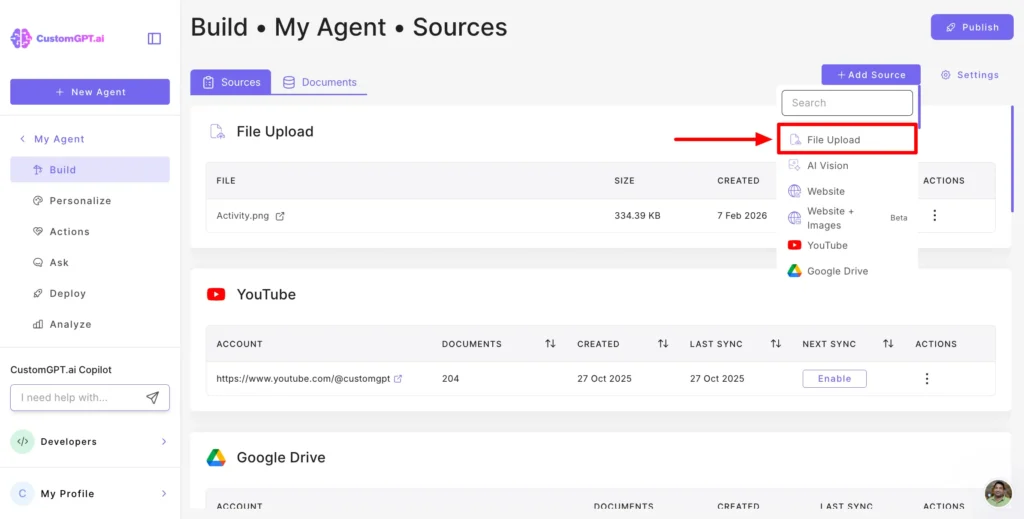
That matters when one wrong answer can quietly cost you a customer’s trust. The no-code builder makes setup accessible even if nobody on your team writes code, and the white-label controls let you remove all references to the underlying platform across the chat widget and every customer-facing page.
I lean on it for corporate, legal, and healthcare style businesses where hallucinated answers are not an acceptable risk. The support structure also makes it easier to retrain the bot as your own product or policies change over time.
Pros:
- Builds answers strictly from your uploaded knowledge base to reduce hallucinated responses
- Handles large document sets, including hundreds of PDFs, in one build
- No-code builder usable without a technical team
- White label removes all references to the underlying platform
Cons:
- Best suited to knowledge-heavy use cases rather than transactional bots
- Retraining still requires organizing source material as your business changes
User Rating: 4/5 (G2)
Pricing: Starts at $99/Month
7. Engati – Best for Multilingual Support Across Global Customer Bases
Engati becomes the obvious pick the moment your own customers speak more than one language, which comes up more often than most businesses expect once they start selling beyond one region. It handles conversations in a large number of languages without you building separate bots for each one, detecting and responding in whatever language the visitor is using.
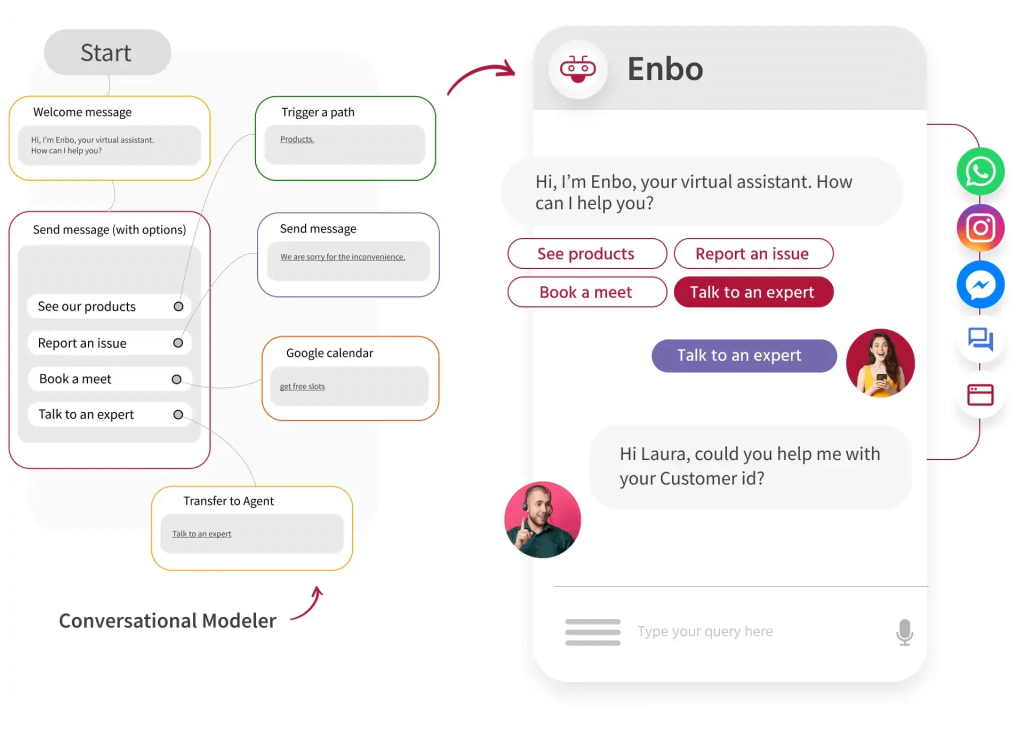
The bot builder itself is drag and drop, so training it on your own FAQs and product data does not require you to bring on a technical hire. White labeling covers the widget, the admin panel, and the domain, so nothing points back to Engati when your own customer opens the chat.
It also supports omnichannel deployment across WhatsApp, Instagram, and web, which keeps every conversation in one place instead of scattered across separate tools. For a business with real international or multilingual traffic, this platform removes language completely as a blocker.
Pros:
- Detects and responds in a large number of languages automatically
- Drag-and-drop builder trains on your FAQs and product data without a developer
- White labeling covers the widget, admin panel, and domain
- Omnichannel deployment across WhatsApp, Instagram, and web in one dashboard
Cons:
- Best suited to businesses with real international or multilingual traffic
- Advanced workflow customization is less flexible than developer-first tools
User Rating: 4.1/5 (G2)
Pricing: Custom Quote
8. Botsify – Best for Live Agent Handoff Combined With Simple Bot Building
A business owner I know had an old chatbot on her site with zero handoff to a human, so every unresolved question just dead-ended in frustration for her own site visitors. She switched over to Botsify specifically to fix that gap.
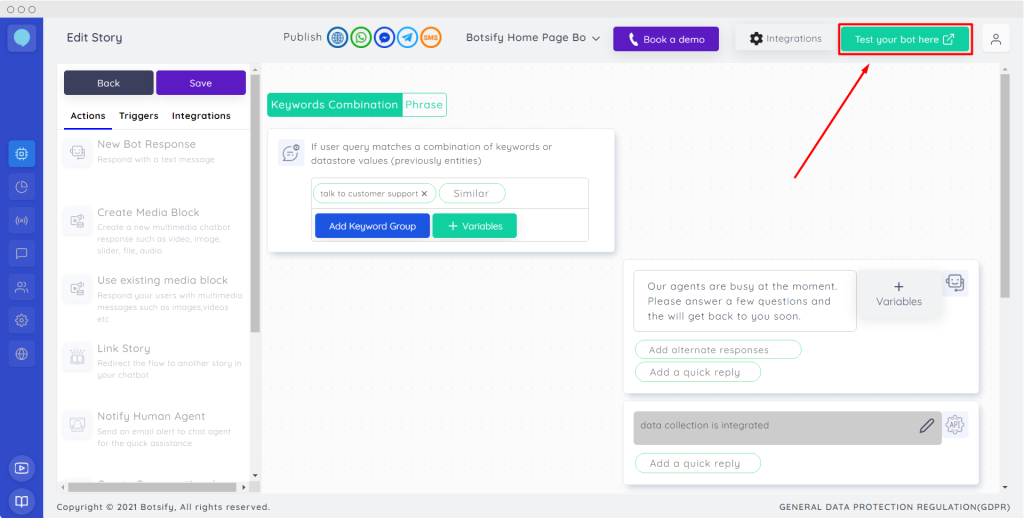
The platform blends a simple drag-and-drop bot builder with a live chat layer, so when the bot hits its limit, she can step directly into the same conversation without the customer having to repeat themselves from scratch. She appreciated how quickly she could get a working version live on her own site, since the setup itself does not demand any developer involvement at all.
White labeling under her plan covers her own domain, logo, and branding across the entire experience. It now sits as her go-to platform ever since her biggest complaint about a previous chatbot was that it never really solved anything on its own.
Pros:
- Live agent handoff built directly into the bot conversation
- Drag-and-drop builder needs no developer involvement to launch
- Covers your own domain, logo, and branding across the entire experience
- Fast to get a working version live on your own site
Cons:
- Full white labeling is tied to the higher-tier plan
- Advanced customization is lighter than fully developer-driven platforms
User Rating: 4.3/5 (G2)
Pricing: Starts at $149 /month
9. Crisp – Best for Live Chat and AI Chatbot Combined Under One Brand
Crisp is the platform I turn to when a website needs live chat and an AI chatbot working together under one brand, not two separate tools bolted together. It combines a chat widget, a knowledge base, and an AI assistant that answers routine questions on its own, escalating to a human the moment it can’t help.
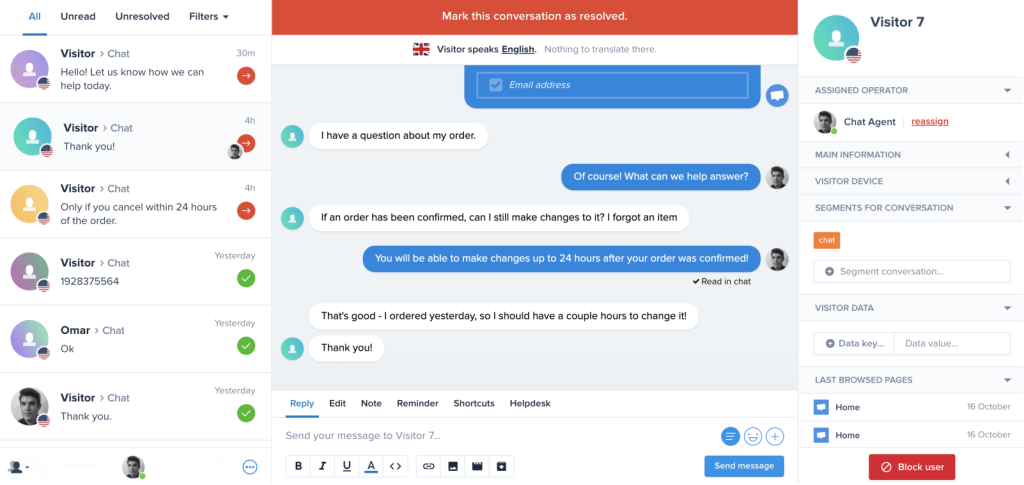
Setup is straightforward: connect the widget, feed it your help content, and adjust the colors and messaging to match your site. The white label option on the paid plan removes the “We run on Crisp” tag completely from the chatbox and outgoing emails, so nothing points back to Crisp.
It also runs its own knowledge base and shared inbox, keeping every conversation in one dashboard instead of scattered tools. For a single business that wants one clean, fully branded support layer instead of stitching several tools together, this ends up being a dependable pick.
Pros:
- Combines live chat, an AI chatbot, and a knowledge base under one widget
- White label removes the “We run on Crisp” branding from the chatbox and emails
- Built-in shared inbox keeps every conversation in one dashboard
- Straightforward color and messaging customization
Cons:
- Branding removal requires upgrading to the paid plan
- AI chatbot depth is lighter than platforms built purely around AI training
User Rating: 4.5/5 (G2)
Pricing: Starts at $45/month/workspace
10. Chatbase – Best for Fast, Affordable AI Chatbot Setup From Your Own Content
Chatbase is the platform I reach for when I need a working AI chatbot live within the hour, trained purely on the content I feed it directly. You upload documents, paste a website link, or drop in raw text, and it builds a chatbot that answers strictly from that source instead of guessing.
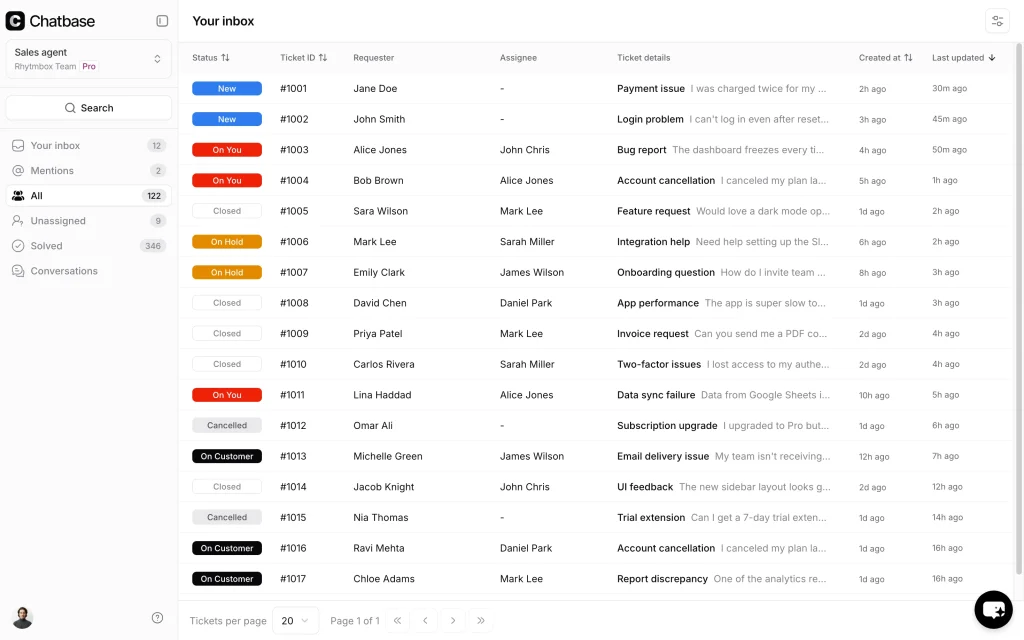
The dashboard is simple enough that no technical background is needed to get a bot trained and embedded on a site. White labeling comes as a paid add-on that strips the “Powered by Chatbase” badge and lets you run the widget on your own custom domain, so visitors never see which tool is running things.
It connects with Zapier, Slack, and a handful of other everyday tools, which cover most basic automation needs without extra setup. For a business that wants something live fast without a complicated build process, this is about as quick as it gets.
Pros:
- Trains directly from documents, website links, or raw text
- White label add-on removes the “Powered by Chatbase” badge and enables a custom domain
- Simple dashboard usable without any technical background
- Integrates with Zapier and Slack for basic automation
Cons:
- Branding removal is a separate paid add-on rather than included by default
- Best suited to straightforward Q&A bots rather than complex multi-step flows
User Rating: 4.9/5 (G2)
Pricing: Starts at $40/month
How I Chose These White Label AI Chatbots
When I evaluate white-label AI chatbot platforms for this list, I don’t just rely on feature lists or vendor claims. I look at how each one performs once it’s actually running on a real website. Here’s the framework I used to make sure every recommendation is practical, reliable, and worth trusting with your own brand:
- User Reviews / Ratings: I start by looking at real user feedback from platforms like G2. This gives me a clear picture of how businesses actually experience the tool day to day, what they love, and where it falls short.
- Core Features & Functionality: I focus on what truly matters in a rebrandable chatbot platform. This includes AI training accuracy, channel coverage, and integrations. If a tool cannot handle these well, it does not make the cut.
- Ease of Use: I pay close attention to how intuitive the platform feels for someone setting up a bot on a deadline. A tool might be powerful, but if your team struggles to configure it, it defeats the purpose.
- Customer Support: From my experience, implementation is where many white-label setups fail. I evaluate how responsive and helpful the support team is, especially since any downtime becomes your problem in front of your own customers, not the vendor’s.
- Value for Money: I compare what each platform delivers against what it actually costs to run on your site long term. This is not about picking the cheapest option, but about whether it holds up as your traffic grows.
- Personal Experience / Expert Insights: Wherever possible, I rely on my own hands-on experience setting these up on real websites. I also factor in insights from other business owners who’ve deployed these platforms on their own sites.
Top 3 White Label AI Chatbot Platforms
Out of everything on this list, three platforms consistently come out ahead once I think about what a growing business actually needs from a chatbot running on its own website or app.
1. ProProfs Chat
My top recommendation for businesses that want speed above everything else. It trains straight from your own website, removes all vendor branding under white label, and covers every channel your customers are likely to use. If you want one default platform, start here.
2. BotPenguin
The best pick once your customers are messaging you across more than just your website. Its unified dashboard and channel coverage make it far easier to keep every conversation in one place instead of juggling separate tools.
3. Botpress
The right call when your own needs go past a standard FAQ bot. Full API access and custom logic mean you can build something genuinely specific instead of working within a fixed template.
FREE. All Features. FOREVER!
Try our Forever FREE account with all premium features!
How to Launch a White Label AI Chatbot in 5 Steps
Let me show you exactly how quick a white-label chatbot for websites actually is to launch, using ProProfs Chat as the walkthrough, since its AI training and white-label setup make the whole process about as fast and effortless as it gets.
- Scan the source: Point the AI at your website, help center, or uploaded files, and it trains itself into working answers within seconds, no manual scripting needed.
- Brand the widget: Swap in your logo, colors, and chat window styling in a few clicks.
- Swap the domain: Move the widget onto your own domain, and the white label option strips out any “Powered by” tag completely.
- Test the handoff: Confirm the bot escalates cleanly to a human the moment it hits a question it can’t answer.
- Go live: Drop the code snippet onto your site, and you’re live the same day, not weeks later.
Pick the Platform Your Business Won’t Outgrow
The best white-label AI chatbot should do more than remove vendor branding. It should be easy to launch, accurate, flexible, and capable of handling real customer conversations across channels.
For most businesses, I’d recommend ProProfs Chat because it combines fast AI training, full white labeling, omnichannel support, human handoff, and 100+ integrations in one platform. It can also capture leads, book appointments, update orders, and trigger notifications without custom code.
Train the AI on your website, customize the branding, test the handoff, and launch it on your site.
Frequently Asked Questions
Why should I choose white-label software instead of a generic chatbot widget?
A generic bot often shows the vendor's own branding and rarely matches your site's tone. Going white label keeps customers confident they're talking to your business, resolves repeat questions instantly to cut ticket volume, and lets you expand the bot's role later without switching platforms.
Is white labeling an AI chatbot legal?
Yes. It's a standard licensing arrangement where a vendor allows you to rebrand and use their platform under your own name.
Can I use my own AI or LLM API key with a white-label chatbot?
Some platforms allow this, which can lower your costs since you avoid the vendor's usage markup. Confirm this before you sign an annual contract.
What's the actual difference between white labeling and just adding a chat widget?
White labeling removes the vendor's branding entirely, including the domain, dashboard, and notification emails, not just the visible chat widget.
Will my customers ever find out who built the chatbot?
It's unlikely that the domain, dashboard, and notification emails are fully branded. Partial white labeling is where most of that risk comes from.
Will a white-label chatbot work with my existing website builder?
Most solid platforms drop into WordPress, Shopify, or Wix with a simple code snippet, so you're not rebuilding your site to add one.
Do I need coding experience to launch a white-label chatbot?
No. Most platforms on this list train from a website URL or documents and use a drag-and-drop builder for anything more advanced.
How accurate are the AI's answers, and can it make things up?
A good platform answers strictly from the content you feed it, so accuracy comes down to training quality. Confirm this before launch, since one wrong answer can cost you a customer's trust.
Can I customize more than just colors and a logo?
Yes. Look past cosmetic changes to workflows, APIs, and integrations you can actually configure for your own business.
Does it need to work across channels beyond my website?
For most businesses, WhatsApp, Instagram, and Facebook matter just as much as the website widget itself.
What happens if the underlying platform changes its pricing or shuts down?
This is the real risk behind vendor dependence. Ask about data export options and contract terms before you build your setup around one platform.
Is self-hosting necessary for regulated industries like healthcare or finance?
Not always, but it's worth confirming compliance certifications and data residency options if your business operates in a regulated space.
Can I retrain the bot after it's already live on my site?
Yes. Most platforms let you update the source content, whether that's your website, help center, or uploaded files, and the bot retrains without you rebuilding the whole setup.
FREE. All Features. FOREVER!
Try our Forever FREE account with all premium features!

 We'd love your feedback!
What did you like & how can we make it even better?

 Thanks for your feedback!
 Ask Your Question
Have a question? Get expert help to make your decision easier.