I’ve spent a good chunk of the last year talking to customer support leaders across SaaS, eCommerce, and healthcare, and one thing keeps coming up in every single conversation. Everyone already knows AI agents exist.
Almost nobody has a clean, practical list of where they actually move the needle versus where they’re just noise. That’s the gap I’m closing here. The use cases that actually move the needle are instant query resolution, smart routing, lead capture, proactive engagement, and channel consolidation, and I’m covering all of them below, plus ten more.
This is a rundown of the key use cases of AI agents in customer support that I’ve watched genuinely change how a support team runs, with the exact steps to set each one up, not just theory. I’m including everything that’s actually working right now.
What Is an AI Agent in Customer Support?
Here’s why that difference matters once you’re actually setting one up:
- An agent trained on your own content answers consistently
- Hands off to a human the moment it needs to
- Gets smarter every time you add more source material.
15 Best Use Cases of AI Agents in Customer Support
I’ve picked these based on what I’ve actually seen support teams get real mileage out of, not what sounds impressive on a features page.
For every setup step below, I’m drawing on ProProfs Chat, since it’s the tool I’ve actually worked with for this and one that teams at Sony, Dell, and Cisco already rely on. Each use case includes who it’s best for and exactly how I’d switch it on.
1. Answering Repetitive Questions Instantly
Best for: eCommerce, SaaS, B2B, and any team drowning in the same five questions every day.
I always tell teams to start here. Nobody wants an operator retyping the same return policy answer for the twentieth time this week, so I let the bot pull that answer straight from my own content and reply in seconds, any hour of the day.
This is the most common AI agent in customer support use cases, and I think that’s simply because it’s the fastest to prove out.
How to set it up:
- Point the AI Chatbot at your website URL, help center URL, or upload your policy documents directly.
- Let it scan and organize that content automatically.
- Preview and test it against your 10 most repeated questions before publishing.
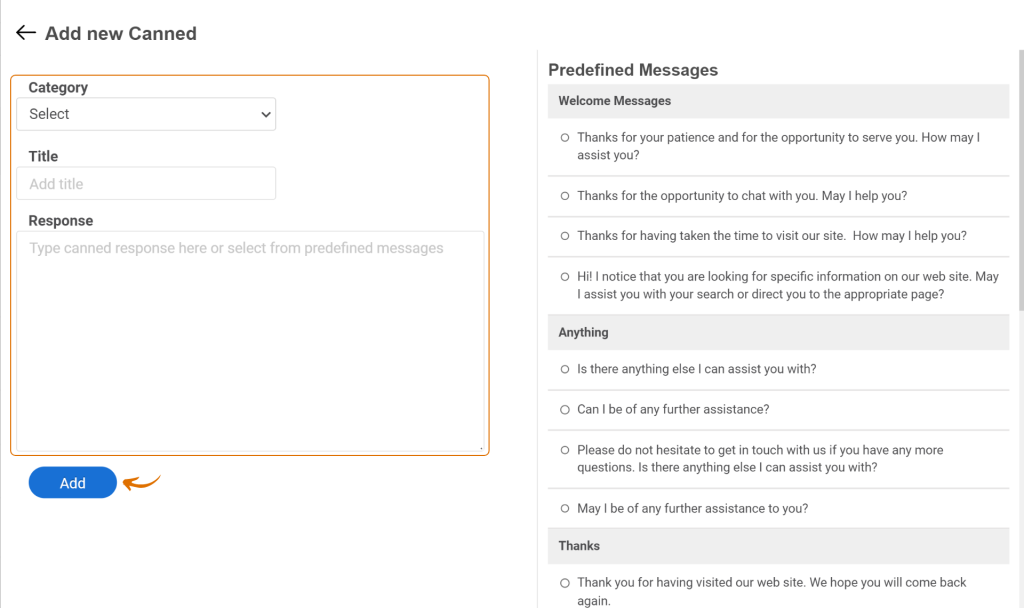
- Back this up with canned responses for your human agents, too. Go to Settings, then General, then Canned Responses, click Add New, pick a category like “customer support,” give it a title, and either use a template or write your own reply.
2. Suggesting Help Articles Mid-Conversation
Best for: Teams with an existing knowledge base that customers rarely find on their own.
I’ve noticed a lot of tickets exist purely because the right answer was buried three clicks deep in a help center nobody actually opens. Once I connect the bot to a knowledge base, it can surface the most relevant article the second it recognizes what the customer is really asking, so they walk away with a full answer instead of a one-line reply.
Pairing the AI Chatbot with a connected knowledge base like this is what gets ticket volume down by as much as 80% for teams that set it up properly.
How to set it up:
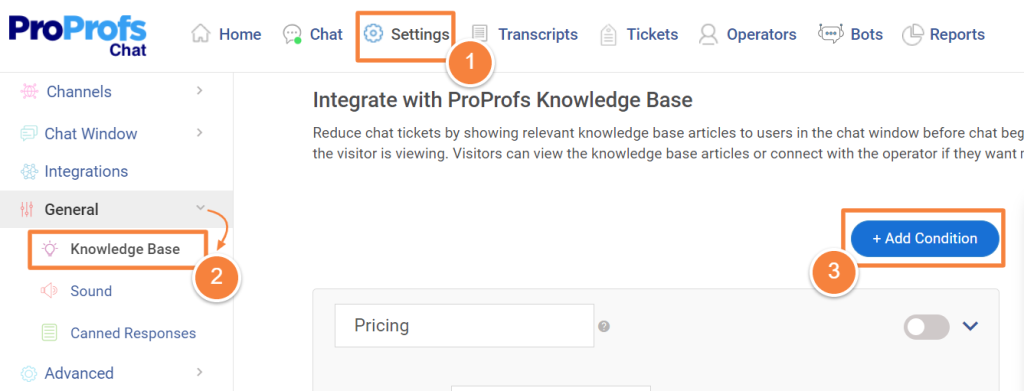
- Connect your AI Chatbot to your ProProfs Knowledge Base.
- Turn on AI article recommendations in your bot settings.
- Keep your knowledge base updated, since the bot can only recommend what’s actually there.
3. Capturing and Qualifying Leads Through Conversation
Best for: Any business where support conversations double as sales opportunities.
Rather than pushing a visitor toward a static form, I let the bot ask a few multiple-choice or open-response questions right inside the lead generation chatbot. It feels like less work for the visitor, and honestly, it gets me better answers too.
To me, this is one of the clearest AI customer support use cases for treating chat as a revenue channel instead of just a cost center.
How to set it up:
- Open the chatbot customization dashboard and define your qualifying questions.
- Mix multiple-choice and open-response formats to keep the conversation natural.
- Test the flow end-to-end before it goes live.
4. Pushing Qualified Leads Straight to Your CRM
Best for: Teams tired of manually copying chat details into a spreadsheet or CRM.
Once a lead is qualified, I don’t see any reason for someone on my team to retype their details into another system. I want that information to show up automatically, right where my sales team already works.
How to set it up:
- Connect the integration for your CRM. Salesforce, Zoho, Microsoft Dynamics, SugarCRM, Infusionsoft, and Nutshell are all supported.
- Map the fields you’re capturing in chat to the matching fields in your CRM.
- Confirm a test lead actually lands where it should before rolling this out fully.
5. Routing Chats to the Right Department Automatically
Best for: Any team split across sales, support, and billing.
Few things frustrate me more as a support manager than watching a customer explain their billing issue to someone in sales who simply can’t help them. That’s exactly why I set up groups, so a billing conversation never lands with an operator who has no way to resolve it.
How to set it up:
- Create operator groups by function (sales, support, billing).
- Add routing rules based on keywords, message text, visitor location, or time of day.
- Turn on least-busy routing within each group so no one operator gets buried.
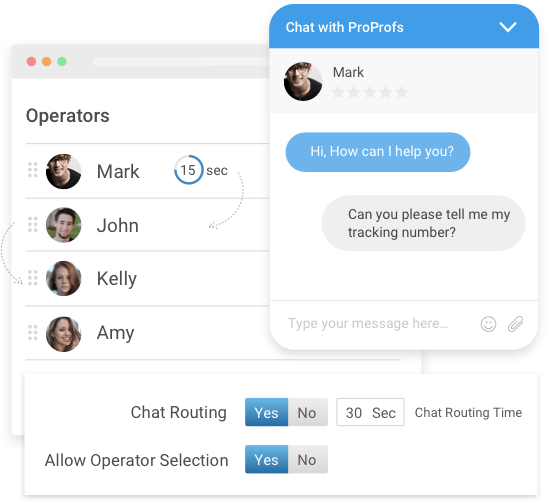
One thing worth knowing: these rules are only as good as the keywords and conditions you set. I’d revisit them every time your team structure changes, not just once at setup.
6. Connecting Returning Visitors to Their Dedicated Account Manager
Best for: B2B and account-based businesses where relationships matter more than first-response speed.
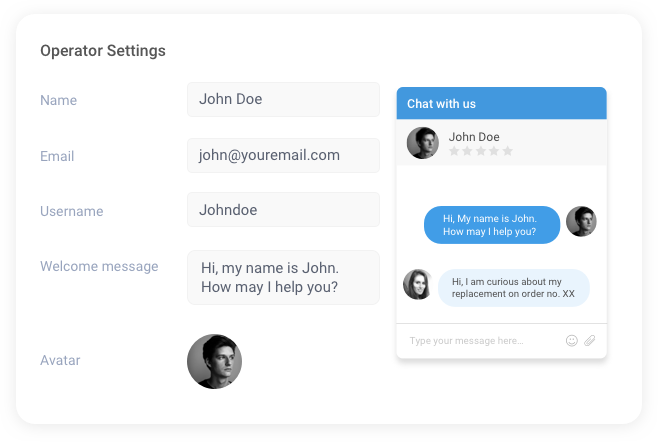
In my view, a returning, logged-in customer shouldn’t have to re-explain their situation to a stranger every single time they reach out. If they already have someone assigned to their account, I want that conversation routed straight to that person.
To me, this is one of the more genuine AI agents for customer service examples, since it uses account history to make support feel personal instead of procedural.
How to set it up:
- Assign dedicated account managers to specific accounts or contacts.
- Enable auto-connect for returning, logged-in visitors in your routing settings.
- Let ProProfs Chat remember the visitor’s last login, so they’re not re-entering details every visit.
7. Creating Support Tickets for Anything the Bot Can’t Resolve
Best for: Teams that don’t want a single question to fall through the cracks after hours.
I’ve made peace with the fact that not every conversation ends with an answer, and that’s fine, as long as it never ends in silence. When the bot genuinely can’t resolve an issue, I want it to automatically create a ticket rather than leave the customer stuck waiting.
How to set it up:
- Connect your AI Chatbot to ProProfs Help Desk.
- Set the conditions under which the bot should stop trying and create a ticket instead.
- Check that the ticket carries the chat transcript along with it, so your team isn’t starting from zero.
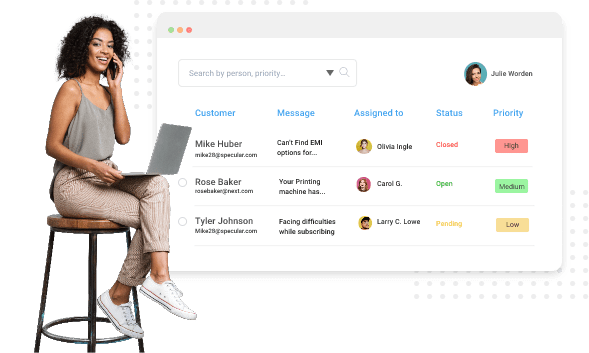
I’d keep a human reviewing the tickets the bot creates for the first few weeks, just to confirm the escalation conditions are actually catching what they should.
8. Supporting Customers in Their Own Language, in Real Time
Best for: Any business with a customer base outside a single region or language.
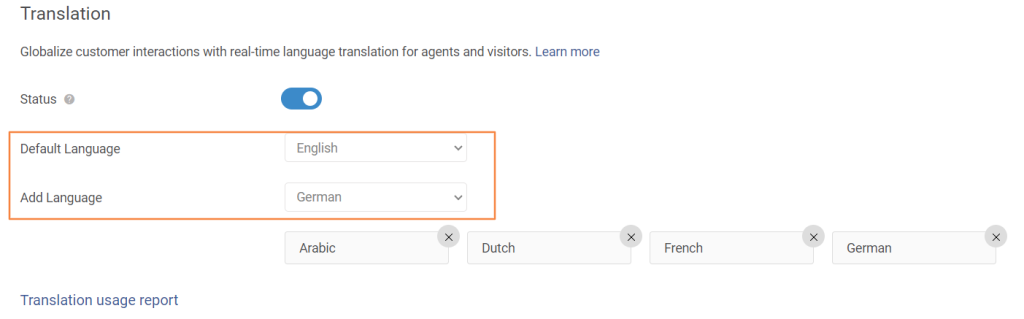
I know hiring a native speaker for every market I serve just isn’t realistic for most teams. That’s why I consider real-time translation one of the more practical AI support automation use cases out there, since it closes that gap without adding a single person to headcount.
How to set it up:
- Enable the languages your visitor base actually uses from your language settings. ProProfs Chat supports 70+.
- Turn on real-time translation so messages translate live for both sides of the conversation.
- Set language customization by visitor location so the right language loads automatically.
9. Reaching Out to Visitors Before They Ask for Help
Best for: eCommerce and any high-intent website where visitors browse and leave without a word.
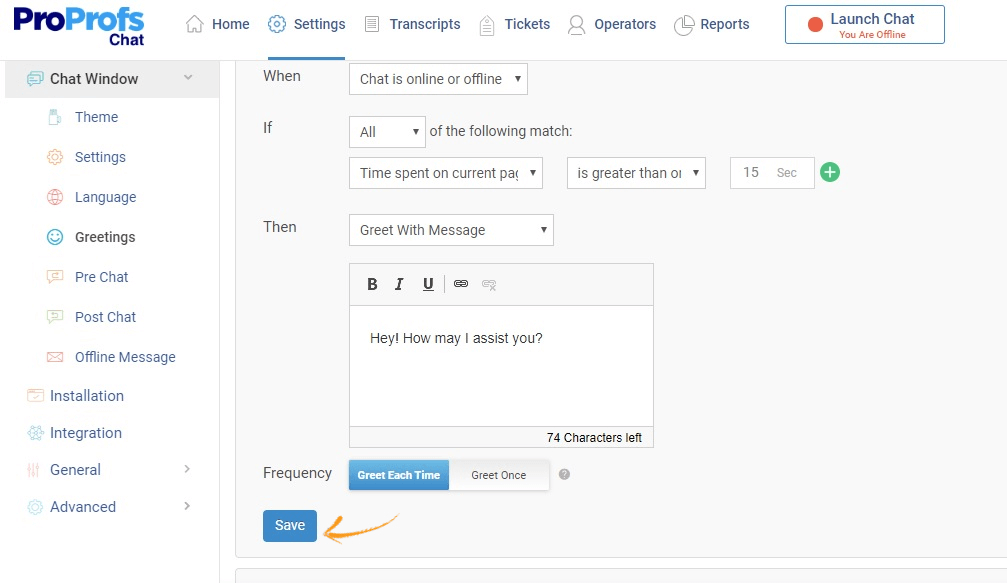
Most visitors, in my experience, won’t click the chat icon on their own, even when it’s obvious they need help. A well-timed, automatic greeting based on their behavior changes that math completely.
Visitors who get invited to chat are roughly 11 times more likely to convert than those who are never greeted, and about half of those convert within that very first conversation. Ever wonder why some sites feel like they’re always one step ahead of what you need? This is usually why.
How to set it up:
- Build page-specific greetings in your chat window customization settings.
- Set conditions based on time spent on a page or specific pages visited.
- Choose automated or manual triggering depending on how hands-on you want your team to be.
10. Saving Visitors Who Land on Broken or Deleted Pages
Best for: Any website with content that’s moved, been removed, or changed URLs.
A visitor who lands on a 404 page is, in my experience, one click away from leaving for good. I like using a quick, contextual greeting that offers an alternate page, since it turns what would’ve been a dead end into a saved conversation, reducing the bounce rate. It’s one of the more overlooked examples of AI agents in customer support, honestly.
How to set it up:
- Set a specific greeting condition for 404 pages in your chat settings.
- Point the message toward a relevant, working page instead of a generic apology.
- Review which broken pages trigger this most often, and fix them at the source when you can.
11. Welcoming New and Returning Visitors Differently
Best for: eCommerce and subscription businesses where repeat visits matter.
To me, a first-time visitor and a returning customer just don’t need the same greeting. One needs an introduction from scratch, and the other needs to feel recognized the moment they show up.
How to set it up:
- Create separate welcome messages for new versus returning visitors.
- Customize the greeting timing so it doesn’t interrupt too early or too late.
- Adjust greeting frequency so returning visitors aren’t shown the same message every single visit.
12. Booking Appointments Directly Inside the Chat
Best for: Healthcare, real estate, consulting, and any service business built around scheduled calls.
If I make a customer leave the chat to go hunt down a separate booking page, I’m giving them a perfectly good reason to drop off halfway through. So I keep the booking inside the same conversation and skip that step entirely.
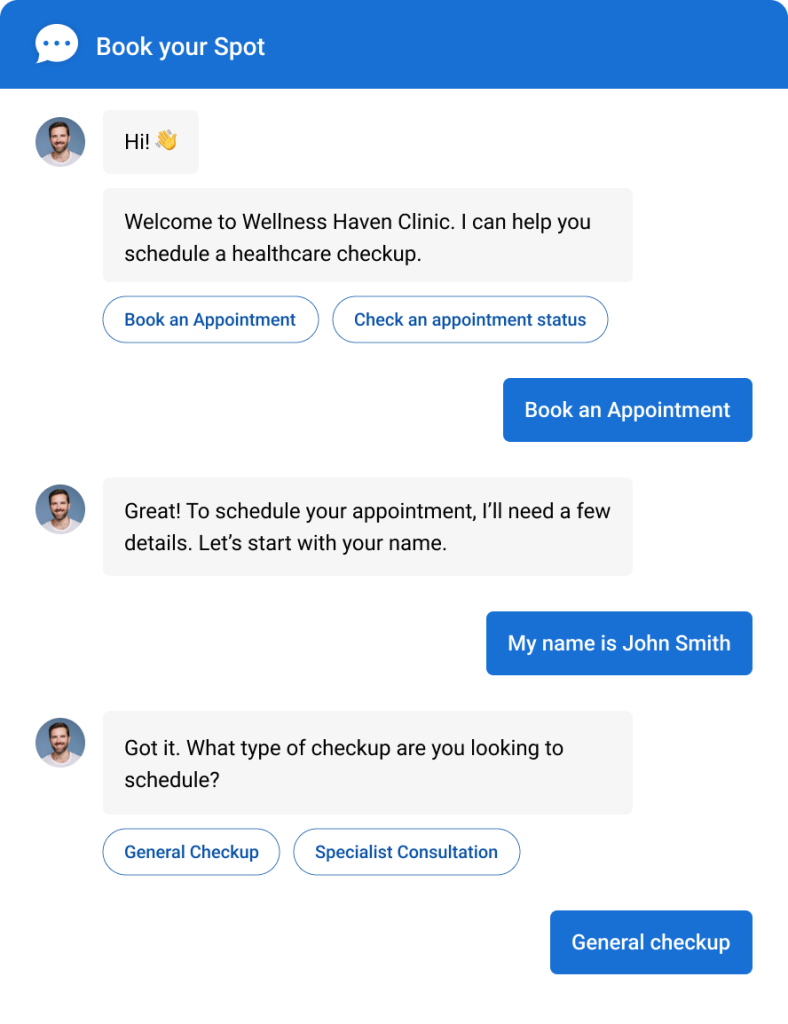
How to set it up:
- Choose the Appointment template from the AI Chatbot template library instead of building from scratch.
- Edit the flow to match the details your team actually needs before a call.
- Preview and test the booking flow before it goes live.
13. Helping Human Agents Respond Faster With Canned Responses
Best for: Any team handling multiple chats at once.
I want to be clear that this use case was never about replacing my agents. It’s about giving them a shortcut for the questions they answer constantly, which is why I’d call it one of the most practical AI agent use cases for customer service out there, since it saves time without taking the human out of the conversation.
How to set it up:
- Build a library of canned responses for your most frequently asked questions.
- Organize them so operators can find the right one in a click, not a search.
- Review and update them regularly as your policies or offers change.
14. Escalating Complex Issues to Audio or Video Calls
Best for: Technical products, SaaS onboarding, and anything too complicated to resolve over text.
Some problems, frankly, just aren’t solvable inside a text box. Being able to escalate straight into a live audio or video call, complete with screen sharing, lets me keep the whole interaction inside one tool instead of bouncing the customer to a separate app.
How to set it up:
- Enable audio and video chat escalation from your chat settings.
- Turn on screen sharing for troubleshooting or live product walkthroughs.
- Train operators on when to escalate versus when to keep resolving over text.
I always make sure my operators know escalation isn’t a failure state. Some issues are just built for a live conversation, not a chat window, and pretending otherwise slows everyone down.
15. Managing Every Channel From One Dashboard
Best for: Any business supporting customers across more than just their website.
Checking four different apps just to answer one customer became unsustainable for me the moment my channels grew past two or three. Centralizing all customer support channels means my team responds from a single place, regardless of where the message originated.
This, to me, is where customer service AI use cases stop being isolated tools and start acting like one connected system.
How to set it up:
- Connect Facebook, WhatsApp, and Instagram so those messages land in the same dashboard as your website chat.
- Add the Chat SDK to your Android or iOS app if you support customers in-app.
- Turn on SMS management from the dashboard if your customers text you directly.
Which Use Cases Should You Turn On First?
Don’t launch all 15 at once. Here’s the order I’d actually recommend.
| Your situation | Start here | Add next |
| Small team, testing the waters | Query resolution, canned responses | Proactive greetings, lead capture |
| Growing ticket volume | Routing rules, ticket creation | Multilingual support, article suggestions |
| Ready to scale support into revenue | Lead qualification, appointment booking | Omnichannel, account manager routing |
Fewer Tickets, Faster Answers, More Time for Your Team
The value here isn’t in running all 15 use cases at once; it’s in matching the right ones to the problem you actually have. Start with query resolution and routing since those give you the fastest, most measurable wins with the least setup.
Add lead qualification and proactive engagement once your team trusts the system, and layer in omnichannel and account-based routing once the basics are running clean.
Every use case in this blog is something you can turn on inside ProProfs Chat directly, no separate tool, no workaround, using the AI Chatbot, routing rules, templates, and integrations that are already part of the platform.
If you want to see this in action, start with your highest-volume repetitive question. Train the AI Chatbot on your help center inside the free plan, preview it, publish it, and watch your ticket queue for a week. That one change usually tells you exactly which use case to turn on next.
Frequently Asked Questions
Do I need to know how to code to set any of this up?
No. Most AI chatbot platforms use drag-and-drop builders, ready-made templates, and simple branding settings, so you can launch and manage common customer support use cases without writing code.
Is there a free way to try these use cases before committing?
Yes. Many AI customer support tools offer free plans or trials, allowing you to test chatbot workflows, automation, and AI responses before upgrading to a paid plan.
What happens if the bot can't answer a question?
When the AI cannot resolve a query, it hands the conversation to a human agent or creates a support ticket. This ensures customers receive timely help instead of reaching a dead end.
Can I test a use case before it goes live for real customers?
Yes. Most platforms let you preview and test chatbot conversations before publishing them, helping you identify issues and refine responses before customers interact with the bot.
Do I have to turn on every use case at once?
No. Start with one or two high-impact use cases, monitor the results, and gradually expand your AI workflows as your team becomes comfortable with the system.
Can small businesses realistically use these use cases?
Absolutely. AI agents automate repetitive support tasks, making them especially valuable for small teams. Many platforms also offer affordable or free plans, making adoption practical for growing businesses.
How long does setup actually take?
Basic setup usually takes only a few minutes. Most of your effort should go into training the AI with your knowledge base and support content to deliver accurate, helpful responses.
FREE. All Features. FOREVER!
Try our Forever FREE account with all premium features!

 We'd love your feedback!
What did you like & how can we make it even better?

 Thanks for your feedback!
 Ask Your Question
Have a question? Get expert help to make your decision easier.