I have spoken with enough customer support leaders, operators, and founders to see the same problem surface at different stages of growth.
Support does not usually break overnight. It starts with scattered conversations, slower handoffs, lost context, and agents spending more time managing tools than helping customers.
That pressure is only getting harder to absorb. According to PwC’s 2025 Customer Experience Survey, 70% of executives say customer expectations are evolving faster than their companies can adapt.
That is why I see help desk software as infrastructure for scaling support, not just another ticketing tool.
In this guide, I compare 10 of the best help desk software options, including their pros, cons, pricing, when to move beyond email, and how to evaluate the right fit.
What Is Help Desk Software?
Here is why this matters for a team like mine, and probably yours too:
- Nothing gets lost: Every request becomes a trackable ticket instead of a message buried in someone’s personal inbox
- Agents stop duplicating work: Shared visibility means two people are never replying to the same customer at once
- Response times actually improve: Automation and routing get tickets to the right person faster than manual sorting ever could
- Customers stop repeating themselves: Full conversation history travels with the ticket, no matter who picks it up
- You get real data: Reports on volume, response time, and satisfaction replace guesswork about how support is actually performing
10 Best Help Desk Software to Streamline Your Support
I have used, recommended, or consulted on every tool on this list. This is not a spec sheet comparison. It is what I have actually seen work, and where each one falls short, in real support teams.
If you are trying to find the best help desk software for your specific setup, the “best for” line under each tool below is where to start.
| Tool | Best For | Starting Price | User Rating |
| ProProfs Chat | Easy Live Chat & AI Customer Service Agent for Instant, Automated Support | Free forever plan available. Paid plans start at $19.99/operator/month | 4.5/5 (G2) |
| ProProfs Help Desk | Easy AI Help Desk for Shared Inboxes, Ticket Workflow Automation, and Scaling Support Teams | Starts at $19.99/user/month | 4.7/5 (G2) |
| Zendesk | Established Teams Wanting an End-to-End Support Suite | Starts at $19/agent/month, paid yearly | 4.3/5 (G2) |
| Freshdesk | Small Teams Just Getting Started with Ticketing | Free plan available. Paid plans start at $15/agent/month | 4.4/5 (G2) |
| Zoho Desk | Budget-Conscious Small Businesses, Especially Existing Zoho Users | Starts at $7/agent/month | 4.4/5 (G2) |
| Jira Service Management | Dev-Adjacent Teams Already Living in Atlassian Tools | Custom Quote | 4.3/5 (G2) |
| HubSpot Service Hub | Teams Wanting Support Tied Directly to Sales and Marketing Data | Free tier available. Paid plans start at $20/seat/month | 4.4/5 (G2) |
| Help Scout | Small Teams Wanting a Simple, Email-Like Shared Inbox | Starts at $25/user/month | 4.4/5 (G2) |
| Front | Collaborative Teams Managing Shared Email Support | Starts at $25/seat/month | 4.7/5 (G2) |
| Gorgias | E-commerce Brands Running Support on Shopify | Starts at $40/month | 4.6/5 (G2) |
1. ProProfs Chat – Best for Easy Live Chat & AI Customer Service Agent for Instant, Automated Support
I set up ProProfs Chat on my main site, expecting a half-day of configuration, and instead had the widget branded and live in about ten minutes. What actually changed how I run things was the AI chatbot.
I trained it directly on our website content and help center articles, and it started handling FAQs on its own from day one, with a clean handoff to a human the moment a question got too specific for it to answer confidently.
See how ProProfs’ AI Customer Support Agent answers the same questions automatically. Try it now:
It also tightly integrates with sibling tools, ProProfs Knowledge Base and ProProfs Help Desk, helping me provide 360-degree customer support. Managing more than one site is where it earned its place as the best live chat and chatbot solution I have used for multi-website businesses.
Every domain gets its own chat window, bot personality, and routing rules, while my team works from one shared dashboard, with Facebook, WhatsApp, and Instagram chats landing in the same inbox.
Pros:
- AI customer support agent trains on the website URL, help center, or uploaded files in seconds
- Omnichannel inbox covering website, Facebook, WhatsApp, Instagram, SMS, and mobile apps
- Custom routing rules by visitor location, time, keyword, or department
- 100+ chat window settings plus white-label branding for agencies managing client sites
- Multilingual support across 70+ languages with language customization by visitor location
Cons:
- Cloud-only, so there is no offline access
- Deeper AI-first automation sits behind the higher-tier plans
User Rating: 4.5/5 (G2)
Pricing: Free forever plan available. Paid plans start at $19.99/operator/month.
2. ProProfs Help Desk – Easiest AI Help Desk for Shared Inboxes, Ticket Workflow Automation, and Scaling Support Teams
I have used ProProfs Help Desk for more than three years, and it has helped reduce repetitive support work without making setup complicated. Emails, live chats, web forms, customer portal requests, and social conversations can all be managed from one place instead of scattered across separate inboxes.
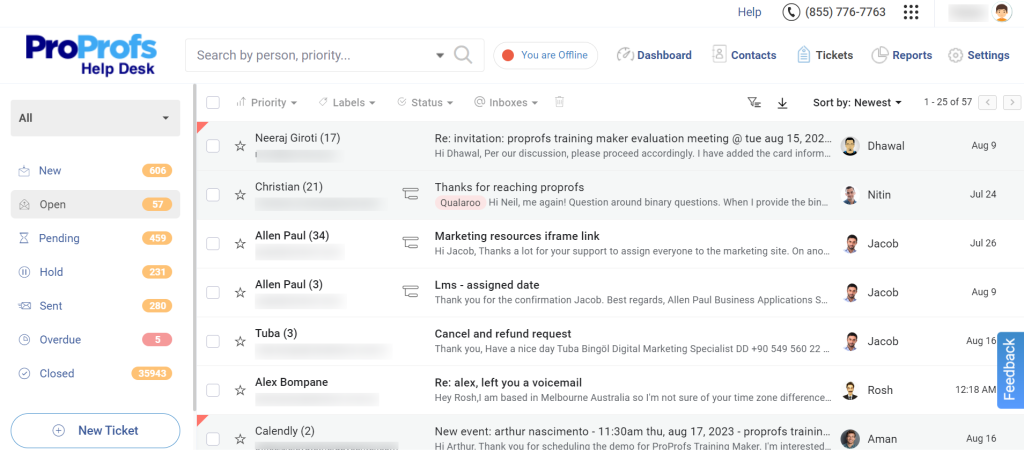
The AI-powered help desk is especially useful. It can summarize long tickets, suggest responses, adjust reply tones, prioritize conversations, and resolve routine requests automatically. This helps agents understand issues faster and focus on more complex customer concerns.
I also rely on the shared inbox, which lets agents manage emails together and use internal notes for collaboration. Automated assignments and escalations help prevent urgent tickets from being overlooked.
Its connection with the Customer Delight Suite, including ProProfs Live Chat and Knowledge Base, makes it easier to scale support as the team grows.
Pros:
- AI agent resolves routine tickets automatically, while AI summarization, response suggestions, tone adjustment, and prioritization speed up complex conversations
- Shared inbox keeps customer-facing emails organized and accessible to the whole team
- Internal notes make it easy to collaborate on difficult tickets without involving the customer
- Automated ticket assignments and escalations help ensure urgent issues reach the right agent quickly
- Tracks response time, resolution time, agent ratings, and other important help desk metrics
- Agent roles and permissions provide greater control over what team members can access
Cons:
- Cloud-only, with no on-premise version
- A dark theme option is not currently available
User Rating: 4.7/5 (G2)
Pricing: Free plan available. Paid plans start at $19.99/user/month.
3. Zendesk – Best for Established Teams Wanting an End-to-End Support Suite
Zendesk was the first proper helpdesk I ever rolled out, back when our support team had outgrown a shared inbox and email threads were getting lost daily. What stood out immediately was how quickly agents adapted since the interface feels lightweight even though the backend is genuinely powerful.
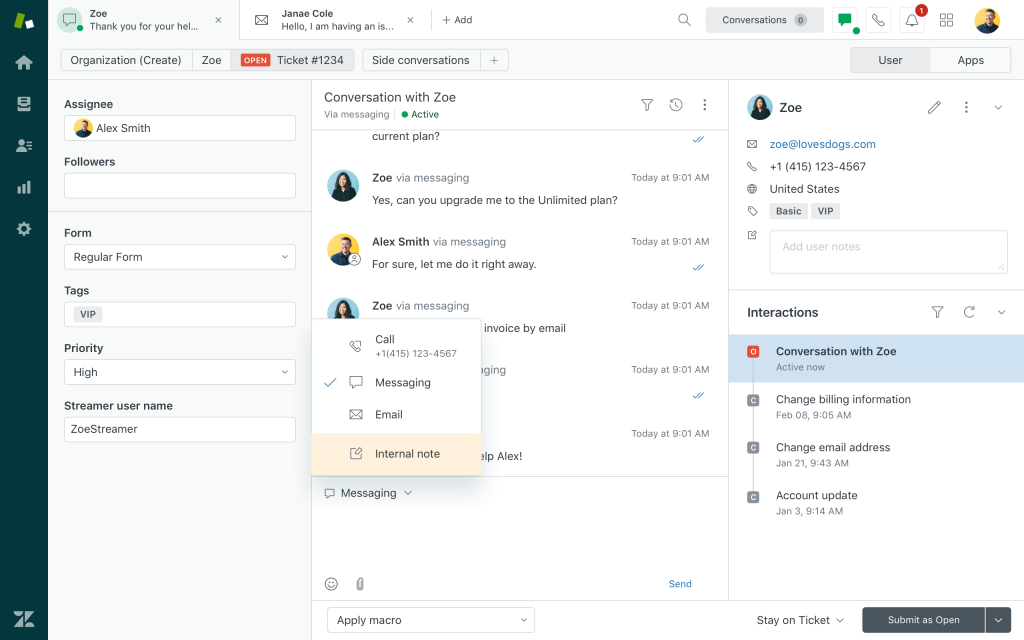
Every channel, email, chat, voice, and social messaging, lands in one workspace, so nobody has to toggle between five different tabs to answer one customer. The AI features route tickets automatically and suggest replies based on past resolutions, which cut our average handling time noticeably within the first month.
I have seen it scale from a five-person team to a much larger one without the platform buckling under the weight. If your team is past the shared inbox stage and needs a system built for real ticket volume with room to grow, Zendesk earns its reputation as one of the most trusted names in the category.
Pros:
- Handles email, chat, voice, and social messaging in a single unified workspace
- AI-powered ticket routing and reply suggestions cut down average handling time
- Scales comfortably from small teams to large, high-volume support operations
- Massive app marketplace covers nearly any integration a growing team might need
Cons:
- Advanced automation and reporting sit behind higher pricing tiers
- New admins face a real learning curve configuring workflows and triggers
User Rating: 4.3/5 (G2)
Pricing: Starts at $19agent/month paid yearly
4. Freshdesk – Best for Small Teams Just Getting Started with Ticketing
Freshdesk was the tool I recommended to a friend starting her first SaaS support team because it does not demand a steep learning curve before you can actually help a customer. Setup took her a single afternoon rather than a week of configuration calls.
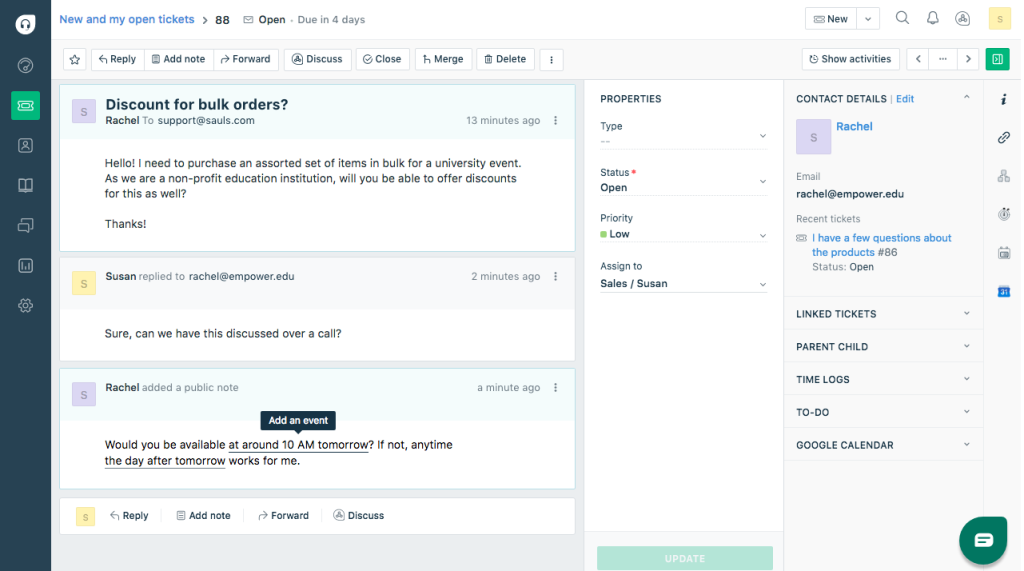
The Freddy AI agent picks up routine, repetitive questions automatically, which freed her two-person team to spend time on messier tickets that actually need a human brain. Multi-channel support means email, chat, and social all funnel into one queue instead of three separate inboxes competing for attention.
There is a genuinely usable free plan for very small teams, and paid tiers stay affordable as headcount grows, which matters when watching every dollar in the early days. What I appreciated most is that her team needed almost no training to get comfortable, and within a week they were resolving tickets faster than they had on their old email-only setup.
Pros:
- Freddy AI handles routine, repetitive questions without human intervention
- Genuinely usable free tier for very small support teams
- Multi-channel queue keeps email, chat, and social in one place
- Fast setup with minimal training required for non-technical teams
Cons:
- Some users report cumbersome workflows for automated follow-ups at scale
- Live chat and deeper omnichannel features require moving up tiers
User Rating: 4.4/5 (G2)
Pricing: Free plan available. Paid plans start at $15/agent/month.
5. Zoho Desk – Best for Budget-Conscious Small Businesses, Especially Existing Zoho Users
Zoho Desk came up when a small retail client of mine needed a helpdesk without blowing their support budget, and it turned out to be exactly the right call. Every message from email, chat, phone, and social pulls into one clean dashboard, so agents are not hopping between tools to piece together a customer’s history.
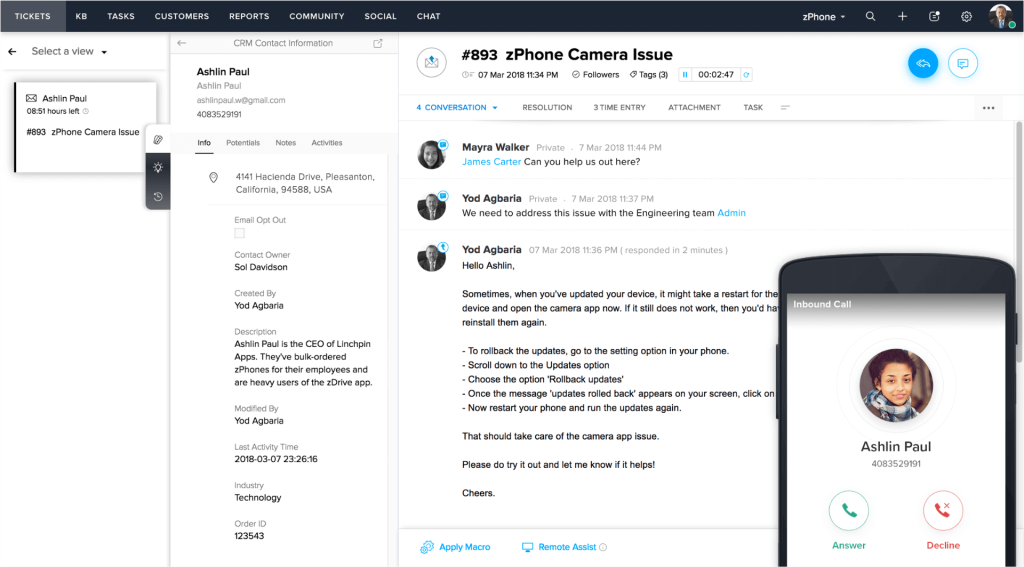
Zia, their built-in AI, suggests replies and flags sentiment, which helped a lean two-agent team resolve tickets noticeably faster without adding headcount. Since my client already ran on Zoho CRM for sales, the two systems talked to each other immediately, giving agents full context on every account the moment a ticket came in.
Pricing sits comfortably below most competitors at this feature level, which mattered a lot for a business watching every line item. If your team is already inside the Zoho ecosystem or simply wants strong automation without an enterprise price tag, this is a genuinely smart pick.
Pros:
- Zia AI suggests replies and flags sentiment automatically
- Clean, unified dashboard pulling in email, chat, phone, and social
- Native Zoho CRM integration gives agents full account context
- Strong value for feature depth relative to price
Cons:
- Interface can feel busy and take time to fully learn
- Deeper customization options are more limited than some competitors
User Rating: 4.4/5 (G2)
Pricing: Starts at $7/agent/month
6. Jira Service Management – Best for Dev-Adjacent Teams Already Living in Atlassian Tools
Jira Service Management got adopted by a dev team I worked with mainly because their engineers already lived inside Jira Software all day, and asking them to learn a second tool for support tickets felt pointless.
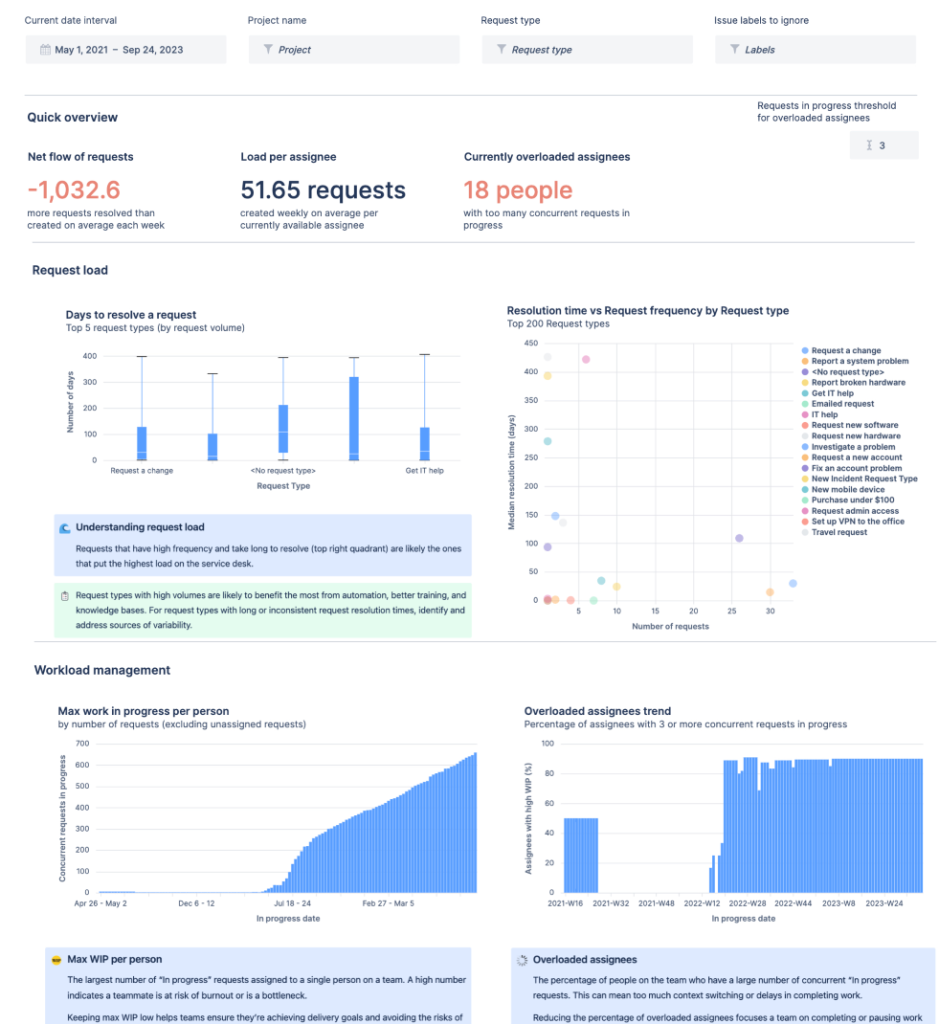
Requests from employees or customers flow straight into the same environment where bugs and sprints already live, so handoffs between support and engineering stopped requiring copy-pasted screenshots in Slack. Built-in automation handles routing and SLA tracking without much manual setup once the rules are configured. The learning curve is real for anyone outside a technical team, and I would not hand this to a non-technical small business without some patience for onboarding.
But for a company already running on Atlassian tools where support tickets frequently need to become actual engineering tickets, the native connection between Confluence, Jira Software, and Jira Service Management removes a genuine amount of friction most standalone helpdesks cannot replicate.
Pros:
- Native connection to Jira Software makes ticket-to-bug handoff seamless
- Built-in automation for routing and SLA tracking
- Strong fit for teams already inside the Atlassian ecosystem
- Free tier available for smaller teams to start with
Cons:
- Steep learning curve for non-technical teams
- Setup and configuration require real time investment upfront
User Rating: 4.3/5 (G2)
Pricing: Custom Quote
7. HubSpot Service Hub – Best for Teams Wanting Support Tied Directly to Sales and Marketing Data
HubSpot Service Hub made sense for a client who was already running their entire sales and marketing operation on HubSpot and did not want a fourth disconnected system just for support. The moment a ticket comes in, agents can already see the customer’s deal history, past marketing touches, and lifetime value without switching screens or asking a colleague for context.
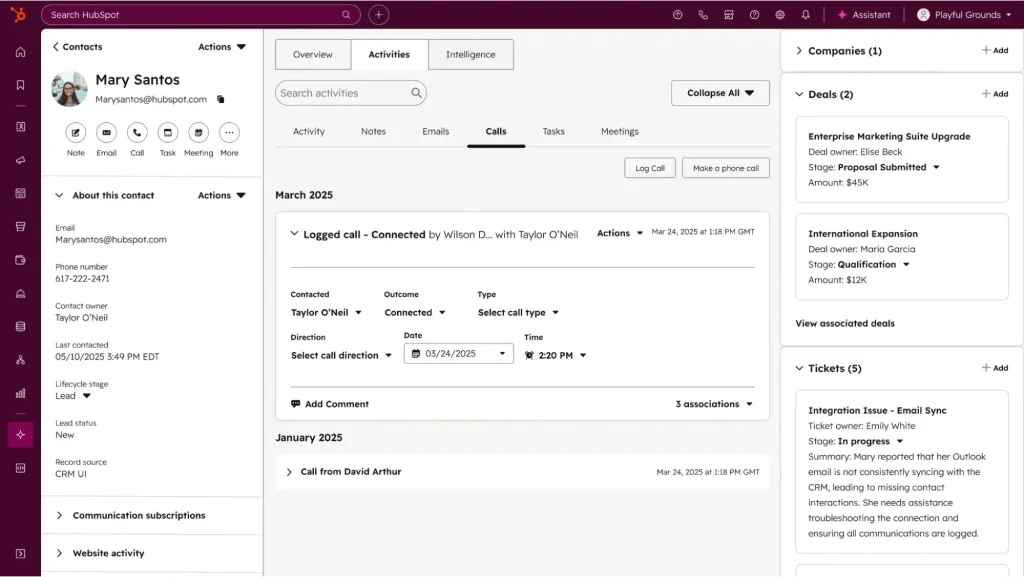
Breeze AI drafts replies, summarizes long threads, and routes tickets to the right agent, which shaved real time off our average first response. There is a solid free tier to start with, so smaller teams are not forced into a paid plan just to test the waters.
What stood out most was how naturally support data started feeding back into sales conversations, since a customer’s support history is now visible right inside the CRM record. If your team already runs on HubSpot, this closes a gap that a standalone helpdesk never really could.
Pros:
- Full customer context (deals, marketing touches, lifetime value) visible on every ticket
- Breeze AI drafts replies, summarizes threads, and routes tickets automatically
- Solid free tier lets smaller teams start without upfront cost
- Support data feeds directly back into sales and marketing views
Cons:
- Some advanced reporting and customization requires higher-tier plans
- Best value is realized only if you already use the HubSpot CRM
User Rating: 4.4/5 (G2)
Pricing: Free tier available. Paid plans start at $20/seat/month
8. Help Scout – Best for Small Teams Wanting a Simple, Email-Like Shared Inbox
Help Scout was suggested to me by another founder who was tired of her small team fumbling through a shared Gmail inbox that nobody could actually organize. The whole interface is designed to feel like email rather than a rigid ticketing system, so her non-technical team adopted it in a single day with zero training sessions.
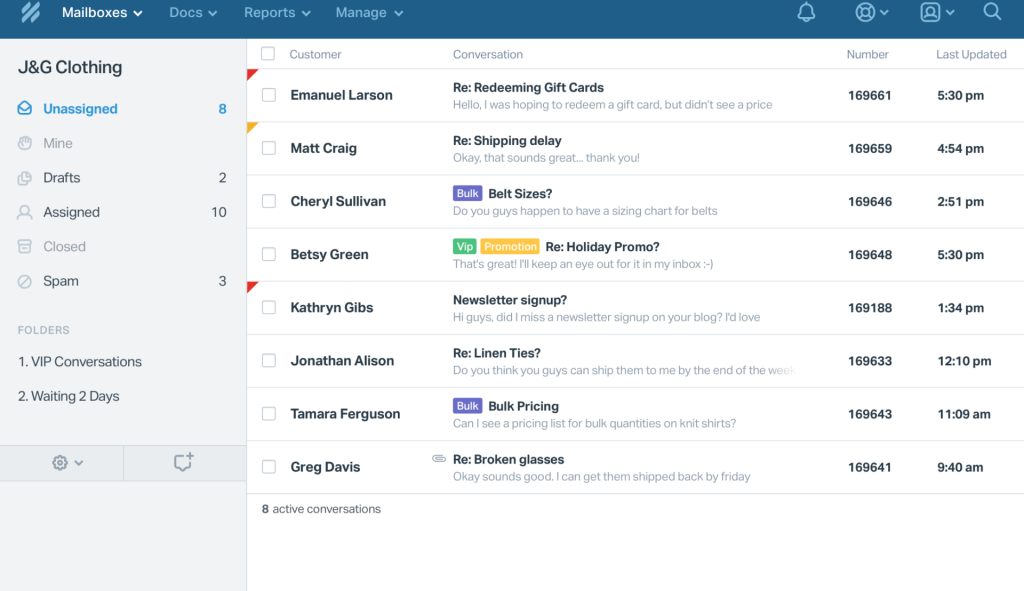
Every conversation gets clean internal notes and an assignment without the clutter of a traditional queue-based helpdesk. A built-in knowledge base sits right alongside the inbox, letting customers self-serve answers before a ticket even gets created, which quietly cut her ticket volume within the first month.
Reporting stays simple: response times, ticket volume, and satisfaction scores, without needing a data analyst to interpret a dashboard. For a small team that wants structure without the intimidation factor of an enterprise-grade system, Help Scout hits a genuinely comfortable middle ground between a shared inbox and a full ticketing platform.
Pros:
- Feels and works like familiar email, so adoption is nearly instant
- Built-in knowledge base reduces ticket volume through self-service
- Clean internal notes and assignment without a clunky queue interface
- Simple, digestible reporting without needing a dedicated analyst
Cons:
- Lacks the deeper automation depth of enterprise-grade helpdesks
- Not built for very high ticket volumes or complex routing rules
User Rating: 4.4/5 (G2)
Pricing: Starts at $25/user/month
9. Front – Best for Collaborative Teams Managing Shared Email Support
Front came into the picture when a remote team I know needed to stop CC’ing each other on customer emails just to stay in the loop. It looks and feels like a regular inbox, meaning almost no ramp-up time, but underneath it gives the whole team shared visibility into every conversation.
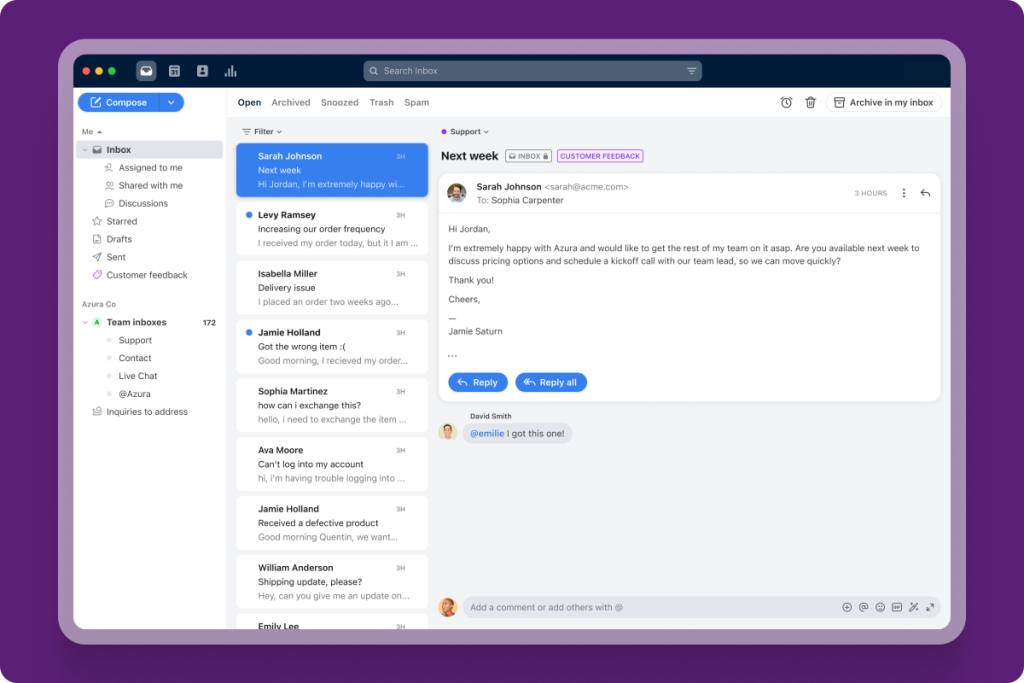
Agents can assign threads, leave internal comments visible only to teammates, and see exactly who is handling what without a single reply crossing wires. Workflow rules route incoming messages automatically based on subject, sender, or keyword, so nothing sits unassigned in a shared inbox limbo.
What I found genuinely useful was how well it handled the collaborative back-and-forth that a rigid ticketing system usually kills, since replies still read like a normal conversation rather than a canned macro. For remote or hybrid teams that want to keep the personal tone of email while adding real team structure, Front fits that need well.
Pros:
- Feels like a normal inbox, so there is almost no ramp-up time
- Internal comments and thread assignment give full team visibility
- Automated workflow rules route messages by subject, sender, or keyword
- Keeps replies conversational instead of forcing canned, templated tone
Cons:
- Less suited to very high-volume, structured ticket queues
- Reporting is lighter than dedicated enterprise ticketing platforms
User Rating: 4.7/5 (G2)
Pricing: Starts at $25/seat/month
10. Gorgias – Best for E-commerce Brands Running Support on Shopify
Gorgias came up when an e-commerce client on Shopify needed support tickets and order data living in the same place instead of switching tabs constantly to check tracking numbers. Every support conversation shows the customer’s order history, past purchases, and subscription status right alongside the message, so agents stop asking customers to repeat information they already gave.
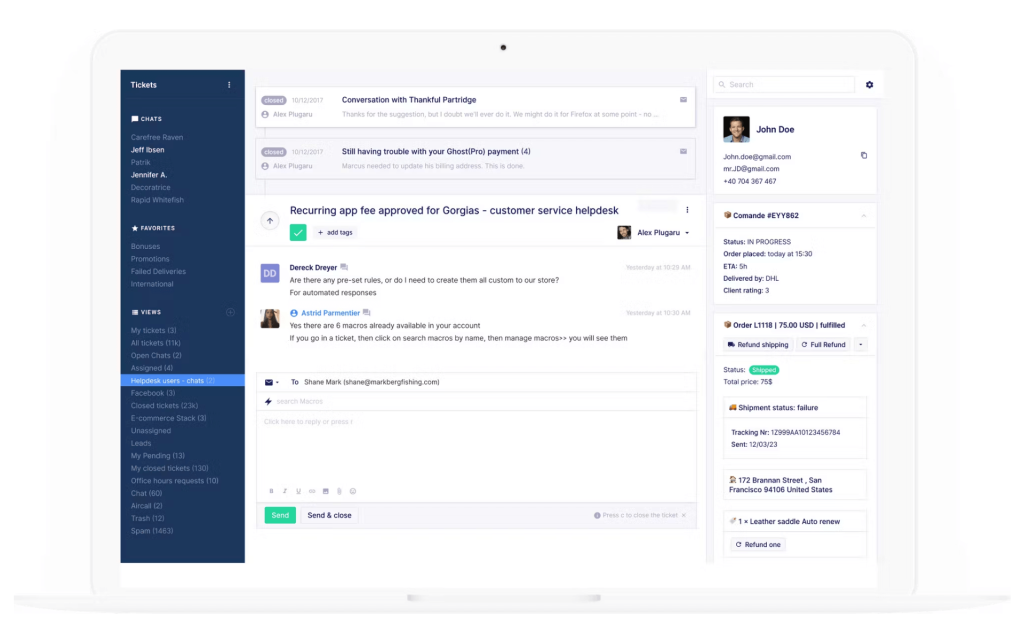
The AI agent handles a real share of repetitive questions like return policies and shipping timelines automatically, which freed her two-person support team during peak sale periods. Deep Shopify integration means agents can issue refunds or edit orders without leaving the helpdesk at all.
What impressed me most was watching support tickets convert into actual upsells, since the AI can recommend products mid-conversation based on browsing behavior. For any online store that wants its help desk software tied directly into revenue rather than treated as a pure cost center, Gorgias earns that specific reputation.
Pros:
- Order history and subscription status visible directly inside every ticket
- Deep Shopify integration lets agents issue refunds without leaving the helpdesk
- AI agent automates repetitive questions like returns and shipping timelines
- Turns support conversations into upsell opportunities based on browsing behavior
Cons:
- Pricing can climb fast with high ticket volume
- Best suited to e-commerce; less useful outside that use case
User Rating: 4.6/5 (G2)
Pricing: Starts at $40/month
How I Chose These Help Desk Software
When I evaluate a help desk software solution for a list like this, I do not just rely on feature lists or marketing claims. I look at how these tools actually perform in real support teams. Here is the framework I used to make sure every recommendation is practical, reliable, and worth considering:
- User Reviews / Ratings: I start by looking at real user feedback from platforms like G2. This gives me a clear picture of how teams actually experience the tool day to day, what they love, and where it falls short.
- Core Features & Functionality: I focus on what truly matters in help desk software. This includes ticket management, automation, channel coverage, AI escalation to a human, and reporting. If a tool cannot handle these well, it does not make the cut.
- Ease of Use: I pay close attention to how intuitive the platform feels. A tool might be powerful, but if a small, non-technical team struggles to adopt it, it defeats the purpose. Clean interface, simple navigation, and quick onboarding are non-negotiable for me.
- Customer Support: From my experience, implementation is where many tools fail. I evaluate how responsive and helpful the vendor’s own support team is, especially during setup and the first few weeks of live use.
- Value for Money: I compare pricing with what the tool actually delivers. This is not about picking the cheapest option, but about whether the features, flexibility, and performance justify the cost as your team grows.
- Personal Experience / Expert Insights: Wherever possible, I rely on my own hands-on experience with these tools. I also lean on insights from support leads, IT managers, and founders who run these systems daily. This helps me go beyond surface-level reviews and highlight what actually works.
Top 3 Help Desk Software Picks
Choosing the right help desk software can make or break how your support team actually performs. I have worked with teams that had solid support processes but still struggled simply because the tool did not fit how they operated day to day.
The three below stand out because they solve a specific, real bottleneck rather than trying to be everything to everyone.
1. ProProfs Chat
ProProfs Chat is my top pick for any team that wants live chat and an AI agent handling instant, automated support without a long implementation cycle. It trains on your own content in a day, flags churn risk automatically, and hands off to a human with full context already attached.
2. Zendesk
Zendesk is the pick for teams that have outgrown a shared inbox and need a system that can handle real ticket volume across every channel without buckling. It scales cleanly as your team and ticket count grow.
3. Freshservice
Freshservice is built for IT teams specifically, not customer support teams. If your real problem is internal employee requests, asset tracking, and incident management, this is the tool built exactly for that job.
FREE. All Features. FOREVER!
Try our Forever FREE account with all premium features!
How Do Support Needs Differ for Customer-Facing vs. IT Teams?
One thing I rarely see addressed clearly in help desk software roundups is that customer support and internal IT help desk software solve genuinely different jobs, even though both get called “help desk.”
| Team Type | What They Handle | What They Need in a Tool |
| Customer Support | Live chat, order questions, refunds, FAQs | Omnichannel chat, AI escalation, CRM sync |
| E-commerce Support | Order tracking, returns, upsells | Deep e-commerce integration, AI product recommendations |
| Internal IT | Password resets, laptop requests, outages | Asset tracking (CMDB), incident and change management |
| Dev-Adjacent Support | Bug reports, feature requests from users | Native connection to engineering tools like Jira |
Before picking a tool, map out who inside your organization will actually be using it. A help desk service software built for customer support rarely satisfies an internal IT team, and the reverse is just as true.
Choose Help Desk Software That Actually Gets Used
The right help desk software will not fix a broken support process on its own. But it will make a good process nearly effortless to run consistently. If I had to give you one decision filter: choose the tool your team will actually open every single day, not the one with the longest feature list.
Community feedback across support forums confirms this repeatedly. Overengineered systems become shelfware within months, while simple, well-integrated tools that match how your team already works keep getting used quarter after quarter.
For most small-to-mid-sized support teams juggling live chat, WhatsApp, and email at once, ProProfs Chat gives you live chat, an AI agent, and a path into a full help desk suite without needing three separate systems stitched together. Start with the free forever plan, run one week of real customer conversations through it, and the results will tell you everything you need to know.
Frequently Asked Questions
What is the difference between help desk software and customer relationship management (CRM) software?
Help desk software focuses on managing and resolving support tickets and requests. CRM software tracks the broader customer relationship, including sales history and marketing touches. Some platforms, like HubSpot Service Hub, connect both so support and sales share the same customer record.
Can help desk software work for both customer support and internal IT requests at the same time?
Yes, though most tools specialize in one or the other. Freshservice and Jira Service Management are built for internal IT and asset management, while ProProfs Chat, Zendesk, and Gorgias are built around customer-facing conversations and order data.
How much does help desk software typically cost for a small team?
Pricing varies widely, from genuinely free tiers for a single operator up to $50 or more per agent per month for advanced AI and automation features. Most small teams should budget for growth rather than picking based only on the cheapest entry price.
Do I need a separate live chat tool if I already have a help desk?
Not necessarily. Tools like ProProfs Chat combine live chat, an AI agent, and help desk ticketing in one system, which avoids paying for and maintaining two separate platforms that need to be manually synced.
How long does it take to implement help desk software?
Simple tools like Freshdesk or Help Scout can be live within a single afternoon for a small team. More complex platforms like Zendesk or Freshservice with custom workflows and integrations can take a few weeks to configure properly.
What is the best free help desk software for a very small team?
Freshdesk and Jira Service Management both offer usable free tiers, and ProProfs Chat offers a forever-free plan for a single operator with full feature access, which is enough to validate fit before paying for anything.
Can help desk software integrate with WhatsApp, Instagram, and Facebook Messenger?
Yes, most modern platforms support these channels natively or through direct integrations. ProProfs Chat centralizes WhatsApp, Facebook, Instagram, and SMS alongside website chat in one dashboard, so agents are not switching between separate apps.
Is it worth paying more for AI-powered support tools over a basic ticketing system?
If your team handles any real ticket volume, yes. AI automation on repetitive questions frees agents for complex issues, and the time saved on manual sorting and replies typically outweighs the added cost within a few months.
How do I migrate from email or a shared inbox to help desk software without losing historical data?
Most platforms support importing existing email threads or CSV exports of past conversations. Before migrating, export your current data and confirm with the vendor exactly how much history transfers over and in what format.
What features actually matter most for first-year adoption of a new helpdesk?
Based on what I have consistently seen work: a clean, familiar interface, automated ticket routing, AI escalation that hands off with context intact, and integration with tools your team already uses. Advanced reporting and customization matter far less in year one than getting the basics adopted.
FREE. All Features. FOREVER!
Try our Forever FREE account with all premium features!

 We'd love your feedback!
What did you like & how can we make it even better?

 Thanks for your feedback!
 Ask Your Question
Have a question? Get expert help to make your decision easier.