A small business owner I spoke to last year spent two hours every morning answering the same five questions. Different customers, same questions, same answers. Six months after setting up an AI support agent, those hours disappeared. The questions still came in, but the agent handled them before anyone reached the office.
That used to feel like something only large companies could afford. Not anymore. Today’s AI customer support agents for small businesses are affordable, quick to set up, and capable of answering FAQs, qualifying leads, routing urgent issues, and saving hours of repetitive work.
I tested the tools on this list across real support scenarios, comparing ease of use, response quality, and automation. Here are the 10 best AI support agents for small businesses in 2026.
What Is an AI Customer Support Agent?
The difference between a basic chatbot and an AI agent matters. A chatbot follows a fixed script. An AI agent reasons through questions it has not seen before, decides what to do, and in some cases takes action: updating an order, booking an appointment, or routing a high-risk conversation to the right person.
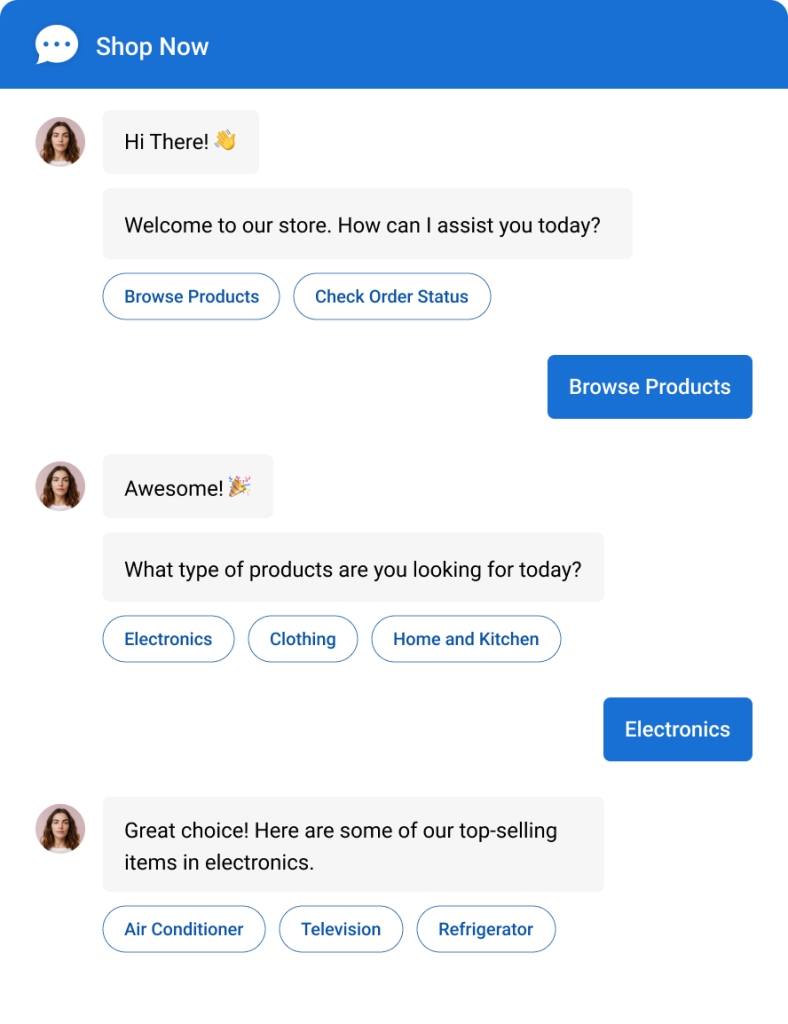
That is what makes them genuinely useful for small teams, and the numbers back it up. According to Gartner’s survey from 2025, agentic AI is expected to autonomously resolve 80% of common customer service issues by 2029, cutting operational costs by 30%.
Top 10 AI Customer Support Agents to Consider This Year
You should not need a six-figure budget, a dedicated IT team, or three months of onboarding to get AI handling your support. The tools below are built for small businesses: lean setups, real ticket volumes, and zero tolerance for complexity.
Here is a quick look at the tools covered in this guide:
| Tool | Best For | Starting Price | Rating |
| ProProfs Chat | Easy Live Chat & AI Customer Service Agent for Instant, Automated Support | A free plan is available for growing teams. Paid plan starts at $19.99/operator/month. | 4.8/5 (Capterra) |
| Tidio | All-in-One for eCommerce | $29/month | 4.7/5 (G2) |
| Freshdesk | Helpdesk + AI for Growing Teams | $15/agent/month | 4.4/5 (G2) |
| Intercom Fin | AI-First Resolution at Scale | $29/month + usage | 4.5/5 (G2) |
| Zoho SalesIQ | Budget-Friendly AI + CRM Teams | $7/operator/month | 4.4/5 (Capterra) |
| HubSpot Chatbot | CRM-Connected Sales Teams | $15/month | 4.5/5 (G2) |
| Chatling | No-Code AI Without Integrations | $25/month | 4.7/5 (G2) |
| Gorgias | Shopify-Centric eCommerce | $10/month | 4.6/5 (G2) |
| Eesel AI | Add AI to Your Existing Helpdesk | $99/month | 4.7/5 (G2) |
| Kommunicate | Multilingual + Global Teams | $40/month | 4.6/5 (Capterra) |
1. ProProfs Chat – Best for Easy Live Chat & AI Customer Service Agent for Instant, Automated Support
ProProfs Chat is the platform I recommend to small businesses looking for AI-powered customer support and live chat without juggling multiple tools or unpredictable pricing. There’s also a forever-free plan for one operator that includes all premium features — no credit card required.
The standout feature is its AI Customer Service Agent, which you can train using your website, help center, FAQs, or uploaded documents to deliver instant, accurate answers around the clock. When a conversation needs a human touch, the Live Chat Handoff transfers the chat to an agent along with the full conversation history, so customers never have to repeat themselves.
Want to see how an AI Customer Support Agent works? Try it now:
Sentiment Analysis detects emotions like frustration and satisfaction in real time, while churn risk scoring flags customers who may be on their way out. After every interaction, AI resolution summaries give agents concise recaps to save time and simplify reviews.
What I particularly like is the AI agent performance reports feature. Customers can rate AI interactions with a thumbs-up or thumbs-down and leave comments after each conversation, giving teams clear visibility into satisfaction levels, recurring issues, and exactly where the AI agent needs improvement.
Beyond support, ProProfs Chat brings website chat, WhatsApp, Facebook, Instagram, SMS, and other channels into a single dashboard, so even a one-person team can manage all channels from one place. Apart from them, it also integrates with its sibling tools – ProProfs Knowledge Base and ProProfs Help Desk, helping you provide 360° customer support.
Pros:
- Train AI chatbots using your website or help center data for highly accurate responses
- Risk prediction scores every conversation for churn risk so the right chats always get human attention
- Ready-to-use chatbot templates to build your bot in minutes
- AI resolution overview auto-summarizes every chat so operators skip the manual note-writing
- Proactive chat invitations trigger on visitor behavior to boost engagement and conversions
Cons:
- Cloud-only deployment with no on-premise option for teams with strict data residency requirements
- No dark mode for the operator interface
User Rating: 4.8/5 (Capterra)
Pricing: A free plan is available for growing teams. Paid plan starts at $19.99/operator/month.
Here’s how Horse Saddle Shop used an AI customer support agent to handle global buyer questions instantly, in their language, without a support team on standby.

2. Tidio – Best for Small eCommerce Teams Wanting an All-in-One
Tidio is one of the more popular entry points for small businesses new to AI support. The platform combines live chat, email marketing, and an AI agent called Lyro into a single inbox, which means you are not juggling three tools before your morning coffee.
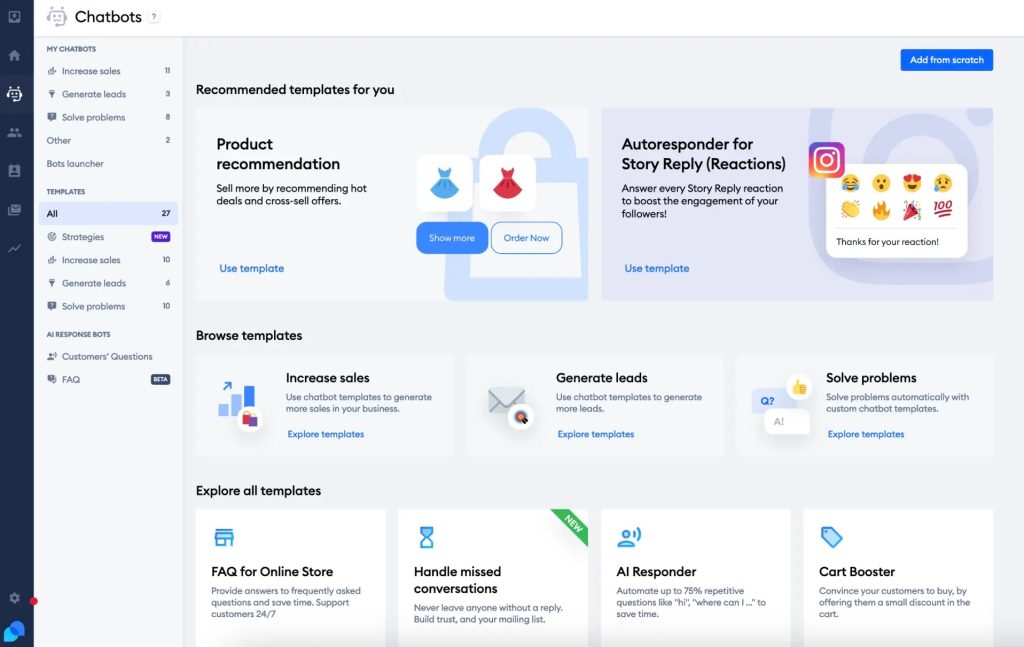
Lyro, Tidio’s AI agent, runs on Anthropic’s Claude model and handles repetitive customer questions using natural language. It trains on your help center content and FAQ data, and when it cannot resolve something, it hands off to a human with context intact. The visual Flows builder lets you build custom automation paths without writing code, and the whole setup from account creation to live agent takes a few hours for most teams.
The main friction I found was at the pricing boundary. Once you cross into paid territory, the cost scales with AI conversation volume, and that can surprise teams that assumed a flat monthly rate.
Pros:
- Lyro AI agent resolves natural-language questions with context-aware answers, not just keyword matching
- Single inbox for live chat, email, Instagram, Messenger, and WhatsApp
- Visual drag-and-drop Flows builder for no-code automation
- 50 Lyro AI conversations included on every account for testing the experience
- Clean, beginner-friendly interface that non-technical teams can learn in a day
Cons:
- AI conversation limits on starter plans can hit fast for businesses with steady inbound traffic
- Salesforce integration creates contacts, not leads, which is a known gap for sales-focused teams
User Rating: 4.7/5 (G2)
Pricing: Paid plans start at $29/month.
3. Freshdesk – Best for Growing Teams That Need a Helpdesk + AI Together
Freshdesk is a helpdesk platform with an AI layer built in, not bolted on after the fact. For small businesses that are already managing a ticket queue and want AI to take the edge off, it is a natural fit.
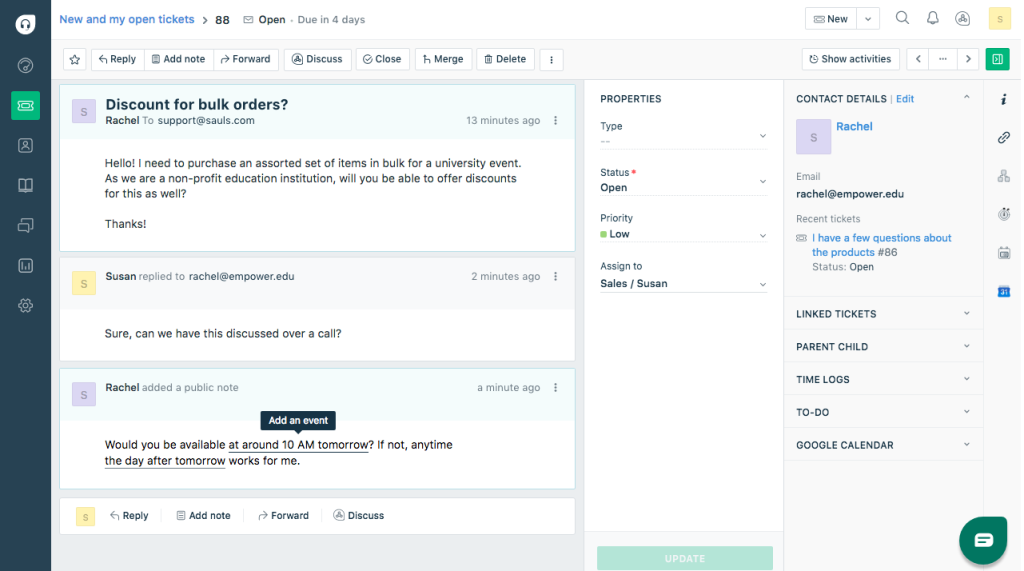
Freddy AI is Freshdesk’s support intelligence engine. It handles ticket triage automatically, surfaces relevant knowledge base articles for agents writing replies, and powers a self-service chatbot for inbound questions.
The impact on small teams is measurable: small businesses using Freddy AI Copilot report a 41.56% improvement in first response time and a 36.39% improvement in resolution time. Those are not incremental gains. That is a meaningful chunk of time returned to a three or four person team every week.
The limitation is that Freddy AI Copilot and the more advanced agent assist tools sit behind paid tiers. Teams get the helpdesk without the full intelligence layer until they move to a paid plan.
Pros:
- Freddy AI handles ticket triage, article suggestions, and first-response drafting natively
- AI Copilot improves agent productivity across every ticket, not just FAQ-style queries
- Omnichannel inbox covers email, chat, phone, social, and WhatsApp
- Strong reporting and analytics for tracking team performance over time
- Straightforward setup for core helpdesk workflows without developer involvement
Cons:
- Full Freddy AI Copilot requires a paid plan; base tier has limited AI capability
- Setup for advanced automation rules takes time and can feel complex for non-technical users
User Rating: 4.4/5 (G2)
Pricing: Paid plans with AI start at $15/agent/month.
4. Intercom Fin – Best for Teams That Want High AI Resolution Rates
Intercom Fin is what happens when a company goes all-in on AI resolution rather than AI assistance. It is not an agent helper. It is designed to close the ticket entirely, without a human involved, across a wide range of query types.
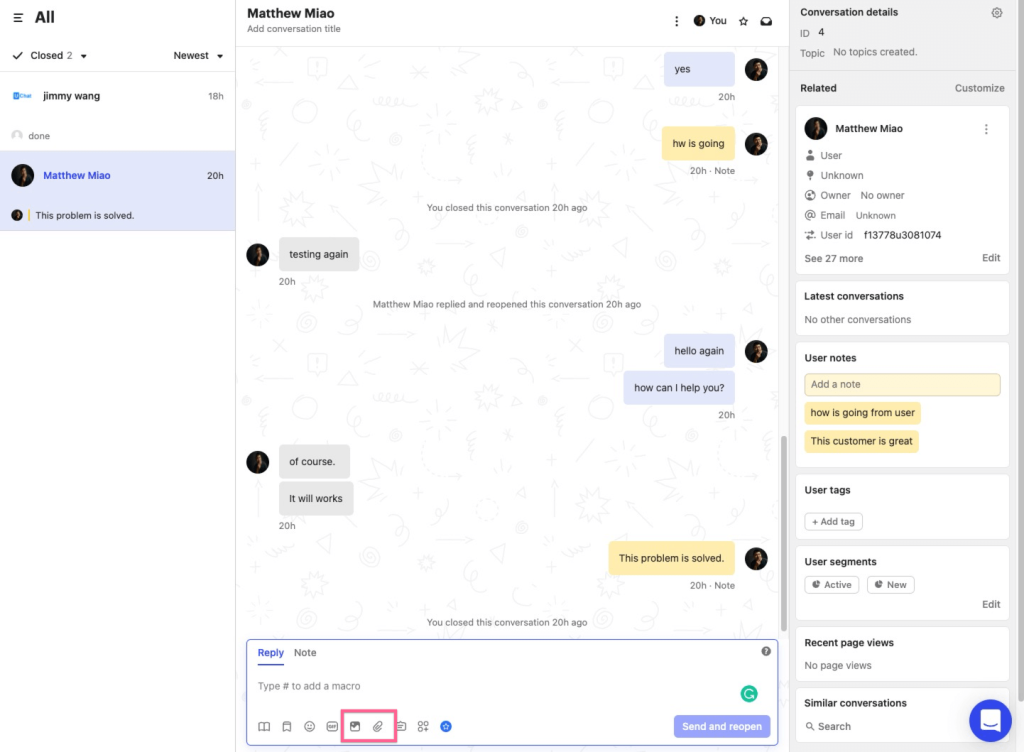
Fin runs on Intercom’s proprietary Apex model, trained on customer experience data specifically, not a generic LLM layer. That training difference shows in resolution rates. The AI customer service software market is growing at a 25.8% CAGR as the era of chatbots gives way to AI agents, and Fin is built for exactly that shift.
It handles conversations across chat, email, and messaging, identifies when it cannot resolve something, and passes off with full context rather than dropping the thread.
For small businesses, the pricing model is the main consideration. Fin charges a base platform fee plus per-resolution pricing, which means your costs are tied to outcomes rather than seats. That works well at volume, but for very small teams with lower ticket counts, a flat monthly fee tool may be more predictable.
Pros:
- Industry-leading autonomous resolution rate across chat, email, and messaging channels
- Runs on Apex, a proprietary model trained on customer service data rather than a generic LLM
- Passes conversations to humans with full context and zero cold handoff
- Continuous self-improvement loop as it processes more conversations over time
- Strong security posture with SOC 2, ISO 27001, and HIPAA compliance
Cons:
- Per-resolution pricing model can be harder to budget for teams with unpredictable ticket volume
- Requires Intercom’s platform, so it is not a standalone add-on to your existing helpdeskI
User Rating: 4.5/5 (G2)
Pricing: Starts at $29/month plus per-resolution fees.
5. Zoho SalesIQ – Best for Budget-Conscious Teams Already in the Zoho Ecosystem
Zoho SalesIQ is one of the more underrated options on this list. If you are already using Zoho CRM, the integration argument alone is worth considering. Every chat conversation, lead capture, and visitor interaction flows directly into your CRM without a Zapier middleman.
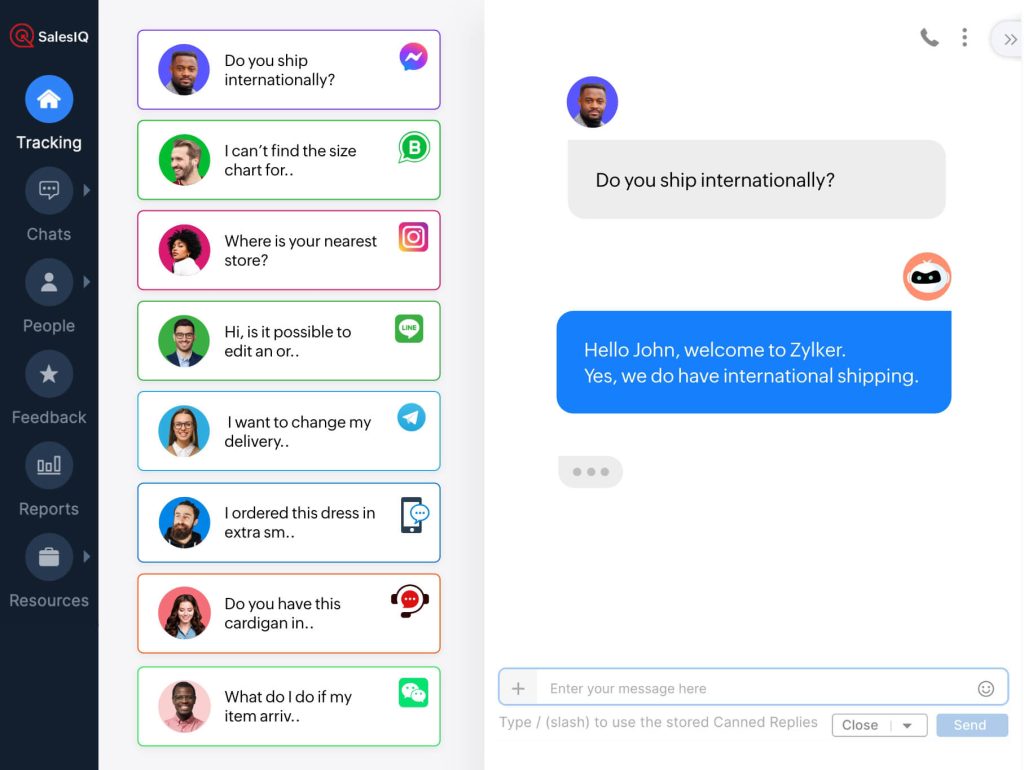
The AI chatbot builder (called Zobot) lets you build intelligent conversation flows without code, and it connects natively with Zoho Desk for ticket creation. The visitor tracking layer shows you who is on your site in real time: what pages they have browsed, where they came from, how long they have been sitting on your pricing page. For small sales teams, that context is useful before you even say hello.
The limitation is the depth of AI intelligence. Zoho SalesIQ’s AI is solid for the price point, but it is not at the same resolution sophistication as more AI-native platforms. If your primary use case is basic FAQ handling and CRM integration, it delivers cleanly. If you need sentiment detection or advanced risk scoring, you will want to look elsewhere.
Pros:
- Native Zoho CRM and Zoho Desk integration with automatic chat sync on every conversation
- Real-time visitor monitoring with behavioral data for proactive engagement before customers ask
- Affordable paid tiers compared to most tools on this list
- Runs across website, mobile app, and Facebook Messenger without additional setup
- No-code Zobot builder for teams that want automation without developer involvement
Cons:
- AI sophistication is lower than dedicated AI-first platforms
- Interface can feel dated compared to newer competitors
User Rating: 4.4/5 (Capterra)
Pricing: Paid plans start at $7/operator/month.
6. HubSpot Chatbot – Best for Sales-Led Small Businesses Already on HubSpot
HubSpot’s chatbot builder is not the most powerful AI agent on this list. But it is the most frictionless choice for teams already running HubSpot for CRM, marketing, or sales.
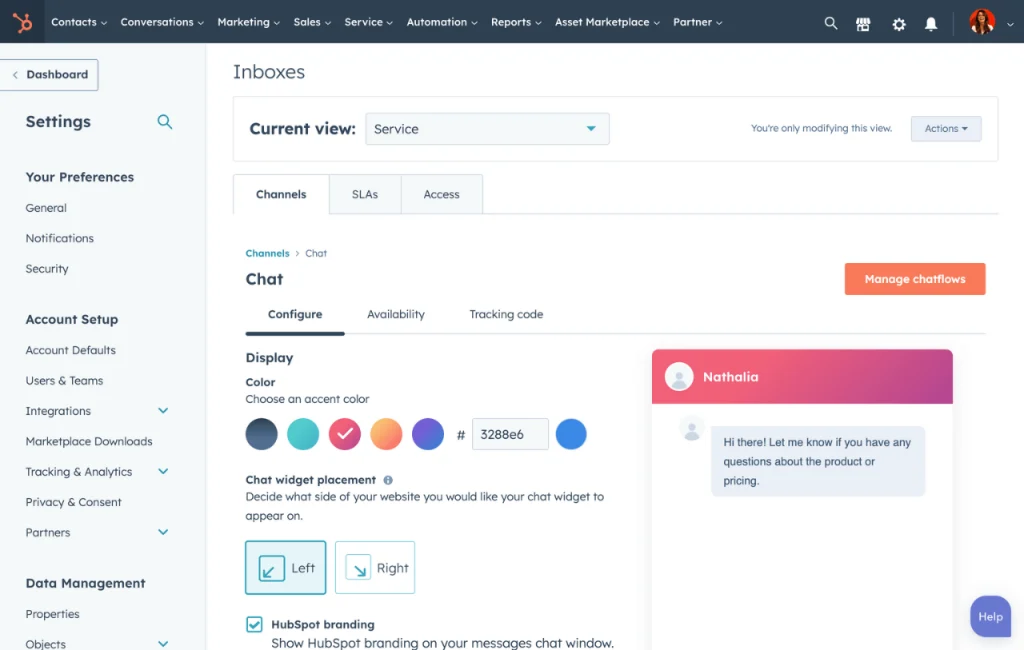
Every conversation is automatically saved in HubSpot CRM. That means when your sales rep follows up on a qualified lead, they see the full conversation history before picking up the phone. The no-code bot builder handles lead qualification, meeting booking, and FAQ responses: the three most common automation use cases for small business support teams. Setup takes under an hour.
The AI layer is more limited than dedicated chat platforms. HubSpot’s chatbot is strong on CRM connection and workflow integration, not on natural-language resolution depth. For teams whose priority is capturing and routing leads into an existing HubSpot workflow, nothing on this list is easier to get running.
Pros:
- Every chat conversation saved automatically in HubSpot CRM with zero integration overhead
- No-code builder for lead qualification, meeting booking, and FAQ handling
- Works within HubSpot’s existing workflows, triggers, and reporting
- Multilingual support for businesses serving customers across different regions
- No credit card required to get started and test the core chatbot functionality
Cons:
- AI resolution depth is limited compared to dedicated AI agent platforms
- A/B testing and advanced features are locked behind higher-tier plans
User Rating: 4.5/5 (G2)
Pricing: Paid plans start at $15/month.
7. Chatling – Best for Small Teams That Want AI Quality Without Integrations
Chatling sits in a growing category of AI chatbot builders that prioritize training accuracy above everything else. You feed it your website URL, uploaded documents, or raw text, and it builds its knowledge base automatically. No flow builder. No conversation design required.
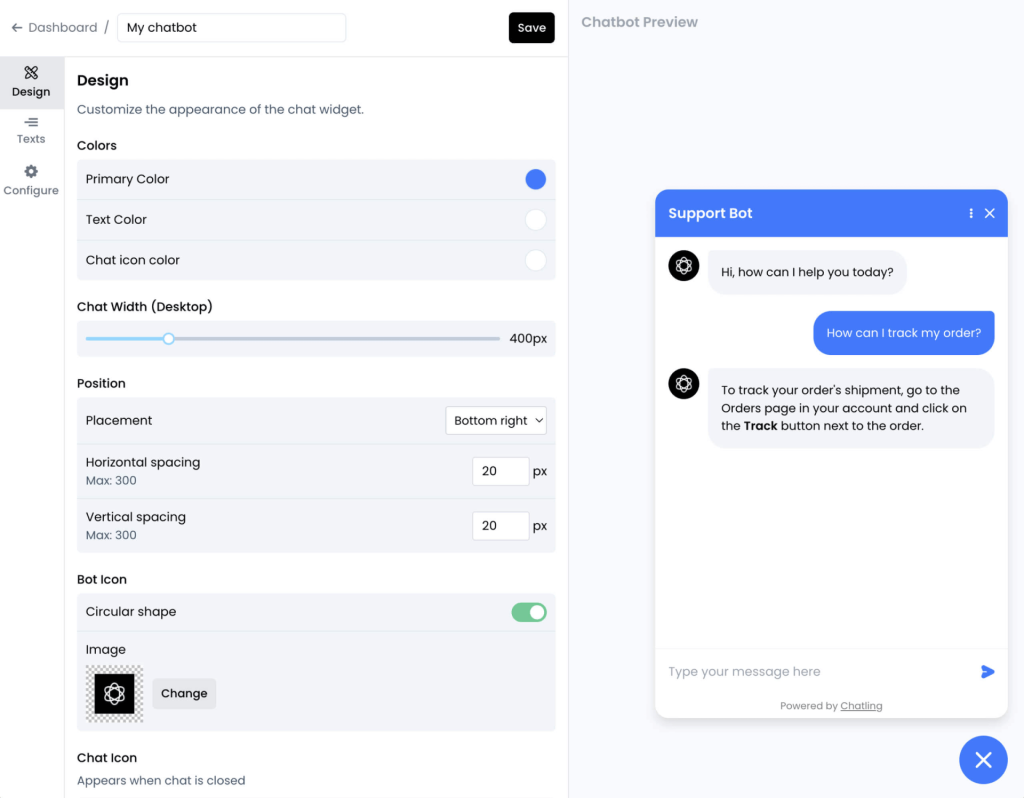
The quality of the AI responses is consistently noted in reviews. Unlike many tools that answer questions with keyword matches or rigid decision trees, Chatling generates answers that read as natural and considered. For small businesses where the AI is often the only first-line response, that quality difference matters to customers more than it does in an enterprise with human backup behind every bot.
The tradeoff is integration breadth. Chatling’s third-party integration options are narrower than most tools on this list. If your workflow depends on pushing leads directly into Salesforce or triggering Zendesk tickets, you will need workarounds. For teams that want a well-trained, well-written AI response engine without heavy backend dependencies, it is a strong choice.
Pros:
- AI trains automatically from your website, documents, and uploaded data with zero flow design needed
- Response quality reads as natural rather than scripted, which genuinely improves customer experience
- Built-in lead capture within the chat flow without needing a separate form builder
- Clean drag-and-drop interface that requires no technical knowledge to operate
- Analytics dashboard for tracking bot performance and identifying gaps over time
Cons:
- Fewer third-party integration options compared to more established platforms
- No native CRM sync on entry-level plans
User Rating: 4.7/5 (G2)
Pricing: Paid plans start at $25/month.
8. Gorgias – Best for Shopify-Native eCommerce Support
Gorgias is purpose-built for eCommerce, and that focus produces real depth where other tools are shallow. If you run a Shopify store: DTC, retail, or subscription, it is the most tightly integrated AI support option available.
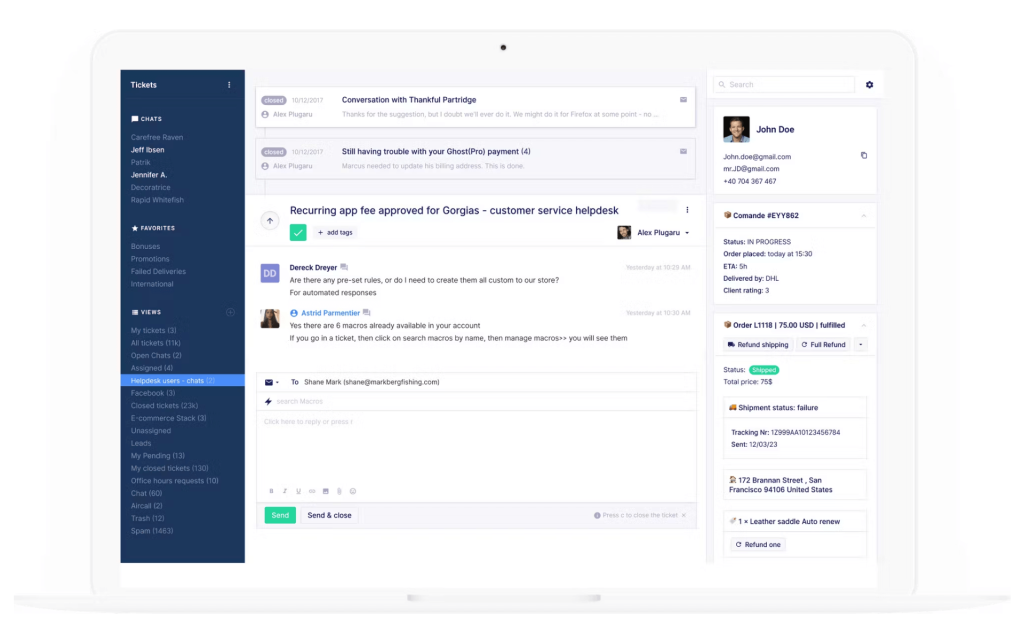
The AI agent handles the queries that make up 80% of eCommerce support volume: order status, return requests, exchange flows, shipping questions, and discount code problems. Because Gorgias reads your Shopify order data directly, it can answer “where is my order?” with the actual tracking link, not a canned redirect to your help center.
That level of action, not just response, is what separates Gorgias from a generic chat widget for Shopify stores. The limitation is obvious: if you are not running a Shopify-centric operation, Gorgias loses most of its edge. The pricing model, which charges per ticket rather than per seat, also requires some thought. High-volume months can cost more than expected.
Pros:
- Deep Shopify integration where AI reads order data and takes real actions, not just generates text responses
- Handles return, exchange, and refund workflows natively without custom configuration
- Omnichannel inbox for email, chat, SMS, Instagram, and Facebook
- Revenue reporting that shows which support interactions lead to purchases
- Large library of eCommerce-specific macros and automation rules
Cons:
- Best value only if Shopify is your primary commerce backend
- Per-ticket pricing model makes costs harder to predict during busy seasons
User Rating: 4.6/5 (G2)
Pricing: Paid plans start at $10/month (based on ticket volume).
9. Eesel AI – Best for Adding AI to Your Existing Helpdesk Without Migrating
Eesel AI is for small businesses that already have a helpdesk they like: Zendesk, Freshdesk, or Intercom, and want to add AI resolution without migrating the whole operation.
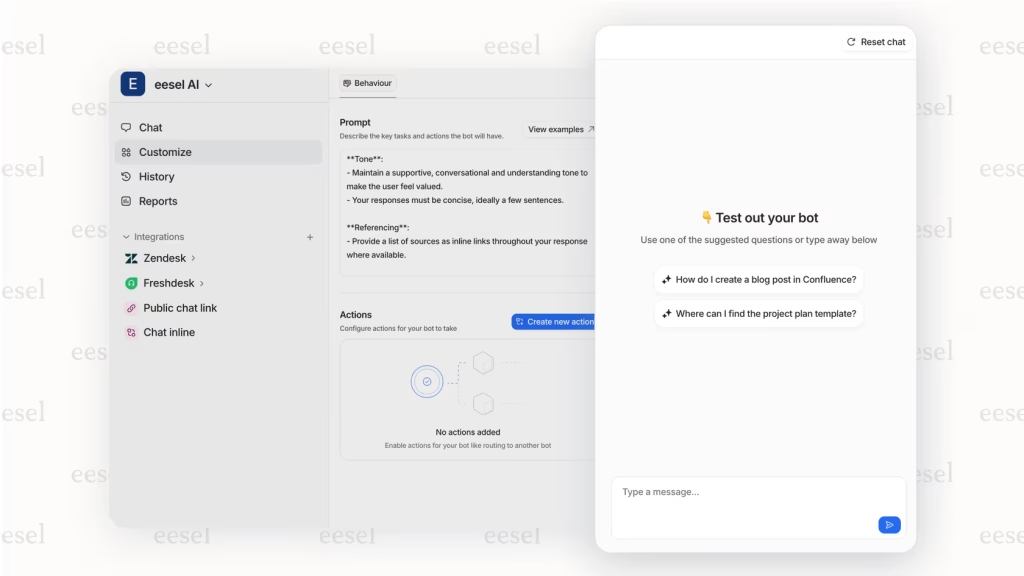
The setup is one of the fastest I tested. Connect your helpdesk and your knowledge sources, and Eesel AI starts learning from your ticket history immediately. You can go from signup to a working AI agent in under 15 minutes without touching a line of code. The AI trains on your past tickets, which means its responses are grounded in how your team actually handles questions, not just what your docs say.
The main limitation is cost. Eesel AI’s pricing starts higher than most of the tools on this list. For small businesses with tight margins, that requires a clear ROI case upfront. For teams already paying for a helpdesk and losing agent time to repetitive tickets, the numbers usually work.
Pros:
- Integrates with existing helpdesks with no migration and no workflow rebuild required
- Trains on past ticket history so AI responses reflect your team’s actual patterns
- Setup takes under 15 minutes, fully self-serve, no sales call required
- AI Actions for triage and routing included on higher plans
- Clean pricing with transparent tiers and no hidden usage fees
Cons:
- Pricing starts high relative to simpler tools on this list
- Best value requires an existing, populated helpdesk to train on
User Rating: 4.7/5 (G2)
Pricing: Paid plans start at $99/month.
10. Kommunicate – Best for Small Businesses Serving a Global Audience
Kommunicate is built for teams where multilingual support is a genuine operational requirement, not a nice-to-have. With support across 100+ languages and clean compatibility across web, iOS, Android, and tablet, it is a practical choice for small businesses serving customers in multiple regions from a single platform.
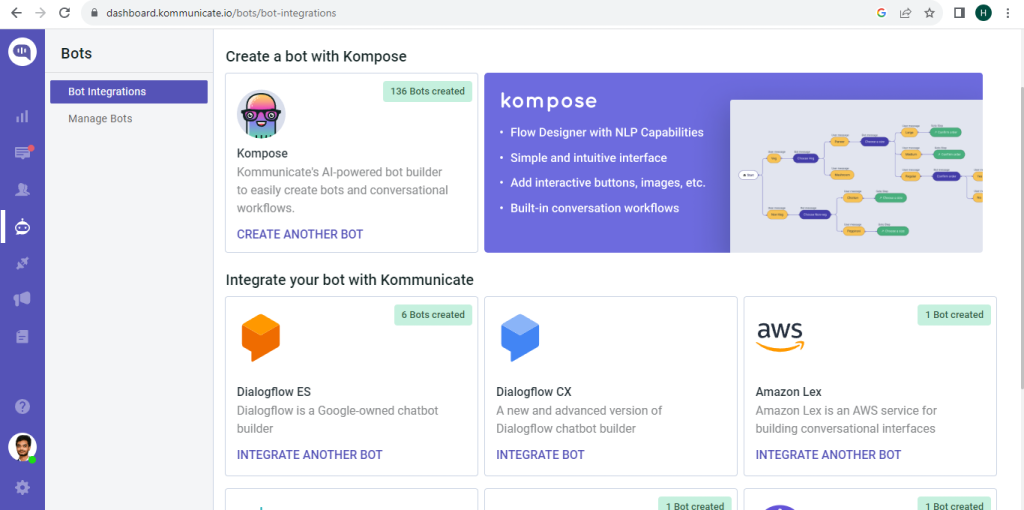
The human-bot hybrid approach is well-executed. You set custom handoff rules that route conversations to the right agent when the bot reaches its limit, and the visitor does not need to repeat themselves. The chat widget customization goes deeper than most tools at this price point. Aligning the look and feel with your brand takes minutes, not a developer engagement.
The tradeoff is cost. Kommunicate sits at the higher end of the small business category, and some users have flagged inconsistencies in support response times. For teams where language coverage is the deciding factor, it earns its place on this list.
Pros:
- 100+ language support with clean multilingual conversation handling across all channels
- Intelligent human handoff with customizable escalation rules based on query type
- Compatible across web, iOS, Android, and tablet without additional setup
- Deep widget customization to match brand identity without code
- Simple bot builder for teams that need basic automation without technical complexity
Cons:
- Pricing starts higher relative to other tools on this list
- Some users have reported slow support response times from the Kommunicate team
- AI sophistication is mid-tier compared to AI-native platforms
User Rating: 4.6/5 (Capterra)
Pricing: Paid plans start at $40/month.
How I Evaluated These AI Customer Support Agents
Choosing the wrong AI agent is an expensive mistake. Not just in licensing costs, but in the time spent migrating and retraining. Here is exactly what I looked at when evaluating each platform.
- User Reviews and Ratings: I went straight to G2, Capterra, and Gartner for verified user feedback, focusing on recurring complaints and what teams actually praised after six months of real use. Star ratings alone tell you nothing. Patterns in the reviews tell you everything.
- Core Features and Functionality: I tested each tool hands-on, specifically looking at AI agent training quality, human handoff experience, customization depth, and whether the reporting gave you actionable insights or just looked good on a dashboard.
- Ease of Use: I asked one simple question: Can a non-technical team member get this running without a training session or a call with sales? If the answer was no, that counted against the tool.
- Customer Support Quality: I paid attention to how each vendor showed up during setup, when things broke, and whether ongoing support felt like a real partnership or just another ticket in a queue.
- Value for Money: I compared plan depth against actual feature access, because affordable AI customer support agent tools are only affordable if they actually deliver the capability at the price they advertise. A tool that locks everything useful behind a paywall is not really affordable. It is just a trial with better branding.
- Personal Experience: I used each platform myself, cross-checked my impressions with peers who run similar operations, and factored in input from people who live inside these tools daily.
My Top 3 Picks for the Best AI Agents for Small Businesses
Still deciding? Here is where most small business teams should start.
1. ProProfs Chat
If you need an AI support agent up and running without a developer or a budget commitment, ProProfs Chat is the cleanest starting point. The AI trains on your content in minutes, handles FAQs around the clock, captures leads, and escalates to a human with full context when needed. The free forever plan covers everything for one operator.
2. Freshdesk
For small teams already managing a ticket queue, Freshdesk is the most natural upgrade path. Freddy AI sits inside the helpdesk you are already using, triaging incoming tickets, drafting replies, and deflecting repetitive questions without disrupting how your team works. It is the right choice when you want AI to improve an existing workflow rather than replace it.
3. Tidio
For small businesses that want live chat, AI support, and email marketing in one place, Tidio keeps things simple. Lyro handles common customer questions naturally, the Flows builder covers standard automation scenarios without code, and a single inbox manages every channel. A practical choice for teams that do not want to stitch multiple tools together.
FREE. All Features. FOREVER!
Try our Forever FREE account with all premium features!
Pick the Right AI Agent and Stop Losing Customers to Slow Responses
Most small businesses lose customers at the same moment: the 2 AM question that nobody answers, the product page visitor who leaves before a human gets online, the frustrated customer who sends a third follow-up because nobody saw the first two.
An AI customer support agent closes those gaps without adding headcount. The tools on this list range from free to mid-market, from no-code chatbot builders to enterprise-grade resolution engines. Matching the tool to your actual workflow, not a feature wishlist, is what makes the difference.
A few tips before you go live: test the human handoff experience before your customers see it. Check the integration with your CRM before you trust it with leads. And measure what the AI resolves in the first two weeks. That number tells you everything about whether the training worked.
If you want a head start without the risk, ProProfs Chat gets you an affordable AI customer support agent with sentiment analysis, risk prediction, AI resolution overview, and proactive chat invitations on a free forever plan with no credit card required. Give it a try today.
Frequently Asked Questions
Do I need technical skills to set up an AI support agent?
Most modern AI support agents offer no-code setup through a copy-paste code snippet or a Google Tag Manager integration. Many also include visual chatbot builders where you design conversation flows without writing a single line of code. ProProfs Chat, for example, trains the AI simply by pointing it at your website URL with no developer involved at any step.
Can an AI agent replace my human support team?
Not entirely, and that is not the goal. The right model is human plus AI, not human or AI. In B2B specifically, roughly 70% of AI usage involves supercharging human agents with drafts and account context rather than full autonomous resolution. AI handles the repetitive, the routine, and the after-hours. Humans handle the complex and the high-stakes.
Is my customer data safe with an AI support agent?
Reputable platforms publish GDPR compliance documentation and SOC 2 certifications clearly. For tools handling EU customer data or operating in regulated industries like healthcare, check whether the vendor offers HIPAA-compliant configurations before deploying. Always review the vendor's data processing agreement and privacy policy before going live.
Can an AI support agent work across WhatsApp and social channels, not just website chat?
Yes, most modern tools support omnichannel deployment. For example, ProProfs Chat handles website chat, WhatsApp, Instagram, Facebook Messenger, and SMS from a single inbox. Check the specific channels you need against each tool's plan tier, as some channel integrations are locked behind paid plans.
How do I know if my AI agent is actually working?
Track three numbers from the first two weeks: AI resolution rate (percentage of conversations closed without human involvement), transfer rate (how often the AI escalates to a human), and unresolved query log (what the AI could not answer). ProProfs Chat surfaces all three in its AI bot performance analytics dashboard. Those numbers tell you exactly where the training needs work.
FREE. All Features. FOREVER!
Try our Forever FREE account with all premium features!

 We'd love your feedback!
What did you like & how can we make it even better?

 Thanks for your feedback!
 Ask Your Question
Have a question? Get expert help to make your decision easier.