A customer lands on your pricing page at 11:47 PM. They have one question standing between them and a purchase decision. Your support team clocked out at 6. There is no live agent. The customer waits, gets nothing, and leaves.
That scenario plays out thousands of times a day across businesses still relying on business-hours-only support. AI customer service agents fix that. They never sleep and answer instantly, qualify leads, resolve common queries, and hand off complex cases to humans without complaining.
I have spent months testing these tools across real support environments. What I found is that the gap between a mediocre AI agent and a great one shows up fast. You see it in missed handoffs, broken integrations, and agents who frustrate users rather than help them.
In this guide, I will walk you through the 10 best AI customer service agents for this year, what each does well, and how to choose the right one without wasting three months on the wrong platform.
What Is an AI Agent in Customer Service?
Unlike traditional chatbots that rely on fixed scripts, AI agents understand customer intent and respond naturally. They use your help center, website content, documents, and FAQs to provide accurate answers in real time.
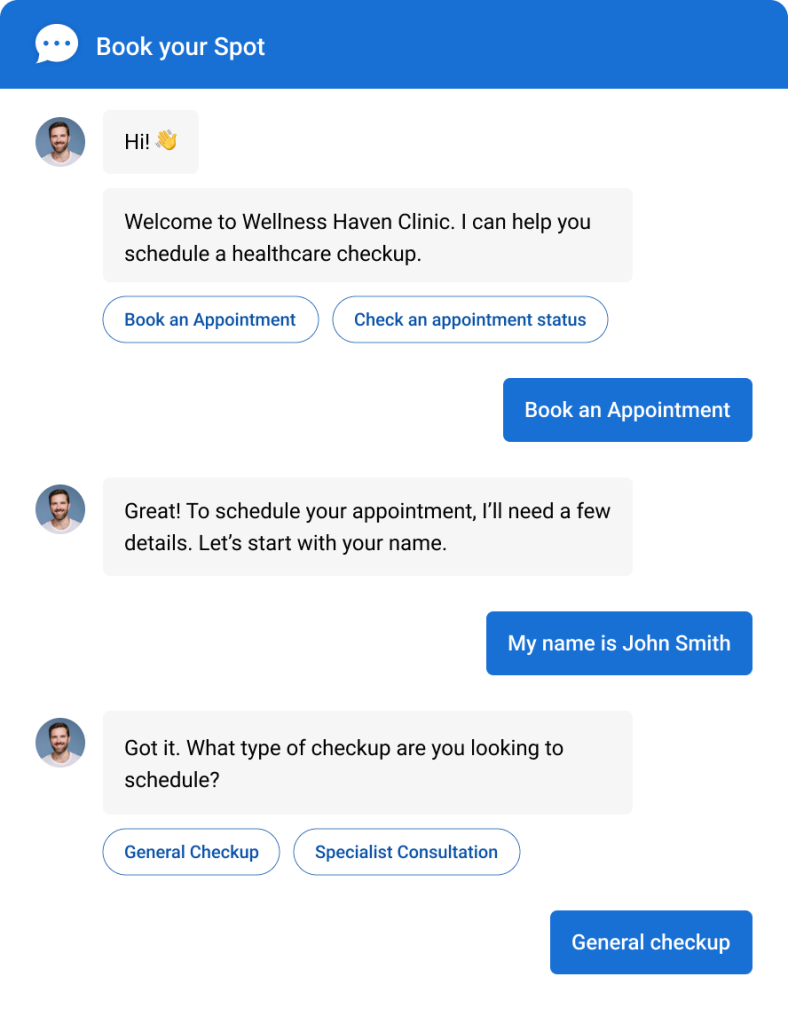
Modern AI agents can also book appointments, create tickets, escalate conversations to human agents, and work across channels like websites, WhatsApp, Facebook, and email. Their biggest advantage is availability because they provide fast, consistent support 24/7 while reducing workload for customer service teams.
Here are the core capabilities that make AI customer service agents so effective:
- Understands customer intent, not just keywords
- Trains on your website, FAQs, documents, and knowledge base for accurate answers
- Provides 24/7 automated customer support
- Escalates complex conversations to human agents
- Integrates with CRM, help desk, and scheduling tools
Top 10 AI Customer Service Agent Tools
I evaluated these tools through hands-on testing, peer recommendations, and analysis of verified reviews on G2, Capterra, and Gartner. Here is a quick summary before the details:
| AI Agents | Best For | Pricing | User Rating |
| ProProfs Chat | Easy Live Chat & AI Customer Service Agent for Instant, Automated Support | Free plan available. Paid plans start at $19.99/user/month | 4.8/5 (Capterra) |
| Intercom | Product-led companies with complex support workflows | Starts at $29/seat/month + $0.99 per AI resolution | 4.5/5 (G2) |
| Tidio | eCommerce support and sales automation | Free plan available. AI starts at $42/month | 4.7/5 (Capterra) |
| Zendesk AI | Enterprise support teams using Zendesk | Starts at $55/agent/month | 4.3/5 (G2) |
| XBert | Support queues that include phone calls | $99/month for 100 AI conversations, then $0.99 each | 4.6/5 (Capterra) |
| Freshdesk Freddy AI | Mid-market support and ITSM teams | Starts at $15/agent/month. AI from $29/agent/month | 4.4/5 (G2) |
| Drift | B2B sales and pipeline acceleration | Custom pricing, typically from $2,500/month | 4.4/5 (G2) |
| Ada | Enterprise-scale AI automation | Custom pricing | 4.6/5 (G2) |
| Salesforce Einstein Bots | Salesforce-based enterprise support teams | Starts at $75/user/month | 4.2/5 (G2) |
| Hiver | Gmail-based customer support teams | Starts at $19/user/month. AI from $49/user/month | 4.6/5 (G2) |
| Kommunicate | Mobile app AI support and in-app chat | Starts at $40/month | 4.5/5 (G2) |
1. ProProfs Chat – Best for Easy Live Chat & AI Customer Service Agent for Instant, Automated Support
I started testing ProProfs Chat when our team needed 24/7 coverage without expanding headcount. What surprised me was how quickly the AI agent was actually useful. Not useful after six weeks of training, but useful within a day.
I could simply enter our website URL and have an AI customer support agent created from the content already available there, which gave me a solid starting point right away.
You train it by pointing it at your website URL, uploading help articles, or connecting your knowledge base. From there, it handles FAQs, qualifies leads with branching question flows, books appointments, and escalates to a human operator with the full conversation context intact. No coding is required at any step, which was the thing I kept coming back to during testing.
I also found the conversation intelligence useful for deciding when humans should get involved. Sentiment analysis picks up emotions during a chat, while risk prediction identifies conversations that may need quicker attention.
For teams managing multiple sites or brands, ProProfs Chat supports multi-domain deployment with white-label options. The bot looks and feels like your product, not a third-party widget. Plus, it seamlessly integrates with Salesforce, HubSpot, Zoho, Zendesk, Shopify, and more.
It also connects with ProProfs Knowledge Base and ProProfs Help Desk, so AI answers, self-service content, and issues requiring human follow-up can work together instead of sitting in separate systems.
The reporting dashboard shows exactly where the AI agent struggled. Unresolved query logs, transfer rates, and customer ratings are all in one place, so every improvement is driven by data rather than guesswork.
Pros:
- Proactive chat invitations to boost interaction and conversion
- Train AI agents using your website or help center data for highly accurate responses
- Real-time visitor tracking for timely engagement
- Customer Delight Suite to offer 360-degree AI-powered support
Cons:
- Cloud-only; no offline access
- No dark theme
User Rating: 4.8/5 (Capterra)
Pricing: A free plan is available for growing teams. Paid plan starts at $19.99/user/month.
See how Horse Saddle Shop used ProProfs Chat to deliver 24/7 multilingual support without adding headcount.
2. Intercom – Best for Product-Led Companies With Complex Support Workflows
Intercom’s AI agent, Fin, is built on large language models and pulls answers from your existing help content.
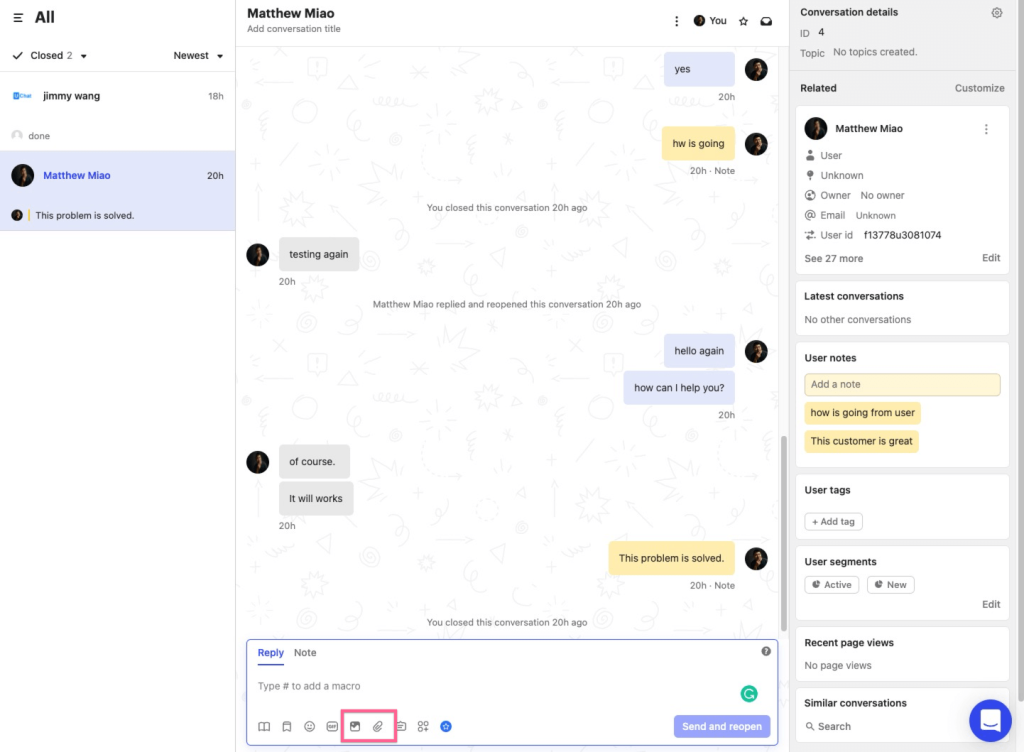
What I noticed during testing is that it handles multi-step conversations better than most tools in this category. It integrates deeply into Intercom’s broader CX platform, covering ticketing, customer data, and proactive messaging in one place.
For SaaS companies with rich help centers and complex customer journeys, Fin reduces tier-1 volume significantly without needing manual flow-building. The tradeoff is cost. Intercom is one of the pricier options on this list, and pricing scales quickly with seat count and usage.
Pros:
- Fin AI agent is genuinely conversational and context-aware
- Deep integration with Intercom’s inbox, ticketing, and CRM
- Strong reporting and resolution rate tracking
- Proactive messaging and behavioral triggers
Cons:
- Pricing is high and becomes expensive quickly at scale
- Overkill for small teams that only need AI chat support
User Rating: 4.5/5 (G2)
Pricing: Starts at $29/seat/month. Fin AI usage is billed separately at $0.99 per resolved conversation.
3. Tidio – Best for eCommerce Support and Sales Automation
Tidio combines live chat and an AI agent called Lyro in a single platform built specifically around eCommerce workflows.
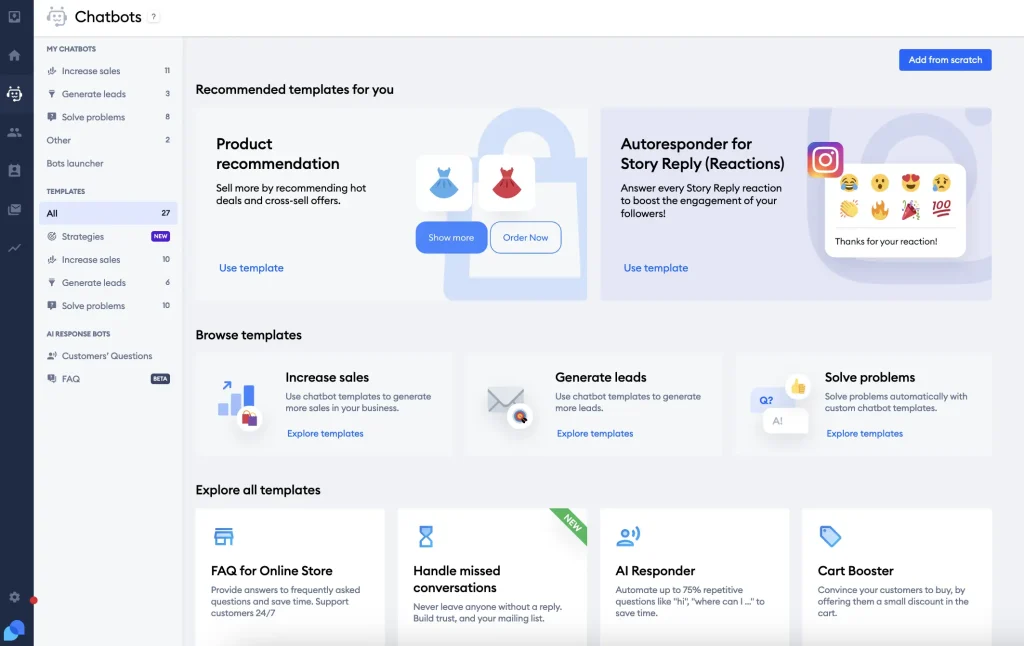
Lyro handles support queries using your FAQ content, while Tidio’s Flows builder lets you create lead capture and cart recovery sequences without writing a single line of code.
What makes Tidio worth considering for online stores is how well the native integrations work in practice. I found that for Shopify and WooCommerce setups, the AI agent can pull order details, recommend products, and trigger post-purchase follow-ups automatically. It is one of the more complete solutions for a store that wants both support and sales covered in one tool.
Pros:
- Lyro AI agent answers support questions from FAQ content
- eCommerce-specific flows for cart abandonment and product recommendations
- Native Shopify, WooCommerce, and Magento integrations
- Clean interface with minimal setup friction
Cons:
- Lyro’s AI has a conversation limit on lower plans and scales up in cost fast
- Less suited for non-eCommerce use cases
User Rating: 4.7/5 (Capterra)
Pricing: Free plan available. Lyro AI from $42/month (50 conversations).
4. Zendesk AI – Best for Enterprise Teams Using Zendesk Ecosystem
Zendesk’s AI agent capabilities sit inside its broader support suite, offering automated ticket triage, intent detection, and self-service resolution built on top of your existing help center content.
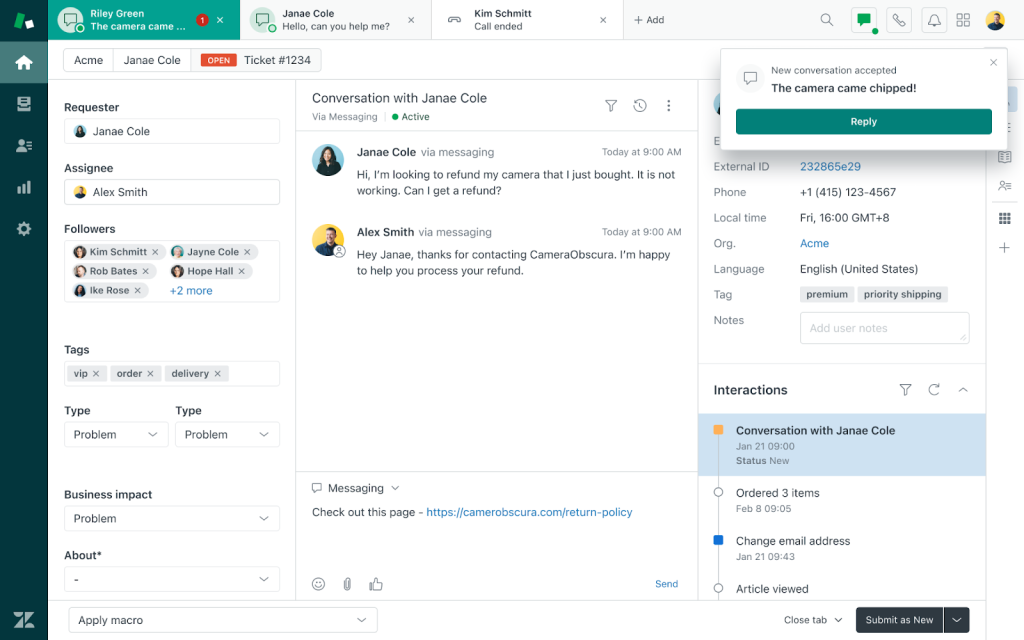
For teams already running Zendesk as their ticketing backbone, the AI layer adds genuine value without requiring a separate platform.
The AI triages incoming tickets, suggests articles, and routes complex cases based on intent, all without manual intervention. Omnichannel routing ensures queries from email, chat, and social flow through the same AI logic, keeping response quality consistent across channels. My experience is that Zendesk AI earns its place most when the team is already deep in the Zendesk ecosystem. Outside of that context, it feels like a lot of infrastructure for what you get.
Pros:
- Tight integration with Zendesk tickets, macros, and workflows
- AI-powered triage and intent detection out of the box
- Strong compliance and enterprise security posture
- Scales well for teams handling thousands of tickets monthly
Cons:
- Requires existing Zendesk infrastructure to get full value
- AI features add meaningful cost on top of base plan pricing
User Rating: 4.3/5 (G2)
Pricing: Suite Team starts at $55/agent/month. AI features available on higher tiers.
5. XBert – Best for Support Queues That Include Phone Calls
XBert is Nextiva’s AI employee, and it runs on the phone line as well as text, web chat, and email. A customer who would rather talk than type reaches it the way they would reach a receptionist, and gets an answer rather than a menu or a hold queue.
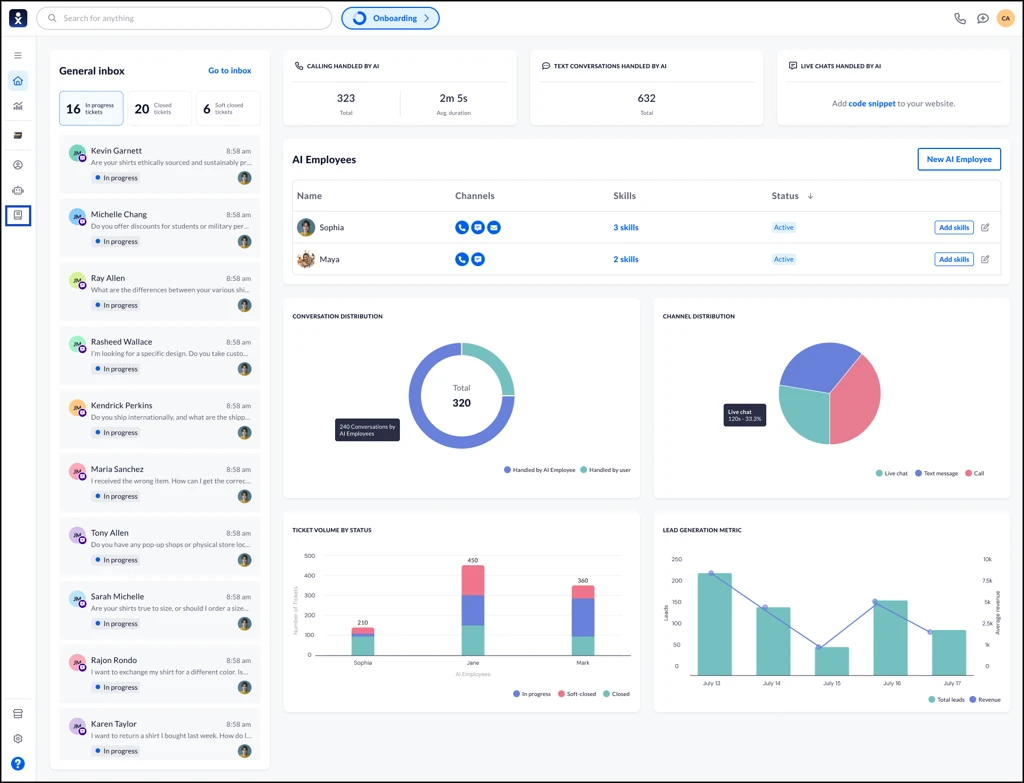
When a conversation needs a person, XBert transfers it with the full transcript and context attached, so the caller does not tell the story a second time. If Nextiva is also the phone system, every call, text, and email lands in a single customer record, so someone getting back in touch a week later is met with their past calls, purchases, and prior conversations already in view.
The answers themselves come from your own material rather than general knowledge. XBert works from the services, hours, policies, and FAQs you give it, and a request that falls outside that scope is escalated instead of answered, so a customer is not told a return window or a price that the business then has to walk back.
Pros:
- Voice, SMS, and web chat handled by a single assistant, 24/7
- The agent’s name, voice, and greeting are yours to set, starting from a Receptionist, Sales, or Support role
- Every conversation is transcribed and summarized with action items pulled out, so follow-ups don’t get dropped
- SOC 2 Type II audited, ISO 27001 certified, and PCI DSS compliant, and HIPAA-eligible with a BAA in place
Cons:
- Newer product, so published ratings are Nextiva platform-level rather than XBert-specific
- Escalations go to your own staff, so someone internal has to be available to take the handoff
User Rating: 4.6/5 (Capterra)
Pricing: $99/month for 100 AI conversations, then $0.99 per conversation. Available standalone or as an add-on to a Nextiva plan.
6. Freshdesk Freddy AI – Best for Mid-Market Support and ITSM Teams
Freshdesk’s Freddy AI runs across their customer support and IT service management products, handling auto-resolution of tickets, intelligent article suggestions, and proactive response drafts for agents.
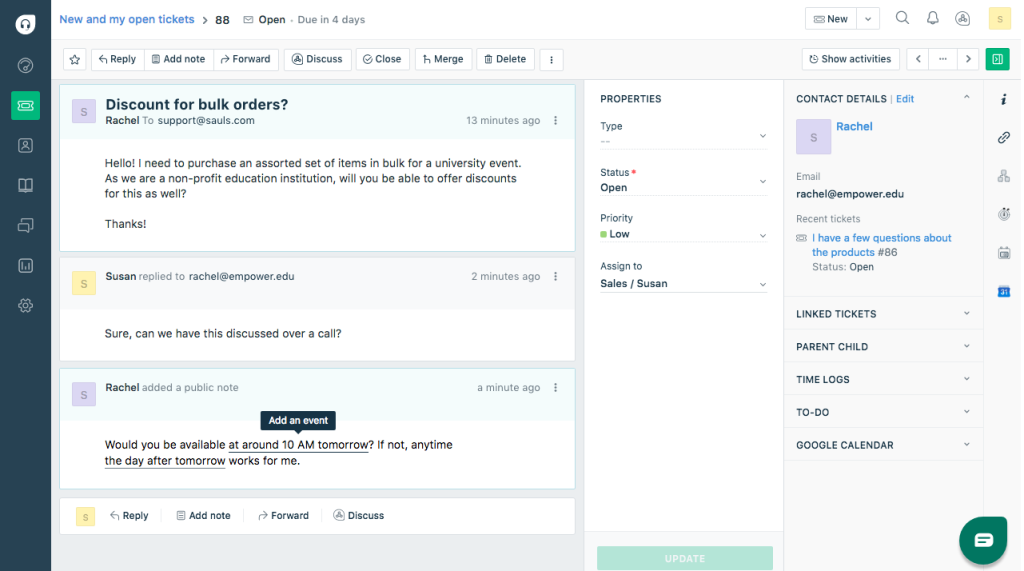
It reads incoming queries, scans the knowledge base, and surfaces the most relevant resolution, either autonomously or as a draft for agent review.
I find Freddy most compelling for teams managing both external customer support and internal IT helpdesk. Instead of running separate tools for each use case, Freddy provides a unified AI layer across both. That said, the AI quality is inconsistent on edge cases, which is worth keeping in mind if your queries tend to be complex.
Pros:
- AI across support, ITSM, and sales products under one platform
- Auto-resolution for common support scenarios
- Multilingual support and global deployment
- Solid reporting with AI resolution rate tracking
Cons:
- AI quality is inconsistent on edge cases and unusual query types
- Full AI capabilities require higher-tier plans
User Rating: 4.4/5 (G2)
Pricing: Growth plan starts at $15/agent/month. Freddy AI features from $29/agent/month.
7. Drift – Best for B2B Sales and Pipeline Acceleration
Drift positions its AI agent primarily as a revenue tool, not just a support tool. The agent identifies high-intent visitors, engages them with personalized conversations, qualifies them using your ideal customer profile criteria, and books meetings, all without a sales rep involved.
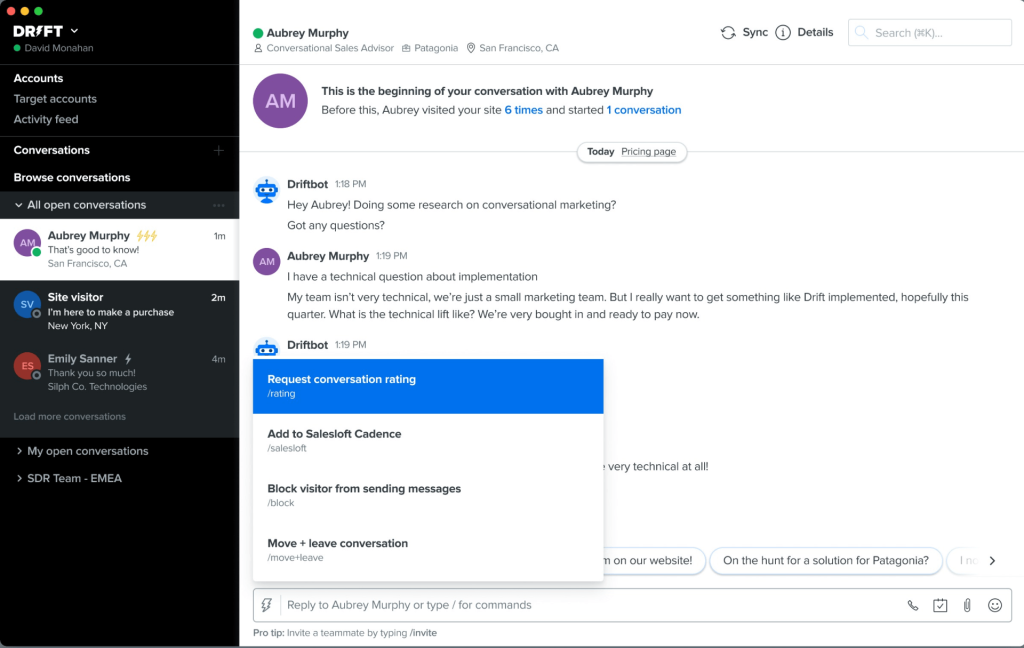
For B2B companies with long sales cycles and high-value accounts, Drift’s account-based engagement features let the AI treat a visitor differently based on the company they are from. It serves tailored messages to target accounts while routing everyone else through a standard flow.
I will be direct: Drift is expensive, and if your primary need is support deflection rather than pipeline acceleration, there are better-value options on this list.
Pros:
- Revenue-focused AI agent with account-based targeting
- Meeting booking built directly into the conversation flow
- Strong Salesforce and HubSpot integration
- Real-time buying signals and intent data
Cons:
- Primarily a sales tool; support use cases are secondary
- Requires significant configuration to get AI performing well
User Rating: 4.4/5 (G2)
Pricing: Custom pricing on request. Starts around $2,500/month for most plans.
8. Ada – Best for Enterprise Scale AI Automation
Ada is built for large organizations that want to automate the majority of customer interactions without human involvement.
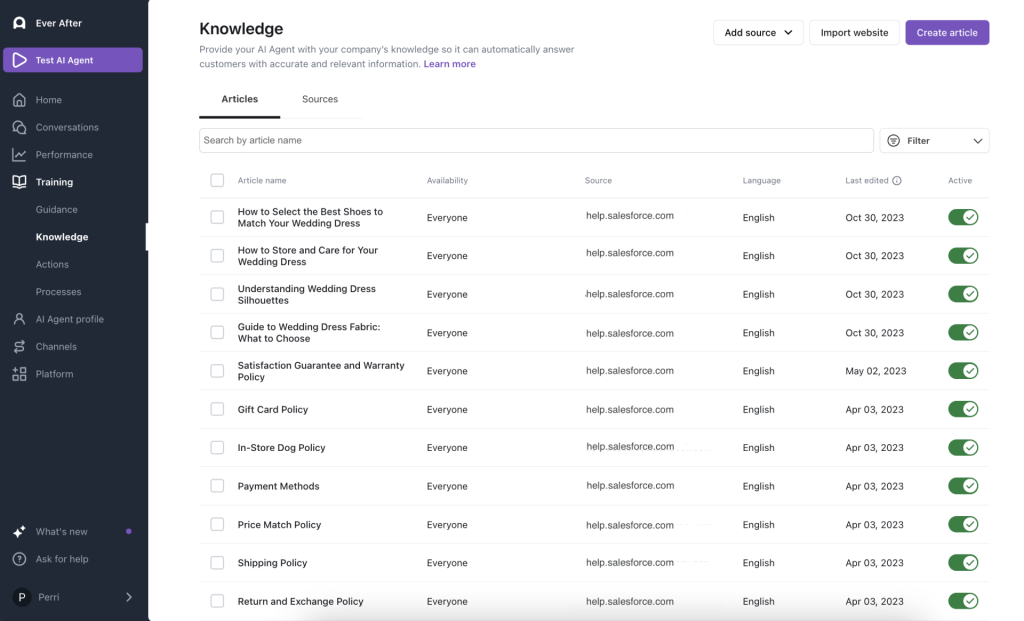
The platform’s AI agent handles complex, multi-step conversations across channels, and its no-code builder lets non-technical teams create and adjust conversation flows without IT support.
Ada’s strength is scale. For brands handling millions of interactions monthly, it maintains consistency and accuracy across languages and channels without degrading in quality as volume spikes. Where I see teams struggle with Ada is in the implementation phase. Getting it to perform well takes time, and smaller teams often find the investment does not pay off at their volume.
Pros:
- Built for high-volume, enterprise-scale automation
- No-code flow builder accessible to non-technical teams
- Strong multilingual support across 50+ languages
- Robust analytics with containment rate and CSAT tracking
Cons:
- Enterprise pricing makes it inaccessible for smaller teams
- Implementation and onboarding require significant time investment
User Rating: 4.6/5 (G2)
Pricing: Custom pricing on request.
9. Salesforce Einstein Bots – Best for Salesforce-Based Enterprise Support Teams
Einstein Bots sit inside Salesforce Service Cloud and are built to handle customer queries using data already in your CRM, things like order history, account status, and open cases, without asking the customer to repeat themselves.
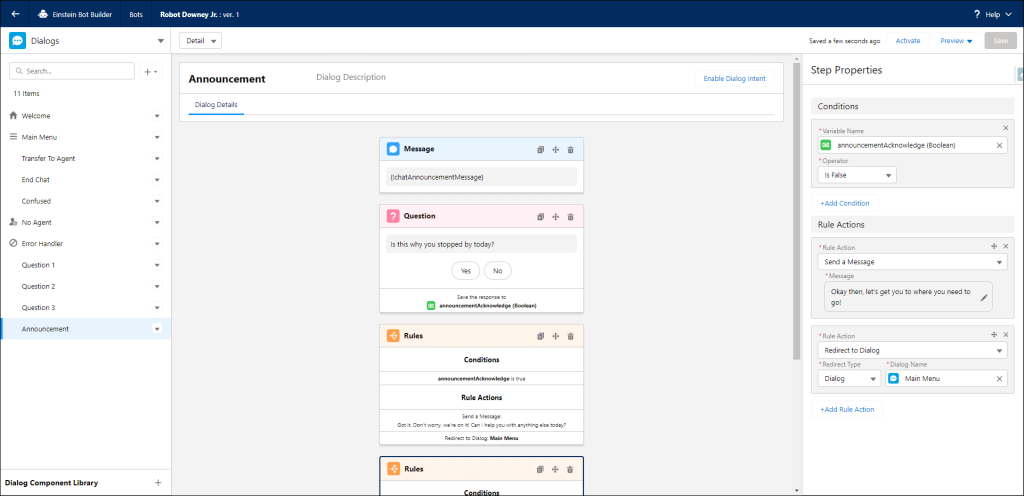
For teams where Salesforce is the operational hub, this is a native AI agent that speaks the same data language as everything else in the stack.
The bot can authenticate users, retrieve account-specific information, and trigger Salesforce workflows mid-conversation, all without a human agent stepping in. I would only recommend this to teams that are already all-in on Salesforce. Outside of that ecosystem, the cost and complexity are hard to justify.
Pros:
- Native access to Salesforce CRM data, personalizes every conversation
- Triggers Salesforce workflows and case creation automatically
- Scales across Service Cloud, Experience Cloud, and Field Service
- Enterprise-grade security and compliance built in
Cons:
- Requires existing Salesforce infrastructure, high base cost
- Setup requires Salesforce admin or developer expertise
User Rating: 4.2/5 (G2)
Pricing: Included with Salesforce Service Cloud. Pricing starts at $75/user/month.
10. Hiver – Best for Gmail-Based Customer Support Teams
Hiver is a helpdesk that lives inside Gmail, and its AI agent capabilities are designed for teams that never want to leave their inbox.
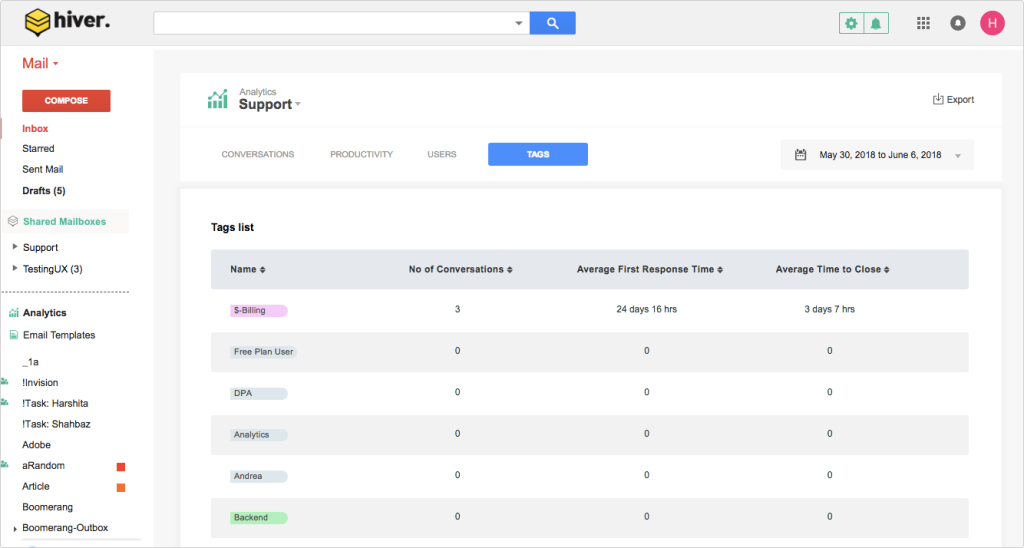
The AI drafts replies, summarizes conversations, categorizes incoming queries, and routes emails to the right team member, all from within the Gmail interface.
What I appreciate about Hiver is the zero-migration pitch. For small and mid-sized teams that run support through email and do not want to move to a dedicated ticketing platform, AI-assisted email triage eliminates the manual overhead of inbox management without forcing a new tool adoption. The limitation is clear though: if you need a website-facing AI agent or omnichannel coverage, Hiver is not the answer.
Pros:
- Lives entirely inside Gmail, no new interface to learn
- AI drafts replies, summarizes threads, and suggests labels
- Shared inbox, assignments, and SLA tracking in one place
- Fast to set up, operational in hours not weeks
Cons:
- Limited to email-based support, no live chat or omnichannel capability
- AI features are more assistive than fully autonomous
User Rating: 4.6/5 (G2)
Pricing: Starter plan at $19/user/month. AI features from $49/user/month.
11. Kommunicate – Best for Mobile App AI Support and In-app Chat
Kommunicate specializes in AI-powered customer support for mobile-first products. Its agent SDK integrates directly into iOS and Android apps, allowing businesses to deploy conversational AI without redirecting users to a separate support channel or breaking the in-app experience.
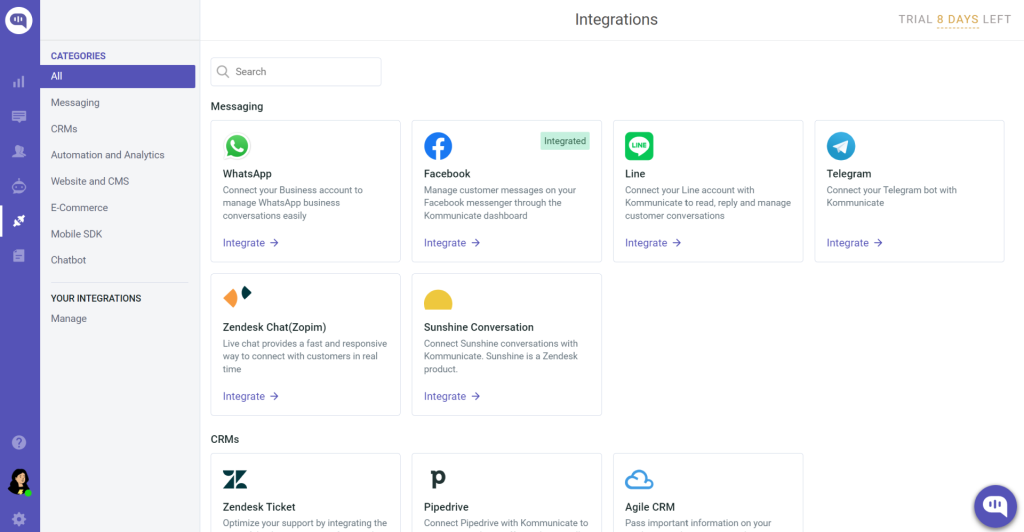
Teams can connect Kommunicate to Dialogflow, Amazon Lex, or IBM Watson for NLP, then build the conversation interface on top. The result is a branded, in-app AI agent that handles FAQs, collects feedback, and escalates issues to human agents without the customer ever leaving the product.
The catch, and it is worth flagging upfront, is that you need to bring your own NLP provider. This is not a plug-and-play setup.
Pros:
- Native iOS and Android SDK for in-app AI agent deployment
- Connects to Dialogflow, Amazon Lex, and IBM Watson
- Human handoff with full context preserved
- Multi-language support and rich media messaging (cards, buttons, images)
Cons:
- Analytics and reporting are thinner than standalone platforms
- Better suited for mobile-first products than website or omnichannel support
User Rating: 4.5/5 (G2)
Pricing: Starter plan at $40/month. Growth from $100/month.
How I Evaluated These AI Customer Service Agent Tools
Choosing the wrong AI agent is expensive. Here is exactly how I avoided that mistake.
- User Reviews and Ratings
I went straight to G2, Capterra, and Gartner for verified user feedback, focusing on recurring complaints and what teams actually praised after six months of real use.
- Core Features and Functionality
I tested each tool hands-on, specifically looking at search quality, content creation speed, team collaboration, and whether the analytics provided actionable insights or just looked pretty.
- Ease of Use
I asked one simple question: Can a non-technical team member get this running without a training session or a call with sales?
- Customer Support Quality
I paid attention to how each vendor showed up during setup, when things broke, and whether ongoing support felt like a partnership or a ticket queue.
- Value for Money
I compared pricing against actual feature depth, because a tool that does three things well is not a bargain for a team of ten.
- Personal Experience
I used each platform myself, cross-checked my impressions with peers who run similar operations, and factored in input from people who live inside these tools daily.
What Are My Top 3 Picks for the Best AI Customer Service Agents?
Still deciding? Here is where I would point most teams:
1. ProProfs Chat
If you are a small or mid-sized team that needs an AI agent up and running quickly, without a developer and without a long onboarding process, ProProfs Chat covers the essentials well. It handles support queries, captures leads, integrates with the CRMs most teams are already using, and gives you a free starting point to test before committing to paid tiers.
2. Intercom
Teams running a SaaS product with a substantial help center will find that Intercom’s Fin handles complex, multi-turn conversations better than most tools in this category. The resolution tracking is detailed enough to show exactly what the agent is and is not earning its keep on. It is a premium option, but the depth of reporting justifies the cost at scale.
3. Tidio
For online stores, the combination of AI-powered support and native eCommerce integrations makes Tidio a practical choice. The Lyro AI handles FAQ queries reliably, the Shopify and WooCommerce connections work without custom setup, and the flow builder covers common scenarios like cart abandonment without needing developer involvement.
FREE. All Features. FOREVER!
Try our Forever FREE account with all premium features!
The Right AI Agent Never Keeps a Customer Waiting
Every hour your support queue goes unanswered means lost leads, frustrated customers, and higher support costs for issues AI could resolve instantly.
The tools on this list solve that differently, so start with your main goal: support deflection, lead capture, or both. Choose a platform your team can actually manage, prioritize CRM and help desk integrations early, and track unresolved queries to improve AI performance over time. Avoid paying enterprise pricing until you validate the use case.
If you want a low-risk starting point, ProProfs Chat’s Forever Free plan includes an AI agent, live chat, and lead capture with no credit card required. You can get it running in a day and quickly see what the AI is resolving.
That is often the fastest route from “we should try AI support” to “our ticket volume dropped significantly.
Frequently Asked Questions
How do I know if my business is ready for an AI customer service agent?
If your team is answering the same questions more than ten times a week, you are ready. Other clear signals: support response times are slipping, after-hours queries go unanswered, or onboarding new agents takes longer than it should because knowledge is not centralized.
Will an AI agent replace my human support team?
No, and the best implementations are not designed to. AI agents handle the repetitive, high-volume tier-1 queries so your human agents can focus on complex cases that actually need judgment, empathy, or account-specific context. Most teams that deploy an AI agent end up with faster response times and higher CSAT, not fewer people.
What kind of content do I need to train an AI agent?
Most platforms accept a website URL, uploaded documents (PDFs, Word files), or a connected knowledge base. You do not need to write training data from scratch. The more structured and accurate your existing help content is, the better the agent will perform out of the box.
How do I measure whether the AI agent is actually working?
Track three numbers: containment rate (how many conversations it resolves without a human), unresolved query rate (what it consistently cannot answer), and customer satisfaction scores on bot interactions. A containment rate above 60% is a solid benchmark for a new deployment.
Can an AI agent be customized to match our brand voice?
Yes. Most platforms let you set a custom name, avatar, tone guidelines, and welcome messages. Some, like ProProfs Chat, also support white-labeling so there is no third-party branding visible to your customers at all.
What happens to the data collected by an AI agent?
Conversation transcripts, captured lead details, and query logs are stored within the platform and, depending on your integrations, pushed to your CRM or help desk. You should review each vendor's data retention and GDPR compliance policies before deployment, especially if you operate in regulated industries.
FREE. All Features. FOREVER!
Try our Forever FREE account with all premium features!

 We'd love your feedback!
What did you like & how can we make it even better?

 Thanks for your feedback!
 Ask Your Question
Have a question? Get expert help to make your decision easier.