Your chatbot just hit its credit limit at 2 PM on a Tuesday. A live campaign is driving traffic. Customers are asking questions. And the bot is silent.
That’s not a hypothetical. It’s the exact scenario several teams described to me when they started looking for Chatbase alternatives after running into its usage walls at the worst possible time. A support bot that goes dark mid-day isn’t a minor inconvenience. It’s missed revenue, frustrated customers, and a support queue that refills overnight.
I’ve spent the last few months testing AI chatbot platforms across real business setups: SaaS support teams, eCommerce stores, healthcare providers, and agencies managing multiple clients. Chatbase came up constantly as the tool people were moving away from, not moving to. The credit model, the missing live chat, the white-label fees, the lack of a flow builder. The same friction points kept surfacing.
Several chatbase competitors impressed me enough to recommend without hesitation. This guide covers the 10 best ones I tested, what each is genuinely good at, and which type of team each one is right for.
Why Look for Chatbase Alternatives?
Before I get into the list, here’s exactly where Chatbase let down the teams I worked with. These are the real friction points that push businesses to make the switch:
1. The credit-based pricing model gets unpredictable fast
Chatbase charges by message credits, and costs escalate quickly at scale. Run a marketing campaign or hit a traffic spike, and you’ll burn through your monthly allocation in days. Add overage charges on top of that and the bill for a straightforward support bot can become hard to forecast month over month.
2. No native live chat or human handoff
Chatbase is an AI-only platform. When a customer’s question falls outside the bot’s knowledge, there’s no built-in way to escalate to a human. You need a separate helpdesk subscription and a custom integration to bridge the gap. For teams that need seamless handoffs, this is a deal-breaker.
3. No visual flow builder
Chatbase doesn’t let you build structured conversation flows. Everything is AI-response-based, which works well for FAQ answering but breaks down the moment you need guided lead capture, onboarding sequences, or conditional routing. You’re stuck with the AI making judgment calls where you’d rather have defined paths.
4. White-labeling costs more than it should
Removing the “Powered by Chatbase” branding is a paid add-on that isn’t included in most standard plans. For agencies managing multiple clients, this adds a meaningful line item on top of the base subscription and catches many teams off guard when they first deploy a client-facing bot.
5. Limited channel reach on most plans
Multi-channel deployment to WhatsApp, Instagram, and Messenger is locked behind higher-tier plans. Teams that need omnichannel coverage from day one find Chatbase’s channel restrictions frustrating.
10 Best Chatbase Alternatives to Consider This Year
I spent several months reviewing AI chatbot and live chat platforms to find the best alternatives to Chatbase. I tested each platform directly, reviewed real user feedback from G2 and Capterra, and evaluated how they hold up for teams that rely on automated chat daily.
Here’s a summary of the top 10 worth considering:
| Chatbase Alternative | Best For | Pricing |
| ProProfs Chat | Easy Live Chat & AI Customer Service Agent for Instant, Automated Support | A free plan is available for growing teams. Paid plan starts at $19.99 /user/month. |
| Tidio | eCommerce businesses wanting AI + live chat in one platform | Free plan available. Paid plans start at $29/month |
| Botpress | Developers who need full control over bot logic and deployment | Free plan available. Paid plans start at $89/month |
| Intercom | Mid-market teams needing a full customer messaging suite | Starts at $39/seat/month |
| Crisp | Agencies and small teams needing multi-channel inbox with AI | Free plan available. Paid plans start at $45/month/workspace |
| Zoho SalesIQ | Businesses already in the Zoho ecosystem | Free plan available. Paid plans start at $7/operator/month |
| Typebot | Teams wanting a no-code visual chatbot builder | Free plan available. Paid plans start at $39/month |
| Freshchat | Mid-size support teams needing AI + ticketing integration | Free plan available. Paid plans start at $15/agent/month |
| ManyChat | Social-first businesses running Instagram and WhatsApp automation | Free plan available. Paid plans start at $15/month |
| Drift (Salesloft) | B2B sales teams focused on pipeline from website traffic | Custom pricing |
1. ProProfs Chat – Best for Easy Live Chat & AI Customer Service Agent for Instant, Automated Support
ProProfs Chat is the platform I recommend to businesses looking for both AI-powered customer support and live chat without juggling multiple tools or dealing with unpredictable usage-based pricing.
The standout feature is its AI customer service Agent, which can be trained using your website, help center, FAQs, or uploaded documents to provide instant, accurate answers to customer questions. When a conversation requires human assistance, the Live Chat Handoff feature seamlessly transfers the chat to an agent along with the full conversation history, ensuring a smooth customer experience.
To help teams stay ahead of customer issues, Sentiment analysis automatically detects emotions such as frustration and satisfaction in real time, while churn risk scoring identifies customers at risk of leaving. The platform also generates AI resolution summaries, creating concise recaps of every interaction to save agents time and simplify reviews.
What I particularly like is the AI agent performance reports feature. Customers can rate AI interactions with a thumbs-up or thumbs-down and leave comments after each conversation. This gives teams clear visibility into satisfaction levels, recurring issues, and the exact areas where the AI agent needs improvement.
Tired of answering the same questions? See how a ProPros’ AI Customer Support Agent handles them. Try it now:
Beyond support, ProProfs Chat brings website chat, WhatsApp, Facebook, Instagram, SMS, and other customer conversations into a single dashboard, making it easier to manage every interaction from one place. Another advantage is that it integrates seamlessly with ProProfs Knowledge Base and ProProfs Help Desk, making it easy to combine self-service articles, AI conversations, and live support within a single customer support workflow.
Pros:
- AI customer service agent trained on your own website URL, help docs, or uploaded files, with no coding required
- Sentiment analysis detects customer emotion in real time so operators know exactly when to step in
- Churn risk scoring flags high-risk conversations before they escalate, with high, medium, and low risk labels
- AI agents complete tasks like order updates, meeting scheduling, and Slack notifications from within the chat
- Omnichannel coverage across website chat, WhatsApp, Facebook, Instagram, and SMS from a single dashboard
Cons:
- Cloud-only – no offline access
- No dark theme
How Does ProProfs Chat Compare to Chatbase?
Chatbase is a pure AI chatbot tool; ProProfs Chat is a complete live chat and AI agent platform. ProProfs Chat wins on three critical dimensions: it includes native human handoff (Chatbase requires a third-party helpdesk), it charges flat per-operator pricing instead of credit-based billing (predictable costs at any volume), and it offers omnichannel deployment across WhatsApp, Instagram, and Facebook on every paid plan. The Forever Free plan also lets you run a real production chatbot with no time limit, which is something Chatbase’s 14-day deletion policy prevents.
User Rating: 4.8/5 (Capterra)
Pricing: A free plan is available for growing teams. Paid plan starts at $19.99 /user/month.
2. Tidio – Best for eCommerce Businesses Wanting AI and Live Chat Together
Tidio is the Chatbase alternative I recommend first to eCommerce teams. Its Lyro AI agent can be trained on your help docs to handle FAQs automatically, and when it can’t resolve a query, it hands off to a live operator natively with no external integration needed. The Shopify and WooCommerce integrations are particularly well-built: Lyro can check order status, handle return queries, and reference product details mid-conversation.
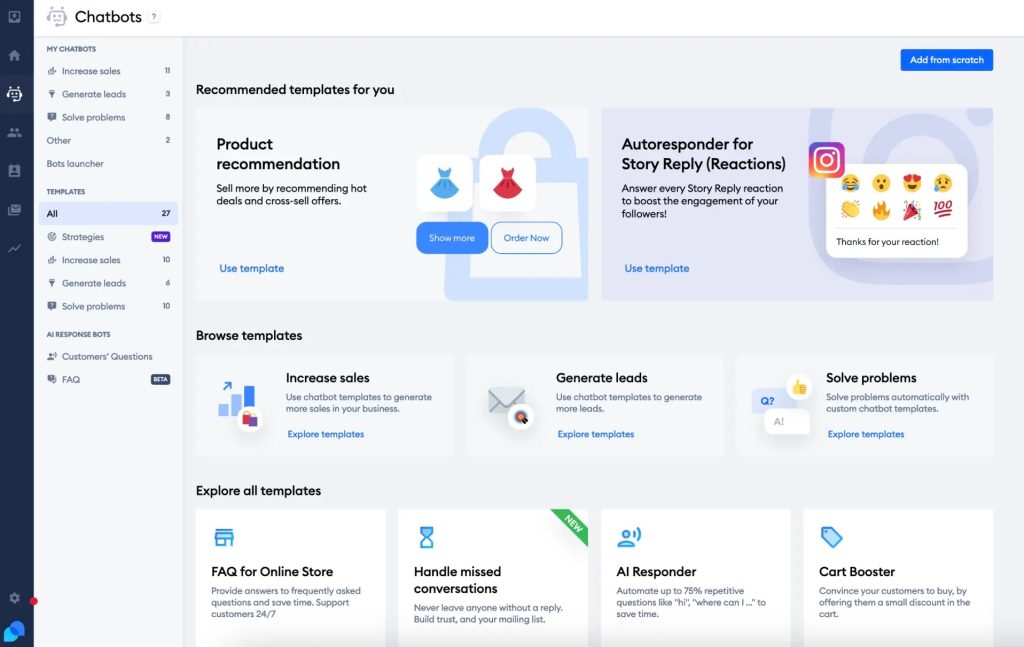
The visual flow builder is a genuine differentiator over Chatbase. You can design structured conversation paths for lead capture, post-purchase follow-up, and cart abandonment recovery without writing a line of code. Chatbase has no equivalent.
The honest trade-off with Tidio is pricing at scale. The per-conversation billing on Lyro can add up for high-traffic stores, and the Salesforce integration syncs contacts rather than leads, which frustrates CRM-driven sales teams.
Pros:
- Lyro AI agent handles FAQs from help docs with natural language understanding, covering complex queries without rigid keyword matching
- Visual flow builder for designing structured conversation paths covering lead capture, cart abandonment, and onboarding
- Native Shopify and WooCommerce integration with real-time order data accessible directly in the chat window
- Live chat and AI in the same platform with seamless bot-to-human handoff and full conversation context preserved
- Proactive chat triggers let you engage visitors based on behavior, time on page, cart value, and referral source
Cons:
- Per-conversation billing on Lyro can be hard to predict for high-traffic businesses
- Salesforce integration syncs contacts, not qualified leads
How Does Tidio Compare to Chatbase?
Tidio covers everything Chatbase does and adds live chat, a flow builder, and stronger eCommerce integrations on top. For online stores that want AI deflection plus proactive engagement, Tidio is the more complete solution. Chatbase wins on simplicity for pure Q&A use cases, but most eCommerce teams need more than that.
User Rating: 4.7/5 (G2)
Pricing: Free plan available. Paid plans start at $29/month. Lyro AI conversations billed separately.
3. Botpress – Best for Developers Who Need Full Control Over Bot Logic
Botpress is the tool I reach for when a technical team needs something that Chatbase simply can’t do: complex multi-agent workflows, custom integrations, self-hosted deployment, and full control over conversation logic. It’s open-source, which means you can inspect the codebase, self-host on your own infrastructure, and keep all conversation data inside your own environment, which is a hard requirement for regulated industries that Chatbase can’t meet.
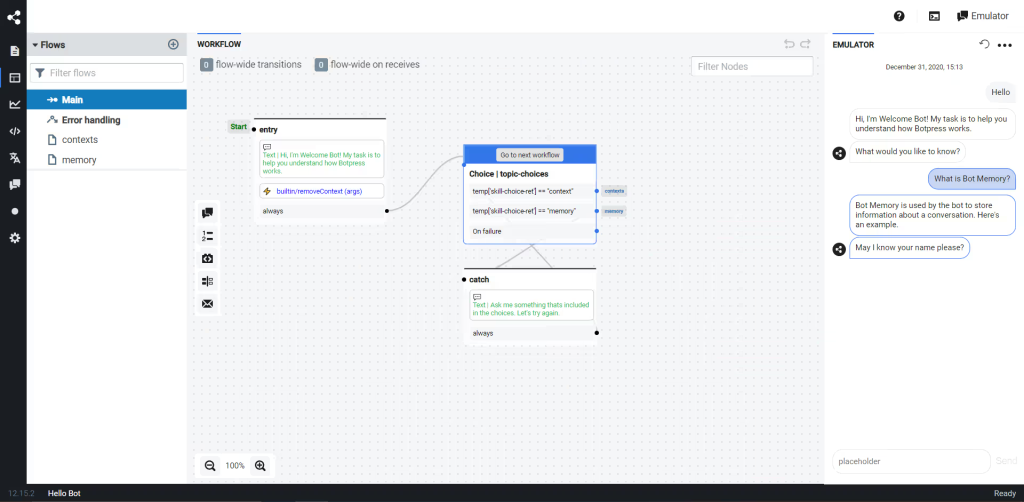
The multi-agent architecture is particularly powerful. You can build specialized agents that handle distinct tasks (one for support FAQs, one for booking, one for escalation) and have them hand off to each other based on conversation context. Chatbase runs everything through a single trained model with no equivalent routing capability.
The honest drawback is complexity. Botpress has a steeper learning curve than any other tool on this list. Non-technical teams will struggle with the interface, and setup takes real engineering time.
Pros:
- Open-source platform with a self-hosted deployment option that gives your team full data sovereignty and infrastructure control
- Multi-agent architecture lets you build specialized bots for distinct workflows and route between them based on conversation context
- Deploys to 10+ channels including WhatsApp, Telegram, Slack, Microsoft Teams, and web without requiring separate integrations
- Supports multiple LLM providers including OpenAI, Anthropic, and custom endpoints so you can choose the model per conversation step
- Visual Agent Studio lets non-developers design and test conversation flows without writing code, while developers retain full code-level access
Cons:
- Steep learning curve; not suitable for non-technical teams
- No native marketing automation features for Instagram or Facebook
How Does Botpress Compare to Chatbase?
Chatbase prioritizes simplicity; Botpress prioritizes control. For developers who need agents that act rather than just answer, Botpress is in a different league. For non-technical teams who need a bot live today, other options on this list will serve better.
User Rating: 4.5/5 (Capterra)
Pricing: Free plan available. Paid plans start at $89/month (Teams).
4. Intercom – Best for Mid-Market Teams Needing a Full Customer Messaging Suite
Intercom’s Fin AI agent is one of the most capable AI support tools I’ve tested. It handles multi-step conversations, escalates to human agents with full context, and connects to Intercom’s broader ticketing and CRM infrastructure without requiring any integration work. For teams that are already scaling support operations and need AI, live chat, and ticketing in one platform, Intercom makes a compelling case.
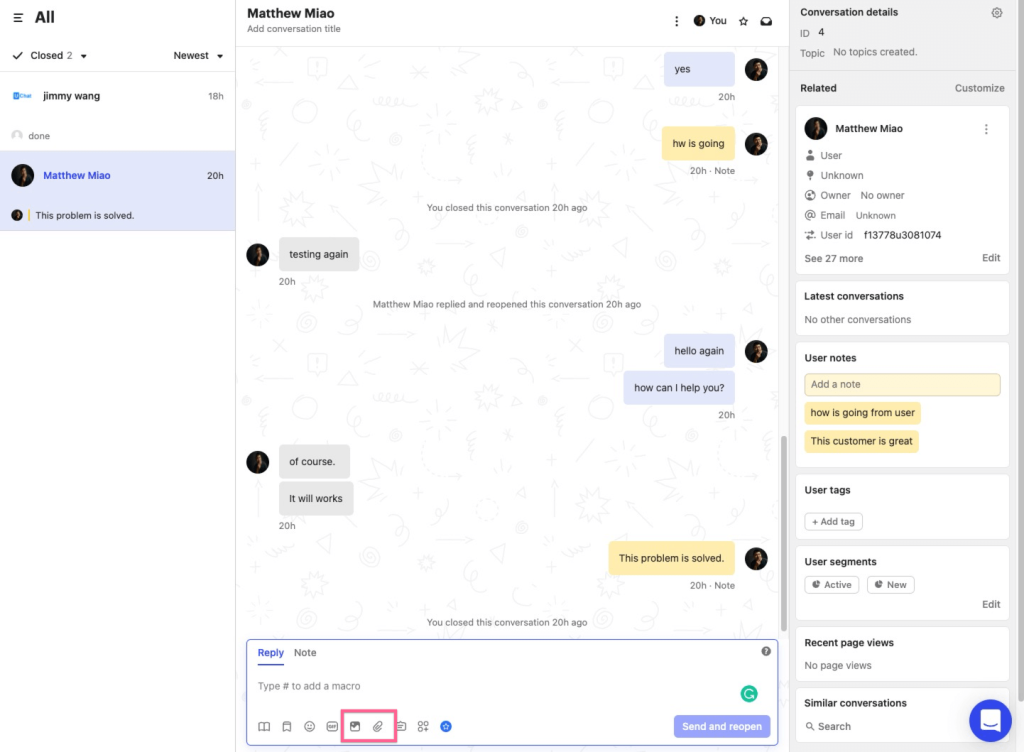
The resolution-based pricing model for Fin is worth understanding before committing. You pay per resolved conversation rather than per message credit, which rewards teams with high resolution rates but penalizes those with complex queries that Fin can’t fully close.
For startups and small businesses, the entry price is a genuine obstacle. Intercom is enterprise software at enterprise pricing, and the cost is disproportionate for teams under 5 agents.
Pros:
- Fin AI agent handles complex, multi-step support queries with documented resolution rates above 50% across its customer base
- Unified inbox for chat, email, and in-app messages keeps all customer conversations in a single place without switching tools
- Deep ticketing and CRM built directly into the platform with no third-party integrations needed for core support workflows
- Proactive outreach, product tours, and in-app messaging make it suitable for SaaS teams running customer success alongside support
- Reporting and analytics suite covers AI resolution rates, agent performance, CSAT, and conversation trends at a depth most tools don’t match
Cons:
- Pricing is significantly higher than most alternatives on this list
- Complexity and setup time are more appropriate for mid-market and enterprise teams
How Does Intercom Compare to Chatbase?
Chatbase is a lightweight chatbot tool; Intercom is a full customer engagement platform. If your team is managing more than 500 conversations per month and needs AI, ticketing, and CRM in one place, Intercom justifies its cost. For smaller teams, the price-to-value ratio points elsewhere.
User Rating: 4.5/5 (G2)
Pricing: Starts at $39/seat/month. Fin AI resolutions billed at approximately $0.99 per resolution on most plans.
5. Crisp – Best for Agencies and Small Teams Needing Multi-Channel Support with AI
Crisp is the platform that surprised me most in this evaluation. At $45 per workspace per month, it gives you a multi-channel shared inbox covering website chat, WhatsApp, Telegram, Instagram, and email, along with an AI agent you can train on your own content, and a knowledge base, all without stitching together multiple tools.
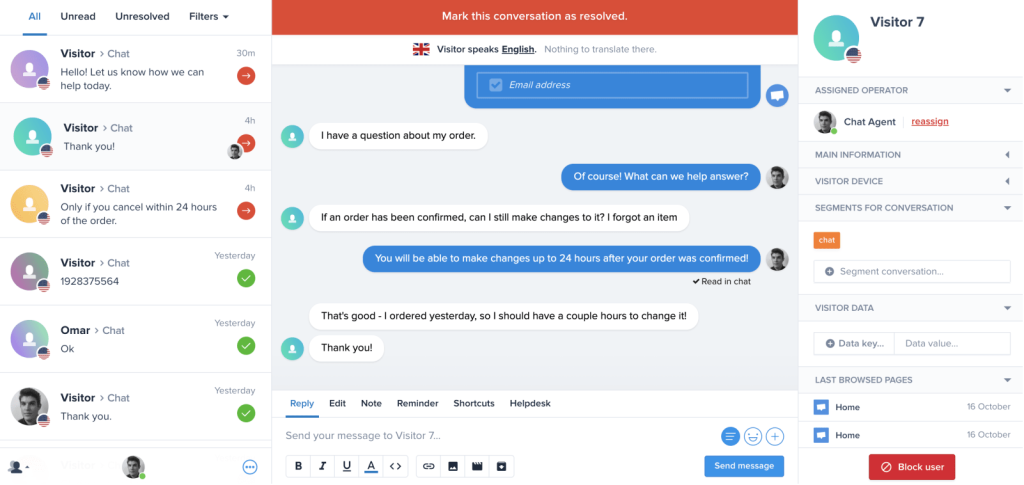
For digital agencies managing support for multiple clients, the workspace-based pricing model is a significant advantage. You pay per workspace rather than per agent seat, which means a 10-person team managing a client costs the same as a 2-person team managing the same client.
The limitation is depth. Crisp’s AI capabilities are solid for basic Q&A and routing, but teams that need advanced analytics, complex conversation logic, or enterprise-grade security controls will find it insufficient.
Pros:
- Multi-channel shared inbox covers website chat, WhatsApp, Telegram, Instagram, and email in a single unified dashboard
- Workspace-based pricing rather than per-agent billing makes it cost-effective for agencies managing multiple client accounts
- Built-in knowledge base lets you train the AI agent on your help content and offer self-service to customers simultaneously
- MagicReply AI drafts suggested responses for operators based on conversation history and your knowledge base content
- GDPR-compliant by default with EU data residency, visitor IP masking, and data retention controls available on all plans
Cons:
- AI capabilities are less advanced than platforms like ProProfs Chat for complex support use cases
- Limited reporting and analytics depth at the base plan level
How Does Crisp Compare to Chatbase?
Chatbase is an AI-first, single-channel website tool. Crisp is a multi-channel support platform with AI built in. For agencies or teams that need to manage multiple channels and clients without paying per seat, Crisp offers far more value per dollar than Chatbase.
User Rating: 4.5/5 (Capterra)
Pricing: Free plan available. Paid plans start at $45/month/workspace.
6. Zoho SalesIQ – Best for Businesses Already in the Zoho Ecosystem
Zoho SalesIQ’s chatbot builder, called Zobot, is one of the most flexible no-code bot builders I’ve tested in this price range. It supports both a drag-and-drop visual builder and scripting with Deluge, JavaScript, or Python for teams that want deeper customization. You can qualify leads, answer FAQs, schedule meetings, and push data directly to Zoho CRM, Zoho Desk, and the rest of the Zoho suite without any middleware.
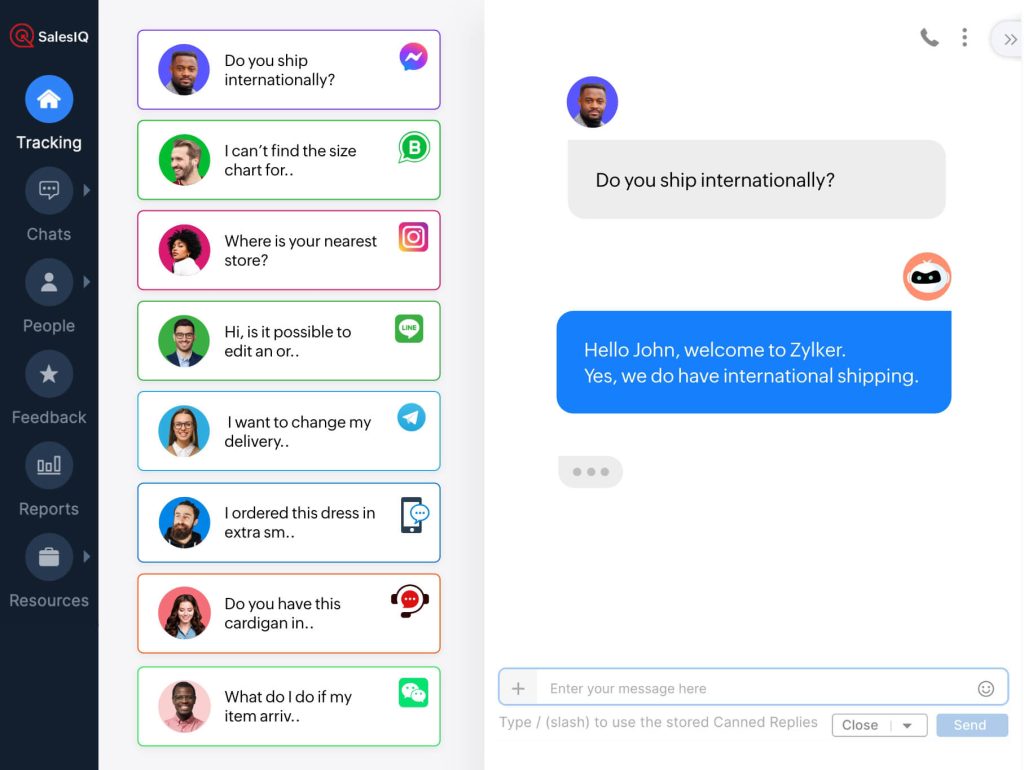
The AI capabilities are solid. Zobot can be trained on your knowledge base and handles natural language queries well. The real value proposition, though, is the native Zoho integration depth. If your team already uses Zoho CRM, Zoho Campaigns, or Zoho Desk, SalesIQ fits in without a single API call.
For teams outside the Zoho ecosystem, the integration advantages largely disappear and the tool becomes less competitive on raw AI capability.
Pros:
- Deep native integration with Zoho CRM, Zoho Desk, Zoho Campaigns, and Zoho Analytics with no middleware required
- Zobot supports both visual no-code builder and scripted low-code customization using Deluge, JavaScript, or Python
- Real-time visitor tracking and lead scoring give sales teams full context on who they’re chatting with before the conversation starts
- Proactive chat invitations can be triggered based on visitor behavior, time on page, and geographic location
- Affordable entry pricing makes it one of the most accessible live chat and chatbot combinations for small businesses
Cons:
- Value proposition diminishes significantly outside the Zoho ecosystem
- Steeper learning curve than simpler alternatives for non-Zoho users
How Does Zoho SalesIQ Compare to Chatbase?
Chatbase is standalone and AI-focused. Zoho SalesIQ is ecosystem-dependent but far more powerful within that ecosystem, especially for sales and CRM-driven teams. For Zoho users, SalesIQ is the clear choice over Chatbase. For everyone else, evaluate based on integration needs.
User Rating: 4.4/5 (Capterra)
Pricing: Free plan available. Paid plans start at $7/operator/month (Basic).
7. Typebot – Best for Teams Wanting a No-Code Visual Chatbot Builder
Typebot is the closest Chatbase alternative I found for teams that specifically want a no-code visual builder without Chatbase’s credit-based pricing. You design conversation flows using a clean canvas interface (branching logic, conditional paths, input collection, and integration triggers) and publish the result as an embeddable chat widget. The UI is genuinely intuitive, and I’ve watched non-technical team members build working lead capture bots in under an hour.
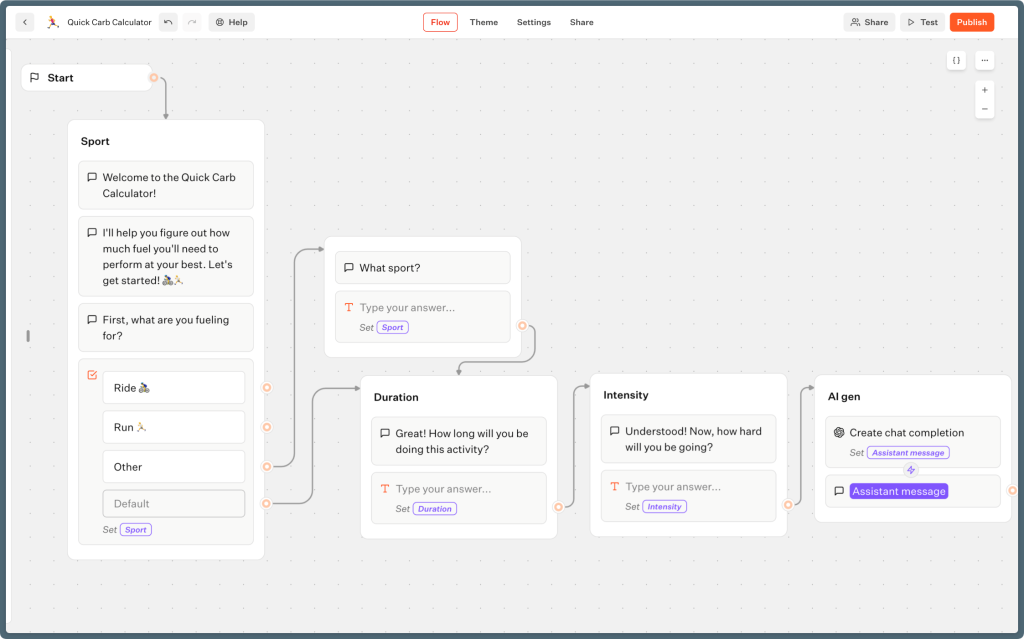
The open-source version is self-hostable, which makes it attractive for startups that want to avoid SaaS billing entirely. The cloud version is affordable at $39 per month for unlimited bots, which is dramatically better value than Chatbase’s credit model at similar usage volumes.
The limitation is AI depth. Typebot is primarily a flow builder. You connect your own AI logic via OpenAI or other providers, but the built-in intelligence is more limited than platforms that have AI trained on your content out of the box.
Pros:
- Visual canvas builder lets you design structured, branching conversation flows with conditional logic, no coding required
- Open-source codebase is fully self-hostable so teams retain complete data control with no recurring SaaS fees
- Flat-rate cloud pricing covers unlimited bots and unlimited responses, removing the per-message unpredictability of Chatbase
- Embeds cleanly on any website via script or iframe, and connects to WhatsApp through third-party integrations
- Extensive native integrations cover Google Sheets, Notion, Airtable, OpenAI, Zapier, and more for workflow automation
Cons:
- Built-in AI capabilities require connecting external providers, not as turnkey as Chatbase
- No native live chat or human handoff; human escalation needs a third-party integration
How Does Typebot Compare to Chatbase?
Chatbase is an AI-first Q&A bot; Typebot is a flow-first builder with AI integration. If your primary need is structured conversational design, Typebot gives you more control and more predictable pricing. If you need out-of-the-box AI trained on your content, a platform like ProProfs Chat is faster to deploy.
User Rating: 4.8/5 (Capterra)
Pricing: Free plan available. Paid plans start at $39/month for unlimited bots.
8. Freshchat – Best for Mid-Size Support Teams Needing AI and Ticketing Together
Freshchat is Freshworks’ messaging platform and pairs directly with Freshdesk for ticketing, making it the natural choice for support teams that want AI deflection to feed seamlessly into a structured ticket workflow. The Freddy AI agent handles common questions from your knowledge base, and when a conversation escalates, it becomes a Freshdesk ticket with full context and no manual copying or integration setup required.
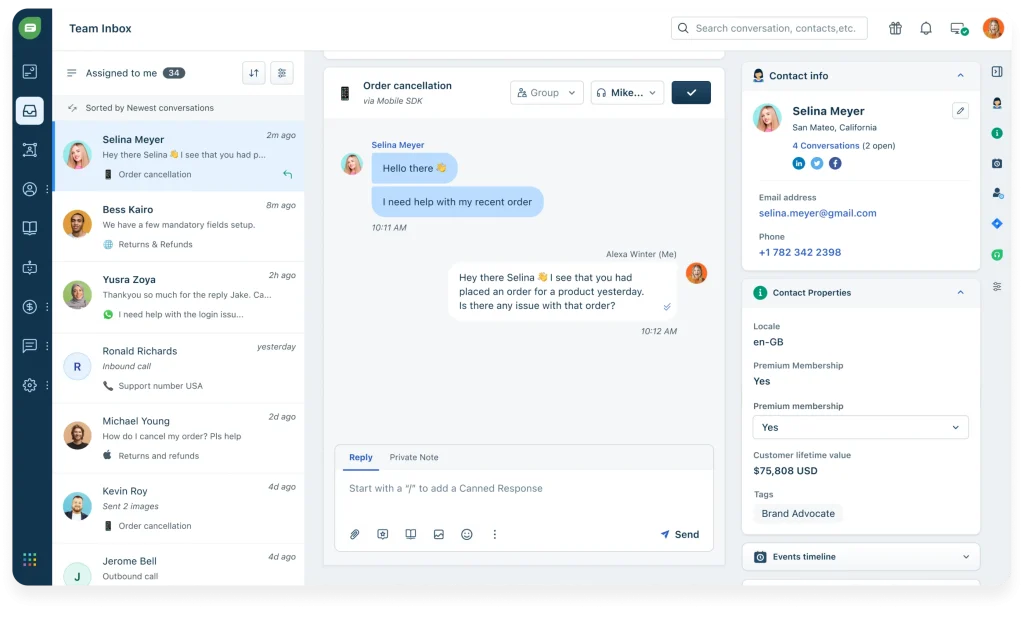
The analytics and reporting are noticeably stronger than Chatbase’s, with conversation-level data, CSAT scores, and agent performance metrics built into the standard plan. For support managers who need visibility into both automated and human-handled conversations, this depth matters.
The per-agent pricing model becomes a cost consideration for larger teams, and the Freshworks ecosystem has some internal complexity between Freshchat and Freshdesk plans that requires careful evaluation before signing.
Pros:
- Native Freshdesk integration converts unresolved bot conversations into support tickets automatically with full chat history attached
- Freddy AI agent trained on knowledge base articles handles self-service deflection for common questions without operator involvement
- Strong analytics covering CSAT scores, agent performance, first response time, and conversation-level reporting in the standard plan
- Omnichannel coverage for WhatsApp, Facebook Messenger, and website chat managed from a single inbox
- IntelliAssign automatically routes incoming chats to the right agent based on skills, workload, and availability rules
Cons:
- Per-agent pricing adds up for teams with more than 5 operators
- Best value when using both Freshchat and Freshdesk; standalone, it’s less competitive
How Does Freshchat Compare to Chatbase?
Chatbase doesn’t have native ticketing; Freshchat is built to connect chat and ticketing natively. For mid-size support teams managing a real ticket queue, Freshchat closes a gap that Chatbase leaves wide open. For simple website Q&A without ticketing needs, Chatbase is faster to get live.
User Rating: 4.4/5 (G2)
Pricing: Free plan available. Paid plans start at $15/agent/month (Growth).
9. ManyChat – Best for Social-First Businesses Running Instagram and WhatsApp Automation
ManyChat is the platform I recommend whenever a business’s customer conversations primarily happen on Instagram or WhatsApp rather than a website chat widget. It’s built from the ground up for social channel automation (Instagram DMs, WhatsApp, Facebook Messenger) with visual flow builders optimized for social conversation patterns.
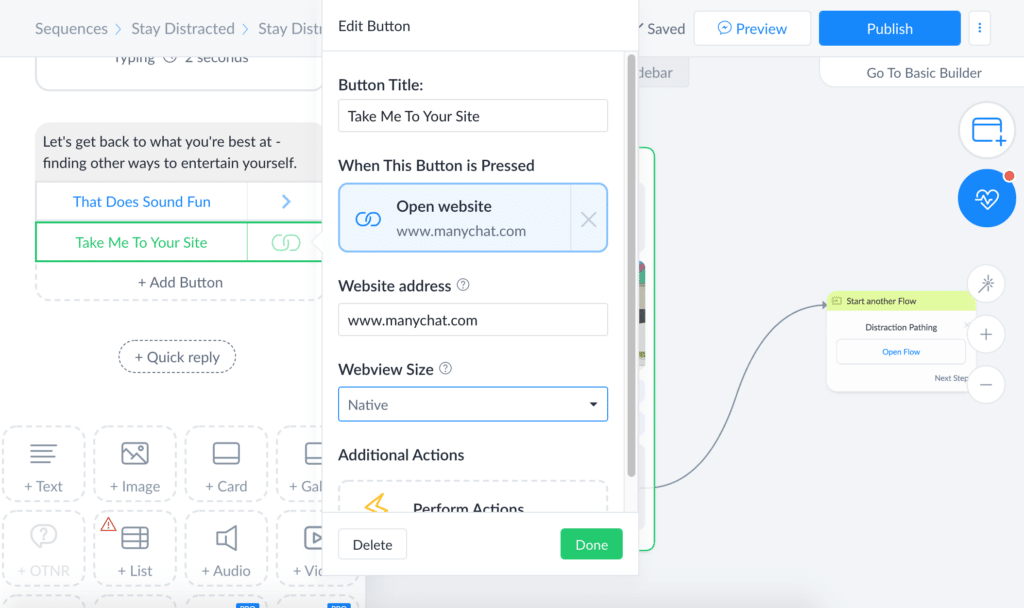
The AI capabilities have improved significantly, with ManyChat now offering an AI step inside flows that can handle open-ended questions using GPT-based responses, falling back to structured flows when needed. For businesses running Instagram campaigns that generate DMs, this combination of structured flows and AI fallback is highly effective.
The limitation is clear: ManyChat is a social automation platform, not a website support tool. If your primary use case is a website chat widget trained on help documentation, Chatbase is a better fit. But if your leads and customers primarily live on Instagram and WhatsApp, Chatbase’s social capabilities are far more limited.
Pros:
- Purpose-built for Instagram DMs, WhatsApp, and Facebook Messenger automation with flows designed around social conversation patterns
- AI step inside flows handles open-ended questions using GPT-based responses before falling back to structured paths
- Keyword triggers and comment automations let you automatically reply to post comments and move conversations to DMs
- Direct integrations with Shopify, HubSpot, Mailchimp, and email platforms sync captured lead data without manual export
- Broadcast and sequence messaging lets you send scheduled campaigns to opted-in contacts across all connected channels
Cons:
- Not designed for website chat widget deployment; weak for traditional support use cases
- Flow complexity can grow unwieldy for businesses with many campaign variations
How Does ManyChat Compare to Chatbase?
Chatbase is a website-first AI Q&A bot. ManyChat is a social-channel-first automation platform. They serve fundamentally different channels. The comparison that matters is: where do your customers actually talk to you? If the answer is Instagram and WhatsApp, ManyChat decisively outperforms Chatbase on those channels.
User Rating: 4.6/5 (Capterra)
Pricing: Free plan available. Paid plans start at $15/month (Pro).
10. Drift (via Salesloft) – Best for B2B Sales Teams Focused on Pipeline From Website Traffic
Drift, now part of Salesloft, is the platform built specifically for B2B revenue teams that want their website chatbot to qualify prospects and book meetings rather than answer support questions. The AI is trained to identify buying intent signals, qualify leads against ICP criteria, and route high-value visitors to the right sales representative in real time.
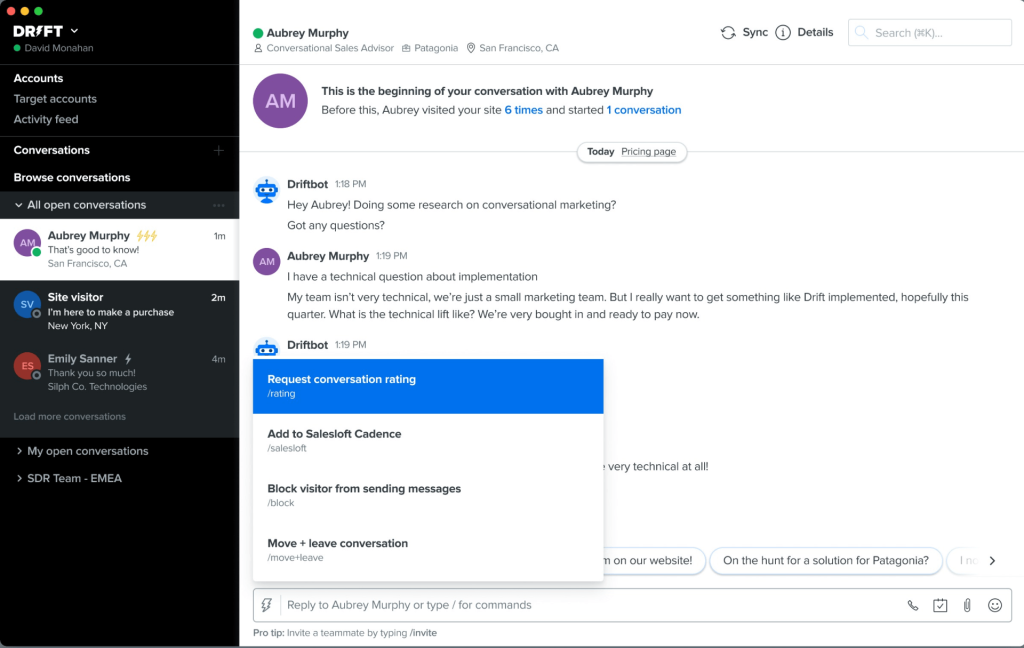
The Salesloft integration means conversation data, qualification status, and engagement signals feed directly into the sales workflow, which is something Chatbase (with no CRM-native design) cannot replicate.
The honest limitation is that Drift has moved further upmarket since the Salesloft acquisition. Pricing is now custom and typically enterprise-level, and the product roadmap has shifted toward serving large revenue teams rather than the mid-market. Smaller B2B teams evaluating Drift today may find the entry bar too high.
Pros:
- AI identifies buying intent signals in real time and routes high-value visitors to the right sales rep before they leave the page
- Meeting booking is built directly into conversation flows so prospects can schedule calls without leaving the chat widget
- Deep Salesloft integration syncs conversation data, qualification status, and engagement signals directly into the sales workflow
- Account-based marketing features let you serve personalized chat experiences to target accounts identified by your ABM platform
- Pipeline analytics track conversation-to-meeting conversion rates and measure the revenue influence of chatbot interactions
Cons:
- Pricing is now enterprise-level; not accessible to small or mid-size teams
- Post-acquisition product focus has narrowed toward larger enterprise accounts
How Does Drift Compare to Chatbase?
Chatbase automates support. Drift automates the pipeline. These tools serve different teams with different goals. If your chatbot’s primary job is to deflect support tickets, ProProfs Chat serves that better. If your chatbot’s primary job is to book sales calls from inbound website traffic, Drift is purpose-built for that outcome in a way Chatbase isn’t.
User Rating: 4.4/5 (Capterra)
Pricing: Custom pricing. Contact sales.
How Did I Evaluate the Top Chatbase Competitors?
I didn’t build this list from spec sheets and vendor decks. I tested each alternative to Chatbase by setting up chatbots, training them on real content, running test conversations, reviewing analytics, and evaluating how human handoff actually works under each system. My evaluation covers six core areas:
- User Reviews / Ratings: I analyzed real user feedback from G2 and Capterra to identify recurring pain points and satisfaction patterns across actual use, not curated testimonials.
- Essential Features and Functionality: I examined each platform’s core capabilities: AI training quality, conversation flow building, live chat, human handoff, omnichannel reach, and reporting. I evaluated how well each handles the demands of production-level support or sales automation.
- Ease of Use: I specifically tested how quickly a non-technical operator could get a working bot live. The baseline I used was time-to-first-conversation, not time-to-demo.
- Customer Support: I reviewed vendor support quality across response time, available channels, and onboarding assistance, because a platform that breaks at 11pm on a Friday is only as good as its support team.
- Value for Money: I compared pricing against feature depth at each tier, factoring in add-on costs, usage limits, and total cost at scale, not just the headline monthly price.
- Personal Experience and Expert Opinions: Every evaluation in this list reflects direct testing, not summarized feature lists. Where I noted industry-specific strengths, those are based on observed customer use cases and published user reviews.
My Top 3 Picks for Chatbase Alternatives
Still deciding? After testing all of these tools on real projects, these three consistently rise to the top.
1. ProProfs Chat
ProProfs Chat is my first recommendation for most businesses. The combination of a free starting plan, a trained AI agent that handles real support conversations, native live chat with human handoff, and omnichannel coverage on a single flat-rate plan makes it the most complete and cost-predictable tool on this list. Whether you’re running customer support, lead generation, or both, ProProfs Chat gets you there without piecing together multiple subscriptions.
2. Tidio
Tidio is my pick for eCommerce teams that need AI deflection and proactive engagement in a single tool. The Shopify integration is genuinely useful, the flow builder handles structured conversation design well, and the live chat is solid. For online stores that want to automate FAQ handling and recover abandoned carts through chat, Tidio is the most focused option.
3. Botpress
Botpress earns its spot for technical teams that have outgrown every tool that prioritizes simplicity. If you need multi-agent workflows, self-hosted infrastructure, or bot logic that goes well beyond Q&A, Botpress gives you that control without the enterprise pricing of larger platforms.
FREE. All Features. FOREVER!
Try our Forever FREE account with all premium features!
Stop Paying for a Bot That Goes Silent. Switch to Something Better.
Chatbase is a fine starting point, but most teams hit its ceiling faster than expected. No live chat, no flow builder, credits that vanish mid-campaign, and a branding fee that catches agencies off guard. The gap between what it promises and what growing businesses actually need is real.
The good news is the switch is easier than it sounds. Most migrations are a re-training exercise, not a full rebuild. Pick the tool that matches your actual bottleneck, test it on live traffic for a week, and let the failure logs guide your tuning.
If you want a platform that combines AI chatbots and live chat without the hassle of multiple tools, ProProfs Chat is where I’d start. You get an AI agent trained on your content, seamless live chat handoff, real-time sentiment analysis, churn risk scoring, omnichannel support across WhatsApp, Instagram, Facebook, and SMS, plus a Forever Free plan with all premium features. No credit-based pricing, no surprise add-ons.
Ready to replace Chatbase with something that actually scales? Try ProProfs Chat Free!
Frequently Asked Questions
What features should I look for in a Chatbase alternative?
The essentials are predictable pricing (flat-rate over credit-based), native live chat with human handoff, an AI agent you can train on your own content, omnichannel deployment across website, WhatsApp, and Instagram, and built-in analytics. If lead generation is a priority, look for proactive chat invitations, CRM integration, and action-based AI agents, all of which ProProfs Chat covers natively.
What is the difference between an AI chatbot and a live chat tool?
An AI chatbot uses machine learning and trained knowledge to answer questions automatically without a human operator. A live chat tool connects customers to a human agent in real time. The most useful platforms combine both so the AI handles common questions, and a human takes over when the bot reaches its limit, giving you coverage at all hours without requiring human agents 24/7. ProProfs Chat is built exactly on this model.
How important is human handoff in a chatbot platform?
It's one of the most critical features for customer-facing deployments. When a bot can't resolve a query, customers expect escalation without friction, and repeating themselves to a new agent is a known driver of customer frustration. A platform with native handoff passes the full conversation context to the operator automatically so the customer doesn't have to start over. ProProfs Chat handles this within the same dashboard with no third-party integration needed.
Do AI chatbot tools integrate with CRMs and helpdesks?
Yes, most modern platforms offer native integrations with tools like Salesforce, HubSpot, Zendesk, and Freshdesk. Chatbase requires these integrations as add-ons. ProProfs Chat integrates natively with 100+ tools including all major CRMs and connects directly to ProProfs Help Desk for seamless ticket creation from unresolved chats.
How do I choose between a standalone chatbot tool and an all-in-one platform?
If your only need is AI-powered Q&A on a website, a standalone tool covers the basics. If you need live chat, human handoff, omnichannel messaging, lead capture, and analytics in one place, an all-in-one platform like ProProfs Chat delivers more value without requiring you to subscribe to and integrate multiple tools.
Can an AI chatbot be trained on my own data without coding?
Yes. Most modern platforms let you train a bot by uploading PDFs, pasting website URLs, or connecting a knowledge base, with no code required. For example, ProProfs Chat supports training on your website URL, uploaded documents, and help center articles directly from the dashboard. The quality of the bot's answers depends largely on how well-structured your training content is, not on your technical skills.
Does Chatbase support WhatsApp and Instagram?
Yes, Chatbase supports WhatsApp, Instagram, and Facebook Messenger, but these channel connections are locked behind higher-tier paid plans. If omnichannel coverage from day one is a requirement, ProProfs Chat includes those channels across its plans without treating them as premium add-ons.
How accurate are AI chatbots trained on custom data?
Accuracy depends on three factors: the quality of your training content, the AI model powering the bot, and how well the platform retrieves relevant information from your knowledge base. Platforms using retrieval-augmented generation (where the bot searches your content before generating a response) tend to produce more grounded, reliable answers than purely generative models. Regularly reviewing failed conversations and retraining the bot on gaps is the most effective way to improve accuracy over time.
What happens when an AI chatbot can't answer a question?
On platforms without native live chat, the bot typically displays a fallback message and the conversation ends, so the customer has to contact support separately. On platforms with built-in human handoff like ProProfs Chat, the bot escalates the conversation to a live agent with full context so the customer doesn't have to repeat themselves. For customer-facing deployments, having a clear escalation path built directly into the platform is essential.
FREE. All Features. FOREVER!
Try our Forever FREE account with all premium features!

 We'd love your feedback!
What did you like & how can we make it even better?

 Thanks for your feedback!
 Ask Your Question
Have a question? Get expert help to make your decision easier.