
If your customers now ask questions on your website instead of in Instagram DMs, Chatfuel alternatives are probably already on your shortlist.
I have watched small teams hit the same wall with a Meta-only bot: it handles comment replies well, but it cannot answer from your own pages, hand a chat to a person cleanly, or log a ticket. I wrote this guide so you can pick by the job you need done, not by brand name.
Each tool below comes with the channels, handoff, and integration details that decide a switch, plus a checklist for moving over without losing leads. Test two finalists on your real customer questions before you commit.
Why Are Teams Switching From Chatfuel?
If you are reading this, you have probably felt a few of these already. I list them so you know what to check when you compare Chatfuel competitors, and each one comes with a quick test you can run yourself.
- Meta-first reach: Chatfuel shines on WhatsApp, Instagram, and Facebook, but customers who ask questions on your website need a bot that lives there too. My quick test: open your own site chat and ask a question from a product page.
- Manual knowledge: Chatfuel’s help docs describe its AI answering from a Knowledge Base you fill in yourself, so every price or policy change means another edit. I look for a tool that learns from my website, help center, and PDFs.
- Fixed handoff: The handoff message in Chatfuel is fixed, with no setting for your own wording. I check that a replacement lets me control when a human steps in and passes the chat history along.
- Credit billing: AI replies draw from a prepaid wallet, and Chatfuel’s docs say automations stop replying when it reaches zero unless auto top-up is on. I ask every vendor what happens when I hit the limit.
- Ticketing gap: Chatfuel focuses on bot automation, not tickets, SLAs, or a shared helpdesk inbox. If my team logs issues in Zendesk or another ticketing system, I confirm a direct connection exists before I sign up.
- Integration friction: Some user reviews mention integration difficulties and scalability limits. I list my must-have connections, such as CRM, scheduling, store, and ticketing, then verify each one by name.
- Support reliability: Several reviewers describe inconsistent support, which hurts when a flow breaks mid-campaign. I message the vendor’s support during the trial and note how fast they answer.
Top 10 Chatfuel Alternatives for Growing Support and Marketing Teams
I put this list together using G2 ratings, product documentation, and community discussions. Every tool here solves at least one of the problems listed above in a meaningful way, and the table lets you compare channels, ratings, and starting prices at a glance.
| Tool | Best For | Main Channels | Starting Price | User Rating |
| ProProfs Chat | Easy Live Chat & AI Customer Service Agent for Instant, Automated Support | Website, Facebook, WhatsApp, Instagram, SMS | Forever free for 1 operator. Paid starts at $19.99/operator/month | 4.5/5 (G2) |
| ManyChat | Making Chatbots for Messaging Apps | Instagram, Messenger, WhatsApp, SMS, email | Starts at $14/month | 4.5/5 (G2) |
| Tidio | Live Chat With Ticketing Functionality | Website, email, Messenger, Instagram, WhatsApp | Starts at $24.17/month | 4.6/5 (G2) |
| Respond.io | WhatsApp-First Multichannel Inbox | WhatsApp, Messenger, Instagram, Telegram, SMS, web chat | Starts at $79/month (billed annually) | 4.8/5 (G2) |
| Landbot | Visual No-Code Bots for Web and WhatsApp | Website, WhatsApp | Starts at $40/month | 4.7/5 (G2) |
| Botpress | Building AI Agents With LLM-Powered Automation | Website, WhatsApp, Slack, Messenger | Starts at $150/month | 4.5/5 (G2) |
| Intercom | Omnichannel Platform With Messenger & App | Chat, email, social DMs, in-app | Starts at $29/seat/month | 4.5/5 (G2) |
| Freshchat | Freshworks Suite Users | Web, mobile, WhatsApp, Apple Business Chat | Starts at $19/agent/month | 4.4/5 (G2) |
| Tawk.to | Free Live Chat for Budget-Conscious Small Businesses | Website, iOS and Android apps | Starts at $0/month (free core plan) | 4.5/5 (G2) |
| Flow XO | Automating Customer Interactions via AI Chatbots | Web, Messenger, SMS | Starts at $25/month | 4.5/5 (G2) |
1. ProProfs Chat: Easiest Live Chat & AI Customer Service Agent for Instant, Automated Support
What I like about ProProfs Chat is how little effort the setup needs. I enter a website URL, and the AI support agent builds itself from that content almost immediately. The AI agent trains on my help center, FAQs, and uploaded files, and every answer cites its source, so I can see exactly where a reply came from.
When a question gets complicated, the chat moves to a human agent with the full conversation context, so customers never repeat themselves. It connects with ProProfs Knowledge Base and ProProfs Help Desk, which keeps self-service, live chat, and follow-up tickets in one setup. It works around the clock, and sentiment analysis helps me spot frustrated visitors early.
Among the Chatfuel alternatives I compared, the drag-and-drop flow builder with templates for lead capture, appointment booking, and CSAT is a really big plus for scripted answers, and Facebook, WhatsApp, and Instagram messages arrive in one shared dashboard.
Pros:
- Proactive chat invitations engage visitors based on behavior, such as time on page or the pages they view
- Intelligent chat routing sends each chat to the least busy operator or the right department using custom rules
- Canned responses give agents one-click answers to common questions, keeping every reply consistent
- 100+ integrations cover CRMs such as Salesforce, Microsoft Dynamics 365, and Zoho CRM, plus WordPress, Wix, and Shopify
- Multilingual support in 70+ languages lets the chat window speak to visitors in their own language
Cons:
- Cloud-only, so there is no offline access
- No dark theme
How ProProfs Chat Compares With Chatfuel: Chatfuel centers on Meta channels and a Knowledge Base you write yourself, while ProProfs Chat starts from your website, help center, and files and answers with the source cited. Add live chat, routing by team, proactive invitations, and bot-to-human handoff in the same dashboard, and it becomes the stronger fit when most of your questions arrive on your site.
User Rating: 4.5/5 (G2)
Price: Forever free for 1 operator. Paid starts at $19.99/operator/month
HorseSaddleShop needed a faster way to answer customers who preferred chat over phone calls, especially for detailed questions about saddle fitting. With ProProfs Chat, the team added 24/7 live chat, automatic translation, and another reliable touchpoint that helped strengthen customer communication and support revenue growth.

2. ManyChat: Best for Making Chatbots for Messaging Apps
Instagram is where a friend selling handmade candles lives, and ManyChat runs nearly every conversation there. When someone comments a keyword on her post, a flow opens in their DMs, collects an email address, asks about scent preferences, and tags the contact for later broadcasts.
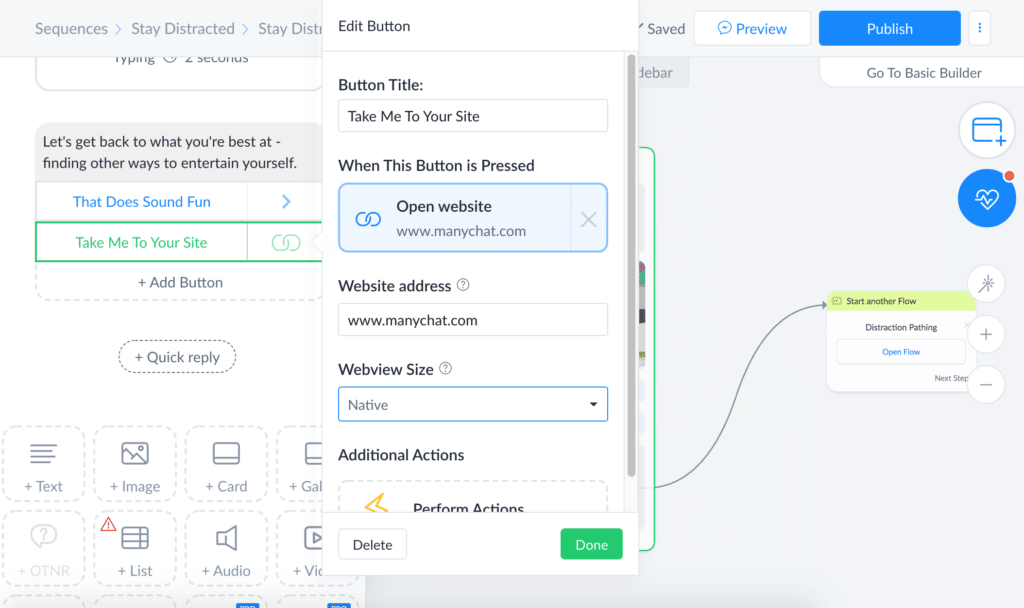
She builds everything on a visual canvas with drag-and-drop messages and delays, then adds SMS and email steps so the sequence continues outside the social apps. Shopify, Stripe, and Google Sheets connect natively, which saves her from copying order details by hand.
She also segments her audience with custom fields, schedules broadcasts to filtered subscriber lists, and runs A/B tests on message blocks to see which opener earns more replies. Her only complaint is that website chat is not what the tool was built for, so she keeps it strictly for Meta channels and direct messages. Flows stay editable later, so she never starts over.
Pros:
- Visual flow builder with drag-and-drop messages and delays speeds up building
- Native integrations for Shopify, Stripe, and Google Sheets remove manual data entry
- User tagging and custom fields enable precise audience segmentation
- Broadcast scheduler sends promos to filtered subscriber lists automatically
- A/B testing built into message blocks helps you optimize openers
Cons:
- Best suited to Meta and messaging channels, so pure website chat is less useful
- Advanced automation flows can take time to learn for first-time users
How ManyChat Compares With Chatfuel: ManyChat is the closest direct rival to Chatfuel, with deep Instagram comment-to-DM flows plus SMS and email steps beyond Meta. At the time of writing, its AI answers on Instagram only and is still in beta, while Chatfuel’s AI runs on every channel it offers. I would choose ManyChat for Instagram-led selling, not for website support.
User Rating: 4.5/5 (G2)
Price: Starts at $14/month
3. Tidio: Best for Live Chat With Ticketing Functionality
When a friend’s online store outgrew its basic chat widget, she tried Tidio before paying for a full help desk. The shared inbox pulls live chats, emails, and Messenger threads into one screen, and the AI agent trains on her website data and Shopify catalog to field where-is-my-order questions. If a customer needs more help, the chat converts into a ticket inside the same dashboard, so nothing slips through.
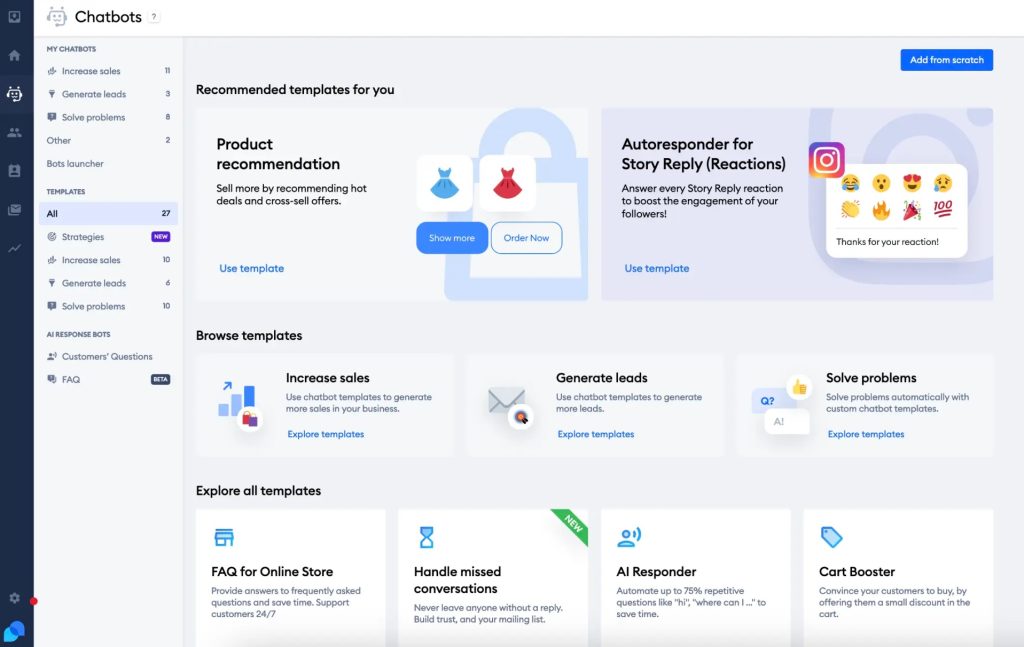
She replies from her phone, snoozes threads for later, and sets proactive messages that fire when a visitor lingers on a page or carries a high cart value. Visual workflows helped her build a product quiz and an upsell pop-up in a single afternoon.
The typing preview lets her start drafting before a message even lands. Everything lives on one dashboard her team reads. Setting up the automations felt heavy at first, so she tackled them one rule at a time.
Pros:
- Unified inbox merges live chats, emails, and Messenger threads in one place
- AI agent trains on website data and handles order status questions automatically
- Chat-to-ticket conversion keeps longer issues organized and easy to track
- Visitor typing preview lets agents prepare answers before the message arrives
- Proactive messages trigger on time on the page or cart value
Cons:
- Automation setup can feel daunting for teams without prior chatbot experience
- Customization can feel limited for highly branded widgets
How Tidio Compares With Chatfuel: Chatfuel automates conversations on Meta channels, while Tidio puts website live chat, an AI agent, and ticket conversion into one inbox. If your customers mostly write from your store or site, Tidio’s order status automation and Shopify catalog training cover ground that a Meta-only bot cannot reach.
User Rating: 4.6/5 (G2)
Price: Starts at $24.17/month
4. Respond.io: Best for WhatsApp-First Multichannel Inbox
My cousin handles customer messages for a small travel agency, and Respond.io gave her one inbox for WhatsApp, Messenger, Instagram, Telegram, SMS, and web chat. Every conversation arrives in a shared view, so nobody on the team guesses who replied last.
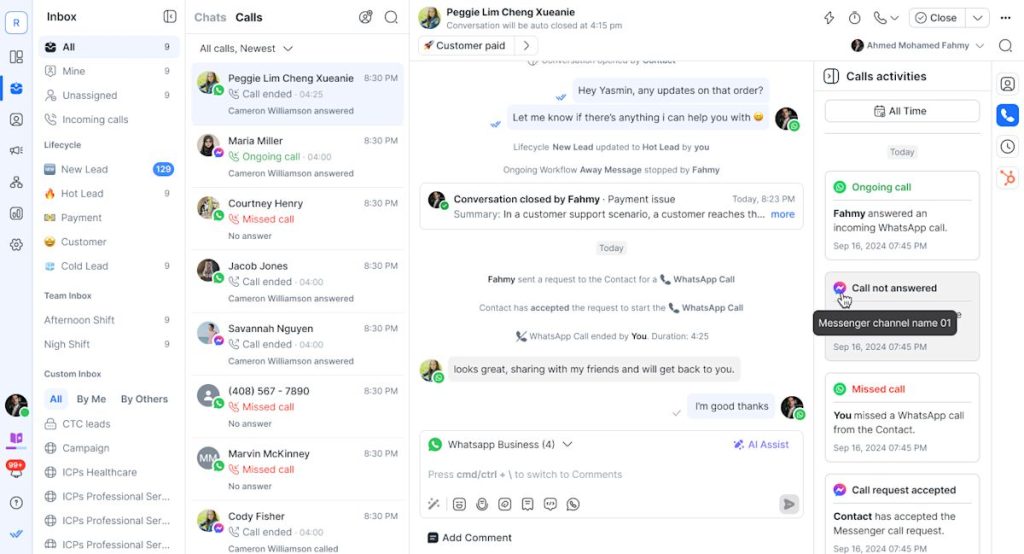
She assigns chats with routing rules, sends departure reminders through broadcasts, and tags new leads with automated workflows. AI agents can answer first and pass tricky questions to a teammate, while analytics show response times by agent and help her plan staffing.
The WhatsApp side is what she values most, since the platform is built around the official WhatsApp Business setup instead of a workaround. She appreciates that setup, routing, and reporting all live in one workspace. She did mention a few features she expected were missing, so she started with WhatsApp alone and connected the other channels only after her whole team felt comfortable with the daily routine.
Pros:
- One shared inbox for WhatsApp, Messenger, Instagram, Telegram, SMS, and web chat
- Routing rules assign each conversation to the right teammate
- Broadcast automation sends reminders and promotions to chosen contacts
- Workflows tag leads and trigger follow-ups without manual steps
- Analytics track response times by agent for smarter staffing
Cons:
- Some advanced features are still missing
- Messaging delivery issues are occasionally reported by users
How Respond.io Compares With Chatfuel: Chatfuel covers WhatsApp, Instagram, and Facebook with bot flows. Respond.io treats those channels as one shared team inbox, then adds Telegram, SMS, and web chat with routing and workflows on top. I would pick it when several people answer WhatsApp-heavy conversations and need clear assignment rather than a single automated bot.
User Rating: 4.8/5 (G2)
Price: Starts at $79/month (billed annually)
5. Landbot: Best for Visual No-Code Bots for Web and WhatsApp
Building my first website bot in Landbot felt easy to follow because the visual canvas shows every step. Each question sits in its own block, conditional logic sends visitors down different paths, and I can run the same flow on WhatsApp whenever I want it there. Lead details travel to a CRM through native HubSpot and Salesforce connections, while custom webhooks cover anything else I need.
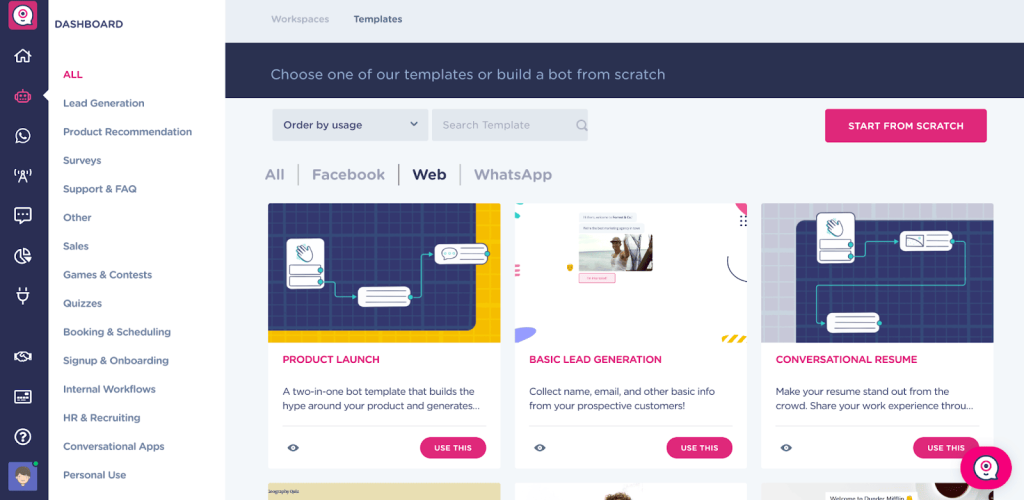
When a visitor asks for a person, the chat can pass to a live agent. AI-powered conversations make the bot sound more natural than a strict script, and broadcast automation handles reminders. Nothing felt like coding. Setting it up took me one relaxed afternoon.
The interface looks polished, with a clean layout that stays readable. The limit appeared when I wanted deeper logic, since the tool works best for simple bots. For lead capture and booking flows, though, it did exactly what I needed.
Pros:
- Drag-and-drop builder with conditional logic sends visitors down different paths
- The same flow can run on your website and on WhatsApp
- Native HubSpot and Salesforce integrations push lead details straight to your CRM
- Custom webhooks connect any tool a native integration does not cover
- Live chat handoff passes a conversation to a person when a visitor asks for one
Cons:
- Best suited to simple bots, so very complex logic can feel limited
- Functional depth trails its polished design for advanced needs
How Landbot Compares With Chatfuel: Chatfuel builds block-based flows mostly for Meta channels, while Landbot’s visual canvas runs the same style of flow on your website and on WhatsApp. It also pushes leads into HubSpot or Salesforce natively and hands off to a live agent, which makes it a practical pick for lead capture on a site.
User Rating: 4.7/5 (G2)
Price: Starts at $40/month
6. Botpress: Best for Building AI Agents With LLM-Powered Automation
Once a no-code builder started feeling limiting for me, Botpress was the tool I tried next. The open-source core can run on a server I control, while Cloud Studio adds a visual builder for the parts I would rather not code. A retrieval node connects the agent to a private knowledge base, so answers draw on uploaded documents without manual vector setup.
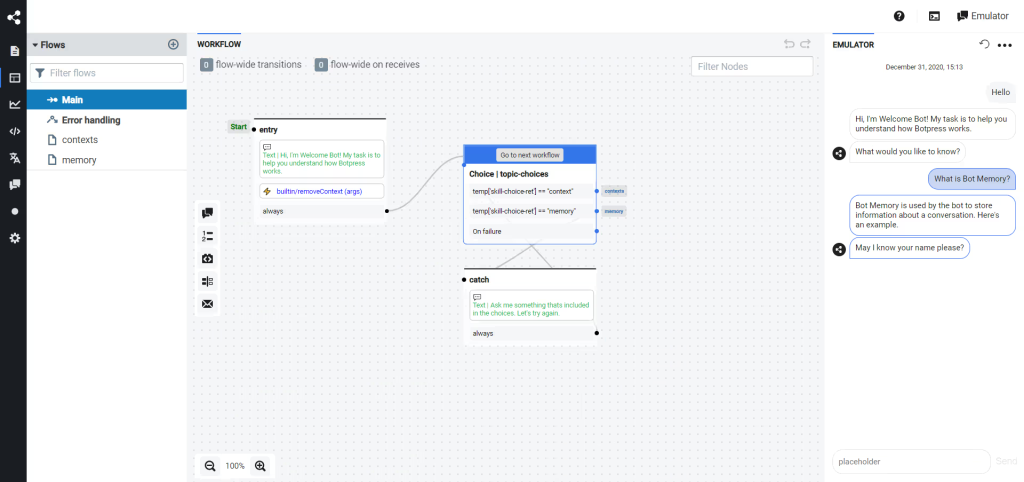
Every step is a JavaScript function, which means I can version, test, and roll back flows like any other service in a normal engineering workflow. I can swap between models such as GPT-4, Claude, or open-source options node by node, and webhooks or API calls trigger the bot reliably. Native modules cover WhatsApp, Slack, Messenger, and a web widget.
I would not hand this to a non-technical owner, because setup takes longer and assumes comfort with code. Teams already running CI/CD pipelines will feel at home.
Pros:
- Retrieval nodes plug LLM answers directly into your private knowledge base
- Event-based architecture triggers bots reliably from webhooks or API calls
- Native modules cover WhatsApp, Slack, Messenger, and a web widget out of the box
- Swap between GPT-4, Claude, or open-source models per node
- CLI deployments let you roll back bots just like any other service
Cons:
- Requires comfort with code, so it is not truly beginner-friendly
- Steeper setup time compared with drag-and-drop chatbot builders
How Botpress Compares With Chatfuel: Chatfuel is built for non-technical marketers who want blocks and templates. Botpress goes the other way, giving engineers code-level control, retrieval over a private knowledge base, and model choice per node. I would choose it only if your team can maintain code, because setup and upkeep take real engineering time.
User Rating: 4.5/5 (G2)
Price: Starts at $150/month
7. Intercom: Best for Omnichannel Platform With Messenger & App
Fin, Intercom’s AI agent, was the first thing I switched on when I tested the platform, and it started handling repetitive questions quite quickly. Fin reads the help center, answers in natural language, and passes the thread to a human with full context once a conversation gets complicated.
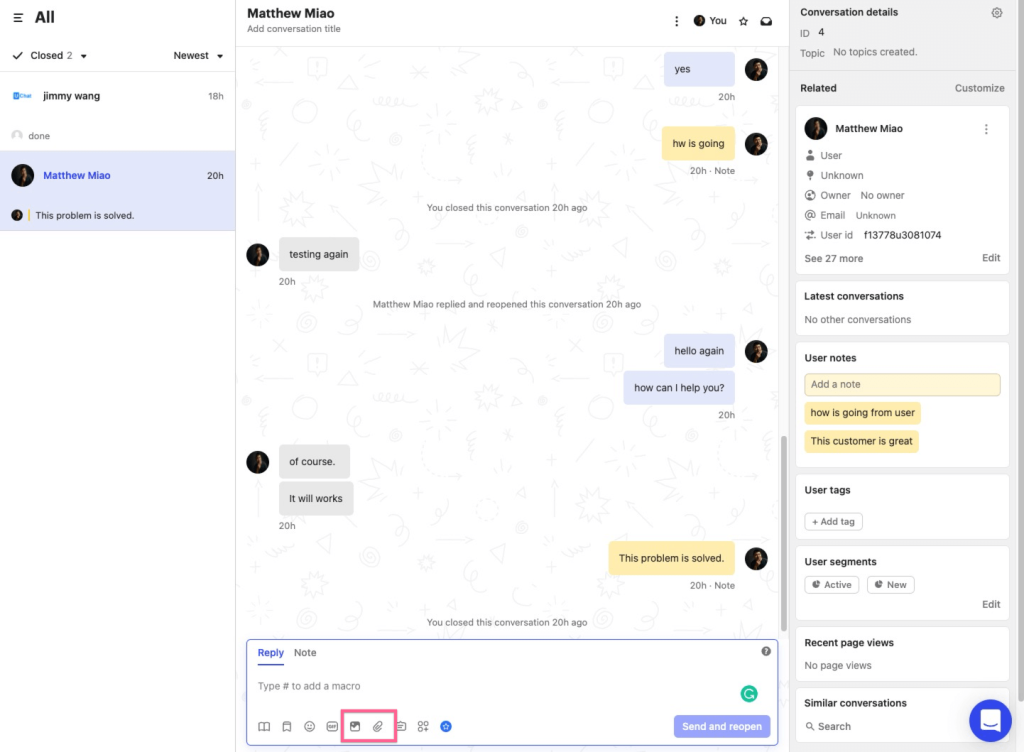
Behind it, an omnichannel inbox combines email, chat, and social DMs, while a drag-and-drop workflow builder routes, tags, and escalates conversations automatically without manual tracking. I also tried interactive product tours and push notifications to guide new users, plus a mobile SDK to message people directly inside an app. Pairing the bot with the inbox means customers rarely have to explain themselves twice.
It suits teams that want support, onboarding, and growth messaging in one cockpit. The learning curve surprised me at first, so I gave myself a few full days to configure workflows properly before testing anything live with real conversations.
Pros:
- Fin AI answers around the clock and hands off with full conversation history intact
- Unified inbox combines chat, email, and social channels into one clean view
- Workflow builder automates routing, SLAs, and follow-ups without manual tracking
- Interactive product tours accelerate feature adoption for new customers
- Mobile SDK pushes targeted in-app messages and surveys directly to users
Cons:
- Interface has a learning curve for teams new to workflow automation tools
- Heavier than needed for teams that only want a simple chat widget
How Intercom Compares With Chatfuel: Chatfuel focuses on Meta conversations and bot flows, whereas Intercom builds a full customer messaging platform around email, chat, social DMs, product tours, and in-app messages. It fits SaaS teams that need support and onboarding together, but it is more than most teams need for simple Instagram automation.
User Rating: 4.5/5 (G2)
Price: Starts at $29/seat/month
8. Freshchat: Best for Freshworks Suite Users
Freshchat slots in naturally if you already live inside Freshdesk, Freshsales, or Freshmarketer, and I saw that right away when I wired it up. The AI bot, live chat, and knowledge base suggestions were working together in well under an hour.
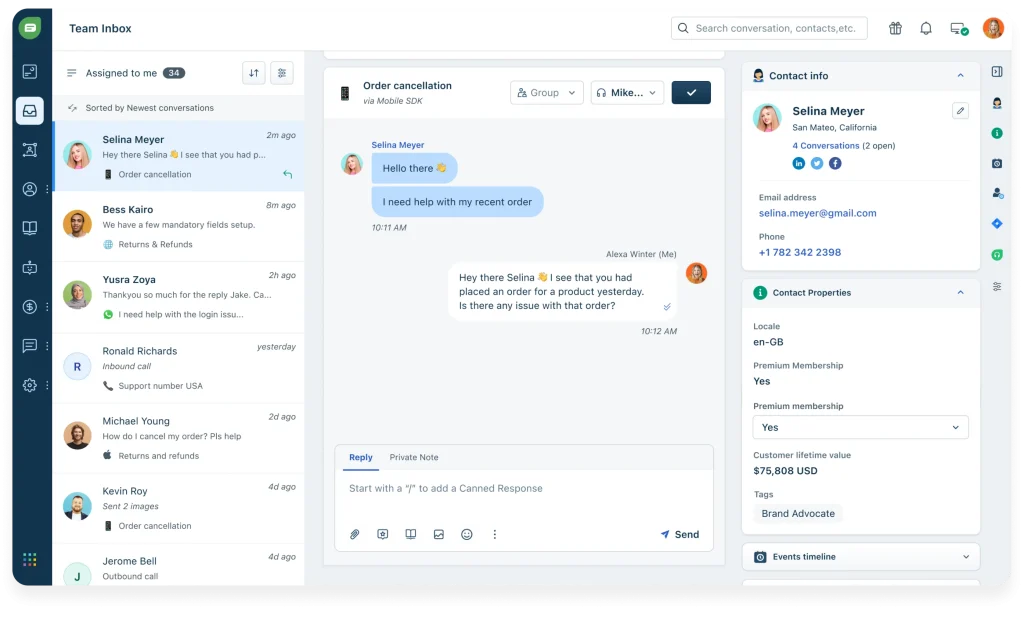
Freddy AI replies in multiple languages, detects sentiment, and nudges priority chats toward human reps instead of leaving them waiting in a queue for hours. The unified inbox shows web, mobile, WhatsApp, and Apple Business Chat threads with rich visitor profiles, and in-thread CSAT surveys close the loop after every conversation. A no-code flow builder with pre-trained FAQ templates gets bots live fast, and trigger campaigns respond to user journey and page behavior.
Marketing, support, and success teams all look at the same screen. I did notice occasional lag when syncing across several Freshworks products at once, and advanced bot flows felt less intuitive than simpler standalone chatbot tools.
Pros:
- Grows natively with other Freshworks apps, giving agents full CRM-level context instantly
- Omnichannel inbox covers web, mobile, WhatsApp, and Apple Business Chat in one screen
- Freddy AI suggests replies and tags intent automatically, speeding up every response
- No-code flow builder with pre-trained FAQ templates gets you live fast
- Trigger campaigns based on user journey and page behavior boost timely engagement
Cons:
- Occasional lag reported when syncing across multiple Freshworks products at once
- Setup for advanced bot flows can feel less intuitive than simpler standalone tools
How Freshchat Compares With Chatfuel: Chatfuel gives you Meta flows and an AI layer, while Freshchat plugs into the Freshworks stack so agents see CRM-level context beside every chat. If you already run Freshdesk or Freshsales, it closes the ticketing and sales-context gaps that a standalone bot leaves open.
User Rating: 4.4/5 (G2)
Price: Starts at $19/agent/month
9. Tawk.to: Best for Free Live Chat for Budget-Conscious Small Businesses
Live chat without a developer was all a neighbor who runs a tutoring center wanted, so I pointed her to Tawk.to. She pasted a script into her homepage and was answering visitors within minutes.
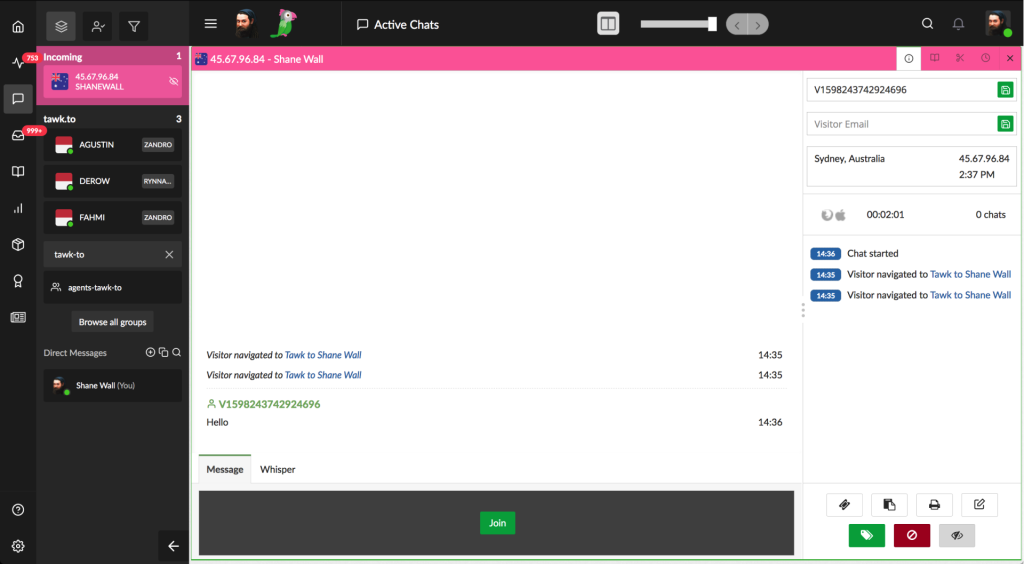
The dashboard combines live chat, a basic ticketing system, and a small knowledge base, and iOS and Android apps let her reply between sessions or while walking to class. Real-time visitor analytics show who is browsing and which pages they read before starting a chat. If she ever wants after-hours coverage, an optional hired agent service can answer for her, and the widget branding can be removed.
Adding it to a second page took another paste. Occasional glitches appeared during heavy traffic, and she found the AI features less advanced than purpose-built AI chatbot tools, so she treats it as a dependable starting point for conversations while her volume stays modest and her needs stay simple.
Pros:
- Live chat, ticketing, and a basic knowledge base sit inside one dashboard
- Mobile apps for iOS and Android make on-the-go replies simple
- Real-time visitor analytics show exactly who is browsing your site
- Setup takes minutes with a simple script paste; no developer needed
- Optional hired agent service can cover after-hours replies
Cons:
- Some glitches are reported during peak traffic
- AI features feel less advanced compared with purpose-built AI chatbot tools
How Tawk.to Compares With Chatfuel: Chatfuel automates conversations on Meta channels, while Tawk.to gives you a plain, reliable live chat widget with ticketing and a knowledge base for your website. It will not match Chatfuel’s AI flows, so I treat it as a starting point for teams whose first need is simply answering visitors on the site.
User Rating: 4.5/5 (G2)
Price: Starts at $0/month (free core plan)
10. Flow XO: Best for Automating Customer Interactions via AI Chatbots
On one drag-and-drop canvas, I designed a web and Messenger bot in Flow XO with welcome texts, quick reply buttons, and keyword rules. I then added SMS follow-ups, Google Sheets logging, and Slack alerts, so a single flow covered three channels. It felt familiar to me because it works like a classic drag-and-drop bot builder, only with more automation around the edges.
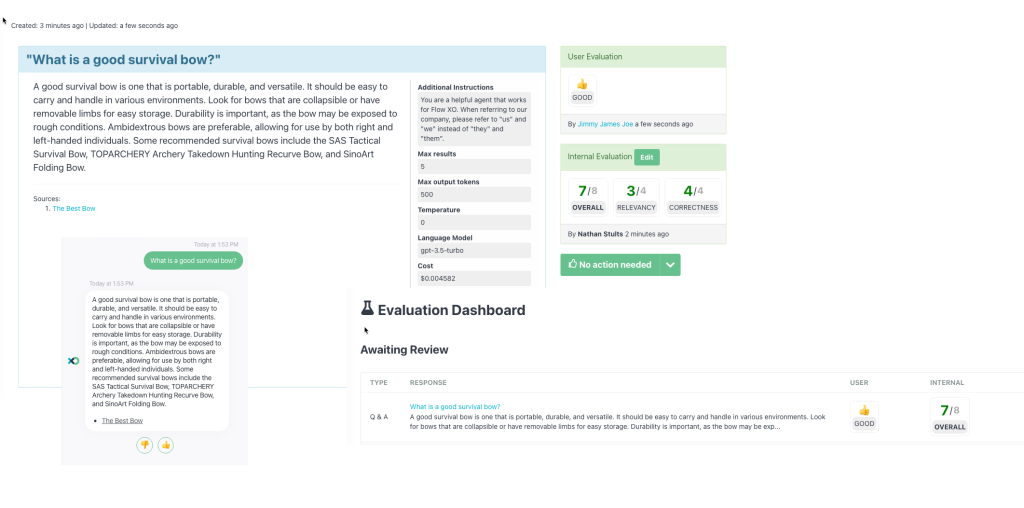
Conditional logic branches each conversation by response, tag, or time, which keeps replies personal without writing custom scripts or juggling APIs. Staff can also take over a live chat whenever a case needs a human touch.
The interface feels simpler than newer AI-first platforms, so it suits straightforward automations better than complex AI conversations. I like that live chat takeover, logging, and alerts all work from one single place. If your main goal is stitching chat into the tools you already use, it deserves a really serious look.
Pros:
- Visual canvas builds chat flows, SMS, and backend tasks in one place
- Ready NLP keyword rules trigger the right response block automatically
- Quick reply buttons and rich cards make navigation easier for visitors
- Live chat takeover lets staff join any in-progress conversation instantly
- Conditional logic branches flows by responses, tags, or time triggers
Cons:
- Interface feels more basic compared with newer AI-first platforms
- Best fit for straightforward automations rather than complex AI conversations
How Flow XO Compares With Chatfuel: Chatfuel and Flow XO both reward people who like building flows by hand. Flow XO stretches further beyond chat by adding SMS, Google Sheets, and Slack steps on the same canvas, though it trails Chatfuel’s newer AI layer. It suits automation-minded teams more than teams chasing AI answers.
User Rating: 4.5/5 (G2)
Price: Starts at $25/month
How I Chose These Chatfuel Alternatives
When I evaluate Chatfuel alternatives for this list, I don’t just rely on feature lists or marketing claims. I look at how these tools actually perform in real-world scenarios, which is how I judge any of the alternatives to Chatfuel you might shortlist. Here’s the framework I used to make sure every recommendation is practical, reliable, and worth considering:
- User Reviews / Ratings: I start by looking at real user feedback from platforms like G2. This gives me a clear picture of how teams actually experience the tool day-to-day, what they love, and where it falls short.
- Core Features & Functionality: I focus on what truly matters in Chatfuel alternatives. This includes training on your own content, bot-to-human handoff, integrations, omnichannel support, and ticketing. If a tool cannot handle these well, it does not make the cut.
- Ease of Use: I pay close attention to how intuitive the platform feels. A tool might be powerful, but if a small team struggles to adopt it, it defeats the purpose. Clean interface, simple navigation, and quick onboarding are non-negotiable for me.
- Customer Support: From my experience, implementation is where many tools fail. I evaluate how responsive and helpful the support team is, especially during setup and ongoing use. Fast, reliable support makes a big difference in adoption.
- Value for Money: I compare pricing with what the tool actually delivers. This is not about picking the cheapest option, but about whether the features, flexibility, and performance justify the cost, including how usage-based fees add up as chat volume grows.
- Personal Experience / Expert Insights: Wherever possible, I rely on my own hands-on experience with these tools. I also consider insights from support managers, marketing leads, and operations teams who use chat platforms in real environments. This helps me go beyond surface-level reviews and highlight what actually works.
Top 3 Chatfuel Alternatives
After comparing all ten, three came out on top for different reasons. The right one depends on where Chatfuel has been letting you down.
1. ProProfs Chat
ProProfs Chat is my top overall pick because it solves the first problem most Chatfuel users hit: answers that come from your own content. It trains on your website, help center, or files, hands off to a person with full chat context, and brings Facebook, WhatsApp, and Instagram messages into the same dashboard as your website chats.
2. ManyChat
ManyChat earns its place for teams whose revenue starts in Instagram comments and DMs. Its visual flows, comment-to-DM triggers, and SMS and email steps make it the easiest direct swap when you want to stay close to Chatfuel’s Meta-first style.
3. Respond.io
Respond.io is the right call when WhatsApp leads your pipeline. One shared inbox covers WhatsApp, Messenger, Instagram, Telegram, SMS, and web chat, with routing rules and workflows for the team behind it.
FREE. All Features. FOREVER!
Try our Forever FREE account with all premium features!
How to Switch From Chatfuel Without Losing Leads?
Switching is mostly about rebuilding flows, not rescuing data. Before I move anything, I narrow the field to two finalists from the competitors of Chatfuel above and run both on real questions for a short pilot.
- Export contacts: Start by exporting my subscriber list from Chatfuel, since most platforms accept contact imports but expect me to rebuild the flows.
- Map flows: All live flows, triggers, and handoff rules go on a list, and I mark which ones AI answers can replace and which should stay scripted.
- Pick finalists: Two tools from the top 10 list above make my shortlist, and each gets the same ten customer questions pulled from my inbox.
- Train the AI: Each tool gets my website URL, help center, and PDFs, then I check every answer against its source page.
- Test escalation: Asking a question the bot cannot answer shows whether the chat reaches a person with the full history, including sensitive topics that should always go to a human.
- Check integrations: Connections such as CRM, ticketing, scheduling, and store get confirmed by name, and I verify each one creates leads, not just contacts.
- Pause old automations: Before the new tool’s automations go live, I turn off Chatfuel’s Instagram automations, so two auto-DM tools never run on one account.
- Move WhatsApp: Re-registering my WhatsApp Business number with the new provider comes next, along with re-authorizing the new tool for my Facebook Page and Instagram account in Meta Business Manager.
- Go live small: Launching just one workflow first, I watch it for 30 days and expand only after the numbers look healthy.
Pick the Chatfuel Alternative That Fits Your Job
Moving on from Chatfuel works best when I choose by job: Meta DMs, website answers, a WhatsApp inbox, or a helpdesk stack. Whatever you pick, make sure it trains on your real content, hands off to a person with full context, connects to your CRM or ticketing tool, and shows usage-based costs upfront.
If most of your questions arrive on your website, ProProfs Chat checks each box directly. It trains on your website, help center, or PDFs, hands off with full chat context, and connects with its Knowledge Base and Help Desk products. It also offers a forever-free plan for one operator, so you can test it on your own questions first.
Start with one workflow this week and see how it performs.
Frequently Asked Questions
When should you stay on Chatfuel?
Staying makes sense when most buyers arrive from Instagram, Facebook, or click-to-chat ads, when WhatsApp AI or AI booking already covers your needs, or when an agency manages several client accounts. Few website questions also reduce the need for a second tool. Test any replacement against those strengths before leaving.
How do per-contact, per-seat, and per-resolution pricing models differ?
Per-contact plans bill by the people messaged, per-seat plans by the agents who reply, and per-resolution plans by each conversation the AI closes. Social-heavy teams feel per-contact fees first, while larger support desks feel per-seat fees first.
How can an AI bot's answers be tested before launch?
List the ten questions the team answers most, ask each one, and compare every reply with the source page. Then ask something the content does not cover to confirm the bot admits it instead of guessing.
Which topics should always go to a human?
Billing disputes, complaints, legal or safety issues, and anything involving personal data are safer with a person. Set rules or keywords that route those chats to an agent immediately instead of letting the bot try first.
What privacy details are worth checking before connecting a chatbot?
Ask where chat data is hosted, whether a data processing agreement is available, and whether conversations are used to train AI models. Confirm GDPR or CCPA support when customers sit in those regions.
How many operators does a small team need?
Start with the number of people who will handle live handoffs, not total headcount. Most small teams begin with one hybrid bot for FAQs and lead capture, then add operators as chat volume grows.
What should agencies confirm before choosing a tool?
Check white-label branding and multi-client management before onboarding any client, since retrofitting them later is difficult.
How soon do results show after launch?
Most teams see faster response times and fewer repetitive tickets within the first 30 days when the bot is trained on existing FAQs and help content.
FREE. All Features. FOREVER!
Try our Forever FREE account with all premium features!

 We'd love your feedback!
What did you like & how can we make it even better?

 Thanks for your feedback!
 Ask Your Question
Have a question? Get expert help to make your decision easier.