Your AI agent just had its best month ever. Resolution rates climbed, escalations dropped, then the invoice landed higher than ever. That contradiction, an AI agent costing more exactly when it works best, is what sends support leads searching for Fin alternatives.
Fin AI Agent is genuinely capable. The problem is how you pay for it. Outcome-based pricing sounds fair; you pay only when it resolves something, but every automation win quietly raises your bill. Stack on Intercom’s per-seat pricing, and it’s clear why teams are actively evaluating Fin alternatives to get costs under control.
I tested AI customer service platforms across support, eCommerce, and SaaS teams, weighing a move off Fin. This guide covers the 10 best Fin competitors and who each one fits.
Why Businesses Look for Fin Alternatives?
Before the list, here’s exactly where Fin let down the teams I worked with. These are the real friction points that push businesses to make the switch:
1. Outcome-Based Pricing Punishes Success
Fin charges per resolution. As your AI gets better at closing conversations without a human, your bill grows in lockstep. Teams that invest in training and tuning their bot end up paying more each month for the exact improvement they were chasing, which makes budgeting nearly impossible.
2. Seats and Outcomes Are Billed Separately
Fin doesn’t stand alone. You need an Intercom seat underneath it, and seat pricing varies widely depending on the plan you choose. Add Copilot, add channel fees for SMS and WhatsApp, and the “simple” per-resolution number becomes one line among several.
3. No Native Live Chat and Human Handoff Outside the Intercom Ecosystem
Fin only works inside Intercom’s inbox or as an add-on to a handful of supported helpdesks. If your team runs on a different stack, bolting Fin on adds integration overhead most teams don’t budget for.
4. Resolution Definitions Are Opaque
A “resolution” counts when the customer confirms an answer helped or simply stops replying. That second case means you can be billed for conversations the customer actually gave up on, not ones your bot genuinely solved.
5. Enterprise Pricing Scales Fast
Once you factor in seats, Copilot, Proactive Support add-ons, and Fin outcomes together, a mid-size team automating a few thousand conversations a month can land at a much higher total cost than the sticker price ever suggested, well before touching a single custom integration.
10 Best Fin Alternatives to Consider This Year
This list isn’t a Google roundup. I put these tools through hands-on testing, ran them by peers whose opinion I trust, and cut the ones that didn’t hold up in practice.
Here’s a quick look at my 10 best alternatives to Fin.
| Fin Alternative | Best For | Pricing | User Rating |
| ProProfs Chat | Easy Live Chat & AI Customer Service Agent for Instant, Automated Support | A free plan is available for growing teams. Paid plan starts at $19.99/user/month. | 4.8/5 (Capterra) |
| Zendesk AI Agents | Teams already living inside Zendesk who want AI natively embedded | Starts at $55/agent/month, plus per-resolution AI fees. | 4.3/5 (G2) |
| Freshdesk (Freddy AI) | Mid-size teams wanting AI and ticketing native together | Starts at $15/agent/month, plus session-based AI Agent fees. | 4.4/5 (G2) |
| Tidio | eCommerce businesses wanting AI plus live chat in one platform | Free plan available. Paid plans start at $29/month. | 4.7/5 (G2) |
| Gorgias | Shopify and eCommerce brands needing AI inside their helpdesk | Starts at $10/month, plus per-resolution AI Agent fees. | 4.4/5 (Capterra) |
| Ada | Enterprise teams needing high-volume, omnichannel AI automation | Custom pricing, typically $30,000+/year. | 4.5/5 (Capterra) |
| Kustomer | Teams wanting a customer-record-first support model | Starts at $89/user/month. | 4.3/5 (G2) |
| HubSpot Service Hub | Teams already running their business on HubSpot CRM | Starts at $90/seat/month, plus AI credit usage. | 4.4/5 (G2) |
| Gladly | Retail and subscription brands wanting one customer timeline | Custom pricing. | 4.6/5 (G2) |
| Drift (Salesloft) | B2B sales teams focused on pipeline from website traffic | Custom pricing. | 4.4/5 (Capterra) |
1. ProProfs Chat – Best for Easy Live Chat & AI Customer Service Agent for Instant, Automated Support
ProProfs Chat is the platform I recommend to support teams that want AI automation without the per-resolution math getting in the way of scaling it. You pay a flat per-operator rate instead of a growing outcome fee, so a better automation rate becomes pure upside, not a bigger invoice, starting with the AI Customer Service Agent, which trains on your website, help center, FAQs, or uploaded documents to answer questions instantly.
The AI can also move beyond answering questions and take action during a conversation, such as updating an order, scheduling a meeting, or triggering an email or Slack notification. When a conversation needs a human, Live Chat Handoff passes the full history along so nothing gets lost during the transfer.
See how ProProfs’ AI Customer Support Agent answers the same questions, automatically. Try it now:
From there, sentiment analysis flags frustration in real time, churn risk scoring highlights at-risk customers, and AI resolution summaries save agents from having to reconstruct every chat, all within one dashboard alongside WhatsApp, Facebook, Instagram, and SMS.
ProProfs Chat also works with ProProfs Knowledge Base and ProProfs Help Desk, so customers can find answers through self-service or AI while conversations requiring human attention can continue through the support workflow.
Pros:
- Train AI chatbots using your website or help center data for highly accurate responses
- Sentiment analysis detects customer emotion in real time so operators know exactly when to step in
- Proactive chat invitations to boost interaction and conversion.
- Churn risk scoring flags high-risk conversations before they escalate, with high, medium, and low risk labels
- Omnichannel coverage across website chat, WhatsApp, Facebook, Instagram, and SMS from a single dashboard
Cons:
- Cloud-only – no offline access
- No dark theme
How Does ProProfs Chat Compare to Fin?
Fin bills per outcome on top of Intercom’s seat price, so a team’s cost climbs as automation improves. ProProfs Chat charges a flat per-operator rate that includes the AI agent, live chat, and omnichannel coverage without a separate resolution meter. ProProfs Chat also includes native human handoff and a Forever Free plan that runs a real production chatbot indefinitely, something Fin’s Intercom-dependent setup doesn’t offer.
User Rating: 4.8/5 (Capterra)
Pricing: A free plan is available for growing teams. Paid plan starts at $19.99/user/month.
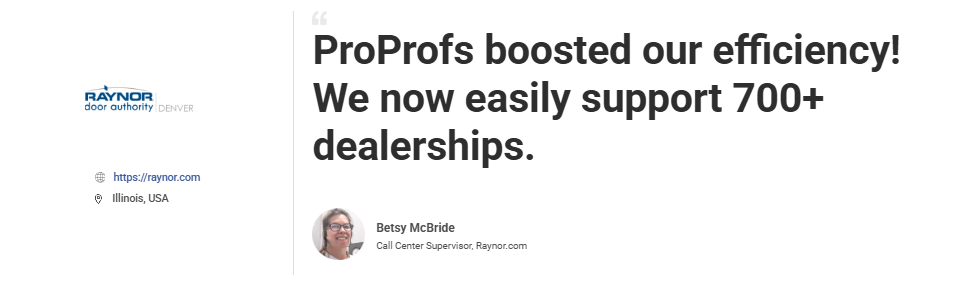
Let’s take a look at what Betsy McBride, founder of Raynor Garage Doors, had to say about ProProfs Chat.
2. Zendesk AI Agents – Best for Teams Already Living Inside Zendesk
Zendesk AI Agents became an easy choice for me whenever I was already running support on Zendesk and wanted AI automation that could use the same knowledge base and ticket history without extra integrations.
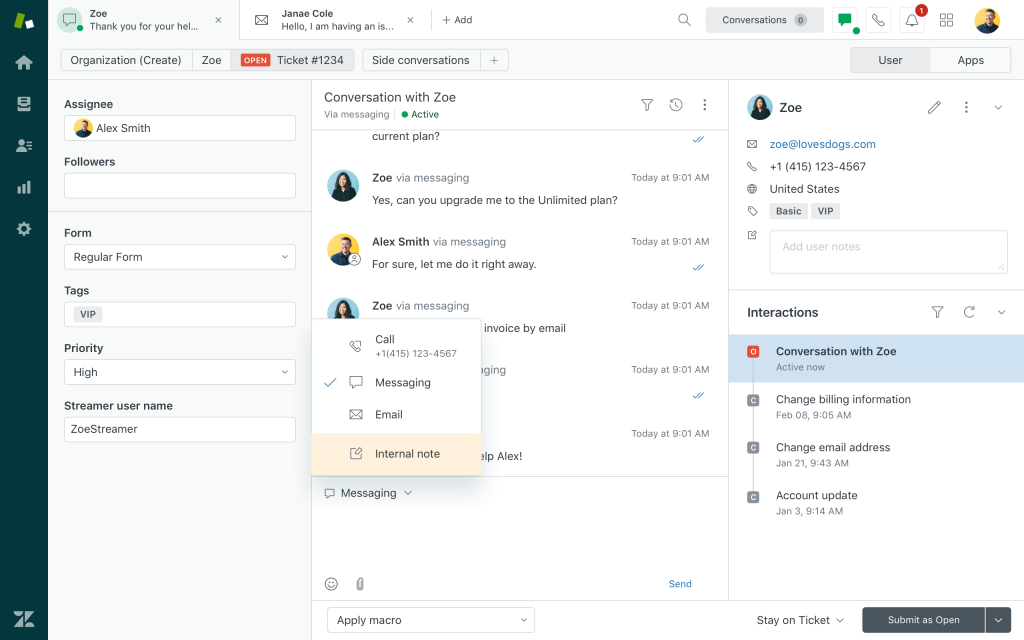
I found the Advanced tier especially useful for handling messy, off-script conversations from start to finish. It can look up orders or update ticket fields during a conversation using a visual dialogue builder with branching logic.
It also supports 80+ languages for understanding customer messages and generating replies. Every AI interaction appears alongside human agent performance in the same Zendesk dashboard I already use. Since it reads my existing content directly, getting AI up and running took almost no effort.
Pros:
- Reads directly from your existing Zendesk knowledge base and ticket history with no separate setup
- Visual dialogue builder lets you design branching conversation flows with conditional logic
- Authorized actions let the AI update tickets or look up orders inside connected systems
- Native fluency across 80+ languages for both understanding and generating replies
- Tight integration with Zendesk’s existing reporting, so AI and human performance sit in one dashboard
Cons:
- Per-resolution AI fees stack on top of per-agent Suite pricing, similar to the Fin billing problem
- Full conversational AI requires the Advanced tier, not just any Suite plan
How Does Zendesk AI Agents Compare to Fin?
Both charge per resolution, so the billing complaint that pushes teams away from Fin often follows them to Zendesk. The real difference is ecosystem: Zendesk suits teams already on Zendesk’s ticketing, while Fin suits teams built around Intercom’s messenger. Neither solves the “AI gets more expensive as it gets better” problem the way flat-rate platforms do.
User Rating: 4.3/5 (G2)
Pricing: Starts at $55/agent/month, plus per-resolution AI fees.
3. Freshdesk (Freddy AI) – Best for Mid-Size Teams Wanting AI and Ticketing Together
Freshdesk stood out to me because Freddy AI Agent connects directly with Freshdesk’s ticketing system, so unresolved AI conversations automatically become tickets with full context. Freddy AI Copilot works alongside it, drafting replies and summarizing tickets for me inside the same inbox.
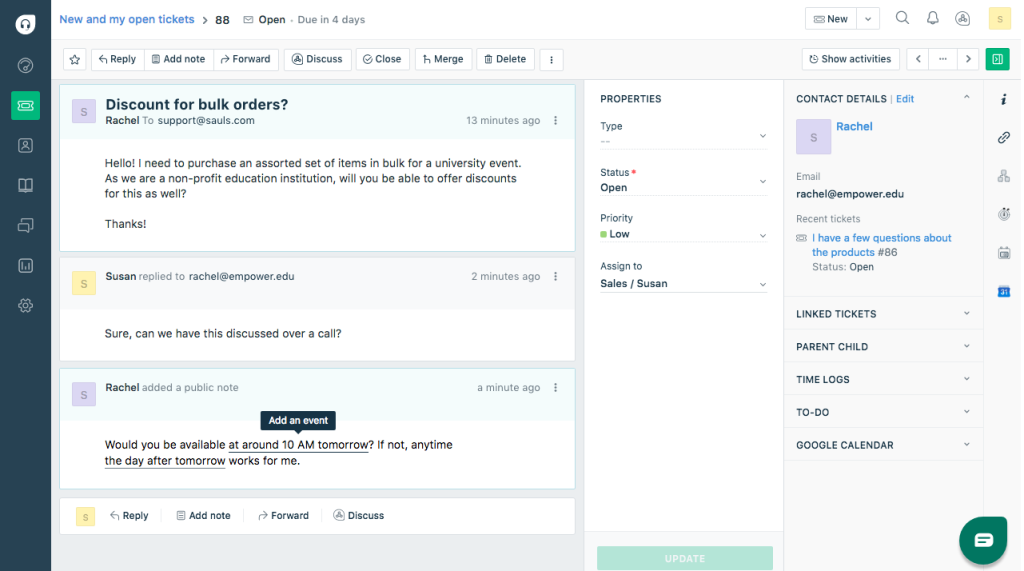
Since everything is native, I didn’t have to set up a separate integration to connect AI with my ticket queue. Reporting includes CSAT, first response time, and agent performance in the standard plan, while omnichannel support covers WhatsApp, Messenger, and website chat from one inbox.
If I want AI deflection to flow neatly into a structured support queue instead of acting as a standalone chatbot, this seamless connection is the biggest advantage.
Pros:
- Native ticketing integration converts unresolved AI conversations into tickets with full context automatically
- Freddy AI Copilot drafts replies and summarizes tickets for human agents inside the same inbox
- Strong reporting on CSAT, first response time, and agent performance in the standard plan
- Omnichannel coverage for WhatsApp, Messenger, and website chat from a single inbox
- Entry-level ticketing plans are considerably cheaper than Intercom’s seat pricing
Cons:
- Session-based AI billing charges for engagement, not resolution, so failed attempts still cost money
- AI Agent, Copilot, and Insights are priced and sold as three separate line items
How Does Freshdesk Compare to Fin?
Fin charges only when a conversation resolves; Freshdesk’s Freddy AI Agent charges per session regardless of outcome. Teams with a high volume of AI attempts that don’t fully resolve may find Freshdesk more expensive in practice, even though the sticker price looks smaller. For teams that mainly want AI deflection tied cleanly to ticketing, Freshdesk still closes a gap Fin leaves open.
User Rating: 4.4/5 (G2)
Pricing: Starts at $15/agent/month, plus session-based AI Agent fees.
4. Tidio – Best for eCommerce Businesses Wanting AI and Live Chat Together
I usually recommend Tidio first to eCommerce teams looking for an affordable option. Its Lyro AI agent learns from my help docs and automatically handles common FAQs. When it reaches a question it cannot resolve, it smoothly transfers the conversation to a live operator without requiring any external integration.
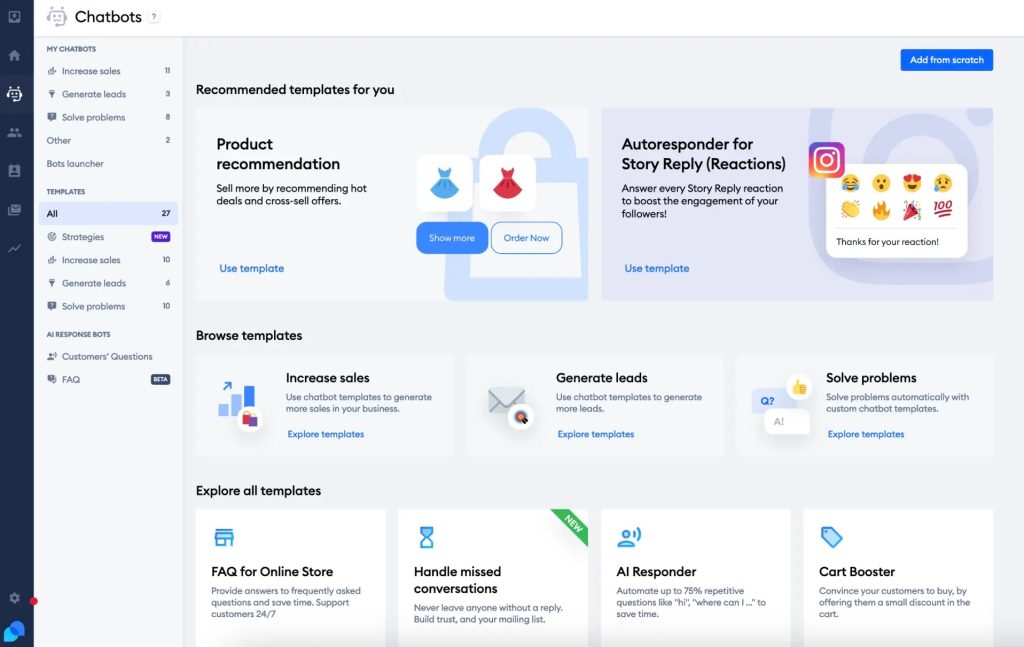
The Shopify and WooCommerce integrations let me check order status and pull product details during conversations. I also like the visual flow builder because I can create lead-capture, post-purchase follow-up, and cart-abandonment journeys without writing code.
Proactive chat triggers based on visitor behavior, time on page, and cart value help me engage shoppers before they leave, rather than waiting for them to ask a question.
Pros:
- Lyro AI agent handles FAQs from help docs with natural language understanding
- Visual flow builder for structured conversation paths covering lead capture and cart abandonment
- Native Shopify and WooCommerce integration with real-time order data inside the chat window
- Live chat and AI in the same platform with seamless bot-to-human handoff
- Proactive chat triggers based on visitor behavior, time on page, and cart value
Cons:
- Per-conversation billing on Lyro can be hard to forecast for high-traffic stores
- Salesforce integration syncs contacts, not qualified leads
How Does Tidio Compare to Fin?
Fin is built around Intercom’s messaging suite and enterprise support workflows. Tidio is built for eCommerce, with order lookups and cart recovery flows Fin doesn’t offer out of the box. For online stores, Tidio’s per-conversation pricing is also generally more accessible than stacking Intercom seats with Fin outcomes.
User Rating: 4.7/5 (G2)
Pricing: Free plan available. Paid plans start at $29/month. Lyro AI conversations billed separately.
5. Gorgias – Best for Shopify and eCommerce Brands Needing AI Inside Their Helpdesk
Gorgias caught my attention because it was built specifically for e-commerce support, especially for order status, returns, and shipping questions, which make up most Shopify tickets. It connects directly to my store data, so the AI agent can reference a customer’s actual order without any extra lookup.
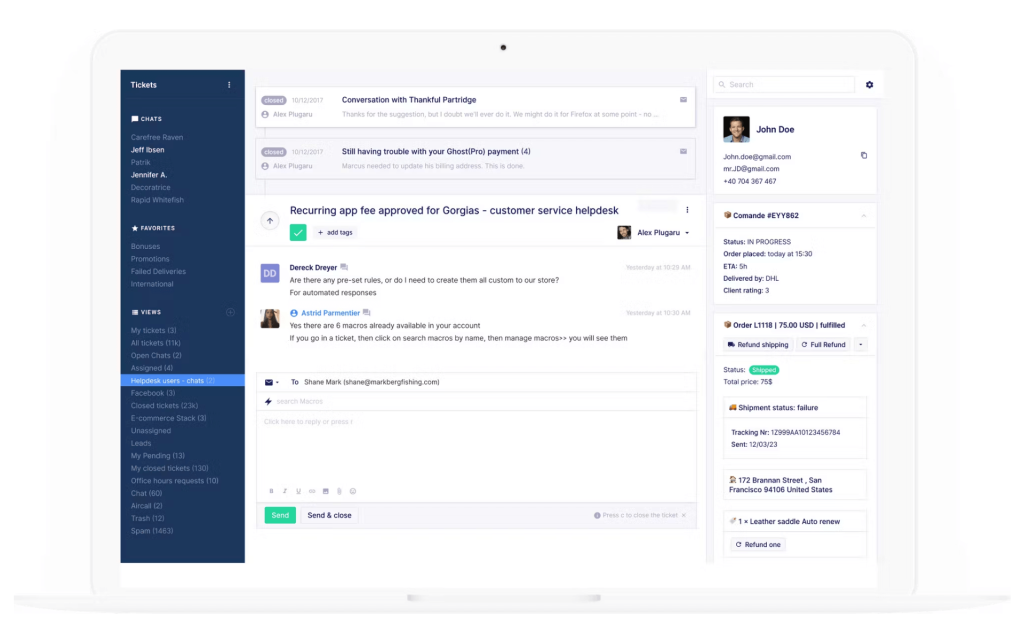
I can choose between the Support Agent for policy questions or the Shopping Assistant for product recommendations and upsells. Every plan includes unlimited users, since pricing is based on ticket volume rather than seats.
The AI Agent also supports multiple languages and lets me customize its tone to match my brand. For a Shopify-focused support team, native access to order and customer data is a real advantage.
Pros:
- Purpose-built for ecommerce: order status, returns, and shipping questions out of the box
- Deep native Shopify integration with real-time order and customer data
- Unlimited users on every plan since Gorgias bills by ticket volume, not seats
- Choose between a Support Agent or a Shopping Assistant skill depending on your use case
- Multi-language support and tone customization built into the AI Agent
Cons:
- AI-resolved conversations are billed as both a resolution fee and a helpdesk ticket
- Overage rates on both tickets and AI resolutions climb quickly during high-volume periods
How Does Gorgias Compare to Fin?
Fin’s $0.99 per outcome is simpler to reason about than Gorgias’s double-billing structure, but Gorgias’s ecommerce-specific training data and Shopify depth often mean it needs fewer setup hours to get useful answers live. Teams should model both against real ticket volume before assuming either one is cheaper.
User Rating: 4.4/5 (Capterra)
Pricing: Starts at $10/month, plus per-resolution AI Agent fees.
6. Ada – Best for Enterprise Teams Needing High-Volume, Omnichannel Automation
Ada is the platform I’d point large, high-volume support organizations toward if Fin’s Intercom dependency is the blocker. Ada isn’t a helpdesk itself; it sits on top of your existing one, whether that’s Zendesk, Salesforce, or another system.
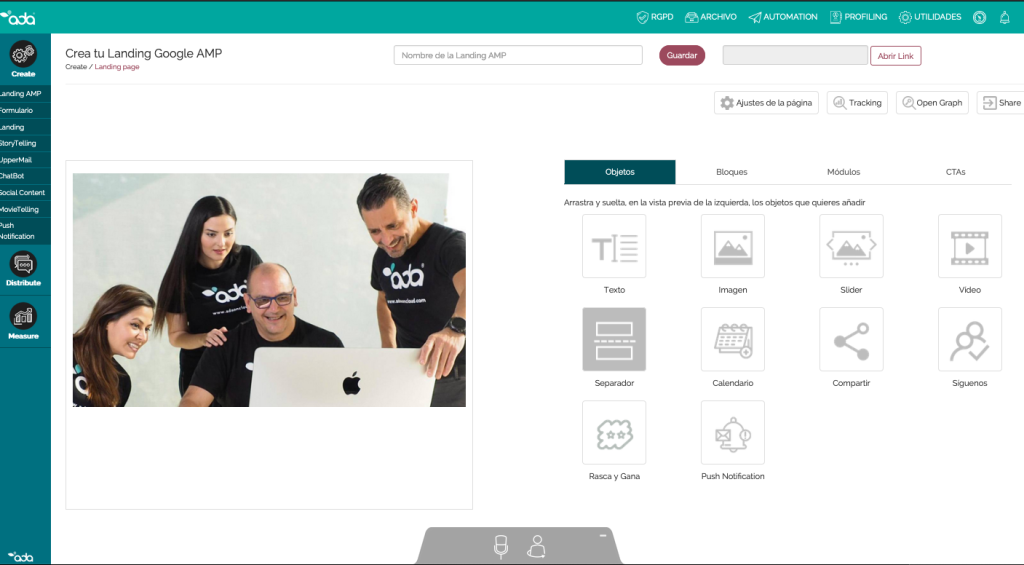
Its Reasoning Engine handles multi-step, agentic workflows across chat, voice, and email rather than just answering FAQs, and it integrates with 13 or more helpdesk and contact center systems for flexible deployment.
Zero data retention agreements with LLM providers strengthen data handling for enterprise buyers, and an adherence supervisor model monitors AI quality and compliance automatically. It’s built for organizations handling large conversation volumes across many channels at once.
Pros:
- Reasoning Engine handles multi-step, agentic workflows beyond simple FAQ answering
- Integrates with 13 or more helpdesk and contact center systems for flexible deployment
- Deploys across chat, voice, email, and messaging from one platform
- Zero data retention agreements with LLM providers for stronger data handling
- Adherence and reviewer models monitor AI quality and compliance automatically
Cons:
- No published pricing; contracts typically start around $30,000 a year
- Enterprise-only deployment with an 8 to 16 week onboarding timeline in most cases
How Does Ada Compare to Fin?
Fin charges per resolution with published, predictable rates. Ada is quote-based and generally more expensive to start, but it isn’t locked to Intercom the way Fin is, and it’s built to handle higher conversation volumes across more channels. Ada makes sense for enterprise teams; Fin’s pricing is more approachable for smaller ones, even with its scaling problem.
User Rating: 4.5/5 (Capterra)
Pricing: Custom pricing, typically $30,000+/year.
7. Kustomer – Best for Teams Wanting a Customer-Record-First Support Model
What I like about Kustomer is that it focuses on the customer instead of just the conversation. Every interaction connects to a single customer record, so both my agents and AI can see order history, previous conversations, and account details in one timeline instead of piecing information together from separate tickets.
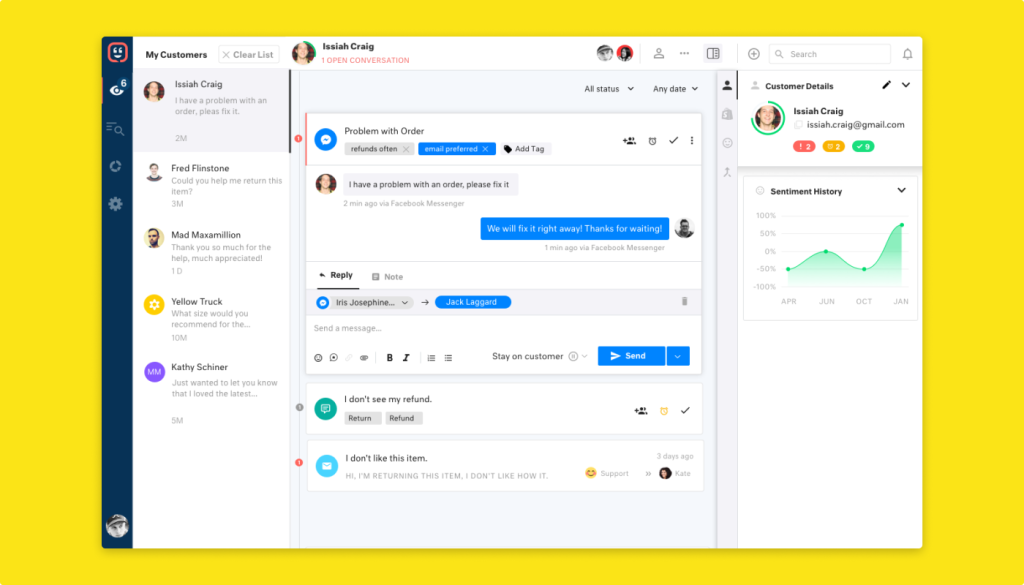
This works especially well when I’m supporting repeat customers across multiple channels because the context stays with the person. Beyond AI chat responses, I can automate workflows and measure performance against customer lifetime value instead of only ticket metrics.
Chat, email, SMS, and social all run from one workspace built around that unified customer timeline.
Pros:
- Customer-record-first model unifies conversation history, orders, and account data in one timeline
- Strong for teams managing repeat customers across chat, email, and social channels
- Built-in automation and workflows beyond just AI chat responses
- Robust reporting tied to customer lifetime value, not just ticket metrics
- Omnichannel support across chat, email, SMS, and social from one workspace
Cons:
- Per-seat pricing starts higher than most alternatives on this list
- AI capabilities are generally an add-on rather than included in the base price
How Does Kustomer Compare to Fin?
Fin is conversation-first and priced by outcome. Kustomer is customer-first and priced by seat, with AI layered on top. Teams that care more about a unified customer view than about outcome-based AI billing will find Kustomer’s architecture the bigger draw, even at a higher starting price.
User Rating: 4.3/5 (G2)
Pricing: Starts at $89/user/month.
8. HubSpot Service Hub – Best for Teams Already Running on HubSpot CRM
I turn to HubSpot Service Hub when sales and marketing are already running on HubSpot. Its AI chatbot and ticketing use the same CRM records as the sales team, so every support conversation shares the same customer history without syncing anything separately.
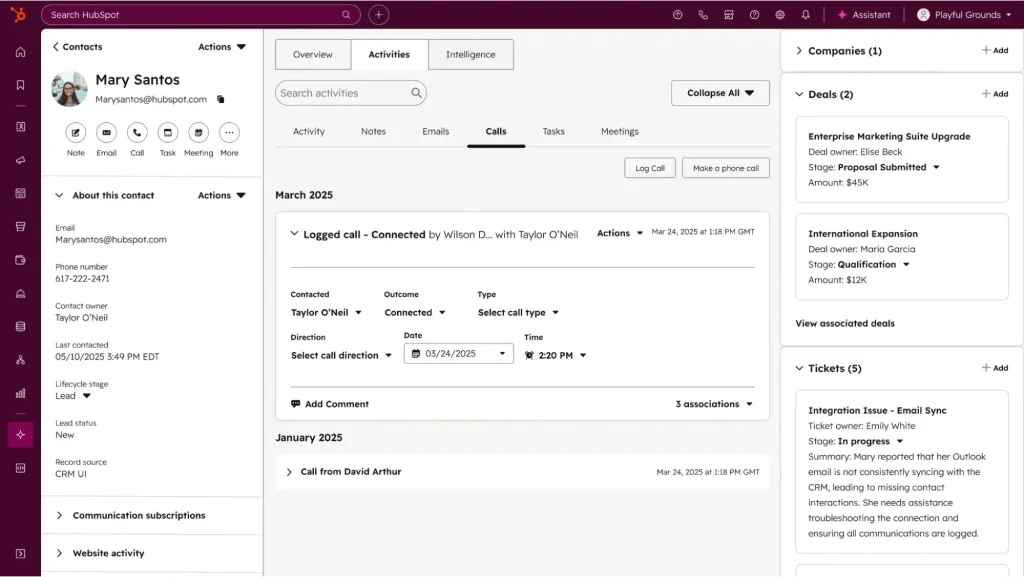
Live chat, ticketing, and the knowledge base all live inside the CRM, while workflow automation makes it easy to hand customers between support, marketing, and sales. I also like that reporting connects support activity to revenue and customer lifetime value instead of just resolution numbers.
If I’m not ready to invest yet, the free tools let me try the core features before moving to a paid plan.
Pros:
- Native CRM integration means support conversations and sales records share the same customer data
- Ticketing, live chat, and knowledge base included in the same platform as your CRM
- Workflow automation extends beyond support into marketing and sales handoffs
- Reporting connects support tickets to revenue and customer lifetime value
- Free tools available to test core functionality before committing to a paid seat
Cons:
- AI features run on a credit system that adds usage-based cost on top of seat pricing
- Full functionality requires buying into the broader HubSpot ecosystem, not just Service Hub alone
How Does HubSpot Service Hub Compare to Fin?
Fin ties AI cost to resolutions; HubSpot ties it to credits, but both mean your AI bill grows with usage rather than staying flat. The real reason to pick HubSpot over Fin isn’t pricing structure, it’s whether your team already runs on HubSpot CRM and wants support data unified with sales and marketing.
User Rating: 4.4/5 (G2)
Pricing: Starts at $90/seat/month, plus AI credit usage.
9. Gladly – Best for Retail and Subscription Brands Wanting One Customer Timeline
Gladly appeals to me because it keeps the focus on the customer instead of the ticket. Whether someone reaches out through chat, phone, email, or SMS, every conversation stays in one continuous thread linked to that person instead of creating a new ticket each time.
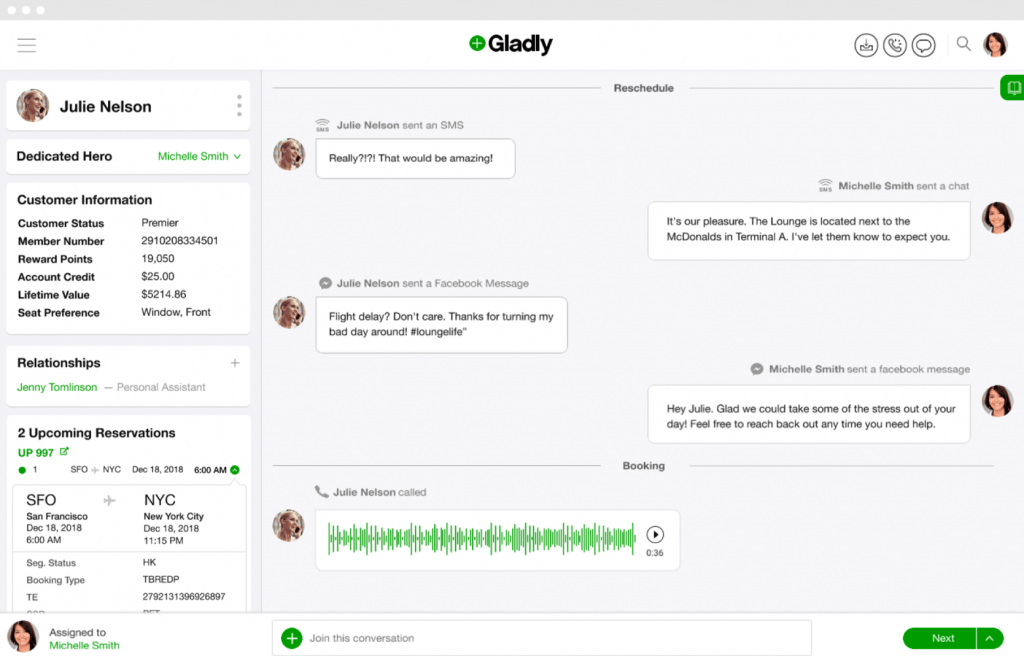
I find this especially valuable for retail and subscription businesses with loyal, repeat customers because the full customer history is available as soon as a conversation begins.
Voice, chat, email, and SMS all connect to the same customer record, and I can also see customer lifetime value during conversations, making it easier to prioritize and personalize every response.
Pros:
- Single customer timeline across every channel instead of separate tickets per conversation
- Strong fit for retail and subscription brands with repeat, high-touch customers
- Voice, chat, email, and SMS all tied to the same customer record
- Built-in customer lifetime value context available to agents mid-conversation
- AI performance improves with active ownership rather than a static setup
Cons:
- No published pricing; requires a sales conversation to get a quote
- AI cost efficiency depends heavily on ongoing tuning, not a one-time setup
How Does Gladly Compare to Fin?
Fin resolves conversations and hands off within Intercom’s inbox. Gladly’s whole architecture is built around customer identity rather than conversation resolution, which suits brands that see the same customers repeatedly. It’s a philosophical difference more than a pricing one, since neither publishes numbers upfront in Gladly’s case.
User Rating: 4.6/5 (G2)
Pricing: Custom pricing.
10. Drift (via Salesloft) – Best for B2B Sales Teams Focused on Pipeline From Website Traffic
I look at Drift differently because it is built for B2B revenue teams, not traditional support. Instead of answering support questions, the AI identifies buying intent, qualifies prospects, and routes high-value visitors to the right sales rep in real time.
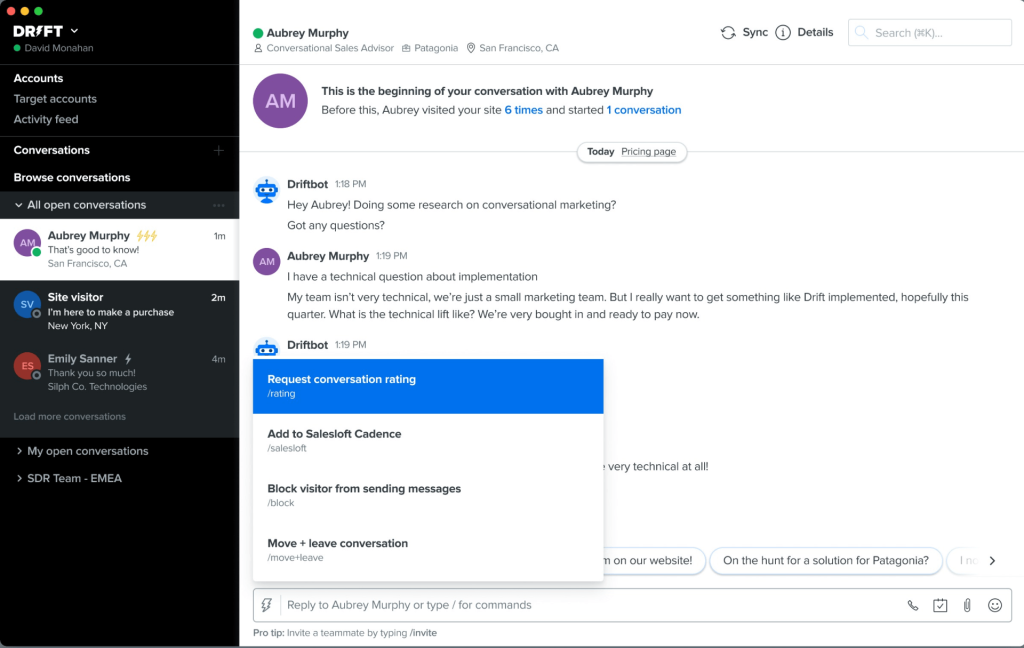
Meeting booking is built directly into the conversation flow, which keeps everything moving. Since it integrates deeply with Salesloft, conversation and qualification data flow straight into my sales process.
I can also personalize chatbot experiences for target accounts with account-based marketing features, while pipeline analytics show how conversations influence meetings and revenue rather than just support metrics.
Pros:
- AI identifies buying intent signals in real time and routes visitors to the right sales rep
- Meeting booking built directly into conversation flows without leaving the chat widget
- Deep Salesloft integration syncs conversation and qualification data into the sales workflow
- Account-based marketing features serve personalized experiences to target accounts
- Pipeline analytics track conversation-to-meeting conversion and revenue influence
Cons:
- Pricing is enterprise-level and not accessible to small or mid-size teams
- Product focus has narrowed toward larger enterprise accounts since the Salesloft acquisition
How Does Drift Compare to Fin?
Fin automates support. Drift automates pipeline. If your chatbot’s job is deflecting support tickets, ProProfs Chat or Freshdesk serve that better. If its job is booking sales calls from inbound traffic, Drift is purpose-built for that in a way Fin isn’t.
User Rating: 4.4/5 (Capterra)
Pricing: Custom pricing. Contact sales.
How Did I Evaluate the Top Fin Competitors?
Ranking a list is easy. Standing behind it takes a consistent yardstick, so here’s exactly what I measured before any tool made the cut, across six core areas:
- User Reviews / Ratings: I analyzed real user feedback from G2 and Capterra to identify recurring pain points and satisfaction patterns.
- Essential Features and Functionality: I examined AI training quality, conversation flow building, live chat, human handoff, omnichannel reach, and reporting.
- Ease of Use: I looked at how quickly a non-technical operator could get a working bot live, not how quickly it could be demoed.
- Pricing Predictability: Since outcome-based billing is the exact reason many teams leave Fin, I weighed how easy each platform’s cost is to forecast at scale.
- Value for Money: I compared pricing against feature depth at each tier, factoring in add-on costs and usage limits.
- Personal Experience and Published Documentation: Every evaluation reflects direct testing and vendor documentation, not summarized feature lists.
My Top 3 Picks for Fin Alternatives
Short on time? These three alternatives to Fin rose above the rest across every category.
1. ProProfs Chat
ProProfs Chat is my first recommendation for most teams leaving Fin. Flat per-operator pricing means your bill doesn’t grow just because your AI resolves more conversations, and you still get native human handoff, sentiment analysis, and omnichannel coverage in one platform.
2. Tidio
Tidio is my pick for eCommerce teams specifically. The Shopify integration is genuinely useful, and the flow builder handles cart recovery and lead capture well, all without Intercom’s seat-plus-outcome pricing stacking on top of each other.
3. Ada
Ada earns its spot for enterprise teams that need agentic, multi-step automation across chat, voice, and email at a scale Fin’s Intercom dependency wasn’t built for, even though its pricing requires a sales conversation to pin down.
FREE. All Features. FOREVER!
Try our Forever FREE account with all premium features!
Stop Paying More for Getting Better Results. Switch Today!
Fin is a capable AI agent, but outcome-based pricing built on top of Intercom’s seat costs means your invoice grows exactly when your automation is working best. That’s a strange incentive to build a support budget around.
The good news is that switching is usually a re-training exercise, not a full rebuild. Pick the tool that matches your actual bottleneck: flat pricing if predictability is the goal, ecommerce depth if Shopify drives your ticket volume, or enterprise scale if you’re automating hundreds of thousands of conversations a year.
If you want a platform that combines AI chatbots and live chat without a per-resolution meter, ProProfs Chat is where I’d start. You get an AI agent trained on your content, seamless live chat handoff, real-time sentiment analysis, churn risk scoring, and omnichannel support across WhatsApp, Instagram, Facebook, and SMS, all on a flat rate with a Forever Free plan to test it first.
Ready to replace Fin with something that doesn’t charge more as it gets better? Try ProProfs Chat Free!
Frequently Asked Questions
How important is human handoff in an AI support platform?
It's one of the most critical features for customer-facing deployments. When a bot can't resolve a query, customers expect escalation without friction. A platform with native handoff passes the full conversation context to the operator automatically so the customer doesn't have to start over.
Do AI support platforms integrate with CRMs and helpdesks?
Yes, most modern platforms offer native integrations with tools like Salesforce, HubSpot, and Zendesk. Some AI agents require a separate helpdesk subscription underneath them as an add-on rather than including one natively, which adds to total cost.
How do I choose between a standalone AI agent and an all-in-one platform?
If your only need is AI-powered Q&A layered onto an existing helpdesk, a standalone agent covers the basics. If you need live chat, human handoff, omnichannel messaging, and analytics in one place without stacking separate subscriptions, an all-in-one platform delivers more value without the integration overhead.
Can an AI agent be trained on my own data without coding?
Yes. Most modern platforms let you train a bot by uploading PDFs, pasting website URLs, or connecting a knowledge base, with no code required. The quality of the bot's answers depends largely on how well-structured your training content is.
Does pricing typically include seats, AI usage, or both?
It depends on the platform. Some charge a seat fee plus a separate usage-based AI fee, which is how per-resolution and per-session models tend to work. Others bundle AI capability into a flat per-operator rate, which makes forecasting costs at scale considerably easier.
What happens when an AI agent can't answer a question?
On platforms without native live chat, the bot typically displays a fallback message and the conversation ends, so the customer has to contact support separately. On platforms with built-in human handoff, the bot escalates the conversation to a live agent with full context so the customer doesn't have to repeat themselves.
How accurate are AI agents trained on custom data?
Accuracy depends on three factors: the quality of your training content, the AI model powering the bot, and how well the platform retrieves relevant information from your knowledge base. Regularly reviewing failed conversations and retraining the bot on gaps is the most effective way to improve accuracy over time.
FREE. All Features. FOREVER!
Try our Forever FREE account with all premium features!

 We'd love your feedback!
What did you like & how can we make it even better?

 Thanks for your feedback!
 Ask Your Question
Have a question? Get expert help to make your decision easier.