Searching for Help Scout alternatives usually means one of two things happened. Either your team outgrew the shared inbox model, or your live chat keeps sliding into email the moment an agent steps away.
I have sat through both problems firsthand, running support across email and chat for teams of ten and fifty agents. Help Scout still does the basics well, but agents juggling phone, chat, and email at once need something that resolves the routine stuff on its own, hands off cleanly with full context, and does not turn every AI resolution into a surprise line item.
This guide walks through 10 tools I have actually used or configured, so you can pick the one that best matches your channel mix, compliance needs, and budget.
Why Support Teams Go Looking for Help Scout Alternatives
I did not wake up one day and decide to shop Help Scout competitors for fun. Every team I have watched make the switch had the same handful of triggers, and they show up in a pattern once you have seen it enough times.
- Pricing whiplash: Help Scout dropped per-seat pricing for contacts, helped model in 2024, then walked much of it back after backlash, so the sticker price you budget for today is rarely the one you renew at.
- Reactive chat: Beacon offers live chat only when an agent marks themselves as available. The moment nobody is online, it drops to a contact form, and the conversation moves to email.
- Gated integrations: Salesforce and Jira connections are available on the Plus plan or higher, so smaller teams pay more just to unlock tools they already use.
- AI nobody asked for: Several long-time users say Help Scout is pushing AI features into the workflow that their customers actively do not want, especially teams whose buyers expect a real person.
- Thin reporting: Standard plans only hold two years of chat history, and users repeatedly flag the reporting as too shallow once a team scales past a handful of agents.
- No SLA controls: There is no dedicated SLA feature, so defining and tracking response-time targets across a growing team requires manual workarounds.
- Compliance behind Pro: HIPAA support only ships on the Pro plan, which needs a ten-seat minimum at the highest per-seat price, pricing out smaller regulated teams entirely.
10 Best Help Scout Alternatives for Quicker Resolutions
I checked review sites like G2 and Capterra to see what real users like and dislike about each tool, then combined that with hands-on use and configuration to put together this shortlist of the best alternatives to help scout for different team shapes and budgets.
| Tool | Best For | User Rating | Starting Price |
| ProProfs Chat | Easiest Live Chat & AI Customer Service Agent for Instant, Automated Support | 4.5/5 (G2) | Forever free for 1 operator; paid plans start at $19.99/operator/month |
| Zendesk | Enterprise-Grade Omnichannel Support & Advanced Reporting | 4.3/5 (G2) | $19/agent/month |
| Freshdesk | Scaling Support Operations With Deep Automation | 4.4/5 (G2) | $19/agent/month |
| Front | Collaborative Shared Inbox Across Email, SMS & Chat | 4.7/5 (G2) | $25/seat/month, billed annually |
| Gorgias | Ecommerce Teams Running Shopify Support | 4.6/5 (G2) | $40/month |
| Missive | Teams Collaborating Across Email, SMS & Social in One Inbox | 4.7/5 (G2) | $14/user/month, billed annually |
| Zoho Desk | Budget-Conscious Teams Wanting Broad Feature Coverage | 4.4/5 (G2) | $7/user/month |
| Hiver | Gmail-Native Teams Wanting a Lightweight Upgrade | 4.6/5 (G2) | $25/user/month |
| Kayako | Autonomous Ticket Resolution at Scale | 4.0/5 (G2) | $1 per AI-resolved ticket, no seat fees |
| HelpCrunch | AI-Forward, Budget-Friendly Customer Communication | 4.7/5 (G2) | $15/month per team member |
1. ProProfs Chat – Best for Easiest Live Chat & AI Customer Service Agent for Instant, Automated Support
ProProfs Chat is the first tool I recommend whenever a team asks me about Help Scout alternatives for chat-heavy support, because it treats live chat and AI as one connected workflow.
I set it up by entering my website URL, and the AI Customer Support Agent started answering visitor questions almost immediately, pulling from my site content, help center articles, and uploaded PDFs, with the source cited alongside every answer.
The AI agent does more than answer questions, too. It updates orders and schedules meetings directly inside the chat window, so routine requests never land in my queue. Sentiment analysis reads visitor emotion in real time and flags frustrated customers early, so my team steps in before churn happens.
Resolution overviews and AI performance reports then show exactly where the bot needs more training, and proactive triggers on exit intent catch hesitant buyers before they quietly abandon their cart.
Pros:
- Trains on your website, PDF, or raw text in one click, so the AI agent builds its own knowledge base in minutes.
- Updates order status and books meetings directly inside the chat window instead of just answering questions.
- Reads visitor emotion in real time through built-in sentiment analysis, so agents know who needs attention first.
- Connects directly with ProProfs Knowledge Base and ProProfs Help Desk for full 360-degree support in one place.
- Launches proactive triggers on exit intent or high cart value to catch hesitant visitors before they leave.
Cons:
- Cloud only, so there is no offline access if your connection drops.
- No dark theme option for agents working night shifts.
How ProProfs Chat Compares With Help Scout: Help Scout’s Beacon only offers chat when an agent is available online, and falls back to a contact form the rest of the time. ProProfs Chat’s AI agent stays on around the clock, resolving routine requests and creating tickets on its own, so nothing waits for someone to log in.
User Rating: 4.5/5 (G2)
Price: Forever free for 1 operator. Paid plans start at $19.99/operator/month
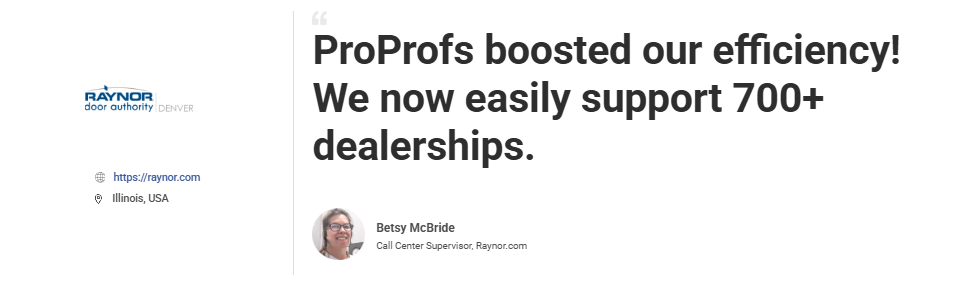
Raynor Garage Doors used ProProfs Chat to support more than 700 dealerships while making its customer service operations more efficient. The platform helped the team handle dealer conversations more smoothly and respond faster, giving agents a more manageable way to support a large network.
2. Zendesk – Best for Enterprise Grade Omnichannel Support & Advanced Reporting
The agent workspace is the first thing that stood out once I got Zendesk running against a ticket queue that had outgrown simple email threads. It pulls email, chat, voice, and social messages into one ticket view, so I never had to switch tabs mid-conversation.
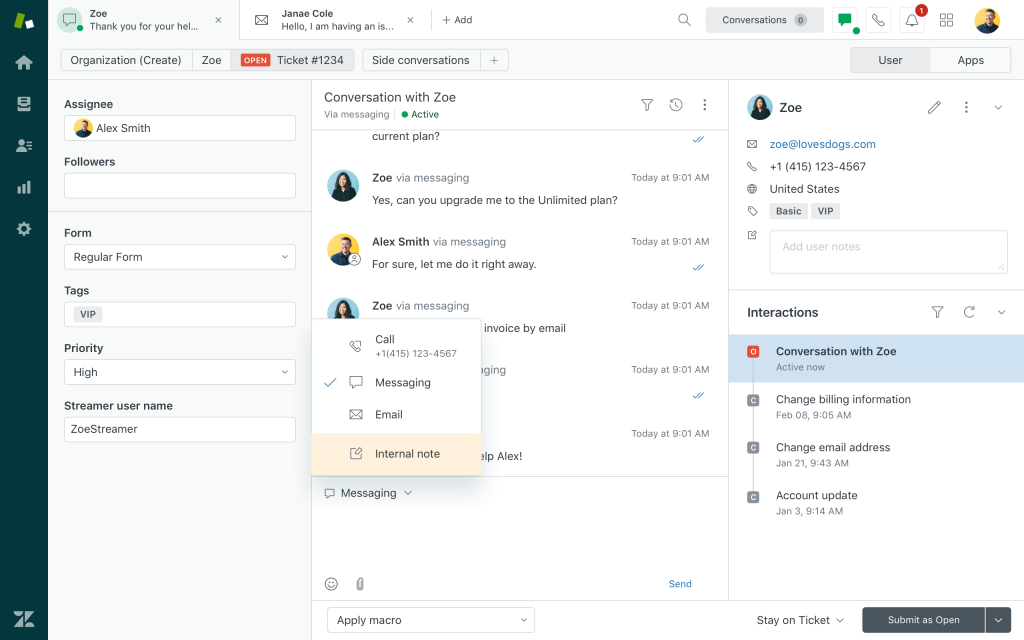
Their AI bot trains directly on Guide help center articles and updates tickets in real time as conversations happen, which noticeably cut down repetitive reset password and invoice tickets once I mapped the right fallback rules. Setup stayed mostly point and click on my end.
I chose which articles to train the bot on, set escalation triggers, and mapped hand off rules without needing a developer. Multilingual article detection served answers automatically in the visitor’s own language during my tests, which matters for teams expanding into new markets. Reporting rolled straight into the Explore dashboards, so nothing ever needed exporting to a separate spreadsheet.
Pros:
- Pulls email, chat, voice, and social conversations into one unified agent workspace instead of separate tabs.
- Trains its AI bot directly on your Guide help center articles, so answers never duplicate existing content.
- Passes full transcripts and visitor data to agents the instant a chat escalates, for context rich handoffs.
- Detects the visitor’s language automatically and serves help center answers in it.
- Rolls ticket trends, agent load, and deflection straight into Explore dashboards without exporting to a spreadsheet.
Cons:
- New admins need adequate ramp-up time to properly configure triggers and workflows.
- Teams new to the Zendesk ecosystem need more time to get fully live.
How Zendesk Compares With Help Scout: Help Scout has no dedicated SLA feature and asks you to merge conversations one at a time. Zendesk builds SLA policies, automated triage, and ticket merging into the core workspace, which matters once your queue crosses a few hundred tickets a week.
User Rating: 4.3/5 (G2)
Price: Starts at $19/agent/month
3. Freshdesk – Best for Scaling Support Operations With Deep Automation
Freshdesk’s automation layer is what won me over once I started digging into how it handles SLA misses and unassigned tickets piling up in a general queue. Dispatch’r rules route incoming tickets by keyword, priority, and channel before an agent opens them, so nothing sits unassigned once I configure it.
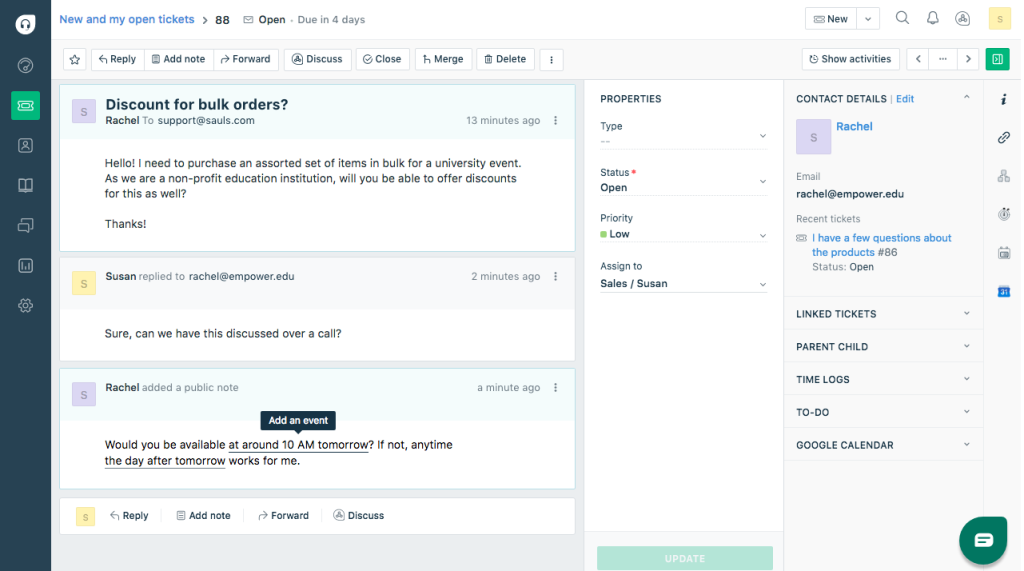
Freddy AI suggests replies, tags intent, and nudges priority conversations toward the right rep instead of letting them wait in line. Custom ticket fields let me capture the exact details a product team would need for every bug report, which is hard to configure cleanly in simpler tools.
The omnichannel inbox pulls in email, chat, phone through Freshcaller, and social mentions into one queue, so agents are not juggling five logins. Round robin routing and CSAT surveys came standard once I moved past the entry tier, and the custom reporting gave me a clear view of workload across every agent.
Pros:
- Routes tickets by keyword, priority, and channel through Dispatch’r rules before an agent even opens them.
- Tags intent and drafts replies through Freddy AI, so agents move faster on repetitive tickets.
- Captures exactly the details your team needs through fully custom ticket fields.
- Brings email, chat, phone through Freshcaller, and social into one true omnichannel inbox.
- Distributes incoming tickets evenly through round robin routing, so no single agent gets buried.
Cons:
- Teams new to Freshdesk report that the admin panel feels dense at first.
- Advanced automation setup takes longer to learn than simpler standalone tools.
How Freshdesk Compares With Help Scout: Help Scout keeps automation fairly basic, and gates advanced routing behind higher plans. Freshdesk builds SLA management, keyword-based dispatch, and round robin routing into the core product, so it scales more predictably once ticket volume climbs past what a small team can handle manually.
User Rating: 4.4/5 (G2)
Price: Starts at $19/agent/month
4. Front – Best for Collaborative Shared Inbox Across Email, SMS & Chat
Front’s pitch clicked once I saw how it handles a team that keeps losing track of which teammate replied to which email, and the collaborative inbox model is what stood out. Every message, whether it lands in email, SMS, or a chat channel, opens as one thread that the whole team can see, comment on, and assign without forwarding copies around.
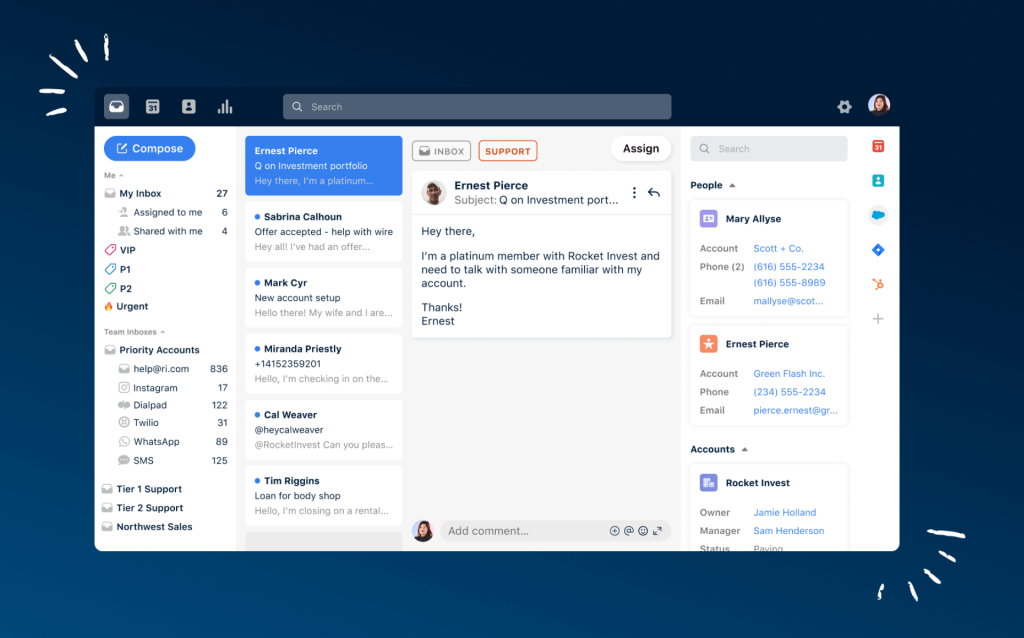
Collision detection shows the moment a teammate starts typing a reply, so duplicate replies to the same customer stopped happening during my testing. Shared drafts let a newer rep write a response and tag a teammate to review it before it goes out, which would shorten onboarding time.
Rules automatically tag, route, and snooze conversations based on keywords or sender, cutting manual sorting out of the day. SSO and SCIM support are included for security once a team crosses fifty seats, and multiple workspaces let you separate client accounts.
Pros:
- Lets teammates co-write and review a shared draft before it ever reaches the customer.
- Shows the moment someone else starts typing through collision detection, so you never send a duplicate reply.
- Opens email, SMS, and chat conversations in the same multichannel thread view.
- Auto tags, routes, and snoozes conversations through a built-in rules engine based on sender or keyword.
- Adds SSO and SCIM for enterprise-grade login controls once your team grows past a handful of seats.
Cons:
- The lightest plan only supports one channel type at a time.
- Smart QA and Copilot sit outside the base plan and need to be added on separately.
How Front Compares With Help Scout: Help Scout organizes conversations around a shared inbox built mainly for support. Front turns the same idea into a full collaborative workspace across email, SMS, and chat, with shared drafts and comment threads that make cross-team coordination much easier to see.
User Rating: 4.7/5 (G2)
Price: Starts at $25/seat/month (billed annually)
5. Gorgias – Best for E-commerce Teams Running Shopify Support
Running Gorgias against a Shopify store setup made it obvious why ecommerce teams reach for it once a plain shared inbox stops being enough. Every order, past purchase, and shipping detail shows up right inside the ticket, so agents can answer where is my order questions without opening a second tab to check Shopify.
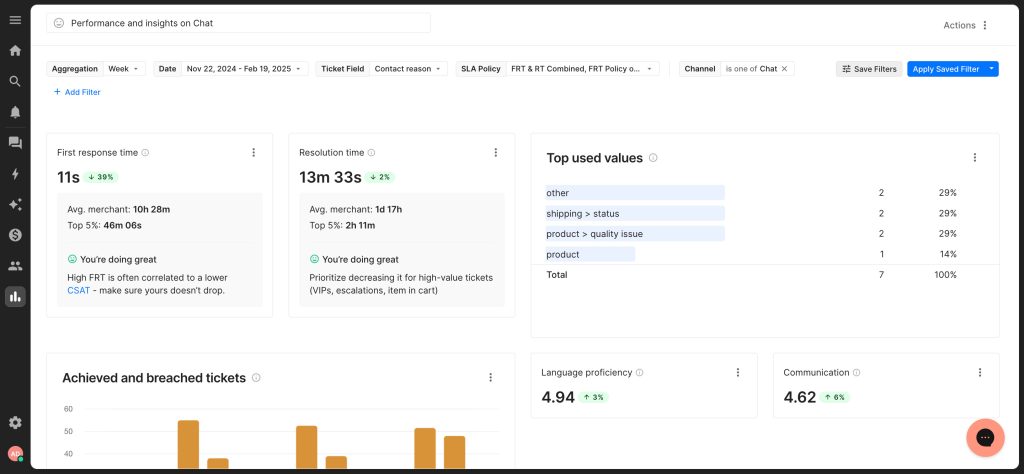
The AI Agent runs in two modes depending on what the moment calls for. Support Agent mode handles routine order status and returns questions automatically, while Shopping Assistant mode shifts into recommending products and nudging a hesitant browser toward checkout.
Macros pull in live order data, so a canned response about a delayed shipment still shows the real tracking number instead of a generic placeholder. Automation rules tag and route tickets by product line, which would keep a sudden sale surge from burying the agents who normally handle a specific product category during busy peak weeks.
Pros:
- Shows order history and shipping status right inside the ticket, so agents never leave the conversation.
- Switches between two AI Agent modes, resolving support tickets and actively upselling based on context.
- Pulls real order details into every canned response through live macros instead of generic placeholder text.
- Tags and routes tickets by product category automatically through built-in automation rules.
- Connects natively with Shopify, Klaviyo, and the wider ecommerce stack.
Cons:
- Lower tiers cap monthly ticket counts, so fast-growing stores outgrow them quickly.
- Teams outside of e-commerce will not get the same depth of integration.
How Gorgias Compares With Help Scout: Help Scout is channel and industry-agnostic, built to work the same way for any business. Gorgias goes deep on one vertical instead, wiring order data, product catalogs, and checkout actions straight into every ticket, which is the difference that ecommerce teams notice within the first week.
User Rating: 4.6/5 (G2)
Price: Starts at $40/month
6. Missive – Best for Teams Collaborating Across Email, SMS & Social in One Inbox
Missive made the most sense the moment I saw how it handles a small team sharing one support email address without a full help desk. Every account, whether it comes in through email, WhatsApp, Instagram, or SMS, lands in the same shared inbox, so nothing gets missed because it lives in a separate app.
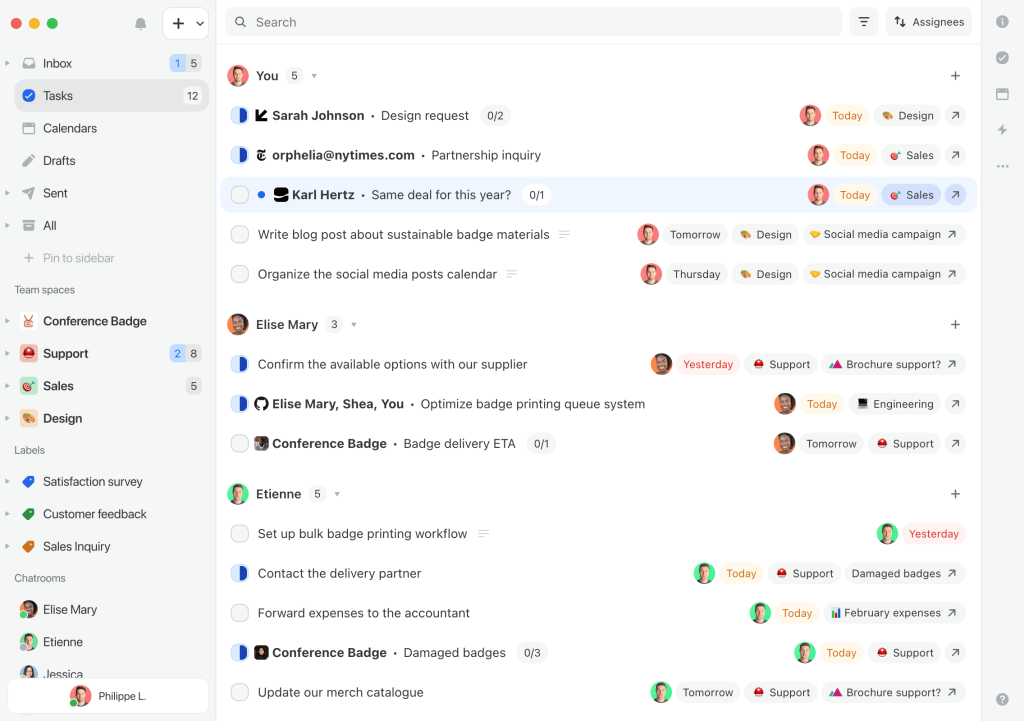
Team chat sits right next to each conversation, so a tricky refund request can get discussed beside the customer thread instead of switching over to Slack and losing context. Rules automatically snooze, tag, and assign conversations based on sender or keyword, which cuts a lot of manual sorting once it is set up properly.
Team spaces let a growing operation split billing and general support into separate, dedicated inboxes cleanly. SOC 2 Type II compliance comes standard even on the entry plan, which matters once a larger client asks for security documentation before signing a contract.
Pros:
- Lands email, SMS, WhatsApp, and Instagram messages inside one multichannel shared inbox.
- Lets your team discuss a conversation right next to the thread through inline team chat.
- Automatically snoozes, tags, and assigns conversations through a rules engine based on sender or keyword.
- Includes SOC 2 Type II security compliance from the entry plan, not gated behind enterprise tiers.
- Separates shared inboxes for different departments or client accounts through team spaces.
Cons:
- Lighter tiers cap how many teammates can join the workspace.
- Teams wanting deep SLA reporting will still want a dedicated help desk layer.
How Missive Compares With Help Scout: Help Scout builds a shared inbox around support tickets specifically. Missive builds the same collaboration model around your whole team’s communication, covering email, SMS, and social DMs together, which suits teams who want one workspace instead of a support tool plus a separate chat app.
User Rating: 4.7/5 (G2)
Price: Starts at $14/user/month (billed annually)
7. Zoho Desk – Best for Budget-Conscious Teams Wanting Broad Feature Coverage
A friend running ops for a 20-person team switched to Zoho Desk because her finance lead would not approve another five-figure support contract, and she has not looked back. Blueprint lets her map out a ticket workflow, from first response to resolution, with mandatory fields at each stage so nothing gets marked done by mistake.
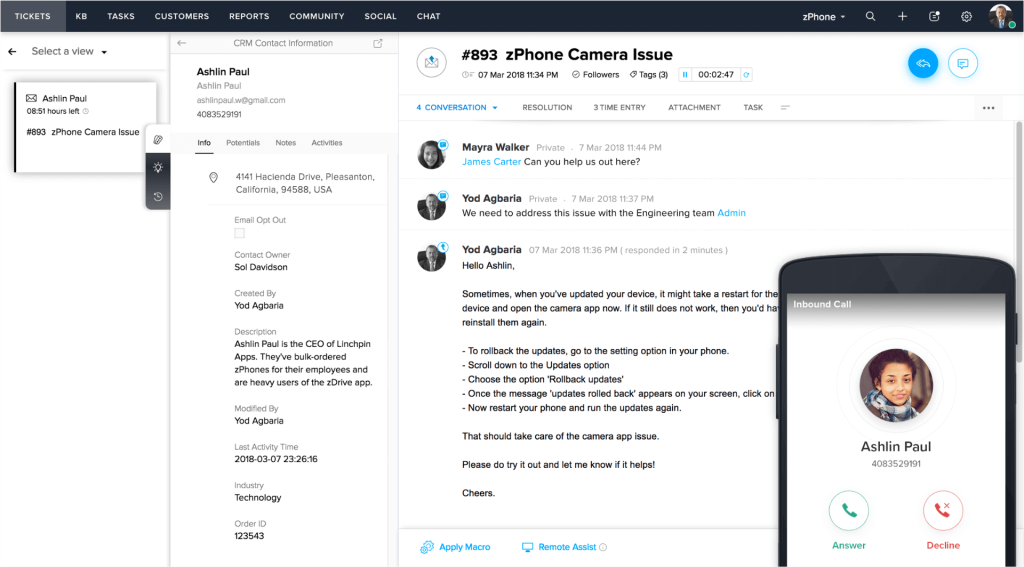
Zia, the built-in AI, tags ticket sentiment and suggests responses, which she says catches frustrated customers faster than her old tool did. Because Zoho Desk sits inside the wider Zoho ecosystem, tickets automatically pull customer context from Zoho CRM, so her agents know the deal size and history before they type a reply.
Multi-department support lets her split billing questions and technical tickets into separate queues without buying a second license. The REST API covers tickets, users, and automations well enough that her developer built a custom dashboard in an afternoon.
Pros:
- Maps out ticket stages with mandatory fields through Blueprint, so nothing skips a step.
- Tags sentiment and suggests responses automatically through Zia, the built-in AI.
- Pulls deal size and account history straight from Zoho CRM into every ticket.
- Splits billing, technical, and general support into separate queues through multi-department support.
- Covers tickets, users, and automations through an open REST API for custom reporting builds.
Cons:
- Teams outside the Zoho ecosystem get a lighter version of the CRM benefit.
- Knowledge base API coverage is thinner than the rest of the platform.
How Zoho Desk Compares With Help Scout: Help Scout’s integration library stays smaller than most full help desks, and deeper CRM connections often require a paid workaround. Zoho Desk pulls CRM context natively when you run Zoho CRM, and Blueprint gives you visual workflow control that Help Scout does not offer out of the box.
User Rating: 4.4/5 (G2)
Price: Starts at $7/user/month
8. Hiver – Best for Gmail Native Teams Wanting a Lightweight Upgrade
Hiver’s strength showed up the moment I saw how it upgrades a shared Gmail label setup without asking a small team to leave Gmail. Shared inboxes turn support@ and billing@ addresses into proper queues inside the same Gmail interface most teams already know how to use, so there is no new tool to teach anyone.
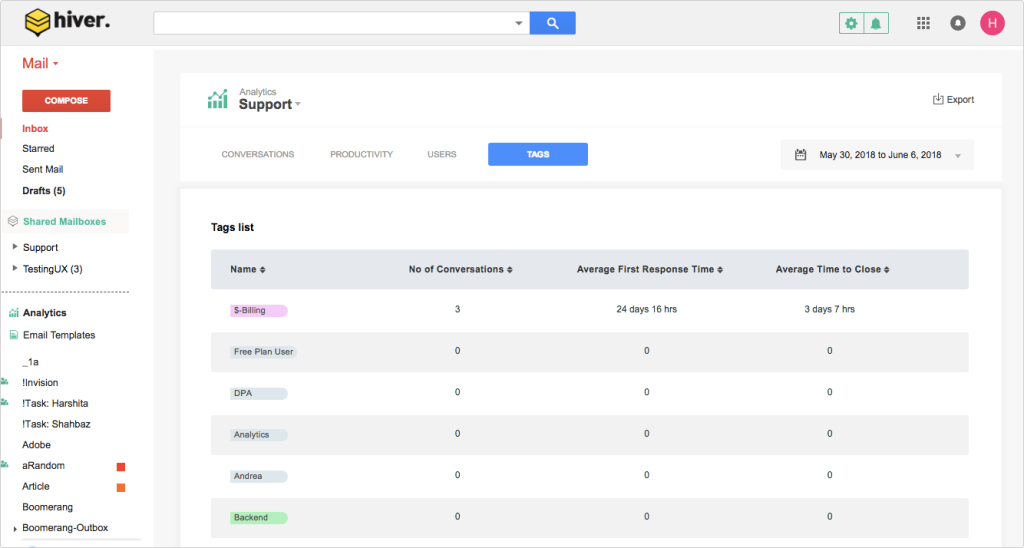
Assignment and status tags show who owns which email, which ends the awkward habit of two people replying to the same customer within minutes of each other. Collision alerts pop up the second a teammate opens a thread, so duplicate replies stop happening.
Canned responses and SLA reminders run inside the Gmail sidebar, and a lightweight analytics dashboard gives a manager visibility into response times without exporting anything to a spreadsheet. Setting up a first shared inbox takes less than fifteen minutes, and every new hire needs almost no training at all to get started.
Pros:
- Works inside the same Gmail interface your team already uses daily through native shared inboxes.
- Shows instantly when a teammate is already replying to the same thread through collision alerts.
- Lets you know exactly who owns an email through assignment and status tags, without asking around.
- Surfaces response time nudges right inside the Gmail sidebar you already check.
- Needs almost no training for new hires since the interface is Gmail itself.
Cons:
- Teams outside Gmail do not get the same lightweight experience.
- Larger, more complex support operations will eventually want a full help desk.
How Hiver Compares With Help Scout: Help Scout asks your team to learn a standalone inbox from scratch. Hiver keeps everyone inside Gmail, which means zero learning curve for teams that already live in Google Workspace and do not want to bounce between two different tools all day.
User Rating: 4.6/5 (G2)
Price: Starts at $25/user/month
9. Kayako – Best for Autonomous Ticket Resolution at Scale
A support director I know was drowning in repetitive password reset and order status tickets before she brought in Kayako to take the routine volume off her team’s plate. Their AI agent, Kay, resolves tickets across email, live chat, voice, and social without a human touching them, learning from every past conversation it handles.
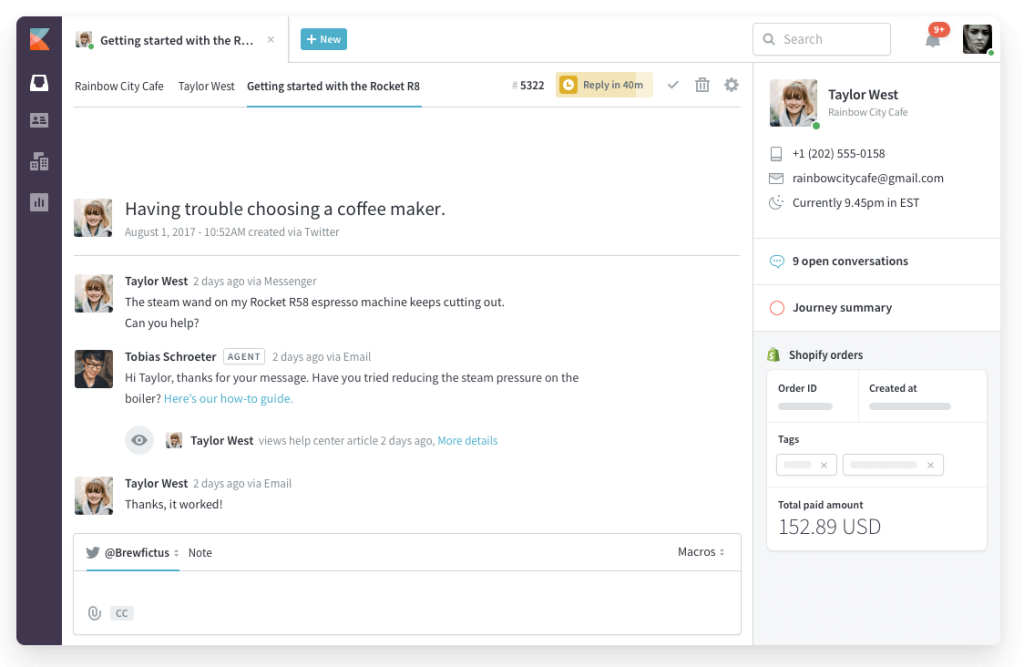
SingleView gives every agent a unified timeline for a customer instead of a contact record, so nobody has to piece together history from five different tabs. AI Triage auto-classifies incoming tickets, prioritizes the urgent ones, and routes them through the automation workflow before an agent sees them land in the queue.
Omnichannel support stretches across social media and ecommerce channels, so her team stopped bouncing between separate apps for each platform. The built-in knowledge base keeps self-service answers consistent with what agents say, which cuts down on the contradictory answers customers used to get.
Pros:
- Resolves tickets across email, chat, voice, and social without human input through its AI agent, Kay.
- Gives every agent one unified customer history through SingleView instead of scattered contact fields.
- Classifies, prioritizes, and routes incoming tickets automatically through AI Triage before an agent opens them.
- Covers social media and ecommerce channels alongside standard support inboxes for true omnichannel reach.
- Keeps self-service answers aligned with what live agents actually tell customers.
Cons:
- Teams used to flat per-seat pricing need time to model usage-based costs.
- Lighter ticket volume teams may not see the full value of the AI layer.
How Kayako Compares With Help Scout: Help Scout helps your team reply faster to conversations that a human still has to read and answer. Kayako resolves a share of those conversations on its own through Kay, and keeps learning from every ticket it touches, which matters most once your queue outgrows what your headcount can realistically read line by line.
User Rating: 4/5 (G2)
Price: Usage-based, from $1 per AI resolved ticket, no seat fees
10. HelpCrunch – Best for AI-Forward, Budget-Friendly Customer Communication
What surprised me most about HelpCrunch was how much AI came bundled into a plan priced like a bare bones live chat widget. The AI Agent trains on your help center and past conversations, then answers, tags, and escalates without needing separate automation rules bolted on later.
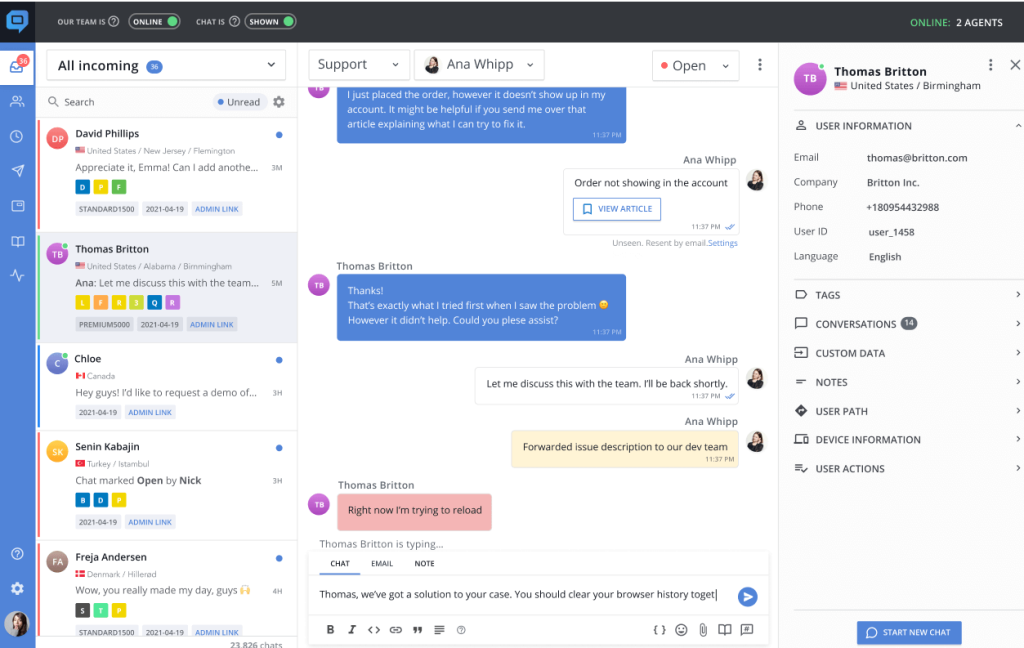
It’s shared inbox merges chat, email, and Messenger threads into one queue, so nothing about the setup felt half-finished the way budget tools sometimes do. Automated email responses and popups run from the same dashboard, letting marketing nudge a visitor while support handles the actual question in the same widget.
The knowledge base publishes in multiple languages out of the box, which mattered once visitors started reaching out from outside English-speaking markets. Setup took under an hour end-to-end, including connecting the widget to an existing website and importing help articles the AI could immediately reference, right from day one.
Pros:
- Trains its AI Agent on your help center and past conversations, so it answers, tags, and escalates without extra setup.
- Merges chat, email, and Messenger threads into one shared inbox instead of three separate tools.
- Runs automated email responses and popups from the same dashboard as live chat and support.
- Publishes a multilingual knowledge base out of the box for visitors outside English-speaking markets.
- Gets a widget live and connected to your website in under an hour, help articles included.
Cons:
- AI Agents and advanced chatbot flows are missing from the entry tier.
- Live chat can feel slow to load for a small share of users during peak traffic.
How HelpCrunch Compares With Help Scout: Help Scout treats AI as a bolt-on feature layered over an email-first inbox. HelpCrunch builds AI Agents, chatbot flows, and marketing automation into the same dashboard as live chat and the shared inbox, at a price that undercuts most full help desks.
User Rating: 4.7/5 (G2)
Price: Starts at $15/month per team member
How I Chose These Help Scout Alternatives
When I evaluate Help Scout alternatives for this list, I don’t just rely on feature lists or marketing claims. I look at how these tools actually perform in real-world scenarios. Here’s the framework I used to make sure every recommendation is practical, reliable, and worth considering.
- User Reviews / Ratings: I start by looking at real user feedback from platforms like G2. This gives me a clear picture of how teams actually experience the tool day to day, what they love, and where it falls short.
- Core Features & Functionality: I focus on what truly matters in help desk and live chat software. This includes ticketing, live chat depth, AI agent quality, human handoff, reporting, and integrations. If a tool cannot handle these well, it does not make the cut.
- Ease of Use: I pay close attention to how intuitive the platform feels. A tool might be powerful, but if teams struggle to adopt it, it defeats the purpose. Clean interface, simple navigation, and quick onboarding are non-negotiable for me.
- Customer Support: From my experience, migration is where many tools fail. I evaluate how responsive and helpful the support team is, especially during setup and ongoing use. Fast, reliable support makes a big difference in adoption.
- Value for Money: I compare pricing with what the tool actually delivers. This is not about picking the cheapest option, but about whether the features, flexibility, and performance justify the cost. This is also where I look closely at any competitors of Help Scout that score well on paper but hide real costs in usage-based AI fees.
- Personal Experience / Expert Insights: Wherever possible, I rely on my own hands-on experience with these tools. I also consider insights from support leads, operations teams, and product managers who use these systems in real environments. This helps me go beyond surface-level reviews and highlight what actually works.
Top 3 Help Scout Alternatives
If you only have a few minutes, these are the three I would put in front of any SMB support lead first, and the specific reason each one made the cut.
1. ProProfs Chat
ProProfs Chat tops this list because it solves the exact gap Help Scout leaves open: chat that stays live and resolves requests even when no agent is online. It trains on your website or help center in minutes, then hands off with full context whenever a human is truly needed.
2. Zendesk
Zendesk earns the second spot because it is the safest choice once your queue already spans email, chat, voice, and social in one place. The unified agent workspace, AI trained on your help center, and Explore reporting give growing teams the enterprise-grade structure that Help Scout simply does not offer.
3. Freshdesk
Freshdesk makes the cut because it solves what breaks first as teams scale: SLA misses and unassigned tickets. Dispatch’r rules, Freddy AI, and round robin routing keep the queue moving automatically, so support leads managing a growing agent count stop relying on manual sorting to catch what slips quietly through.
FREE. All Features. FOREVER!
Try our Forever FREE account with all premium features!
Pick the Help Scout Alternative That Actually Fits Your Queue
A Help Scout alternative only works if it fixes the exact gap you are feeling today, whether that is chat going quiet after hours, integrations locked behind a pricier plan, or a bill that keeps changing shape.
Map your must-haves first: channel mix, compliance needs, and how much of the routine volume you actually want AI to absorb. Then trial your top two picks with your own data for a week before committing to a year of billing.
ProProfs Chat checks the box that most SMB support leads open this list looking for. It trains on your website, help center, or PDFs in one click, hands off with full context, and keeps chat live around the clock instead of dropping to a contact form the moment your team logs off. It also offers a forever-free plan for one operator.
Start your first AI-powered chat this week and see how much of your queue it can take off your plate.
Frequently Asked Questions
Is Help Scout still worth considering in 2026?
Yes, if your team is small, mostly email-based, and does not need deep automation or compliance features. It is a weaker fit once you need proactive live chat, SLA management, or predictable AI costs at scale.
Will I lose my ticket history if I switch alternatives?
Most tools support CSV or API based migration for tickets, contacts, and saved replies. Confirm before you sign up whether the new platform imports full conversation history and not just contact records, so agents have context on day one.
Do these Help Scout alternatives support HIPAA or other compliance needs?
do at their higher tiers rather than by default. Always confirm the exact plan that includes HIPAA, SOC 2, or SSO before you buy, since compliance features are commonly gated behind a seat minimum or a higher-priced plan.
How long should I trial a tool before switching for good?
Run a parallel trial for one to two weeks using real conversations, not test data. That is long enough to judge AI accuracy, agent adoption, and how well the escalation flow actually works under normal volume.
Can I run a new tool alongside Help Scout during migration?
Yes, and it is the safer approach. Keep Help Scout live for existing threads while you route new conversations through your new tool, then fully cut over once your team is comfortable and your data has moved over cleanly.
FREE. All Features. FOREVER!
Try our Forever FREE account with all premium features!

 We'd love your feedback!
What did you like & how can we make it even better?

 Thanks for your feedback!
 Ask Your Question
Have a question? Get expert help to make your decision easier.