If you built a scripted flow in Landbot and now need AI answers plus a real human handoff, this guide to Landbot alternatives is for you. Scripted bots handle the questions you predicted, then stall on everything else.
That is where support leads lose time: the bot cannot answer from your own content, escalation feels clunky, and billing meters make costs hard to forecast. I compared ten tools against those exact problems and kept only the ones that solve them without creating new headaches for you.
You will find which tool suits each user, what to test before you switch, a cost breakdown, and a migration plan you can start this week.
Why Are Support Teams Switching From Landbot?
If you are looking at alternatives to Landbot, you have probably hit a few of these already. I have listed each one with a quick test, so you know exactly what to check in a replacement.
- Scripted flow ceiling: Landbot asks you to predict every exit and wire a trigger for it. Test any replacement with five questions that your flow never covered, and see whether it answers from your own content.
- Weak agent inbox: Landbot is bot-first, so live chat with agents and a shared inbox are not its strengths. Check for a shared inbox, routing rules, and a handoff that carries the full chat history.
- Metered billing: Landbot bills chats and AI chats separately, and reviewers say teams end up throttling their own bot to protect quota. Ask every vendor what counts as a chat, an AI conversation, and a resolution.
- Helpdesk gaps: There is no native Zendesk, Freshdesk, or Gorgias app, so a developer ends up owning your escalation path. Confirm that any replacement integrates natively and creates tickets or full leads, not only contacts.
- WhatsApp costs: Reviewers call Landbot’s WhatsApp and AI chat pricing expensive next to other platforms. Compare whether WhatsApp, Instagram, and Facebook come included, and what Meta’s message fees add on top.
- Agency limits: Standard plans have no white-labeling, and there is no real-time multi-user editing or version control. If you run bots for clients, check white-label, branding controls, and team editing before you sign.
- Growing complexity: The builder looks great, but gets harder to manage as scenarios multiply. If you maintain dozens of triggers for exits, move to an AI-first tool and keep scripts for policy FAQs only.
Top 10 Landbot Alternatives for Support Teams
Those seven problems shaped my shortlist, so here are the ten tools I kept, side by side, before I walk through each one in detail.
| Tool | Best For | Starting Price | User Rating |
| ProProfs Chat | Easy Live Chat & AI Customer Service Agent for Instant, Automated Support | Free for 1 operator; paid from $19.99/operator/month | 4.5/5 (G2) |
| Tidio | Live Chat With an AI Agent for E-commerce and Small Support Teams | $24.17/month | 4.6/5 (G2) |
| Intercom | Support Teams Wanting a Leading AI Agent Inside a Full Helpdesk | $29/seat/month + $0.99 per Fin outcome | 4.5/5 (G2) |
| Botpress | Developer-Led Teams Building Custom AI Agents | $150/month | 4.5/5 (G2) |
| Voiceflow | Teams Designing Chat and Voice Agents Together | Custom quote | 4.5/5 (G2) |
| ManyChat | Instagram, Facebook, and WhatsApp Messaging Automation | $14/month | 4.5/5 (G2) |
| Wati | WhatsApp-First Teams Needing a Shared Team Inbox | $99/month | 4.6/5 (G2) |
| Typebot | Open-Source Conversational Flows and Lead Capture | Free plan available; paid from $39/month | 4.6/5 (G2) |
| Crisp | Small Teams Wanting a Shared Inbox and Chatbot in One Workspace | Free plan available; paid from $45/workspace/month | 4.5/5 (G2) |
| Freshchat | Teams Already Using Freshworks Products | $19/agent/month | 4.4/5 (G2) |
1. ProProfs Chat: Easiest Live Chat & AI Customer Service Agent for Instant, Automated Support
I pointed ProProfs Chat at my website URL, and an AI Customer Support Agent was answering visitor questions within minutes. AI support agent trains on your website, help center, FAQs, or uploaded files, and each answer shows its source, so I can spot content gaps fast. Getting started took almost no effort.
Coming from a scripted tool, I liked that the drag-and-drop flow builder is still there. Templates for lead gen, support, appointment booking, sales, and CSAT save setup time, and branching logic covers complex paths.
When a chat needs a person, the handoff carries full chat context, so customers never repeat themselves. Routing sends conversations to the least busy operator or the right department, and sentiment analysis flags frustrated customers early.
Connecting it with ProProfs Knowledge Base and ProProfs Help Desk turns unresolved chats into tickets automatically, with no copy-pasting between tools. That is the setup I would recommend to support leads.
Pros:
- AI trains on your website, help center, PDFs, or raw text, so every answer draws from your real content
- Drag-and-drop flow builder with branching logic and ready templates for lead gen, support, appointments, sales, and CSAT
- Bot-to-human handoff passes full chat context, with routing to the least busy operator or the right department
- Sentiment analysis flags frustrated customers early, and resolution overviews track AI agent performance over time
- Website chat, WhatsApp, Instagram, and Facebook messages sit in one dashboard, backed by 100+ integrations including Salesforce, Zendesk, WordPress, Wix, and Shopify
Cons:
- Cloud-only, so there is no offline access
- No dark theme
How ProProfs Chat Compares With Landbot: Landbot asks you to script every path. ProProfs Chat lets you keep a drag-and-drop flow builder for the basics, then adds AI that answers from your own content and hands off to a person with full context. If all you need is polished lead-gen flows, Landbot’s builder is still excellent, but for a support team that needs AI plus real handoff, ProProfs Chat covers the whole job in one tool.
User Rating: 4.5/5 (G2)
Price: Forever free for 1 operator. Paid starts at $19.99/operator/month.
2. Tidio: Best for Live Chat With an AI Agent for E-commerce and Small Support Teams
Shopify store owners in my circle keep recommending Tidio, so I put it through its paces. One inbox collected website chat, Messenger, Instagram, WhatsApp, and email, which ended my tab hopping.
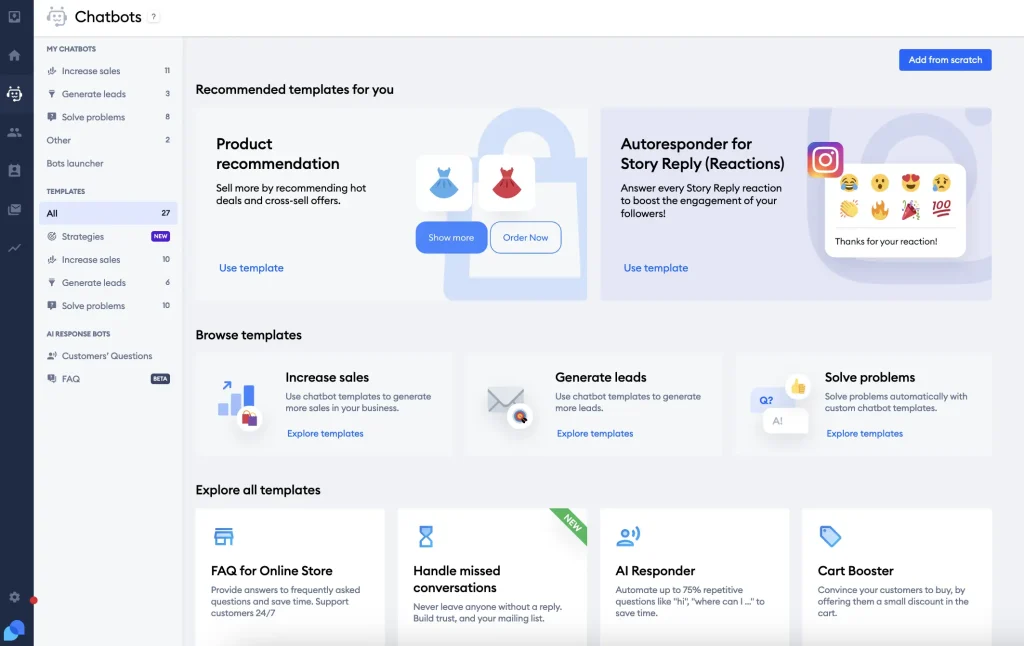
Lyro, the AI agent, replies in 45+ languages and trains on your website data and Shopify catalogs. Lyro Smart Actions can look up orders in connected systems, so the classic where is my order queue clears without a human touching it.
Longer issues convert into tickets on the same dashboard, and the visual Flows builder handled quizzes, upsell pop-ups, and proactive messages triggered by time on page or cart value. My tip: test how Flows and Lyro work together, since they run as two separate systems, and set aside a few hours for automation setup. Agents can also reply from mobile, snooze threads, and trigger automated follow-ups without juggling extra tools. The blended inbox kept my setup very simple.
Pros:
- Unified inbox brings live chat, Messenger, Instagram, WhatsApp, and email into one place
- Lyro AI agent replies in 45+ languages and trains on website data and Shopify catalogs
- Lyro Smart Actions can look up orders in connected systems without a human
- Chat-to-ticket conversion keeps longer issues organized on the same dashboard
- Visual Flows builder covers quizzes, upsell pop-ups, and proactive messages triggered by time on page or cart value
Cons:
- Flows and Lyro run as two separate systems, and Lyro cannot run inside a Flow
- Automation setup can feel daunting for teams without prior chatbot experience
How Tidio Compares With Landbot: Landbot is bot-first. Tidio adds the native live chat and human handoff that Landbot lacks, plus a shared inbox your agents can work from. Landbot still wins on conversational design, since its branching web flows feel more crafted than Tidio’s.
User Rating: 4.6/5 (G2)
Price: Starts at $24.17/month. Lyro AI is a separate add-on on lower plans.
3. Intercom: Best for Support Teams That Want a Leading AI Agent Inside a Full Helpdesk
After Intercom moved under the Fin name, I took another look, and the AI agent is clearly the heart of the product. Fin answered from my help center in natural language, then flipped the thread to a human with the full history intact.
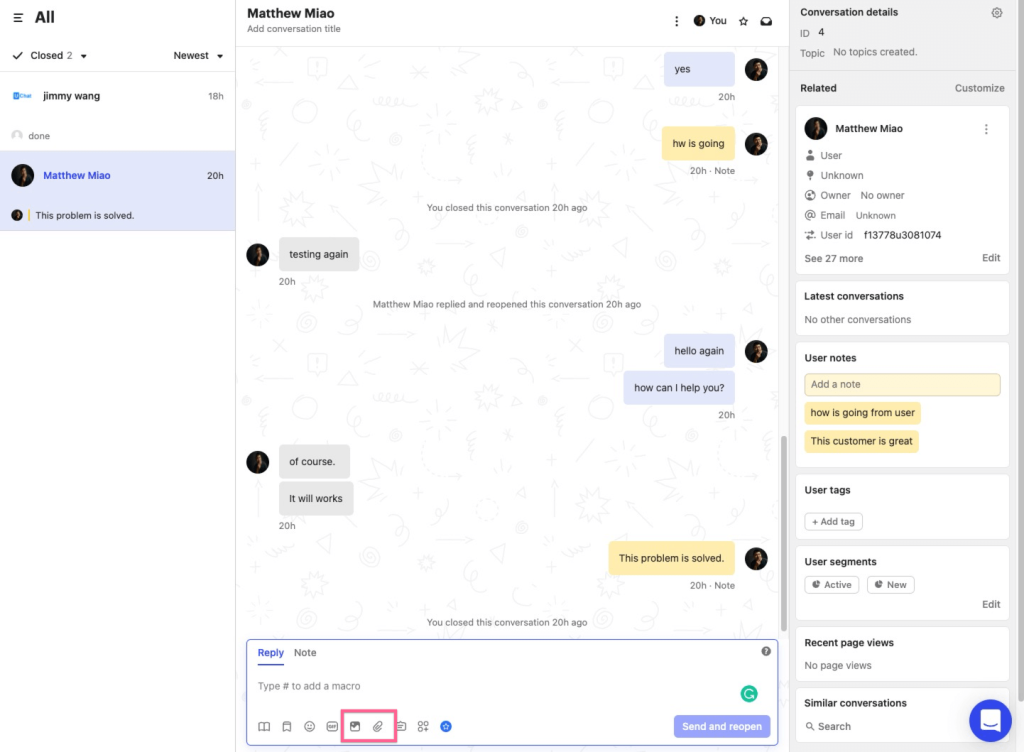
What I liked most was the flexibility. Fin can work with other helpdesks such as Zendesk, Salesforce, and HubSpot, so I did not have to move my whole queue just to try it. Inside Intercom, an omnichannel inbox merges email, chat, and social messages, while a drag-and-drop workflow builder routes, tags, and escalates for me.
Product tours and in-app messages are a bonus if your support team also owns onboarding. I would run a batch of technical, unusual questions through Fin first, since that is where I expect accuracy to slip. Fin is available during the trial, so test it before deciding. Setup felt quick to me.
Pros:
- Fin AI agent answers from your help center and hands off with full conversation history intact
- Fin can work with other helpdesks, including Zendesk, Salesforce, and HubSpot
- Unified inbox combines chat, email, and social channels into one view
- Workflow builder automates routing, tagging, and escalation without manual tracking
- Interactive product tours and a mobile SDK push in-app messages and surveys to users
Cons:
- Reviewers say Fin has difficulty with very technical or uncommon questions
- Interface has a learning curve for teams new to workflow automation tools
How Intercom Compares With Landbot: Landbot expects you to wire every exit by hand. Fin answers from your help center and escalates with context, and it can sit on top of the helpdesk you already use. Landbot is the simpler build for lead-gen flows, while Intercom’s seat plus per-outcome billing is worth modelling at your real volume before you commit.
User Rating: 4.5/5 (G2)
Price: Starts at $29/seat/month billed annually, plus $0.99 per Fin outcome.
4. Botpress: Best for Developer-Led Teams Building Custom AI Agents
Botpress is where my developer friend spends his weekends, so I borrowed an afternoon in it. It started as an open-source framework, and Botpress Studio puts a visual builder on top for the parts you do not want to hand-code.
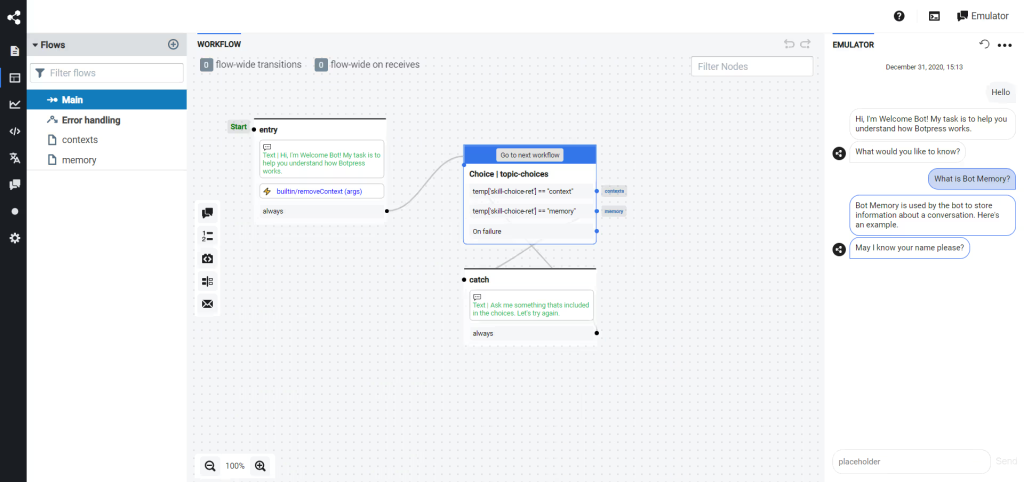
Retrieval nodes were my favorite part. I pointed an agent at documents, and answers came from the private knowledge base. You can swap between models from OpenAI, Anthropic, Google, and others, then ship changes through a CLI and version flows like any other service.
Native modules cover WhatsApp, Slack, Messenger, and a web widget, and a pay-as-you-go entry lets you prototype before committing. The trade-off is effort. Learning the platform took me real time, so I treat Botpress as a build project, not a quick install. Rolling back a bad deploy works just like any other service. Without developer help, I would shortlist it last, and only for custom logic.
Pros:
- Retrieval nodes connect LLM answers directly to your private knowledge base
- Choose between models from OpenAI, Anthropic, Google, and others per agent
- Native modules cover WhatsApp, Slack, Messenger, and a web widget
- Visual Studio builder sits on top of an open-source core for teams that want control
- CLI deploys, and version control lets you roll back bots like any other service
Cons:
- Requires comfort with code, so it is not truly beginner-friendly
- Steeper setup time compared to drag-and-drop chatbot builders
How Botpress Compares With Landbot: Landbot’s scripted flows can hit a ceiling. Botpress gives you autonomous reasoning and model choice for teams who want to build beyond it. The cost is setup effort, so it suits developer-led teams more than a support lead working alone.
User Rating: 4.5/5 (G2)
Price: Starts at $150/month
5. Voiceflow: Best for Teams Designing Chat and Voice Agents Together
Opening Voiceflow felt like Landbot’s visual canvas with more AI plumbing underneath. A designer I know sketches the conversation while an engineer adds logic and APIs, all on one shared agent canvas.
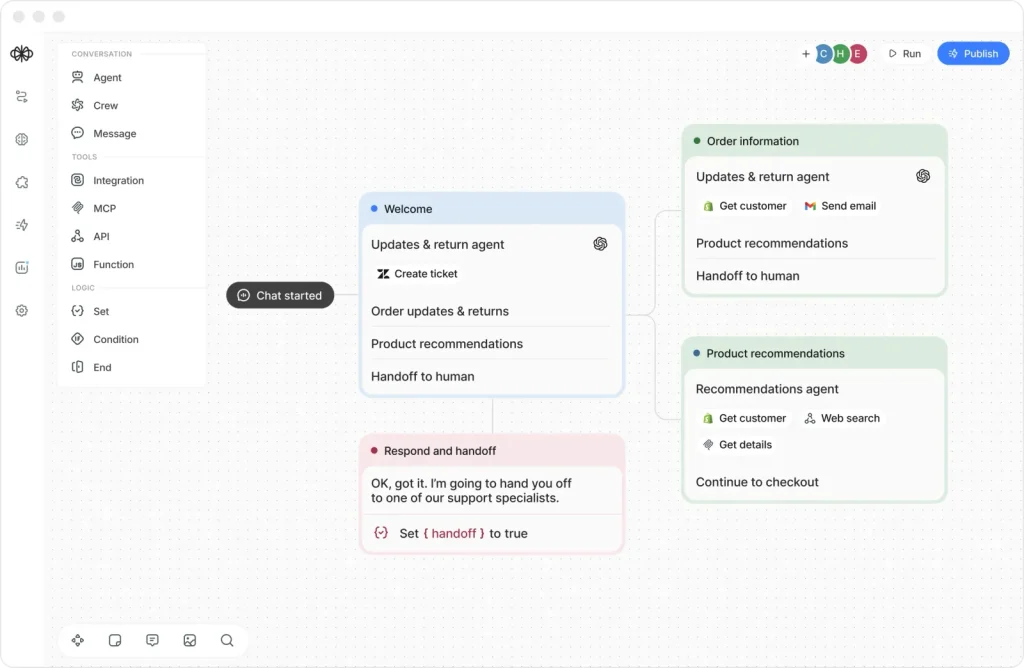
The built-in knowledge base pulls answers from uploaded documents, URLs, or plain text, which fixed the dead ends I used to hit in scripted flows. Team features are the real draw for me: real-time multi-user editing, comments, versioning, and reusable components shared across agents. APIs let you control agent state, manage knowledge base content, and pull transcripts programmatically. Git export suits DevOps-minded teams, and it builds voice agents too, not only chat.
Here is the catch I hit first. There is no native live chat and no built-in human handoff, so bringing agents into the conversation needs custom API work. If handoff is your main reason for leaving Landbot, compare this one carefully before you rebuild any flows.
Pros:
- Built-in knowledge base answers from uploaded documents, URLs, or plain text
- Shared agent canvas lets designers and engineers build in the same place
- Real-time multi-user editing, comments, and versioning support team workflows
- Reusable components can be shared across multiple agent projects
- Platform APIs control agent state, knowledge base content, and transcripts
Cons:
- No native live chat and no built-in human handoff, so agent takeover needs a custom API setup
- G2 reviewers rate Landbot as easier to use and set up
How Voiceflow Compares With Landbot: G2 reviewers rate Landbot easier to use, set up, and administer, so Landbot is the faster build. Voiceflow wins on team editing, version history, and a knowledge base, but you will need extra work to add live agents. If handoff is your main gap, I would look at the tools above first.
User Rating: 4.5/5 (G2)
Price: Custom Quote
6. ManyChat: Best for Instagram, Facebook, and WhatsApp Messaging Automation
Instagram DMs are where ManyChat earned its place in my coach friend’s workflow. Someone comments on a post, the bot jumps into the thread, collects an email and a goal, and the lead lands in a tagged list without anyone typing a word.
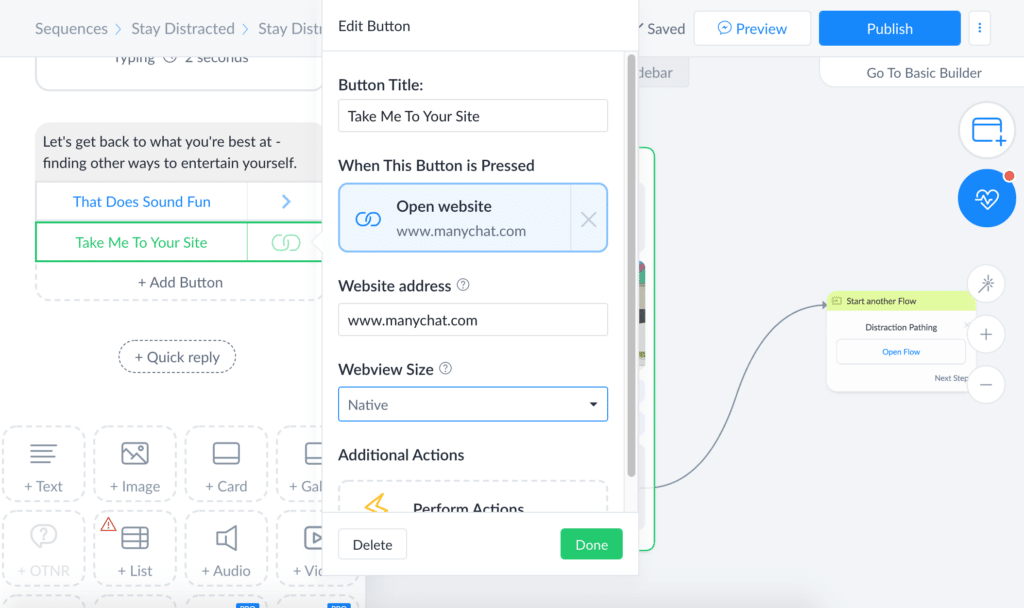
I found the visual builder easy to pick up, and native integrations with Shopify, Stripe, and Google Sheets cut manual entry. I appreciate the extras: custom fields for segmentation, a broadcast scheduler, and A/B testing inside each message block. GPT-powered quick replies keep the tone conversational, and SMS and email steps extend sequences beyond the social apps. It is an official Meta Business Partner as well.
It leans hard toward Meta channels, so I would not choose it for pure website support. Treat it as a marketing and DM automation tool first. Advanced automations also take a while to learn, which matters if your team is small.
Pros:
- Visual flow builder with drag-and-drop messages and delays speeds up building
- Instagram comment-to-DM automation turns posts into lead capture
- Native integrations for Shopify, Stripe, and Google Sheets remove manual data entry
- User tagging and custom fields enable precise audience segmentation
- Broadcast scheduler and built-in A/B testing help you optimize campaigns
Cons:
- Best suited for Meta and messaging channels, less useful for pure website chat
- Advanced automation flows can take time to learn for first-time users
How ManyChat Compares With Landbot: Many Landbot leavers try ManyChat first because it covers more channels, especially Instagram and Facebook. For a support team that needs a live agent inbox and human handoff, it is a weaker fit than the tools above. I would pick it for marketing and DM automation.
User Rating: 4.5/5 (G2)
Price: Starts at $14/month.
7. Wati: Best for WhatsApp-First Teams Needing a Shared Team Inbox
WhatsApp-heavy customers pushed me toward Wati, and its focus shows in a good way. As an official Meta business solution provider, it removes the painful part of getting a verified number live.
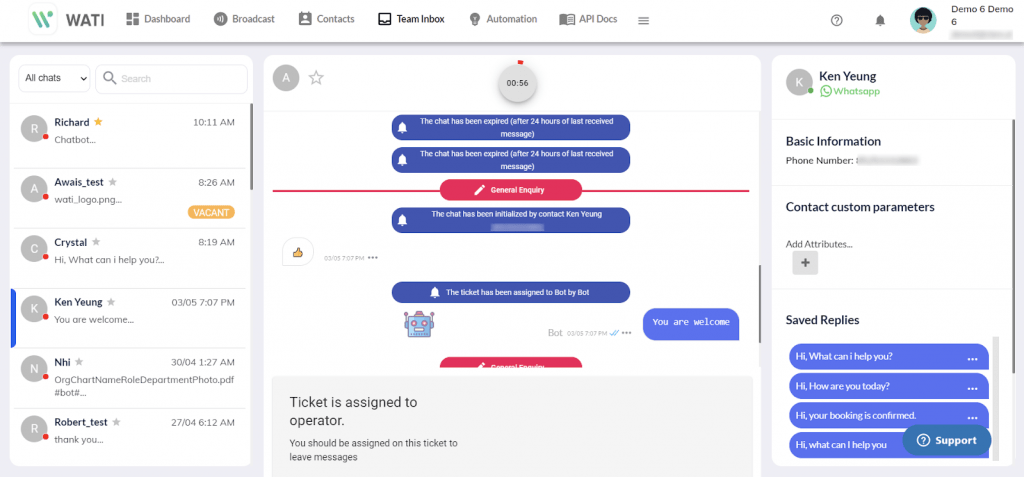
Day to day, I spent my time in the shared team inbox. Chats get assigned, quick replies speed up repeat answers, several teammates can manage conversations from a single shared WhatsApp number without stepping on each other’s replies, and categories keep conversations organized.
The no-code chatbot builder covered FAQs and order status, and the AI KnowBot adds answers from your own content. Broadcast campaigns, Zapier connections, and Instagram automation round out the setup.
Templates need WhatsApp approval before you send them, so plan that into your launch timeline. Because everything centers on WhatsApp, I would pair Wati with another tool if customers also reach you on your website or other channels, and for WhatsApp-first teams, it works well.
Pros:
- Shared team inbox organizes WhatsApp conversations in one dashboard
- Chat assignment, quick replies, and chat categories speed up agent work
- No-code chatbot builder handles FAQs and order-status automations
- AI KnowBot adds answers from your own content
- Broadcast campaigns and Zapier integration extend what the inbox can do
Cons:
- Centered on WhatsApp, so teams needing wide omnichannel coverage may outgrow it
- Message templates need WhatsApp approval before you can send them
How Wati Compares With Landbot: Landbot treats WhatsApp as one channel among several. Wati is built around WhatsApp, with a shared inbox for agents. I would pick Wati if WhatsApp is nearly all of your volume, and a broader tool if it is not.
User Rating: 4.6/5 (G2)
Price: Starts at $99/month.
8. Typebot: Best for Open-Source Conversational Flows and Lead Capture
Typebot is the one I reach for when owning my data matters. The core is open source, and the self-hosted route turned out more hands-on than I expected.
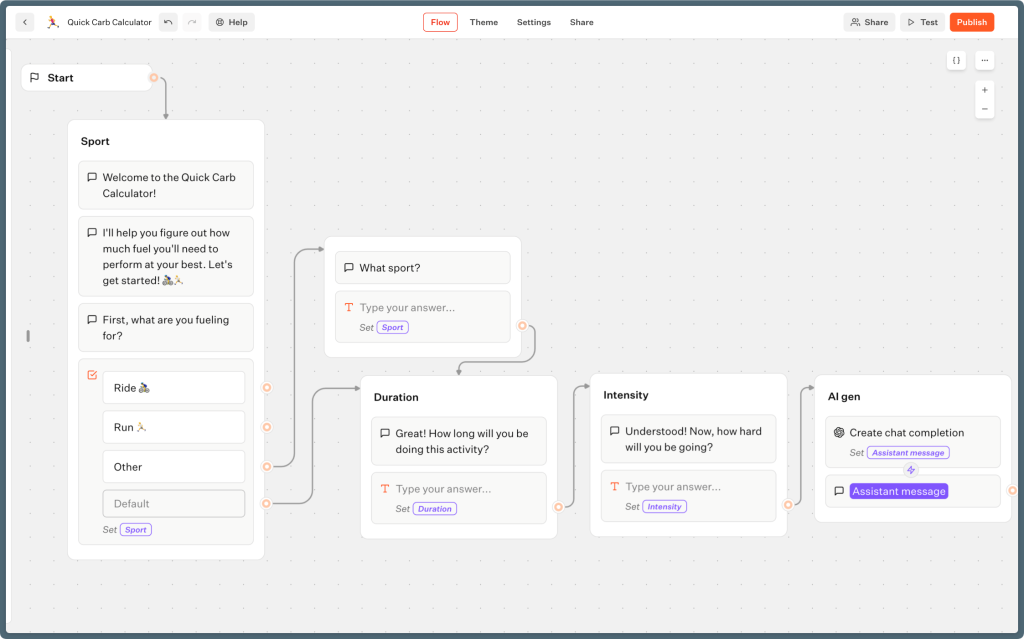
The builder felt familiar after Landbot. Its drag-and-drop editor offers 30+ building blocks, and I embedded bots inline, as a popup, and as a chat project. Webhooks and HTTP request blocks connect it to your own tools, themes with custom CSS match your branding, and WhatsApp integration is available. In-depth analytics on Pro show how each flow is performing overall.
Unlimited typebots are allowed on every plan, which suits teams juggling many different flows. Where it fell short in support was plug-and-play integrations, since the native list is shorter than some competitors. I see Typebot as a strong flow builder for lead capture and conversational forms, not a full support desk with a shared inbox and live agents working side by side.
Pros:
- Drag-and-drop editor with 30+ building blocks for complex chatbot flows
- Embed bots inline, as a popup, or as a chat project on any website
- Webhooks and HTTP request blocks connect bots to external tools
- Themes with custom CSS match your brand fonts, colors, and styles
- Open-source core with a self-hosting option for full data control
Cons:
- List of plug-and-play integrations is shorter than that of some competitors
- Self-hosting the open-source version takes hands-on effort
How Typebot Compares With Landbot: Typebot is the closest to Landbot’s flow-first design, with open-source control and a self-hosting option. It suits lead capture and conversational forms. If your gap is live agents and AI answers from your own content, I would look at the tools above instead.
User Rating: 4.6/5 (G2)
Price: Free plan available. Paid starts at $39/month, with WhatsApp on the Pro plan.
9. Crisp: Best for Small Teams Wanting a Shared Inbox and Chatbot in One Workspace
Crisp keeps things refreshingly simple: one workspace, one inbox, one bill. The centralized inbox made it easy for a new agent to get comfortable fast, which matters when you onboard staff often.
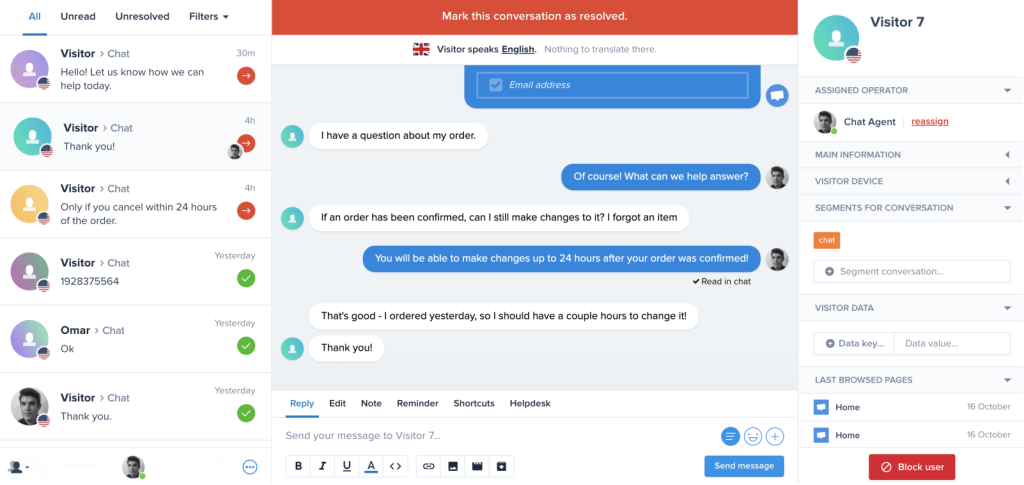
Inside that workspace, you get live chat, a workflow builder, a built-in knowledge base, and an AI chatbot, with Hugo as the AI agent. Co-browsing helped me walk a customer through a tricky step. The free plan with two seats let me try the inbox first, so testing cost me nothing.
Pricing is flat per workspace instead of per seat, so adding agents up to the plan limit does not change the bill. Plus adds ticketing, white-labeling, and 100+ integrations for larger teams, too. I would watch the workspace model if you run several brands, because each brand lives in its own workspace. For deep ticketing or large helpdesk workflows, check whether Crisp gives you enough room first.
Pros:
- Centralized inbox gathers customer conversations in one workspace
- Hugo AI agent answers customer questions inside the same workspace
- Workflow builder and built-in knowledge base support self-service and automation
- Co-browsing helps agents guide customers through tricky steps
- Analytics track conversations and team activity
Cons:
- Teams needing deep ticketing or large-team helpdesk workflows can run out of room
- Each brand lives in its own workspace, so multi-site teams manage separate setups
How Crisp Compares With Landbot: Landbot is bot-first, while Crisp is built around a shared inbox with chat, a knowledge base, and an AI agent in a single workspace. Landbot still gives you deeper flow design for marketing funnels. I would pick Crisp for a small team that wants everything in one place.
User Rating: 4.5/5 (G2)
Price: Free plan available. Paid starts at $45/workspace/month.
10. Freshchat: Best for Teams Already Using Freshworks Products
One colleague of mine already lived inside Freshdesk and Freshsales, so Freshchat was the obvious next step. It plugs into the Freshworks apps, so agents see CRM-level context during a chat without extra clicks.
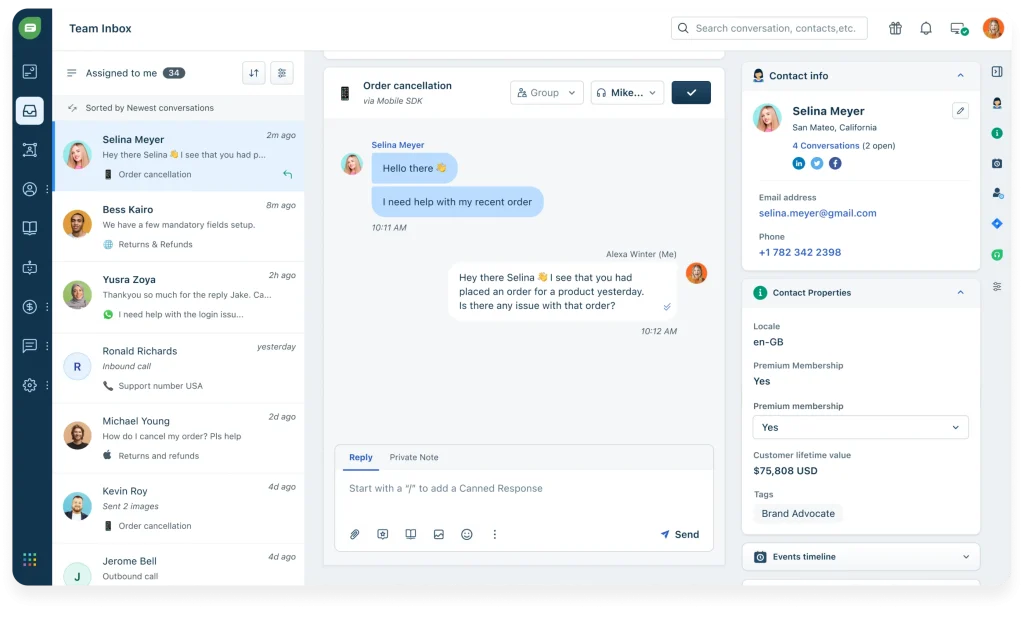
The Freddy AI layer handles multiple languages, detects sentiment, and nudges priority chats toward human reps before they sit in a queue. One omnichannel inbox covers web, mobile, WhatsApp, and Apple Business Chat, and in-thread CSAT surveys close the loop.
Unified inboxes and rich visitor profiles keep marketing, support, and success on the same screen, and the no-code flow builder with pre-trained FAQ templates got them live quickly. Trigger campaigns based on user journey and page behavior helped them start timely, relevant conversations with visitors.
My advice is to test the advanced bot flows early, since setup there felt less intuitive than simpler standalone tools, and expect occasional lag when several Freshworks products sync at once.
Pros:
- Grows natively with other Freshworks apps, giving agents CRM-level context instantly
- Omnichannel inbox covers web, mobile, WhatsApp, and Apple Business Chat in one screen
- Freddy AI suggests replies and tags intent automatically, speeding up every response
- No-code flow builder with pre-trained FAQ templates gets you live fast
- Trigger campaigns based on user journey and page behavior for timely engagement
Cons:
- Occasional lag reported when syncing across multiple Freshworks products at once
- Setup for advanced bot flows can feel less intuitive than simpler standalone tools
How Freshchat Compares With Landbot: Landbot has no native Freshdesk app, and that is where Freshchat is strongest. It gives Freshworks teams AI, an inbox, and CRM context in one place. Outside the Freshworks stack, its advantages shrink.
User Rating: 4.4/5 (G2)
Price: Starts at $19/agent/month.
How I Chose These Landbot Alternatives
When I evaluate Landbot competitors for this list, I don’t just rely on feature lists or marketing claims. I look at how these tools actually perform in real-world scenarios. Here’s the framework I used to make sure every recommendation is practical, reliable, and worth considering:
- User Reviews / Ratings: I start by looking at real user feedback from platforms like G2. This gives me a clear picture of how teams actually experience the tool day to day, what they love, and where it falls short.
- Core Features & Functionality: I focus on what truly matters when you are replacing a scripted Landbot flow. This includes training the AI on your own content, bot-to-human handoff, a shared inbox, helpdesk, and CRM integrations, and WhatsApp or omnichannel coverage. If a tool cannot handle these well, it does not make the cut.
- Ease of Use: I pay close attention to how intuitive the platform feels. A tool might be powerful, but if your team struggles to adopt it, it defeats the purpose. Clean interface, simple navigation, and quick onboarding are non-negotiable for me.
- Customer Support: From my experience, implementation is where many tools fail. I evaluate how responsive and helpful the support team is, especially during setup and ongoing use. Fast, reliable support makes a big difference in adoption.
- Value for Money: I compare pricing with what the tool actually delivers. This is not about picking the cheapest option, but about whether the features, flexibility, and performance justify the cost, including how chats, AI chats, seats, and WhatsApp are metered.
- Personal Experience / Expert Insights: Wherever possible, I rely on my own hands-on experience with these tools. I also consider insights from support managers, CX leads, and operations teams who use chatbot platforms in real environments. This helps me go beyond surface-level reviews and highlight what actually works.
Top 3 Landbot Alternatives
After comparing all ten platforms against each other, three consistently came out on top. If you are weighing competitors of Landbot, the right one depends on where Landbot has been letting you down.
1. ProProfs Chat
The easiest live chat & AI customer service agent for instant, automated support. It answers routine questions, trains in minutes on your website or FAQs, and transfers full chat context when a person needs to step in, so customers never repeat themselves. You can keep a drag-and-drop flow builder for scripted basics.
2. Tidio
My pick for e-commerce and small support teams that want native live chat, a shared inbox, and the Lyro AI agent in one product. It gives you the agent inbox that Landbot lacks, and Lyro Smart Actions can look up orders without a human, which keeps where-is-my-order chats off your agents.
3. Intercom
My pick for teams that want a leading AI agent with deep handoff. Fin answers from your help center and hands the thread to a person with the full history intact. It can sit on top of the helpdesk you already run, such as Zendesk or HubSpot, so you can try it without migrating.
FREE. All Features. FOREVER!
Try our Forever FREE account with all premium features!
How to Move Off Landbot Without Breaking Support
A clean switch is mostly preparation. Follow these steps in order, and you can have a proof of concept running before you touch your live site.
- Audit your flows: List every Landbot flow with its trigger and monthly volume. Keep the top five by volume and retire the rest.
- Gather source content: Collect your website URLs, help center articles, and FAQ PDFs. This is what the AI will learn from, so remove outdated pages first.
- Rebuild the basics: Keep a scripted bot for policy and FAQ answers, and let AI handle everything else. With ProProfs Chat, setup is three steps: brand the chat window, add the code, and start chatting.
- Wire your escalation: Decide which topics go straight to a person, such as sensitive issues, and route them to the right team. Test with a question the bot cannot answer and confirm the full chat history carries over.
- Connect your stack: Link your helpdesk and CRM, and confirm it creates leads, not only contacts. Add WhatsApp, Instagram, or Facebook if your customers use them.
- Run a proof of concept: Test on your real data for a short window before cutover. Compare answer accuracy and handoff quality against your current Landbot flows.
- Pilot, then expand: Run one workflow for 30 days, check missed chats and response time, and then retire the matching Landbot flow.
Give Your Support Team Answers That Actually Resolve Chats
Switching from Landbot is less about finding a better-looking builder and more about choosing AI that can answer from your own content and hand conversations to agents without losing context.
Before you switch, test escalation with a question the bot cannot answer, train it on current website pages, help center content, and PDFs, and start with one workflow before expanding. It also helps to compare pricing against your actual chat volume and AI usage.
If you want a tool that trains on your content, hands off with full chat context, and connects with ProProfs Knowledge Base and Help Desk, ProProfs Chat is an easy place to start. You can start free and test your first AI conversation.
Frequently Asked Questions
How do I handle customers who speak different languages?
ProProfs Chat supports 70+ languages and can customize language by visitor location. Whichever tool you pick, test it with real questions in your top three languages before launch.
Are these tools GDPR compliant?
ProProfs Chat documents GDPR and CCPA compliance. For the others, ask each vendor for its compliance page and data processing terms before you connect customer data.
Will an AI agent replace my human agents?
No. AI covers repeat questions, and people handle sensitive or complex ones. Set escalation rules so those chats reach a person quickly.
Can I install these tools on WordPress or Wix?
Most embed with a script or plugin. ProProfs Chat installs with copy-paste code and has WordPress and Wix integrations.
Which Landbot Alternative Works for Agencies?
I would go with ProProfs Chat. Its white-label option removes the Powered by ProProfs label, 100+ chat window settings cover each client's logo, colors, and fonts, and custom domain support keeps the widget on brand. Reports export as CSV for client updates. White-label is an add-on, so factor it into your quote.
How do I stop an AI bot from giving wrong answers?
Train it only on approved content, test it with questions outside your docs, and review the sources it cites. ProProfs Chat shows the source with each answer, and its AI Answer Accuracy Report is available on the Business tier and above.
How many operators do I need?
Start with the number of people who will manage live handoffs, not your total headcount.
What will a Landbot replacement really cost?
Entry plans across the eight paid tools in this list average roughly $30 a month, and Landbot's Starter sits at $36 billed annually. ProProfs Chat comes in under that average, with a forever-free plan for one operator and paid plans from $19.99/operator/month. Real cost climbs with AI conversations, seats, and WhatsApp fees, so model your own volume first.
How do I know the switch worked?
Track missed chats, response time, and CSAT for 30 days against your Landbot baseline. ProProfs Chat reports cover total, rated, and missed chats and response time, plus post-chat surveys.
FREE. All Features. FOREVER!
Try our Forever FREE account with all premium features!

 We'd love your feedback!
What did you like & how can we make it even better?

 Thanks for your feedback!
 Ask Your Question
Have a question? Get expert help to make your decision easier.