

Here’s a pattern I keep seeing across small and mid-sized businesses: solid web traffic, decent products, and still leaving money on the table simply because no one’s engaging visitors when it matters most.
The fix isn’t more ad spend or a bigger team. Deploying the best free chatbot for support is one of the highest-ROI moves a business owner can make right now. It captures leads at midnight, handles repetitive support questions at scale, and keeps your team focused on conversations that actually need a human.
I’ve tested every major option in the market and pulled out the 10 free chatbot fo websites that are genuinely worth your time, not just another list of tools with a paywall hiding the features that matter.
Let’s get into it.
What Is a Free Chatbot for Customer Support?
What’s changed in the last two years is the baseline quality. Today’s free chatbots understand context, train on your own content, support multiple languages, and integrate with the CRMs and help desks you’re already using. In fact, according to McKinsey’s State of AI report from 2025, 71% of companies now use generative AI in at least one business function, up from 65% in early 2024.
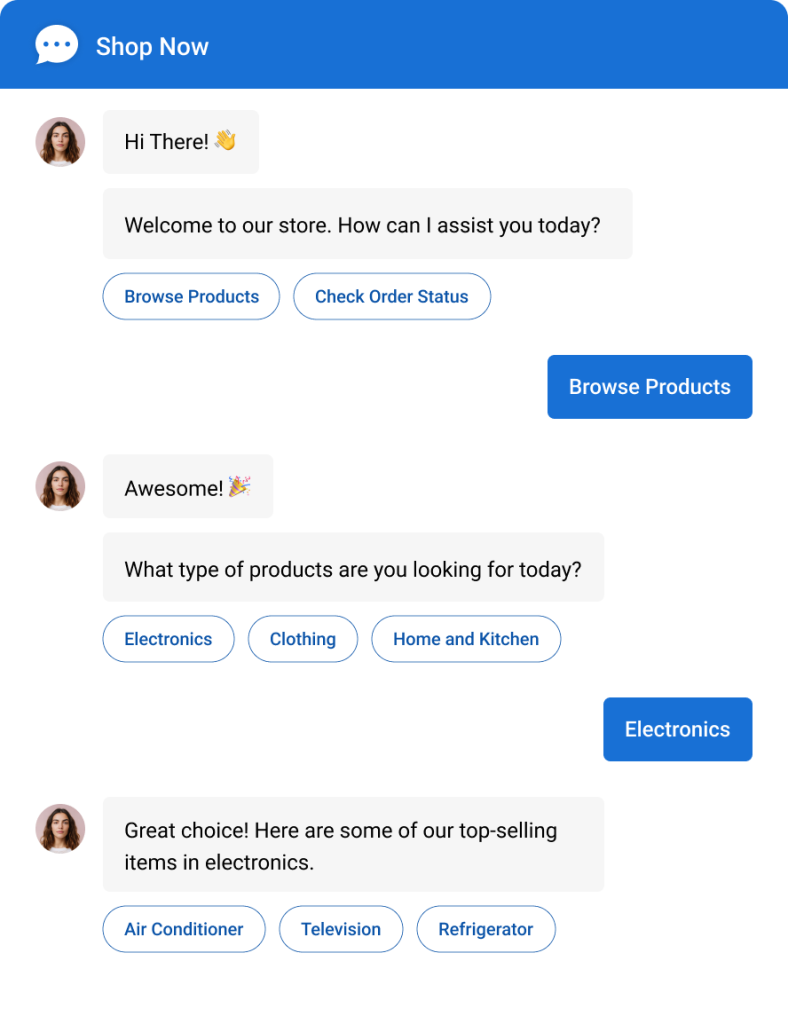
But “free” means different things depending on the platform:
- Some are free trials: 14 to 30 days, then you’re on the clock
- Some are freemium with tight limits on conversations or features
- Others, like ProProfs Chat, offer a forever-free plan with full premium features for a single operator, a real option for solo founders and lean teams, not just a demo hook
Top 10 Free AI Chatbots for Smarter Customer Service
The best free chatbot development platforms don’t just automate conversations. They deliver a seamless experience and real features without hidden limitations that can quietly hurt your scalability or support.
Here’s a quick summary of my top 10 free chatbot platforms:
| Free Chatbot | Best For | Pricing | User Rating |
| ProProfs Chat | Easy live chat & AI customer service agent for instant, automated support | Forever-free for 1 operator. Paid plan starts at $19.99/operator/month | 4.8/5 (Capterra) |
| Freshchat | Multichannel support for Freshworks users | Free plan available. Paid plan starts at $19/month | 4.1/5 (Capterra) |
| Tidio | Action-based triggers and visitor targeting | Free plan available. Paid plan starts at $24.17/month | 4.7/5 (G2) |
| Chatling | NLP-powered chatbot building | Free plan available. Paid plan starts at $25/month | 4.8/5 (G2) |
| Smartsupp | Real-time analytics and visitor recordings | Free plan available. Paid plan starts at $14/month | 4.7/5 (G2) |
| Zoho SalesIQ | Hybrid AI and rule-based bots for Zoho users | Free plan available (100 chat sessions/month). Paid plan starts at $7/month | 4.4/5 (Capterra) |
| Flow XO | Workflow automation via no-code chatbots | Free plan available. Paid plan starts at $25/month | 4.2/5 (G2) |
| IntelliTicks | Conversational landing pages and post-ad lead capture | Free plan available (60 conversations/month). Paid plan starts at $20/month | 4.6/5 (G2) |
| Landbot | Visual drag-and-drop chatbot builder | Forever-free plan available. Paid plan starts at $45/month | 4.7/5 (G2) |
| Tawk.to | Bot-to-human handoff for small businesses | Free forever | 4.5/5 (G2) |
1. ProProfs Live Chat – Best for Easy Live Chat & AI Customer Service Agent for Instant, Automated Support
ProProfs Chat is one of those tools that doesn’t make you work hard to get started. It offers a forever-free plan that lets you create free AI chatbots for support in minutes, which handle customer queries, capture leads, and even assist with appointment booking.
You train the AI support agent on your website, help center, uploaded files, and FAQs, run a few tests to see how it responds, and you’re live. It also goes beyond basic support. The chatbot can qualify leads, guide visitors to relevant products or services, and help streamline your sales process. You can even deploy action-based agents that complete tasks right from the chat, like updating orders in Shopify, scheduling meetings, or triggering notifications via email or Slack.
Want to see how a free chatbot works? Try it now:

On the intelligence side, ProProfs Chat also gives your team useful context behind every conversation. It scans messages in real time to detect customer sentiment, whether someone is angry, confused, or happy, so your team knows exactly when to step in. It also assigns a churn risk score to every conversation so you can prioritize the customers who need urgent attention.
I also appreciate its 24/7 availability and multilingual support, which makes it easier to connect with customers anytime, regardless of location.
Pros:
- Real-time chat monitoring to track live conversations
- Automated chat routing to direct queries to the right individuals and teams
- AI-generated chat summaries that capture what the customer raised and how it was resolved
- AI Agent Performance Reports to see exactly where your AI agent falls short
- Integrates with ProProfs Knowledge Base and ProProfs Help Desk, making it easy to deliver connected AI, self-service, and live support.
Pros:
- Real-time chat monitoring to track live conversations
- Automated chat routing to direct queries to the right individuals and teams
- Integration with CRM and email for seamless workflow.
- Customer Delight Suite to offer 360-degree support
Cons:
- Cloud-only – no offline access
- No dark theme
User Rating: 4.8/5 (Capterra)
Pricing: A free plan is available for growing teams. Paid plan starts at $19.99/user/month.
See how Horse Saddle Shop used ProProfs Chat to deliver 24/7 multilingual support without adding headcount.

2. Freshchat – Best for Multichannel Support
I used Freshchat for my online business and was impressed by its features and performance. The platform offers AI assistance, Freddy, useful when extending customer support to your website visitors.
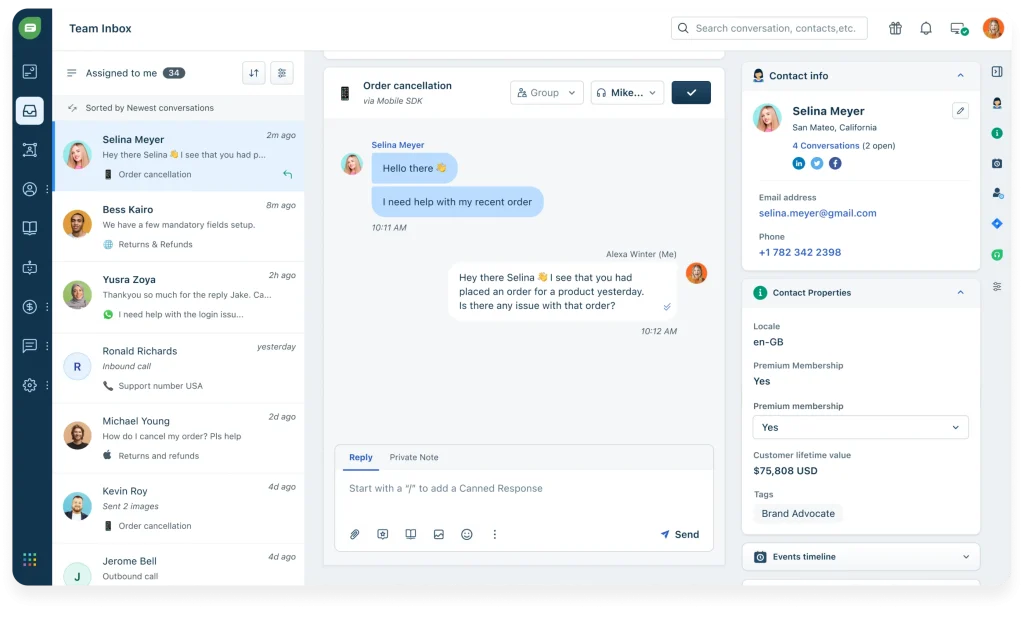
One of the best features of this chatbot software is its multichannel support. You can connect with your customers wherever they are and provide them with personalized and timely responses.
You can also use Freshchat’s AI-powered chatbots to automate common queries and provide self-service options. Freshchat also gives you real-time analytics and insights into customer satisfaction and agent productivity.
Freshchat is a powerful and easy-to-use tool that can help you boost your customer engagement and loyalty. It is one of the best free chatbot software available in the market. I highly recommend it to anyone looking for a reliable and scalable messaging solution.
Pros:
- Team inbox to manage and assign conversations across departments from one place
- Targeted messages based on visitor actions and attributes for personalized engagement
- Co-browsing and screen sharing to assist customers through complex issues in real time
- In-app FAQs to help customers self-serve without leaving the chat window
- AI-powered Freddy bot to automate common queries and reduce agent workload
Cons:
- Customization options are limited compared to other tools on this list
- Customer support can be slow, particularly on the free tier
User Rating: 4.1/5 (Capterra)
Pricing: Free plan available (file sharing not included). Paid plan starts at $19/month.
3. Tidio – Best for Action-Based Triggers and Visitor Targeting
I used Tidio’s chatbot software for my online store, and I was amazed by how easy it was to set up and use.
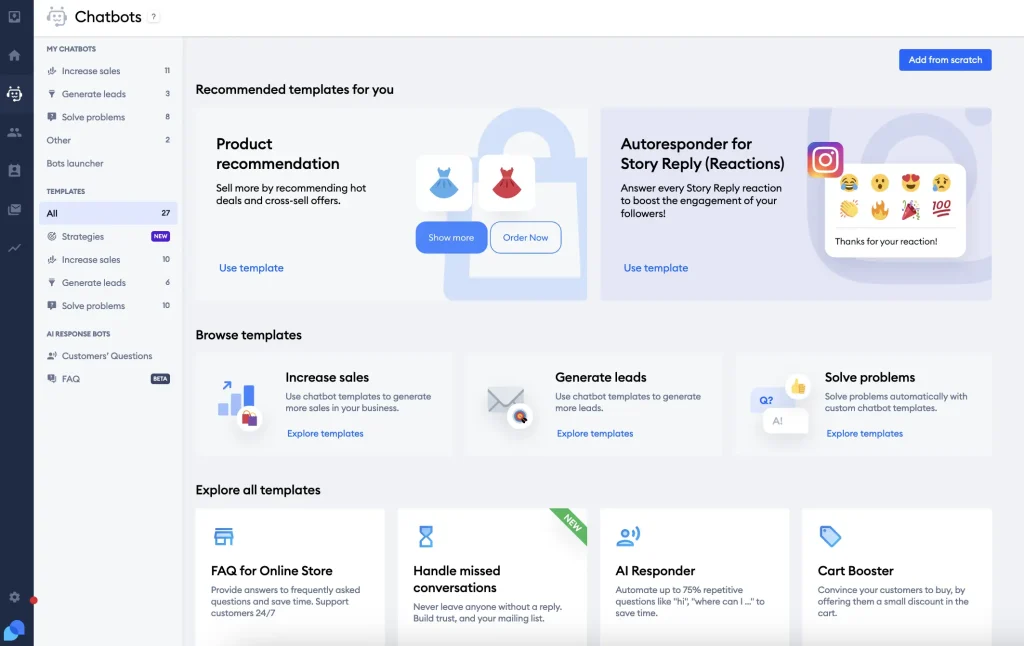
Tidio is an all-in-one customer service platform that combines live chat and AI chatbots. It helped me to solve customer problems, generate more leads, and increase sales.
One of the best features of Tidio is the action-based triggers. These chatbot workflows launch automatically based on certain conditions, such as when visitors visit the website, view a product, or add something to their cart.
I could customize these triggers to suit my business needs and offer personalized messages and discounts to my customers. This way, I could engage them in real time and convince them to purchase.
Tidio also provided analytics and feedback tools to help me measure and improve my customer service perform
Pros:
- Action-based triggers that launch chatbot workflows automatically based on visitor behavior
- Visitor list and contact profiles to view and manage customer data and activity
- Typing insights and sentiment analysis to understand customer intent before responding
- Mobile app and desktop notifications to stay connected with customers on the go
- Email and messenger integration to reach customers across multiple channels
Cons:
- Integration options are limited compared to other tools on this list
- Occasional bugs have been reported by users that affect chatbot reliability
User Rating: 4.7/5 (G2)
Pricing: Free plan available (limited features). Paid plan starts at $24.17/month.
4. Chatling – Best for NLP-Powered Chatbot Building
I have used many chatbot software in the past, but only some impressed me as much as Chatling. It is easy to use, powerful, and customizable.
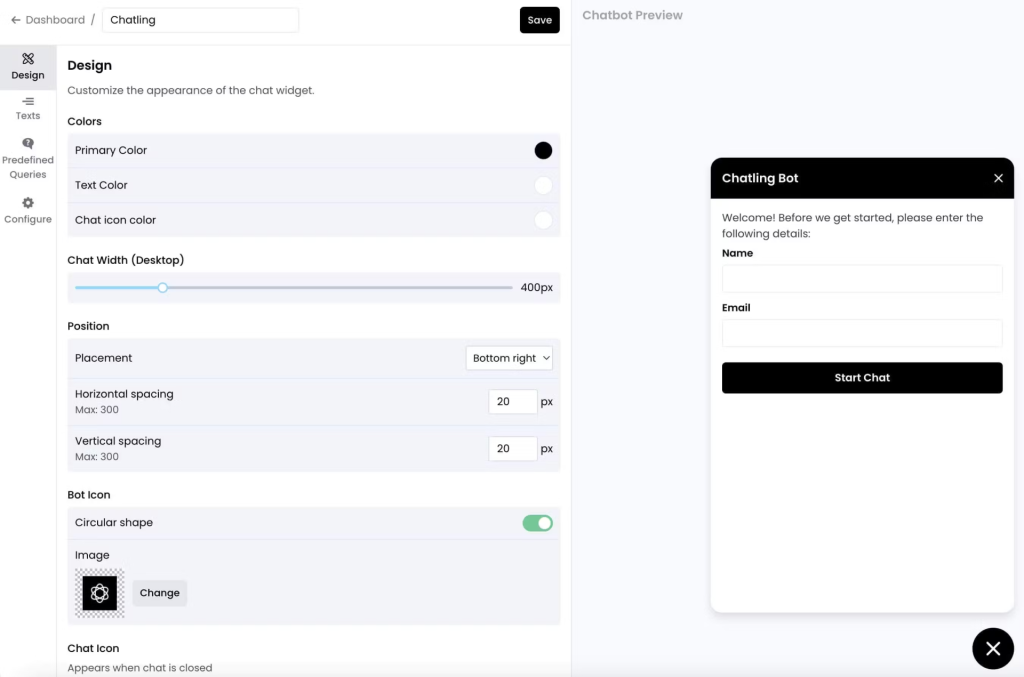
Chatling lets you create chatbots for various purposes, such as customer service, lead generation, sales, education, entertainment, and more. You can also integrate your chatbot with popular platforms like Facebook, WhatsApp, Telegram, and Slack.
One of the features that I love about Chatling is its natural language processing (NLP) engine. Chatling uses advanced NLP techniques to understand the intent and context of the user’s messages and provide relevant and engaging responses. Chatling also learns from the user’s feedback and behavior and adapts to their preferences and needs.
If you are looking for free chatbot software to help you create amazing chatbots, I highly recommend Chatling.
Pros:
- Advanced NLP engine that understands context and user intent, not just keywords
- Multilingual support to communicate with customers in their preferred language
- Voice chat for a more interactive and accessible customer experience
- Chatbot training and testing tools to continuously improve accuracy over time
- Chat transcripts to store and review previous conversations with customers
Cons:
- Limited filtering and search options for saved chat records
- Struggles with highly complex or ambiguous queries that require human judgment
User Rating: 4.8/5 (G2)
Pricing: Free plan available (limited customization). Paid plan starts at $25/month.
5. Smartsupp – Best for Real-Time Analytics and Visitor Recordings
I used Smartsupp during the initial phase of my professional career, and I must say it impressed me enough.
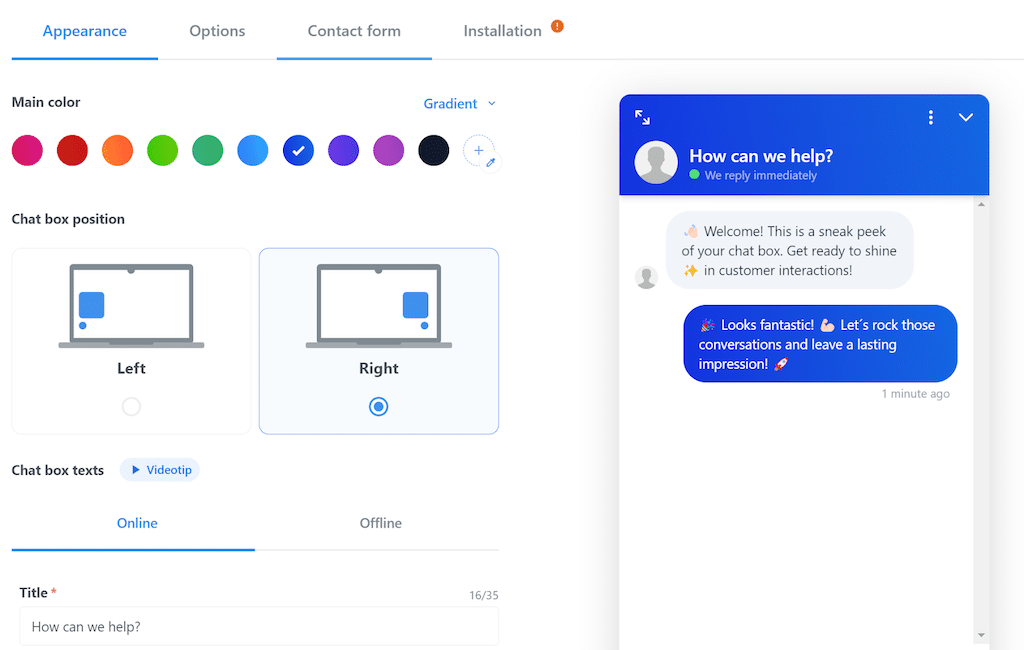
Smartsupp takes a broader approach to customer engagement. Beyond chatbots and live chat, it offers live video recordings of visitor sessions, which lets you see exactly how people are interacting with your website and your chatbot flows. That’s a level of visibility most tools on this list don’t offer.
The real-time analytics cover visitor behavior, questions asked, products browsed, and satisfaction scores, giving you data that’s useful not just for improving the chatbot but for informing wider site and product decisions.
One thing to know upfront: the free plan covers basic live chat only. AI chatbot features require an upgrade to the Pro plan.
Pros:
- Live video recording to see how visitors interact with your website in real time
- Real-time analytics covering visitor behavior, chatbot performance, and satisfaction scores
- Team collaboration tools to assign chats to agents based on expertise and availability
- Offline message capture to collect leads and inquiries when your team is unavailable
- Proactive chat invitations triggered by browsing behavior, time on page, or exit intent
Cons:
- AI chatbots are locked behind the paid plan — not available on the free tier
- Mobile app has fewer features than the desktop version
User Rating: 4.7/5 (G2)
Pricing: Free plan available (limited to 100 conversations/month, live chat only). Paid plan starts at $14/month.
6. Zoho SalesIQ – Best for Zoho Suite Users
I used Zoho SalesIQ to engage with my website visitors and convert them into customers. It had powerful features for exceptional engagement, such as live visitor tracking, communication modes, and CRM integration.
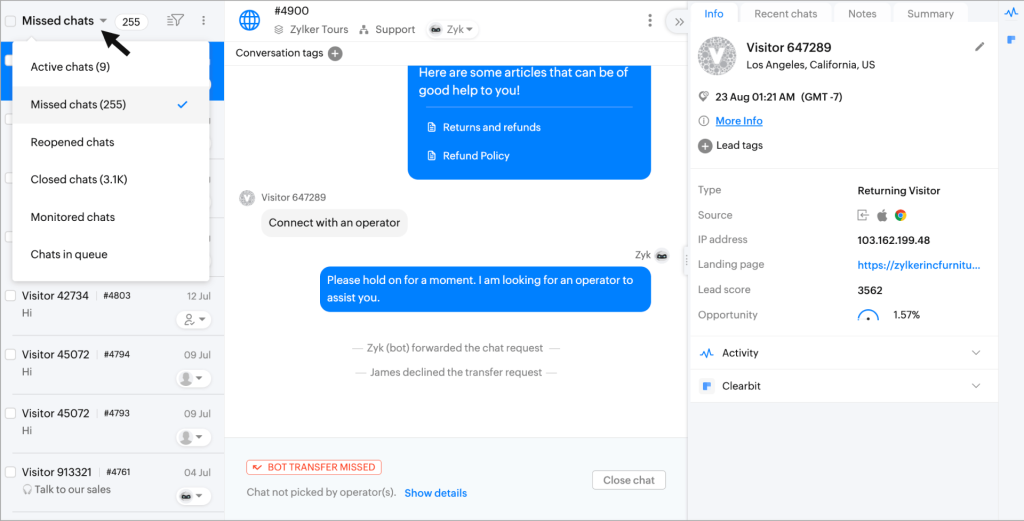
One of the features that I liked the most was the hybrid bots. I could combine the advantages of AI and guided chatbots by plugging the answer bot into my codeless or programmed bot built using Zobot. This way, I could automate routine interactions and provide personalized answers to common queries using the resource library.
Zoho SalesIQ also helped me analyze the behavior of my prospects on my site, send them relevant marketing messages, and measure the effectiveness of my efforts on sales or signups. It was easy to set up and use and integrated well with my favorite apps.
Pros:
- Hybrid bots that combine AI responses with rule-based guided conversation flows
- Native integration with Zoho CRM and Zoho Desk for seamless lead and ticket management
- Lead scoring and qualification to identify and prioritize high-value prospects automatically
- Chat translation via Google Translate to communicate with visitors in multiple languages
- Reports and insights to measure chat activity and sales effectiveness over time
Cons:
- Free plan is capped at 100 chat sessions per month
- Limited integrations outside the Zoho ecosystem; relies heavily on Zapier for third-party tools
User Rating: 4.4/5 (Capterra)
Pricing: Free plan available (100 chat sessions/month). Paid plan starts at $7/month.
7. Flow XO – Best for Workflow Automation
Flow XO is built for businesses that want their chatbot to do more than answer questions. It allows you to build chatbots without writing any code. You can choose from multiple templates or start from scratch. I liked how I could test the chatbot in the interface and see the changes instantly.
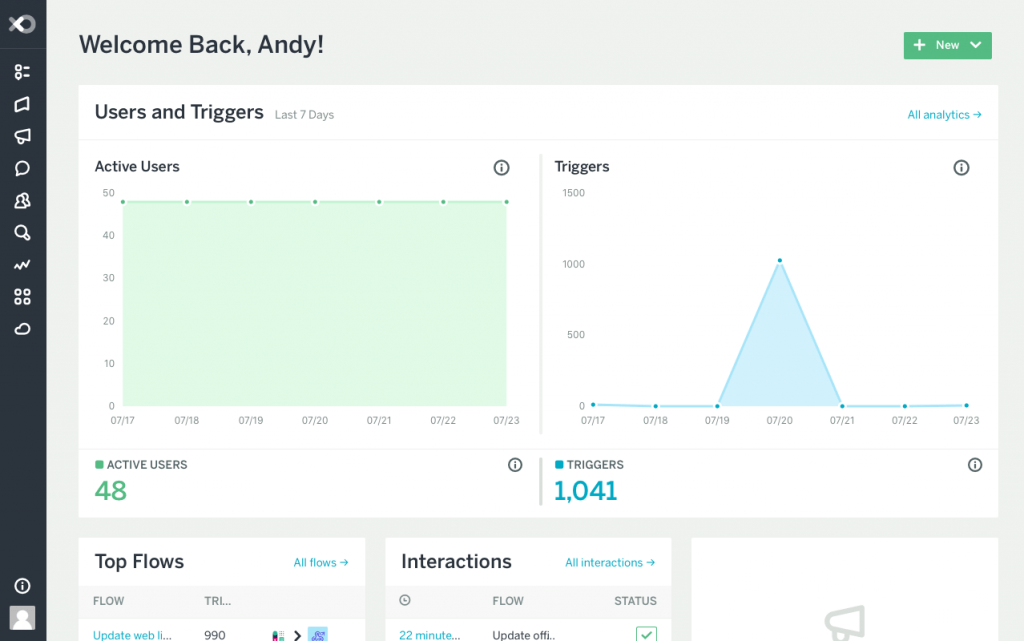
Its automated workflows let you trigger actions based on conversation context: sending a follow-up email, updating a spreadsheet, or pushing data to a third-party service. That makes it useful for operations teams that want to connect chatbot conversations to broader business processes.
The no-code builder is genuinely accessible. You can start from templates or build from scratch, test flows in the interface before deploying, and switch between bot and human agent within the same conversation.
Pros:
- Automated workflows triggered by user input and conversation context for multi-step actions
- No-code builder with ready-made templates for a range of use cases and industries
- Built-in live chat to switch between bot and human agent within the same conversation
- Webhooks and integrations for connecting to platforms like Mailchimp, Stripe, and more
- Chatbot hosting to deploy and share bots with your customers without external infrastructure
Cons:
- Reporting features are limited compared to other tools on this list
- Cannot recognize or process images or screenshots shared by users
User Rating: 4.2/5 (G2)
Pricing: Free plan available (limited interactions). Paid plan starts at $25/month.
8. IntelliTicks – Best for Conversational Landing Pages
IntelliTicks is built for a specific use case: converting paid traffic. Its conversational landing page feature replaces static post-click pages with an interactive chatbot experience that engages visitors immediately and captures lead data before they bounce.
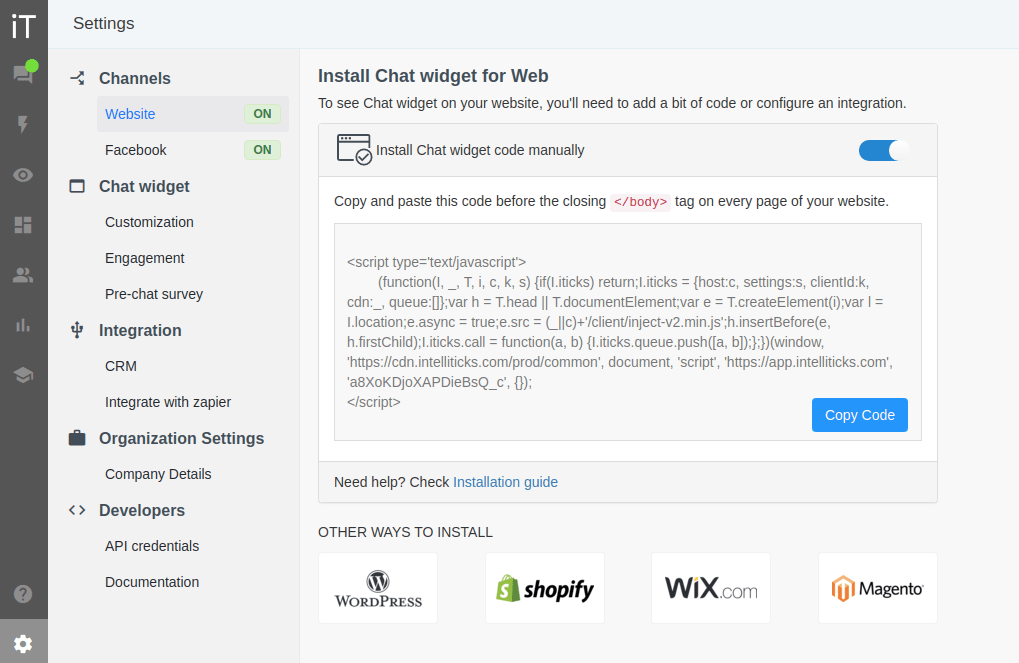
For businesses running paid campaigns on Google or Meta, this can make a meaningful difference in conversion rates. The AI-to-human transfer is seamless, and flash responses keep conversations moving fast enough to hold attention.
Pros:
- Conversational landing pages that replace static forms with interactive post-ad-click experiences
- Seamless AI-to-human transfer so hot leads reach a real agent without friction
- Customer segmentation to tailor chatbot responses based on visitor profile and behavior
- Appointment scheduling and reminders built directly into the chatbot conversation flow
- Knowledge base integration to provide instant answers to common questions without human involvement
Cons:
- Steeper learning curve compared to other tools on this list
- Free plan is limited to 60 conversations per month
User Rating: 4.6/5 (G2)
Pricing: Free plan available (60 conversations/month). Paid plan starts at $20/month.
9. Landbot – Best for Visual Chatbot Building
Landbot allows you to build chatbots without coding. You can design your chatbot flows with a visual drag-and-drop interface and customize them with rich media, variables, formulas, and conditional logic. Landbot also integrates with many popular apps to sync your data across different platforms.
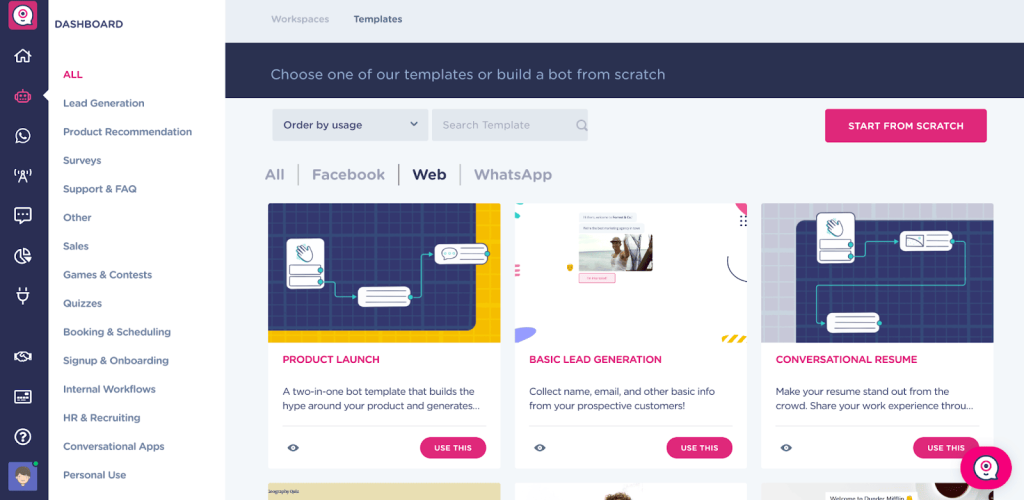
One of the features that I liked the most about Landbot was the AI chatbot generator. It helped me create chatbots that could understand natural language and provide relevant responses. To enhance their capabilities, I could also connect my chatbots to Dialogflow, a powerful natural language processing tool.
Landbot was easy to use, flexible, and powerful. It helped me generate more leads, increase engagement, and provide better customer service.
Pros:
- Visual drag-and-drop builder for creating complex, logic-based conversation flows without code
- WhatsApp and Facebook Messenger integration managed from a single centralized dashboard
- Reusable templates and bricks to build and maintain multiple chatbots efficiently
- Stripe and PayPal integration to accept payments and donations directly within the chat
- Chatbot variables and conditional logic to deliver dynamic, personalized conversation paths
Cons:
- Free plan is limited to 100 chats per month
- Paid plans are among the more expensive options on this list for small businesses
User Rating: 4.7/5 (G2)
Pricing: Forever-free plan available (100 chats/month). Paid plan starts at $45/month.
10. Tawk.to – Best for Bot-to-Human Handoff on a Zero Budget
Tawk.to was recommended by an industry peer some months ago. This platform has launched its new chatbot, named Apollo bot.
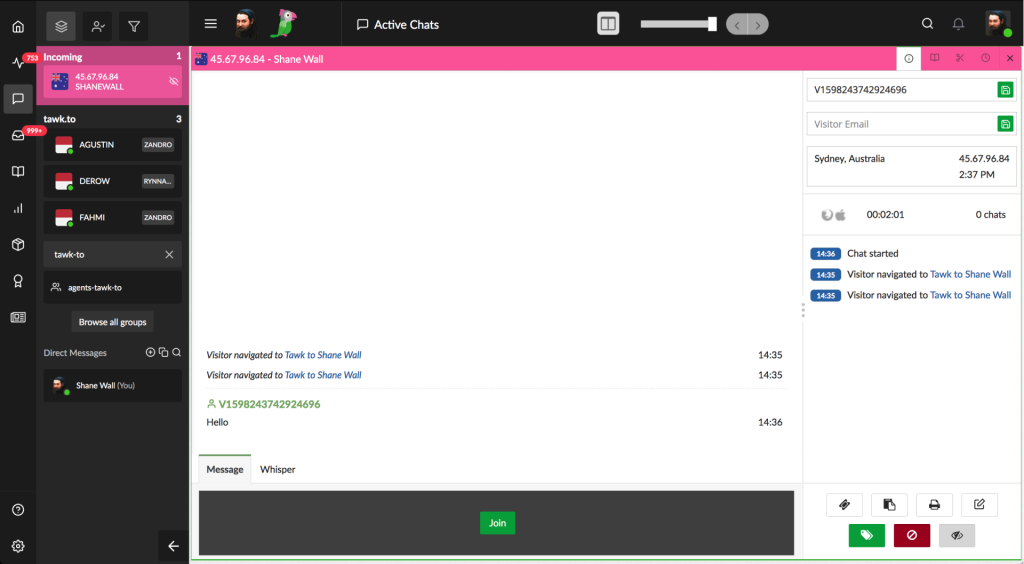
It allows you to create and deploy conversational agents on your website, mobile app, or social media platforms. You can use it to automate customer service, sales, marketing, and support tasks and provide personalized and engaging experiences to your visitors.
One of the features that I heard the most about was the bot-to-human handover. This feature allows you to seamlessly transfer the conversation from the chatbot to a live agent whenever the chatbot cannot handle a complex or sensitive query. This way, you can ensure that your customers always get the best possible service.
Though I haven’t used this chatbot personally, I recommend it based on the reviews of my industry peers.
Pros:
- Free forever with no conversation limits and no hidden paywalls
- Bot-to-human handoff for seamless escalation to live agents when needed
- Ticketing system to manage and resolve customer issues raised via chat
- AI commands to help agents brainstorm, simplify, and summarize responses on the fly
- Triggers to automate and initiate chat interactions based on visitor behavior
Cons:
- Feature set is considerably thinner than most alternatives on this list
- Data privacy and security concerns have been raised by users in reviews
User Rating: 4.5/5 (G2)
Pricing: Free forever.
How I Evaluated These Free Customer Support Chatbots
With so many tools claiming to be the best, I used a consistent framework to cut through the noise. Here’s exactly what I measured:
- User Reviews and Ratings I pulled verified feedback from G2, Capterra, and Gartner, focusing specifically on what users said about the free tier before upgrading, and whether the free version delivered real value or just enough to push them toward a paid plan.
- Core Features and Functionality I tested each free plan directly, looking at AI response quality, customization options, human handoff, and lead capture. Features that were locked behind a paywall were noted clearly in each entry.
- Ease of Use The test was simple: can a non-technical team member get this running without a training session or a call with sales? This matters most on free plans, where onboarding support is rarely included.
- Customer Support Quality Free plan users are typically deprioritized by vendors. I looked at whether each platform offered meaningful documentation, community resources, or responsive support without a paid subscription.
- Value for Free Free doesn’t mean costless. You’re investing time to set up, train, and maintain the chatbot, and trusting a platform with your customer data. I evaluated what each tool actually delivers against those real costs, including conversation limits, feature access, and whether the free tier is genuinely usable.
- Personal Experience I used each free plan myself, cross-checked my impressions with peers running similar operations, and factored in feedback from people who rely on these tools daily.
My Top 3 Picks for Free Chatbot for Customer Support
Stuck on a choice? Here are my top three right away.
1. ProProfs Chat
ProProfs Chat is the strongest free option for businesses that want customization, automation, and real performance data in one place. The AI trains on your existing content, intelligent routing sends every query to the right agent automatically, and bot performance reports show you exactly what’s working and what isn’t. The forever-free single-operator plan is a genuine starting point, not a trial.
2. Tidio
Tidio is the best fit for eCommerce teams that want to catch visitors at the right moment. Action-based triggers, detailed visitor profiles, and Lyro’s AI handle routine queries automatically while keeping complex conversations for your human agents. It’s quick to set up, easy to manage, and delivers measurable results for online stores without a steep learning curve.
3. Smartsupp
Smartsupp is the pick if visibility matters as much as automation. Live video recordings of visitor sessions, real-time analytics, and proactive chat invitations give you a level of insight that most free tools simply don’t offer. Keep in mind that AI chatbot features are on the paid plan, the free tier covers live chat only.
FREE. All Features. FOREVER!
Try our Forever FREE account with all premium features!
Get Your Free Customer Support Chatbot Running Today
Free chatbots have made it easier than ever to improve customer experience without stretching your budget. The right tool automates conversations, captures leads, and keeps you available around the clock.
When choosing, focus on ease of setup, AI accuracy, integrations, and whether the free tier is actually usable or just a hook to get your credit card.
If you want a tool that delivers all of this without the complexity, ProProfs Chat is worth a serious look. The forever-free plan gives you AI chatbot training, ready-made templates, intelligent routing, bot performance reports, and deep customization with no credit card required to start.
Sign up today and turn every website visitor into an opportunity.
Frequently Asked Questions
Can free chatbots handle real customer support, or are they just for simple FAQs?
Most modern free chatbots can handle a wide range of queries when trained on your business content. They work best for FAQs, lead capture, and routing, and escalate complex issues to a human agent automatically.
Do free chatbots support integration with CRMs and help desks?
Yes, most tools on this list integrate with popular CRMs like HubSpot, Salesforce, and Zoho, and help desks like Zendesk. Integration depth varies by platform and plan tier.
Can I train a free chatbot on my own website content?
Yes. Tools like ProProfs Chat let you train the AI chatbot using your website URL, help center articles, or uploaded documents, so responses are specific to your business.
What happens when a free chatbot can't answer a question?
Most tools support bot-to-human handoff, which transfers the conversation to a live agent when the bot reaches the limit of its training. The agent typically receives the full conversation context.
Is my customer data safe with a free chatbot?
Security standards vary by platform. Most include SSL encryption and basic compliance measures. Always review the platform's data policy before deployment, particularly if you're handling sensitive customer information.
How long does it take to set up a free chatbot?
For most tools on this list, a basic chatbot can be live in under 30 minutes. AI-trained bots that use your own content may take slightly longer depending on the volume of material being indexed.
Can free chatbots work in multiple languages?
Yes. Several tools on this list, including ProProfs Chat and Chatling, support multilingual conversations either natively or via translation integrations.
FREE. All Features. FOREVER!
Try our Forever FREE account with all premium features!

 We'd love your feedback!
What did you like & how can we make it even better?

 Thanks for your feedback!
 Ask Your Question
Have a question? Get expert help to make your decision easier.