If you are hunting for Botpress alternatives, chances are the bot itself works, but running it has become a project. Every policy change needs a developer, the monthly bill moves with usage, and handing a chat to a live agent feels clunky.
I wrote this guide for support and operations leads who own the customer experience but not the codebase. I compared ten tools on how quickly a non-developer can set them up, how cleanly they learn from your website and PDFs, how well they hand off to humans, and how predictable the cost remains.
Below, I cover why teams leave, how to choose, ten tools, cost checks, and migration.
Why Are Teams Switching From Botpress?
Botpress is a capable platform, but it is built for developer-led teams, and the gaps show up once support owns the bot day to day. If you are weighing botpress competitors, I treat these seven pain points as the checklist and ask every vendor to prove the fix live.
- Developer dependency: Anything past basic Q&A, like CRM links, webhooks, or custom actions, usually needs JavaScript, and the documentation is one of the most criticized parts. I ask every vendor to connect a CRM or help desk live, with no code.
- Handoff friction: Passing a chat to a live agent reportedly takes extra integration work, with live agent support tied to higher plans. I run a test escalation and confirm the agent sees the full chat history.
- Billing surprises: Botpress counts a conversation as any exchange with two user messages in a month, and test chats in the emulator count too. I ask what counts as billable and whether test traffic is free.
- Pricing changes: Botpress changed its pricing on May 14, 2026 for new workspaces, so older and newer workspaces bill differently. I confirm which model my workspace is on before comparing any quotes.
- Maintenance load: Every product update, policy change, or new channel needs someone technical to touch the bot. I ask who edits the bot when a return policy changes, and the answer has to be me.
- Clunky agent inbox: Some support teams describe laggy performance and an agent inbox that is hard to use. I give my agents a 30-minute hands-on session in each trial inbox before signing anything.
- Hard takeovers: AI agents can stray from what you want, and stepping in is not easy. I confirm I can watch live chats, jump in, and send sensitive topics like billing or complaints straight to a human.
Top 10 Botpress Alternatives for Support Teams
I compared these ten tools on setup effort for non-developers, human handoff, training on your own content, and channel coverage. ProProfs Chat leads because it is the easiest live chat and AI customer service agent for instant, automated support.
| Tool | Best For | Starting Price | User Rating |
| ProProfs Chat | Easy Live Chat & AI Customer Service Agent for Instant, Automated Support | Forever free for 1 operator. Paid starts at $19.99/operator/month | 4.5/5 (G2) |
| Tidio | Live Chat, AI Agent & Ticketing in One Inbox | Starts at $24.17/month | 4.6/5 (G2) |
| Intercom | AI-to-Human Handoff in One Omnichannel Inbox | Starts at $29/seat/month | 4.5/5 (G2) |
| Freshchat | Teams Already on the Freshworks Suite | Starts at $19/agent/month | 4.4/5 (G2) |
| Zendesk | Help Desk Teams That Want the Bot Inside Their Ticket Queue | Starts at $19/agent/month | 4.3/5 (G2) |
| Voiceflow | Designing Conversation Flows Visually Without Code | Free tier. Pro starts at $60/editor/month | 4.6/5 (G2) |
| Landbot | WhatsApp & Web Bots With Human Takeover | Free sandbox. Paid starts at $45/month | 4.7/5 (G2) |
| ManyChat | Instagram, Facebook & WhatsApp Automation | Starts at $14/month | 4.5/5 (G2) |
| Chatfuel | Sales Flows Inside Meta Apps & Shopify | Starts at $49/month | 4.4/5 (G2) |
| Tawk.to | Free Live Chat for Your Human Agents | Starts at $0/month (free core plan) | 4.5/5 (G2) |
1. ProProfs Chat: Easiest Live Chat & AI Customer Service Agent for Instant, Automated Support
I put ProProfs Chat first because it covers the two jobs most Botpress teams really need: instant AI answers and a clean handoff to a person. Setup starts with your website URL, help center, uploaded files, or FAQs, and the AI Customer Support Agent trains on that content, with the source cited next to each reply.
When I want scripted control for policy questions, the drag-and-drop flow builder offers templates for lead generation, support, appointment booking, sales, and CSAT, plus branching logic, all without code.
Once a chat needs a human, the bot passes the full conversation along, so nobody repeats themselves. Routing can go to the least busy operator, a department, or custom rules based on location, time, or keywords. WhatsApp, Facebook, and Instagram messages land in the same dashboard, and the ProProfs Help Desk connection creates tickets automatically. Sentiment tags also flag frustrated customers early for your agents.
Pros:
- AI trains on your website, help center, PDFs, or raw text in one click, so setup takes minutes
- Bot-to-human handoff carries the full chat context, so customers never repeat themselves
- Action-based AI agents update orders and schedule meetings directly inside the chat window
- Drag-and-drop flow builder with branching logic lets you script policy answers without code
- Visitor tracking and sentiment analysis show agents who are browsing and who needs attention first
Cons:
- Cloud-only, so there is no offline access
- No dark theme
How ProProfs Chat Compares With Botpress: Botpress expects JavaScript and API work for integrations, and the bot stays a builder project that someone technical has to maintain. ProProfs Chat lets a non-developer train the AI from a URL, script routine answers in a drag-and-drop builder, and pass chats to operators with full context. Routing, canned responses, and WhatsApp, Facebook, and Instagram messages all sit in one dashboard.
User Rating: 4.5/5 (G2)
Price: Forever free for a single operator. Paid starts at $19.99/operator/month
2. Tidio: Best for Live Chat, AI Agent & Ticketing in One Inbox
A friend who runs support for a small team keeps recommending Tidio to anyone who wants live chat, an AI agent, and ticketing together. What they like first is that the AI agent learns from website data and Shopify catalogs, so routine questions such as where an order is get answered on their own.
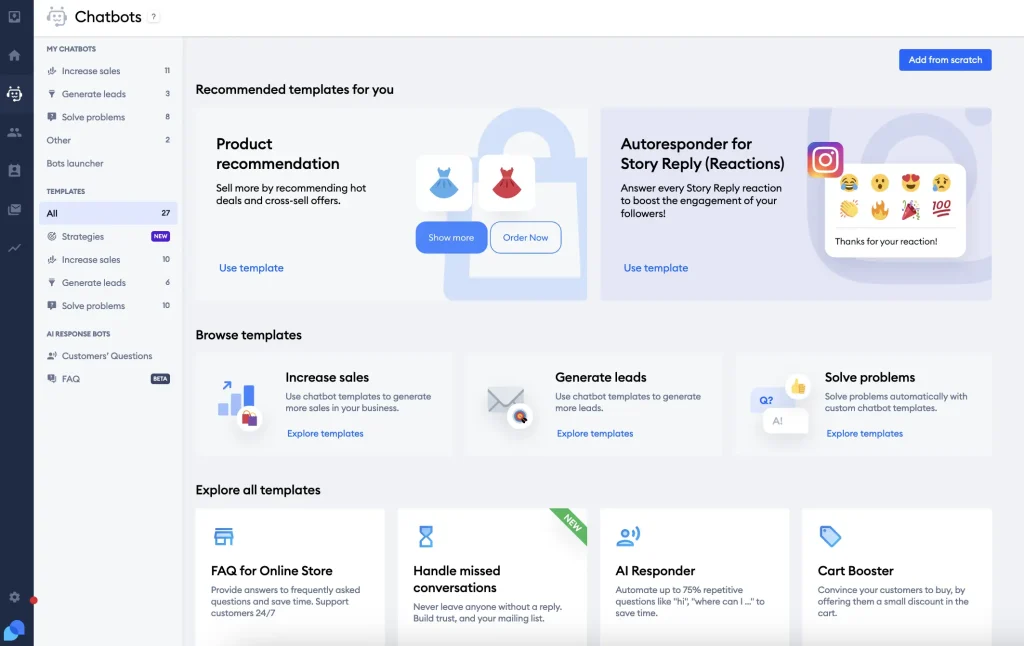
When a chat needs real attention, it turns into a ticket on the same dashboard, and nothing slips between tools. Their agents reply from mobile, snooze threads, and set up automated follow-ups without leaving the inbox, which also pulls in emails and Messenger threads.
They mentioned the visual workflows too, which cover product quizzes or upsell pop-ups, and proactive messages that fire on time spent on a page or cart value. The verdict I heard was simple: a small team without a developer really gets a lot here, and new agents learn the dashboard very quickly.
Pros:
- Unified inbox merges live chats, emails, and Messenger threads in one place
- AI agent trains on website data and Shopify catalogs to answer order status questions
- Chat-to-ticket conversion keeps longer issues organized and easy to track
- Visitor typing preview lets agents prepare an answer before the message even arrives
- Proactive messages trigger on time spent on a page or cart value
Cons:
- Automation setup can feel daunting for teams without prior chatbot experience
- Support responsiveness has been inconsistent, according to some users
How Tidio Compares With Botpress: Botpress asks you to build and connect the pieces yourself, including live agent handoff and any ticketing link. Tidio ships the live chat inbox, AI agent, and ticketing together, so a non-developer can move a conversation from bot to agent to ticket without custom code. The trade-off is depth, because Botpress still allows far more custom logic.
User Rating: 4.6/5 (G2)
Price: Starts at $24.17/month
3. Intercom: Best for AI-to-Human Handoff in One Omnichannel Inbox
Ask a former coworker of mine about Intercom, and Fin is the first thing they bring up. It sits inside the familiar Messenger widget, reads the help center, answers in natural language, and flips the thread to a human with the full context once things get truly complicated.
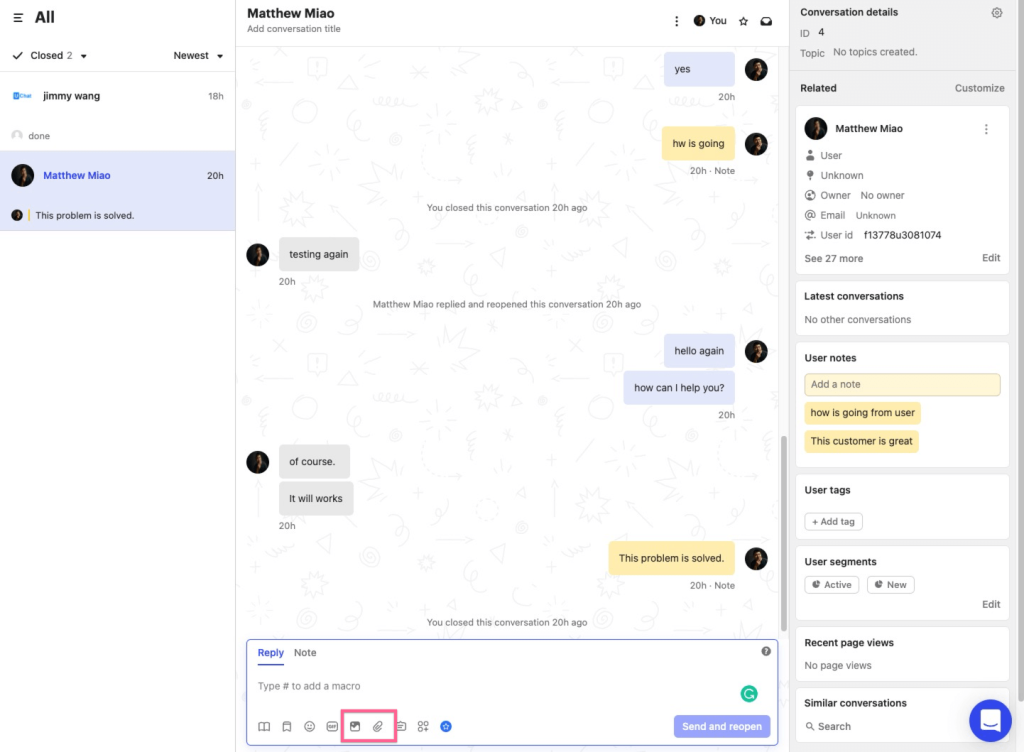
Customers never explain themselves twice, which they valued most. They also liked that one omnichannel inbox merges email, chat, and social DMs, while a drag-and-drop workflow builder routes, tags, and escalates conversations without code.
Interactive product tours and push notifications let support, onboarding, and growth share one place, and the mobile SDK sends targeted in-app messages and surveys directly to users. Their advice is that it suits teams whose conversations start inside a product or app. The interface took some getting used to, so they suggest a full week of hands-on practice with real chats before judging it against your own setup.
Pros:
- Fin answers around the clock and hands off with the full conversation history intact
- Unified inbox combines chat, email, and social channels into one clean view
- Workflow builder automates routing, SLAs, and follow-ups without manual tracking
- Interactive product tours help new customers adopt features faster
- Mobile SDK pushes targeted in-app messages and surveys directly to users
Cons:
- Interface has a learning curve for teams new to workflow automation tools
- Some users report a dip in support responsiveness during peak periods
How Intercom Compares With Botpress: Botpress reportedly needs extra integration work before a chat can reach a live agent. In Intercom, Fin and your human agents already share one inbox and customer record, so an escalation lands in the agent’s normal workspace with the full thread and an AI-generated summary. Botpress still wins on deep custom logic and self-hosting.
User Rating: 4.5/5 (G2)
Price: Starts at $29/seat/month
4. Freshchat: Best for Teams Already on the Freshworks Suite
Someone on my team already lived in Freshdesk and Freshsales, so Freshchat slotted in without much fuss. The Freddy AI layer handles multiple languages, detects sentiment on its own, and nudges priority chats toward human reps instead of leaving them in a queue.
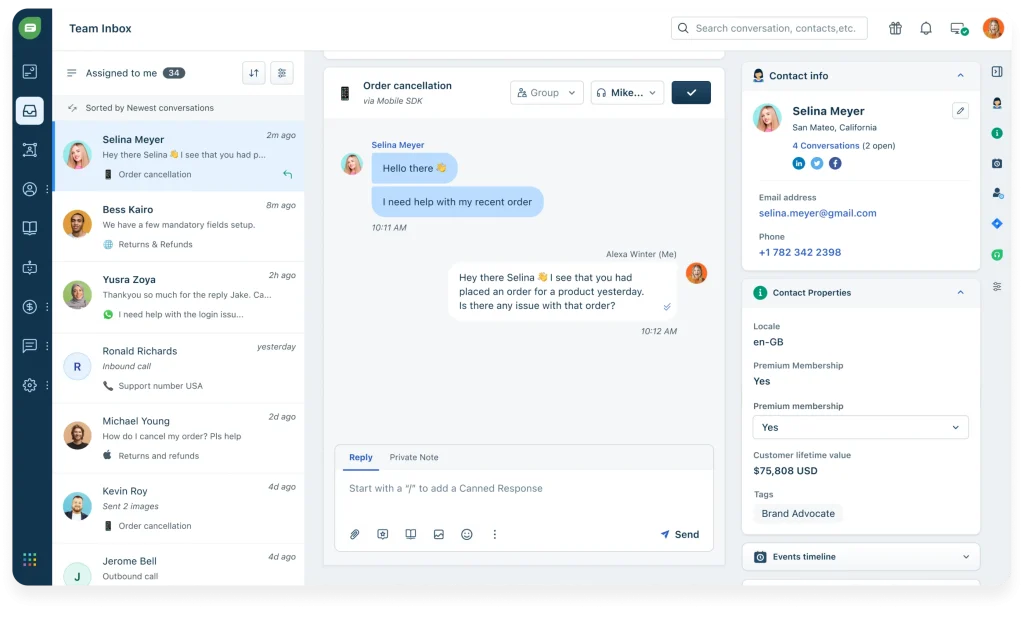
That speaks to the clunky handoff problem many teams want solved when leaving a builder-first platform. They pointed out the unified inbox, with rich visitor profiles and in-thread CSAT surveys, so marketing, support, and success look at the same screen. Web, mobile, WhatsApp, and Apple Business Chat all feed into it.
On the bot side, the no-code flow builder ships with pre-trained FAQ templates, and Freddy suggests replies and tags intent automatically. Trigger campaigns based on user journey and page behavior add a proactive layer. Their tip: start with the templates, then edit them to match your tone. It suits anyone wanting fewer separate logins each day.
Pros:
- Grows natively with other Freshworks apps, giving agents CRM-level context instantly
- Omnichannel inbox covers web, mobile, WhatsApp, and Apple Business Chat on one screen
- Freddy AI suggests replies and tags intent automatically, speeding up every response
- No-code flow builder with pre-trained FAQ templates gets you live fast
- Trigger campaigns based on user journey and page behavior for timely engagement
Cons:
- Occasional lag reported when syncing across multiple Freshworks products at once
- Setup for advanced bot flows can feel less intuitive than simpler standalone tools
How Freshchat Compares With Botpress: Botpress gives you the engine and leaves CRM context, inboxes, and surveys for you to connect. Freshchat arrives with an inbox, visitor profiles, and in-thread CSAT, and it plugs natively into Freshdesk and Freshsales. If your stack is already Freshworks, I would expect less glue work than with Botpress, though you give up developer-level control.
User Rating: 4.4/5 (G2)
Price: Starts at $19/agent/month
5. Zendesk: Best for Help Desk Teams That Want the Bot Inside Their Ticket Queue
Tickets ran the day for an acquaintance of mine, so Zendesk was the obvious pick, because adding a separate chatbot tool would only have created another silo. The Advanced Bot lives inside the same agent workspace they already used, pulls answers from Guide articles, and updates tickets in real time while conversations happen.
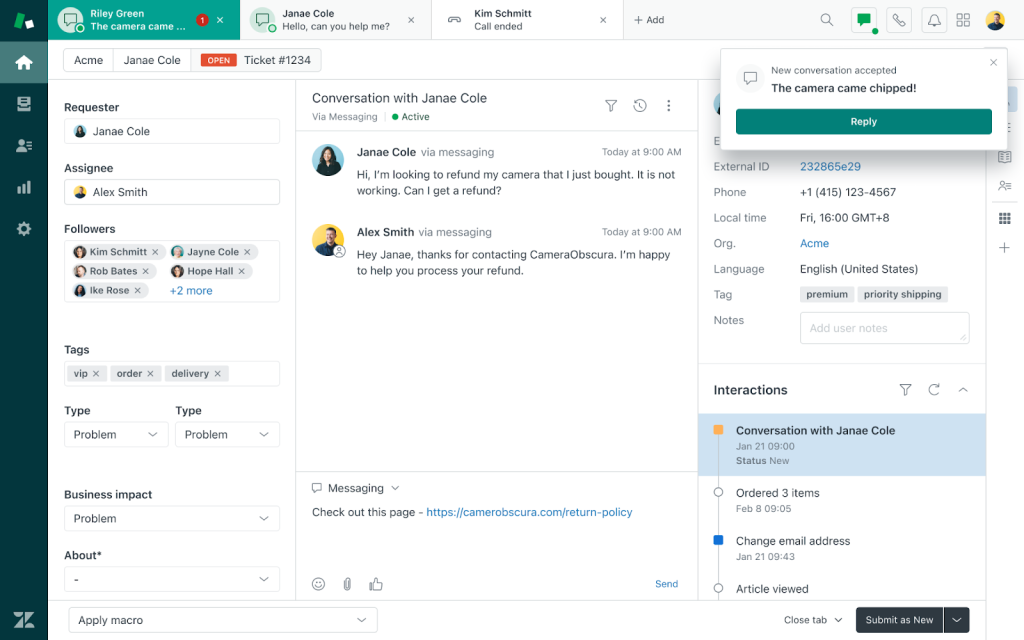
They told me setup felt mostly like point and click. They chose which articles the bot trains on, set fallback rules, and mapped handoff triggers without asking a developer for help. Multilingual article detection serves answers in the visitor’s language, and unresolved chats convert into follow-up tickets automatically.
Reporting rolls into the Explore dashboards their team already checked, so no new analytics habit was needed. Agents kept a familiar interface while customers got instant answers around the clock. Their summary was that the bot works for the ticket queue instead of beside it, which is the appeal.
Pros:
- Native to Zendesk Support, Guide, and Messaging, so nothing feels bolted on
- Trains directly on help center articles, avoiding duplicate content work
- Context-rich handoffs pass transcripts and user data to agents instantly
- Multilingual article detection serves answers in the visitor’s language automatically
- Smart triggers convert unresolved chats into follow-up tickets automatically
Cons:
- Some users report minor usability quirks in the agent workspace
- Initial setup can take longer for teams new to the Zendesk ecosystem
How Zendesk Compares With Botpress: With Botpress, ticketing and handoff are pieces you connect on your own. Zendesk’s Advanced Bot lives inside the agent workspace your team already uses, trains on Guide articles, and turns unresolved chats into tickets. That suits a ticket-first team better than a builder-first platform, but it will not give you Botpress’s freedom to code custom flows.
User Rating: 4.3/5 (G2)
Price: Starts at $19/agent/month
6. Voiceflow: Best for Designing Conversation Flows Visually Without Code
Voiceflow is for the person on your team who enjoys designing the conversation itself. Everything happens on a visual canvas where agents, steps, and handoffs connect like a flowchart.
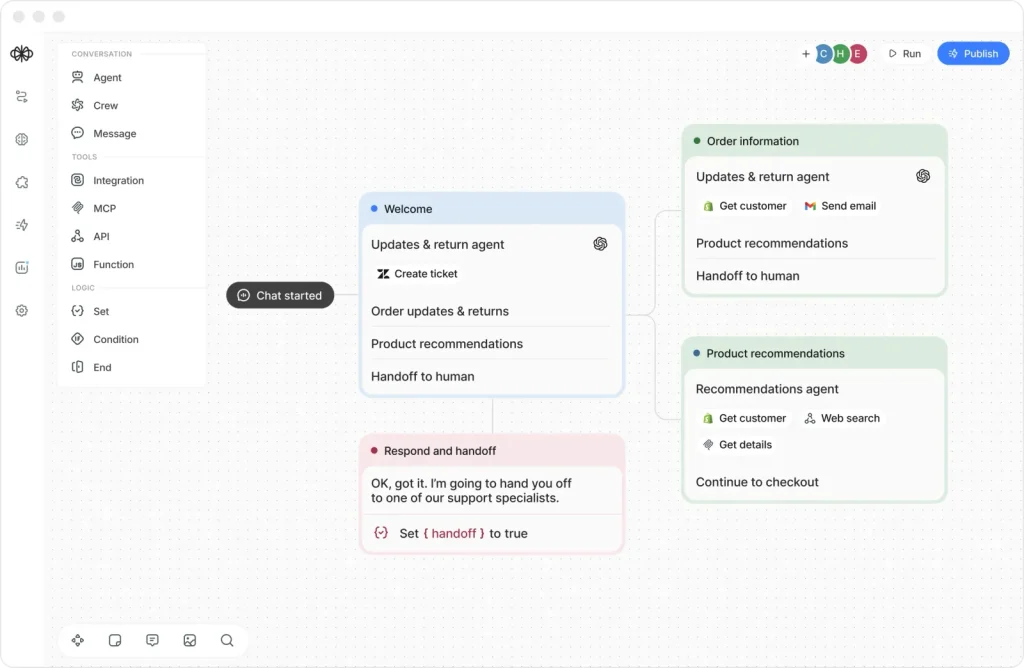
For answers, the knowledge base accepts URLs, a sitemap, file uploads, plain text, and sources such as Zendesk, Salesforce, and Shopify, and you can toggle it, along with buttons, cards, and forms, for each agent.
I like that you can test and tune a flow before anything goes live for real customers, and integrations with tools like Zapier, Shopify, Calendly, Airtable, and Twilio cover common support tasks.
Some users rate its human handoff lower than helpdesk-first tools, so I would test that part on day one. Treat it as a builder: someone on your team needs to own the canvas and keep it current. If that sounds like a fun job rather than a burden, it is certainly worth a trial.
Pros:
- Visual canvas shows every agent, step, and handoff as one connected flow
- Knowledge base accepts URLs, sitemaps, file uploads, plain text, and sources like Zendesk and Shopify
- Buttons, cards, and forms can be switched on for each agent
- Integrations with Zapier, Shopify, Calendly, Airtable, and Twilio cover common support tasks
- Transcript review and batch evaluation help you tune conversations after launch
Cons:
- Human handoff is rated lower than helpdesk-first tools, so test it early
- Someone on your team has to own and maintain the canvas
How Voiceflow Compares With Botpress: Voiceflow keeps the visual-builder idea Botpress users know, but its no-code canvas asks less of a non-developer. The catch is familiar: it is a builder, so someone still owns the flows, and live agent handoff needs a close look before you commit. For a team that wants to design conversations without JavaScript, it is a natural step.
User Rating: 4.6/5 (G2)
Price: Free tier. Pro starts at $60/editor/month
7. Landbot: Best for WhatsApp & Web Bots With Human Takeover
Landbot gives me a cleaner picture of a bot flow than most builders do. The visual no-code canvas mixes predictable linear flows with native AI blocks, and an AI Copilot guides you while you build and test. Because the paths stay visible, a non-developer can see exactly what the bot will say next.
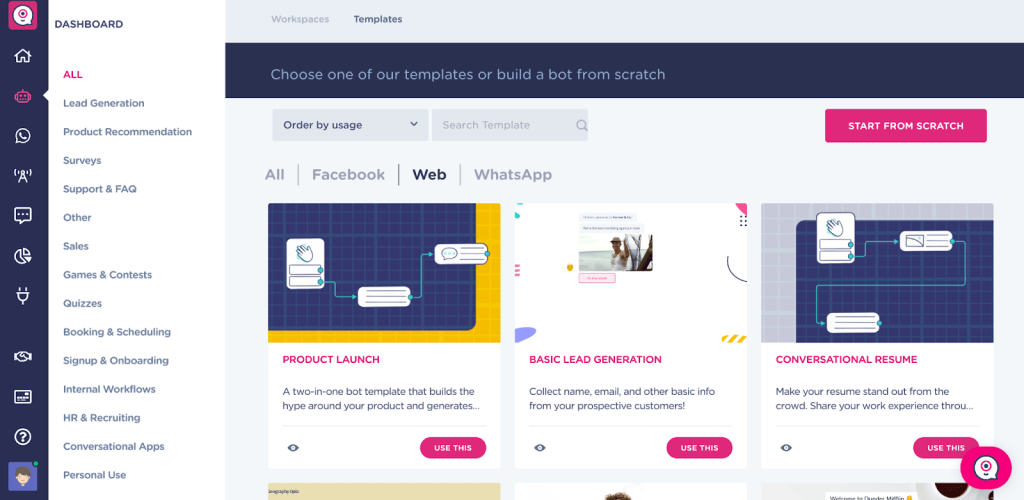
Human handoff is handled by a Human Takeover block. When the bot reaches its limit, the conversation moves to a built-in inbox, designated agents get an alert, and you can filter conversations by channel, including web, WhatsApp, and Messenger.
WhatsApp is a common home for Landbot bots, since the bot can collect context before an agent steps in. Planning matters here: sketch your flow on paper first, then build it carefully. Teams that want full control over every branch without writing code will feel at home, while teams that want the AI to improvise should look elsewhere.
Pros:
- Visual no-code builder mixes predictable linear flows with native AI blocks
- AI Copilot guides you while building, testing, and optimizing bots
- Human Takeover block hands the conversation to a built-in inbox with agent alerts
- Inbox can be filtered by channel, including web, WhatsApp, and Messenger
- WhatsApp bots can collect context before an agent steps in
Cons:
- Flows need planning up front, so building takes some forethought
- One user notes that JavaScript cannot be used inside WhatsApp chatbots
How Landbot Compares With Botpress: Landbot keeps the flow-building you know from Botpress and removes the code requirement, while its Human Takeover block gives agents an inbox out of the box. Where Botpress lets developers script almost anything, Landbot works best for predictable flows, with AI blocks used exactly where you choose to place them.
User Rating: 4.7/5 (G2)
Price: Free sandbox. Paid starts at $45/month
8. ManyChat: Best for Instagram, Facebook & WhatsApp Automation
Instagram DMs were where a friend’s customers already spent their time, which is why ManyChat clicked for them. It automates Instagram DMs, WhatsApp, Facebook Messenger, and SMS, and a comment, a story mention, or a swipe-up link can start the conversation. From there, the bot asks questions and records the answers.
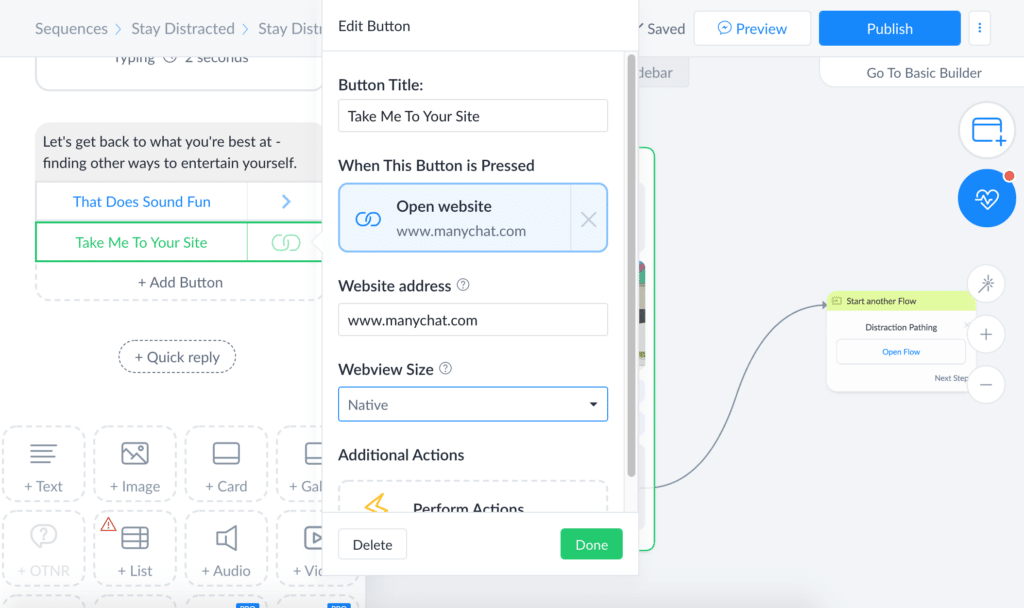
They found the visual flow builder easy to follow, and GPT-powered quick replies make the tone feel more natural. Built-in SMS and email steps carry a sequence beyond social apps, while tags and custom fields let them segment people precisely.
Two features they pushed me to try were the broadcast scheduler and the A/B testing inside each message block. Native links to Shopify, Stripe, and Google Sheets cut manual data entry for the team. Their one caveat: it is not built to replace a knowledge base on your website, so pair it with a support tool for product questions.
Pros:
- Visual flow builder with drag-and-drop messages and delays speeds up building
- Native integrations for Shopify, Stripe, and Google Sheets remove manual data entry
- User tagging and custom fields enable precise audience segmentation
- Broadcast scheduler sends promos to filtered subscriber lists automatically
- A/B testing built into every message block helps you optimize continuously
Cons:
- Best suited to Meta and messaging channels, less useful for pure website chat
- Advanced automation flows can take time to learn for first-time users
How ManyChat Compares With Botpress: Botpress can serve social channels too, but wiring them up takes developer time. ManyChat is built around them from the start, with comment triggers, story mentions, and DM flows that a marketer can set up alone. It is not a website support agent, so teams that need a knowledge-trained support bot should pair it with another tool.
User Rating: 4.5/5 (G2)
Price: Starts at $14/month
9. Chatfuel: Best for Sales Flows Inside Meta Apps & Shopify
Chatfuel was the answer when I asked a seller I know where her orders usually begin: inside Meta apps. It lives on Facebook Messenger, Instagram, and WhatsApp, and she described the no-code composer as a simplified design tool for chat, not a coding project. Ready-made ecommerce templates got her first bot live very quickly.
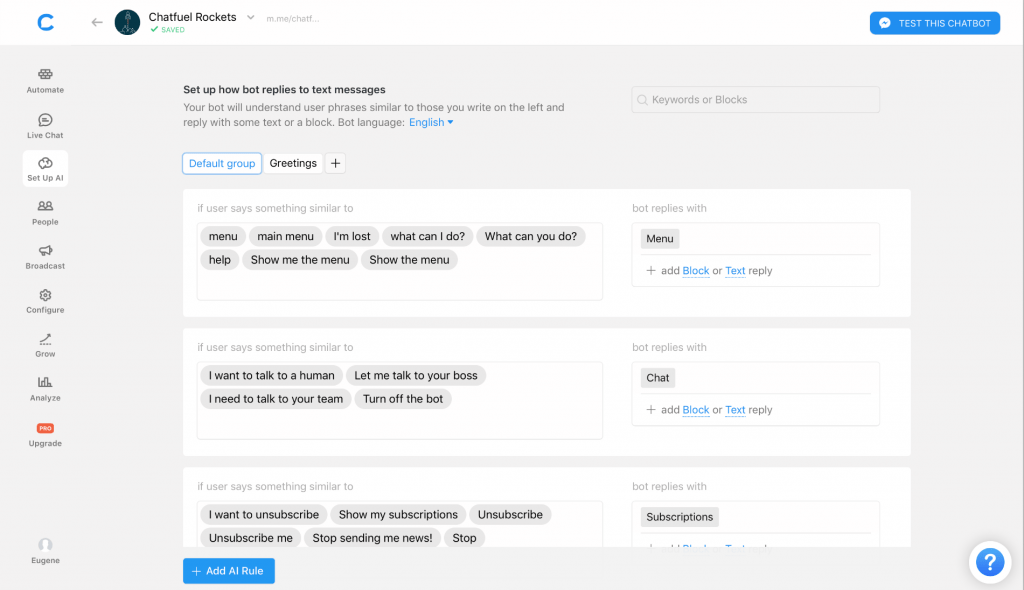
GPT-powered responses sounded more human than older template replies, and quick reply buttons walk shoppers through product quizzes and recommendations. Her favorite part was the growth widgets: comment to DM, story replies, and QR codes turn social touchpoints into opt-in conversations.
A one-click Shopify connection handles cart recovery and order updates, and Stripe and PayPal support lets a customer pay without leaving the chat. If most of your leads arrive through Instagram comments or WhatsApp, it can shorten the path from a comment to a confirmed order. For detailed website questions, she would choose something else.
Pros:
- Drag-and-drop composer with ready-made ecommerce templates speeds up launch
- Instagram comment-to-DM automation turns giveaways into qualified lead capture
- Quick reply buttons guide shoppers through product quizzes and recommendations
- One-click Shopify integration handles cart recovery and order updates automatically
- In-chat payment support via Stripe and PayPal shortens the path to purchase
Cons:
- Customer support quality has been inconsistent, according to several users
- Best suited to Meta channels, so non-social website use cases feel limited
How Chatfuel Compares With Botpress: Botpress covers Messenger, WhatsApp, and web through developer-built modules. Chatfuel narrows the job to selling inside Meta apps and gives you templates and a Shopify link that need no code. Choose it when social is your main channel, and keep another tool in the mix if a trained website support agent is your priority.
User Rating: 4.4/5 (G2)
Price: Starts at $49/month
10. Tawk.to: Best for Free Live Chat for Your Human Agents
For the human side of support, Tawk.to is the practical pick. One dashboard covers live chat, basic ticketing, and a small knowledge base, with unlimited agents, chats, and sites. Dropping a script onto your homepage gets the widget live in minutes, so no developer is needed at all.
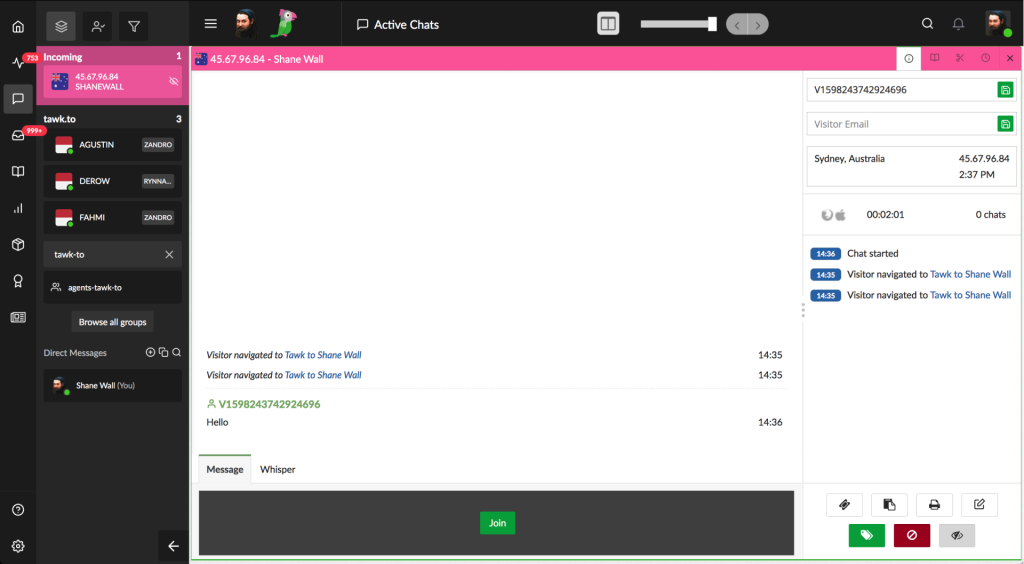
I find the real-time visitor analytics handy, because you can see who is browsing before they ever type a message. iOS and Android apps let agents answer on the go, and you can remove the Tawk.to branding from the widget when you are ready. There is even an optional hired agent service for after-hours coverage.
The trade-off is intelligence. Its AI features feel less advanced than purpose-built AI chatbot tools, so I see it as a strong base for live agents rather than a full Botpress replacement. Pair it with a dedicated AI tool if automation is your top priority right now.
Pros:
- Live chat, ticketing, and a basic knowledge base sit inside one dashboard
- Unlimited agents, chats, and sites on a single account
- Real-time visitor analytics show exactly who is browsing your site
- iOS and Android apps make on-the-go replies simple
- Optional hired agent service covers after-hours chats
Cons:
- Some users report occasional technical glitches during peak traffic
- AI features feel less advanced than purpose-built AI chatbot tools
How Tawk.to Compares With Botpress: Botpress is an AI agent builder, while Tawk.to is a live chat desk you install by pasting a script. If your biggest pain is that agents cannot easily step into chats, Tawk.to fixes it with an inbox, ticketing, and mobile apps. It will not match Botpress’s AI depth, so pair it with a dedicated AI tool.
User Rating: 4.5/5 (G2)
Price: Starts at $0/month (free core plan)
How I Chose These Botpress Alternatives
When I evaluate alternatives to Botpress for this list, I don’t just rely on feature lists or marketing claims. I look at how these tools actually perform in real-world scenarios. Here is the framework I used to make sure every recommendation is practical, reliable, and worth considering:
- User Reviews / Ratings: I start by looking at real user feedback from platforms like G2. This gives me a clear picture of how support teams actually experience the tool day to day, what they love, and where it falls short.
- Core Features & Functionality: I focus on what truly matters in customer service chatbot software. This includes training on your own content, bot-to-human handoff, integrations, and omnichannel support. If a tool cannot handle these well, it does not make the cut.
- Ease of Use: I pay close attention to how intuitive the platform feels for a non-developer. A tool might be powerful, but if you need a developer to edit a flow, it defeats the purpose. Clean interface, simple navigation, and quick onboarding are non-negotiable for me.
- Customer Support: From my experience, setup is where many tools fail. I evaluate how responsive and helpful the support team is, especially during onboarding and ongoing use. Fast, reliable support makes a big difference in adoption.
- Value for Money: I compare pricing with what the tool actually delivers, and I check whether billing is per operator, per conversation, or usage-based, since that is where chatbot costs quietly climb. This is not about picking the cheapest option, but about whether the features, flexibility, and performance justify the cost.
- Personal Experience / Expert Insights: Wherever possible, I rely on my own hands-on experience with these tools. I also consider insights from support managers, operations teams, and marketing leads who use chat tools in real environments. This helps me go beyond surface-level reviews and highlight what actually works.
Top 3 Botpress Alternatives
After comparing all ten tools against each other, three came out on top for different reasons. The right one for you depends on where Botpress has been letting you down.
1. ProProfs Chat
ProProfs Chat wins my vote because it is the easiest live chat and AI customer service agent for instant, automated support. It trains on your website, help center, or PDFs, hands chats to your team with full context, and keeps WhatsApp, Facebook, and Instagram messages together, letting non-developers run it.
2. Tidio
Ticketing and e-commerce order questions in the same inbox are what put Tidio on my shortlist. The AI agent trains on website data and Shopify catalogs, so routine order questions get answered automatically, and longer issues become tickets without leaving the dashboard. A team gets chat, AI, and tickets together.
3. Landbot
Landbot earned its spot for anyone who still wants to design every branch without writing JavaScript. The Human Takeover block moves a chat to a built-in inbox with agent alerts, and channel filters help, especially on WhatsApp. Its AI Copilot guides the build, so non-developers keep control of the flow.
FREE. All Features. FOREVER!
Try our Forever FREE account with all premium features!
How to Move Off Botpress Without a Developer
Whichever of the competitors of Botpress you pick, most of the calendar time goes to testing and integrations, not setup. Here is the order I follow, so nothing breaks on the way.
- Gather content: List every source the old bot uses: website URLs, help center articles, PDFs, and FAQs. This carries over because new tools train on the same sources, and ProProfs Chat takes a URL, help center, or uploaded files.
- Sort flows: List each Botpress flow and tag it scripted (policy, FAQ) or open (needs AI). Plan to rebuild flows by hand in the new builder, and ask each vendor whether an import exists.
- Rebuild connections: Write down every integration, like order status, CRM, and ticketing, then rebuild each one through a native integration, Zapier, or the API. ProProfs Chat connects with Salesforce, Zoho CRM, Shopify, WordPress, and ProProfs Help Desk.
- Set handoff rules: Decide which topics go straight to a human, such as billing disputes or complaints, who receives the chat, and what happens when nobody is online. Then test it the way a customer would.
- Run a pilot: Put the new bot on one page or one channel for 30 days while Botpress keeps running elsewhere. Compare answers to the same real questions before widening it.
- Cut over: Swap the widget code, move the remaining channels, and keep Botpress available for a month so you can check old transcripts.
Give Your Support Team a Chat Setup It Can Run Without a Developer
Moving away from Botpress does not mean giving up control. It means a setup your support team can run, with a stronger fit for every pain point among these Botpress alternatives.
I would test handoff first, train every trial on your own content, price one shared volume, and pilot one channel for 30 days.
If you want a place to start, ProProfs Chat is the easiest live chat and AI customer service agent for instant, automated support, with a forever-free plan for one operator.
Test the handoff yourself this week. Start free with ProProfs Chat.
Frequently Asked Questions
How can chatbot costs be compared fairly across vendors?
To compare costs fairly, price every vendor at one shared monthly chat volume. Convert it into each billing unit (operator, seat, conversation, or credits), then add AI usage, channel add-ons, and test chats. Total each vendor in one sheet.
Is there a free alternative to Botpress?
Yes. Tawk.to offer a free core product for live chat, and ProProfs Chat has a forever-free plan for one operator. Test the exact feature you need, such as AI training or handoff, before committing to any free tier.
Is there an open-source alternative to Botpress?
Rasa and Typebot come up most often. Rasa suits teams with strong engineering resources, while Typebot is a no-code builder that can be self-hosted, though its flows follow scripts instead of AI.
How can an AI chatbot be kept from giving wrong answers?
Train it only on approved content, choose a tool that cites its sources, and set a fallback that sends unclear questions to a human. Review a sample of conversations weekly and update the content when answers drift.
How many bots and operators does a small team need?
One hybrid bot is usually enough to start, covering FAQs, lead capture, and basic scheduling. Count operators by the people who will take live handoffs, not by total headcount.
What should be checked on data privacy before switching?
Ask where chat data is stored, whether your content trains shared models, and how data is deleted if you leave. Also check SSO and access controls for the team. ProProfs Chat documents GDPR and CCPA compliance.
Can a chat tool offer voice or video support?
Some can. ProProfs Chat offers audio and video chat with real-time screen sharing for live agents on its higher plans, and Voiceflow is built to design voice agents as well as chat.
FREE. All Features. FOREVER!
Try our Forever FREE account with all premium features!

 We'd love your feedback!
What did you like & how can we make it even better?

 Thanks for your feedback!
 Ask Your Question
Have a question? Get expert help to make your decision easier.