Searching for FlowXO alternatives usually means your first no-code bot has stopped keeping up. FlowXO is easy to start with, but reviewers keep raising the same limits: flows get hard to follow, analytics stay thin, and AI answers need more than keyword rules.
I compared ten tools using review data, hands-on testing, and the questions support teams ask most. Each one is checked on training the bot with your own content, handing chats to a human with full context, integrations, and how cost behaves as chat volume grows.
I also added a switching checklist and a trial plan, so you can test before you commit. Below, you will find the reasons teams switch, the ten best tools, my evaluation criteria, my top three picks, a switching plan, and a conclusion.
Why Are Teams Switching From FlowXO?
If you are reading this, you have probably hit at least a few of these already. I pulled them from reviewer feedback and my own testing, so you know exactly what to check while comparing FlowXO competitors.
- Hard-to-follow builder: FlowXO stacks triggers and actions one under another in a block builder, so once a bot grows past a few flows, tracing the path a visitor took gets slow.
- Thin analytics: Reviewers say dashboards stop at basics like users and messages and do not show which questions the bot failed to answer, which is the data you need to close gaps.
- No segmentation: You cannot tag users or build segments, so follow-ups and broadcasts stay broad instead of reaching the right visitors with the right message.
- Integration glitches: One reviewer reports glitches after connecting apps, and any bug that breaks a CRM or email sync quietly costs you leads.
- Steeper learning curve: Reviewers say it feels less intuitive than platforms built around conversation design, which slows down every new teammate who has to edit a flow.
- Basic AI depth: It handles simple automations well, but complex AI conversations that need accurate answers from your own content push teams toward AI-first tools.
- Small review base: Independent review coverage is thin, with only a couple of verified reviews on major directories, so you get fewer real-world experiences to learn from before committing.
Top 10 FlowXO Alternatives for Website Support Teams
I put this list together using G2 ratings, product documentation, and hands-on testing of the tools I could try myself. Start with the table, pick the two tools that match your main job, then read their full breakdowns.
| Tool | Best For | Starting Price | User Rating |
| ProProfs Chat | Easy Live Chat & AI Customer Service Agent for Instant, Automated Support | Forever free for 1 operator. Paid starts at $19.99/operator/month | 4.5/5 (G2) |
| Tidio | Live Chat With Ticketing Functionality | Starts at $24.17/month | 4.6/5 (G2) |
| ManyChat | Making Chatbots for Messaging Apps | Starts at $14/month | 4.5/5 (G2) |
| Landbot | Visual Chat Flows on Your Website and WhatsApp | Free plan available. Paid starts at $36/month, billed annually | 4.7/5 (G2) |
| Chatbase | AI Agents Trained on Your Own Content | Free plan available | 4.8/5 (G2) |
| Botpress | Building AI Agents With LLM-Powered Automation | Starts at $150/month | 4.5/5 (G2) |
| Intercom | Omnichannel Platform With Messenger & App | Starts at $29/seat/month | 4.5/5 (G2) |
| Freshchat | Freshworks Suite Users | Starts at $19/agent/month | 4.4/5 (G2) |
| Chatfuel | AI-Driven Sales & Customer Engagement on Social | Starts at $49/month | 4.4/5 (G2) |
| Tawk.to | Simple Live Chat and Ticketing for Small Teams | Starts at $0/month (free core plan) | 4.5/5 (G2) |
1. ProProfs Chat: Easiest Live Chat & AI Customer Service Agent for Instant, Automated Support
Pasting a website URL into ProProfs Chat was all it took for the AI customer support agent to start answering visitor questions within minutes. The agent trains on your website, help center, FAQs, or uploaded files, and every reply cites its source, so I can check answers against the source content.
When a chat gets complicated, the AI support agent hands it to a human with the full conversation attached, so visitors never repeat themselves. I also liked the drag-and-drop flow builder, which comes with ready templates for lead generation, support, appointment booking, and sales, plus branching logic for longer conversations.
Setup stayed simple because I never had to touch HTML or CSS. Canned responses covered common repeat questions, and chat transfers between operators kept handoffs smooth. Connections to WordPress, Wix, Shopify, and CRMs such as Salesforce and Zoho kept the setup tidy, and chat summary reports showed me what to improve next.
Pros:
- Proactive chat invitations trigger on visitor behavior, such as pages browsed and time spent
- Visitor tracking shows customer details while a chat is still in progress
- Multilingual support covers 70+ languages, so one bot can serve visitors in their own language
- ProProfs Knowledge Base and ProProfs Help Desk integration gives visitors 24/7 self-help and turns unresolved chats into tickets
- Post-chat surveys and operator ratings show how each conversation landed
Cons:
- Cloud-only, so there is no offline access
- No dark theme
How ProProfs Chat Compares With FlowXO: FlowXO gives you a block builder, over 100 direct integrations, and knowledge base training for its AI. ProProfs Chat starts from your content instead: paste a URL, get a source-cited AI agent, and add a human handoff with the full chat attached. Facebook, WhatsApp, and Instagram messages can also sit in one dashboard on the Business tier and above. If your main job is instant, automated support for website visitors, I would pick ProProfs Chat. If you mostly chain automations across many apps, FlowXO’s builder still fits that job.
User Rating: 4.5/5 (G2)
Price: Forever free for 1 operator. Paid starts at $19.99/operator/month
2. Tidio: Best for Live Chat With Ticketing Functionality
One eCommerce store I know had outgrown plain live chat but was not ready for a full help desk, so the owner trialed Tidio. The AI agent trained on website data and the Shopify catalog, then handled routine where-is-my-order questions without any agent involvement.
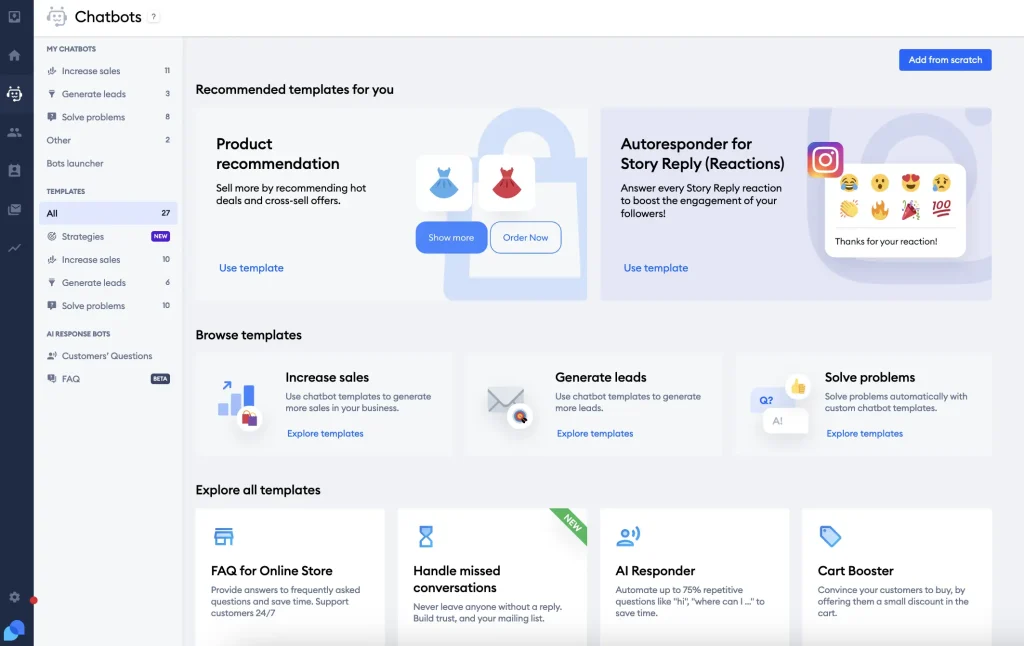
Agents replied from their phones and snoozed threads they could not finish, which kept the inbox calm during busy afternoons. On the marketing side, visual workflows let the team build a skincare quiz and an upsell pop-up in a few minutes, with no developer needed.
Visitors got instant answers instead of waiting for slow email replies, which was the main reason they picked it. What struck me was how little setup it needed, because live chat, automation, and customer replies all sat inside one dashboard. For a small team that wants support and light automation under one roof, I think it checks most of the boxes.
Pros:
- Unified inbox merges live chats, emails, and Messenger threads in one place
- Chat-to-ticket conversion keeps longer issues organized and easy to track
- Visitor typing preview lets agents prepare answers before the message even arrives
- Proactive messages trigger based on the time spent on a page or the cart value
- Automated follow-ups keep conversations moving without switching tools
Cons:
- Automation setup can feel daunting for teams without prior chatbot experience
- Support responsiveness can feel inconsistent at times
How Tidio Compares With FlowXO: FlowXO leans on a block builder and cross-app automation. Tidio puts live chat, a shared inbox, and tickets in one dashboard, and its visual workflows are easier to read once a bot grows. I would pick Tidio if your team answers customers every day and wants chats to become tickets. I would stay on FlowXO if wiring automations across many apps matters more to you than the inbox.
User Rating: 4.6/5 (G2)
Price: Starts at $24.17/month
3. ManyChat: Best for Making Chatbots for Messaging Apps
Instagram comments do most of the heavy lifting in a growth marketer’s ManyChat setup, and she walked me through it step by step. Someone comments a keyword on her post, the bot jumps into their DMs, collects an email and a fitness goal, then schedules workout reminders without her touching anything.
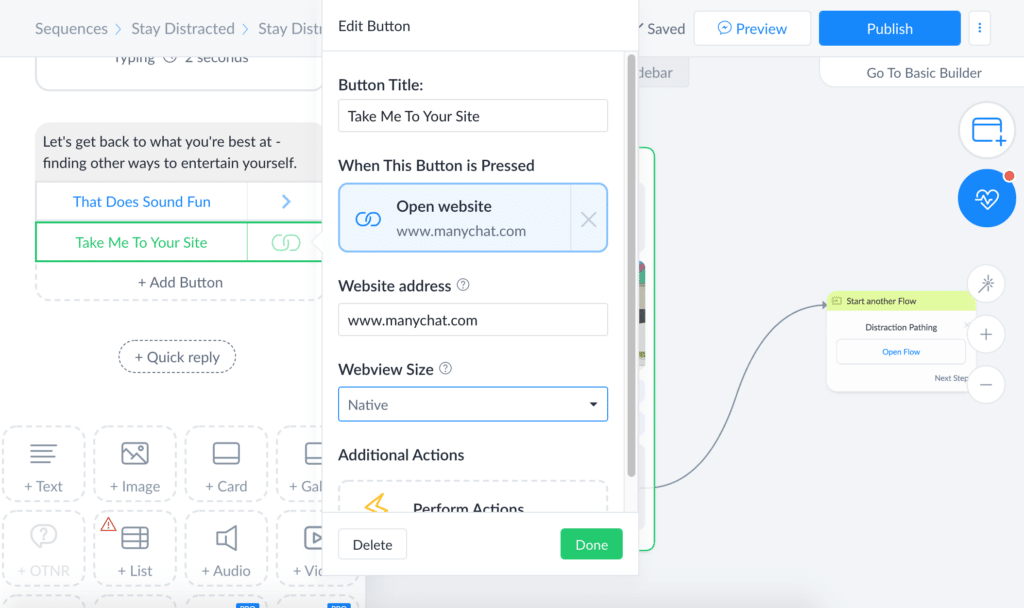
Story mentions and swipe-up links start conversations too, and GPT-powered quick replies keep the tone natural instead of robotic. Tags and custom fields let her segment people by goal, so a beginner never gets the same message as someone training for a race. The bot can even process payments for her challenge sign-ups.
She told me the biggest shift was no longer chasing people manually, since every emoji reaction now turns into first-party data she can act on later. If your audience mostly lives on Instagram, Facebook or WhatsApp, I would say this tool was built for exactly that.
Pros:
- Visual flow builder with drag-and-drop messages and delays speeds up building
- Native integrations for Shopify, Stripe, and Google Sheets remove manual data entry
- Broadcast scheduler sends promos to filtered subscriber lists automatically
- A/B testing built into message blocks helps you optimize wording continuously
- Built-in SMS and email steps extend sequences beyond the messaging apps
Cons:
- Best suited for Meta and messaging channels, less useful for pure website chat
- Advanced automation flows can take time to learn for first-time users
How ManyChat Compares With FlowXO: One detailed FlowXO review notes that you cannot tag users or build segments. ManyChat is built around exactly that, with tags, custom fields and broadcasts to filtered lists. It fits better when social DM marketing and segmentation matter more than website support. For a website-first support desk, I would look at the other tools on this list before ManyChat.
User Rating: 4.5/5 (G2)
Price: Starts at $14/month
4. Landbot: Best for Visual Chat Flows on Your Website and WhatsApp
Lead capture is where Landbot earned its place in a friend’s test. She built a conversation on a drag-and-drop canvas, with no code at all, to qualify visitors and book them through Calendly.
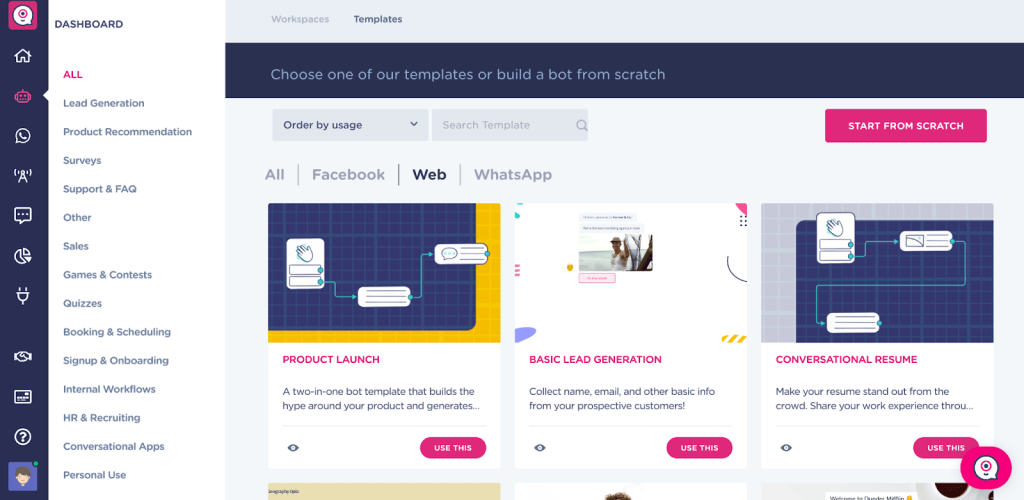
Landbot’s AI blocks sit inside the flow, so she added an AI FAQ assistant for open questions while keeping the lead steps rule-based. The same flow ran on her website, Facebook Messenger, and WhatsApp Business, which mattered because many of her leads preferred messaging. Answers landed in HubSpot and Google Sheets automatically, so her sales team never had to copy details by hand.
For me, the visual canvas is the biggest contrast with block-style builders, because you can see every branch at a glance. She said the result felt like a real conversation instead of a stiff form. Landbot is a bot builder first, so I would suggest it to teams who enjoy designing conversations on purpose.
Pros:
- Human takeover lets your sales or support team join a live conversation
- AI lead generation assistant qualifies visitors inside the flow
- Custom CSS and JavaScript allow branding tweaks without leaving the builder
- Survey builder collects feedback at the end of a conversation
- Mailchimp and Stripe connections cover email lists and payments
Cons:
- Focused on building bots, so live chat inbox features are lighter than in full live chat suites
- WhatsApp setups need extra configuration, such as a WhatsApp Business number and opt-in tools
How Landbot Compares With FlowXO: FlowXO’s vertical block builder gets harder to follow as bots grow. Landbot keeps the whole conversation on a visual canvas, with AI blocks and human takeover built into the flow. I would choose Landbot for lead qualification and WhatsApp conversations where the flow needs to stay readable. I would keep FlowXO if backend automation across many apps is the bigger job for you.
User Rating: 4.7/5 (G2)
Price: Free plan available. Paid starts at $36/month, billed annually
5. Chatbase: Best for AI Agents Trained on Your Own Content
Content comes first with Chatbase, and a developer friend of mine proved it in a single afternoon. He fed it his site URL, a few PDFs, and some questions and answer pairs for replies he wanted word-for-word, then embedded the agent with a simple copy-paste snippet.
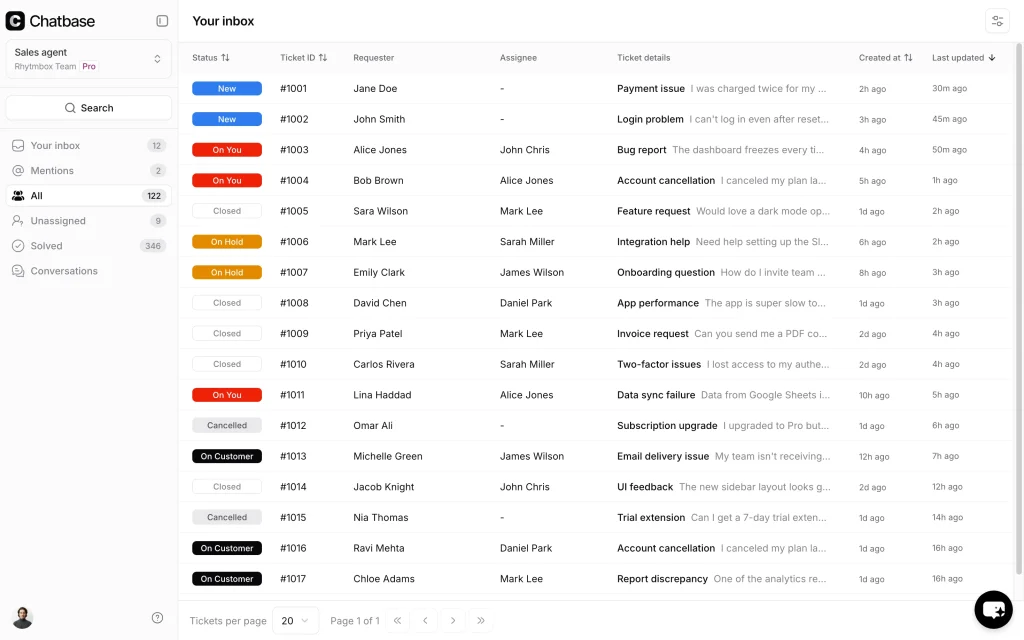
Pre-built actions let it book through Calendly, ping Slack, and escalate to a person when it gets stuck, and custom actions can call any API. Persistent conversation memory and conditional branching meant follow-up questions made sense instead of starting from zero.
Chatbase documentation says one agent can be deployed to a website widget, WhatsApp, Meta apps, Slack, and email, which is handy when you want a single brain across channels. He reviewed conversations each week to see where answers fell short, then tightened his sources. I would recommend it to teams that already have solid documentation, since thin content produces thin answers.
Pros:
- Lead collection captures names and emails during conversations automatically
- Analytics track conversations and show where answers need improvement
- Integrated helpdesk lets AI and human agents work from the same conversation
- Stripe and Zendesk integrations let the agent pull real account and order details
- Notion and Google Drive connections add training sources beyond PDFs and URLs
Cons:
- Answer quality depends on your source content, so thin documentation means thin replies
- WhatsApp and Slack connections need extra OAuth setup steps
How Chatbase Compares With FlowXO: FlowXO also trains on a knowledge base, but it sits inside a flow builder with credit-based AI usage. Chatbase is built around the trained agent first, with actions, analytics, and many channels from one agent. I would pick Chatbase when the answer quality from your documents matters most. I would pick FlowXO when you want hand-built flows plus app automations in the same place.
User Rating: 4.8/5 (G2)
Price: Free plan available
6. Botpress: Best for Building AI Agents With LLM-Powered Automation
If you prefer Git commits over drag and drop, Botpress is where I would point you. I aimed an agent at some docs, switched on the retrieval node, and it wired answers from a private knowledge base into the flow without any manual vector setup.
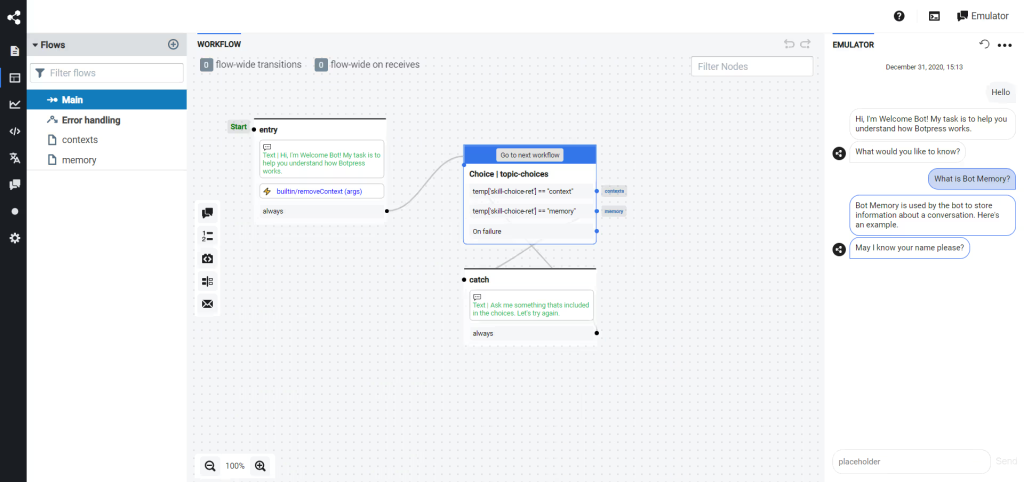
Cloud Studio gives you a visual builder for the parts you do not want to code, while the open-source core lets you host on your own server. Every step is a JavaScript function underneath, so I could version flows, run unit tests, and ship changes safely through CI/CD like any other service.
That also means a bad release is one command away from a rollback, which I rarely see in chatbot tools. Honestly, it feels like DevOps for chatbots, minus the babysitting. It is built for teams comfortable with code, so I would not hand it to a non-technical owner running the website bot.
Pros:
- Native modules cover WhatsApp, Slack, Messenger, and the web widget out of the box
- Event-based architecture triggers bots from webhooks or API calls
- Per-node model switching lets you pick GPT-4, Claude, or open source models
- CLI deploys let you roll back bots like any other service
- Retrieval nodes connect LLM answers directly to your private knowledge base
Cons:
- Requires comfort with code, so it is not truly beginner-friendly
- Steeper setup time compared with drag-and-drop chatbot builders
How Botpress Compares With FlowXO: FlowXO is made for non-coders. Botpress gives developers retrieval nodes, versioned flows, and model choice, but it assumes comfort with code. I would pick Botpress if you have a technical teammate and want control over how your agent behaves. I would pick FlowXO or another no-code tool if the person owning your bot does not write code.
User Rating: 4.5/5 (G2)
Price: Starts at $150/month
7. Intercom: Best for Omnichannel Platform With Messenger & App
Deflection climbed within the first week when a fintech team rolled Intercom out on their app, and nobody wrote a line of code. Its Fin AI agent sits inside the familiar Messenger widget, reads your help center, answers in natural language, and passes the thread to a person with the history intact when things get tricky.
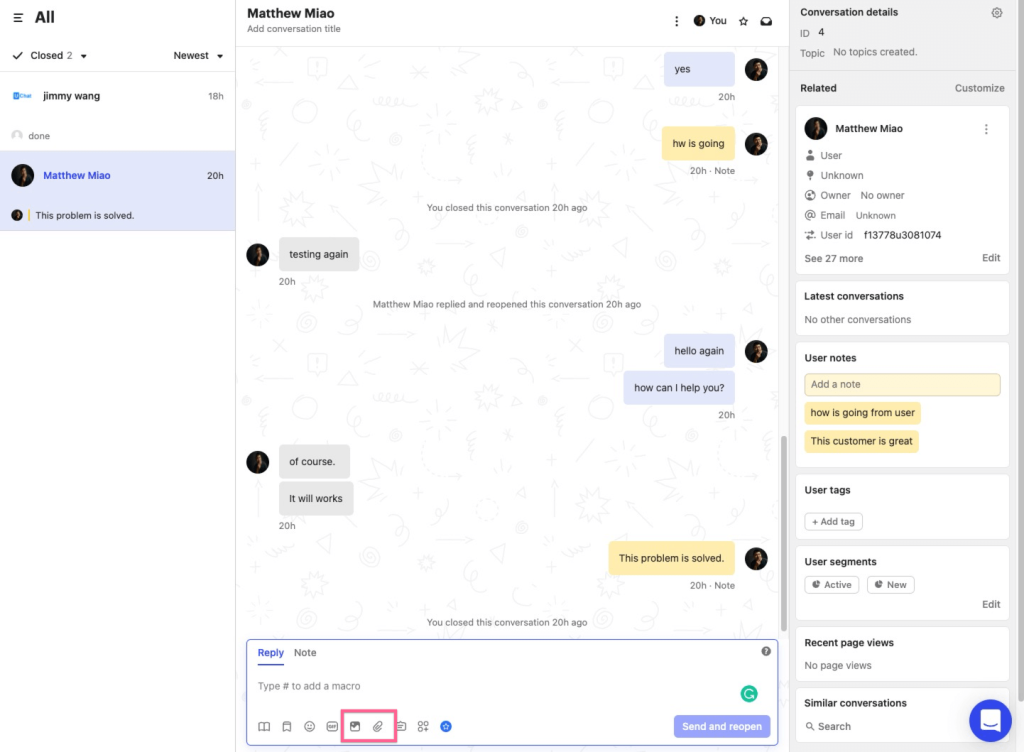
Fin answers around the clock, so overnight questions no longer stack up for the morning shift. A drag-and-drop workflow builder routes, tags, and escalates conversations automatically behind the scenes. They also used interactive product tours to guide new users through features, and the mobile SDK pushed targeted in-app messages and surveys.
That combination put support, onboarding, and growth inside a single workspace, which saved them from stitching together separate tools. It suits SaaS teams with an app to talk to, though I would plan some time for the team to learn the workflow tools.
Pros:
- Unified inbox combines chat, email, and social channels into one clean view
- Workflow builder automates routing, SLAs, and follow-ups without manual tracking
- Fin hands off with the full conversation history intact
- Interactive product tours speed up feature adoption for new customers
- Mobile SDK pushes targeted in-app messages and surveys to users
Cons:
- Interface has a learning curve for teams new to workflow automation tools
- Support responsiveness can dip during peak periods
How Intercom Compares With FlowXO: FlowXO focuses on bots and automation. Intercom is a full engagement platform with an AI agent, a shared inbox, product tours, and in-app messaging. It makes sense when you have an app to support and onboard users in. It is more than you need if all you want is a website bot, so I would match the tool to the size of the job.
User Rating: 4.5/5 (G2)
Price: Starts at $29/seat/month
8. Freshchat: Best for Freshworks Suite Users
For a SaaS team already on Freshdesk, Freshchat slotted in like the missing piece. They had the AI bot, live chat, and knowledge base suggestions talking to each other in under an hour.
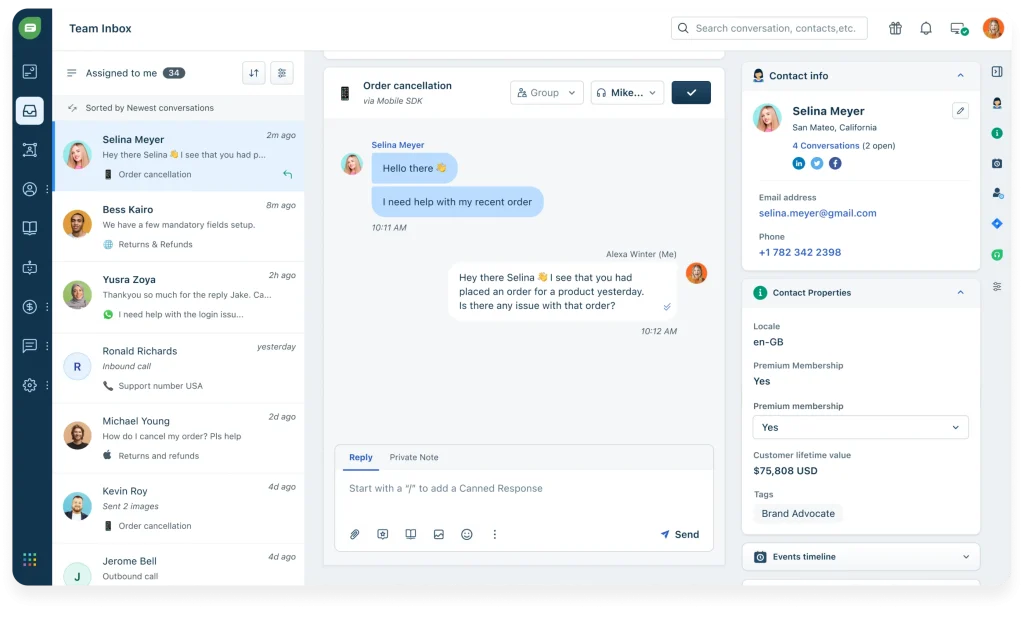
Freddy AI handles several languages, reads sentiment, and nudges priority chats toward a human rep instead of leaving them waiting in a queue. Agents get rich visitor profiles, and CSAT surveys appear right inside the thread. They built the first bot with the no-code flow builder, starting from a pre-trained FAQ template, and then added campaigns triggered by page behavior.
Omnichannel coverage spans web, mobile, WhatsApp, and Apple Business Chat from one shared inbox. Everything lived on one screen, so marketing, support, and success stopped juggling three different tools. The big payoff is CRM-level context for agents whenever Freshworks apps share data. Teams outside that family may find advanced bot flows less intuitive than simpler standalone tools.
Pros:
- Grows natively with other Freshworks apps, giving agents full CRM-level context instantly
- Freddy AI suggests replies and tags intent automatically, speeding up every response
- Pre-trained FAQ templates in the no-code flow builder get you live fast
- Trigger campaigns based on user journey and page behavior to boost timely engagement
- In-thread CSAT surveys capture feedback without sending customers elsewhere
Cons:
- Syncing across multiple Freshworks products at once can lag occasionally
- Setup for advanced bot flows can feel less intuitive than simpler standalone tools
How Freshchat Compares With FlowXO: FlowXO connects to other apps through direct integrations and Zapier or Make. Freshchat works natively with Freshdesk, Freshsales, and Freshmarketer, so agents see CRM context on one screen. I would pick Freshchat if your team already lives in Freshworks. If you do not, I would not take on that dependency just for the chat widget.
User Rating: 4.4/5 (G2)
Price: Starts at $19/agent/month
9. Chatfuel: Best for AI-Driven Sales & Customer Engagement on Social
Borrowing a friend’s skincare store for a weekend let me test Chatfuel properly. By Sunday night, the Instagram DM bot was matching shades and sending qualified leads straight to Shopify checkout, and neither of us touched the backend again.
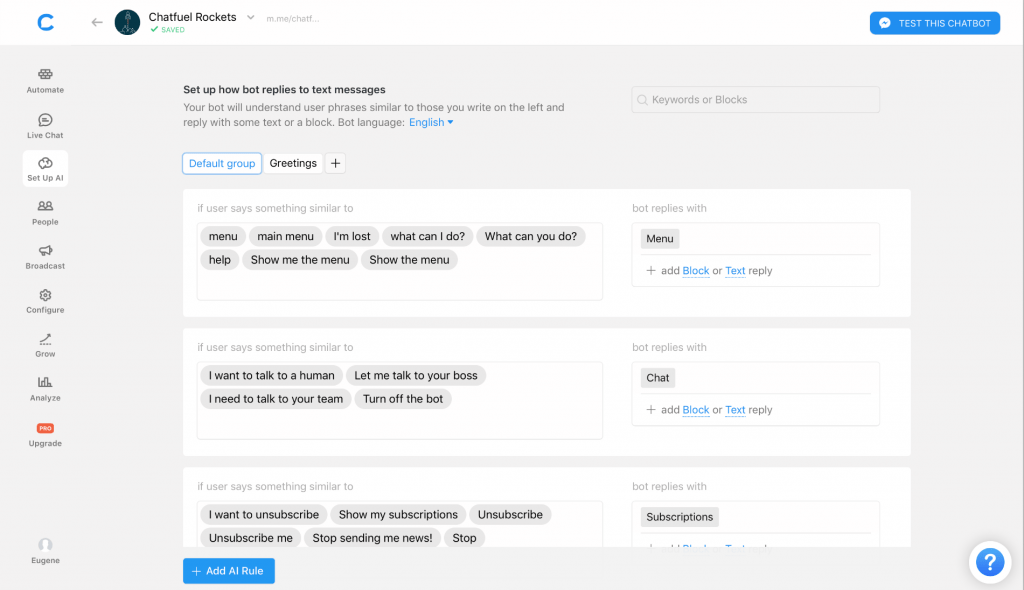
The drag and drop composer comes with ready eCommerce templates, and quick reply buttons walk shoppers through product quizzes. GPT-powered replies add a human tone that older template bots never had, and in-chat payments through Stripe and PayPal shorten the path to purchase.
The one-click Shopify integration also handled cart recovery and order updates automatically for the owner. The software lives exactly where customers scroll, which is why setup felt closer to a simple design tool than a coding project. If most of your revenue starts on Meta platforms, this can be one of the quickest routes from a comment to an order confirmation. It matters less for pure website support.
Pros:
- Instagram comment-to-DM automation turns giveaways into qualified lead capture
- Story replies, and QR codes turn every social touchpoint into an opt-in
- Ready-made eCommerce templates speed up launch
- Shopify integration covers cart recovery and order updates
- Stripe and PayPal support let shoppers pay without leaving the chat
Cons:
- Support quality can feel inconsistent at times
- Best suited for Meta channels, so non-social website use cases feel limited
How Chatfuel Compares With FlowXO: FlowXO spreads across several channels, including SMS, Telegram, and Slack. Chatfuel is built around Meta channels, with growth tools like comment-to-DM and story replies. I would pick Chatfuel if your revenue starts in social DMs and checkout happens on Shopify. For website-first support, another tool on this list is a better fit.
User Rating: 4.4/5 (G2)
Price: Starts at $49/month
10. Tawk.to: Best for Simple Live Chat and Ticketing for Small Teams
Wanting live chat without hiring a developer, a friend who runs a small landscaping business pasted one Tawk.to script into her homepage and was live within minutes. That quick start is what I remember most about her setup. I usually recommend it as a first live chat tool for non-technical owners.
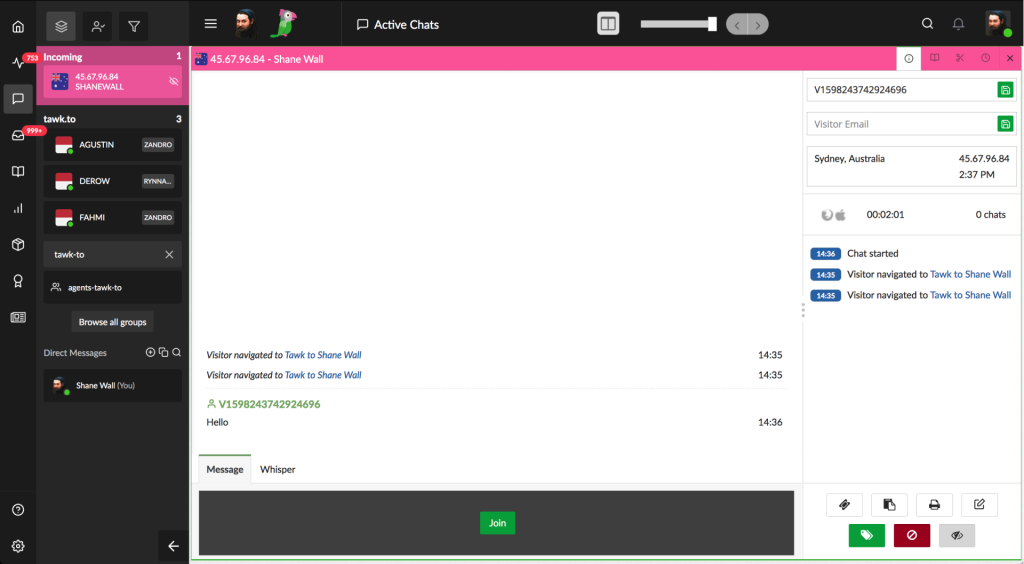
Her dashboard covers live chat, basic ticketing, and a small knowledge base, so she is not juggling separate tools for each job. She answers visitors between jobs from the iOS app, then checks real-time analytics to see who is browsing and which pages they read.
When she wanted after-hours coverage, she found that hired agents can answer chats for her. The AI side is lighter than purpose-built chatbot tools, so I would not choose it for complex automation or detailed flows. For a bootstrapped team that mainly needs dependable live chat with some self-help content, it covers the essentials.
Pros:
- Live chat, ticketing, and a basic knowledge base share one dashboard
- iOS and Android apps make on-the-go replies simple
- Real-time visitor analytics show exactly who is browsing your site
- Setup takes minutes with a simple script paste, no developer needed
- An optional hired agent service can cover after-hours chats
Cons:
- Occasional technical glitches can show up during peak traffic
- AI features feel less advanced compared with purpose-built AI chatbot tools
How Tawk.to Compares With FlowXO: Tawk.to is a live chat tool first, with ticketing, a knowledge base, and mobile apps. FlowXO is a bot builder first. I would pick Tawk.to when humans will answer most chats, and you want a simple, dependable live chat. I would not pick it when you need strong AI answers or multi-step automation, since FlowXO and several tools above go further there.
User Rating: 4.5/5 (G2)
Price: Starts at $0/month (free core plan)
How I Chose These FlowXO Alternatives
When I evaluate chatbot platforms for this list, I don’t just rely on feature lists or marketing claims. I look at how these tools actually perform in real-world scenarios. Here’s the framework I used on all competitors of FlowXO, so every recommendation is practical, reliable, and worth considering:
- User Reviews / Ratings: I start by looking at real user feedback from platforms like G2. This gives me a clear picture of how teams actually experience the tool day to day, what they love, and where it falls short.
- Core Features & Functionality: I focus on what truly matters in chatbot software. This includes training on your own content, bot-to-human handoff, integrations, and omnichannel support. If a tool cannot handle these well, it does not make the cut.
- Ease of Use: I pay close attention to how intuitive the platform feels. A tool might be powerful, but if teams struggle to adopt it, it defeats the purpose. Clean interface, simple navigation, and quick onboarding are non-negotiable for me.
- Customer Support: From my experience, implementation is where many tools fail. I evaluate how responsive and helpful the support team is, especially during setup and ongoing use. Fast, reliable support makes a big difference in adoption.
- Value for Money: I compare pricing with what the tool actually delivers. This is not about picking the cheapest option, but about whether the features, flexibility, and performance justify the cost, including usage limits such as chats, AI credits, and seats.
- Personal Experience / Expert Insights: Wherever possible, I rely on my own hands-on experience with these tools. I also consider insights from support managers, marketing operations leads, and agencies that run chatbots in real environments. This helps me go beyond surface-level reviews and highlight what actually works.
Top 3 FlowXO Alternatives
After comparing all ten platforms against each other, three consistently came out on top for different reasons. The right one for you depends on where FlowXO has been letting you down.
1. ProProfs Chat
ProProfs Chat is my top overall pick because it solves the problems that FlowXO users raise first. It trains on your website, help center, or PDFs in minutes, cites the source behind every answer, and hands chats to a human with the full conversation attached. A drag-and-drop flow builder with ready templates covers lead generation, support, and appointments, while connections to Salesforce, Zoho, WordPress, Wix, and Shopify keep your stack together.
2. Landbot
Landbot is the right pick if your biggest complaint is a builder that is hard to follow. The visual canvas keeps every branch readable, AI blocks sit inside the flow, and human takeover lets your team step in when a visitor wants a person. It also runs on your website, Messenger and WhatsApp Business.
3. Tidio
Tidio earns its place for teams that answer customers every day and want chats to become tickets. Live chat, a shared inbox, and an AI agent trained on your website data sit in one dashboard, so you spend less time stitching tools together.
FREE. All Features. FOREVER!
Try our Forever FREE account with all premium features!
What to Verify on FlowXO Before Switching?
Before you commit to leaving, spend ten minutes on FlowXO’s own pricing and documentation pages. Third-party sources disagree on some details, so confirm these points directly and write the numbers down.
- Interaction limits: Check how many interactions your plan includes each month and what happens when you pass the cap, so a busy week does not surprise you.
- Active bot limits: Count the bots or active flows you run today. FlowXO meters these, so extra ones can become an add-on.
- AI credits: Find out how many credits a typical AI answer uses, then multiply by your monthly chat volume to estimate real usage.
- Team seats: List everyone who needs inbox access, since seats are metered too, and handoff teams tend to grow faster than expected.
- Your integrations: Check each app you rely on, either as a direct integration or through Zapier or Make, and note which ones need an extra tool.
- Data export: Ask what you can export, such as contacts, attributes, and conversation history, before you plan a move.
How to Switch From FlowXO Without Breaking Your Bot?
Switching is easier when you treat it as a checklist. Here is the order I would follow when moving a bot to any of the alternatives to FlowXO above, so nothing breaks on a live site.
- Audit your flows: Export or screenshot every active flow and rank them by traffic, so you rebuild the busiest five first.
- Gather your sources: Collect the website URLs, help center articles, and PDFs your bot answers from, since AI-first tools can train on these directly.
- Map your channels: Write down every channel in use, such as website, WhatsApp, or Facebook, and confirm the new tool covers each one.
- Reconnect your stack: Re-link your CRM, email, and ticketing tools first, such as Salesforce, Zoho, or Zendesk, and confirm each sync works.
- Rebuild your handoff: Decide which topics go to a human, who receives them, and what chat context travels with the conversation.
- Pilot one page: Put the new bot on a single high-traffic page while FlowXO stays live elsewhere, then compare resolved chats for a week.
- Retire the old bot: Redirect the remaining pages once the pilot holds up, and keep a backup of your exports before you cancel.
How to Test an Alternative Before Buying?
A short trial on your own content tells you more than any demo or review. Here is the seven-day test I would run, so you can judge answer accuracy and handoff quality before you pay for anything.
- Use your content: Train the bot on your own website pages and PDFs, not a demo site, because accuracy on your real content is the only score that matters.
- Ask 20 questions: Pull them from your inbox or past chats, and include five that the bot should not be able to answer.
- Test the handoff: Trigger an escalation yourself and check that the full chat history reaches the human agent, so customers never repeat themselves.
- Mix scripted and AI: Keep routine FAQs on scripted answers and let AI handle the unusual questions, then watch how usage grows so costs stay predictable.
- Time the support: Ask one setup question during the trial and note how long the reply takes, because that is your onboarding preview.
- Check the reports: Open the analytics and see whether you can find unanswered questions, conversation volume, and handoff rates without exporting a spreadsheet.
Pick the FlowXO Alternative That Fits Your Job
Switching from FlowXO comes down to three checks: can the bot answer from your own content, does it hand off to a human with full context, and can you see what to fix next? Landbot and Tidio suit visual flows and live chat, but I would start with ProProfs Chat.
It trains on your website, help center, or PDFs in minutes, cites the source behind every answer, and passes the whole conversation to your team.
Paste your website URL into its forever-free plan this week, test your ten most common visitor questions, and trigger one handoff before deciding.
Frequently Asked Questions
Is FlowXO free?
FlowXO lists a free plan for the website channel, with monthly caps on interactions, active bots, and AI credits. Paid plans raise those limits and add team seats, so check its pricing page for current numbers before planning around it.
Does FlowXO support WhatsApp and Instagram?
FlowXO's published channel list includes WhatsApp, along with the website, Facebook Messenger, SMS, Telegram, and Slack. Instagram does not appear on that list, so confirm with FlowXO before planning around Instagram DMs.
Does FlowXO have built-in live chat?
One detailed third-party review describes a built-in live chat inbox with auto-assignment rules, while another review site claims otherwise. Test the human handoff inside a FlowXO trial before depending on it.
How many operators does a small team need?
Start with the number of people who will manage live handoffs, not total headcount. Most small teams begin with one operator plus a bot for FAQs and lead capture, then add seats as chat volume grows.
Should agencies look for anything different in chatbot software?
Yes. Confirm white labeling and multi-site or multi-client management upfront, since adding them after onboarding clients is difficult. Also, check whether branding removal is included or sold as an add-on.
Will a new chatbot create full leads in my CRM or only contacts?
It depends on the tool. Some only create basic contacts, so ask the vendor whether full leads with qualifying details reach your CRM, and confirm it with a sample record before switching.
FREE. All Features. FOREVER!
Try our Forever FREE account with all premium features!

 We'd love your feedback!
What did you like & how can we make it even better?

 Thanks for your feedback!
 Ask Your Question
Have a question? Get expert help to make your decision easier.