I still remember the first time a customer typed a question into our site chat, and the bot just froze, then repeated the same line twice. That is usually the moment small business owners start actively comparing chatbot software instead of settling for whatever came free with their website builder.
According to the Capgemini Research Institute’s 2025 report, only 45% of consumers said they were satisfied with the customer service they received.
That gap usually comes down to three things. The bot cannot answer using your own content. Escalation to a human feels clunky. Pricing hides the real cost until you are already signed up.
I tested this list of chatbot software against real reviews and my own hands-on use, so you can pick one that actually solves this instead of adding to it.
What Is Chatbot Software?
Here is why that matters once you actually start using one:
- Saves time by answering repetitive questions like order status or pricing automatically
- Keeps visitors engaged with instant responses instead of slow email replies
- Trains on your own website, help center, or PDFs for accurate answers, which is what most AI chatbot software buyers want today
- Hands off to a human with full chat context the moment a query gets complex
- Unifies your website, WhatsApp, Instagram, and Facebook in one dashboard, key if you are choosing chatbot software for website and social channels together
- Scales with transparent pricing, so costs stay predictable as chat volume grows
10 Best Chatbot Software for Different Business Needs
I checked software review sites like G2 and Capterra to see what real users like and dislike, then combined that with hands-on testing to put this list together.
| Tool | Best For | Starting Price | User Rating |
| ProProfs Chat | Easy Live Chat & AI Customer Service Agent for Instant, Automated Support | Forever free for 1 operator. Paid starts at $19.99/operator/month | 4.5/5 (G2) |
| Freshchat | Freshworks Suite Users | Starts at $19/agent/month | 4.4/5 (G2) |
| Intercom | Omnichannel Platform With Messenger & App | Starts at $29/seat/month | 4.5/5 (G2) |
| Chatfuel | AI-Driven Sales & Customer Engagement | Starts at $49/month | 4.4/5 (G2) |
| Botpress | Building AI Agents With LLM-Powered Automation | Starts at $150/month | 4.5/5 (G2) |
| Tawk.to | Free Live Chat for Budget-Conscious Small Businesses | Starts at $0/month (free core plan) | 4.5/5 (G2) |
| Tidio | Live Chat With Ticketing Functionality | Starts at $24.17/month | 4.6/5 (G2) |
| ManyChat | Making Chatbots for Messaging Apps | Starts at $14/month | 4.5/5 (G2) |
| Flow XO | Automating Customer Interactions via AI Chatbots | Starts at $25/month | 4.5/5 (G2) |
| Zendesk | Converting Sales & Engaging Customers With Free Live Chat | Starts at $19/agent/month | 4.3/5 (G2) |
1. ProProfs Chat – Best for Easy Live Chat & AI Customer Service Agent for Instant, Automated Support
I run ProProfs Chat, one of the easiest chatbot software options I have tested, on two commerce sites, and the AI agent handles the night shift so my team gets to sleep. Advanced AI support agent training pulls straight from your website, help center, and FAQs, so every AI-generated answer draws from your real data with the source cited alongside it.
Getting started took almost no effort. I entered my website URL, and ProProfs AI built an AI Customer Support Agent that started responding to customer questions almost immediately.
Once live, the AI Customer Service Agent handles tasks like updating orders and scheduling meetings directly from chat, and it connects with ProProfs Knowledge Base and ProProfs Help Desk for complete 360-degree support.
Sentiment analysis reads emotions in real time and feeds into risk prediction, so my team knows who needs attention first. Resolution overviews and AI agent performance reports, then continuously track satisfaction.
Plus, I think their free plan is a great place to start if you’re new to AI chatbots. You get to use the complete package yourself and see if it is worth an investment.
Pros:
- AI trains on your website, PDF, or raw text in one click, so setup takes minutes
- Action-based AI agents update orders and schedule meetings directly inside the chat window
- Sentiment analysis flags frustrated customers early, so agents step in before churn happens
- Resolution overviews and AI performance reports help you continuously improve chatbot accuracy
- Proactive triggers launch on exit intent or high cart value, catching hesitant buyers instantly
Cons:
- Cloud-only, so there is no offline access
- No dark theme
User Rating: 4.5/5 (G2)
Price: Forever Free for a single operator. Starts at $19.99/operator/month
ProProfs Chat helped Colorado Theological Seminary reduce phone calls and email inquiries by giving students quick access to FAQs and live support. This saved staff time and resources while helping prospective students get faster answers, contributing to increased enrollments and graduates.

2. Freshchat – Best for Freshworks Suite Users
If you are already running Freshdesk, Freshsales, or Freshmarketer, Freshchat slots in like the missing piece of the puzzle. I wired it up for a SaaS client last quarter and had the AI bot, live chat, and knowledge base suggestions all talking to each other in under an hour.
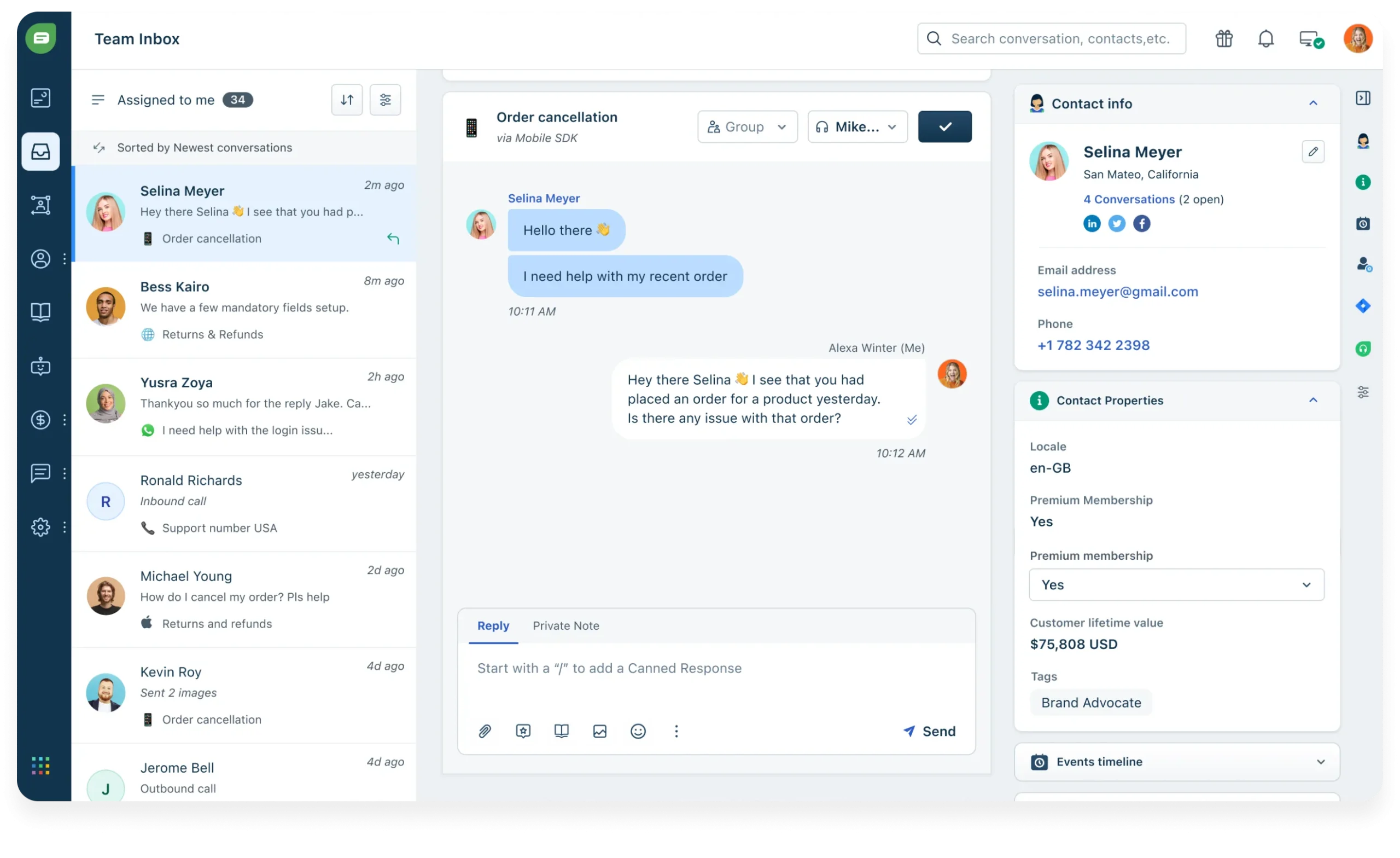
The Freddy AI layer handles multiple languages, auto-detects sentiment, and nudges priority chats toward human reps instead of letting them sit in a queue for hours on end waiting. You get unified inboxes, rich visitor profiles, and in-thread CSAT surveys, so marketing, support, and success finally look at the same screen instead of three different tools.
Pricing starts low, which helps if you are testing the waters, but keep an eye on extra bot conversation packs once your chat volume climbs, since that is where the bill can creep up faster than most first-time buyers expect going in.
Pros:
- Grows natively with other Freshworks apps, giving agents full CRM level context instantly
- Omnichannel inbox covers web, mobile, WhatsApp, and Apple Business Chat in one screen
- Freddy AI suggests replies and tags intent automatically, speeding up every response
- No code flow builder with pre-trained FAQ templates gets you live fast
- Trigger campaigns based on user journey and page behavior to boost timely engagement
Cons:
- Occasional lag reported when syncing across multiple Freshworks products at once
- Setup for advanced bot flows can feel less intuitive than simpler standalone tools
User Rating: 4.4/5 (G2)
Price: Starts at $19/agent/month
3. Intercom – Best for Omnichannel Platform With Messenger & App
Intercom’s Fin AI agent plugs straight into the iconic Messenger widget you have probably seen on half the SaaS sites you visit daily. I deployed it on a fintech app and watched deflection jump within the first week without touching a single line of code.
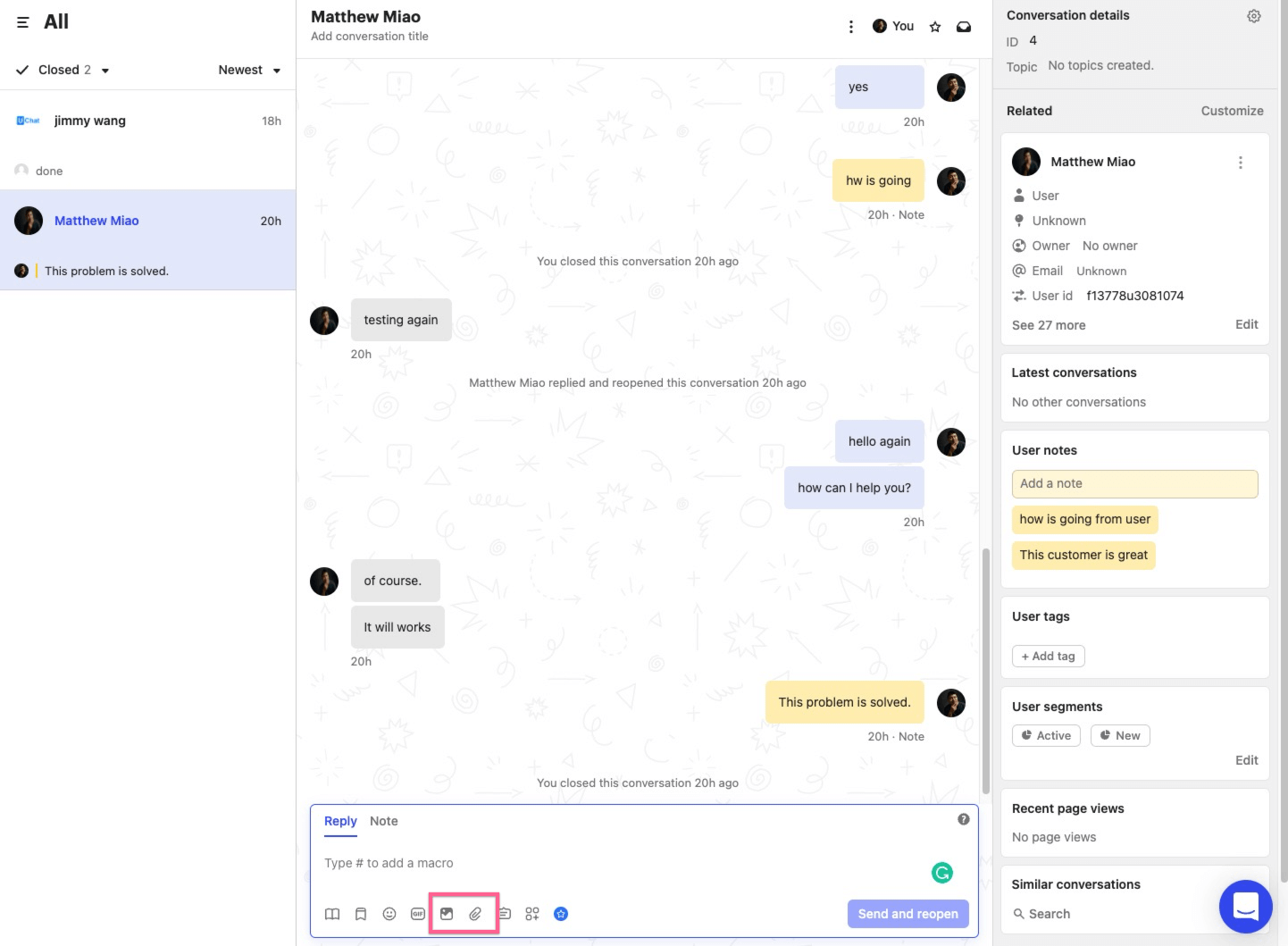
Fin scrapes your help center, answers in natural language, and flips the thread to a human with full context the moment things get complicated, so customers never have to explain themselves twice. Behind the scenes, an omnichannel inbox merges email, chat, and social DMs into one place, while a drag-and-drop workflow builder routes, tags, and escalates conversations automatically.
Add interactive product tours and push notifications on top, and you get support, onboarding, and growth working from the same cockpit. Just watch the AI resolution fees closely, since they sit on top of your seat pricing and can add up quickly once volume grows.
Pros:
- Fin AI answers 24/7 and hands off with full conversation history intact
- Unified inbox combines chat, email, and social channels into one clean view
- Workflow builder automates routing, SLAs, and follow ups without manual tracking
- Interactive product tours accelerate feature adoption for new customers automatically
- Mobile SDK pushes targeted in-app messages and surveys directly to users
Cons:
- Interface has a learning curve for teams new to workflow automation tools
- Some users report a dip in support responsiveness during peak periods
User Rating: 4.5/5 (G2)
Price: Starts at $29/seat/month
4. Chatfuel – Best for AI-Driven Sales & Customer Engagement
I did not run Chatfuel on my own site. I borrowed a friend’s DTC skincare store for a weekend hack fest instead, out of curiosity. By Sunday night, the Instagram DM bot was fielding shade matching questions and handing qualified leads straight to Shopify checkout without either of us touching the backend again.
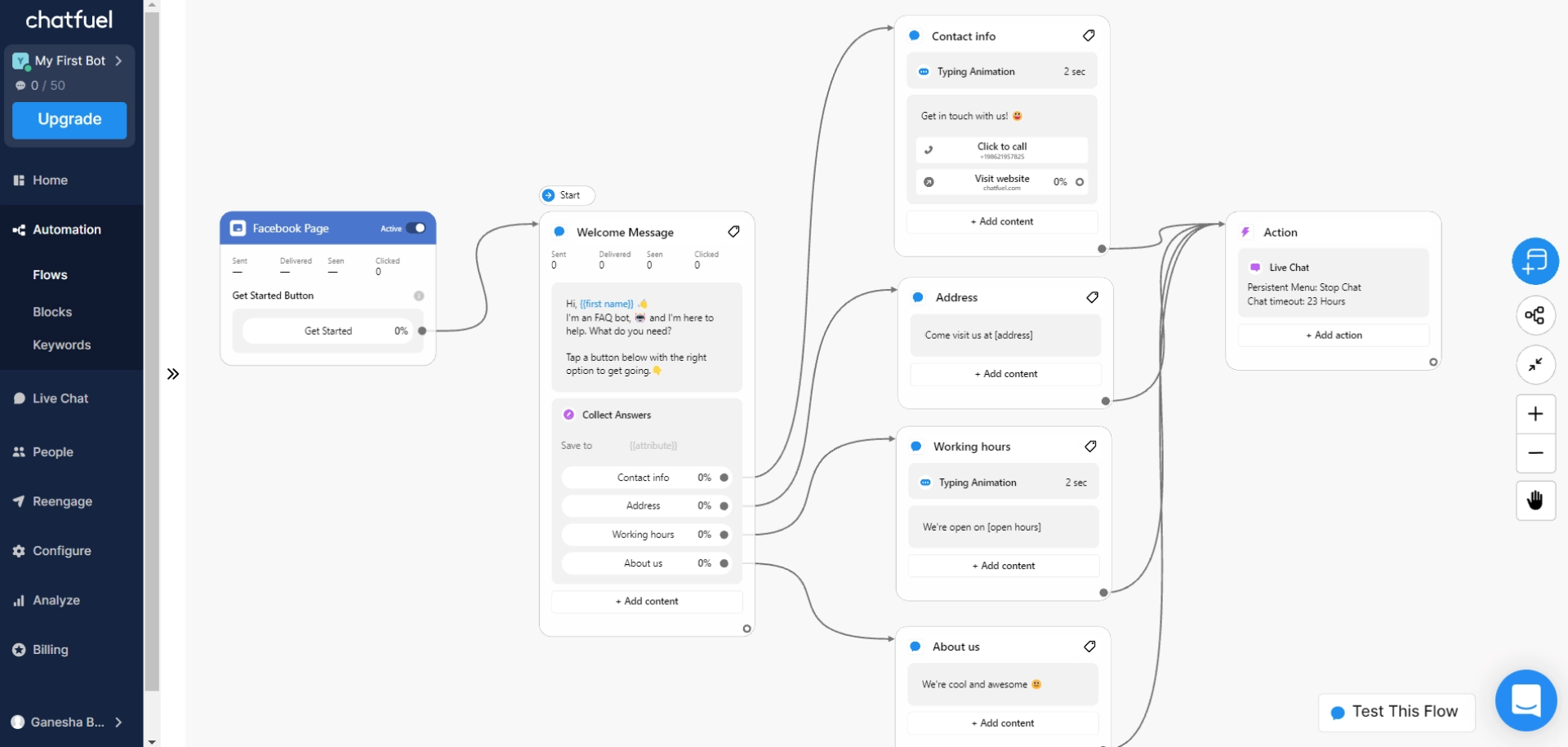
The software lives exactly where customers scroll, meaning Facebook Messenger, Instagram, and WhatsApp, and the no-code flow builder feels like a simplified design tool for chat rather than a coding project.
The newer GPT-powered responses add a human-sounding flair that the older template-based replies never had. Built-in growth widgets like comment to DM, story replies, and QR codes turn every social touchpoint into an opt-in funnel worth watching. If your revenue mostly starts on Meta platforms, this can be one of the fastest routes from a comment to an order confirmation.
Pros:
- Drag and drop composer with ready made eCommerce templates speeds up launch
- Instagram comment to DM automation turns giveaways into qualified lead capture
- Quick reply buttons guide shoppers smoothly through product quizzes and recommendations
- One click Shopify integration handles cart recovery and order updates automatically
- In chat payment support via Stripe and PayPal shortens the path to purchase
Cons:
- Customer support quality has been inconsistent according to several reviewers
- Best suited for Meta channels, so non-social website use cases feel limited
User Rating: 4.4/5 (G2)
Price: Starts at $49/month
5. Botpress – Best for Building AI Agents With LLM-Powered Automation
If you prefer Git commits over drag and drop builders but still want cutting-edge AI, Botpress hits a sweet spot most no-code tools cannot reach. The open source core lets you host on your own server, while Cloud Studio layers a visual builder on top for the parts you do not want to hand-code.
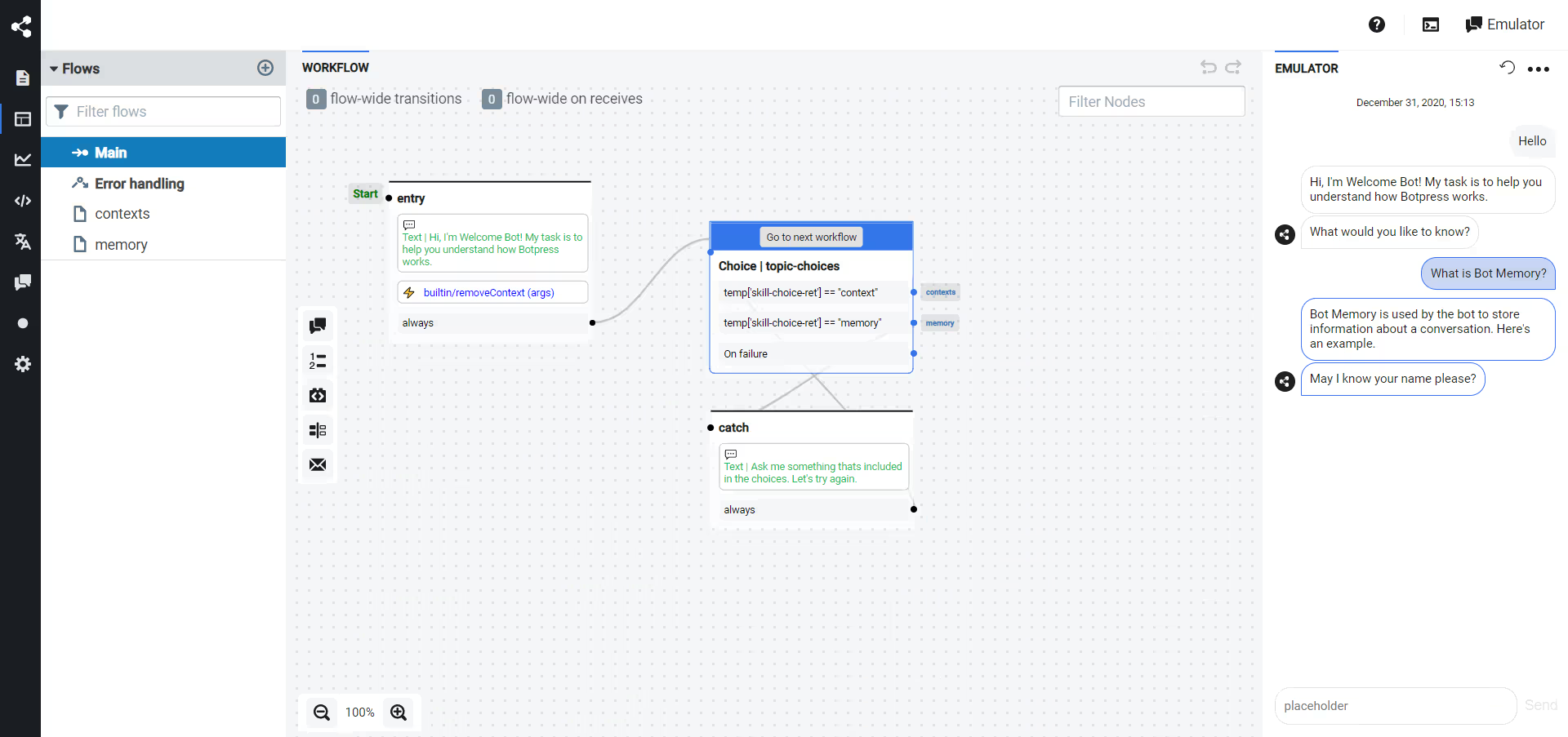
I point an agent at my docs, flip on the retrieval node, and the system wires RAG straight into the flow with no manual vector setup required on my end at all. Every step is just a JavaScript function under the hood, so I can version flows, run unit tests, and ship changes through CI/CD like any other microservice in my stack.
It genuinely feels like DevOps for chatbots, minus the babysitting. Just know that this is built for teams comfortable with code, not a true drag-and-drop option for non-technical owners.
Pros:
- Retrieval nodes plug LLM answers directly into your private knowledge base
- Event based architecture triggers bots reliably from webhooks or API calls
- Native modules cover WhatsApp, Slack, Messenger, and web widget out of the box
- Hot swap between GPT-4, Claude, or open source models per node
- CLI deploys let you roll back bots just like any other service
Cons:
- Requires comfort with code, so it is not truly beginner friendly
- Steeper setup time compared to drag and drop chatbot builders
User Rating: 4.5/5 (G2)
Price: Starts at $150/month
6. Tawk.to – Best for Free Live Chat for Budget-Conscious Small Businesses
A friend of mine runs a small landscaping business and refused to pay for live chat until I pointed her toward Tawk.to last year. The entire core product is free, unlimited agents, unlimited chat volume, and unlimited sites, which is rare in a category where free usually means capped and restricted.
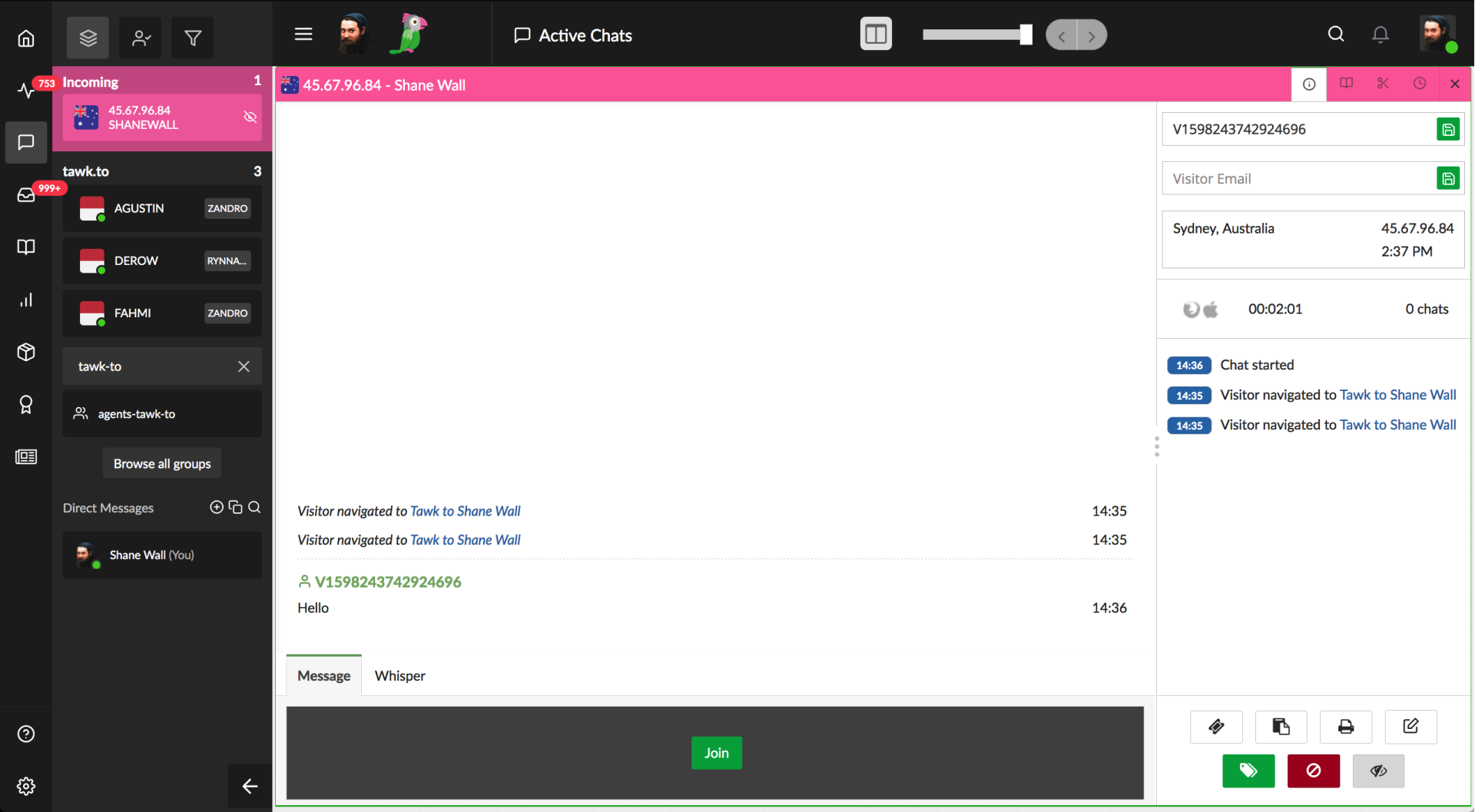
She pasted the script into her homepage and was live within minutes without touching a developer. The dashboard covers live chat, a basic ticketing system, a small knowledge base, and mobile apps for iOS and Android, so she is not stuck juggling separate tools for each channel.
If she wants the chat widget without Tawk.to branding, that is a small paid add-on, and there is even an optional hired agent service if she ever wants a real human answering after hours. For a bootstrapped small business just getting started with chat, it is hard to beat the price.
Pros:
- Unlimited agents, chats, and sites are included on the core plan
- Live chat, ticketing, and a basic knowledge base sit inside one dashboard
- Mobile apps for iOS and Android make on-the-go replies simple
- Real time visitor analytics show exactly who is browsing your site
- Setup takes minutes with a simple script paste, no developer needed
Cons:
- Some users report occasional technical glitches during peak traffic
- AI features feel less advanced compared to purpose built AI chatbot tools
User Rating: 4.5/5 (G2)
Price: Starts at $0/month (free core plan)
7. Tidio – Best for Live Chat With Ticketing Functionality
One of the eCommerce stores I personally advise outgrew pure live chat but was not ready to invest in a full help desk system yet, so we tried Tidio to bridge that exact gap. The blended inbox plus AI agent covered it nicely without adding much complexity to our setup.
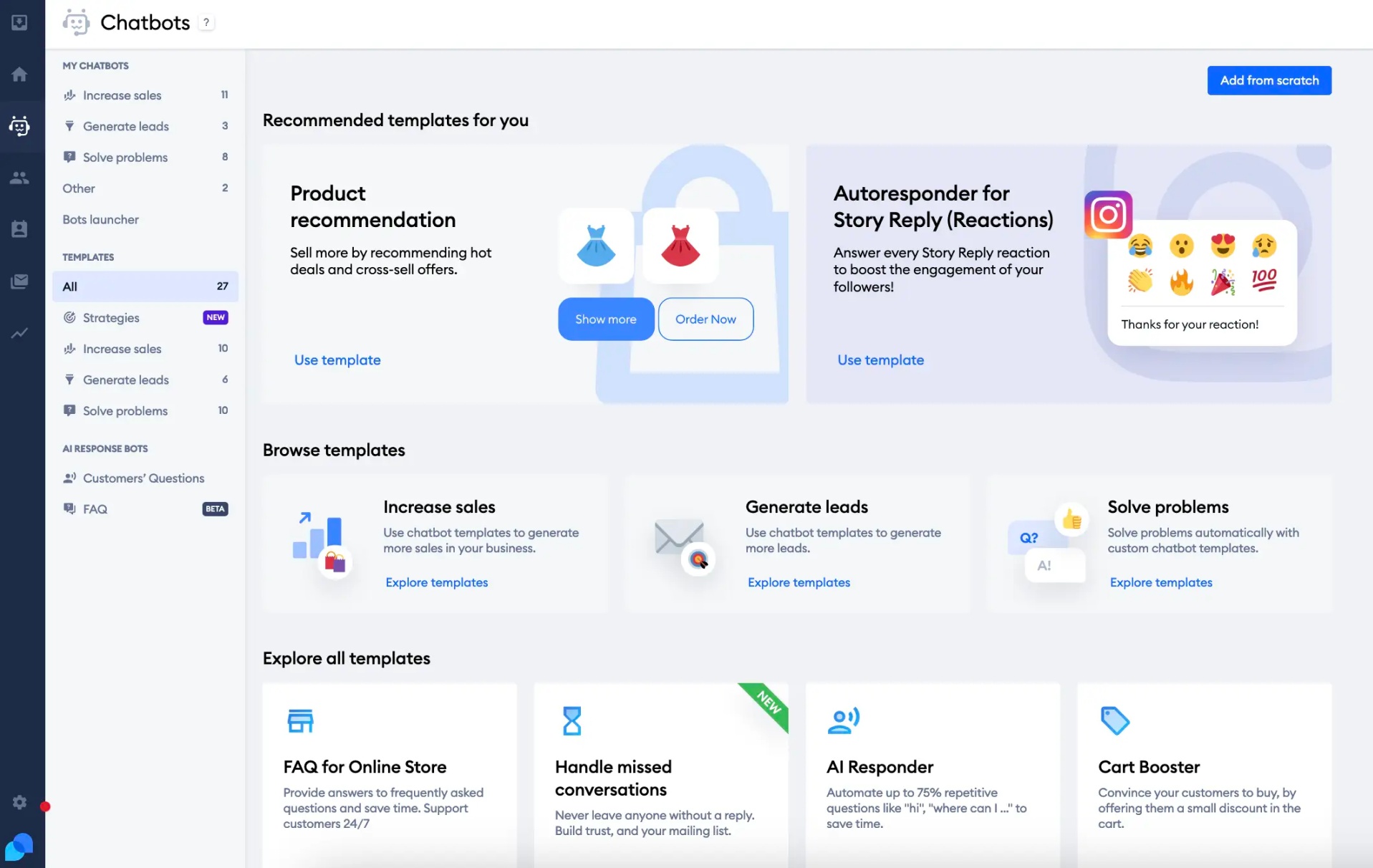
The widget greets visitors and fields routine where is my order questions on its own, and when something needs more attention, it converts the chat into a ticket that lands right on the same dashboard. Agents can reply from mobile, snooze threads, and trigger automated follow-ups without juggling multiple tools throughout the day.
The AI agent trains on website data and Shopify catalogs directly, while visual workflows let you build product quizzes or upsell pop ups in a few minutes. For a small team that wants support and light automation under one roof, Tidio checks most of the boxes.
Pros:
- Unified inbox merges live chats, emails, and Messenger threads in one place
- AI Agent trains on website data and handles order status questions automatically
- Chat to ticket conversion keeps longer issues organized and easy to track
- Visitor typing preview lets agents prepare answers before the message even arrives
- Proactive messages trigger on time on the page or cart value to boost conversions
Cons:
- Automation setup can feel daunting for teams without prior chatbot experience
- Customer support responsiveness has been inconsistent, according to some reviewers
User Rating: 4.6/5 (G2)
Price: Starts at $24.17/month
8. ManyChat – Best for Making Chatbots for Messaging Apps
A growth marketing friend of mine runs fitness challenges on Instagram, and ManyChat handles almost all of her direct messages at this point in her fast-growing coaching business today. When someone comments “START” on her post, the bot jumps straight into the thread, collects their email and fitness goals, and schedules workout reminders, with no human touch required on her end at all.
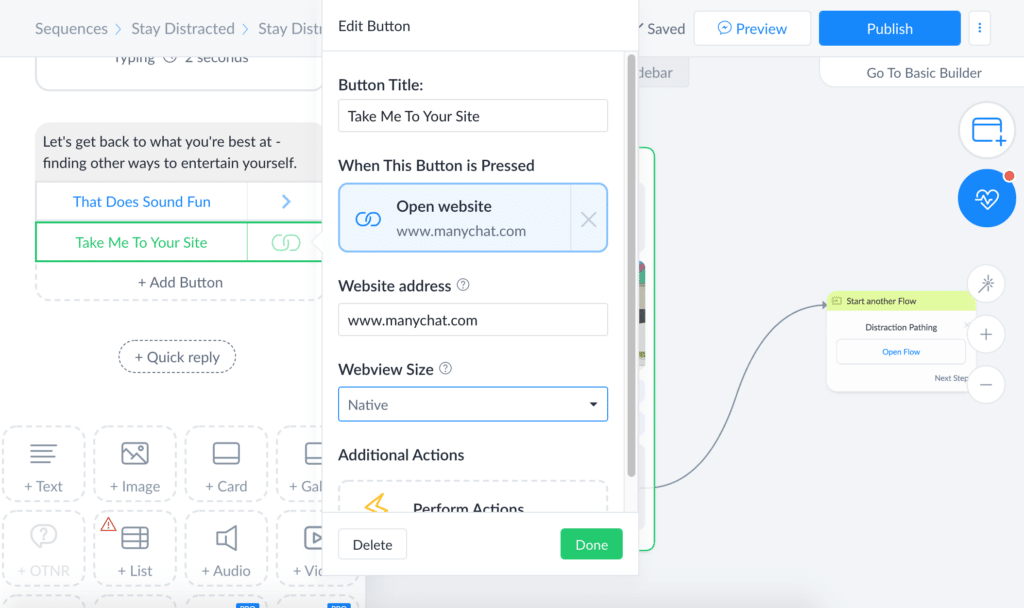
That is really the whole playbook here, pairing simple visual flows with Meta’s messaging entry points like comments, story mentions, and swipe-up links, then letting the bot qualify, nurture, and even process payments on its own.
GPT-powered quick replies keep the tone conversational, while built-in SMS and email steps extend the sequence past the walled garden of social apps. If your audience mostly lives on Instagram, Facebook, or WhatsApp, this turns every emoji reaction into first-party data she can act on later.
Pros:
- Visual flow builder with drag and drop messages and delays speeds up building
- Native integrations for Shopify, Stripe, and Google Sheets remove manual data entry
- User tagging and custom fields enable precise audience segmentation
- Broadcast scheduler sends promos to filtered subscriber lists automatically
- A/B testing built into every message block helps you optimize continuously
Cons:
- Best suited for Meta and messaging channels, less useful for pure website chat
- Advanced automation flows can take time to learn for first time users
User Rating: 4.5/5 (G2)
Price: Starts at $14/month
9. Flow XO – Best for Automating Customer Interactions via AI Chatbots
I watched a nonprofit roll this out last year, and it genuinely surprised me how much ground one flow covered without a single line of code being written. Flow XO sits right at the crossroads of chatbot and automation platforms.
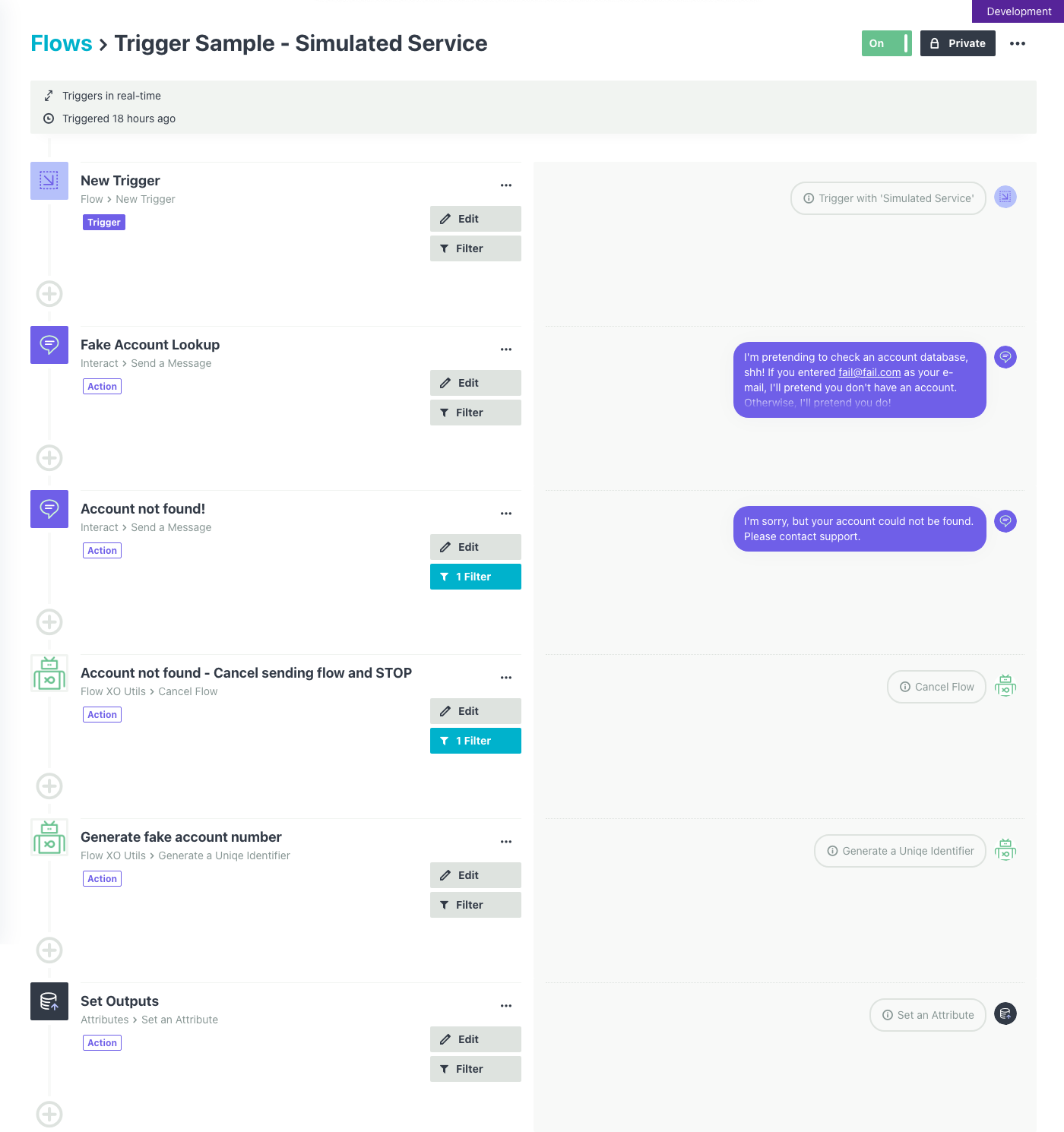
On the same drag and drop canvas, you can design a web or Messenger bot complete with welcome texts, quick reply buttons, and NLP keyword rules, then bolt on SMS follow-ups, Google Sheets logging, or Slack pings on top of it. In this case, the bot qualified donors on the landing page, texted a confirmation, and alerted the finance team in Slack, all from three channels and one flow.
Because every step can branch based on user input, you get personalized conversations without juggling APIs or writing custom scripts. For small teams that want automation stitched across tools, not just a chat widget, this is worth a serious look.
Pros:
- Visual canvas builds chat flows, SMS, and backend tasks together in one place
- Ready NLP keyword rules trigger the right response block automatically
- Quick reply buttons and rich cards make navigation easier for visitors
- Live chat takeover lets staff join any in-progress conversation instantly
- Conditional logic branches flow by responses, tags, or time triggers
Cons:
- Interface and flow structures feel more basic compared to newer AI-first platforms
- Best fit for straightforward automations rather than complex AI conversations
User Rating: 4.5/5 (G2)
Price: Starts at $25/month
10. Zendesk – Best for Converting Sales & Engaging Customers With Free Live Chat
When a support team is already knee deep in Zendesk tickets, macros, and SLAs, bolting on a separate standalone chatbot tool just creates another silo to manage every single working day. That is exactly the problem Zendesk’s Advanced Bot solves by living inside the same agent workspace, pulling answers straight from your Guide articles and updating tickets in real time as conversations happen.
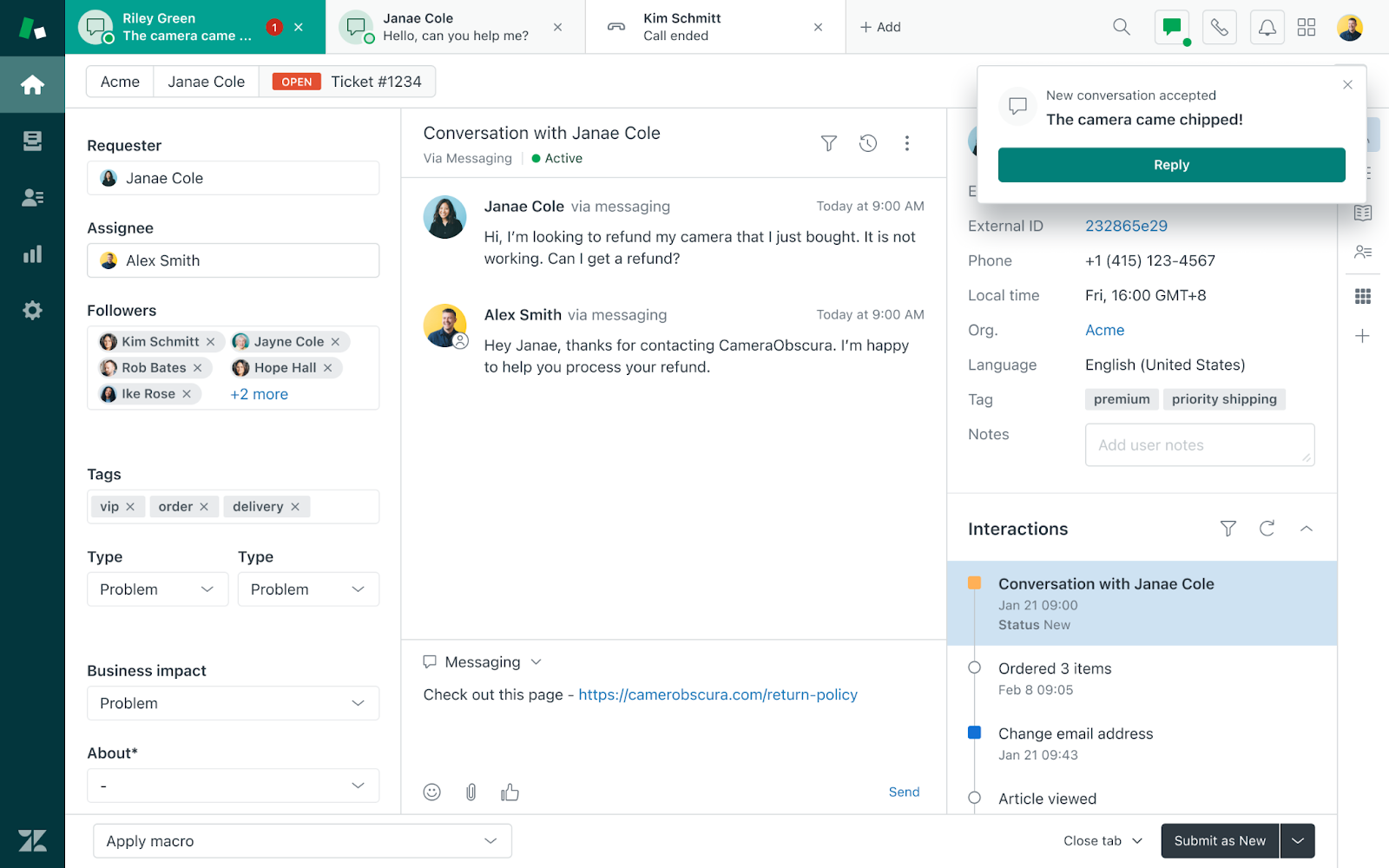
I have seen a 25-agent SaaS desk flip this on and slice their email backlog by roughly a third, since the bot resolved routine reset password and invoice-needed tickets before they ever hit the human queue. Setup is mostly point and click.
You choose which articles to train on, set fallback rules, and map hand-off triggers without needing a developer involved. Agents keep their familiar interface, customers get instant answers, and reporting rolls straight into the existing Explore dashboards your team already checks daily.
Pros:
- Native to Zendesk Support, Guide, and Messaging, so nothing feels bolted on
- Trains directly on help center articles, avoiding duplicate content work
- Context-rich handoffs pass transcripts and user data to agents instantly
- Multilingual article detection serves answers automatically in the visitor’s language
- Smart triggers convert unresolved chats into follow-up tickets automatically
Cons:
- Some users report minor usability quirks in the agent workspace
- Initial setup can take longer for teams new to the Zendesk ecosystem
User Rating: 4.3/5 (G2)
Price: Starts at $19/agent/month
How I Chose These Chatbot Software
When I evaluate chatbot software for this list, I do not just rely on feature lists or marketing claims. I look at how these tools actually perform in real-world scenarios. Here is the framework I used to make sure every recommendation is practical, reliable, and worth considering.
- User Reviews / Ratings: I start by looking at real user feedback from platforms like G2 and Capterra. This gives me a clear picture of how businesses actually experience the tool day to day, what they love, and where it falls short.
- Core Features & Functionality: I focus on what truly matters in customer service chatbot software. This includes training on your own content, bot-to-human handoff, integrations, and omnichannel support. If a tool cannot handle these well, it does not make the cut.
- Ease of Use: I pay close attention to how intuitive the platform feels for a non-technical owner. A tool might be powerful, but if you need a developer to edit a flow, it defeats the purpose.
- Customer Support: From my experience, setup is where many tools fail. I evaluate how responsive the support team is, especially during onboarding and ongoing use.
- Value for Money: I compare pricing with what the tool actually delivers, checking whether it is per operator, per conversation, or usage-based, since that is where business chatbot software costs quietly climb.
- Personal Experience / Expert Insights: Wherever possible, I rely on my own hands-on experience with these tools, along with insights from support managers and marketing leads who use them daily.
Top 3 Chatbot Software Picks
Short on time? Here is a glimpse of the three tools I would pick first, balancing value, functionality, and budget.
1. ProProfs Chat
The easiest live chat and AI customer service agent for instant, automated support. It answers routine questions, reduces tickets, and trains in minutes using your website or FAQs. When a conversation needs a human, it transfers full chat context so customers never repeat themselves.
2. ManyChat
Build no-code chatbots that automate conversations across Instagram, Facebook Messenger, and WhatsApp. Visual flows trigger from comments, story mentions, or DMs, then capture leads and even accept payments.
3. Freshchat
Snaps into Freshdesk, Freshsales, and the rest of the Freshworks stack for live chat, AI answers, and knowledge base suggestions in one place. Freddy AI auto-detects language and sentiment and routes priority issues to agents.
FREE. All Features. FOREVER!
Try our Forever FREE account with all premium features!
Pick the Chatbot That Actually Solves Your Problem
Chatbot software only works if it trains on your real content, hands off cleanly to a human, and does not hide fees. Blend a scripted layer for FAQs with AI for everything else, confirm it syncs with your CRM and ticketing system, and pilot one workflow for 30 days before expanding. Test the escalation flow yourself, and pick pricing that matches your chat volume, not team size.
ProProfs Chat checks each box directly. It trains on your website, help center, or PDFs in one click, hands off with full chat context, and connects with Knowledge Base and Help Desk. It also offers a forever-free plan for one operator.
Start with one workflow this week and see how it performs.
Frequently Asked Questions
What is the difference between a rule-based chatbot and an AI chatbot?
A rule-based chatbot follows a fixed script and breaks when a question is phrased differently. An AI chatbot trains on your website, help center, or documents, so it understands intent instead of just matching keywords.
How many chatbots or operators does a small business actually need?
Most small businesses need just one hybrid bot handling FAQs, lead capture, and basic scheduling. Start with the number of people who will manage live handoffs, not your total headcount.
Can chatbot software integrate with WhatsApp, Instagram, and Facebook together?
Yes, most modern platforms unify these channels into a single dashboard, so agents are not switching between separate apps for each one.
Will a chatbot work if I do not know how to code?
Yes, most tools today use drag and drop builders or ready templates, so a non-technical owner can set up and edit flows without a developer.
How do I know if a chatbot's escalation to a human actually works well?
Test it yourself before buying. Ask it a question it clearly cannot answer and check whether it hands off the full chat history so the customer does not repeat themselves.
Is free chatbot software good enough for a small business?
Free plans work well if your chat volume is low and you mainly need basic live chat. Once you need AI training or multiple operators, you will likely need to upgrade.
What is the biggest pricing trap to watch for?
Usage based AI fees on top of your base seat price. Always ask what counts as a resolution before you sign up, since this is where bills climb fastest.
Can chatbot software create leads directly in my CRM, not just contacts?
This depends on the tool. Some only create basic contacts, so confirm directly with the vendor whether it pushes full leads with qualifying details into your CRM.
How long does it take to see results after launching a chatbot?
Most businesses see ticket deflection and faster response times within the first 30 days, especially if the bot is trained on existing FAQs and help center content.
Should agencies look for anything different in chatbot software?
Yes, confirm white labeling and multi site or multi client management exist upfront, since retrofitting this later after onboarding clients is difficult.
FREE. All Features. FOREVER!
Try our Forever FREE account with all premium features!

 We'd love your feedback!
What did you like & how can we make it even better?

 Thanks for your feedback!
 Ask Your Question
Have a question? Get expert help to make your decision easier.