

“Every abandoned cart has a reason.” After years of working with ecommerce teams, I’ve learned that many drop-offs happen on PrestaShop right in the final moments, when a buyer needs quick clarity and gets silence instead. In moments like these, a live chat PrestaShop module helps keep the conversation alive as buyers are close to making a decision.
When someone is browsing your store, timing becomes a real growth lever. Fast, human responses build trust and remove friction instantly. The challenge is choosing a live chat module that supports your team without creating extra operational noise. Some tools scale smoothly as traffic grows. Others slow you down the moment conversations increase.
In this guide, I’ll walk through what PrestaShop chat modules are, the features worth prioritizing, the best tools to consider, and how to install live chat on your PrestaShop store without overcomplicating the process.
What Are PrestaShop Live Chat Modules?
PrestaShop live chat modules are add-ons that allow you to talk to customers in real time directly on your online store. Instead of waiting for emails or form submissions, visitors can ask questions while browsing products or during checkout.
These modules help remove buying hesitation, improve customer experience, and give store owners more control over conversations. Most live chat modules for PrestaShop integrate smoothly with the backend, making it easy to manage chats, track visitors, and respond without interrupting daily store operations.
Here’s what makes PrestaShop live chat modules useful:
- Enable real-time conversations with store visitors
- Help reduce cart abandonment and unanswered queries
- Integrate seamlessly with your existing PrestaShop store setup
- Support multiple agents and chat routing
- Offer visitor insights, such as pages viewed or time spent
Key Features Every Serious PrestaShop Store Needs in Its Live Chat
Not all live chat modules are built with ecommerce in mind.
Some focus only on messaging, while others actively support sales, service, and scale. For PrestaShop stores, the difference lies in the features behind the chat window. The following features help turn live chat into a practical tool for improving customer experience and driving better outcomes.
1. Fully Customizable Live Chat Widget
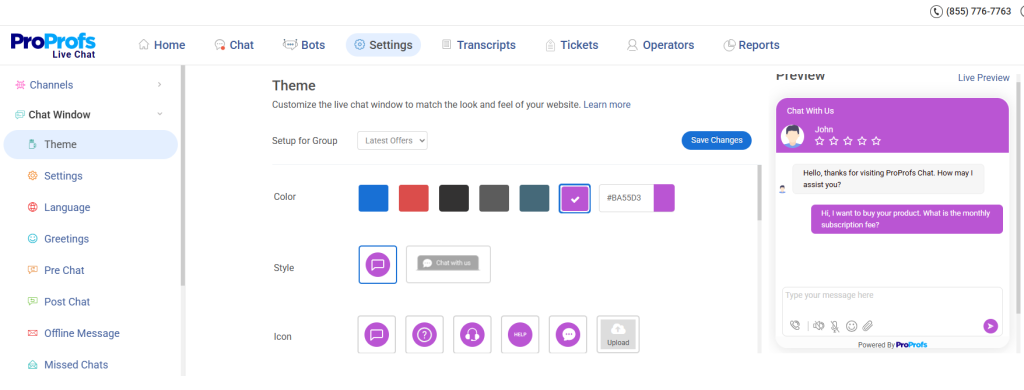
First impressions matter, especially in ecommerce. A customizable chat widget helps the live chat blend seamlessly with the store’s design, rather than looking like an external add-on. It allows control over colors, fonts, placement, and welcome messages so the chat experience feels consistent with the brand.
When the widget looks familiar and trustworthy, visitors are more likely to engage. Custom greetings, offline messages, and branding elements also help set expectations and maintain a polished, professional storefront experience.
2. AI-Powered Chatbots for 24/7 Support
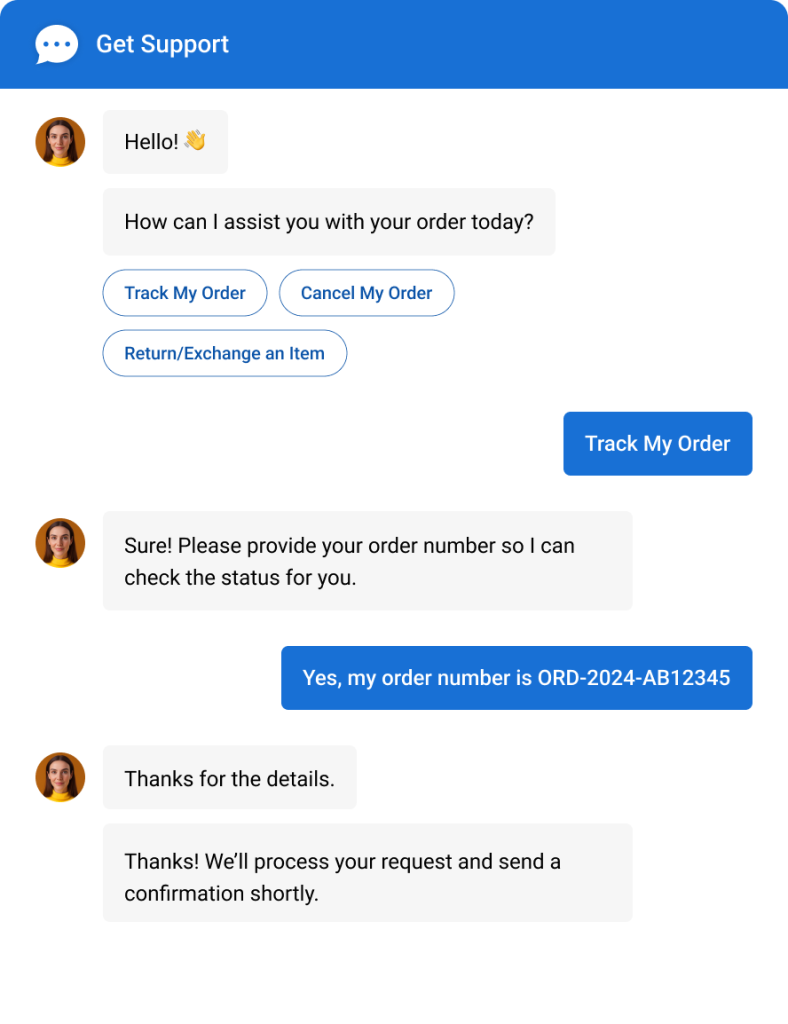
Customers browse online stores at all hours, not just during business hours. AI-powered chatbots ensure support stays available even when agents are offline. These bots handle common questions, share product or order details, book appointments, and guide visitors to relevant pages.
Used correctly, automation reduces response delays and keeps conversations flowing. It also helps support teams focus on more complex issues while ensuring visitors always receive timely assistance.
3. Real-Time Visitor Monitoring & Tracking
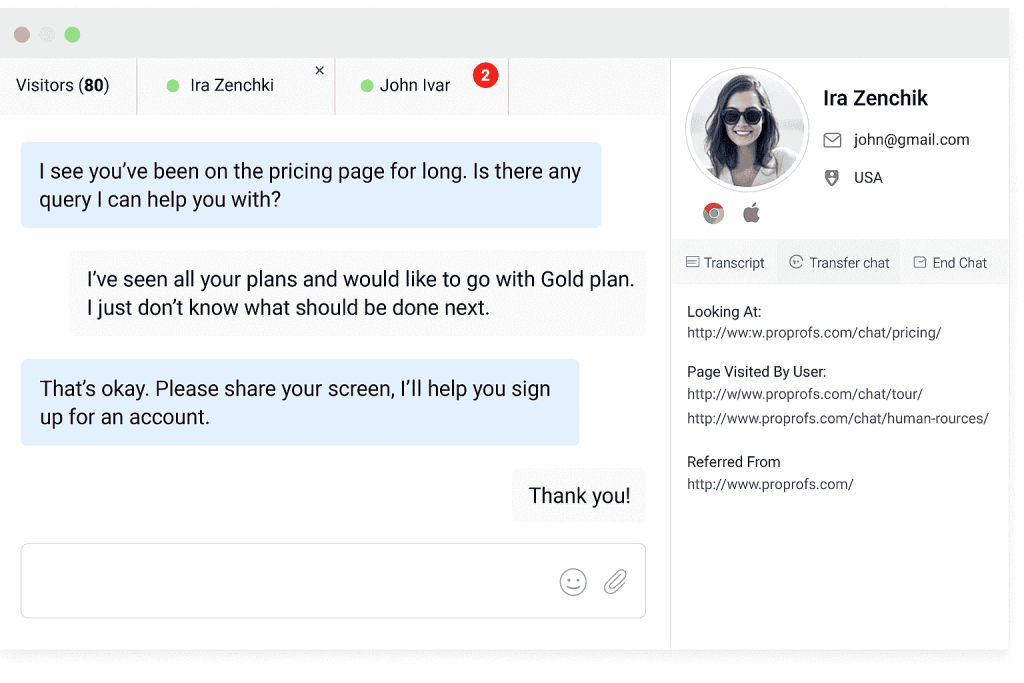
Live chat becomes far more effective when support teams understand visitor behavior. Real-time visitor tracking shows which pages a customer is viewing, how long they have stayed, and where they may be hesitating.
This context allows agents to respond with relevant and timely information instead of generic replies. With better visibility, support feels more guided and intentional, helping move visitors closer to a purchase decision.
4. Automatic Translation in Multiple Languages

Serving a global audience often means dealing with language barriers. Automatic translation enables smooth conversations between agents and customers who speak different languages. This feature removes friction, improves clarity, and makes international shoppers feel more comfortable engaging with support.
It also allows stores to expand their reach without maintaining large multilingual support teams, creating a more inclusive shopping experience.
5. Detailed Analytics & Performance Reports
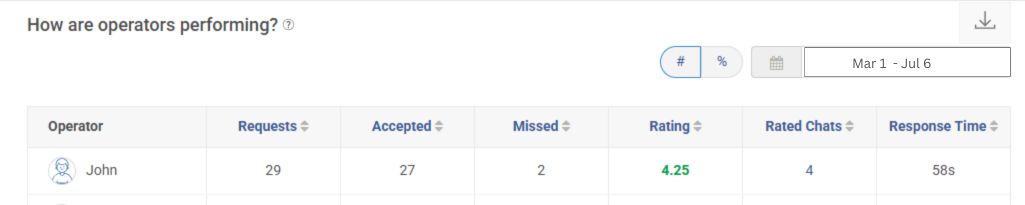
Effective live chat strategies rely on data, not assumptions. Analytics and performance reports provide insight into response times, chat volume, customer satisfaction, and overall impact on conversions. These metrics help identify gaps, optimize workflows, and improve agent performance over time. With clear reporting, store owners can measure the true value of live chat and make informed decisions to improve customer engagement.
Top 5 PrestaShop Live Chat Tools for Maximum Conversions
After reviewing multiple PrestaShop live chat options, I narrowed this list down to tools that genuinely make a difference. Each solution on this list reflects what the best live chat for PrestaShop should deliver, helping capture high-intent chats and turn them into sales, not just conversations.
1. ProProfs Chat
I see ProProfs Chat as a strong fit for PrestaShop stores that want reliable live chat without slowing down their sites. It lets me chat with visitors in real time, track what pages they are browsing, and step in when they need help before abandoning a purchase.
The best part is that the AI chatbot can be trained using FAQs, support articles, etc, thereby improving responses over time and automatically handling common questions.
I also value how smoothly chats move from bot to agent without disrupting the conversation. With SSL encryption, U.S.-based servers, custom branding, and mobile apps, it supports both customer trust and team productivity without slowing down the store.
Pros:
- Visitor tracking to engage shoppers based on real-time behavior
- Chatbot training using FAQs and knowledge content for smarter responses
- Automatic chat routing to connect customers with the right agent faster
- Multilingual support to assist customers in their preferred language
Cons:
- Cloud-only – no offline access
- No dark theme
Pricing: A free plan is available for growing teams. Paid plan starts at $19.99/user/month
2. Freshchat
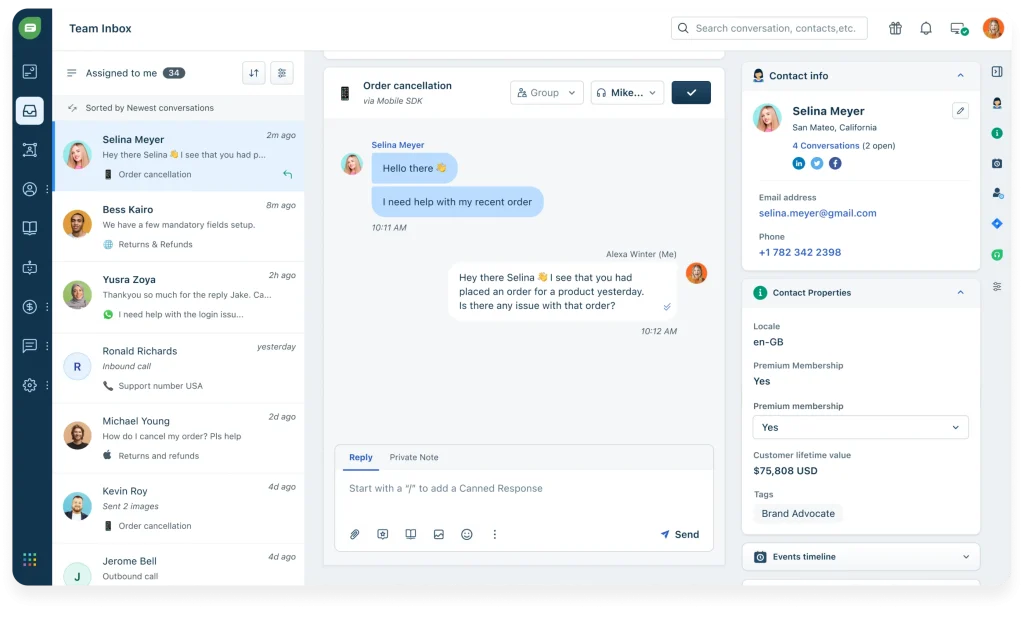
Freshchat works well for ecommerce teams that want structure without losing speed. I like how it combines live chat and automation in one interface, which keeps conversations organized even during peak hours.
The inbox feels intuitive, so agents can switch between chats without confusion. AI chatbots help answer routine questions, which keeps customers engaged when agents are offline. From my experience, this reduces response pressure on the team while still maintaining a helpful presence.
For PrestaShop stores growing their support operations, Freshchat offers a reliable way to manage conversations without turning support into a bottleneck.
Pros:
- Real-time live chat messaging that enables instant customer responses
- AI chatbots to handle repetitive questions and reduce agent workload
- Shared inbox for managing multiple conversations efficiently
- Customizable chat widget to match store branding
Cons:
- Advanced features are locked behind higher plans
- Limited ecommerce-specific workflows
Pricing: Starts at 19/user/month.
3. Smartsupp
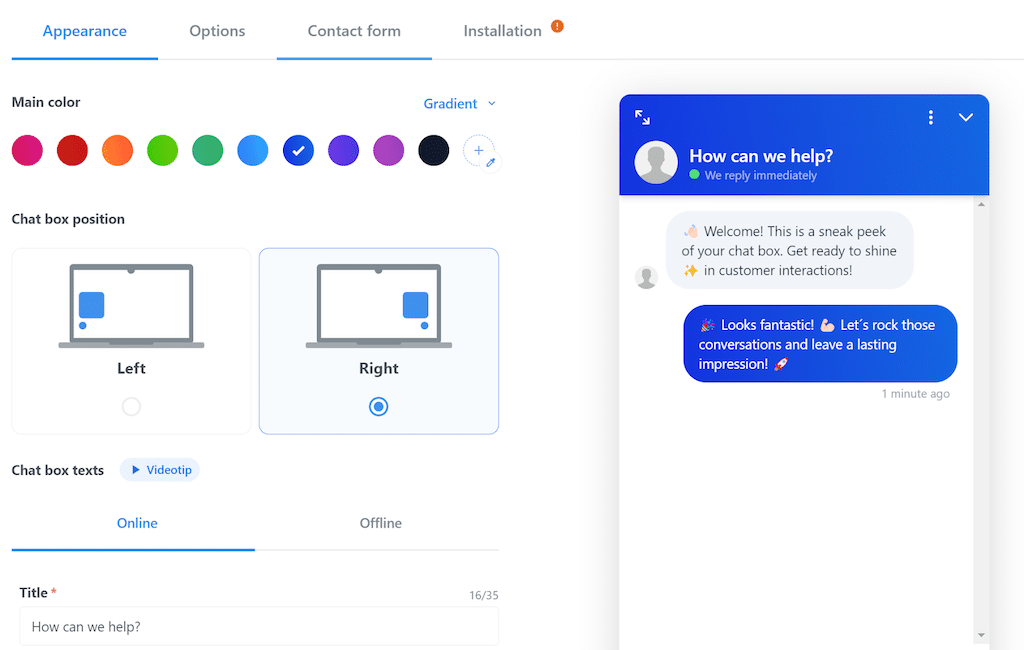
Smartsupp feels like a practical choice for stores that want live chat without unnecessary complexity.
I find the setup process refreshingly quick, which makes it easy to launch without technical help. The platform focuses on visitor context, showing customer details and browsing behavior during chats. That helps conversations feel relevant instead of generic.
One feature I appreciate is session recording, which gives a clear picture of where customers hesitate or drop off. For PrestaShop stores that value simplicity and insight over heavy automation, Smartsupp keeps support approachable and efficient.
Pros:
- Visitor details inside chat for more informed conversations
- Proactive chat messages based on user behavior
- Session recordings to identify friction points
- Simple setup with minimal configuration
Cons:
- Analytics and reporting are fairly limited
- Automation options are basic
Pricing: Starts at $14/user/month.
4. Gorgias
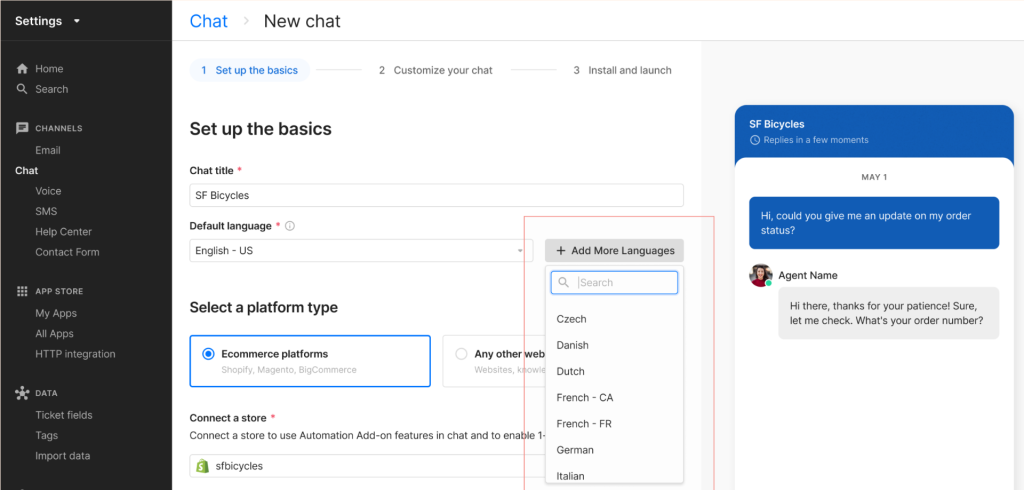
Gorgias is built with ecommerce workflows in mind, and that shows in how conversations are handled.
I like that customer history and order details appear directly inside the chat, which saves time during support interactions. This context helps agents respond faster and more accurately. Automation also plays a big role, especially for repetitive questions like order status or returns. In my experience, this keeps response times low even during high-volume periods.
For PrestaShop stores scaling their customer support, Gorgias feels more like a support command center than a simple chat tool.
Pros:
- Centralized inbox with order and customer context
- AI automation for handling repetitive support queries
- Smart routing to assign chats to the right agents
- Strong integrations with ecommerce platforms
Cons:
- Setup requires time for deeper customization
- Advanced automation features need premium plans
5. Intercom
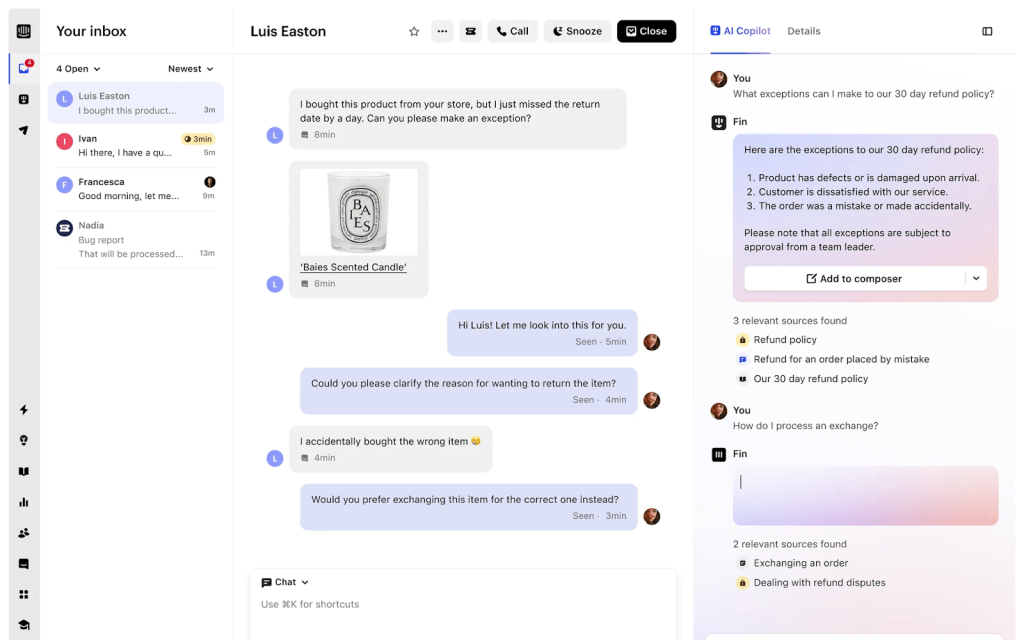
Intercom feels more like a full customer communication platform than just a live chat tool.
I have seen it being used effectively by ecommerce teams that want automation and messaging to work alongside live support. Bots handle common questions before agents step in, which keeps conversations efficient. Messaging can also be triggered based on user behavior, helping guide customers during checkout or onboarding.
While it requires thoughtful setup, I find it works best for mid-to-large PrestaShop stores that want flexibility and deeper control over how they communicate with customers.
Pros:
- Live chat combined with automated messaging workflows
- AI bots to qualify leads and resolve common issues
- Behavior-based targeting for personalized engagement
- Wide range of integrations with business tools
Cons:
- Costs increase quickly as usage grows
- Some automation features are add-ons
Pricing: Starts at $29/user/month.
How to Install Live Chat on Prestashop
When it comes to adding live chat on PrestaShop, clarity matters more than technical detail. The goal is to get support up and running quickly without disrupting your store or overthinking the setup. To keep things practical, I’ll use ProProfs Chat to walk through the process step by step.
This way, you can see how live chat fits into a real PrestaShop store and replicate the same setup with confidence.
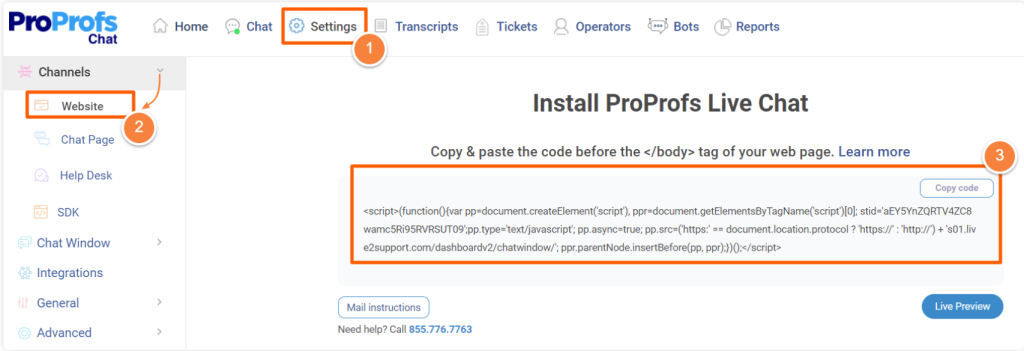
Step 1: Log in to your ProProfs Live Chat account. Navigate to Settings > Channels > Website, then copy the installation code.
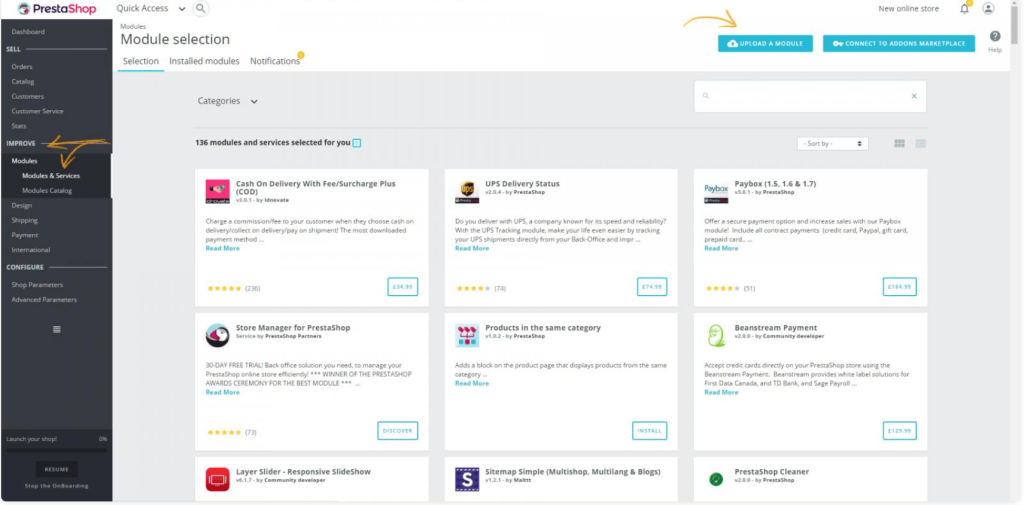
Step 2: Download the ProProfs Live Chat plugin from proprofschat.com/downloads.Step 3: Log in to your PrestaShop admin account. Go to Improve > Modules & Services, then click Upload a Module to install the plugin.
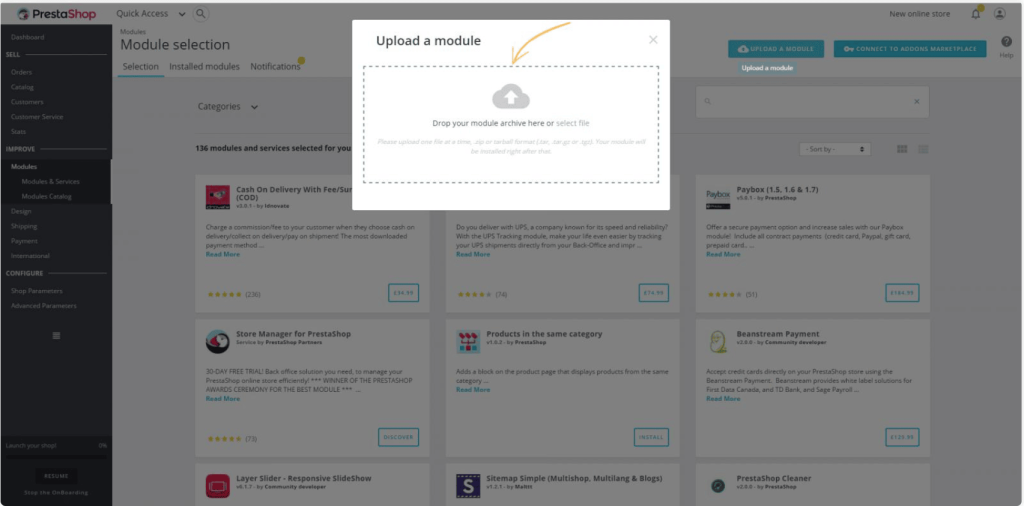
Step 4: Click “Select file” and upload the ProProfs Live Chat plugin.
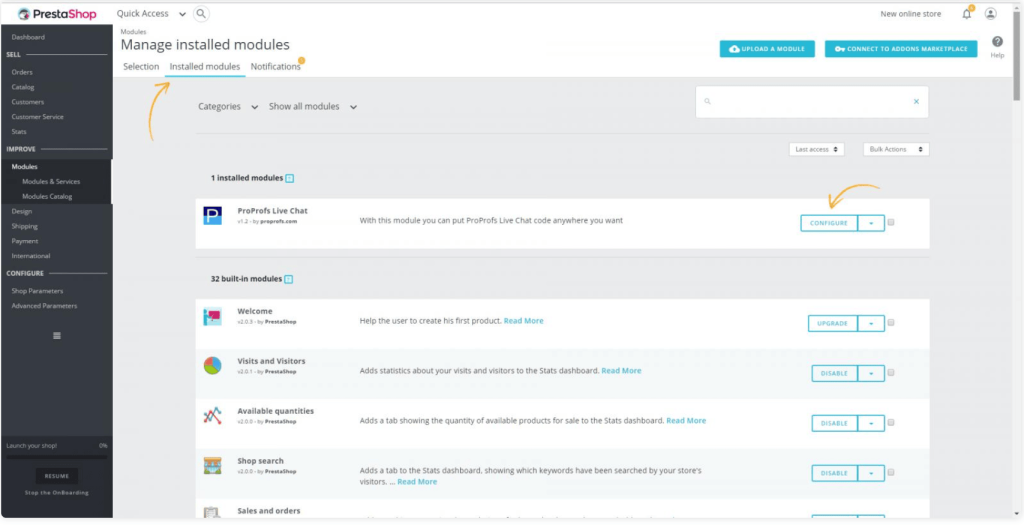
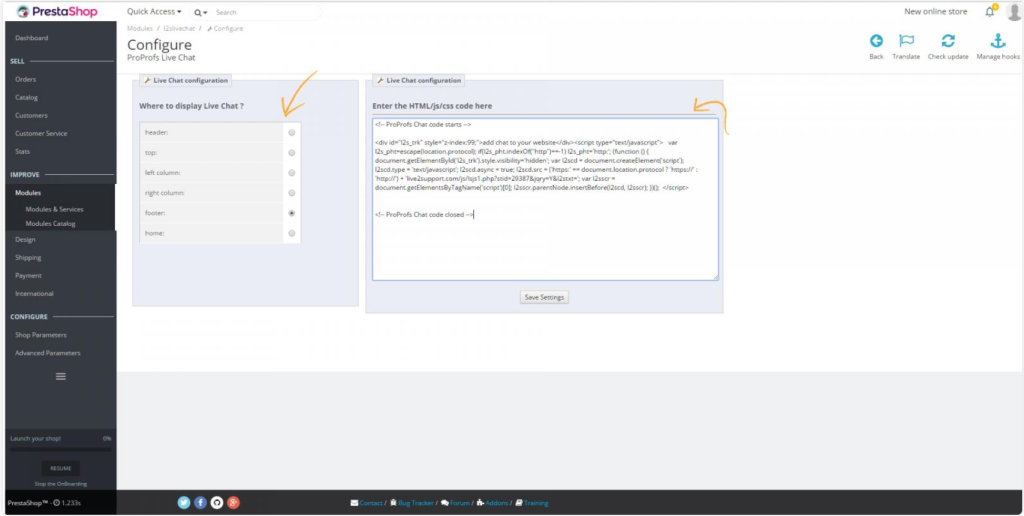
Step 5: Go to Installed Modules > Configure to edit the module and paste your ProProfs Live Chat code.
Step 6: Select the position for the ProProfs Live Chat on your store. Paste the code into the text area, then click “Save Settings”.
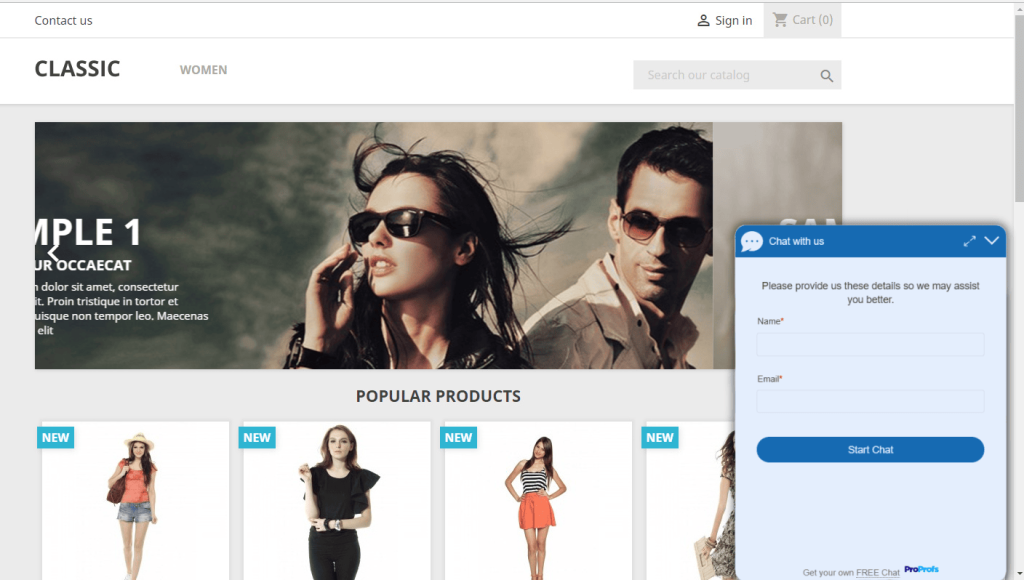
Congratulations! Your ProProfs Live Chat widget is now live and ready to boost engagement on your PrestaShop store.
FREE. All Features. FOREVER!
Try our Forever FREE account with all premium features!
Keep Buyers Moving Forward On PrestaShop With Live Chat Support
PrestaShop live chat modules play a bigger role than most store owners realize. They help answer questions instantly, reduce hesitation, and keep shoppers moving toward checkout with confidence.
When choosing a live chat module, focus on ease of setup, chatbot capabilities, visitor tracking, and performance impact. Look for tools that stay lightweight, support automation, and scale as your store grows. Training your chatbot with real questions and keeping responses updated also makes a noticeable difference over time.
If you want a reliable, ecommerce-ready solution, ProProfs Chat is worth exploring. It combines real-time chat, trained AI chatbots, visitor insights, and fast performance in one place. Try it out and turn more conversations into conversions today.
FREE. All Features. FOREVER!
Try our Forever FREE account with all premium features!

 We'd love your feedback!
What did you like & how can we make it even better?

 Thanks for your feedback!
 Ask Your Question
Have a question? Get expert help to make your decision easier.