If your support team is always busy but the queue keeps growing, you don’t have a productivity problem. You have a scaling problem.
I realized this when I saw one of our agents handling a phone call while typing a live chat reply. Both customers were waiting, and neither was getting our best.
And customer expectations are only rising. According to Gartner’s customer survey in 2025, 58% of customers are willing to use a GenAI assistant for customer service interactions on their behalf.
For growing SaaS and ecommerce teams, simply hiring more agents isn’t a sustainable fix.
That’s why I started looking at how AI chatbots reduce support ticket volume. Done right, they resolve repetitive questions, prepare complex issues for agents, and know when a human should take over. Here’s how I’d approach it today.
What Is an AI Chatbot for Support Ticket Deflection?
If you go looking for AI chatbots to reduce helpdesk ticket volume, statistics, case studies online, you’ll find the same pattern repeated everywhere: bots trained on real, specific content consistently outperform generic ones.
Here’s why this distinction matters before we go further:
- A basic, rule-based chatbot only matches keywords, which is why traditional bots resolve queries only about 28% of the time
- A modern AI chatbot understands intent and context, so it can actually resolve a question instead of just pointing at a help article
- The goal was never “make the chat window busy.” It’s fewer tickets landing in your queue, and the ones that do land there already have the context your agent needs
How AI Chatbots Reduce Support Ticket Volume
I’ve broken this down into four mechanisms. Each one solves a different part of the ticket volume problem, and together they’re what actually moves the number down, rather than just moving the complaint from a support ticket to a frustrated tweet.
When people ask me what the best chatbot platform for reducing ticket volume actually looks like, my answer is always the same: whichever one lets you train on your own content and take real action, without needing a developer to set it up.
1. Instant Self-Service
This is your first and biggest lever. ProProfs Chat lets you train your AI agent on your own website, help center, uploaded files, and FAQs.
Once it’s trained, it doesn’t guess at answers. It reads the conversation (text and images), pulls from your trained data, and delivers an answer with the source cited, so your customer and your team both know exactly where that answer came from.
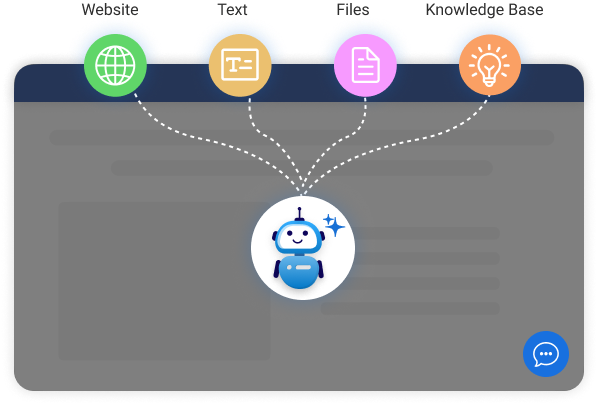
- Train your AI agent on your website, help center, uploaded files, and FAQs, and run tests to see how it responds before you go live
- Let it answer using cited sources from your own data instead of generic responses, so customers trust what they’re getting
- Pair it with a connected knowledge base. According to a Gartner case study in 2024, a GenAI chatbot improved self-service success from 18% to 62%, with bot-optimized knowledge management identified as one of the critical factors behind the improvement.
- Train it on your top 3 to 5 most repeated ticket categories first, since a small number of question types usually make up most of your volume
2. Action-Based Resolution
A lot of tickets don’t need an answer. They need something done. ProProfs Chat’s action-based AI agents don’t just assist, they complete tasks like updating an order in Shopify, scheduling a meeting, or triggering a notification over email or Slack, right from the chat window.
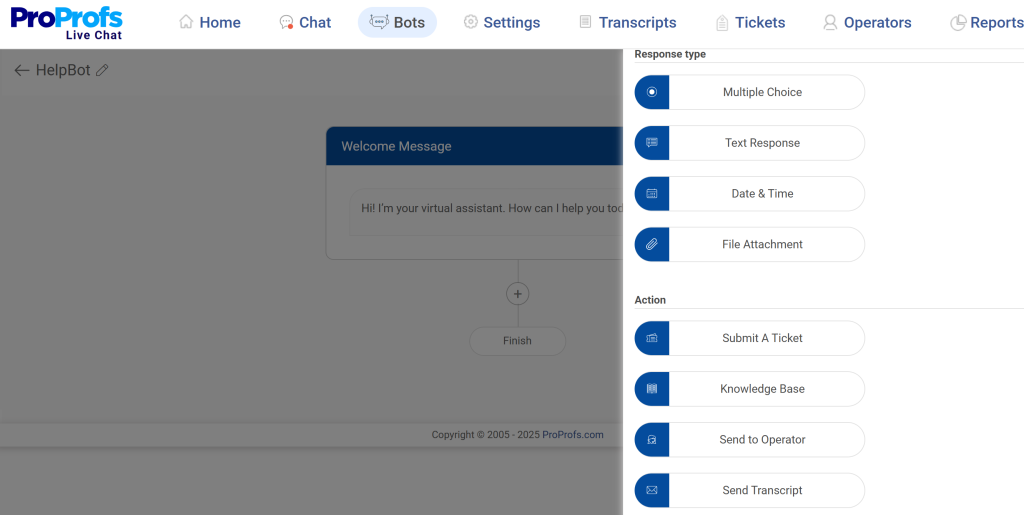
- Set up your AI agent to update orders directly in Shopify instead of just telling the customer to check their account
- Let it schedule meetings or callbacks on the spot instead of routing that request to an agent’s inbox
- Trigger email or Slack notifications automatically when a task needs a teammate’s attention, so nothing sits unnoticed
- Start with your highest-volume actionable requests (order changes, rescheduling, status updates) and expand from there
3. Proactive Prevention
Some tickets never need to exist if you catch the customer before frustration builds.
ProProfs Chat’s sentiment analysis scans every message in real time and tells you whether a customer is angry, sad, confused, confident, or happy, so your team knows exactly when to step in before a simple question turns into an escalation.
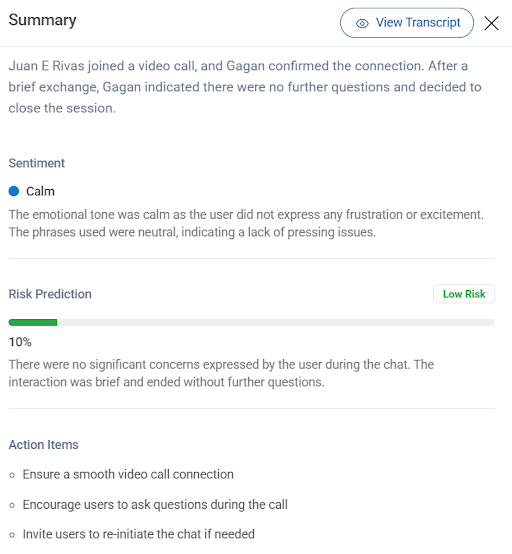
- Turn on sentiment analysis so your team gets a real-time read on how a customer feels during the chat, not after
- Use the churn risk score (High, Medium, or Low) that ProProfs Chat’s risk prediction assigns to every conversation to flag who needs urgent attention
- Set a rule to alert a human the moment sentiment shifts negative, instead of letting the AI agent keep trying on its own
- Review your high-risk conversations weekly to catch patterns before they turn into repeat tickets
4. Clean Handoffs
This is the piece most teams get wrong, and it’s exactly why support teams end up switching chatbot vendors.
If the bot can’t resolve something and the handoff to a human is clunky, slow, or drops context, customers get more frustrated than if there were no bot at all.
- Rely on ProProfs Chat’s resolution overview, which auto-generates a structured summary of what the customer raised and what was done to resolve it at the end of every chat, so your agent isn’t starting from zero
- Use the AI agent performance reports, where customers rate interactions with a thumbs up or down and comments, to see live satisfaction scores and exactly where the AI agent falls short
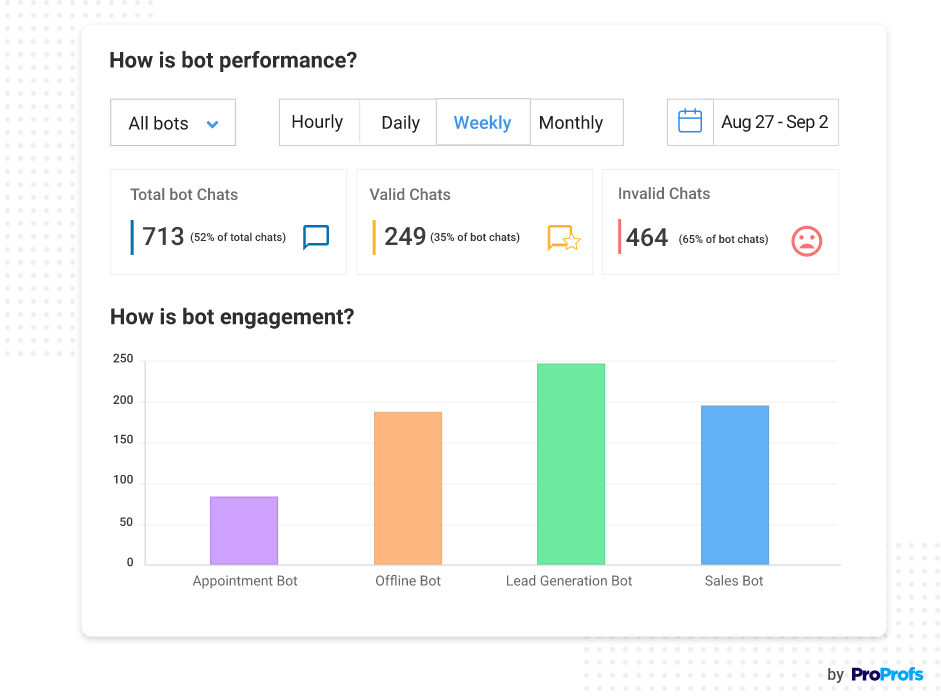
- Review the top issues flagged in your performance reports every month and retrain your AI agent on whatever keeps getting a thumbs down
- Test the handoff yourself as a customer would experience it before you roll the AI agent out widely
Where to start: If you’re setting this up for the first time, get the AI agent trained on your top ticket categories, connect it to your knowledge base, and confirm sentiment-based escalation and the resolution summary handoff are working before you turn on action-based automation. Get the fundamentals resolving cleanly first.
Resolve More Support Questions Before They Become Tickets
Chatbot Deflection vs. Resolution
I want to slow down on this one because it’s the single biggest reason chatbot projects fail, even when the deflection numbers look great on a dashboard.
Deflection means a ticket didn’t reach a human. Resolution means the customer’s actual problem was solved.
These are not the same thing, and optimizing for the first one without checking the second is how you end up with a chatbot that looks efficient while your customers are quietly churning.
| What to Watch | What It Means | What To Do |
| The trap | A high deflection rate with no resolution tracking will hide the fact that customers are giving up on the bot, not getting helped by it | Never report deflection rate on its own. Pair it with the resolution rate in every review |
| The fix | Track resolution rate and CSAT alongside deflection rate, not deflection alone | Add a post-chat CSAT survey and a resolution tag to every bot conversation, then review both weekly |
| The tell | If your deflection rate is climbing but your CSAT or repeat-contact rate is also climbing, your bot is closing tickets, not solving problems | Pull the transcripts behind your lowest-CSAT bot chats and retrain on exactly where they went wrong |
| The standard to hold | A good AI chatbot should be judged on how many customers actually got what they needed, not how many tickets it kept off your queue | Set resolution rate, not deflection rate, as the metric your team is actually measured on |
Which Ticket Types Should You Automate First?
I get this question a lot, especially from teams unsure whether they need one flexible AI agent or several separate bots for different jobs. You don’t need three bots. You need one AI chatbot trained well and routed correctly.
I’ve pulled this priority list from real AI chatbots, reduce helpdesk ticket volume case studies, statistics, not guesswork. Here’s how I’d prioritize what to automate.
| Ticket Type | Automation Level | How I’d Handle It |
| Password Resets | Fully automate | High volume, low complexity, no reason a human needs to be involved. Train your bot on the exact steps from your help center article so the answer is consistent every time |
| Order Status | Fully automate with a data connection | If your AI chatbot can pull real order or account information through your CRM or ecommerce integration, it can answer instantly instead of pointing to a generic tracking page |
| Billing Questions | Automate the factual ones, escalate the emotional ones | Automate common questions like “what’s included in my plan” or “when does my subscription renew.” Route disputes and refund requests straight to a human, since customers expect empathy here, not a script |
| Technical Issues | Pre-triage only | Let the bot gather details (what they were doing, what error they saw, what plan they’re on) and hand off to your agent with all of it attached. Don’t force full automation here, since technical users can tell when they’re being deflected instead of helped |
FREE. All Features. FOREVER!
Try our Forever FREE account with all premium features!
How to Automate Support Tickets With AI Chatbots
If you’re wondering how to reduce support ticket volume with AI chatbots without hiring a dev team, here’s the order I’d actually follow, whether you’re starting from scratch or fixing a chatbot that isn’t performing.
Step 1: Audit Your Tickets
Pull your last 30 to 90 days of tickets and group them by category. You’re looking for the handful of question types that make up most of your volume. This tells you exactly what to train your bot on first, instead of guessing.
Step 2: Train On Real Content
Feed your AI chatbot your actual website content, help center articles, and any PDFs or documents customers already rely on. ProProfs Chat scans and organizes this automatically, so you’re not manually scripting every possible conversation.
Step 3: Set Escalation Rules
Decide upfront which categories get full automation, which get pre-triage only, and which should skip the bot entirely and go straight to a human. This is also where you confirm your bot to human handoff actually preserves context instead of dropping it.
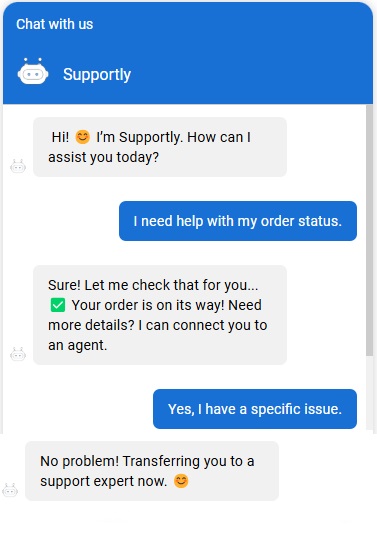
Step 4: Turn On Proactive Triggers
Once your reactive flow is solid, layer in proactive chat invitations and automated greetings for known friction points, like a failed payment or a page where customers commonly get stuck.
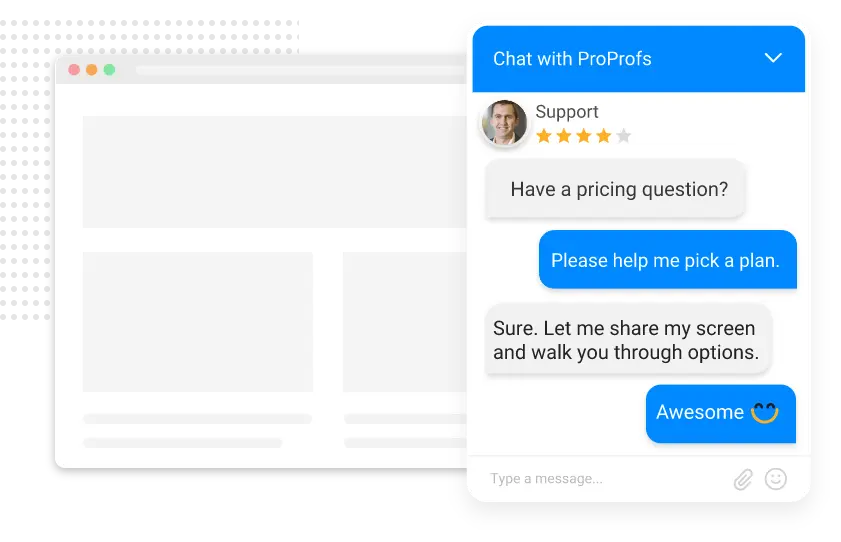
Step 5: Monitor Both Numbers
Track deflection rate and resolution rate together every month, not just once at launch. If deflection climbs but resolution or CSAT doesn’t, go back and retrain the bot on where it’s actually failing customers.
You can go live with the basics fast. ProProfs Chat’s setup is three steps: brand your chat window, add the code to your site, and start chatting. No developer is required to get the core flow running.
Start Resolving Routine Support Requests Automatically
Common AI Chatbot Mistakes That Increase Tickets
I’ve seen teams do everything right on paper and still end up with a chatbot that makes things worse. Here’s what to watch for.
1. Chasing Deflection Only
If your team gets rewarded for a high deflection rate without anyone checking resolution, you’ll optimize for the wrong outcome. Customers will find workarounds, like emailing you directly or calling in anyway, which actually adds more work than if the bot didn’t exist.
- Pair every deflection number you report with a resolution rate and CSAT score
- Set team goals around resolution, not just how many tickets the bot kept off your queue
- Flag any spike in repeat contacts or direct emails as a sign the bot is deflecting, not resolving
2. Weak Human Handoff
I’ve talked to teams that switched vendors specifically because escalating a bot conversation to a live agent was slow and frustrating, on top of the bot itself lagging. If your handoff loses context or takes too long, customers lose patience fast.
- Test the handoff yourself as a customer would before scaling up automation
- Confirm that the full chat analytics and customer details carry over to the agent, so nothing needs to be repeated
- Set a clear time limit for how long a bot should try before escalating, instead of letting it stall
3. Stale Training Data
A chatbot trained on outdated pricing pages or old policies will confidently give wrong answers, and customers won’t know how to question it.
- Set a recurring schedule to refresh what your bot is trained on whenever your docs, pricing, or policies change
- Spot-check bot answers against your live help center content every month
- Retrain immediately after any major product, pricing, or policy update, not on your next scheduled cycle
4. Treating It as One and Done
The teams that get the best results treat their chatbot as a living system, not a project that ends at launch.
- Review handoff reasons regularly to see where the bot is falling short
- Retrain on new question patterns as your product and customer base evolve
- Revisit and adjust escalation rules as your ticket categories shift over time
Ready to Put This Into Practice?
ProProfs Chat is a practical option if you want to apply this approach without building a complex automation setup from scratch. You can train its AI agent using your website, help center, FAQs, and uploaded files, then test responses before going live.
It also supports action-based resolution, sentiment-aware escalation, conversation summaries, and AI performance reporting, which helps you cover the full journey from self-service to human handoff.
Pick your top 3 to 5 repetitive ticket categories, train your AI agent on the relevant content, test its answers and escalation flow, and then expand automation based on actual resolution data.
Start with ProProfs Chat and see how many repetitive support tickets you can resolve before they ever reach your agents.
Frequently Asked Questions
How does an AI chatbot actually compare to email or phone support?
Email and phone both involve wait time, while an AI chatbot responds the moment a customer asks, at any hour of the day, with no queue. It also costs a fraction of what a human-handled ticket costs, and it gives you 24/7 self-help coverage without needing a night shift.
Can AI chatbots fully replace human customer support?
No, and they shouldn't try to. AI chatbots handle repetitive, well-defined questions well, but anything emotionally sensitive, high stakes, or genuinely complex needs a human. The goal is freeing your team for those cases, not removing them.
Will my customers get frustrated talking to a bot instead of a person?
Only if the bot is poorly trained or the handoff to a human is slow. Customers generally care more about getting a fast, accurate answer than about who or what provided it.
Is my customer data secure when I connect it to an AI chatbot?
Look for SSL encryption, GDPR and CCPA compliance, and single sign-on support at a minimum. ProProfs Chat includes all of these, along with IP restriction and spam blocking.
Does an AI chatbot work if I support customers in multiple languages?
Yes, as long as your platform supports it. ProProfs Chat supports 70+ languages and lets you customize language display based on visitor location.
How long does it realistically take to set up an AI chatbot for support?
The core setup, branding your chat window, adding the install code, and training the bot on your content can be done in minutes. Fine-tuning escalation rules and proactive triggers is where most teams spend the first few weeks.
What if my team is small and doesn't have time to manage a chatbot?
Start with a narrow scope. Train it only on your top 3 to 5 ticket categories, set clear escalation rules, and expand from there once it's proven itself. You don't need a dedicated admin to keep it running well.
FREE. All Features. FOREVER!
Try our Forever FREE account with all premium features!

 We'd love your feedback!
What did you like & how can we make it even better?

 Thanks for your feedback!
 Ask Your Question
Have a question? Get expert help to make your decision easier.