I’ve talked to e-commerce founders and SaaS ops leads who all describe the same dread: a customer question sitting unanswered at midnight, quietly turning into a lost sale before the team even wakes up.
Finding the best AI chatbot app fixed that almost overnight. According to a 2025 IBM study, 74% of consumers say AI improves their ability to get answers quickly, and that number only grows once a bot is trained on your own content.
If you’re juggling marketing, support, and everything in between, you know manual replies do not scale. This guide walks through the 10 best AI chatbot apps for Android, tested against real needs: training on your content, human handoff, and CRM integration.
What Is an Android AI Chatbot?
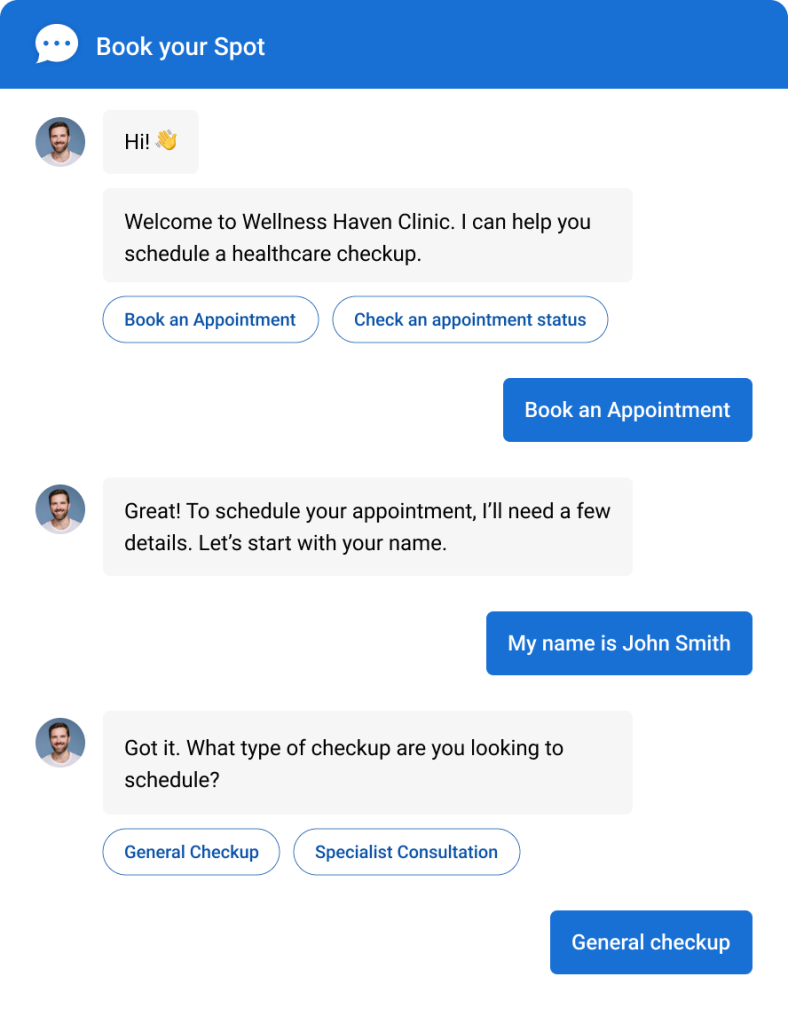
These tools are trained on your knowledge base, website content, and FAQs, so responses stay accurate and on-brand. Industries like e-commerce, healthcare, and manufacturing use them to cut response times and keep support running 24/7, even when your team is offline.
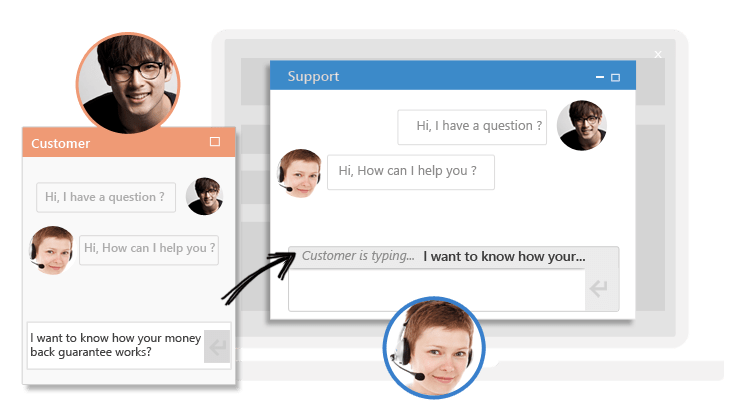
Curious how that handoff between bot and human actually works in practice? This video breaks it down.
Why this matters for your business:
- Faster resolutions: Customers get answered in seconds instead of sitting in an email queue for hours
- Lead capture that never sleeps: Visitors who show up at midnight still get qualified and routed before they lose interest
- Lower cost per conversation: One bot handles the repetitive 60 to 70 percent, so your team focuses on what actually needs a human
- A real edge: If you’re comparing the best AI chatbot app for Android against a desktop-only tool that feels clunky the moment someone opens it on a phone
10 Best AI Chatbot Apps for Android (Tested and Compared)
I tested each of these hands-on and ran them by peers who manage support or growth for a living. Here’s a quick side-by-side before we get into the details:
| AI Chatbot App | Best For | Pricing | User Rating |
| ProProfs Chat | Easy Live Chat & AI Customer Service Agent for Instant, Automated Support | Free plan available. Paid starts at $19.99/user/month | 4.8/5 (Capterra) |
| Zendesk | Converting Sales and Engaging Customers With Free Live Chat | Starts at $19/agent/month, billed yearly | 4.4/5 (Capterra) |
| Salesloft | Conversational Landing Pages | Custom quote | 4.3/5 (Capterra) |
| Tidio | Live Chat With Ticketing Functionality | Starts at $29/month | 4.7/5 (Capterra) |
| Manychat | Making Chatbots for Messaging Apps | Starts at $14/month | 4.6/5 (Capterra) |
| Wati | WhatsApp Outreach | Starts at $49/month | 4.6/5 (Capterra) |
| Chatfuel | Facebook and Instagram | Starts at $11.99/month | 4.3/5 (Capterra) |
| Freshchat | AI-Powered Support Across Every Channel | Starts at $19/user/month | 4.2/5 (Capterra) |
| Comm100 | Voice-Based Interactions | Starts at $31/agent/month | 4.7/5 (Capterra) |
| Intercom | Multichannel Communication | Starts at $19/user/month | 4.5/5 (Capterra) |
1. ProProfs Chat – Best for Easy Live Chat & AI Customer Service Agent for Instant, Automated Support
I’ve been using ProProfs Chat, and it’s one of the best AI chatbot apps I’ve worked with. Setting it up for my Android app took a few minutes, and the level of customization was incredible. From answering FAQs to booking appointments and processing orders, it keeps things running smoothly even when my team is offline.
What impressed me even more was how quickly the AI Customer Support Agent started helping visitors. You simply enter your website URL, and ProProfs AI automatically builds a chatbot that’s ready to answer customer questions using your existing content.
The best part? Advanced AI agent training trains the chatbot on your website, help center, and FAQs, so AI-generated answers always pull from your actual data with the source cited. It can also complete tasks on its own, like updating a Shopify order or triggering a Slack notification, not just answer questions.
Sentiment analysis detects emotions in real time and feeds into risk prediction, which assigns churn scores so your team knows who needs attention. Plus, resolution overviews and AI agent performance reports are then tracked continuously to assess satisfaction. It complements its third-party integrations with native connections to ProProfs Knowledge Base and ProProfs Help Desk, creating a unified customer support ecosystem.
Pros:
- Drag-and-drop builder to create conversation flows
- AI training on your website, help center, uploaded files, and FAQs in seconds
- Omnichannel inbox covering website, Facebook, WhatsApp, Instagram, SMS, and mobile apps
- Custom chat routing rules by visitor location, time, keyword, or department
- Multilingual support across 70+ languages, with customization by visitor location
- 100+ chat window settings plus white-label branding for multi-site and agency use
- Ready-to-use templates for lead generation, sales, customer support, ticketing, etc
Cons:
- Cloud-only – no offline access
- No dark theme
Pricing: A free plan is available for growing teams. Paid plan starts at $19.99/user/month
User Rating: 4.8/5 (Capterra)
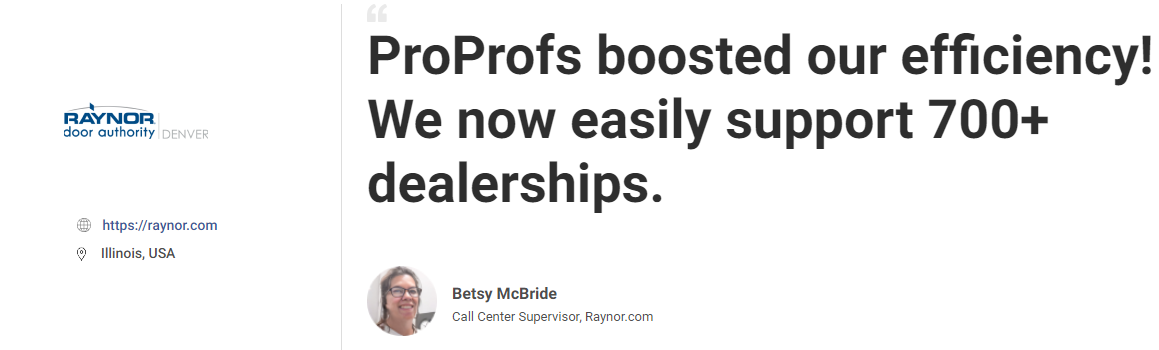
ProProfs Chat helped Raynor Garage Doors streamline dealer support across 700+ dealerships with faster chat handling, file sharing, chat transcripts, and better reporting. The result was improved efficiency, stronger accountability, and a smoother support experience for both agents and dealers.
2. Zendesk – Best for Converting Sales and Engaging Customers With Free Live Chat
My support team switched over to Zendesk Bot the year our ticket queue tripled overnight during a product launch. What sold me was how quickly it deflected repeat questions about order status and account access, freeing my agents to handle the messy stuff that needed a human.
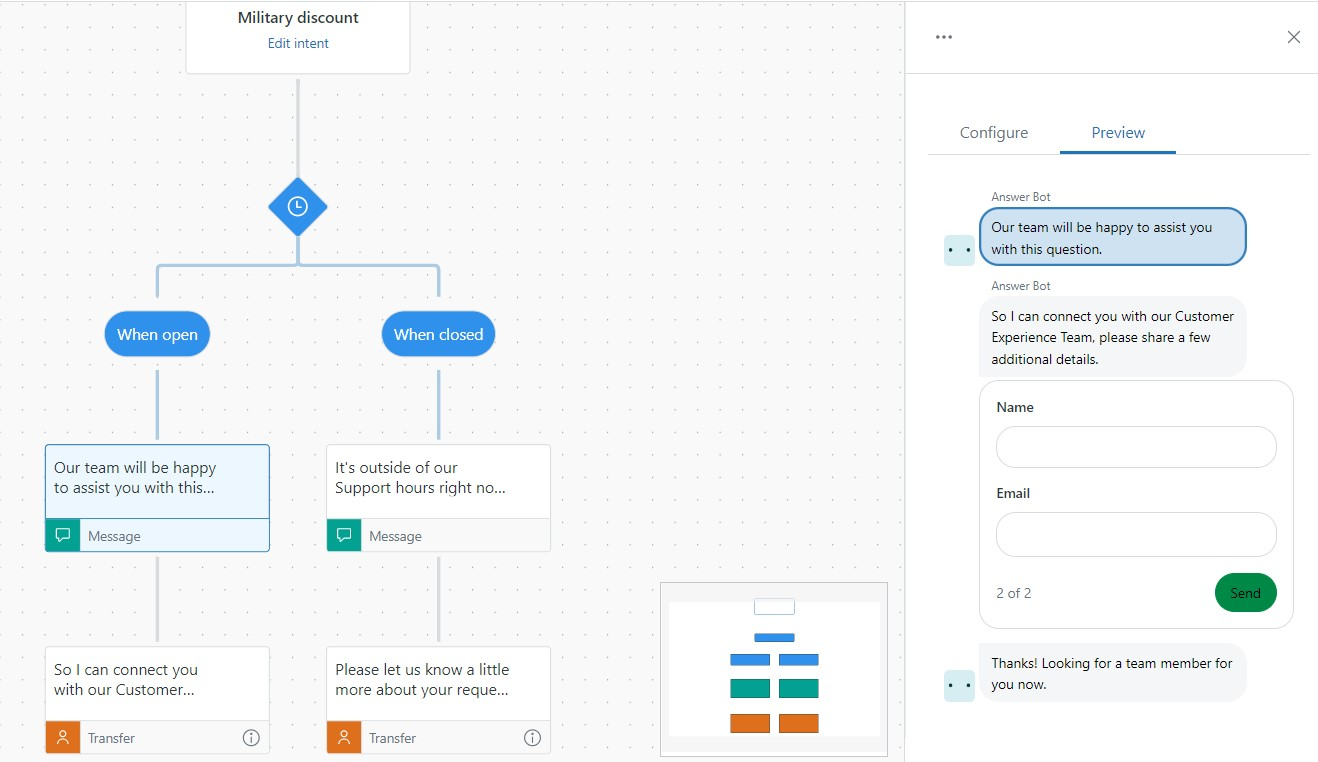
The AI and NLP layer felt conversational rather than the rigid keyword-matching I’d dealt with before, and the dashboards gave me a real read on which questions the bot was nailing and where it kept stumbling.
Where it got tricky was onboarding. My non-technical ops person needed a full week and two calls with support to get flows configured the way we wanted, and customizing conversation branches beyond the basics required more patience than I expected. If your team lives inside Zendesk for ticketing, the bot slots in cleanly.
Pros:
- AI-powered automation for quick issue resolution and ticket creation
- Detailed customer profiles for personalized support interactions
- Integration with platforms like HubSpot, Salesforce, Slack, and Shopify
- Real-time analytics and reporting to track your chatbot performance
Cons:
- Complex setup and configuration process
- Limited flexibility in designing chatbot conversations
User Rating: 4.4/5 (Capterra)
Pricing: Paid plan starts at $19agent/month, paid yearly
3. Salesloft – Best for Conversational Landing Pages
Our sales team brought Salesloft’s AI Chat Agents in after watching too many high-intent visitors bounce off our pricing page without booking a call. The chat agents turned every visit into a live conversation instead of a static form, qualifying leads and booking meetings automatically without needing a rep on standby.
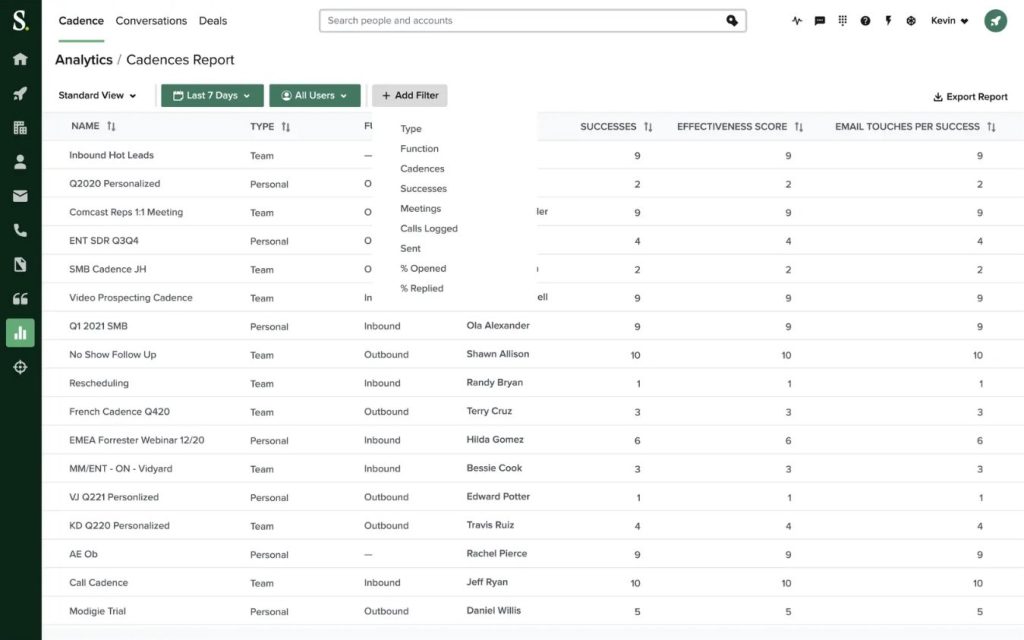
What impressed me most was how tightly it ties into the rest of Salesloft; reps could ask the AI agent about a deal or account and get an answer pulled straight from real conversation history instead of digging through dashboards.
The catch shows up in complexity, not casual use. This is built for teams running a real outbound and inbound sales motion, not a side project. Pricing isn’t published anywhere; you’ll need a sales call just to get a quote, and getting the chat flows dialed in alongside our existing cadences took real time from my team.
Pros:
- AI Chat Agents that qualify leads and book meetings without a live rep
- Deep integration with Salesloft’s own cadence, analytics, and deal data
- Reps can query the AI agent directly about accounts or past conversations
- Strong Salesforce and HubSpot sync for unified pipeline tracking
Cons:
- Pricing isn’t published, expect a sales call before you get a quote
- Backend setup often needs a dedicated admin to manage properly
User Rating: 4.3/5 (Capterra)
Pricing: Custom Quote
4. Tidio – Best for Live Chat with Ticketing Functionality
Tidio impressed me the moment Lyro started fielding repetitive shipping and returns questions without any hand-holding from my side. Getting a bot live took an afternoon, thanks to the ready-made templates, no developer required, and turning conversations into tickets meant nothing slipped through unanswered.
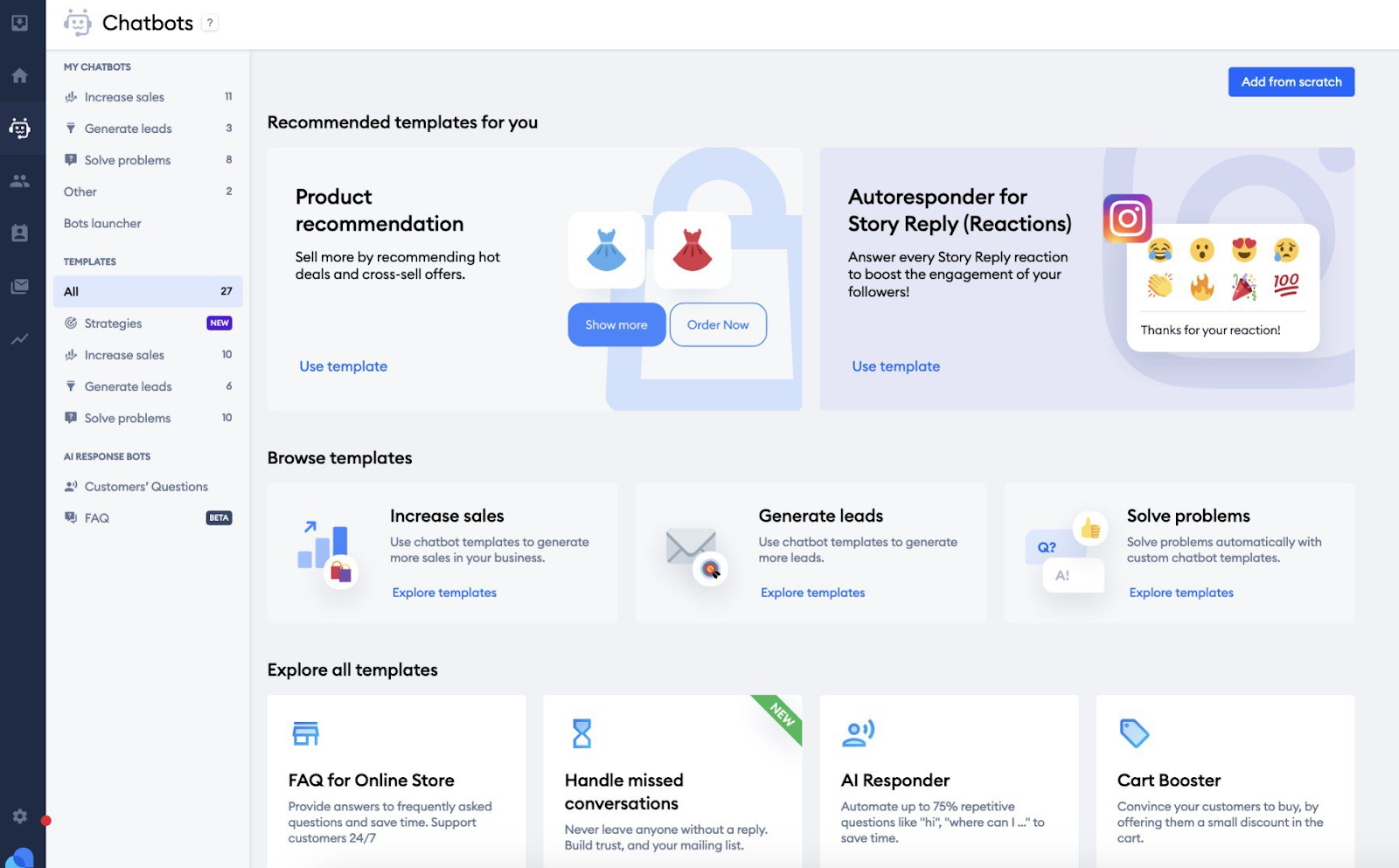
The dashboard felt clean enough that I never had to dig through a manual to find a setting. What caught me off guard was how some features that felt included at first quietly needed an upgrade path once conversation volume climbed, so what you get on day one isn’t necessarily what scales with you.
There’s also no native knowledge base, so self-help articles mean running a second tool alongside it. For a scrappy team just getting serious about automated support, Tidio gets you moving fast. Just keep an eye on your usage numbers as volume increases.
Pros:
- Multichannel support to ensure smooth communication worldwide
- Real-time visitor tracking to monitor user activity and improve engagement
- Conversation history for personalized customer experience
- Email and messenger integrations for consistent communication
Cons:
- Does not have a built-in knowledge base feature to create and share self-help resources
- Does not offer much flexibility and control over the design and behavior of your chatbot
User Ratings: 4.7/5 (Capterra)
Pricing: Starts at $29/month.
5. Manychat – Best for Making Chatbots for Messaging Apps
A friend running a DTC brand kept telling me how Manychat transformed her Instagram DMs into an actual sales channel, and watching her set it up on her brand’s Facebook page won me over, too. The visual builder made it simple to map out flows without touching code, and the ability to turn comments into direct conversations genuinely boosted her engagement rates more than she expected.
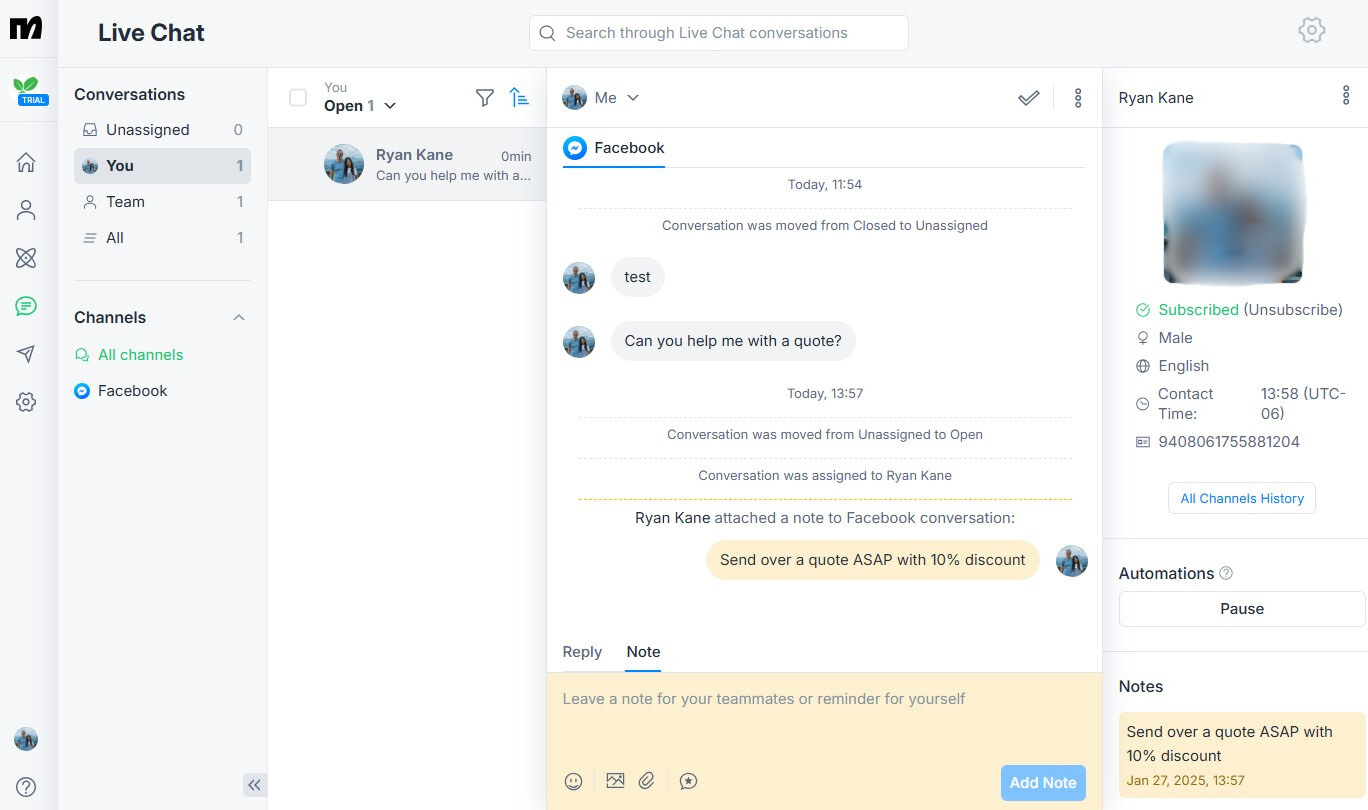
Where it started to feel limiting was the scale beyond social. Manychat only covers Facebook Messenger, Instagram, and WhatsApp, so if your customers are emailing or messaging you through your website too, you’re stitching together separate tools.
Analytics also stay fairly shallow by default, so proving ROI to a skeptical stakeholder takes more manual digging than it should. If your entire funnel lives on social and you want to turn ad clicks into conversations fast, it delivers. If you need one dashboard for every channel, it’s only part of the picture.
Pros:
- Visual chatbot builder for easy customization
- Automated drip campaigns for lead nurturing
- Interactive surveys and quizzes to engage users
- Multilingual support to expand global reach
Cons:
- Only supports three social media platforms: Facebook Messenger, Instagram DMs, and WhatsApp
- Limited analytics and reporting depth out of the box
User Rating: 4.6/5 (Capterra)
Pricing: Starts at $14/month.
6. Wati – Best for WhatsApp Outreach
Wati stood out to me the moment customers started completing entire purchases without ever leaving the chat thread, which felt like meeting people exactly where they already were on WhatsApp. The shared team inbox kept every conversation organized instead of scattered across someone’s personal phone, and setting up broadcast campaigns for re-engaging past customers took barely any effort once I got the hang of the dashboard.
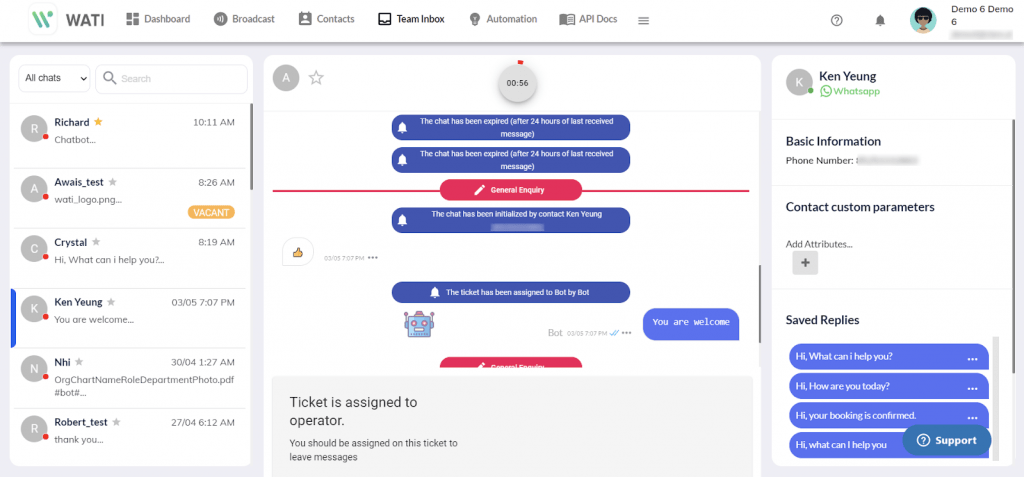
What surprised me was how much more involved managing a larger audience got as the contact list grew; the platform simply asks more of you at scale than it does on day one.
Building anything beyond basic automated replies also demanded more technical know-how than I expected going in. If WhatsApp is where your customers actually want to talk to you, Wati handles that relationship well. Just know the setup gets more hands-on as your list grows.
Pros:
- Shared team inbox to manage all your WhatsApp conversations in one place
- Integration with Shopify, HubSpot, and other platforms for smooth workflows
- Broadcast and marketing campaigns to send promotions, updates, and reminders
- Analytics and performance tracking to monitor chatbot interactions
Cons:
- Managing a large contact list adds real operational overhead as your audience grows
- Advanced customization of chatbot interactions requires technical expertise
User Rating: 4.6/5 (Capterra)
Pricing: Starts at $49/month.
7. Chatfuel – Best for Facebook and Instagram
A friend of mine who runs paid social ads for small businesses built her first chatbot on Chatfuel, mostly because the templates meant she didn’t need a developer on standby. Handling FAQs and product recommendations felt effortless once the flow was mapped out, and the built-in A/B testing let her actually improve responses instead of guessing.
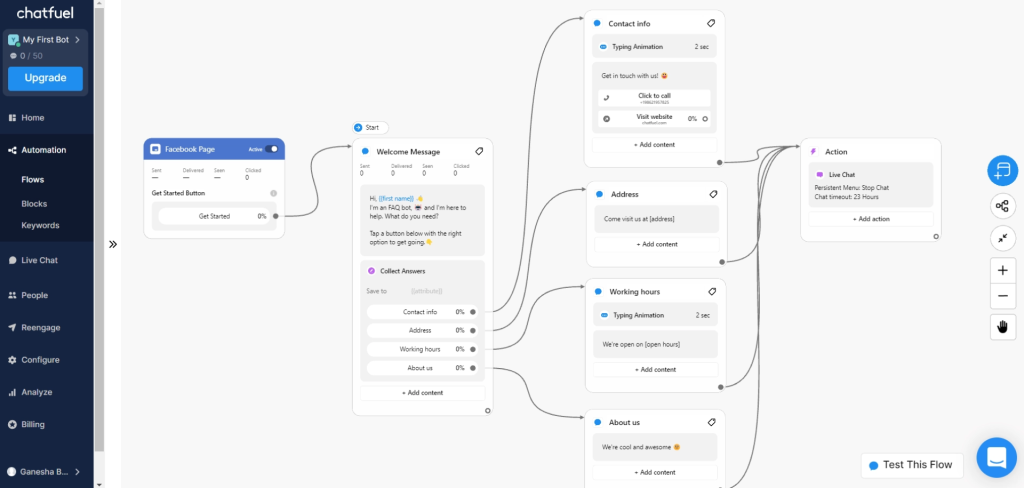
What frustrated her over time was the natural language handling. Anything slightly off-script and the bot would misread intent, sending customers down the wrong path more often than she’d like to admit.
By default, Chatfuel branding shows up on every conversation, which looked unpolished next to the brand identity she’d carefully built. It’s a solid pick if your chatbot lives entirely inside Messenger and Instagram and your questions stay fairly predictable. If brand consistency matters to you, removing that branding needs to be part of your setup checklist from day one.
Pros:
- Visual flow builder for designing complex conversational flows
- Broadcast and drip campaigns for audience engagement
- Live chat handoff to seamlessly transfer chats to human agents when needed
- Seamless integration with ChatGPT to enhance customer engagement
Cons:
- Chatfuel branding appears on conversations by default, which may not suit all businesses
- Limited natural language processing capabilities, leading to occasional misinterpretation of user queries
User Rating: 4.3/5 (Capterra)
Pricing: Starts at $11.99/month.
8. Freshchat – Best for AI-Powered Support Across Every Channel
A SaaS founder I know switched to Freshchat after outgrowing a patchwork of email support and a basic widget that couldn’t keep up with growing volume. Freddy AI, their built-in assistant, pulled answers straight from existing help articles instead of guessing, and it handed off to a live agent the moment a conversation got complicated instead of looping customers in circles.
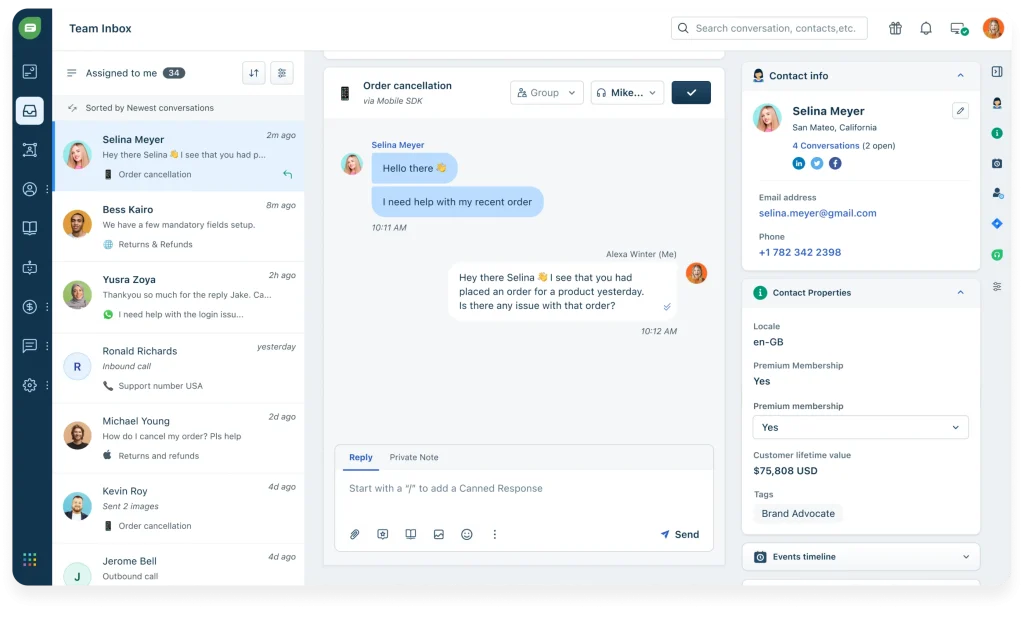
What stood out was how well it played with the rest of the Freshworks suite; tickets synced automatically, so nothing got answered twice in two different systems. The setup wasn’t instant, though; connecting it with an existing CRM took some back-and-forth with their support team over about a week.
Advanced automation sits a layer deeper than the basics, so it’s worth mapping out your automation needs before assuming everything is available out of the box. For teams already inside the Freshworks ecosystem, it’s close to seamless. For everyone else, expect a short but real setup curve.
Pros:
- Freddy AI pulls answers directly from your help center content
- Native integration across the Freshworks suite (tickets, CRM, campaigns)
- Smooth bot-to-agent handoff for complex conversations
- Multichannel inbox covering web, mobile, and social in one place
Cons:
- Advanced automation features require additional setup to unlock
- Initial CRM integration can take longer than expected to configure
User Rating: 4.2/5 (Capterra)
Pricing: Starts at $19/user/month.
9. Comm100 – Best for Voice-Based Interactions
A colleague running support for a regional bank recommended Comm100 to me specifically because of its voice feature, and after testing it myself, I understood why. Conversations felt noticeably more natural than typical scripted bots, and when a query got too complex or sensitive, like anything involving a VIP account, it handed off to a human agent smoothly instead of looping the customer in circles.
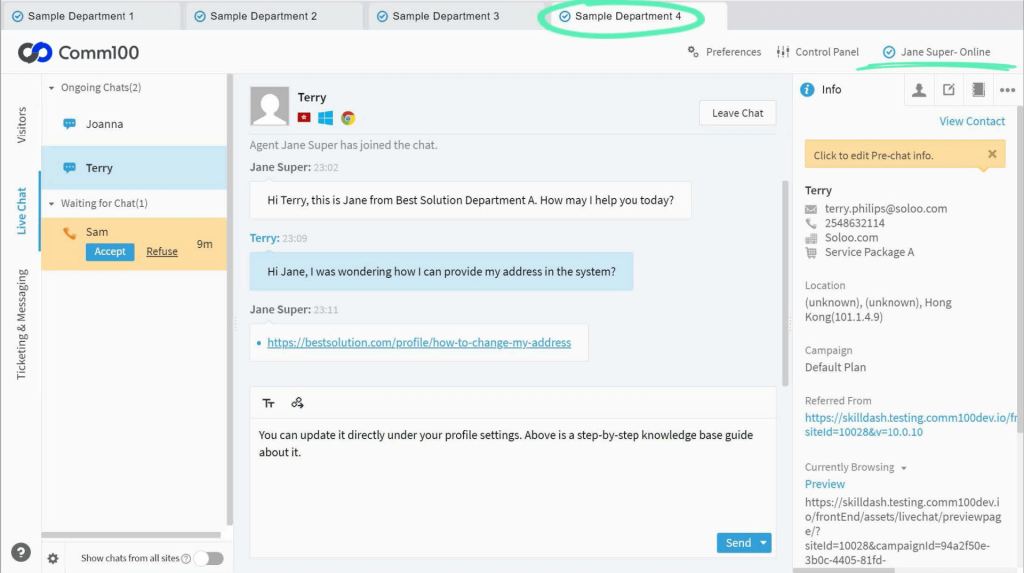
Agent Assist quietly summarized long threads so that agents picking up mid-conversation wouldn’t have to scramble to catch up, saving real time during busy hours. My one complaint is the lack of pop-up notifications when the bot responds; customers sometimes miss replies simply because nothing nudges them to check back.
Chatbot design customization also felt more limited than I’d like, especially compared to how much control I had over routing and escalation rules. If voice-based, high-trust interactions matter to your business, this is worth a serious look. For pure text-based FAQ deflection, simpler tools will do the job for less.
Pros:
- Integration with CRM and helpdesk systems for seamless support
- AI-powered chat routing for efficient issue resolution
- Conditional logic to personalize customer interactions based on profile
- Advanced security features for protecting customer data and privacy
Cons:
- No notification pop-ups for customers when the chatbot sends a response
- Limited customization options for the chatbot design
User Rating: 4.7/5 (Capterra)
Pricing: Starts at $31/agent/month.
10. Intercom – Best for Multichannel Communication
Everyone on my product team kept mentioning Intercom’s Fin AI, so I finally tested it across our own Android and web support channels together. Fin pulled answers straight from our existing help center instead of improvising, and it resolved more than half of incoming questions without ever pulling in a human agent, which was more than I expected going in.
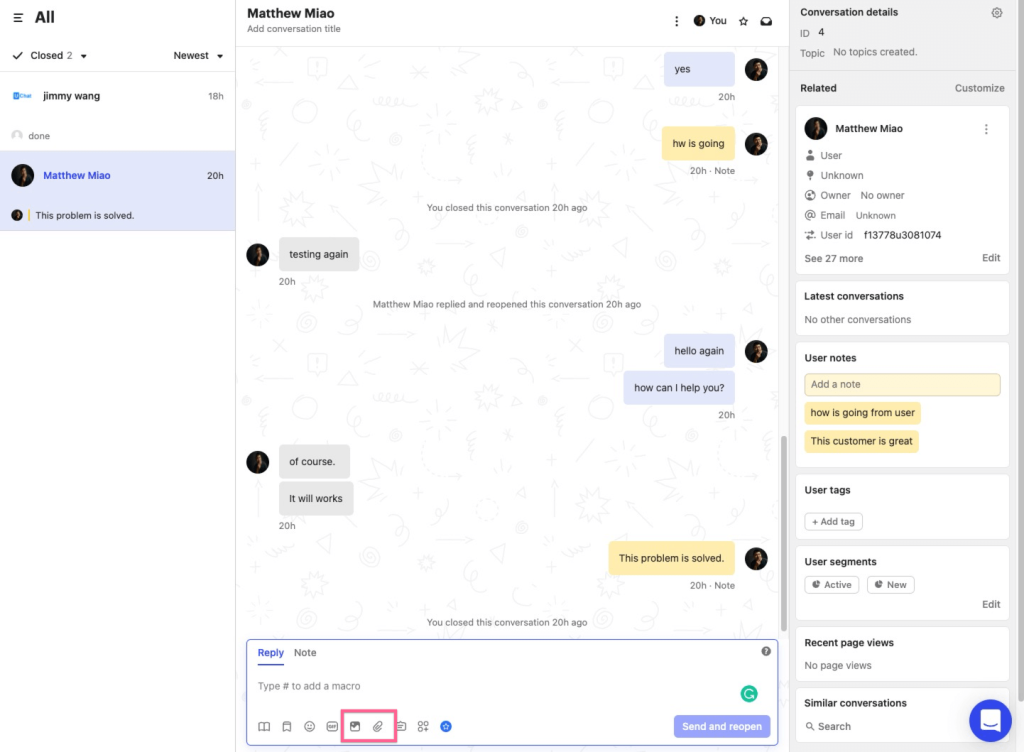
Managing conversations across the website, app, and social channels from one unified inbox removed a genuine headache my team had been living with for months. The workflow builder automated repetitive follow-ups without needing a single line of code, which our non-technical support lead appreciated.
Where it gets harder to justify is complexity, the learning curve for advanced automation is real even for a fairly technical team, and getting full value out of Fin AI means investing real time in setup. If your team has the bandwidth to configure it properly, it delivers. If you need something you can set up solo in an afternoon, look elsewhere on this list first.
Pros:
- Integration with knowledge bases for instant information retrieval
- Real-time user segmentation for targeted messaging
- Collaboration features for seamless communication within teams
- Multichannel messaging for reaching users on their preferred platforms
Cons:
- Heavier setup and configuration than other chatbot solutions on this list
- Steeper learning curve for configuring advanced automation and chatbot workflows
User Rating: 4.5/5 (Capterra)
Pricing: Starts at $19/user/month.
How I Evaluated These AI Chatbot Apps for Android
I didn’t just Google this list. I tested these apps hands-on, ran them by peers I trust, and cut anything that didn’t hold up in real use. Here’s the framework I used to make sure every recommendation is practical, reliable, and worth considering:
- User Reviews: Real feedback from verified users on G2, Capterra, and Reddit shaped this ranking, going beyond star ratings to the actual comments people leave after living with a tool for months. Recurring complaints and recurring praise both mattered more than the score alone.
- Core Features: Each tool was assessed on the capabilities that actually matter: AI training on custom data, CRM integrations, bot-to-human handoff, multilingual support, lead capture flows, and mobile-first performance. Tools that do a few things exceptionally well scored higher than tools that do many things poorly.
- Setup Speed: Close attention was given to how long it takes a non-technical team member to go from signup to a live, trained AI chatbot for Android, without reading a manual. If a store owner or ops lead cannot get started on day one, that shows up in the scores.
- Support Quality: Responsiveness of each vendor’s own support was evaluated, including whether live help or hands-on onboarding is accessible on entry-level plans or locked behind enterprise tiers. A chatbot company with poor support sends a clear signal.
- Value for Money: What each tool costs is compared against what it actually delivers for a typical small-to-mid-sized business, factoring in free plan limits, per-user pricing, and which features require an upgrade to use in practice.
- Real Buyer Insights: Hands-on testing got combined with insights from support managers, e-commerce teams, and SaaS founders who recently evaluated or switched tools, since real buyer experience tells you more than a feature list ever will.
Top 3 Picks for AI Chatbots for Android
Still on the fence? Here are three worth a closer look.
1. ProProfs Chat
ProProfs Chat is an easy-to-use chatbot tool that automates FAQs, bookings, and orders across Android apps. With AI training, multilingual support, and seamless platform integration, it improves customer interactions and streamlines support.
2. Comm100
Comm100 Chatbot stands out with its voice feature, making interactions feel natural. It provides detailed performance reports, smoothly transfers complex queries to human agents, and includes Agent Assist to summarize conversations and automate workflows.
3. Drift
Drift Chatbot makes customer interactions effortless with human-like conversations and real-time lead capture. Easy to set up and customize, it’s a great choice for businesses looking to boost engagement and streamline customer support.
FREE. All Features. FOREVER!
Try our Forever FREE account with all premium features!
5 Common Challenges With AI Chatbot Apps (And Their Fixes)
The best AI chatbot Android options promise speed, automation, and scale. But without the right features, most fall short in real-world business use. Here are the challenges I see most often, and how ProProfs Chat helps you get past them.
1. Integration Gaps
Many chatbot apps don’t connect well with CRMs, helpdesks, or knowledge bases, leading to data silos and more manual work.
Fix it with:
- Connect to Salesforce, Microsoft Dynamics, Zoho, Shopify, Zendesk, and 100+ other tools through ProProfs Chat’s native integrations
- Push chat transcripts and customer journeys automatically into connected systems so nothing gets re-entered by hand
2. Missed Leads
Visitors leave without engaging when the chatbot doesn’t start the right conversation at the right time.
Fix it with:
- Trigger AI-powered bots, pre-chat forms, and behavior-based greetings that engage visitors automatically
- Capture full context, name, query, intent, chat history, straight into your CRM before the conversation even ends
3. Unclear ROI
If you can’t track chatbot performance, you can’t justify the investment or improve it.
Fix it with:
- Use supervisor dashboards and real-time reports for complete visibility into chat volume, resolution rates, and bot-handled conversations
- Track the impact directly: ProProfs Chat helps reduce support ticket volume by up to 35%, and up to 80% when paired with its Knowledge Base
4. Clunky Mobile Experience
Some chatbot tools are desktop ports that feel slow on Android.
Fix it with:
- Run ProProfs Chat’s mobile-first design, built with dedicated Android and iOS apps and fast load times
- Rely on real-time visitor tracking made for users who are on their phones, not their laptops
5. Weak Human Handoff
A bot that can’t hand off cleanly frustrates customers right when they need help most.
Fix it with:
- Set up intelligent chat routing so conversations move to the right operator automatically
- Avoid customers getting stuck talking to a bot that’s already out of its depth
Turn Your Business Into a 24/7 Support Engine
The best AI chatbot apps simplify customer interactions, automate tasks, and save your team time, but only if the tool fits how your business runs. Match it to your customers’ channel, your budget, and how much setup your team can handle.
Before you commit, train your bot on real content, confirm CRM integration, and ask how human handoff works; that’s where most tools fall short. ProProfs Chat checks all of these boxes without the setup headache, offering 24/7 support, multilingual capabilities, and seamless integration to keep your business running smoothly.
Try ProProfs Chat free today and set up your first AI bot in minutes.
Frequently Asked Questions
What is the best AI chatbot app for a small business just starting out?
ProProfs Chat and Tidio both offer a low-friction start, with free or low-cost plans and setup that takes minutes rather than days.
How do I set up an AI chatbot app on Android using ProProfs Chat?
With ProProfs Chat, create an AI bot, train it using your website URL or custom content, and preview it before launch. Then add the ProProfs Chat SDK to your Android app through Android Studio, enable the SDK under Channels, and start offering real-time AI-powered support.
Do AI chatbot apps work the same way on Android as they do on desktop?
Mostly yes, though performance varies. Look for tools with dedicated mobile SDKs rather than a desktop widget squeezed onto a small screen.
Can I use more than one chatbot app at the same time?
Technically yes, but it usually creates data silos and duplicate conversations. Pick one platform that covers your main channels instead.
How long does it take to train an AI chatbot on my own content?
Most tools process a website scan or document upload in minutes, though accuracy improves over the first few weeks as you correct edge cases.
What happens when the AI chatbot can't answer a question?
A well-built bot escalates to a human agent with the full conversation history attached, so the customer never has to repeat themselves.
Do I need coding skills to set up an AI chatbot app?
No. Every tool on this list offers a no-code or drag-and-drop builder, though deeper customization sometimes benefits from technical help.
Is a free AI chatbot app good enough for a growing business?
Free plans work for testing and very low volume, but most businesses outgrow them within a few months as conversation volume and feature needs increase.
How do I know if a chatbot app will integrate with my existing CRM?
Check the vendor's integrations page before signing up, and ask directly about your specific CRM if it isn't listed, since this is where many tools fall short in practice.
FREE. All Features. FOREVER!
Try our Forever FREE account with all premium features!

 We'd love your feedback!
What did you like & how can we make it even better?

 Thanks for your feedback!
 Ask Your Question
Have a question? Get expert help to make your decision easier.