
When I launched my first Shopify store, I quickly realized that even the best products don’t sell themselves. You need live chat for Shopify to have in-the-moment conversations that turn visitors into customers.
I’ve worked with multiple ecommerce teams over the years, and one thing consistently makes a difference: how quickly and effectively you respond to shoppers in the moment.
But let’s be honest: The Shopify App Store is overwhelming. So I did what any scrappy entrepreneur would do: I tested, compared, and narrowed it down to the best of the best.
Here’s what you’ll find in this guide:
- The 10 best live chat software for Shopify
- How to choose the right chat tool for your online store
- How to integrate live chat into your Shopify Store
Let’s start!
What Is Shopify Live Chat?
But what makes it truly powerful? Here are the key capabilities that set it apart.
- Automates FAQs and order updates with smart AI-powered chatbots.
- Supports multichannel chats via WhatsApp, Messenger, and Instagram.
- Captures leads through pre-chat forms and email prompts.
- Offers full customization to match your brand’s look and feel.
- Provides real-time analytics to monitor chat performance and visitor behavior.
Ready to turn visitors into customers?
Which Are the Best Live Chat Apps for Shopify?
There is no one-size-fits-all live chat Shopify app. It really comes down to what your store needs.
But to save you the headache, I’ve done the digging and narrowed it down to some top contenders that actually deliver.
Before diving into the details, here’s a quick comparison of the tools based on best use case, pricing, and user ratings.
| Shopify Live Chat Apps | Best For | Pricing | User Rating |
|---|---|---|---|
| ProProfs Chat | 24/7 Delightful Customer Support with AI Chatbots | A free plan is available for growing teams. Paid plan starts at $19.99/user/month | 4.8 (Capterra) |
| Smartsupp | Lead Generation | Paid plans start at $14/month | 4.7 (G2) |
| Tidio | Ticketing Systems | Paid plans start at $24.17/month | 4.7 (G2) |
| Willdesk | Self-Service Widget | Paid plans start at $16.90/month | 4.9 (G2) |
| Richpanel | AI-Powered Customer Service | Paid plans start at $69/agent/month. | 4.7 (G2) |
| Re:amaze | Push Campaigns | Paid plans start at $29/user/month | 4.6 (G2) |
| Channel Talk | Personalizing Customer Experience | Paid plans start at $27/month | 4.8 (G2) |
| Chatra | Targeted Chats and Triggers | Paid plans start at $25/agent/month | 4.7 (Capterra) |
| LiveChat | Reports & Analytics | Paid plans start at $20/month | 4.5 (G2) |
| Zendesk | Customer Experience (CX) | Paid plans start at $19/agent/month | 4.5 (G2) |
1. ProProfs Chat – Best for 24/7 Delightful Customer Support with AI Chatbots
I consider ProProfs Chat an essential part of my Shopify store toolkit. It lets me talk to customers in real time, offer personalized help, and keep the shopping experience smooth so people actually come back.
What stood out to me most was how it supports both automation and live support workflows. The AI chatbot can be trained on your own content to answer common questions instantly, while more complex issues are transferred to a live agent. This hybrid approach helps reduce repetitive support requests while still allowing customers to speak with a real person when needed.
Everything also runs securely with SSL encryption on U.S.-based servers, which gives me real confidence that my customer data is safe.
On top of that, it is lightweight, so it doesn’t slow down my Shopify store. Features like visitor tracking, automated routing, and integrations with tools like HubSpot, WhatsApp, and Instagram also make it easier to manage customer conversations across channels.
Pros:
- Visitor tracking to interact with users based on their on-site behavior
- Canned responses to quickly handle common customer queries
- Automated chat routing to direct conversations to the right agent instantly
- Multilingual support to communicate with customers in their preferred language
Cons:
- Cloud-only – no offline access
- No dark theme
User Rating: 4.8 (Capterra)
Pricing: A free plan is available for growing teams. Paid plan starts at $19.99/user/month.
See how Horse Saddle Shop used ProProfs Live Chat to offer 24/7 support, boost sales, and assist global customers with instant translation.

2. Smartsupp – Best for Lead Generation
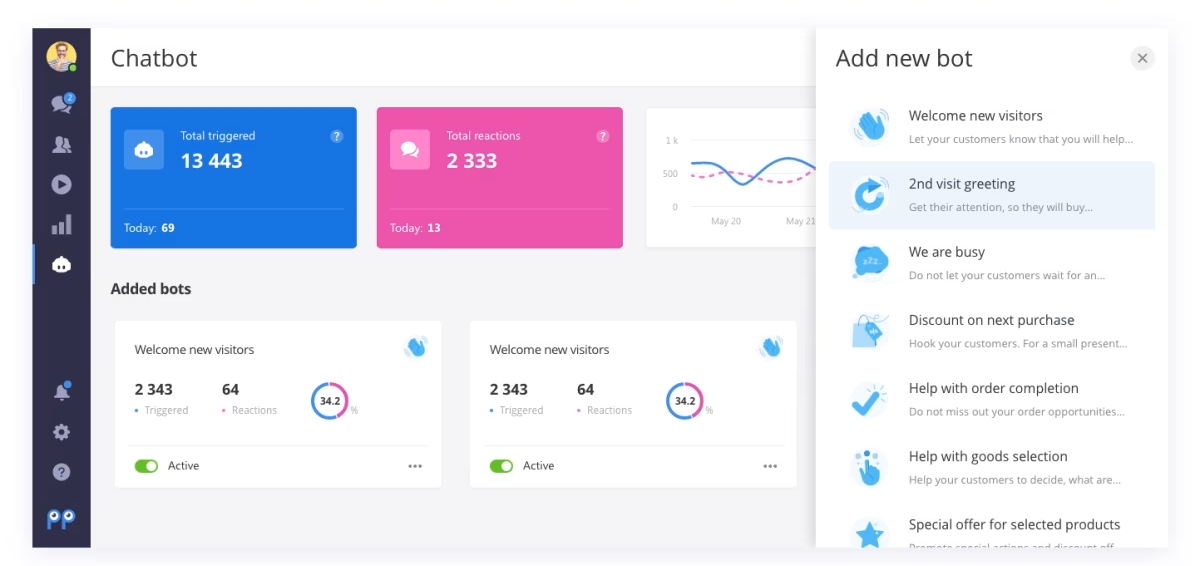
Smartsupp enables versatile customer communication through its three main features: a customizable widget, contact form, and live chat mobile app. I appreciate how the widget blends effortlessly with my brand’s look, supports multilingual chats, and even allows file sharing, making it perfect for connecting with a global audience.
Leveraging AI, lead-gen automation, and live chat, it creates a powerful customer engagement engine tailored for high-growth stores. Plus, the mobile app keeps you responsive and in control, no matter where you are, ensuring customers always get the support they need, fast.
Smartsupp balances security, speed, and ease with encryption and GDPR compliance, making customer chats feel seamless and professional.
Pros:
- Customizable widget to match chat design to your brand and support multilingual conversations
- Smart contact forms to capture leads and queries with follow-up-ready customer info
- Performance-optimized script to load quickly without affecting site speed or UX
- File sharing support to enable customers upload images and documents directly in chat
Cons:
- Chatbot builder is less intuitive compared to competitors
- Limited third-party integrations outside of core platforms
User Rating: 4.7 (G2)
Pricing: Paid plans start at $14/month.
3. Tidio – Best for Ticketing Systems

Tidio is more than just a live chat tool—it’s a complete customer support system built for speed and reliability. I’ve found its AI chatbot remarkably helpful, resolving up to 70% of customer queries right out of the gate.
Managing support emails through its integrated ticketing system is seamless. It’s mobile-optimized, so your team can respond on the go without missing a beat. Even better, the widget is lightweight, ensuring no noticeable lag or drag on my site’s loading speed.
Security hasn’t been an afterthought either—Tidio is GDPR-compliant and offers secure data handling across chats and tickets. The separation of chat and email conversations into dedicated tabs keeps our workflow clean.
Whether you’re a solo entrepreneur or part of a growing team, it’s built to scale with you.
Pros:
- Comprehensive analytics and reporting tools for performance assessment
- Integrated Ticketing System to convert emails into trackable support tickets
- Seamless integration with Shopify and various other platforms
- Customizable Chat Interface to adjust themes, greetings, and branding to match your store
Cons:
- Some advanced automation features have a learning curve
- Free plan restricts the number of monthly active visitors
User Ratings: 4.7 (G2)
Pricing: Paid plans start at $24.17/month.
4. Willdesk – Best for Self-Service Widget
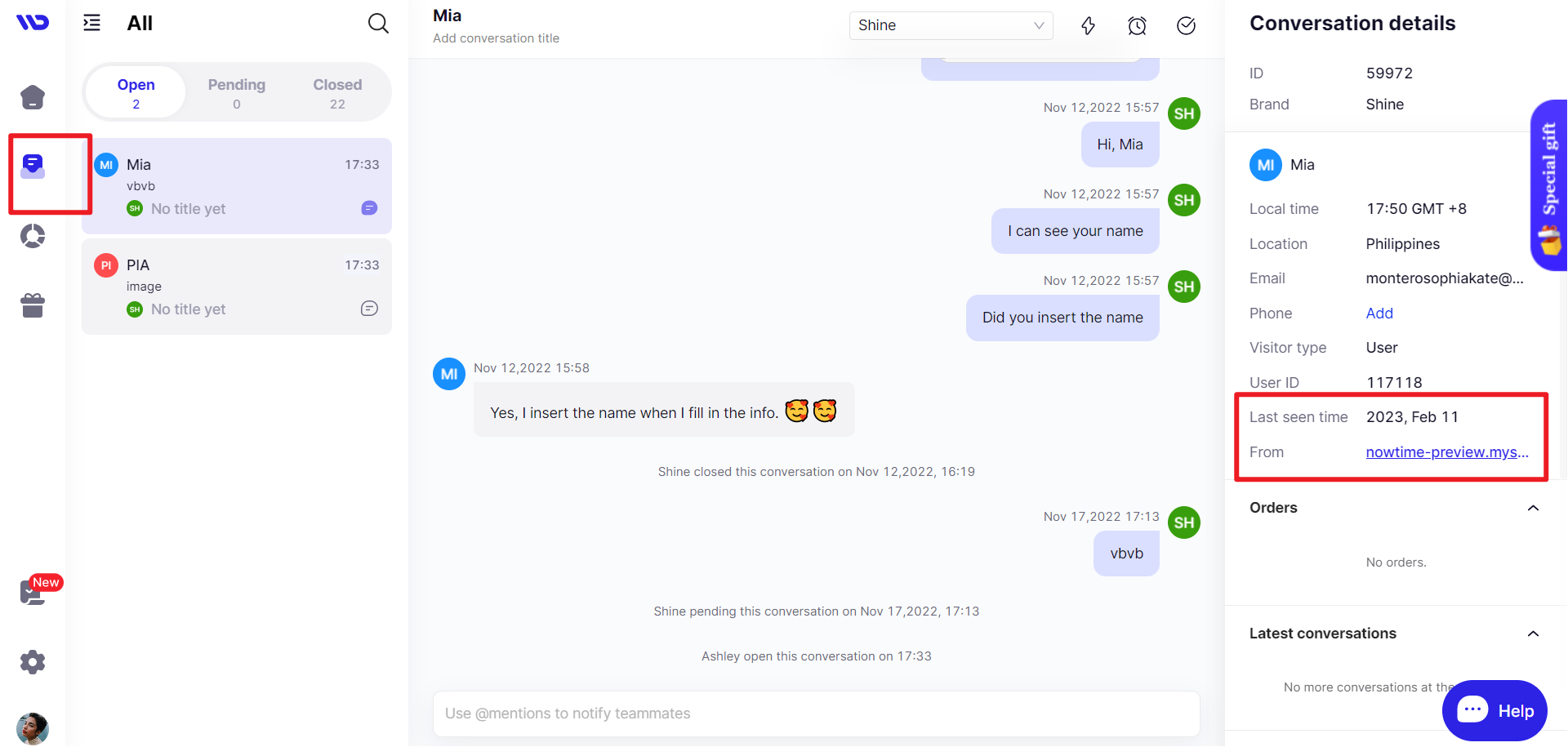
When looking for a solid self-service widget for your Shopify store, I found WillDesk to be one of the most reliable and user-friendly tools. It helps customers find answers fast, reducing support tickets and boosting satisfaction. What stood out to me was how seamlessly it integrates without disrupting your storefront.
I also loved how mobile-friendly it is. Whether on a phone or tablet, the experience stays fast and easy to use. And despite all its features, WillDesk doesn’t slow down your site, which is a huge win. Its lightweight build helps pages load quickly, reducing bounce rates.
Security-wise, it ticks all the boxes. It’s GDPR-compliant, handles data securely, and gives you control over what customer info is stored. With built-in analytics and flexible branding, it’s a powerful support tool that keeps you in control and your customers happy.
Pros:
- User-friendly setup to launch live chat without needing advanced technical skills
- Multilingual support to engage global customers with 40+ supported languages.
- Self-service tools to let users access FAQs, order tracking, and basic help instantly.
- Mobile responsiveness to offer a consistent and optimized chat experience on any device.
Cons:
- Chatbot customization options are fairly basic
- Customer support response times can be inconsistent
User Rating: 4.9 (G2)
Pricing: Paid plans start at $16.90/month.
5. Richpanel – Best for AI-Powered Customer Service
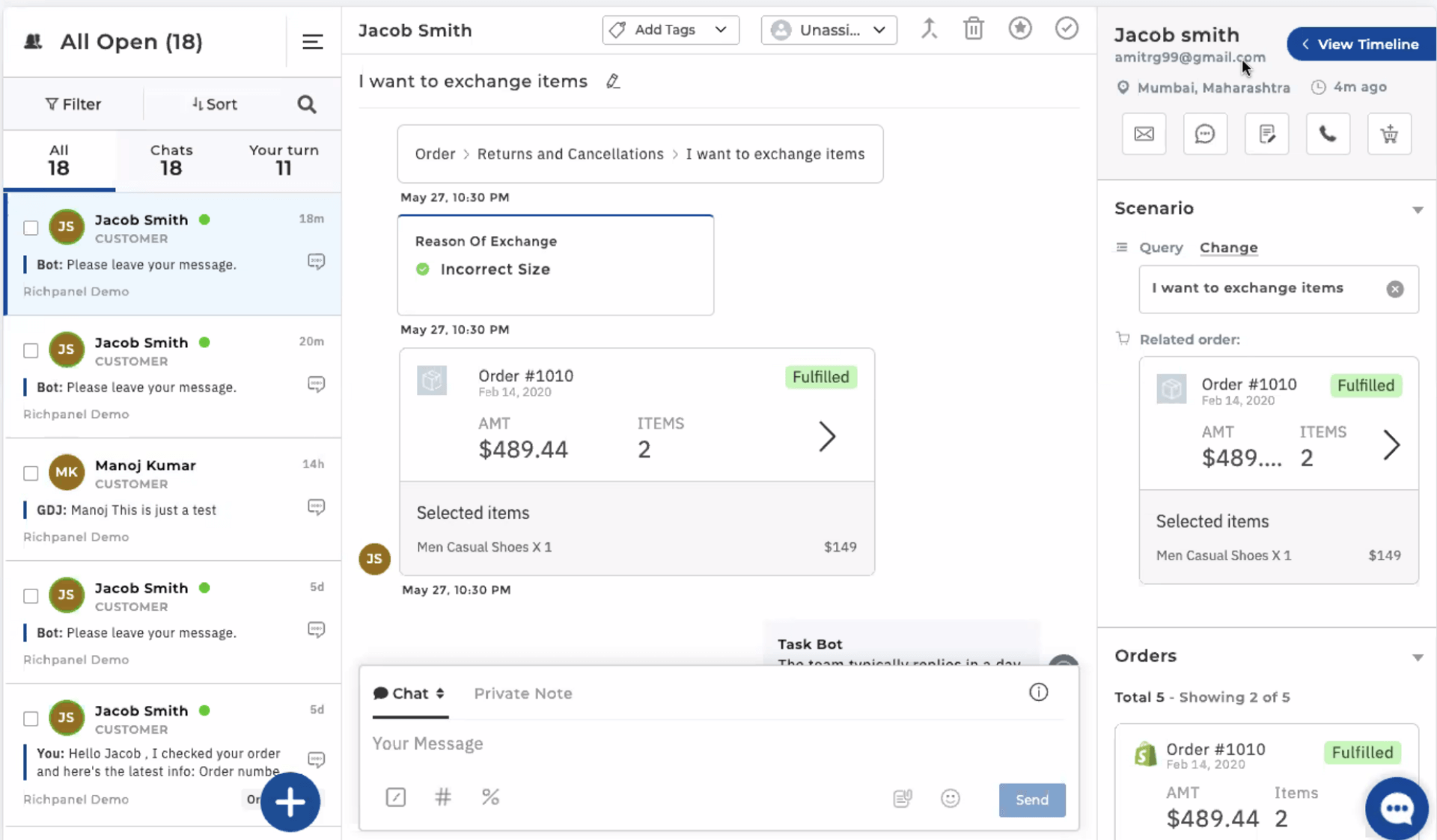
Richpanel is a powerful AI customer service platform built to scale support while maintaining personalization. I’ve found it particularly useful for automating routine queries, managing order-related questions, and keeping customers happy even when I’m offline. Its Shopify live chat feature works effortlessly and feels like an extension of my storefront.
Beyond automation, Richpanel offers excellent mobile optimization, making it easy for both my team and customers to chat on the go. GDPR compliance and encrypted data handling ensure peace of mind for businesses like mine that deal with sensitive customer info.
What truly sets it apart is the ability to view detailed customer interaction histories and performance analytics. These insights help you make better decisions, train your support staff smarter, and refine the customer experience based on real behavior, not just assumptions.
Pros:
- CRM integrations to connect easily with tools like HubSpot and ActiveCampaign.
- Unified inbox to manage chats from email, social, and site in one place.
- Real-time analytics to track support performance and agent efficiency.
- User-friendly interface for easy navigation.
Cons:
- Some AI features require manual configuration to work well
- Limited customization options for the chat widget appearance
User Rating: 4.7 (G2)
Pricing: Paid plans start at $69/agent/month.
6. Re:amaze – Best for Push Campaigns
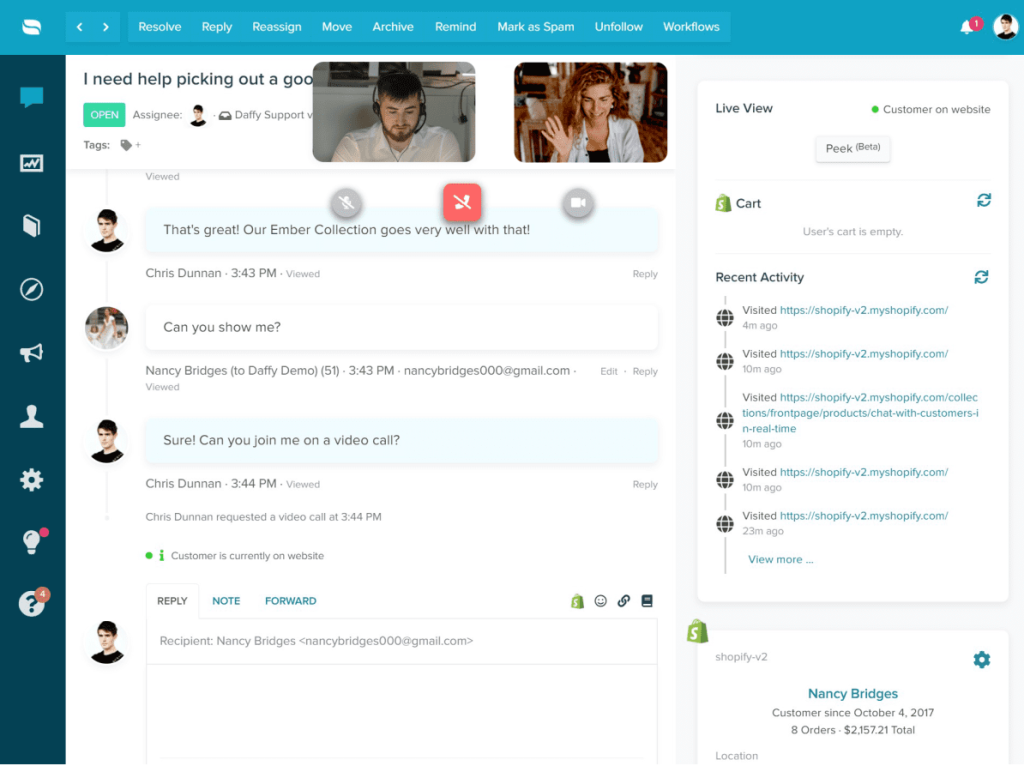
When I used Re:amaze for my Shopify store, the push campaigns were easily my favorite feature, letting me send targeted messages and offers that boosted engagement and conversions right from the chat.
It brought email, chat, social, and SMS together in one streamlined dashboard, which made managing support so much easier for my team and helped us respond faster. I also appreciated the focus on security- GDPR compliance, encrypted data, and clear permission controls made team management easy and reliable.
On the mobile side, the app worked great across iOS and Android. Real-time syncing meant nothing ever slipped through the cracks, even when I was on the go. Plus, the analytics and chatbot handoff features made it one of the most complete support tools I’ve used.
Pros:
- Secure data handling to offer encryption, access controls, and GDPR compliance
- Mobile-optimized apps for a seamless support experience on iOS and Android
- Multi-brand support to manage multiple stores or websites from a single dashboard
- Team collaboration tools to use notes, assignments, and shared views for efficient teamwork
Cons:
- Chatbot builder requires technical knowledge to fully utilize
- No built-in voice or video chat support
User Rating: 4.6 (G2)
Pricing: Paid plans start at $29/user/month.
7. Channel Talk – Best for Personalizing Customer Experience
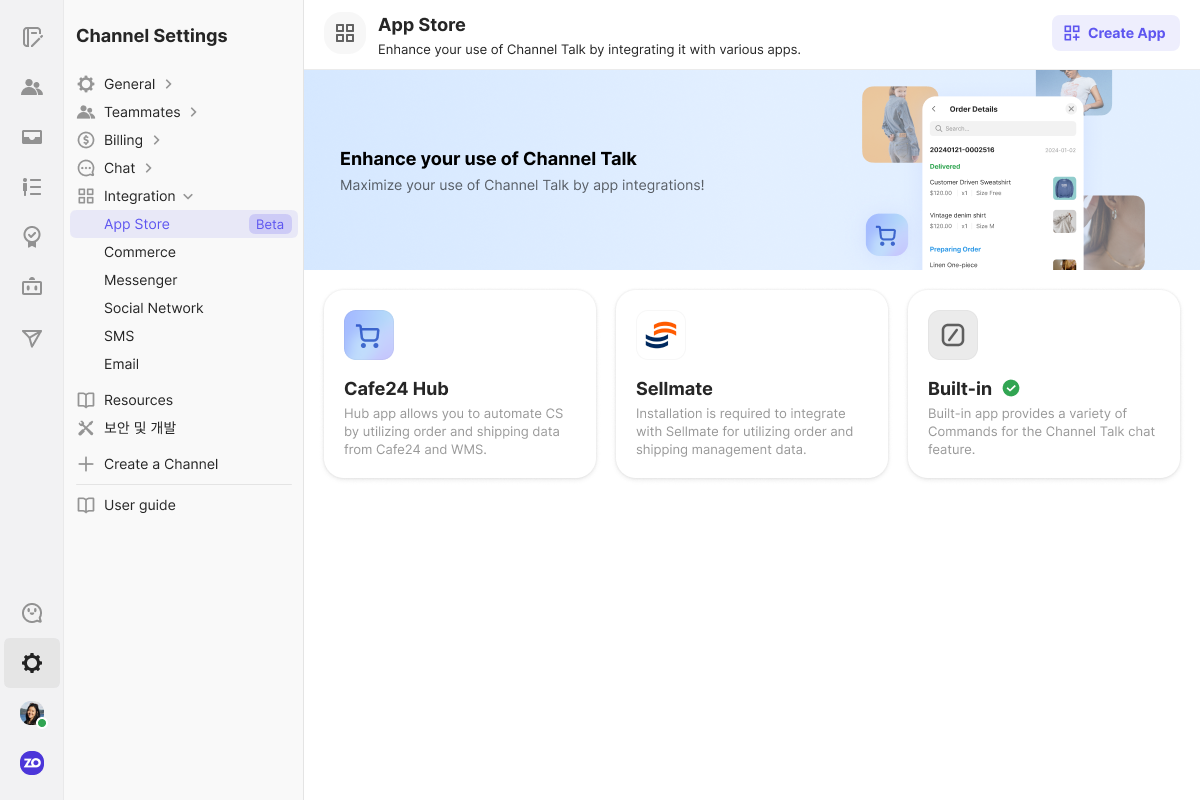
Channel Talk impressed me with how seamlessly it merges live chat, CRM, and automation into one unified platform. It’s more than just a messaging tool—it’s a growth engine. From the moment I integrated it into my Shopify store, I noticed a measurable boost in engagement and response time.
Security was a big priority for me, and Channel Talk didn’t disappoint. It’s GDPR-compliant with strong encryption and secure storage. Plus, the mobile app worked flawlessly on both iOS and Android, so I could help customers from anywhere without a hitch.
The custom chatbots were a lifesaver for handling FAQs and order tracking, freeing up my team for tougher questions. I also appreciated the real-time analytics and smart triggers that kept chats relevant. And with all the customization options—from widget design to messaging—it made our support feel more personal and on-brand.
Pros:
- Customizable live chat to tailor the widget to match your store’s branding
- AI-powered chatbots to handle common questions instantly
- Omnichannel messaging to engage users via the website, Messenger, and more
- Built-in analytics to monitor chat performance with detailed reporting
User Rating: 4.8 (G2)
Pricing: Paid plans start at $27/month.
8. Chatra – Best for Targeted Chats and Triggers
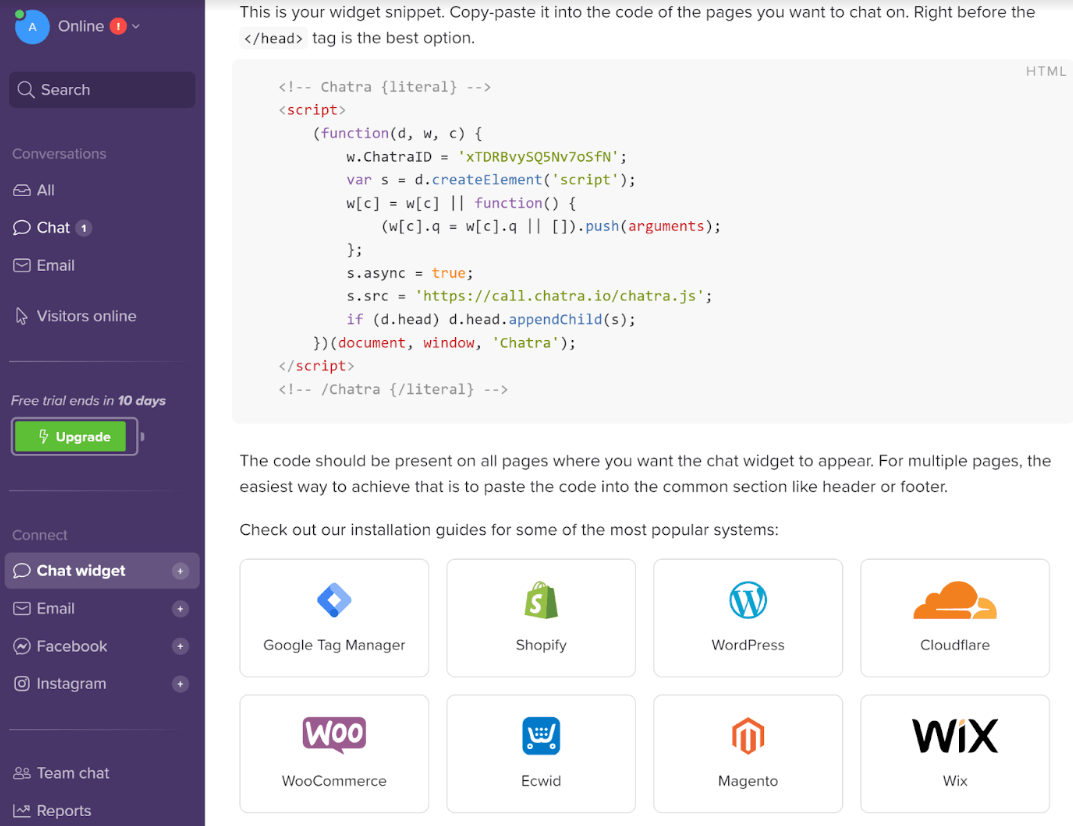
Chatra brings a proactive twist to customer interaction by using smart triggers and behavior-based messaging to start conversations at the right time. I’ve found this especially useful for saving abandoned carts and gently nudging hesitant shoppers toward conversion.
What I appreciate most is how Chatra balances power with simplicity. Its interface is intuitive, the setup is code-free, and the real-time chat feature feels genuinely personal. I can easily guide visitors, answer product questions, or redirect them to bestsellers, making the overall shopping experience smoother and more supportive.
Plus, it’s built for today’s mobile-first world. With strong data security, GDPR compliance, and a mobile app that lets me support customers on the go, Chatra fits right into my workflow—whether I’m at my desk or out grabbing coffee.
Pros:
- Proactive triggers to auto-start chats based on visitor behavior
- Custom chatbot flows to guide users with pre-set replies and paths
- Offline lead capture to collect info when agents are away
- Multichannel inbox to manage site, email, and social chats together
Cons:
- Mobile app occasionally lags during high-traffic periods
- CRM features may feel redundant if you already use a dedicated CRM
User Rating: 4.7 (Capterra)Pricing: Paid plan starts at $25/agent/month.
9. LiveChat – Best for Reports & Analytics
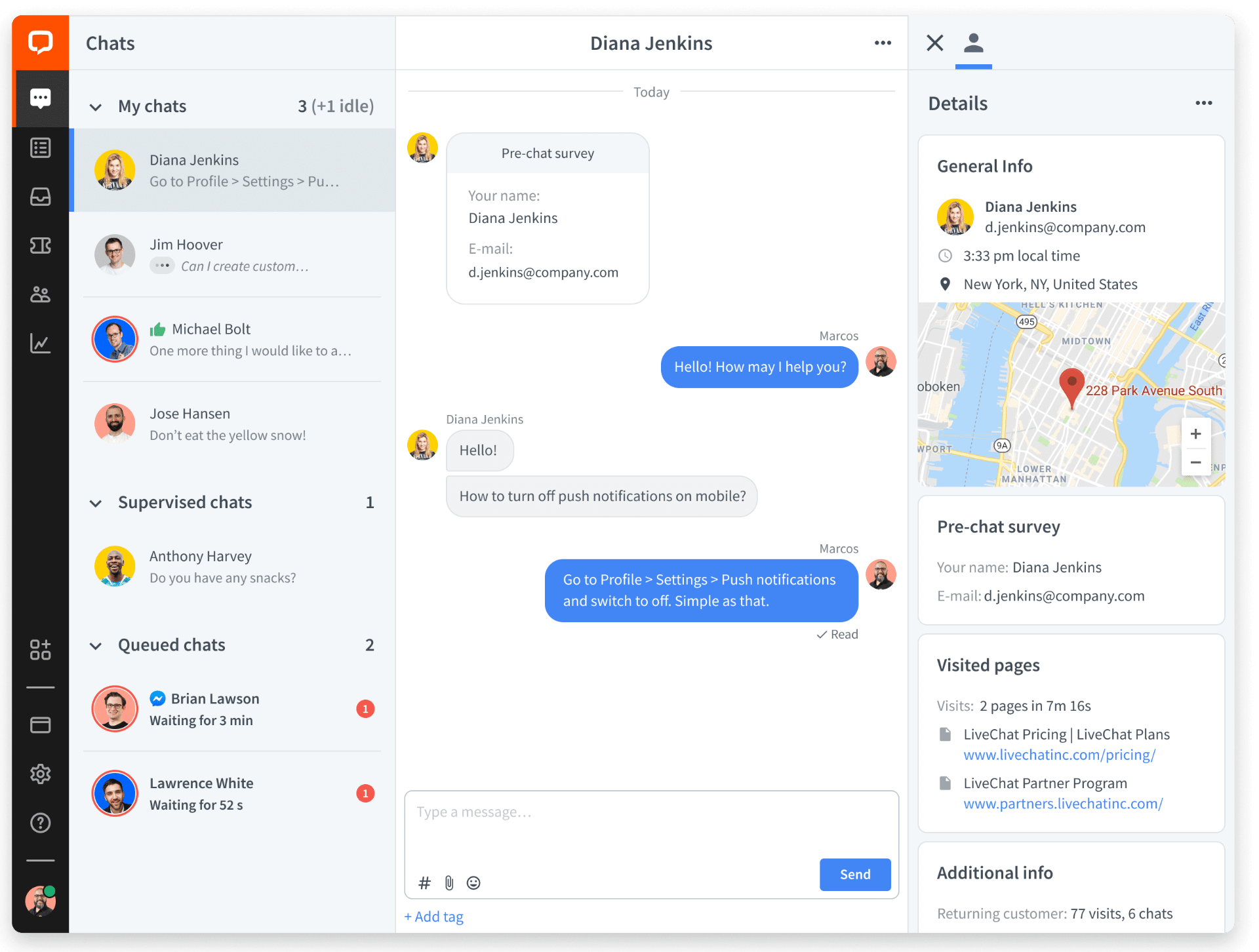
At first, I didn’t think live chat would make much of a difference—until I used LiveChat. It completely changed how I connected with customers. Being able to answer questions right away helped turn casual visitors into buyers and built trust faster than any email ever could.
What I really liked is how easily it integrated with my Shopify store. Customer info, orders, and even abandoned cart details are synced automatically. I also connected it with Messenger, WhatsApp, and Instagram, and set up chatbots to handle common questions while I focused on other tasks.
Security and mobility were solid, too. With GDPR compliance and full encryption, I never had to worry about customer data. And thanks to the mobile apps, I could jump into chats on the go—whether I was at my desk or out grabbing lunch.
Pros:
- On-site assistance to keep customers engaged by answering questions directly in your store
- Chat transcripts for reference, feedback, or training
- Built-in analytics to track performance, spot trends, and improve your service
- Omnichannel support to chat with customers on Messenger, WhatsApp, or Instagram
Cons:
- Cost per agent makes it pricey for larger support teams
- Some integrations require additional setup or third-party tools
User Rating: 4.5 (G2)
Pricing: Paid plans start at $20/month.
10. Zendesk – Best for Customer Experience (CX)
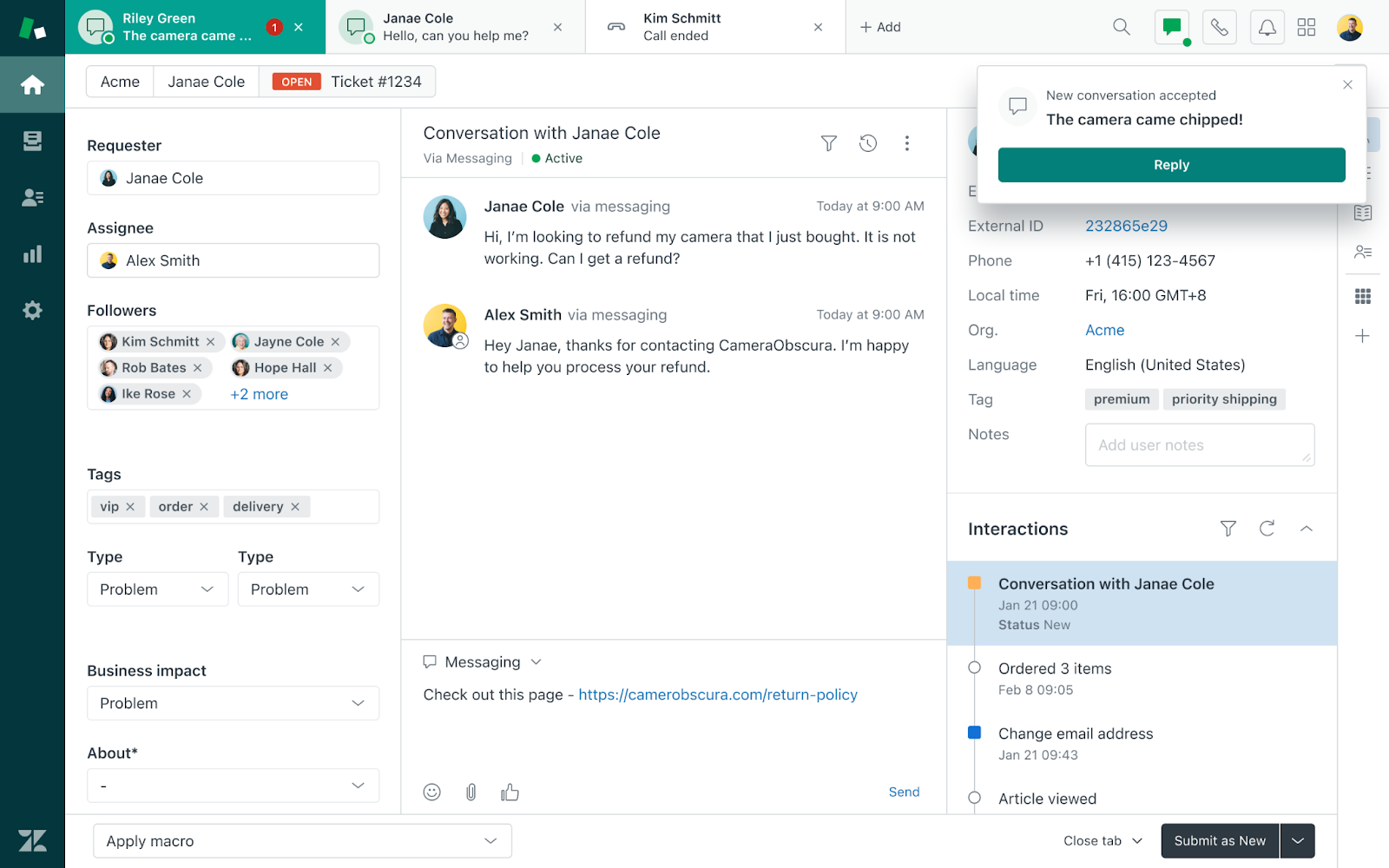
A friend of mine runs a busy Shopify store, and when they needed a strong customer support tool, they went with Zendesk—and honestly, they couldn’t be happier. What they loved right away was how easy it was to get started. Even their non-tech team members picked it up quickly thanks to the clean, intuitive interface.
They mentioned how well Zendesk scales too—whether it’s just two agents or a full support team, it grows with you. They could handle emails, live chats, social DMs, and even WhatsApp messages—all in one dashboard.
And when it came to security, Zendesk checked every box: end-to-end encryption, role-based access controls, audit logs, and full GDPR compliance. On top of that, Zendesk’s mobile app made it super easy for them to manage support on the go, which was a huge plus during sales or busy weekends.
Pros:
- Advanced ticketing system to organize and prioritize customer inquiries
- AI-powered responses to provide instant, relevant answers to common questions
- Knowledge base integration to empower customers with self-service options
- Unified inbox to manage chat, email, and social messages in one place
Cons:
- Full feature access requires purchasing multiple add-ons
- Can feel overpowered for stores with low to moderate support volume
Pricing: Paid plans start at $19/agent/month.
User Rating: 4.5 (G2)
What Are My Top 3 Picks for Live Chat for Shopify?
Not sure which one to choose? Let my top 3 favorites make it easy for you!
1. ProProfs Chat
ProProfs Chat is a powerful Shopify support tool offering real-time chat, a trainable AI chatbot, and seamless bot-to-agent handoffs. With SSL security, lightweight performance, and integrations like HubSpot and WhatsApp, it is a complete support system built to scale with your store.
2. Smartsupp
Smartsupp stands out for its flexible customer communication, offering a customizable widget, contact form, and live chat mobile app. It adapts to your brand, supports multiple languages, and ensures no customer query goes unanswered, making it perfect for businesses seeking a personalized communication experience.
3. Tidio
Tidio is renowned for its ticketing system and AI chatbot, resolving up to 70% of customer inquiries. It offers seamless integration with platforms like Shopify and provides comprehensive analytics, making it essential for businesses looking to enhance their customer service operations and responsiveness.
Evaluation Criteria for Live Chat for Shopify Store
After testing dozens of Shopify live chat tools, I’ve learned what separates a great app from a frustrating one. If you’re trying to find the best live chat for Shopify, these are the exact criteria I use to evaluate every tool before recommending it.
| Criteria | What I Check | Why It Matters |
|---|---|---|
| Ease of Use | How easy the app is to set up and navigate | A great app should be up and running within minutes |
| Real-Time and Offline Chat | Whether it supports both live and offline messaging | Keeps your store available and responsive 24/7 |
| AI Chatbot Capabilities | Can it automate FAQs, order tracking, and agent handoffs | Saves time and supports customers instantly |
| Shopify Integration | Built for Shopify with native order and customer data sync | Enables seamless, informed conversations |
| Widget Customization | Whether you can customize the chat window to match your brand | Makes the chat feel like an extension of your store |
| Mobile Access | Works well on mobile and supports iOS and Android | Lets you manage chats and stay responsive on the go |
| Data Security | Uses data encryption and is fully GDPR compliant | Keeps customer data safe and builds trust |
| Multilingual Support | Can it handle multiple languages | Helps serve global customers and improve conversions |
| Third-Party Integrations | Connects with platforms like WhatsApp and Instagram | Enhances reach and streamlines workflows |
| Analytics and Reporting | Includes built-in reports and visitor insights | Helps improve your support strategy over time |
FREE. All Features. FOREVER!
Try our Forever FREE account with all premium features!
How to Integrate ProProfs Live Chat With Shopify Store
I needed a quick way to connect with visitors on my Shopify store. ProProfs Live Chat made it easy with two simple options:
- Add it using a JavaScript code snippet
- Install it directly from the Shopify App Store
Here’s how I set it up in just a few steps.
1. Manual Installation via Code
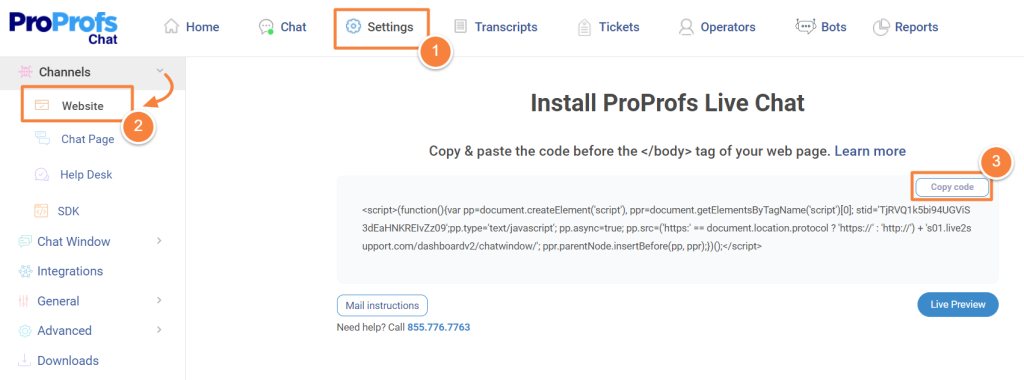
Step 1: Log into ProProfs Chat and go to Settings > Installation to copy the installation code.
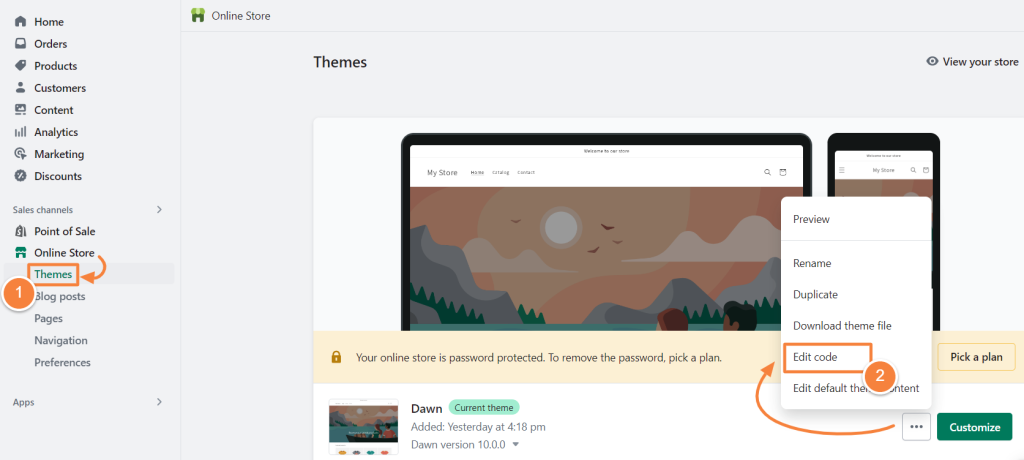
Step 2: Log into Shopify, navigate to Online Store > Themes, click the three-dot menu, and select Edit code.
Step 3: Open “theme.liquid” and paste the code after <body> or before </body>, then Save.

2. Install via Shopify App Store
Step 1: Go to Shopify > Online Store and search for “ProProfs—Live Chat & Chatbot.”

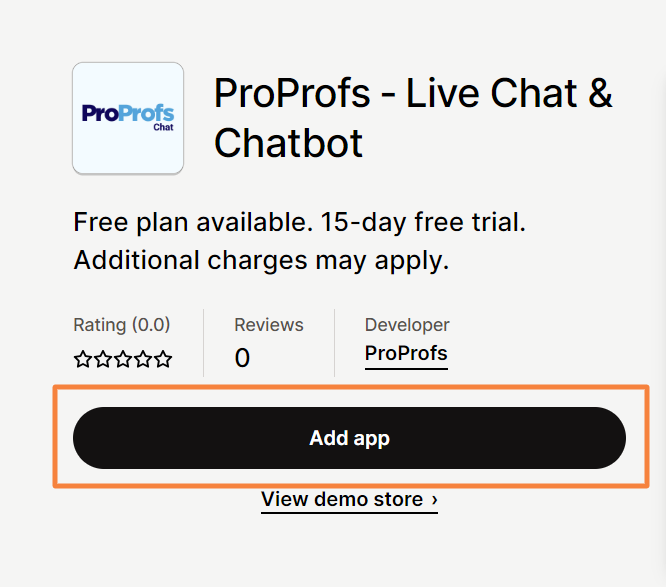
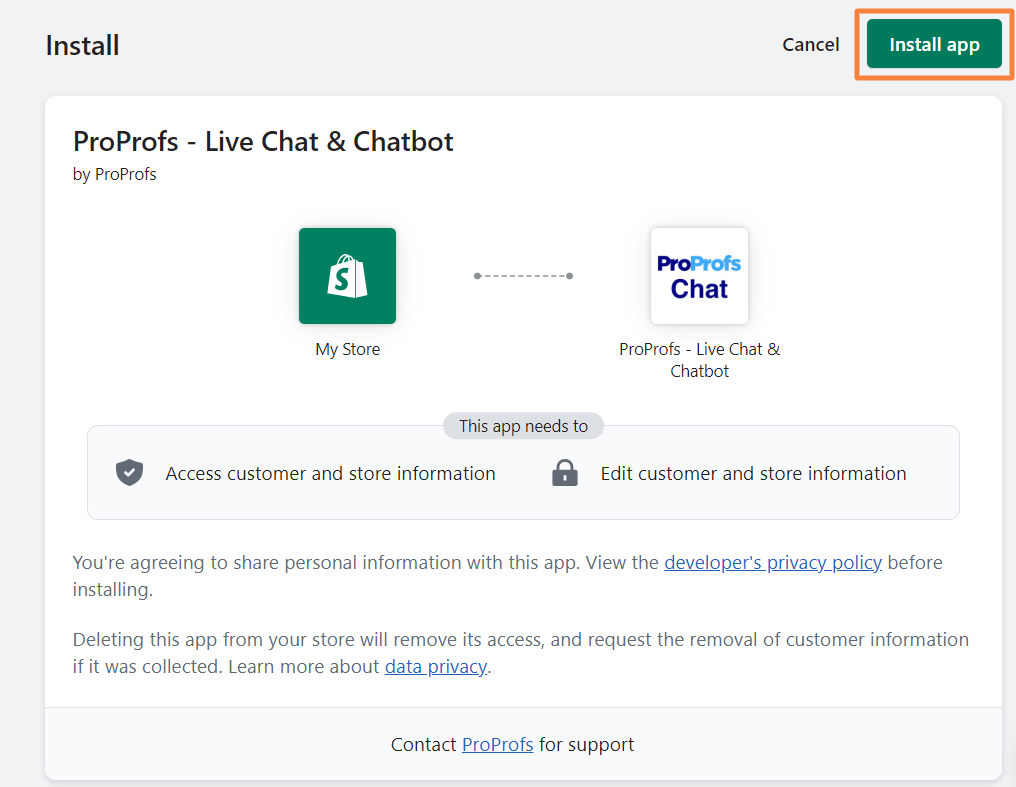
Step 2: Click Add app, then hit Install app.
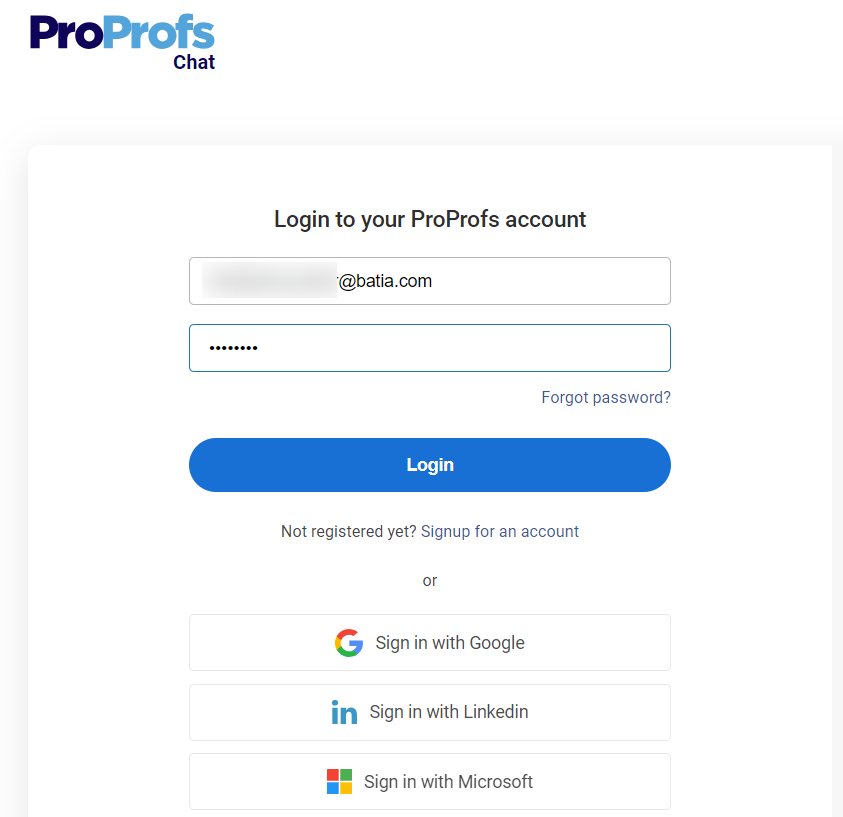
Step 3: Log in with your ProProfs Chat credentials.
Step 4: Once installed, check Apps & Sales Channels to confirm ProProfs Chat is active.
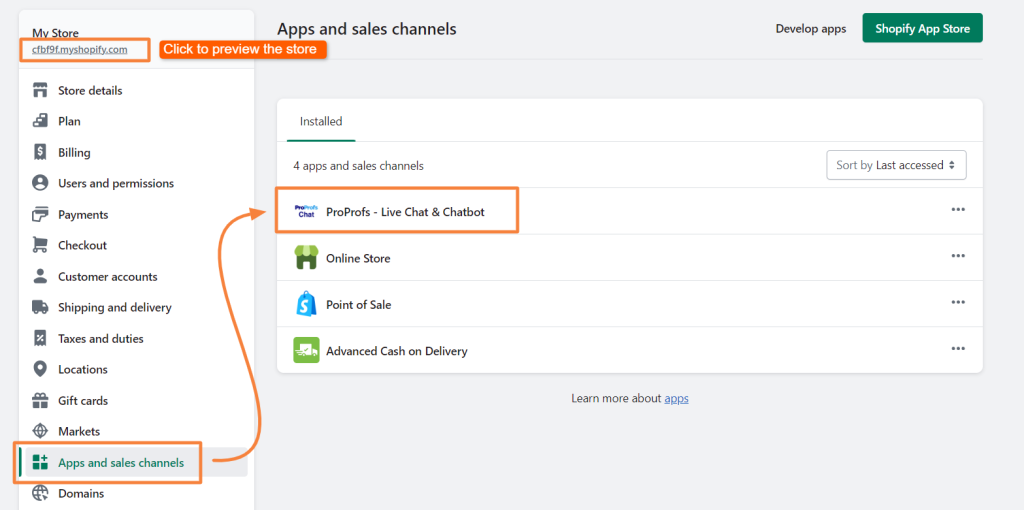
That’s it! Your live chat widget is now live on your Shopify store.
What Are the Most Common Shopify Live Chat Challenges and How to Fix Them?
Shopify stores use live chat to boost sales and support, but many apps fall short on integration, multilingual support, and more. Here are five key challenges—and how ProProfs Chat solves them.
1. Chatbot Inaccuracy & Poor Multilingual Support
Chatbots often give inaccurate or irrelevant replies, lack multilingual capabilities, and can’t handle complex queries. Without smooth escalation to human agents, user experience suffers, especially for global stores dealing with a global audience or complex product queries.
How ProProfs Chat Solves It:
- Train AI chatbots using a knowledge base/website data to deliver accurate, personalized responses.
- Real-time language translation + support for 70+ languages ensures native-like conversations.
- Escalation & Transfer lets users connect with human agents instantly.
- Custom Greetings, Logos & Themes align chat with brand identity.
- Knowledge Base Integration supports complex product queries instantly.
Pro Tip: You can use ready-to-use chatbot templates to deliver faster, more accurate replies and keep every conversation relevant from the start!
2. Weak Integration With Shopify & Other Tools
Many live chat apps struggle to integrate with Shopify, CRMs (like Salesforce), or messaging tools like WhatsApp and Facebook. Poor API/webhook support hinders automation and data syncing, slowing down support and marketing workflows.
How ProProfs Chat Solves It:
- Seamlessly integrates with Shopify, ActiveCampaign, and more.
- Connects with Facebook, WhatsApp, and Instagram for omnichannel support.
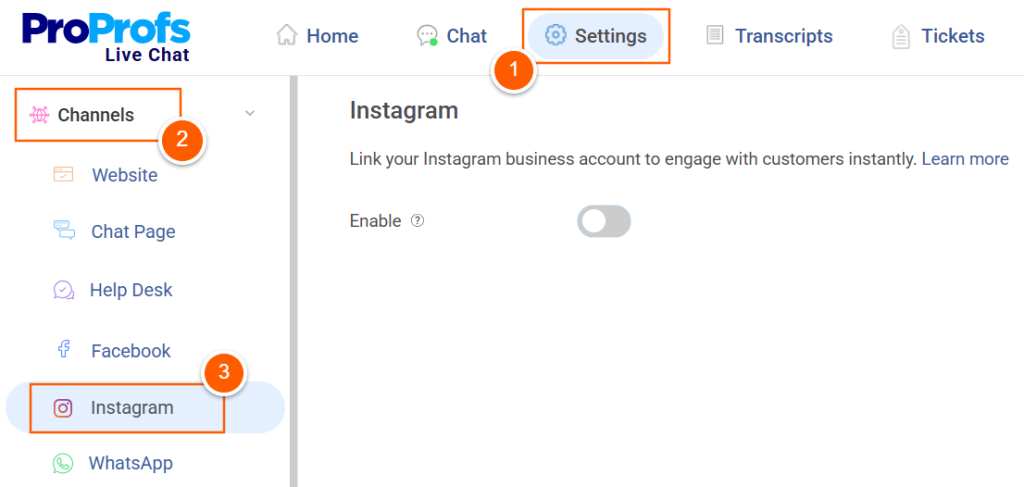
- Smart API/Webhook Support allows custom workflows and syncing customer/cart data.
- Offline Message API auto-pushes data into your CRM, reducing response delays.
3. Ineffective Lead Generation & Routing
Lack of pre-chat forms and behavior-based routing leads to missed opportunities. Agents can’t prioritize or qualify leads effectively, causing delays in follow-up or support for high-value customers, especially those with abandoned carts or high purchase intent.
How ProProfs Chat Solves It:
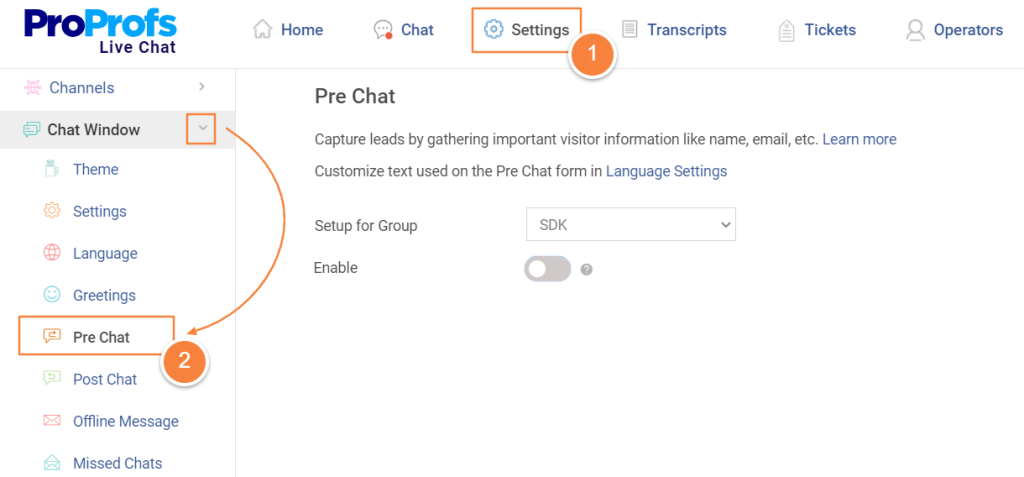
- Pre-Chat forms capture user data upfront.
- Visitor tracking reveals behavior like product views or cart abandonment.
- Automatic chat routing ensures leads reach the right department instantly.
- Tagging & filters help agents prioritize queries.
- Data syncs to CRMs for follow-up marketing or sales campaigns.
4. No Automated Appointment or After-Hour Support
Manual appointment scheduling causes delays and missed follow-ups, especially after hours. Chatbots can’t manage calendars or guide users to schedule demos or consultations, which is crucial for stores with high-ticket or complex products.
How ProProfs Chat Solves It:
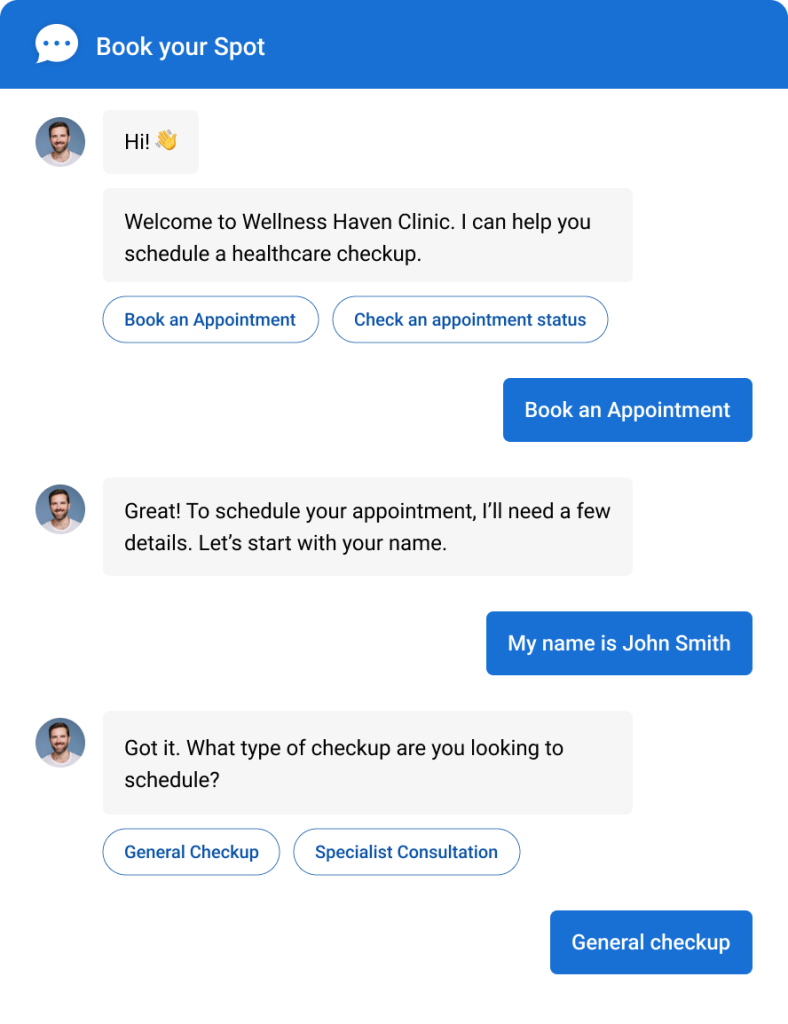
- AI chatbot enables automated appointment booking 24/7.
- Callback Scheduling for follow-up when agents are offline.
- Real-time chat + calendar APIs streamline appointment workflows.
- Great for scheduling product walkthroughs or consultations for complex items.
- Proactive Engagement increases demo bookings and sales conversions.
5. Poor Performance, UX & Security Gaps
Live chat can slow down your site, be tricky to set up, and annoy visitors with bugs or clunky design. On top of that, missing privacy controls and limited branding options make it hard to build trust, especially with cautious shoppers or those ready to check out.
How ProProfs Chat Solves It:
Watch: How to Customize Your Live Chat Window to match your brand in minutes.
- Lightweight code ensures fast website performance.
- One-click Setup suits non-technical users.
- White-label chat with custom colors & logos maintains branding.
- SSL Encryption, GDPR Compliance, Vault Backup, and IP Blocking ensure security.
- Chat Queue & delivery status enhance real-time communication and trust.
Make Every Visitor Count With the Right Shopify Chat App
Live chat is a powerful way to connect with your Shopify store visitors, offer instant support, and boost conversions. Each free live chat tool for Shopify we discussed improves customer support and boosts conversions on your store without breaking the budget.
To get the most out of live chat, look for a solution that’s easy to use, mobile-friendly, and integrates well with Shopify. If you want a reliable, all-in-one tool, ProProfs Live Chat is a great pick. With features like chatbots, multilingual support, and CRM integration, it helps you turn conversations into lasting customer relationships.
Frequently Asked Questions

Do Shopify live chat apps support multiple languages?
Yes, many live chat apps offer multilingual support to help you connect with global customers easily.
Do Shopify chat apps support AI-powered chatbots?
Yes, several apps like ProProfs Chat include AI chatbots that can handle queries, book appointments, and generate leads 24/7.
How does live chat help increase sales?
Live chat provides instant answers, builds trust, and reduces cart abandonment—leading to more conversions.
Can live chat reduce the number of support emails for Shopify stores?
Yes. Many Shopify businesses use live chat to answer questions instantly instead of creating email tickets. This helps support teams resolve issues faster and prevents inbox backlogs.
Can live chat connect with CRM platforms like Salesforce or HubSpot?
Many Shopify chat apps integrate with CRM platforms so customer conversations, leads, and chat transcripts can be synced automatically with your sales or support database.
Can Shopify live chat tools show which visitors are currently browsing the store?
Many chat platforms include visitor tracking that allows support teams to see who is browsing the website, what pages they are viewing, and when they start a chat.
FREE. All Features. FOREVER!
Try our Forever FREE account with all premium features!

 We'd love your feedback!
What did you like & how can we make it even better?

 Thanks for your feedback!
 Ask Your Question
Have a question? Get expert help to make your decision easier.